
Sony XAV-AX6000 review shoppers usually want a modern receiver without turning the dashboard into a tablet mount. The XAV-AX6000 is a 6.95-inch in-dash multimedia receiver with wireless Apple CarPlay and wireless Android Auto. It best suits drivers with a compatible dash opening who value a clean, responsive interface and strong system-expansion options. Its best feature is the combination of dependable phone integration and three 5-volt preamp outputs. Its biggest limitation is equally clear: the 800 × 480 display is modest by 2026 standards, and successful installation depends heavily on the vehicle-specific parts you buy around it.
Moon Picke has not installed or bench-tested this receiver. This assessment is based on Sony documentation, its current support record, the official help guide, and the active Amazon listing.
Quick verdict
The Sony XAV-AX6000 remains a sensible premium upgrade when you want wireless phone projection, a restrained integrated screen, physical volume buttons, and useful outputs for a future amplifier. Sony still lists the model and issued firmware version 3.04.00 on July 16, 2026, which is meaningful evidence that the platform is being maintained.
It is less compelling if display resolution is your first priority, if your vehicle needs extensive factory-feature retention, or if a floating screen is the only practical way to gain more display area. Think of the AX6000 as a polished system hub rather than a spec-sheet showpiece.
- Best for: compatible vehicles where wireless CarPlay or Android Auto and clean audio expansion matter.
- Skip it if: you expect universal fitment, multiple dedicated camera inputs, or a high-resolution oversized display.
- Our view: still worth buying in 2026 at a competitive street price, provided the complete installation plan makes sense.
Key specifications that matter
Sony specifies a 6.95-inch, 800 × 480 capacitive touchscreen with a typical brightness of 600 cd/m². The receiver supports wireless and wired Apple CarPlay, plus wireless and wired Android Auto. Bluetooth 5.0 handles conventional calling and audio, with SBC, AAC, and LDAC codec support.
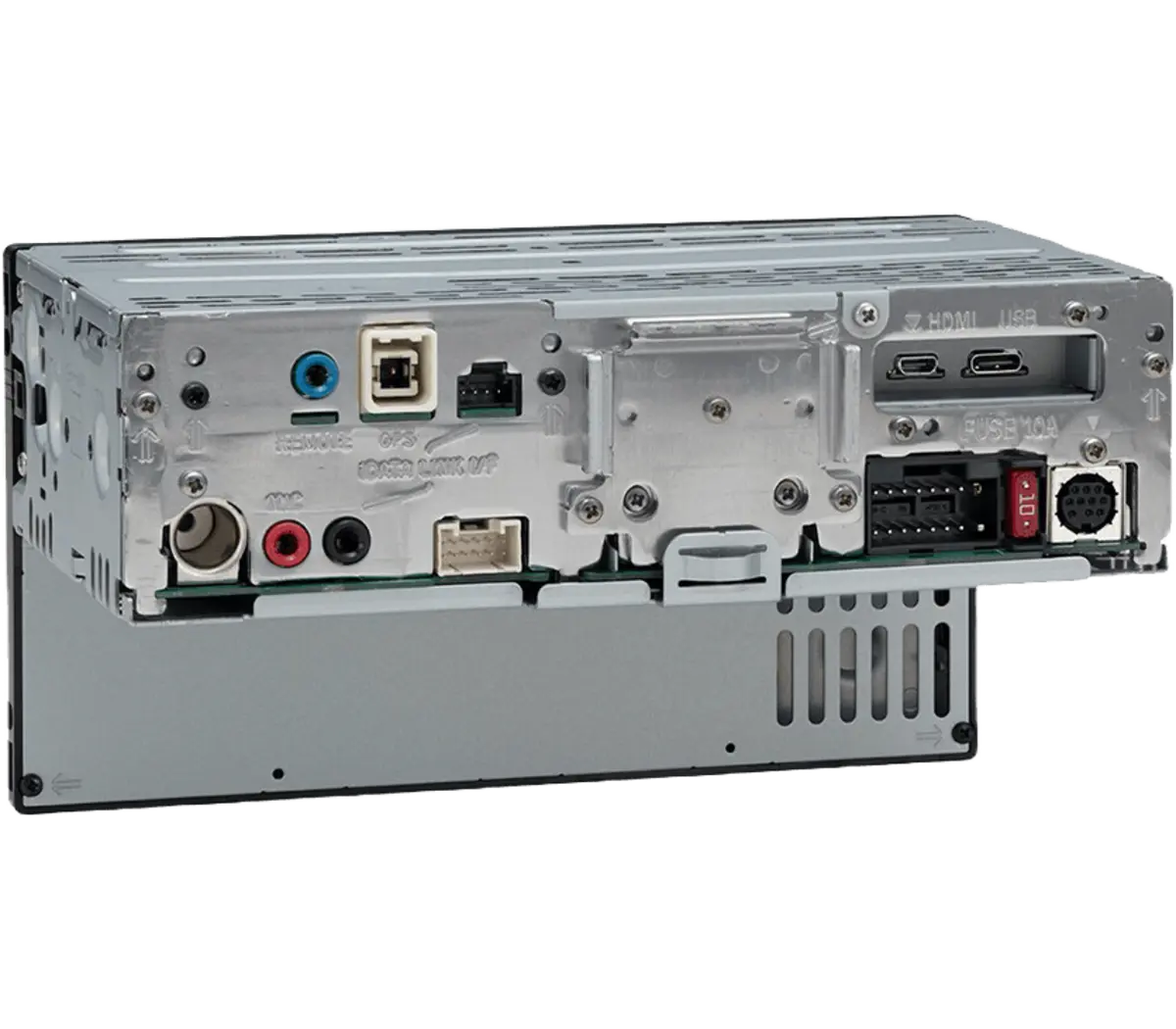
For system building, there are three pairs of 5-volt preamp outputs for front, rear, and subwoofer channels, a 14-band equalizer, time alignment, a rear USB-C connection rated up to 3 amps, HDMI input, and one composite rear-camera input. Sony lists amplifier output as 55 watts × 4 maximum. That is a peak figure, not an RMS power rating, so it should not be compared directly with an external amplifier’s continuous output.
The supplied items include an external microphone, GPS antenna, USB-C extension cable, steering-control cable, power leads, and audio/camera cables. Vehicle-specific dash kits, wiring interfaces, antenna adapters, camera adapters, and data modules are separate.

Wireless CarPlay and Android Auto
Wireless projection is the main reason to choose the AX6000 over a basic Bluetooth receiver. After pairing, a compatible phone can present navigation, calls, messages, music, and supported apps on the receiver while it remains in a pocket or bag. A wired connection is still useful on long drives because it combines a stable data path with charging.
Wireless performance is never determined by the receiver alone. Phone software, radio interference, power management, and pairing history can affect reconnection. Sony’s recent firmware notes include Android Auto wireless improvements and CarPlay-related refinements, so installing the current firmware is a sensible first step if you encounter connection problems. Follow Sony’s update instructions exactly and keep vehicle power stable during the process.
The rear USB-C port can supply up to 3 amps, but actual charging behavior depends on the phone and cable. Route the supplied extension to a secure, accessible location rather than leaving it loose behind the dash.

Display and everyday controls
The 6.95-inch panel is close to the familiar seven-inch format, so it can look integrated in vehicles that accept this face size. Capacitive touch should feel more direct than older resistive panels, and the physical buttons along the lower edge provide a useful tactile fallback for volume and common functions.
The tradeoff is resolution. At 800 × 480, text, maps, and album art will not look as crisp as they do on newer high-resolution receivers. Resolution alone does not determine usability: brightness, viewing angle, interface speed, and correct mounting angle also matter. Still, buyers moving from a modern phone or a high-density factory screen should set expectations accordingly.
Before ordering, sit in the vehicle and consider sightlines. A receiver mounted low in the center stack can demand more eye movement than a factory display positioned near the road view. No screen upgrade compensates for a poor ergonomic location.
Audio and expansion value
The AX6000’s strongest long-term argument is its audio architecture. Three 5-volt preamp-output pairs make it easier to feed clean, relatively strong signals to front, rear, and subwoofer amplifiers. That does not guarantee better sound by itself, but it gives an installer a useful foundation and may reduce how much amplifier input gain is required.
The 14-band equalizer and time alignment provide more control than basic bass and treble adjustments. Time alignment can help the sound arrive more coherently at the driver’s position, while the equalizer can address broad tonal imbalances. Use both conservatively. Extreme boosts consume headroom and can expose the limits of factory speakers.
If you plan to keep the factory speakers, the receiver’s internal amplifier can operate them in many conventional systems. Remember that Sony’s 55W × 4 claim is maximum power. Buyers seeking higher clean output, stronger sub-bass, or demanding aftermarket speakers should budget for an appropriate external amplifier rather than treating the maximum figure as continuous power.
As an Amazon Associate I earn from qualifying purchases.
Check the current Sony XAV-AX6000 price on Amazon.
Fitment is a system, not a screen-size guess
The XAV-AX6000 is an integrated in-dash receiver with a compact rear chassis, but that does not make it universal. Dash opening, trim shape, mounting depth, bracket position, wiring, factory amplifier, steering-wheel controls, antenna, USB ports, cameras, warning chimes, and vehicle settings can all affect compatibility.
Start with a reputable vehicle-fitment database using the exact year, make, model, trim, and factory audio package. Then build a complete parts list. A vehicle may physically accept the receiver yet require an expensive interface to preserve amplified audio or steering-wheel controls. Some factory cameras need voltage conversion or a video adapter. Some vehicle settings remain tied to the original radio.
Sony’s help guide identifies compatibility with optional iDatalink Maestro RR or RR2 modules for the North American XAV-AX6000, but Maestro support varies by vehicle and retained feature. Confirm the exact receiver firmware, module firmware, harness, and vehicle coverage before purchase.

Rear camera and HDMI limitations
Sony documents one dedicated rear-camera input. When the reverse trigger wire receives the correct signal, the receiver can display the connected camera. The camera and its RCA cable are not included. If your vehicle already has a factory camera, do not assume its connector, voltage, image format, or dynamic guidelines will transfer directly.
Buyers wanting front, cargo, side, or multi-angle cameras may need an external switcher or a different receiver with multiple camera inputs. That is an important distinction because product pages sometimes use the plural idea of “camera-ready” without explaining the actual input count.
The HDMI input can accept supported video resolutions, but its value depends on your source device, adapters, local laws, and safe-use restrictions. It is an input rather than an HDMI output, and it should not be treated as a substitute for phone projection.
Sony XAV-AX6000 vs XAV-AX8500
The AX6000 favors a conventional integrated 6.95-inch screen, while the XAV-AX8500 moves to a much larger floating display. The AX8500 is better suited to a buyer who prioritizes screen area and can accommodate a display that projects from the dash. The AX6000 is the tidier choice when you prefer an OEM-like footprint, want fewer concerns about vents or adjacent controls, and can live with 800 × 480 resolution.
Both decisions still begin with vehicle fitment and system goals. A larger screen is not automatically better if it blocks controls, creates glare, or looks awkward in the cabin. For a closer look at Sony’s larger option, read our Sony XAV-AX8500 review. This comparison is intentionally narrow so each model retains a distinct buying role.
Current price and buying logic
The relevant number is the current checkout price, not Sony’s original list price or a crossed-out reference price. Compare the receiver price together with the dash kit, harness, integration module, adapters, professional labor, and any amplifier or camera work. A seemingly cheaper receiver can produce a more expensive project if it needs additional interfaces.
At a competitive street price, the AX6000 earns its premium through wireless projection, 5-volt outputs, tuning tools, current firmware support, and a compact integrated presentation. Its value weakens when the install parts approach the receiver’s cost or when another compatible model provides the display or camera inputs you specifically need.
View availability for the Sony XAV-AX6000 on Amazon. Confirm the seller, return terms, included accessories, and exact model before checkout.
Who should buy it?
- Drivers replacing an older radio who want wireless CarPlay and Android Auto.
- Owners who prefer an integrated seven-inch-class screen over a floating display.
- Audio upgraders who can use three 5-volt preamp-output pairs.
- Vehicles with a verified dash kit and a clear plan for retaining essential factory functions.
- Buyers who value active manufacturer firmware support more than headline screen resolution.
See the broader Moon Picke Auto Tech hub for related upgrade guidance, or browse published Car Tech articles.
Who should skip it?
- Anyone shopping by screen size alone without checking the full vehicle configuration.
- Drivers who need several native camera inputs.
- Buyers who expect an 800 × 480 panel to resemble a current high-density smartphone display.
- Owners whose crucial climate, camera, warning, or vehicle-setting functions cannot be retained.
- Listeners who expect the internal 55W × 4 maximum rating to replace a serious external amplifier.

Installation checklist before you order
- Enter the full vehicle year, make, model, trim, and factory audio package in a reliable fitment tool.
- Confirm the dash kit, brackets, wiring harness, antenna adapter, and USB retention parts.
- List every factory feature that must remain: amplifier, steering controls, cameras, chimes, climate display, parking sensors, and settings.
- Verify whether Maestro RR/RR2 support applies to your exact vehicle and desired features.
- Decide whether one rear-camera input is enough.
- Plan microphone, GPS antenna, USB-C extension, and cable routes.
- Estimate the complete installed cost and review seller return terms before opening trim or wiring packages.
- Download current Sony documentation and firmware instructions.
Our How We Evaluate page explains why we separate documented capabilities from hands-on claims.
What ownership should look like after installation
A good receiver should fade into the routine rather than demand attention. For the AX6000, that means the phone reconnects, the microphone is positioned away from vents and wind noise, the USB extension is secured, and the screen angle remains readable in daylight. Spend time configuring favorites, audio sources, call volume, navigation prompts, and the home screen while the vehicle is parked. A few deliberate choices reduce distraction later.
Keep a copy of the installer’s wiring notes and every interface model number. If a future firmware update, battery replacement, or troubleshooting visit becomes necessary, that record is far more useful than knowing only the receiver model. Save the factory radio and reusable trim pieces as well; they can help with diagnosis or resale.
Firmware updates should be treated as maintenance, not entertainment. Read Sony’s release notes, confirm that the update applies to the exact model and region, and avoid interrupting power. If the system is already stable, there is no need to reset every setting merely to experiment. When a problem appears, begin with the phone software, cable, saved pairing, and receiver firmware before assuming the hardware has failed.
What the specification sheet cannot decide
Published specifications can confirm inputs, outputs, display size, and supported platforms, but they cannot determine whether this receiver will feel right in a particular cabin. The same 6.95-inch screen may sit high and easy to glance at in one vehicle, then low and partially shaded in another. Factory speakers, road noise, amplifier topology, and installer workmanship also have more influence on the final result than a product page can show.
That is why our recommendation is conditional. The AX6000 has a coherent feature set and current support evidence, yet the vehicle-specific integration plan remains the decisive factor. Ask an installer to explain which factory functions will remain, which will change, and which cannot be retained. A clear written answer is more valuable than a generic compatibility badge.
Frequently asked questions
Does the Sony XAV-AX6000 have wireless Apple CarPlay?
Yes. Sony documents wireless and wired Apple CarPlay support. Compatibility and available functions still depend on the iPhone, software version, region, and connection conditions.
Does it support wireless Android Auto?
Yes. Wireless and wired Android Auto are supported with compatible phones. Sony firmware updates have continued to address wireless Android Auto behavior.
Is the Sony XAV-AX6000 a universal fit?
No. Physical mounting is only one part of fitment. Vehicle wiring, trim, amplifiers, cameras, steering controls, chimes, and settings may require specific interfaces or may not be fully retainable.
How many camera inputs does it have?
Sony specifies one composite rear-camera input. Additional camera views generally require external switching hardware or another receiver designed with more native inputs.
Is 55W × 4 an RMS rating?
No. Sony labels 55W × 4 as maximum output power. Do not compare it directly with an amplifier’s RMS or continuous rating.
Is the XAV-AX6000 still supported in 2026?
Yes. Sony’s support page remains active, and firmware version 3.04.00 was released on July 16, 2026. Future support duration is never guaranteed, but that is current evidence of maintenance.
Final recommendation
The Sony XAV-AX6000 is still worth considering in 2026 because it combines the phone features most drivers use every day with unusually useful audio-expansion hardware. Wireless CarPlay and Android Auto reduce cable friction, while three 5-volt preamp-output pairs, time alignment, and a 14-band equalizer give a well-planned system room to grow.
Its compromises are visible rather than hidden: the 800 × 480 screen is no longer impressive on paper, there is one dedicated rear-camera input, and the receiver cannot solve vehicle integration by itself. Those limitations are manageable when the dash location works and the parts list is verified before purchase.
Check current Amazon availability for the Sony XAV-AX6000, then price the complete installation before deciding.