
The best dash cams for parking mode are not the ones with the highest resolution. Parking mode is several different recording strategies — buffered events, motion detection, impact/G-sensor clips, time-lapse, low-bitrate continuous parking, and (on some systems) cloud/LTE alerts — and none of them run without a power plan. A cigarette-lighter plug usually dies with ignition. Moon Picke has not parked overnight with these cameras; this guide uses manufacturer documentation as of September 11, 2026.
Read How We Evaluate, Editorial Standards, and our Affiliate Disclosure. A dash cam records evidence. It is not a car alarm and does not prevent theft or vandalism. Check local recording laws, including audio, before you enable a microphone while parked.
As an Amazon Associate I earn from qualifying purchases.
Best Dash Cams for Parking Mode: Quick Picks
| Dash Cam | Best For | Parking Modes | Buffered | Channels | Hardwire Needed | Cloud/Subscription | Main Limitation |
|---|---|---|---|---|---|---|---|
| Thinkware U3000 2CH | Overall parking toolkit | Radar, motion & impact, time-lapse, energy-saving, Smart Parking | Thinkware documents 10s before/after on radar clips | 4K front + 2K rear | Hardwire or OBD-II | THINKWARE CONNECTED needs internet; carrier charges may apply | Radar mode turns network features off |
| BlackVue DR970X-2CH LTE Plus II | Remote alerts + buffer | Motion & impact; time-lapse; event files | 10s pre-buffer on Plus II class | 4K front + 1080p rear | Yes; cable in box | Built-in LTE; SIM + Cloud plan extra | Ongoing SIM/Cloud cost |
| VIOFO A329S 2CH | Local modes, no mandatory cloud | Hybrid (HK6), event, time-lapse, low-bitrate, low-power impact | Auto event detection (series parking architecture) | 4K/60 front + 2K rear | HK4 or HK6 sold separately | Local app/Wi-Fi; optional BP100 pack | Kit + card not in camera box |
| Vantrue N5S 4CH | Wide parked coverage | Motion, collision, low bitrate, low frame rate | 10s pre-record (Vantrue) | 2.7K + extra channels | ACC hardwire required | Optional LTE module sold separately | Four cameras raise power/storage load |
| Garmin Dash Cam Mini 3 | Simple Parking Guard | Parking Guard incident clips | Not published as a timed pre-buffer | Front 1080p | Parking Mode Cable sold separately | Wi-Fi phone alerts, not LTE | Front-only; no rear parking channel |
Confirm New condition, channel count, and whether a hardwire kit or card is in the carton before you buy.
See Thinkware U3000 2CH listings (ASIN B0DCY88YXS; confirm hardwire vs OBD in the box) →
See BlackVue DR970X-2CH LTE Plus II (ASIN B0FHJTNN3M; SIM not included) →
See VIOFO A329S 2CH (ASIN B0FFT3YBH7; hardwire/card sold separately) →
See Vantrue N5S bundle (ASIN B0FGJQ3ZD5; confirm kit + 256GB vs camera-only) →
See Garmin Dash Cam Mini 3 (ASIN B0DDM7PFLW; Parking Mode Cable extra) →
How We Chose These Parking-Mode Dash Cams
Every model had to document a real parking/Parking Guard mode that can run after ignition off when given constant power. We prioritized parking-mode type, buffering language, power accessories, low-voltage protection, channel count in parking, storage limits, cloud/LTE disclosure, and current support pages. We did not run motion-accuracy, battery-drain, heat, night, or cloud-latency tests. Resolution is supporting context only — 4K is not automatically the best parking camera. Dual-channel picks stay limited so this page does not replace a front-and-rear roundup. These best dash cams for parking mode were filtered on parking architecture, not overnight tests.
Thinkware U3000 2CH — Best Overall Parking-Mode Toolkit
Thinkware’s U3000 earns the overall slot because it publishes several parking strategies, not one toggle. Official modes include Radar Parking (built-in front/rear radar, hardwire or OBD-II required), motion and impact detection, time-lapse (Thinkware lists 2 fps), Energy Saving, and Smart Parking that can drop to impact-only in high temperature. Radar is a low-power wake-up: Thinkware says it records a 20-second clip (10 seconds before and 10 after) when motion or impact is in range. THINKWARE CONNECTED (live view, impact notification) needs internet and is unavailable in Radar mode because radios are powered down.
Power: parking surveillance requires the hardwiring cable or OBD-II cable. Professional installation is recommended. Low-voltage behavior lives in that power path — it reduces drain risk; it does not eliminate it. The 2CH kit is 4K UHD front (Sony STARVIS 2) and 2K QHD rear; parking can use both cameras depending on mode. microSD up to 256 GB (UHS-I). Operating temperature 14–140°F (−10–60°C); supercapacitor for shutdown, not all-night parking power. THINKWARE CONNECTED may incur carrier charges. Amazon 2CH listing B0DCY88YXS advertises a hardwiring cable — confirm the exact carton. Skip if you want built-in LTE without pairing a phone hotspot.
BlackVue DR970X-2CH LTE Plus II — Best Cloud Parking Alerts
Choose this when you want notice while away, not only a file on a card. BlackVue documents parking recording on motion, separate event files on impact, and time-lapse at 1 fps (playback sped up). Plus II-class units use a 10-second pre-buffer before a trigger. Rear recording in parking can be left on or set to stop after five minutes. Built-in 4G LTE (nano-SIM not included; North America bands on the spec sheet) plus Cloud features such as live view and event upload — Cloud is not free. Wi-Fi is for local app use; LTE is the remote path. See our LTE dash cam vs Wi-Fi dash cam explainer.
The hardwiring power cable is included; ACC+ enters parking when ignition is off. Built-in voltage monitoring and a parking timer protect the vehicle battery (default examples on BlackVue’s parking-mode guide include a 12 V cutoff — set per vehicle, not as universal advice). Optional B-130A / B-130X battery pack is supported. Spec: 4K@30 front, 1080p@30 rear; microSD 64–512 GB (Amazon listing includes 64 GB); supercapacitor; operating −4–158°F (−20–70°C) with high-temp cut-off about 70°C. Parking power draw is listed around 370–430 mA at 12 V depending on Cloud — not a runtime guarantee. Skip if you refuse a SIM and Cloud bill; local BlackVue parking still works on the card.
VIOFO A329S 2CH — Best Local Parking Modes Without a Mandatory Subscription
This is the no-subscription representative, not a full “best without a subscription” roundup. VIOFO lists five parking modes: Hybrid Parking Recording (HK6), Low Power Impact Detection, Auto Event Detection, time-lapse, and low-bitrate continuous parking. Hybrid starts in time-lapse or low-bitrate, then can drop to ultra-low-power impact detection when a cut-off voltage or timer is hit. HK4 enables basic modes and cut-off time; HK6 adds Bluetooth voltage to the camera, Hybrid, and menu cut-off voltage. Neither kit is in the 2CH Amazon camera box (B0FFT3YBH7: car charger, not hardwire; no microSD). Optional BP100 pack is a separate power strategy.
Auto Event Detection is VIOFO’s motion-triggered parking path; do not treat it as the same as impact-only Low Power mode. Time-lapse uses fewer frames (VIOFO documents selectable fps on this family; audio is typically off in time-lapse). Front 4K/60 + rear 2K/30; parking HDR is not assumed. Storage: up to 512 GB microSD or optional SSD up to 4 TB. Operating temperature −20–65°C. Use a high-endurance card; format as VIOFO specifies. Skip if you need native LTE alerts without extras.
Vantrue N5S 4CH — Best Parked Coverage Footprint
Vantrue documents 24/7 parking monitoring as a feature name, not a proven hour count, plus 10-second buffered pre-recording on motion and separate collision/quick-start impact capture. Manual parking types include collision detection, motion detection, low bit-rate, and low frame-rate. An ACC hardwire kit is required; Vantrue warns third-party ACC pinouts may fail. Amazon ASIN B0FGJQ3ZD5 is a bundle (camera + hardwire + 256 GB) — camera-only boxes still need the kit (Vantrue cites B083XB8T7T). Optional LTE module is sold separately; the free app is local unless LTE is added.
Four channels increase coverage while parked and also increase write load and current. Max card 1 TB. This is not a dual-channel ranking page; extra interior/side views are a parking-evidence choice. Who should buy: street parking where a single front lens is not enough. Who should skip: simple front-only needs, or anyone who will not hardwire.
Garmin Dash Cam Mini 3 — Best Compact Parking Guard
Garmin Parking Guard records automatically while parked after you connect an always-on 12 V source or the official Parking Mode Cable (USB-C, 010-13412-00). The camera saves a clip when it detects an incident and can notify a phone when connected to Wi-Fi — that is not cellular cloud. Garmin recommends a qualified installer. The cable’s documentation lists low-battery protection that turns the device off below 12 V on that accessory; that reduces risk, it does not “prevent drain completely.” Front-only 1080p, 140° FOV, Garmin Drive app. Operating range −4–140°F (−20–60°C). No rear parking channel. Skip if you need dual-channel parked coverage or LTE live view.
Buffered vs Motion vs Time-Lapse Parking Mode
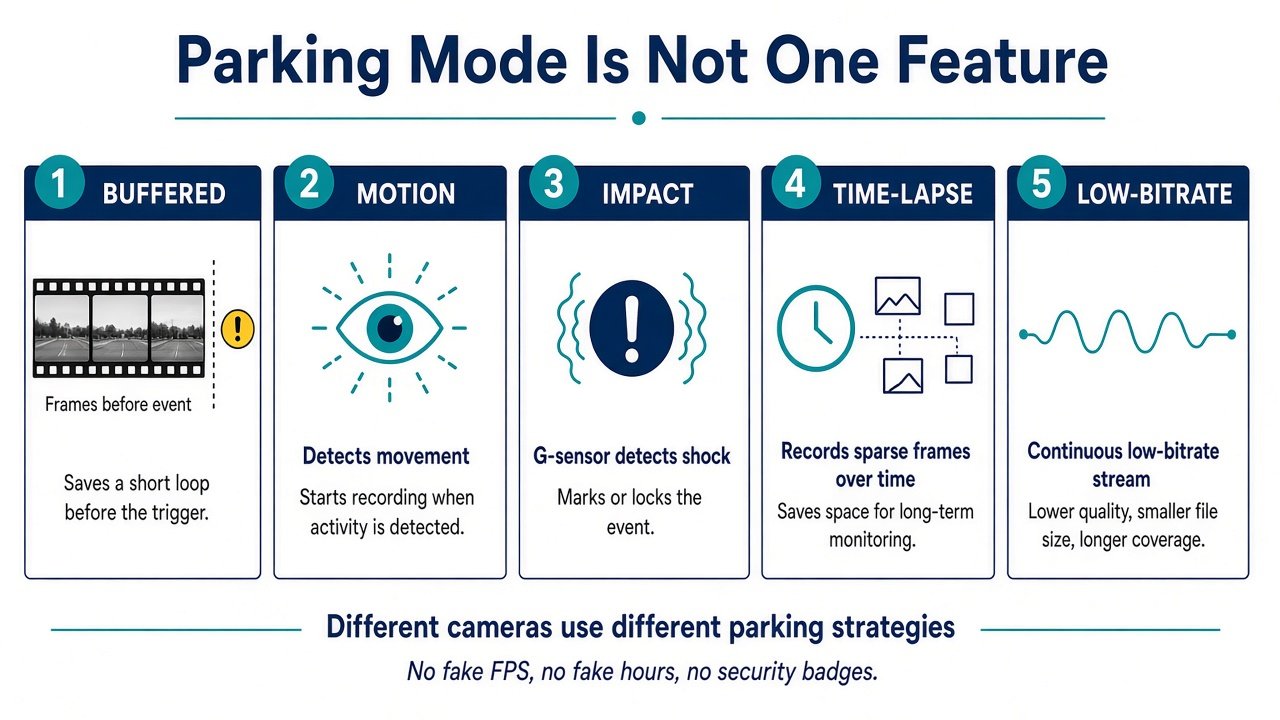
Motion detection starts or saves video when something moves in the scene. Impact/G-sensor recording reacts to shock. They are not the same; a camera may offer one, both, or extra radar/hybrid modes. Buffered parking keeps a rolling cache so a trigger can include seconds before the event — useful context, not a promise to capture every incident. Time-lapse stores fewer frames (Thinkware 2 fps; BlackVue 1 fps) to stretch storage and power, with less temporal detail. Low-bitrate parking keeps continuous video at a reduced data rate. Cloud/LTE event upload is a service layer on top, not a recording mode by itself.
How Parking Mode Gets Power When the Car Is Off
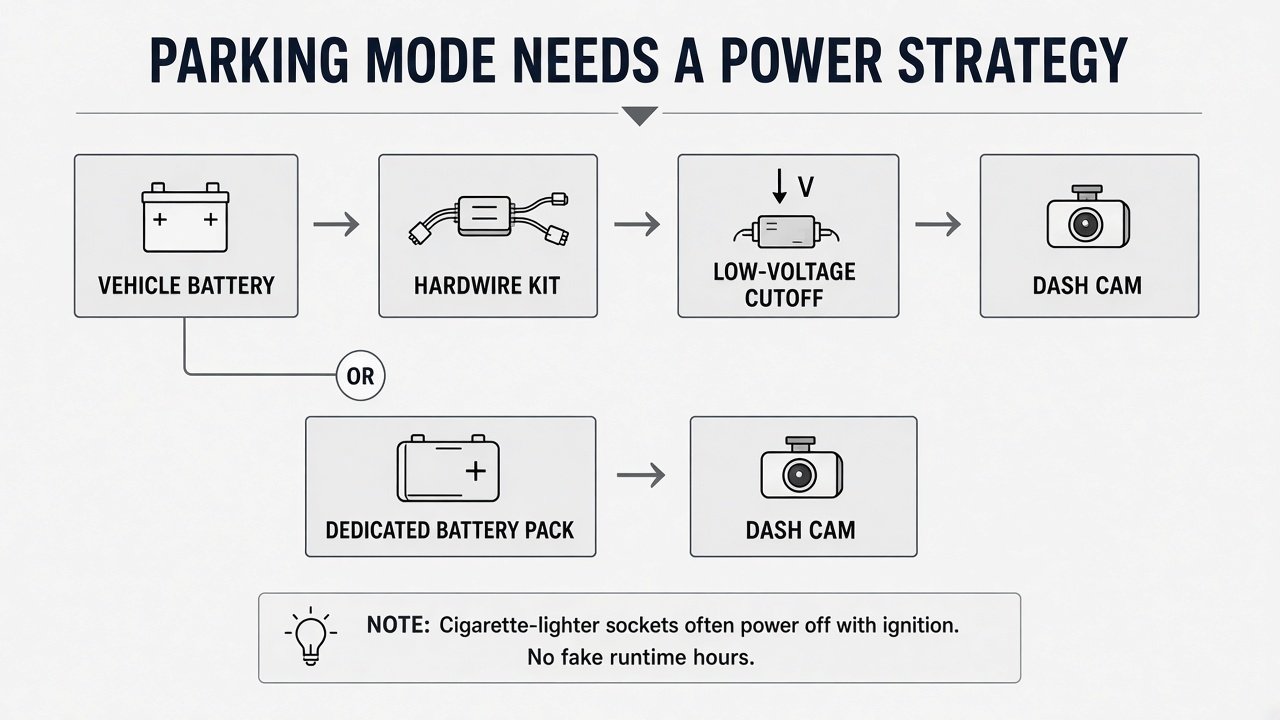
Parking mode needs constant power: a 3-wire hardwire kit (BATT / ACC / GND), an OBD constant-power cable where the maker supports it, or a dedicated dash-cam battery pack. A hardwire kit is not merely a longer USB cable — ACC tells the camera the engine is off. See hardwire kit vs OBD cable and battery pack vs hardwire kit. Super capacitors save files at shutdown; they do not power hours of parking. EVs and hybrids may not behave like a simple 12 V ICE battery — confirm with the vehicle maker or installer. Professional installation adds vehicle-specific cost; we will not invent a dollar range.
A dedicated pack can isolate the starter battery and may extend parked recording, at extra cost, bulk, and charging complexity. It is not universally better. Manufacturer runtime charts depend on mode, channels, heat, and LTE — we will not convert them into “records all night.”
Will Parking Mode Drain Your Car Battery?
It can, if the camera is hardwired to the vehicle battery. That is why low-voltage cutoff (in the camera, the kit, or both) and optional timers exist. Cutoff reduces the chance of a no-start; it does not make drain impossible. Do not copy a 11.8 V / 12.0 V / 12.4 V switch setting from a kit onto every car. Start-stop systems and weak batteries need extra caution. If the camera stays on a switched socket, parking mode usually will not run at all.
Cloud Parking Mode: Useful or Unnecessary?
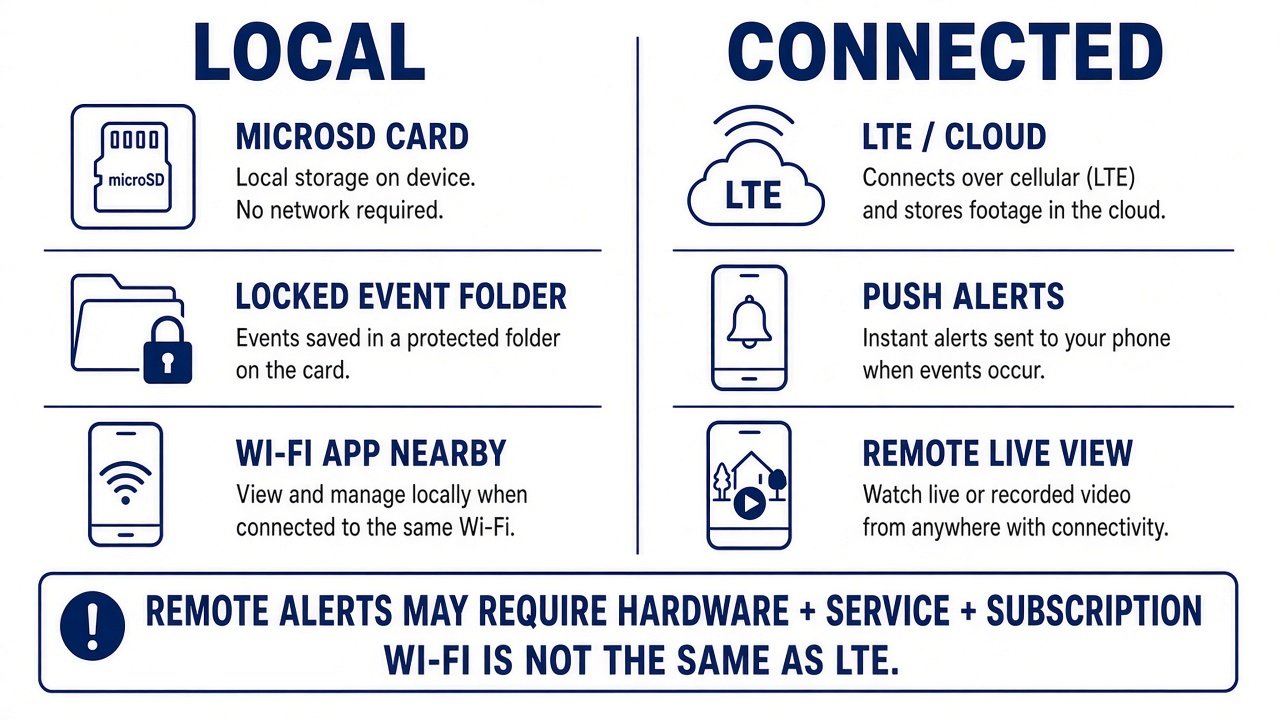
Want evidence after you return? Local buffered/event files on a locked folder plus dual coverage often suffice — garage parking especially. Want a ping during an incident? You need LTE or another always-on internet path, a Cloud/CONNECTED account, and usually a SIM or hotspot. Wi-Fi to a phone in the driveway is not remote LTE. Recurring cost does not make a camera “bad”; it is the price of remote awareness. Shoppers who refuse subscriptions should stay on local systems (VIOFO in this list) rather than stretching this page into a no-subscription roundup.
What to Check Before Buying
1) Exact parking-mode type. 2) Buffered seconds if published. 3) Front/rear (or more) still recording in that mode. 4) Hardwire/OBD/pack. 5) Where low-voltage cutoff lives. 6) Pack compatibility. 7) Max microSD and high-endurance guidance. 8) Event-file lock vs loop overwrite (formatting erases locked files on many systems). 9) Cloud/LTE/SIM. 10) Subscription or carrier fees. 11) Operating temperature as a spec, not a cabin guarantee. 12) App: local vs remote. 13) Exact Amazon bundle. 14) Install complexity.
Street parking often wants coverage + buffering. Long workplace sits want power strategy (pack or conservative cutoff). Hot climates: read the temp spec, then stop — heat ranking is a different article. Audio while parked has privacy implications; we are not giving state-by-state legal advice.
Which Parking Dash Cam Should You Buy?
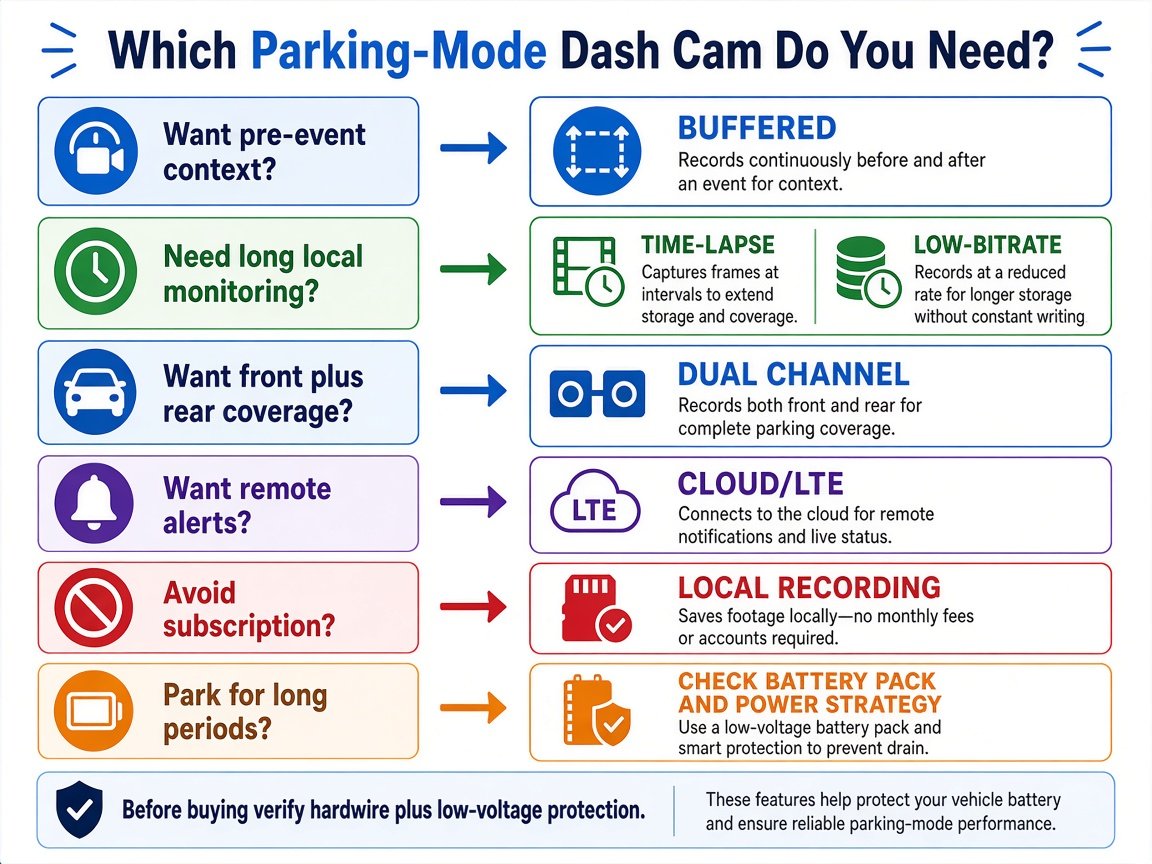
If you only remember one thing about best dash cams for parking mode, match the trigger and the power plan first. Want pre-event context → buffered (Thinkware radar clips, BlackVue Plus II 10 s, Vantrue 10 s). Want long local monitoring → time-lapse or low-bitrate (VIOFO, Thinkware, BlackVue). Want front+rear parked coverage → U3000 2CH, DR970X 2CH, A329S 2CH (N5S if you need more views). Want remote alerts → BlackVue LTE Plus II (or Thinkware CONNECTED with internet). Avoid subscription → VIOFO A329S + HK6, local card. Long parking periods → verify pack compatibility (BlackVue B-130, VIOFO BP100) and cutoff. Compact/simple → Garmin Mini 3 + official cable.
Final Verdict
For best dash cams for parking mode, start with how the camera stays on, what triggers it, what it saves, and how it protects the battery — not 4K on the box. The Thinkware U3000 2CH is the most complete parking-mode menu. The BlackVue DR970X-2CH LTE Plus II is the remote-alert pick if you will pay for SIM and Cloud. The VIOFO A329S 2CH is the local-recording workhorse. Match the best parking mode dash cam to power + buffering + coverage + ongoing cost, then budget kit, card, and install on top of the sticker.
FAQ
What is the best dash cam for parking mode?
There is no single winner. U3000 for mode variety, BlackVue LTE Plus II for remote alerts, A329S for local hybrid/time-lapse/low-bitrate.
What is buffered parking mode?
The camera keeps a short rolling cache so a motion or impact trigger can include footage from before the trigger. Length is model-specific.
Does parking mode work when the car is off?
Only with constant power (hardwire, supported OBD lead, or battery pack). Many 12 V outlets are ignition-switched.
Does a parking dash cam drain the battery?
It can if hardwired. Low-voltage cutoff and timers reduce risk; they do not zero it.
Do I need a hardwire kit? Is a battery pack worth it?
Usually yes for automatic parking mode. A pack is worth considering for long sits or to spare the starter battery — extra cost and install.
Does parking mode require a subscription?
Local recording does not. Cloud/LTE alerts usually need hardware plus service.
How long can a dash cam record while parked?
There is no universal hour figure. It depends on mode, channels, bitrate, temperature, LTE, and the power source.