
Moon Picke independently researches products. If you buy through our links, we may earn a commission at no extra cost to you. Read our affiliate disclosure.
An aftermarket dash cam is a camera you buy and install after the car is built. A factory or OEM system is recording supplied or officially integrated by the vehicle maker. Neither is universally better. The real trade-off is integration versus choice: OEM hardware can sit cleaner inside one vehicle ecosystem, while aftermarket kits let you pick cameras, parking behavior, and upgrades that the car may never offer. The right answer depends on what your vehicle actually records today—not on the word “factory.”
As an Amazon Associate I earn from qualifying purchases.
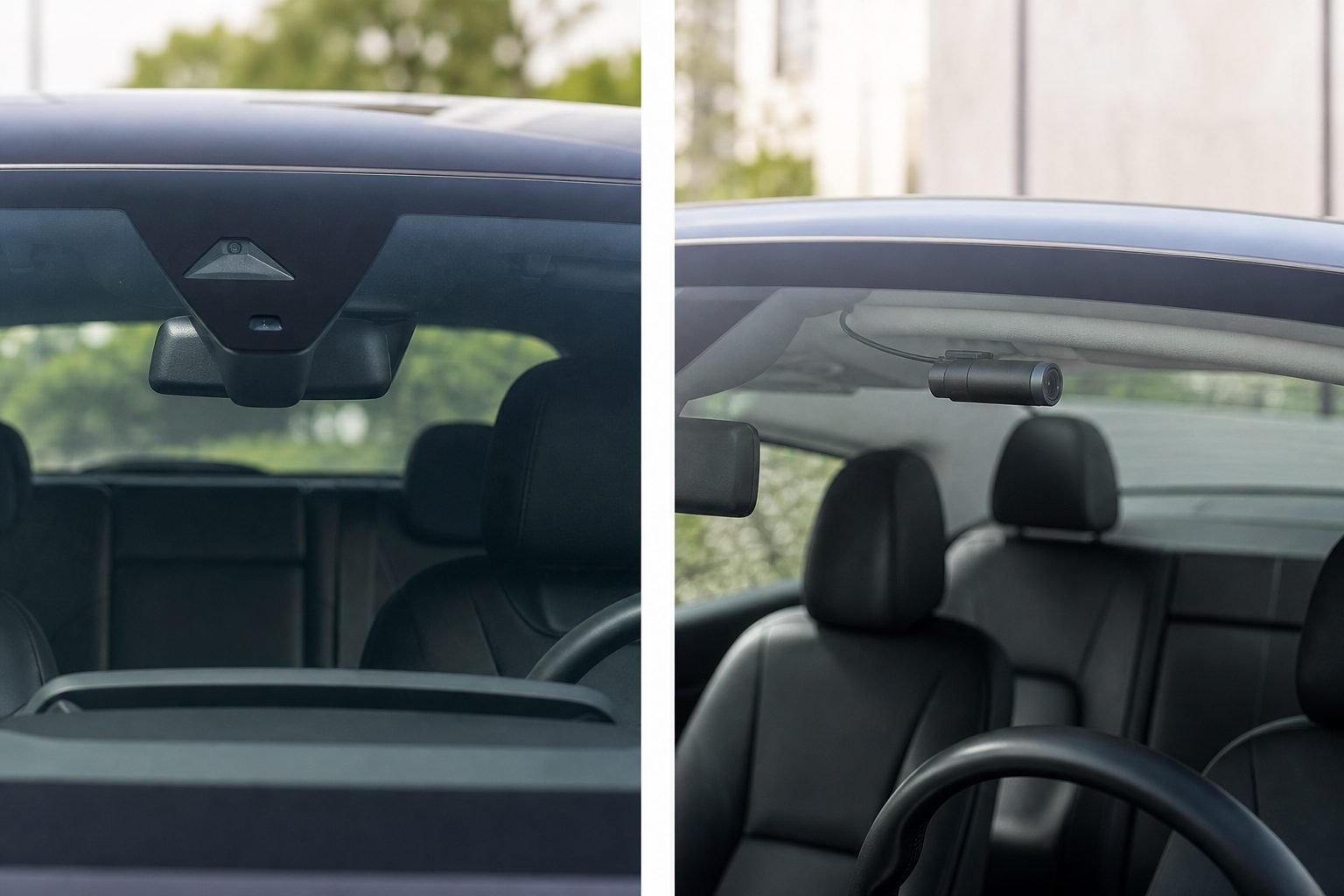
Aftermarket Dash Cam vs Factory Dash Cam: Quick Answer
Is an aftermarket dash cam better than a factory system? Only if the vehicle’s built-in recording is missing the coverage, parking behavior, or export workflow you need. Choose OEM when the car already records useful clips, stores them so you can retrieve them, and you want one vehicle app. Choose add-on hardware when the car has no dedicated recording, weak parking capture, no rear channel, or sensors you cannot upgrade. This is a category decision, not a score. Moon Picke has not road-tested every OEM camera.
What Is a Factory or OEM Dash Cam?
A factory or OEM dash cam is a recording function the vehicle manufacturer supplies or officially integrates. That label covers three different setups, and they are not identical.
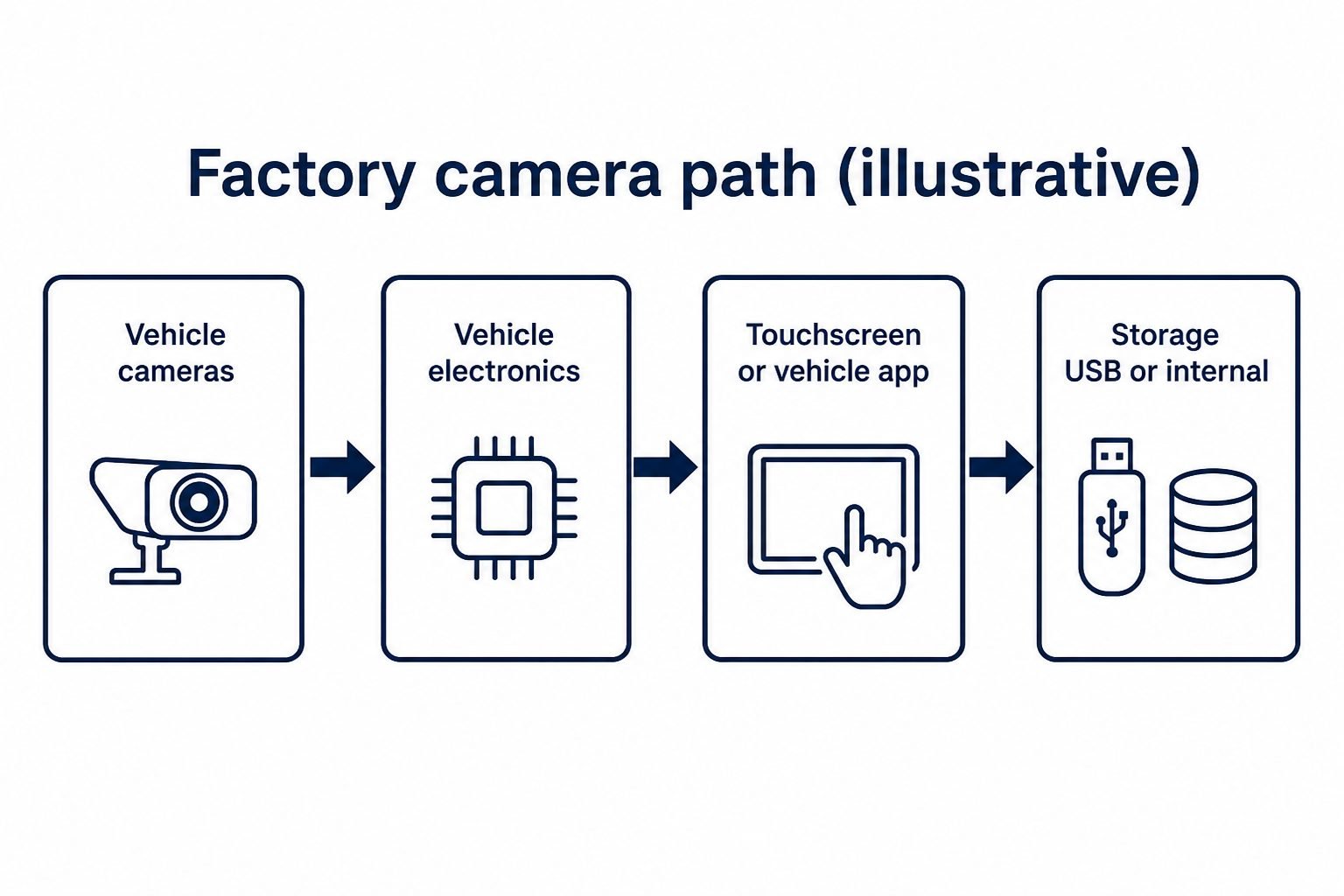
True integrated recording reuses the car’s existing cameras and software. Tesla’s owner’s manuals describe Dashcam and Sentry Mode this way: exterior cameras write locally to a formatted USB drive in a TeslaCam folder. Tesla states recordings are not sent to Tesla, unsaved Dashcam footage is overwritten, and Sentry Mode needs Dashcam enabled. Without a USB drive, Sentry can still alert through the app but will not save camera recordings. Live camera viewing requires premium connectivity and a paired phone. That is one OEM implementation—not a template for every brand.
Dealer-installed official accessories are branded cameras fitted to a specific model range. BMW Advanced Car Eye 3.1, sold through BMW dealers as an official accessory, is documented by dealers as a 3K front camera (2960 × 1666) and Full HD rear camera (1920 × 1080), with driving and parking modes and a G-sensor. That is still OEM-channel hardware. It is not the same as Tesla reusing Autopilot cameras, and it is not an independent aftermarket brand you can move freely between cars.
ADAS, backup, surround-view, and cabin cameras may share lenses with recording features, or they may only feed driver-assist and parking displays. A backup camera that shows the hitch on the infotainment screen is not automatically a dash cam. Do not assume every camera on the body is saving incident files.
What Is an Aftermarket Dash Cam?
It is a separate recorder purchased after the vehicle, then mounted and powered independently of the factory camera suite. Typical kits are 1-channel (front only), 2-channel (front and rear), 3-channel (front, rear, and cabin), or 4-channel on some fleet models. Not every kit includes 4K, radar, LTE, GPS, Wi-Fi, parking mode, or a battery pack. Those extras are available on some models, not all of them. For channel count and parking power in a wider shopping process, see Moon Picke’s 2026 dash-cam overview—this page is the factory-versus-aftermarket decision, not that product guide.
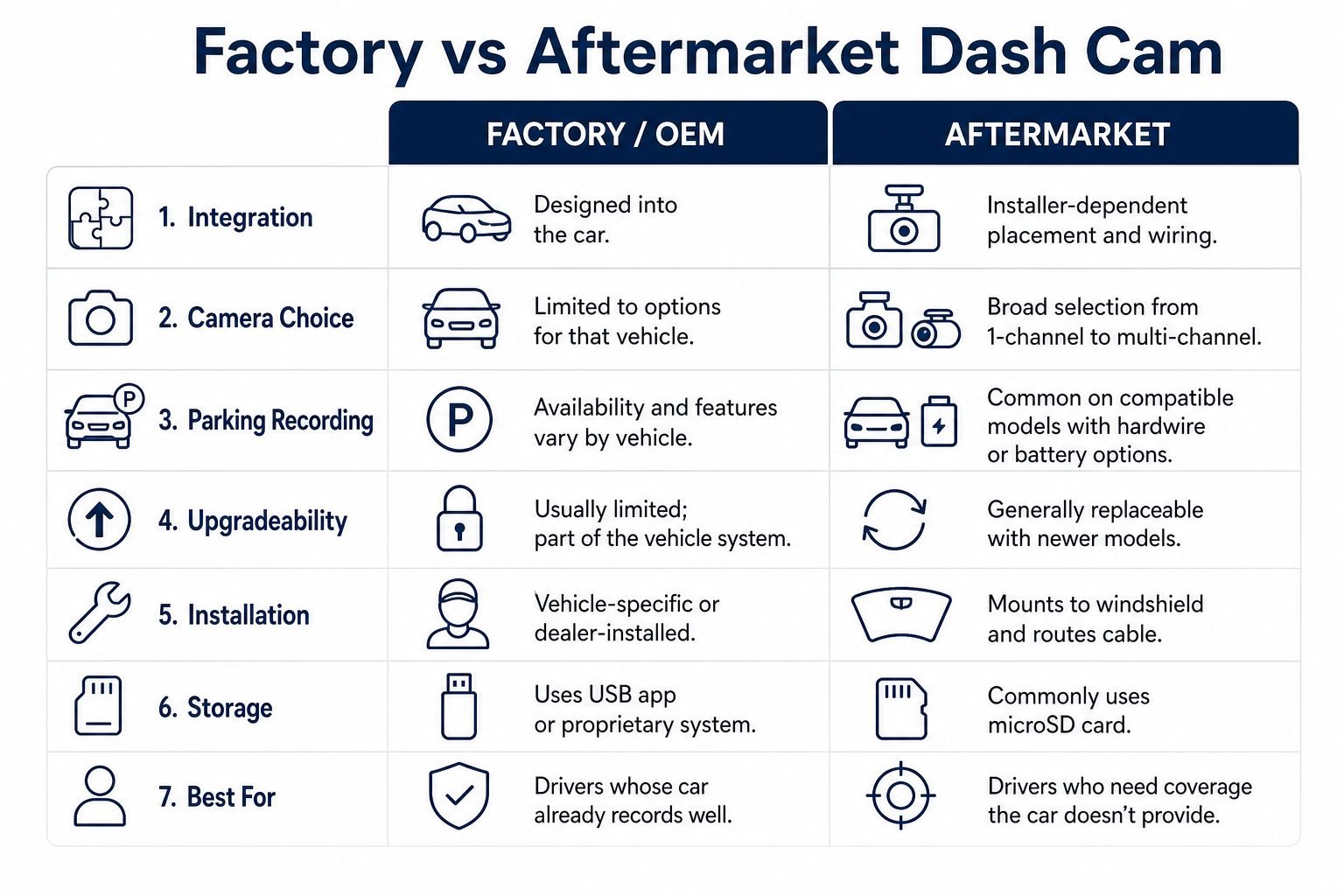
Factory vs Aftermarket: The Key Differences
| Factor | Factory / OEM | Aftermarket |
|---|---|---|
| Vehicle integration | Usually strongest when the car was designed for it | Depends on mount, cable routing, and installer quality |
| Product choice | Limited to that vehicle’s ecosystem and year | Broad: many brands and channel counts |
| Camera configuration | Vehicle- and trim-dependent | 1CH to multi-channel kits are available |
| Parking recording | Vehicle-dependent; some systems record parked events, some do not | Common on compatible models; usually needs hardwire or a battery pack |
| Upgradeability | Usually limited to that vehicle generation | Generally stronger: replace the camera without replacing the car |
| Appearance | Highly integrated on some cars; still visible on others | Installer- and model-dependent |
| Storage | USB, internal, app, or proprietary—implementation-specific | Commonly microSD |
| App / cloud | Vehicle ecosystem and connected-car services | Camera-brand app; cloud/LTE on some premium models |
| Move to another car | Usually no | Sometimes possible if you remount and rewire |
| Total cost | Trim, package, dealer accessory, and services | Camera + card + power kit + possible installer |
These are category tendencies. A well-specified OEM accessory can out-record a cheap plug-in camera. A poorly installed aftermarket kit can be worse to live with than a simple factory viewer.
Which Offers Better Recording Hardware?
Aftermarket systems offer more hardware choice, not an automatic quality win. Resolution, sensor, lens, HDR, frame rate, compression, and mount all affect a file. 4K does not guarantee a readable plate. Lighting, distance, speed, glass condition, and exposure still decide what you can identify. Tesla Dashcam uses the vehicle’s exterior cameras and can save multiple views. BMW’s dealer Advanced Car Eye 3.1 listing specifies 3K front and 1080p rear. Coverage and dedicated incident sensors are different jobs.
Examples Moon Picke has specified separately include Thinkware’s U3000 PRO 2CH (documented 4K front / 2K rear Sony STARVIS 2, dual built-in radar) and BlackVue’s ELITE 10-2CH (documented 4K front and rear, front-only HDR). Those kits exist because buyers want dedicated sensors the car may not sell. Choice still requires homework: a 1080p add-on camera can be weaker than a current OEM accessory. Use the 2026 dash-cam overview for selection criteria, not as a second product list on this page.
Parking Mode: Where Aftermarket Systems Can Differ
Is aftermarket parking mode better? It can be, when the factory system does not record parked incidents the way you need—and when you actually power the aftermarket camera. Some factory systems do record while parked. Tesla Sentry Mode is documented to watch while locked in Park and save event clips to USB when a drive is installed. BMW Advanced Car Eye dealer copy describes driving and parking modes with impact detection. Other cars offer no parked recording at all. Do not write every OEM into one bucket.
Many compatible add-on models offer parking features such as impact detection, motion detection, time-lapse, energy-saving sleep, and—on some models—radar. Thinkware documents dual built-in radar and multiple parking modes on the U3000 PRO, with parking surveillance requiring an OBD-II cable or a separate hardwire kit. BlackVue documents Power Saving, motion, and time-lapse on ELITE 10, with hardwire or a dedicated battery for constant power. Those are optional paths, not universal. Plug-in cigarette adapters often stop recording when the ignition is off. For the power-and-mode framework across cameras, see the parking-mode dash cam guide.
Example aftermarket parking kit: Thinkware U3000 PRO 2CH →
Installation and Vehicle Integration
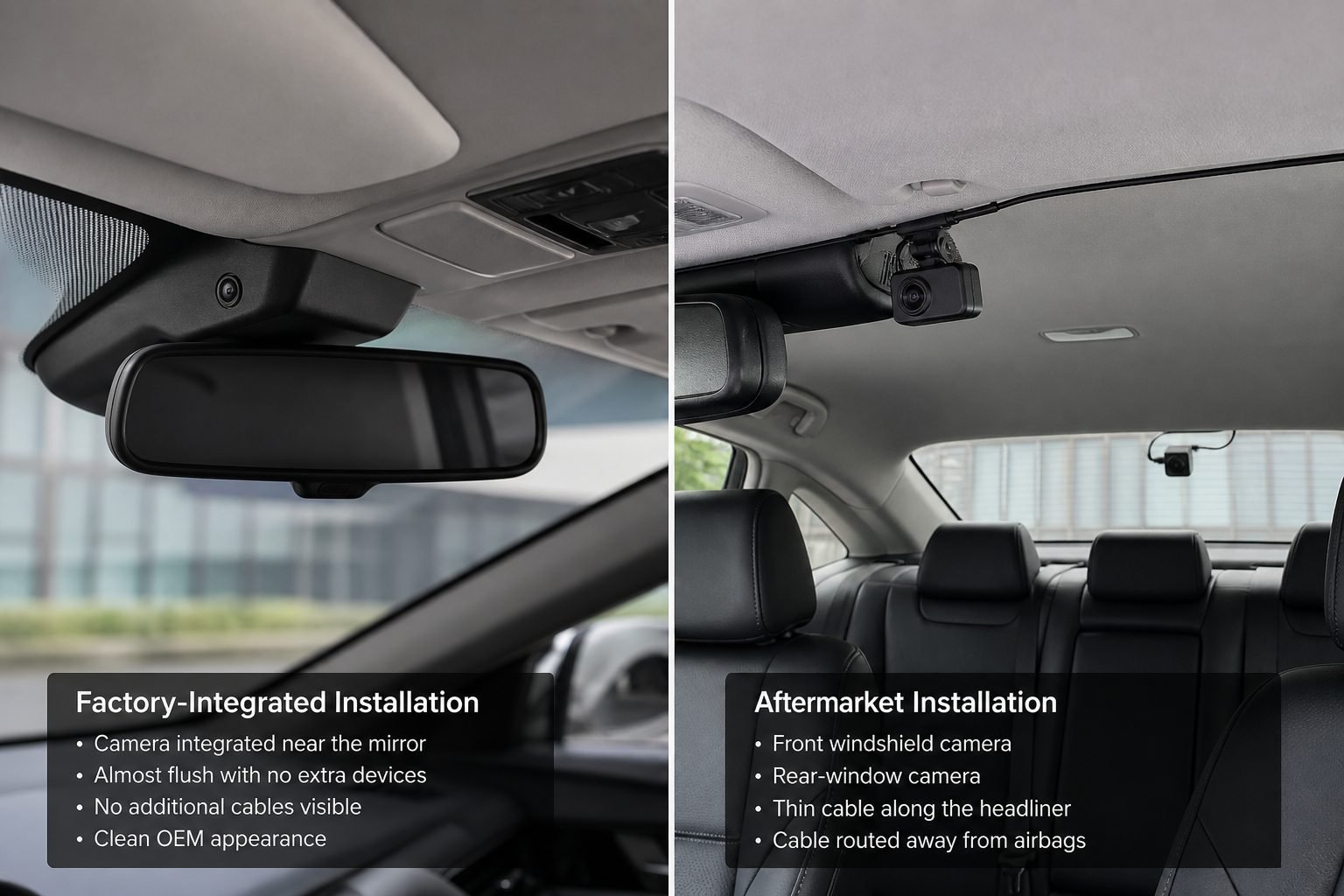
Factory integration can look cleaner because cameras, wiring, and menus were designed around that body. Dealer accessories still need a professional fit, but the parts and paths are vehicle-specific. Aftermarket installation is more flexible and more failure-prone. Front placement must stay legal and clear of the driver’s view. Rear cables should follow the headliner and pillars, not curtain-airbag paths, hatch pinch points, or dangling cargo loops. Do not tap fuses in unsupported ways. Follow the camera maker’s instructions or use a qualified installer.
Information gain: an aftermarket camera can offer better feature choice and still be a worse ownership experience if the install is crooked, noisy, or half-powered. A factory system can look invisible and still be hard to export. Appearance is not evidence quality.
Storage, Apps and Getting Footage Off the Camera
Recording quality is only half of usability. A dash cam is a data workflow: record → store → find the event → export → share. The useful system is the one that lets you pull the clip before the loop overwrites it.
Tesla’s manuals are a clear OEM workflow example: format the USB as exFAT, keep a TeslaCam folder, view clips on the touchscreen in Park, or move the drive to a computer. Loop overwrite is explicit. Drive size changes how much history you keep. Encrypted clips, when that option is used, are not ordinary computer files. Live viewing is a connected-car feature, not local USB playback.
Aftermarket kits commonly use microSD plus a brand app over Wi-Fi at the car. Some premium models add cloud backup or an optional LTE module. Thinkware CONNECTED remote features need extra LTE hardware and a subscription. BlackVue lists 5 GB of free cloud backup, with remote live view still needing a hotspot or LTE module. Local recording on the card does not require those plans. If you want files without a connected-car or camera-cloud layer, see Moon Picke’s no-subscription dash cam notes.
Factory convenience can mean vendor lock-in: the clip lives in the car’s USB, infotainment, or app. Aftermarket convenience can mean a tiny card and a second app. Neither workflow is “better” until you try to find last Tuesday’s parking tap.
Upgradeability and Long-Term Ownership
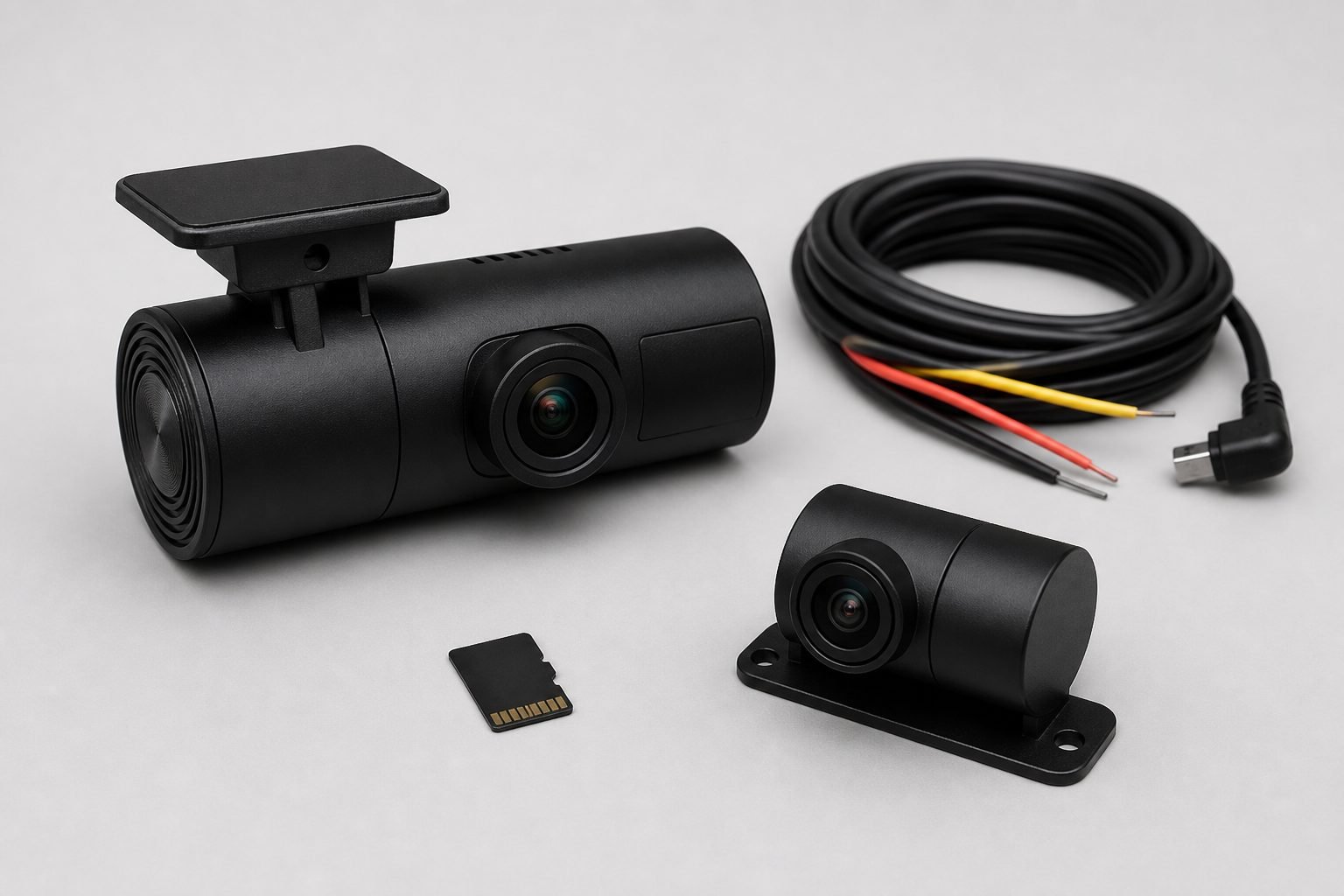
Are add-on cameras easier to upgrade? Often yes. Factory cameras age with the vehicle generation. You usually cannot drop a newer sensor into last year’s OEM housing. Software updates may add viewer features; they rarely replace the lens. When you sell the car, recording usually stays with it. A separate kit can be swapped for a newer 2CH or 3CH unit, a larger card, or a different parking power method. Moving the same unit to a second car is sometimes possible if you remount and rewire it. “Integrated” and “upgradeable” compete. Pick which problem you are solving for the next five years.
What About Vehicle Warranty?
Does installing add-on recording void my warranty? Do not treat that as a universal yes. Moon Picke is not giving legal advice. Effects can depend on jurisdiction, the vehicle’s terms, how power is connected, and whether a failure was caused by the installation. Damage from an unsupported fuse tap is different from the mere presence of a windshield camera. Review the warranty booklet, ask the dealer how they handle accessories, and use a qualified installer if you are not experienced with vehicle circuits.
Factory vs Aftermarket Cost
Compare total system cost, not the camera sticker. OEM cost may be buried in a trim, a connected-car plan, a dealer accessory, and fitting. Tesla Dashcam still needs a suitable USB drive even when the cameras are already on the car. BMW Advanced Car Eye is sold as a priced accessory with fitting in dealer listings; those figures vary by market and are not a global average.
Aftermarket total cost is the camera, a rear or cabin module if you want extra channels, a high-endurance microSD card, a hardwire kit or parking battery, and possibly professional installation. A cheap front-only unit is not comparable to a dual-4K hardwired kit. Do not use a single Amazon price as the category cost. Budget the install if parking mode is the reason you are shopping.
When a Factory Dash Cam Makes More Sense
Stay with the vehicle system when it already records the views you need, stores files you can export, and you prefer one car app. Tesla owners who will keep a formatted USB in the glovebox and use Sentry as documented may not need a second windshield brick. Buyers who took a dealer camera accessory for a clean, vehicle-specific fit may prefer that path if parking and rear coverage are already in the package. Upgradeability is a low priority if you keep cars a long time and rarely change recording hardware. If the OEM system is only a backup camera or an ADAS sensor with no incident files, this section does not apply—that is not a dash cam.
When an Aftermarket Dash Cam Makes More Sense
Choose an add-on kit when the car has no dedicated incident recorder, when you want front and rear (or cabin) coverage the factory does not sell, or when parking files matter and the OEM feature is missing or unusable. Product choice matters if you want a specific sensor mix, radar parking on some models, or dual 4K rear evidence. Future replacement matters if you change cars. For dual-camera shopping criteria, see the front-and-rear dash cam guide. Premium kits specified on Moon Picke include Thinkware U3000 PRO and BlackVue ELITE 10-2CH; they are illustrations, not a roundup.
Example dual-4K aftermarket kit: BlackVue ELITE 10-2CH →
Should You Buy an Aftermarket Dash Cam?
Should I install one? Yes if you have verified that factory cameras do not provide the recording, parking, or export path you need, and you will complete a safe install including power for any parking mode. No if the OEM system already covers those jobs and you dislike extra glass, cables, and apps. Decide from the actual capabilities of your vehicle, not because “OEM” sounds official. An aftermarket dash cam is a tool. It is worth buying when it closes a real gap.
FAQ
What is an aftermarket dash cam? A camera system you buy and install separately from the vehicle manufacturer’s cameras. It is not the backup camera in the infotainment screen unless that system also saves incident video.
Is add-on hardware better than a factory system? Not automatically. Aftermarket wins on choice and often on upgradeability. Factory can win on integration and a single vehicle workflow. Compare the files you can actually export.
Can I install one in any car? Most cars can accept a windshield camera and a power lead. Parking mode, rear cameras, and legal mounting still depend on the vehicle and local rules. Follow manufacturer instructions.
Does it void my warranty? There is no universal yes. Effects depend on jurisdiction, vehicle terms, and whether installation caused damage. This is not legal advice.
Do these cameras record while parked? Some compatible models can, if they have constant power (hardwire or battery pack) and a parking mode enabled. Many plug-in cameras do not.
Can the kit use a rear camera? Yes, on 2-channel and higher kits. Rear coverage is a cable-routing job, not a software toggle.
Can I move it to another vehicle? Sometimes, if you remount it and redo power and rear cables. Factory integrated recording usually stays with the original car.
Sources: Tesla Dashcam, Tesla Sentry Mode, Tesla USB recording, BMW Advanced Car Eye 3.1 (dealer), Thinkware U3000 PRO and BlackVue ELITE 10 specifications used as aftermarket examples.