
An ecommerce seller usually does not need a general text-to-video model. The practical job is narrower: take a product page, a product URL, product images, or the facts already on a listing, and turn that material into a video that can sit on a product page, a marketplace gallery, an organic social post, or a paid placement. This guide compares AI video generators for that job. It is not a roundup of cinematic generators, and it is not a list of UGC-only or ad-only tools.
Live US search results for “best AI video generators for ecommerce” mix vendor blogs, product-URL tools, avatar products, and third-party listicles. Many of those pages invent side-by-side tests, quality scores, and cost-per-clip math. Moon Picke did not use those figures. The two finalists below are here because their own pages, checked on 5 October 2026, describe a path from a product link to a video and publish a current price. Tools that only animate a prompt, or that hid US dollar prices behind a localized currency, stayed off the ranking.
Quick picks
- Best overall: Creatify, because the priced Platform product is organized around a product URL, AI actors, and named listing sources.
- Best product URL workflow: Creatify. Its Amazon tool page says a pasted listing URL supplies images, price, and key details, and its feature pages also name Shopify and Etsy links.
- Best AI actor library on a price card: Creatify. Starter lists 300 realistic AI actors. Pro lists 1,500 plus three custom avatars.
- Best when a product link sits next to generative video models: Topview. The URL-to-video page names Shopify, Amazon, and WooCommerce links. The price cards sell model credits, not a dedicated ecommerce video unit.
- Lowest published annual entry: Topview Basic, at $6.70 per month billed annually ($80 billed annually) for 50 credits a month. That credit is not the same unit as a Creatify credit.
- Best documented free path: Creatify’s pricing FAQ, which describes 10 monthly credits and a watermark on free exports.
These categories were not filled in: best Shopify app, best Amazon seller integration, best TikTok Shop catalog, best verified product-holding demo, and best product-only editor. Neither finalist published evidence for those labels on the pages checked. Pasting a Shopify or Amazon URL is not an app connection, and an avatar standing beside a product image is not proof that the avatar holds or uses the product.
Comparison table
Pricing, product-import options, usage limits, and ecommerce claims were checked on 5 October 2026 and may change. Check each provider’s current specifications before purchasing.
| Tool | Best for | Product URL | UGC / actor | Product-only | 9:16 | 1:1 | 16:9 | Starting price |
|---|---|---|---|---|---|---|---|---|
| Creatify | Product URL to actor-led video | Yes | Yes, synthetic actors | Listed, not shown on the price cards | Yes, on tool pages | Yes, on tool pages | Yes, on tool pages | $39/month, or a free credit allowance |
| Topview | Product link plus generative models | Yes | Avatars exist elsewhere in the product | Not verified on the URL page | Named on a use-case page | Named on a use-case page | Named on a use-case page | Basic $6.70/month, billed annually |
Ecommerce workflow table
| Tool | Shopify | Amazon URL | Product images | Product holding | Product demo | Bulk | Direct publish |
|---|---|---|---|---|---|---|---|
| Creatify | URL paste. App not verified | Yes, on the Amazon tool page | Yes. Pages say media is pulled and more images can be added | Advertised as generated avatar behavior | A demo tool exists. It is generated, not a real test | Limited. Parallel generations and script variations are described | Not verified. An Ad Launcher row names Meta, TikTok, and AppLovin |
| Topview | URL paste. App not verified | Yes, on the URL-to-video page | Page extraction is claimed. A separate upload step was not on that page | Not verified | Not verified as product use | Limited. The FAQ says one link can yield multiple versions | Not verified |
How we chose the best AI video generators for ecommerce
The reader behind this keyword sells products online and wants software that can start from product material. A qualifying tool had to show a current path from a product URL, a product page, product images, or product data toward a video a merchant could export. A generic text-to-video model, a general editor, and a pure ad-analytics product did not clear that gate.
Each serious candidate was checked for separate facts rather than one collapsed “imports products” label. A general webpage URL is not a product URL. A pasted Shopify link is not a Shopify app, catalog sync, or a publish-back-to-the-store connection. An Amazon URL is not an Amazon seller integration. A TikTok marketing mention is not a TikTok Shop catalog. Product-image upload is not product holding. A product shown next to an actor is display, not a demonstration. A generated hand on a bottle is synthetic interaction, not a real customer using the item.
Aspect ratios were recorded only when a current page named 9:16, 1:1, 16:9, or 4:5. “HD” was not treated as 1080p. Download was not treated as direct publishing. A logo strip was not treated as an integration. Copying one project by hand was not treated as bulk generation. Credits, avatar minutes, and generative seconds were not treated as the same unit, so this article does not invent a cost per video unless both the plan unit and the spend for one video are printed.
Affiliate status had no effect on rank. Several affiliate products were reviewed and left out because the ecommerce evidence or the public price was incomplete. Zero affiliate links appear in this article.
US results for this phrase mix URL-to-video tools, avatar products, image-animation tools, and general generators. This page stays on product assets in and a usable ecommerce video out. UGC, ads, and TikTok are branches. Related Moon Picke guides cover the branches on their own: AI UGC generators, ecommerce UGC, product video generators, product image-to-video, and the broader AI video generator guide.
What is an AI ecommerce video generator?
An AI ecommerce video generator is software that starts from something a store already has and produces a video about that product. The input might be a public product URL, uploaded packshots, a title and description the merchant types, or a mix of those. The output might be a short actor-led clip, a product showcase, a lifestyle scene, a product-page video, or a social cut. The defining feature is the product workflow, not the presence of a text box that can mention a product.
A useful tool lets you see what was imported before export. Title, price, features, images, brand, variants, and reviews are separate fields. A script must stay editable, because a model can invent a material, a discount, or a review. A spoken call to action is text inside the file, not a clickable button.
AI ecommerce video generator vs AI product video generator
A product video tool is aimed at footage of the item. An ecommerce video tool also has to cover a store page, a marketplace file, an organic post, and a paid cut. Packshot motion alone belongs in a product-image guide.
AI ecommerce video generator vs AI UGC generator
AI UGC is a synthetic person speaking in a creator style. It can be one ecommerce format. A store hero or a marketplace clip may be better with no face. A synthetic actor is not a customer. Real customer footage, hired creator footage, and generated UGC are three different things.
AI ecommerce video generator vs AI video ad generator
Paid creative is one destination. A tool built only for ad hooks is a weak default for a product page that needs a clean frame. This ranking does not use click-through rate, return on ad spend, or “winning creative” claims. Those results were not measured here.
1. Creatify: best for turning a product URL into an actor-led ecommerce video
Creatify, from Creatify Lab, is a web app at creatify.ai. The public Platform pricing page loaded in English with US dollar prices on 5 October 2026. Windows, macOS, iOS, and Android apps were not part of that page. The product type is an AI video ad and avatar studio with a documented product-link workflow, which is why it leads a broad ecommerce list even though much of its own language is about ads.
It leads because the workflow is specific. The URL feature says a product link supplies assets and a script. The AI video feature says that link supplies the name, description, and media, and that more images can be added. The Amazon page says an Amazon URL supplies images, price, and key details. The same feature family names Shopify and Etsy links. That is URL support. It is not a Shopify app, a catalog sync, or an Amazon upload. Skip it if you only want a silent packshot, or a verified Shopify admin connection. Product Video and Product Photos appear in the navigation. The pricing capture does not show those editors.
What the link workflow claims to extract
Across the pages above, Creatify’s own copy names product name, description, media or images, price, and “key details” or features and benefits. Reviews, star ratings, brand as a separate field, and variants were not listed as extracted fields on those pages, so they are not claimed here. The API documentation shows a create-link call with an Amazon product URL as the example, then a link-to-video call. That confirms URL ingestion in the API. It does not mean every public webpage is understood as a catalog record. A blog URL and a product URL can both be “a link.” The merchant still has to read the extracted text and delete anything the page did not actually say.
TikTok Shop import and CSV catalog import were not on these pages. The API can accept a link that is not a product page, so a merchant still has to read the extracted text and delete anything the listing did not say.
Actors, holding, and demos
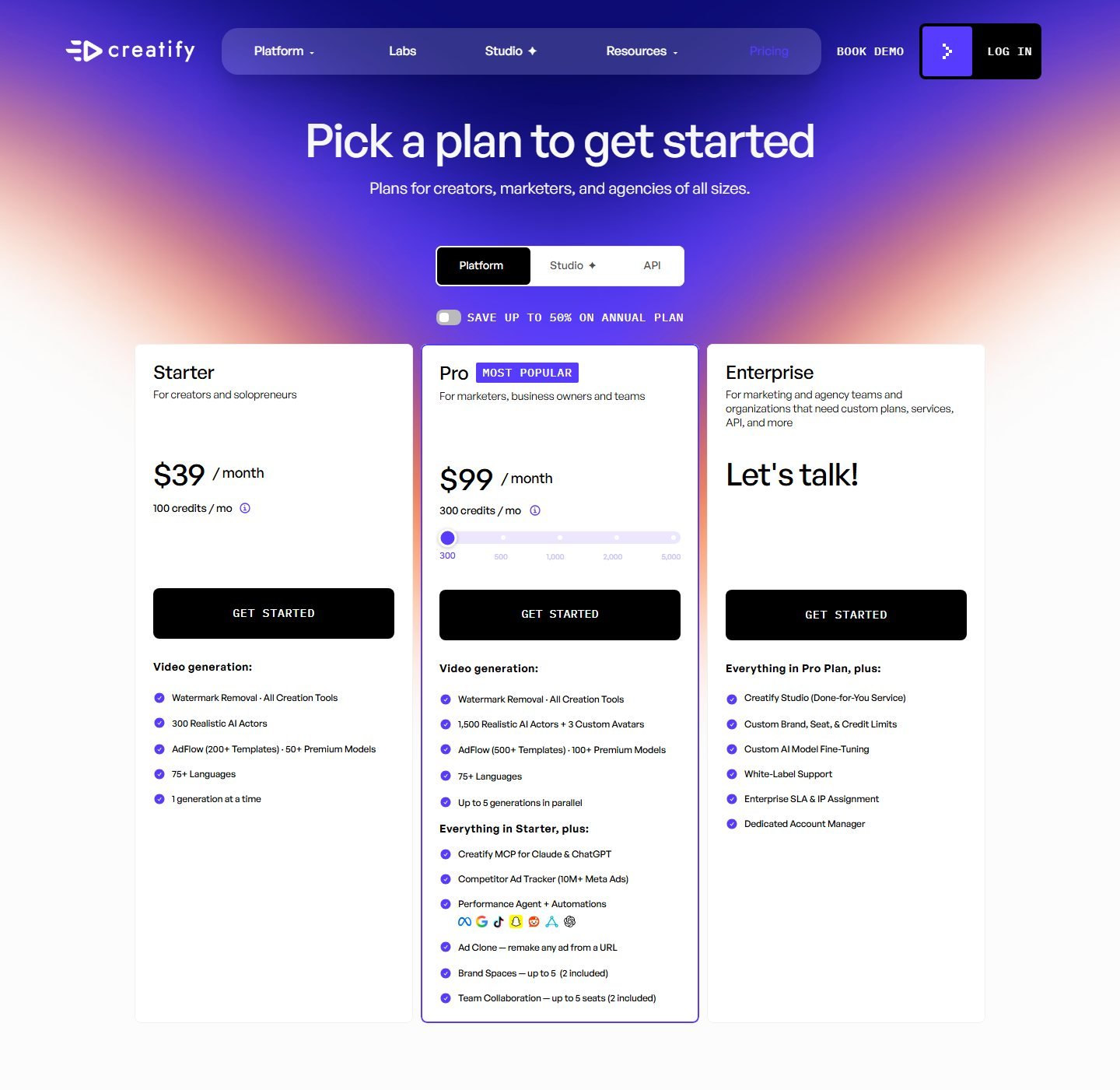
The Starter card lists 300 realistic AI actors. The Pro card lists 1,500 realistic AI actors and three custom avatars. These are synthetic performers. They are not customers, and a video of one is not a testimonial. The avatar feature page says you can have an avatar hold your product, and it has a “Product holding” section that describes avatars showcasing products with branded clothing and custom backgrounds. Treat that as generated product interaction. It is not footage of a person holding the real item, and it is not a performance test. The product-demo tool is a separate page: paste a URL, pick or describe an avatar, and the system writes a script it describes as having a hook and benefit-focused copy. Lip-sync to a selected voice is part of that page’s description. A dedicated hook-scoring tool was not shown. A call to action, if the script includes one, is spoken or written inside the video. It is not a button.
Creatify Labs lists a separate Aurora model at 480p and 720p with per-second rates. That rate card is not the Platform plan. The Platform cards do not print 720p, 1080p, or 4K.
Formats, export, and branding
The Amazon tool page and the AI video generator feature name 9:16, 1:1, and 16:9. 4:5 was not named. The compare table lists duration up to 2 minutes on Starter and up to 10 minutes on Pro, plus 5 GB and 10 GB of smart-asset storage. Watermark removal is on both paid cards. The free-plan FAQ says exports include a watermark, with 10 monthly credits, up to 2 video ads or 20 image ads, 300 AI actors, 10 premium models, and 40 ad templates.
Brand control on the Pro card is “Brand Spaces \u2014 up to 5 (2 included),” plus custom avatars. A full brand-kit checklist of logo, font, and color was not printed on the Starter card. The compare table includes a row named Ad Launcher for Meta, TikTok, and AppLovin. That is a named row, not a publishing test. Direct organic posting to TikTok, Instagram, or YouTube was not verified. Shopify publish-back was not listed.
The URL flow writes a script, and the feature page says a product can produce several script variations. Pro lists up to five generations in parallel, and Batch Mode is in the navigation. That is variation support, not a catalog export. Both paid cards say 75+ languages. That line is not a dubbing or caption-file suite. Captions and music are mentioned on marketing pages and were not line items on the price cards.
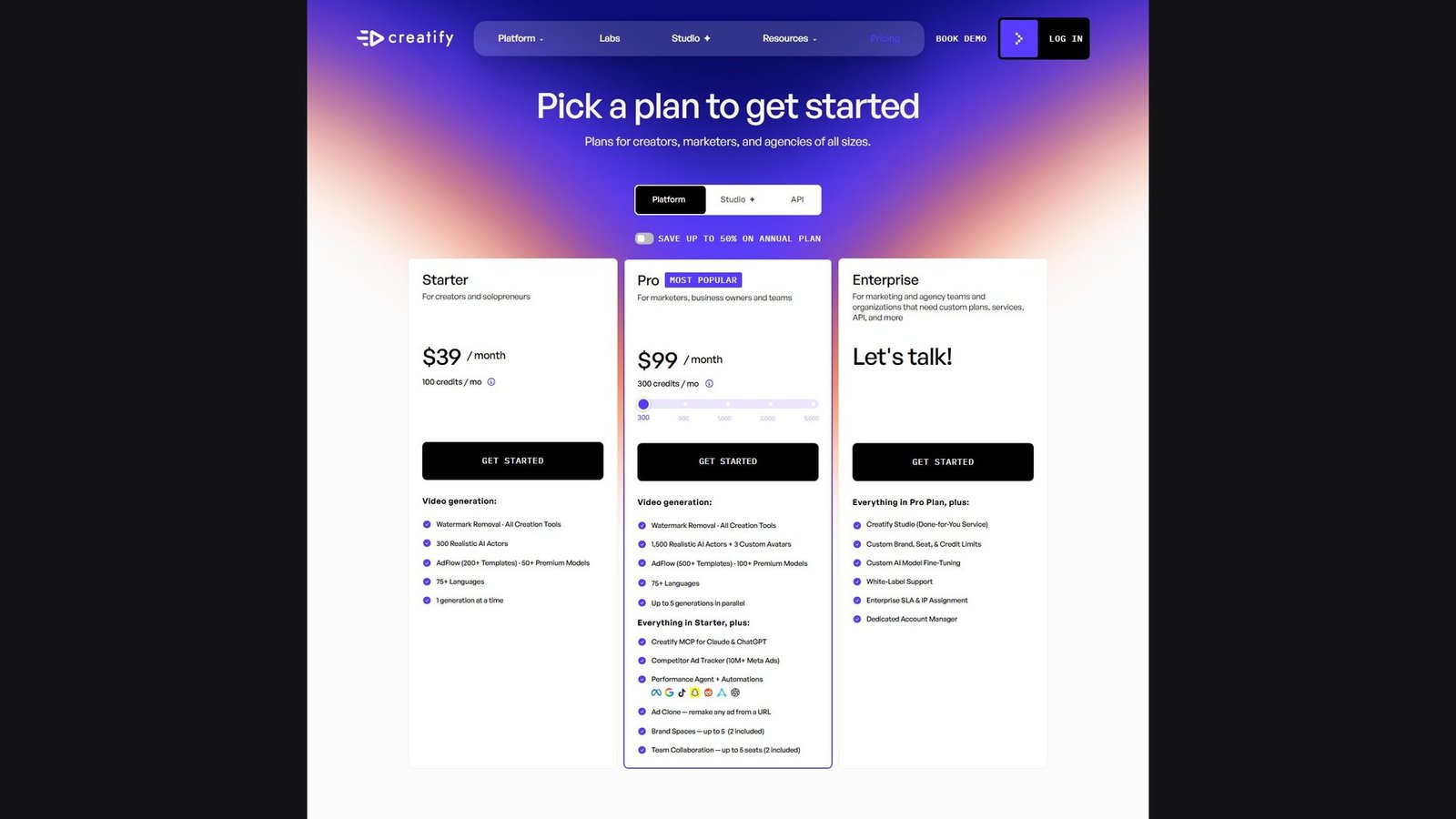
Creatify pricing
On the monthly view, Starter is $39 per month for 100 credits, one generation at a time, watermark removal, and all creation tools. Pro is $99 per month. Its slider starts at 300 credits and also shows 500, 1,000, 2,000, and 5,000. Enterprise is “Let’s talk,” with custom limits. A toggle reads “Save up to 50% on annual plan.” The annual dollar amounts were not on screen while that toggle was off, so they are not stated here. The API docs say link-to-video costs 4 credits per 30 seconds. That figure belongs to the API example, not to a proven Platform click, so this article does not convert Platform credits into a price per finished video.
The biggest advantage is the combination of a named product-URL path, a large actor library printed on the price card, and three aspect ratios named on the tool pages. The biggest limitation is that the product is framed as ad creative. A clean store video with no actor and no social pacing is not what the pricing page demonstrates. Commercial use of the export is also narrower than “watermark removed.” The pricing FAQ asks about limits on ads made with Creatify, but the answer was not expanded in the captured text. Product photos, trademarks, music, and an actor likeness still need their own rights check. Paid watermark removal does not clear those.
Best for: a public product URL that should become a short actor-led video in 9:16, 1:1, or 16:9. Skip if: you need a verified Shopify app, a silent product-only editor, or a published 1080p or 4K spec on the plan card.
2. Topview: best when a product link feeds a generative video stack
Topview is a web product at topview.ai. The company lists a Los Angeles address on the URL-to-video page and a Singapore address beside it. The pricing page checked on 5 October 2026 showed USD and Stripe, so a US billing path was visible even though other tools on the same day localized currency. Desktop and mobile apps were not listed on the pricing cards. The product type is a multi-model AI video and image studio with a separate link-to-video workflow.
It made the list because the URL-to-video page is explicit about ecommerce sources. It says you can paste a Shopify product link, an Amazon listing, a WooCommerce page, or another public product or landing-page URL. It says the system reads the page, pulls product images, pricing, headlines, reviews, and benefit claims, and builds a draft with a script, scenes, and captions. That is a product-URL claim, including review text. It is not a Shopify app and not an Amazon seller integration. A later ecommerce use-case page also says a product URL can be pasted for Shopify, Amazon, or AliExpress. AliExpress is a fourth named URL source, still not a marketplace login.
Who it is for: a seller who wants a first draft from a listing URL and also wants generative models under one credit balance. Skip it if you need a printed credit cost for one product video, a verified actor holding the product, or a Shopify app that publishes the file back to the store.
What to do with imported reviews and prices
If a tool copies reviews, the safe use is research for the merchant, not a fake customer quote in the video. Do not put a generated sentence in quotation marks and present it as a buyer. Do not invent a star rating or a review count if the import only grabbed a sentence. Price is the same kind of risk. A listing price can change after the draft is made. The video should be checked against the live page before it is uploaded to a product page or an ad account. Title, images, and benefit lines are the fields the URL page actually names, along with pricing, headlines, and reviews. Variants and a separate brand field were not named, so they stay unverified.
TikTok Shop was not shown as a product import on the URL-to-video page. A different ecommerce use-case page talks about making formats for TikTok Shop, Amazon listings, and Shopify. That is a format claim. It is not evidence of a Shop catalog connection, a product tag, or a direct post. Manual image upload is plausible in a studio this broad, but the URL page describes extraction from the link rather than an upload slot, so a separate image-upload step is not marked as verified for that workflow.
Actors, product-only video, and B-roll
Topview’s credits guide documents avatar video and a product-avatar path, including image generation for “product plus model” and video rates for named avatar models. That is evidence of avatar and product-image tools inside the same account. It is not evidence that the URL-to-video draft makes an actor hold the product. Product holding is not verified for the link workflow. Product display may occur if the draft uses listing images. A generated scene of someone using the product would still be synthetic interaction, not a demonstration that Moon Picke or the vendor performed.
A product-only showcase was not walked through on the URL page. Image-to-video and text-to-video are separate credit rows, and a generative clip can drift on logos, label text, color, and packaging. Watch the export before it represents the SKU.
The URL page says the draft includes scenes, captions, hooks, and call-to-action language drawn from the page. That is copy inside the video, not a scored hook tool and not a clickable button. Stock B-roll was not separated from generated scenes on that page.
Aspect ratios and resolution
The ecommerce use-case page names 16:9, 9:16, and 1:1 for listing and social cuts. The advertising use-case page also names 4:5, and it pairs 16:9 with 1920×1080, 9:16 with 1080×1920, and 1:1 with 1080×1080. A social use-case page placed 1080×1350 near a 1:1 label, which conflicts with the advertising page, because 1080×1350 is a 4:5 frame. Exact pixel sizes are therefore not treated as settled. The ratios themselves are named. They were not printed on the pricing cards in the screenshot.
720p, 1080p, and 480p appear as Seedance 2.5 credit rates, including 6 credits per 4 seconds at 720p and 14.8 credits per 4 seconds at 1080p. Those are model rates, not a URL-to-video export size. 4K appears on other model rows, not as a default product-video setting. Watermark status is not on the four plan cards. The open API page describes a URL-to-video submit endpoint. That is an API, not a one-click post to TikTok, Instagram, YouTube, or Shopify.
Topview pricing
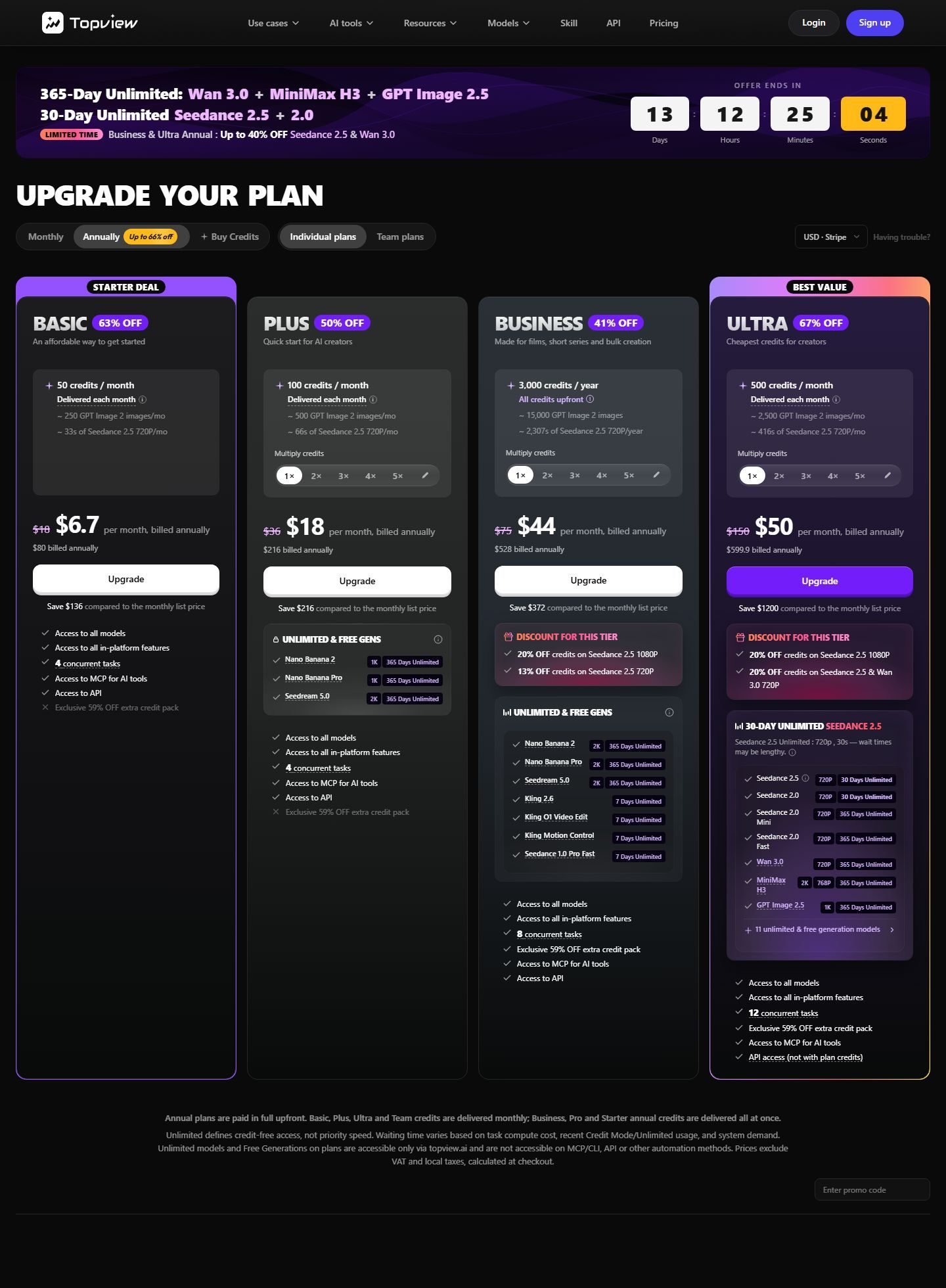
The screenshot is the annual toggle. Basic includes 50 credits a month, shows a struck $18, and charges $6.70 per month billed annually, which the card states as $80 billed annually. Plus includes 100 credits a month, struck $36, $18 per month billed annually, $216 billed annually. Business includes 3,000 credits for the year, delivered upfront, struck $75, $44 per month billed annually, $528 billed annually. Ultra includes 500 credits a month, struck $150, $50 per month billed annually, $599.90 billed annually. The save lines compare those annual prices with the monthly list. The monthly toggle was visible and was not the view captured, so the struck amounts are reported as the list prices printed on the annual cards, not as a second screenshot.
A Team row further down the page lists 500 credits per seat per month, a struck $180, and $56 per month billed annually, stated as $672 billed annually per seat. The note under the cards says annual plans are paid in full upfront. Basic, Plus, Ultra, and Team credits are delivered monthly. Business credits on an annual plan are delivered at once. “Unlimited” on several model names means credit-free access on those models, not priority speed, and the same note says unlimited and free generations are not available through the API. Ultra’s card says API access is not with plan credits. Prices exclude VAT and local taxes.
Basic’s card estimates about 33 seconds of Seedance 2.5 at 720p from 50 credits. That is one model, not the cost of a URL-to-video draft, so no price per ecommerce video is calculated. A free plan was not on these four cards. Commercial rights for music, stock, and likeness were not stated on the cards.
The URL page also prints speed and savings lines, plus customer quotations. Those are vendor claims, not measurements used for this ranking. The biggest advantage is a named Amazon, Shopify, and WooCommerce URL path next to a published USD price. The biggest limitation is that you buy a pool of generative credits. Aspect ratio, watermark, product holding, and the credit cost of one product video are not settled on the plan card.
Best for: a first draft from a public product URL when the team also wants generative models in the same account. Skip if: you need a printed cost per product video, a Shopify app, or a verified shot of an actor holding your exact product.
Use-case winners
Product URL: Creatify. Both accept product links. Creatify’s pages name the extracted pieces more clearly, including price on the Amazon page. Topview also claims review text, which only helps if a person checks it. Actors: Creatify, because the counts are on the price card and the avatar page describes generated product holding. Topview has avatar tools that were not tied to a holding shot on the URL page. Neither actor is a real customer. Lower annual entry: Topview Basic. The credits are not the same unit as Creatify credits. Creatify is the clearer month-to-month card at $39, and the only documented free allowance in this pair. Product-only video, a Shopify app, Amazon export, TikTok Shop, a verified product demonstration, and direct publishing were not awarded.
Pricing and limits
Creatify’s paid unit on the Platform cards is a monthly credit. Starter is $39 for 100 credits. Pro starts at $99 for 300 credits and can be raised on the slider. Free access is a FAQ allowance of 10 credits a month, with a watermark, not a 14-day trial described on that FAQ. Annual dollars were hidden behind a toggle that only promised savings up to 50 percent. Watermark removal is on the paid cards. Resolution is not. Commercial terms for finished ads were asked in the FAQ and not answered in the text captured here.
Topview’s paid unit is also called a credit, and the cards spend it on named models at printed rates such as credits per 4 seconds. Basic is the cheapest annual entry at $80 billed annually. Business is the plan that delivers a yearly credit lump, 3,000 credits, rather than a monthly drip. Unlimited model access is not unlimited speed and does not extend to the API. No watermark line and no free-plan line appeared on the four cards. A URL-to-video credit price was not printed, so a cost per product video is not calculated for either finalist.
How to choose an AI video generator for ecommerce
Start from the destination, then from the asset you actually have. If the destination is a product detail page, prefer a clean frame, readable product, and a ratio the theme can hold, often 16:9 or a square, and avoid a caption style that only makes sense inside a social app. If the destination is a marketplace gallery, check that marketplace’s current file rules yourself. This article does not restate Amazon, Walmart, or Etsy specs, because those rules change and a generator’s export menu is not the marketplace’s rulebook.
If you have a stable public URL, either finalist is in range, and Creatify is the more specific actor workflow. If the page is private, gated, or a draft inside Shopify admin, URL paste will fail or grab the wrong template. In that case you need image and text fields you can fill by hand. If you refuse synthetic people, do not buy a plan for its actor count. Look for a product-image or showcase path, and treat generative redraws as something you must review for label accuracy. If you need many SKUs, ask whether the product can take a catalog or CSV. Neither finalist showed that import on the pages used here. Parallel generations and “multiple versions of one link” are not a catalog sync.
Before checkout, confirm the watermark rule, the ratios in the export menu, whether 1080p is named, and whether music and likeness are cleared. A lower monthly number is not a better ecommerce tool when the credit buys a different workflow.
How to turn a product URL into a video
Paste the live product URL, not the homepage. Read every extracted field. Delete features, prices, and review lines the current page does not support. Keep images of the correct color and variant. Edit one short script around one use case, and add an actor only if a person belongs in the frame. Choose 9:16, 1:1, or 16:9 for that destination. Export, watch the file, and check the label, the price, and every spoken claim before you upload it yourself.
How to make AI UGC for ecommerce
Write one angle, a first line, a benefit, and a short call to action. Pick a synthetic actor and label the file internally as AI, not as a customer. Add product images. Use a generated holding shot only if the product still looks like your SKU, and do not describe it as a test. Use a voice you have rights to, add captions if the viewer may mute the clip, and follow the channel’s current rule for labeling realistic synthetic people or audio.
How to make product-only AI videos
Start from approved images or an existing product clip. A move on a still, a template, and a generative scene are different features, and a generative scene can change the label. Keep claims in text you can edit, use music you have rights to, and skip a social frame if the file is for a product page. Neither finalist was ranked as a product-only specialist. Packshot motion is covered in the product image-to-video guide.
How to make videos for product pages
Show the item, state one true benefit, and match the brand. Skip a creator-style opener and burned-in social captions. Use 16:9 when the theme expects a wide player. Keep the product color consistent with the photography already on the page. Leave price and discounts out of the file unless someone owns updating it when the offer ends. Watch the clip on a draft product page before it replaces live media.
How to make social-commerce videos
The difference from a product-page file is the opening line, the vertical frame, captions, and a spoken or written next step. Both finalists name 9:16 on a tool or use-case page. Confirm the placement’s current spec when the crop matters. A TikTok Shop connection was not verified for either tool. Download the file and upload it in the channel you use, with the disclosure and synthetic-media label that channel requires.
Common ecommerce AI video mistakes
- Leaving an invented feature, material, size, or performance line in a script.
- Trusting an import after the price, color, or variant has changed.
- Turning review text into a testimonial, or presenting an AI actor as a buyer.
- Calling an uploaded packshot “product holding,” or a product beside a person “a demo.”
- Treating a generated hand or application shot as a real test.
- Ignoring logo, label, and color drift.
- Using stock footage until the product is barely visible, or one generic script for every SKU.
- Putting a vertical ad, captions included, into a product-page slot that needed a clean wide video.
- Using music, a voice, or a likeness without checking rights, or publishing variants you have not watched.
- Expecting the software to produce sales. The file is a creative asset. Results depend on the offer, the page, and the traffic you measure afterward.
This is not legal advice. Before you publish, confirm product claims, prices, discounts, testimonials, before-and-after lines, health or performance language, and any sponsored or affiliate disclosure against the rules of the channel you use.
FAQ
What is the best AI video generator for ecommerce?
For a public product URL that should become an actor-led video, Creatify is the stronger fit on the evidence gathered on 5 October 2026. Topview is the alternative when you want that URL step inside a broader generative-credit plan. “Best” here means workflow fit, not a measured sales result.
Can AI turn a product URL into a video?
Yes, both finalists describe that path. Creatify names name, description, media, and, on its Amazon page, price. Topview names images, pricing, headlines, reviews, and benefit claims. You still have to check the extract. A URL the tool cannot read will not become a reliable video.
Can AI create videos from product images?
Creatify says you can add images after a URL import, and it lists product-photo tools. Topview charges credits for image-to-video as a general tool. Adding a still, moving a still, and generating a new scene are different features. None of them guarantees that small label text survives.
Can AI actors hold a product?
Creatify’s avatar page says avatars can hold a product. That is a generated interaction, and it was not a frame captured for this article. Topview’s URL page does not establish product holding. An image of the product beside a person is display, not holding, and neither is a real demonstration.
What is the best AI video generator for Shopify?
Neither finalist showed a Shopify app, a catalog sync, or publishing into the theme. Both say you can paste a Shopify product URL. If that is the workflow you want, Creatify is the more specific video product. If you need the file to land in Shopify admin by itself, this ranking does not have a winner.
Can AI create Amazon product videos?
Both tools say an Amazon product URL can be an input. That produces a video file you can download. It does not upload the file to Amazon, and it does not mean the file meets Amazon’s current video rules. Check those rules before you add the clip to a listing.
Can these tools create TikTok Shop videos?
They can create a vertical video if you choose 9:16, which both name on use-case or tool pages. A TikTok Shop product connection, a shoppable link, and direct publishing were not verified. Make the file, then use TikTok’s own posting flow.
Can AI generate multiple product video variations?
Creatify describes multiple scripts from a product and, on Pro, up to five generations at once. Topview’s URL FAQ says one link can produce multiple versions. That is variation of a creative, not a verified batch across a whole catalog.
What is the best free AI ecommerce video generator?
Creatify’s pricing FAQ is the documented free path in this comparison: 10 credits a month and a watermark on exports. Topview’s four paid cards did not show a free plan. Free credits are not the same thing as a paid plan with the watermark removed.
Final verdict
Ecommerce video, in this sense, is a workflow. The product page or the product images go in. A file you can place on a store, a marketplace, a social channel, or an ad account comes out. On 5 October 2026, Creatify documented that path with the clearest mix of URL extraction, synthetic actors, three named aspect ratios, and a straightforward monthly price. Topview documented Amazon, Shopify, and WooCommerce URLs and sold a generative credit plan at a lower annual entry, with more of the ecommerce specifics living outside the price card.
The gaps are as important as the ranking. Neither tool was verified as a Shopify app, an Amazon exporter, or a TikTok Shop connection. Product holding is a Creatify avatar-page claim, not a captured demo, and it is generated interaction rather than a real test. Product-only video was not strong enough on either product to win a category. If your next video depends on a ratio, a watermark, or a credit cost that was not printed on the plan you are about to buy, confirm it in the current interface before you pay.