
Sony XAV-AX8500 installation is a vehicle-system project, not a “10.1-inch screen equals fit” decision. The U.S. XAV-AX8500(UC) is a compact single-DIN-class chassis with a floating 10.1-inch display; a radio opening that accepts the chassis still does not prove display clearance, wiring, or factory-feature retention. Verify year/make/model/trim, dash kit, harness, any data interface, and screen clearance before you order. This is a pre-purchase compatibility guide, not a review. Product facts: Sony Electronics U.S. page and Sony Help Guide/manual as of September 11, 2026. Moon Picke did not install this receiver.
For how the radio works as a product, see the Sony XAV-AX8500 review. Read How We Evaluate, Editorial Standards, and our Affiliate Disclosure. This page is not an AX6000 comparison, not an Alpine shootout, and not an older-car head-unit roundup.
Sony XAV-AX8500 Installation: What You Need to Check First
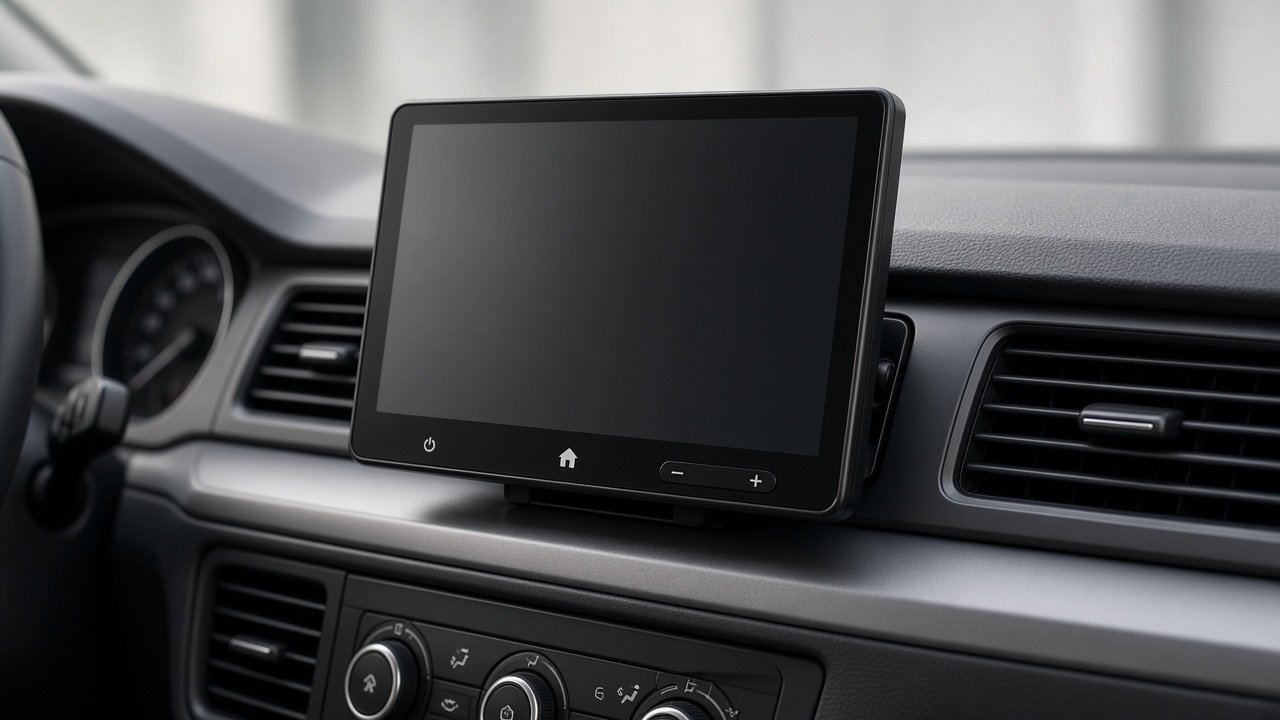
Check, in order: (1) year / make / model / trim; (2) factory radio type; (3) factory amplifier?; (4) factory camera?; (5) steering-wheel controls?; (6) whether the factory screen controls vehicle settings, climate, or alerts; (7) dash opening and mounting depth; (8) required dash kit, harness, and interface; (9) 10.1-inch floating-display clearance; (10) optional Maestro / extra cameras / aftermarket amp. Only then consider buying. Installation complexity varies substantially by vehicle. Do not score this radio “easy” or “hard” in the abstract — the same chassis can be simple in one dash and a full integration job in another. As an Amazon Associate I earn from qualifying purchases.
Verify vehicle-specific dash kit, harness, interfaces, and screen clearance before ordering. See Sony XAV-AX8500 (ASIN B0CXF7H2Z4; confirm New, model XAV-AX8500) →
Will the Sony XAV-AX8500 Fit Your Car?
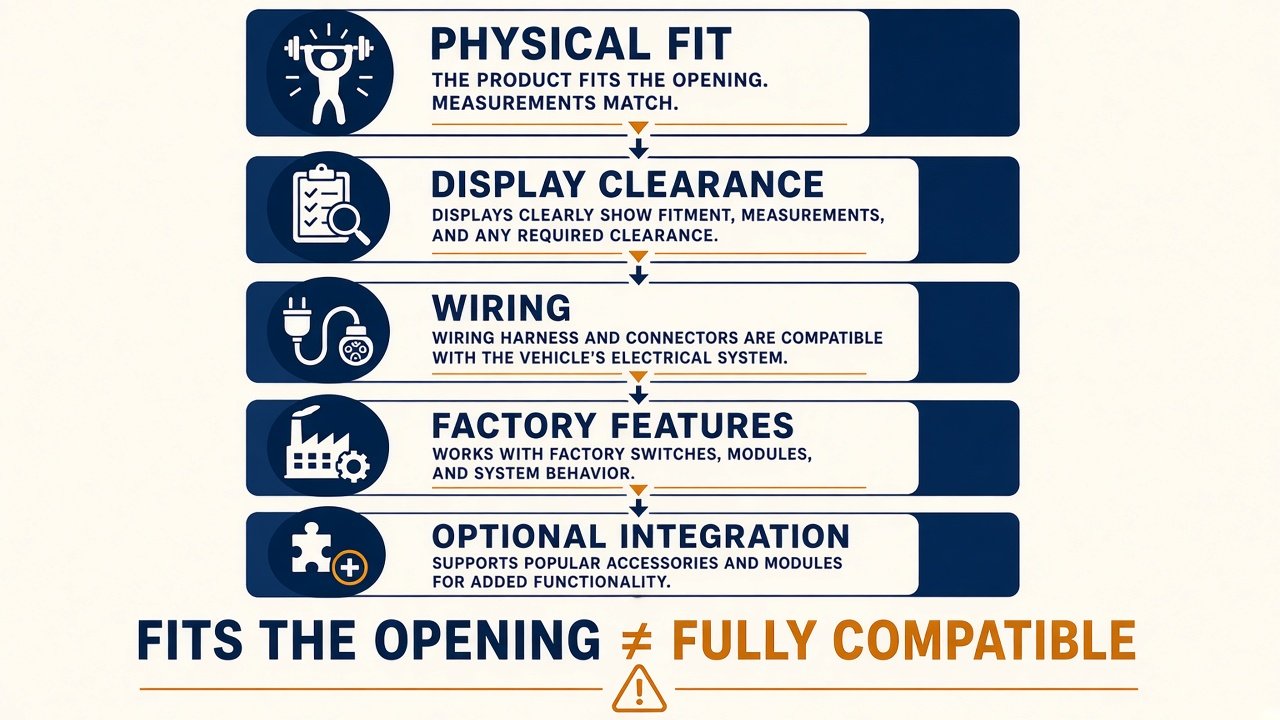
The Sony XAV-AX8500 cannot be declared compatible from screen size or DIN category alone. Compatibility has layers: physical chassis mount; display clearance so the floating panel does not fight vents, HVAC, hazard, shifter, or trim; electrical connection via a proper harness (not “match colors”); factory-feature retention (steering controls, amp, camera, chimes, settings); optional Maestro, SiriusXM tuner, extra cameras, or amplifiers; and phone/firmware support (wired and wireless CarPlay and Android Auto on the U.S. product page). A receiver can pass chassis fit and fail clearance or OEM retention. Sony XAV-AX8500 compatibility is vehicle-specific.
Chassis Fit and Mounting Depth
Sony Help Guide mounting dimensions are about 178 × 50 × 158 mm (7 × 2 × 6 1/4 in). That 50 mm height is single-DIN-class, not a giant double-DIN brick. Maximum size including the floating monitor is about 269 × 167 × 263 mm (10 5/8 × 6 5/8 × 10 3/8 in) — that envelope is the screen plus mechanism, not the hole you cut. Visible screen size is not chassis size (single DIN vs double DIN). Buyers still need brackets or a dash kit that locates the 178 mm-wide chassis; a DIN-shaped hole without a kit is not a finished mount. Depth at 158 mm / 6 1/4 in can still hit HVAC ducts, steel, or harness bundles — measure the cavity, leave room for plugs, USB-C, HDMI, GPS, and a Maestro module if used. Power is 12 V negative-ground, 10 A rated. Speaker impedance on Sony’s table is 4–8 Ω; unusual factory speaker networks should be verified professionally. Classic, 6-volt, or heavily modified vehicles need a professional electrical check, not a generic modern retrofit assumption. Do not treat “AX8500 fits double-DIN cars” as proof of anything.
Will the Floating Screen Clear Your Dashboard?
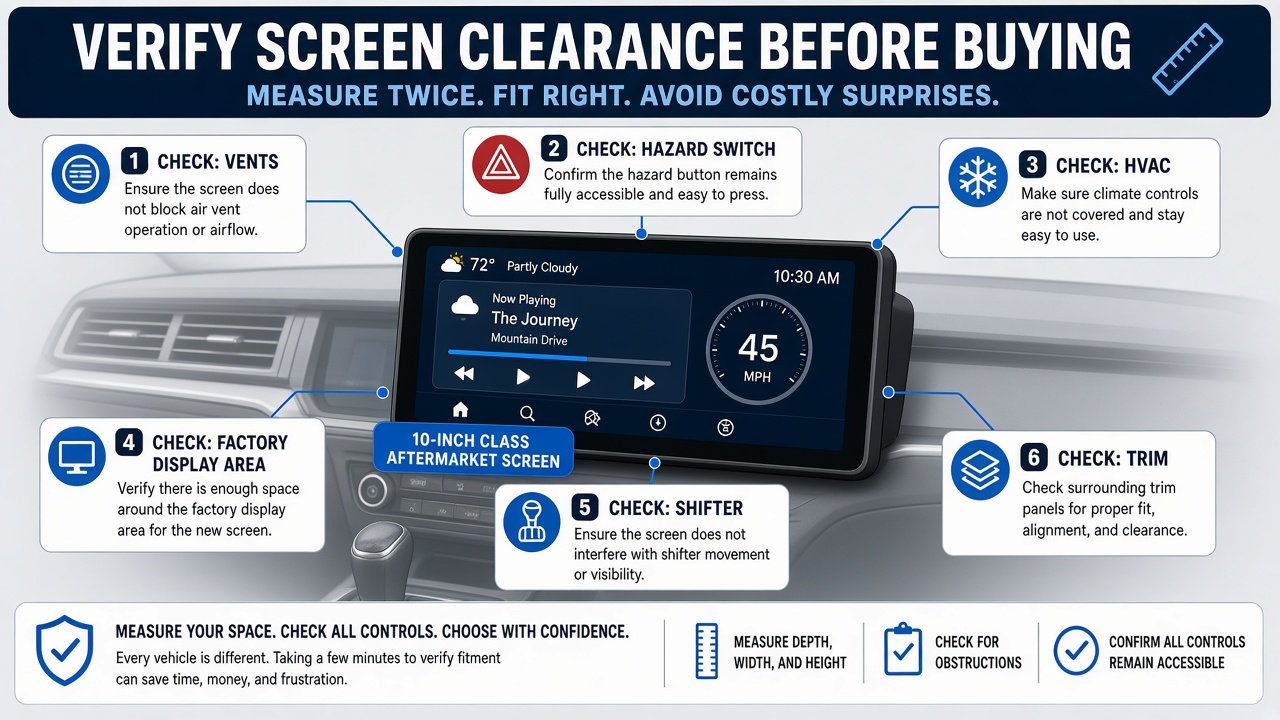
The 10.1-inch (25.7 cm) capacitive HD panel is 1280 × 720 with Sony’s optically gapless construction language — a specification, not a sunlight test. Physical keys live on the monitor (power, home, volume, track, voice). Sony documents post-install manual tilt and swivel of ±15° horizontally and vertically without tools. The install manual also documents display setup depth within 20 mm (13/16 in) in three steps and height within 60 mm (2 3/8 in) in seven steps before you lock the monitor to the chassis. Use those ranges as aiming tools, then mock the glass against vents, the hazard switch, HVAC, a remaining factory screen, start button, and shifter. Check clearance before purchase. Do not say the screen will block a control unless that exact vehicle is verified. Highly integrated dashes may have no practical standalone opening; do not treat custom cutting or drilling as generic DIY. Floating architecture can solve a small opening and still create a trim conflict. For collector or classic interiors, ask whether the mount is reversible before you buy.
Dash Kit, Wiring Harness and Data Interface: What Is the Difference?
A dash kit adapts the aftermarket chassis and trim to the factory opening and often supplies brackets plus a finished bezel. Sony’s carton includes generic mounting hardware (screws, rear panel covers, cable ties, a metal plate) — not a vehicle-specific dash kit. A wiring harness joins receiver leads to the vehicle harness so you are not improvising a color-match splice. A data/CAN interface (sometimes including Maestro) may be required for accessory power, warning chimes, steering controls, a factory amplifier, or vehicle settings — depending on the car. Dash kit ≠ harness ≠ data module. Metra, PAC, and Scosche are example ecosystems, not a SKU for your unnamed vehicle. Do not order a generic Amazon “complete installation kit” as if it were verified for your trim. If two fitment databases disagree, treat that as uncertainty and ask an installer.
Do You Need iDatalink Maestro?
Not always. The U.S. XAV-AX8500 Help Guide lists optional iDataLink Maestro RR and RR2. Sony’s product footnotes: Maestro RR and RR2 sold separately; features vary by vehicle. After you configure firmware for your car type and enter the radio serial number on idatalinkmaestro.com, the HOME screen may show Climate, Gauges, Vehicle Info, or Park Assist if those functions exist for that vehicle. Sony states it does not guarantee all Maestro operations. A Maestro-compatible radio is not a Maestro-compatible vehicle. You may not need Maestro for basic playback if a simpler steering-wheel adapter is documented for your car — also vehicle-specific. Do not buy a Maestro module from a random listing and assume it is flashed for your AX8500 serial.
Can You Keep Steering-Wheel Controls?
Three questions: (1) the AX8500 accepts steering-control integration (Sony includes cable RC-SR1 and documents an adapter path); (2) your wheel actually has compatible buttons; (3) which interface or Maestro firmware your car needs. Steering-control support is not “controls will work.” Programming may be required. Do not invent a PAC, Metra, or Scosche part number without your exact year/make/model/trim application.
Can You Keep the Factory Amplifier?
Potentially, with a vehicle-specific amp interface, preamp path, DSP, or bypass — not because the radio has 5 V preouts. Sony lists three 5 V preouts (front, rear, sub) for aftermarket amplifiers and a built-in amp at 20 W RMS × 4 (CTA-2006) and 55 W × 4 maximum at 4 Ω. Those preouts are a different problem from retaining Bose, JBL, Harman Kardon, Infinity, Mark Levinson, or other factory amplified systems, which do not share one architecture. Specialized factory speakers also need a professional check. Installing the AX8500 does not require new speakers; it also does not repair damaged ones.
Can You Keep the Factory Backup Camera?
Sony documents three camera inputs/triggers (rear plus two additional views such as side or front; cameras sold separately). CAMERA IN is not automatic OEM-camera retention. Factory cameras may need voltage conversion, a trigger, a proprietary connector, or an interface. A new aftermarket camera can use those inputs; this is not a camera shopping list. Camera inputs switch vehicle views. They are not a dash-cam recorder, not continuous loop storage, and not parking-mode surveillance. Confirm trigger polarity and adapter needs with a vehicle-specific interface maker or installer before you assume the factory camera will display on first power-up.
USB, Microphone, GPS and Antenna Connections
USB is Type-C Hi-Speed, 3.0 A maximum, with a supplied Type-C extension; Sony notes a regular Type-C phone cable is not included. Route USB before you bury the chassis if you want wired CarPlay or Android Auto. Connector type is not a fast-charge promise beyond Sony’s 3.0 A figure. Wireless CarPlay and wireless Android Auto are documented; wireless CarPlay is not wireless charging — plan phone power separately. HDMI is micro-HDMI / Type-D input only (cable not supplied); HDMI output is not available. Parked-use video rules apply; this is not a while-driving video guide.
The carton includes an external microphone and a GPS antenna (aerial). Place the mic where it can hear the cabin without blocking airbags; Sony warns against wrapping cords around the steering column or gearstick. GPS placement should see sky and not fight the wireless-CarPlay antenna path — follow Sony’s GPS notes, not a performance claim. AM/FM may need a vehicle antenna adapter or powered-antenna support; no universal SKU. SiriusXM needs a compatible Connect tuner (SXV100/200/300 listed; some features need SXV200 or later) plus antenna and a subscription — none included. Factory USB/aux panels may need their own adapter.
What Else May Be Needed for the Installation?
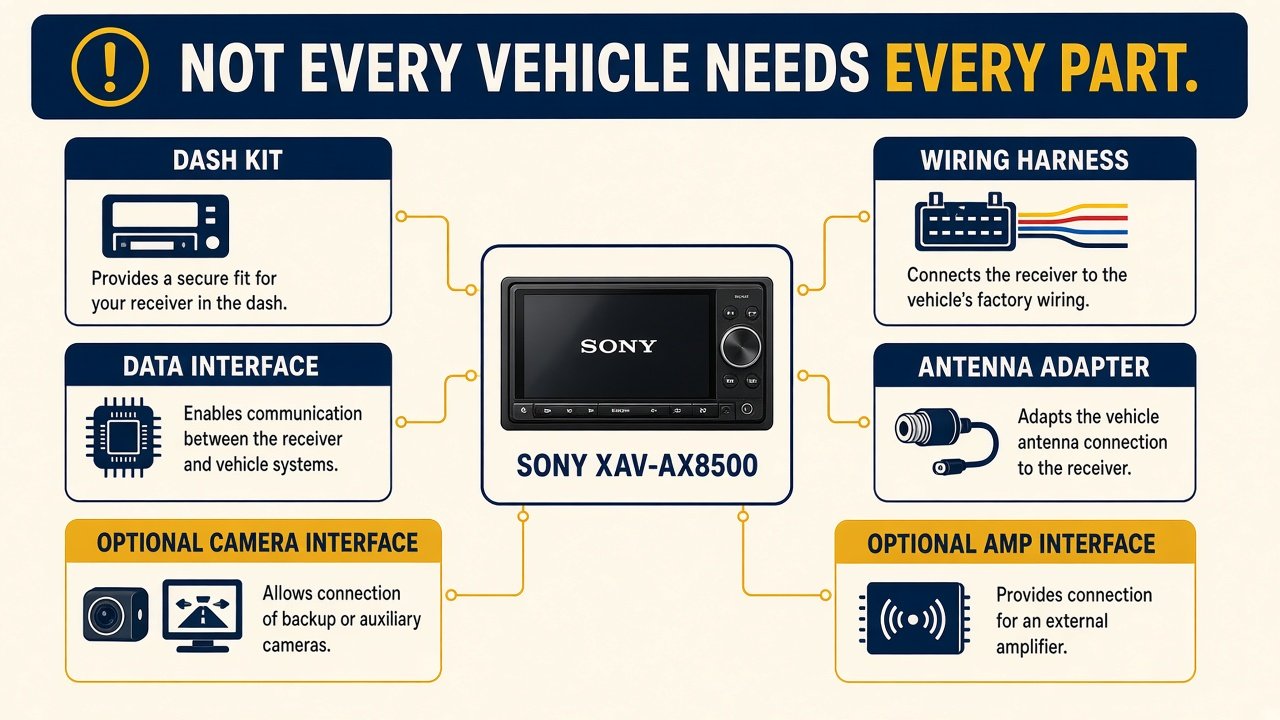
Typical stack: XAV-AX8500 + dash kit + harness + optional data/Maestro module + antenna adapter + optional factory-amp interface + optional camera adapter + USB/mic/GPS/HDMI routing + labor. Not every vehicle needs every part. Sony’s parts list for installation includes power supply leads, audio/camera connection cables, mounting screws, microphone, flat-mount base and tape, USB Type-C extension, steering-wheel remote input cable RC-SR1, GPS antenna, metal plate, rear panel covers, and cable ties. That is still not a dash kit, not Maestro, not SiriusXM, and not an HDMI cable. What the factory radio currently controls — climate, cameras, alerts, personalization, OEM USB, OEM mic — is the list of features you must plan to retain or accept losing. Highly integrated dashes may have no practical standalone opening. Permanent modification should be known before purchase.
What Does a Sony XAV-AX8500 Installation Really Cost?
Head-unit price is not installed price — that is the core commercial fact of Sony XAV-AX8500 installation. Sony.com lists $799.99 (MSRP $999.99) on September 11, 2026. Vehicle-specific kits and interfaces can dominate the budget. An expensive radio can still be a simpler path than a cheaper radio plus a rare interface; compare complete paths, not stickers. Labor cost varies substantially by vehicle and required hardware; we will not invent a dollar range or a timed install. Amazon bundles that add a “kit” are not automatically your kit. Confirm New, model XAV-AX8500, ASIN B0CXF7H2Z4 — not a camera mix or Renewed carton unless you want that condition disclosed.
Should You Install It Yourself or Use a Professional?
Experienced owners can complete some straightforward Sony XAV-AX8500 installation jobs using vehicle-specific instructions from a kit maker. Use a professional when you have a factory amplified system, CAN/Maestro work, complex camera retention, a highly integrated dash, airbag-area routing, permanent modification, or uncertainty. Professional install is not mandatory for every car. This is not a screwdriver sequence and not a wiring-color chart.
Sony’s U.S. support downloads list firmware 3.02.00 (27 May 2025) for the XAV-AX8500 — check that page for later files; do not assume another XAV model’s version. UC remote RM-X400 is listed as optional, not as a guaranteed in-box remote.
Sony XAV-AX8500 Pre-Purchase Compatibility Checklist
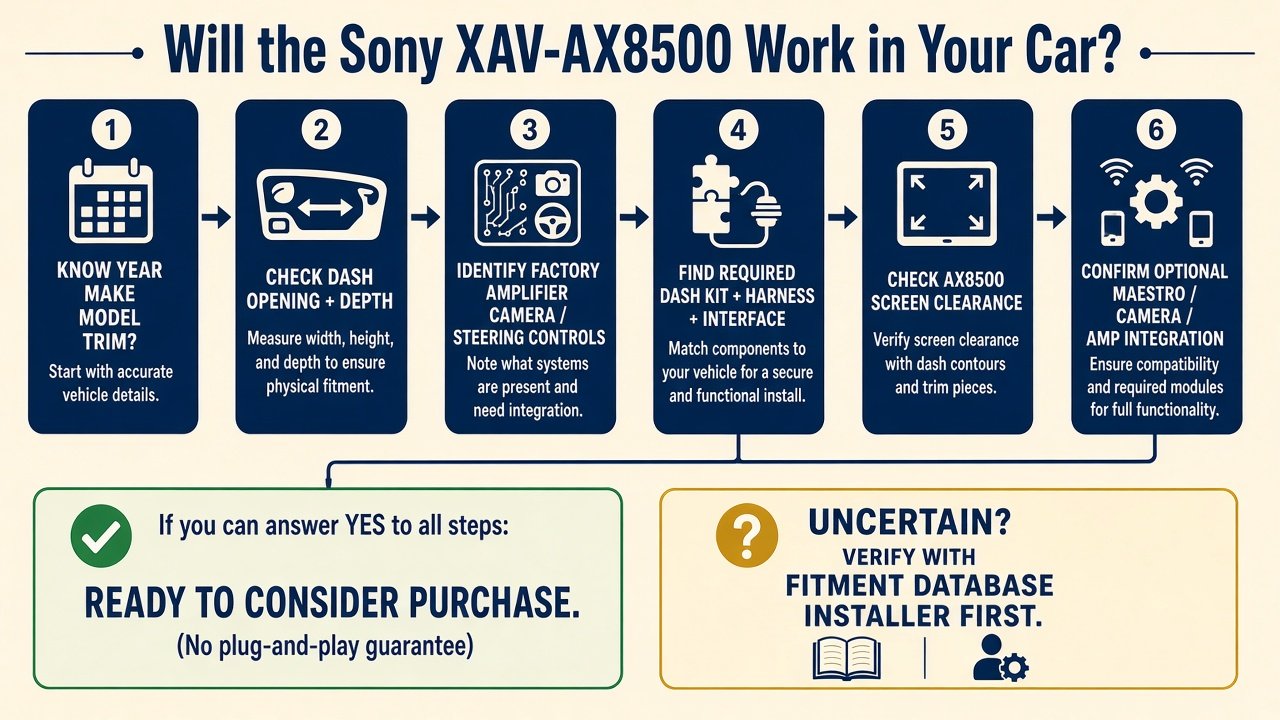
□ Exact year/make/model/trim. □ Factory radio identified. □ Factory amplifier checked. □ Factory camera checked. □ Steering controls checked. □ Vehicle-settings dependency checked. □ Dash opening checked. □ Mounting depth checked (Sony 158 mm / 6 1/4 in class). □ Display clearance checked (10.1 in + ±15°). □ Dash kit identified. □ Wiring harness identified. □ Data interface identified if required. □ Antenna adapter checked. □ USB routing planned. □ Microphone and GPS routing planned. □ Maestro compatibility checked if desired. □ DIY vs installer decided. If any box is a guess, delay the order. That checklist is the entire point of Sony XAV-AX8500 installation planning: the carton is not the project.
Verify vehicle-specific dash kit, harness, interfaces, and screen clearance before ordering. See Sony XAV-AX8500 (ASIN B0CXF7H2Z4) →
Final Verdict
Treat Sony XAV-AX8500 installation as physical fit + screen clearance + wiring + factory-feature retention + required interfaces. The radio is one component. Sony XAV-AX8500 compatibility is not DIN folklore. An XAV-AX8500 installation that “fits the opening” can still drop OEM features. Verify the vehicle first, then buy.
FAQ
Will the Sony XAV-AX8500 fit my car?
Only after you verify year/make/model/trim, kit/harness/interface, and 10.1-inch floating clearance. Screen size and DIN class are not enough.
Is the XAV-AX8500 single-DIN or double-DIN?
Sony’s mounting height is about 50 mm (2 in) — single-DIN-class chassis — with a much larger floating monitor. Screen size is not chassis size.
Do I need a dash kit for the XAV-AX8500?
Often, depending on the dashboard. Sony does not include vehicle-specific trim.
Do I need iDatalink Maestro?
Not always. It can enable vehicle screens/features where the car, module, and firmware support them. RR/RR2 are sold separately.
Can I keep my steering-wheel controls?
Possibly, with a compatible interface or Maestro path. Support on the radio is not automatic retention.
Can I keep my factory backup camera?
Possibly. Three camera inputs do not mean the factory camera plugs in unchanged.
Does it work with a factory amplifier?
Sometimes, with the right interface. 5 V preouts are for aftermarket amps, not a universal OEM-amp decoder.
Can I install the XAV-AX8500 myself?
Some owners can, with vehicle-specific docs. Factory amps, CAN, cameras, and integrated dashes are reasons to hire a shop. Complexity varies by vehicle.