
What to look for when buying a robot vacuum is a home-fit question, not a suction contest. Start with floors, hair, furniture, thresholds, clutter, home size, mopping need, dock space, and how much maintenance you will actually do. Then match hardware and automation to those problems. Do not start with the biggest Pa number or a flagship badge. Verify implementation, read the limitation, compare total cost, and buy only features you will use. This pillar is a robot vacuum buying guide, not a Top 10. Methods: How We Evaluate and editorial standards.
What to Look for When Buying a Robot Vacuum: Quick Checklist
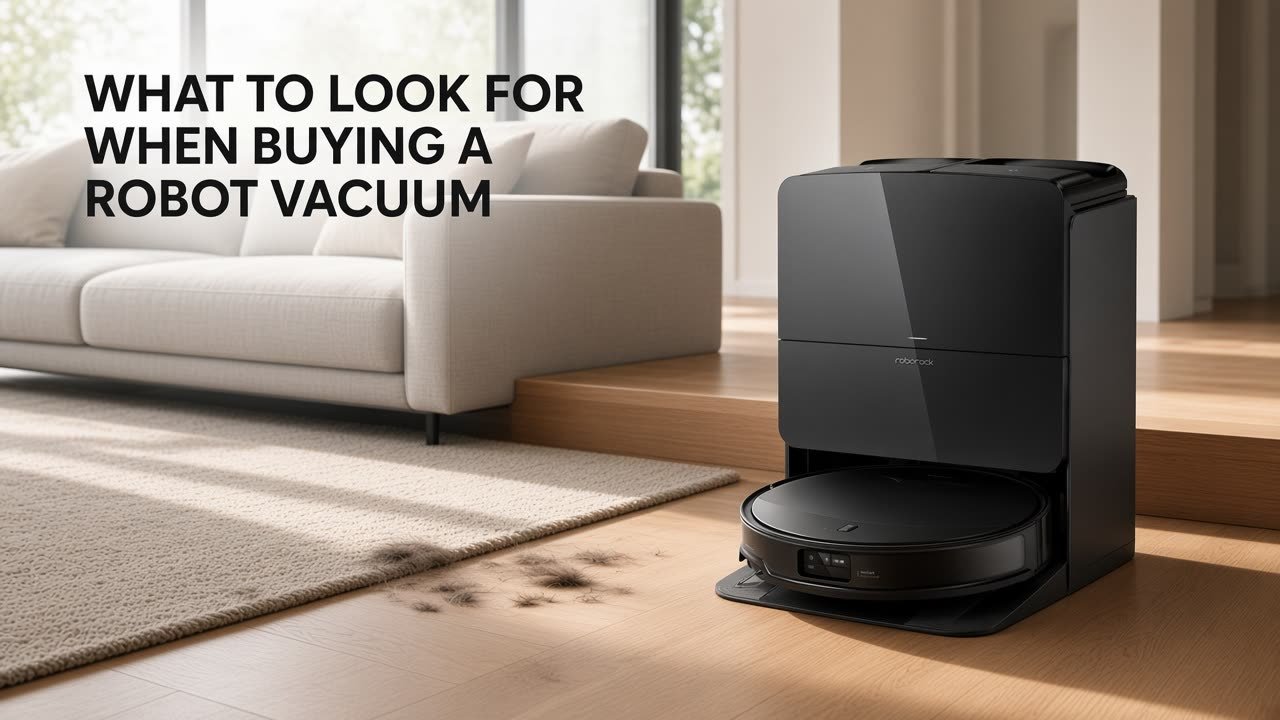
What should I look for when buying a robot vacuum? Your floors and debris first; then brush, hair handling, height, navigation, mop strategy, dock type, maps, consumables, warranty, and today’s street price. Spec sheets are evidence of what exists—not proof it will work in your rooms.
| What to Check | Why It Matters | Don’t Assume |
|---|---|---|
| Floor type | Hardwood, vinyl, tile, stone, and pile height need different contact and water rules | “Hard floor” equals hardwood |
| Main brush | Rubber, bristle, hybrid, dual, split, floating, or lifting designs move debris | Pa replaces brush design |
| Suction (Pa) | A manufacturer spec for rough context | Higher Pa means better overall cleaning |
| Anti-tangle | Reduces wrapping on hair-heavy homes | Never tangles / zero brush work |
| Robot height | Under-bed and sofa access | Listed height equals practical clearance |
| Navigation | LiDAR, vision, ToF, structured light, hybrids map rooms | Sensor label equals route quality |
| Obstacle avoidance | Cords, shoes, toys, pet items | Recognition equals guaranteed avoidance |
| Mopping | Pads, sonic/vibrating plates, rollers, or passive pads | One architecture always wins |
| Carpet strategy | Detection, lift, removal, no-mop zones | Lift equals dry carpet always |
| Battery | Rated maximum runtime | Rating equals home coverage or square footage |
| Self-emptying | Less onboard-bin dumping | Maintenance-free ownership |
| Dock size | Width, depth, height, lid/tank clearance | Product photos show true footprint |
| App / privacy | Maps, rooms, schedules; cameras if present | More menus equals a better app; camera equals a security cam |
| Consumables + price | Bags, filters, brushes, mops, detergent; current New street price | Launch MSRP is today’s value |
Start With Your Floors and Cleaning Problems
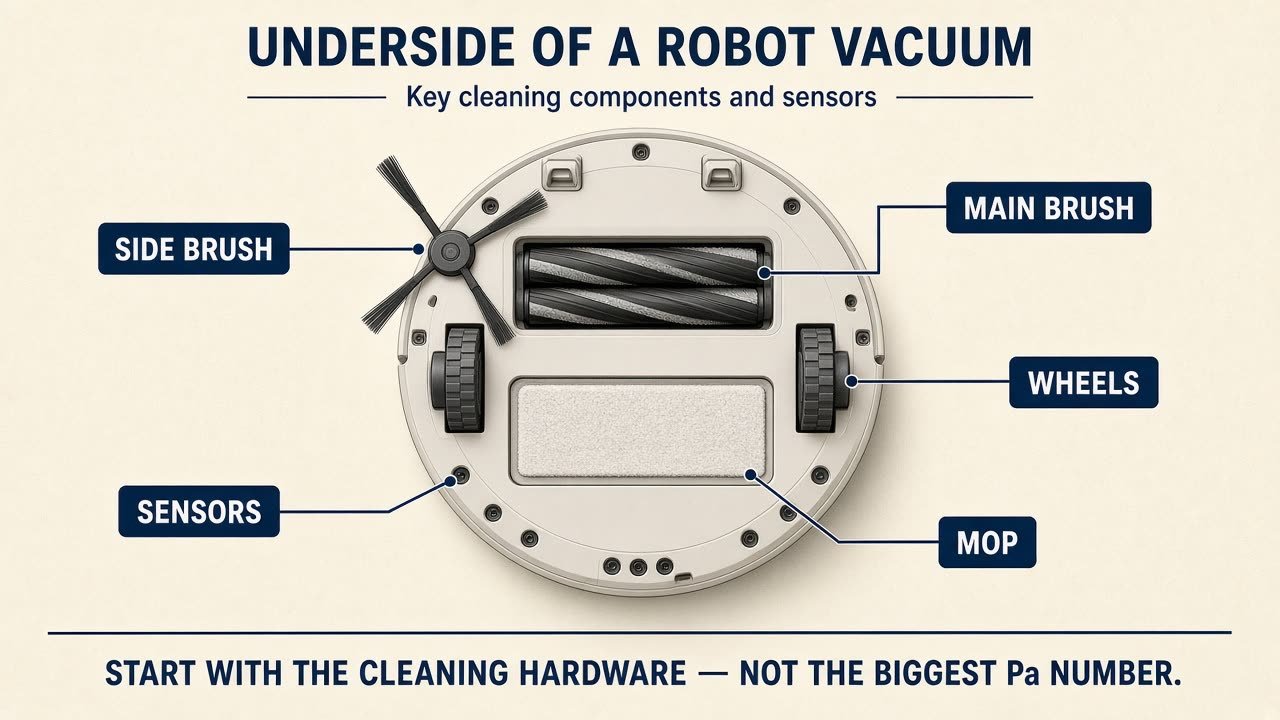
Answer these before a model name: What floors? How much carpet? Area rugs? Pets or long hair? Is mopping actually wanted? Low furniture? Difficult thresholds? Clutter? Single- or multi-story? Dock space? Manual maintenance tolerance? Realistic total budget? Home fit beats spec sheet.
Separate materials. Sealed hardwood is not engineered wood, laminate, vinyl, tile, or stone. Low-pile, medium-pile, and high-pile carpet behave differently; area rugs add tassels and thickness. Do not promise scratch-proof operation. Wheel grit and packed brushes can mark finishes on any robot. Floor-maker moisture guidance overrides generic mop marketing—sealed is not unsealed. If you still want a person with a hose for stairs and sofas, see robot vacuum vs traditional vacuum.
Pets add hair, clutter, and sometimes accidents. Visible fur pickup is not allergen removal, air purification, or a medical benefit. Pet-waste recognition, when marketed, is risk reduction—not a guarantee. Do not run a known accident. Cluttered floors raise the value of obstacle hardware and of picking up cables first.
Brush Design and Suction: What Actually Matters?
How much suction does a robot vacuum need? Buying a robot vacuum from Pa alone is a mistake. Pa is a manufacturer suction specification. It does not automatically mean better carpet pickup, pet-hair pickup, edge cleaning, or a better robot. Also weigh brush architecture, floor contact, airflow, navigation, hair handling, and floor type. Rubber, bristle, hybrid, dual, split, floating, and lifting mains all trade debris scoop, hair wrap, and hard-floor scatter. Side brushes help walls and furniture lines; shape, extension, and anti-tangle design matter. Straight edges are not 90-degree corners—an extending side brush is not perfect corner coverage. What should pet owners look for? Main-brush design, anti-tangle hardware, side-brush wrap, self-empty if debris is heavy, and obstacle sensing around toys and bowls. Use the brand’s exact term (comb, split roller, DuoDivide, ZeroTangle, and similar). Anti-tangle means designed to reduce wrapping—not never tangles and not zero maintenance. Inspect the brush path anyway. This page is not a pet-hair roundup. For a current flagship hardware walkthrough, not a default recommendation, see the Saros 10R review.
Mopping: Choose the Right Architecture
First ask whether you genuinely want automated mopping. If not, do not pay heavily for hot-water wash, mop drying, large tanks, detergent dosing, or plumbing kits unless other features justify the machine. Current architectures include spinning pads, vibrating/sonic pads, roller mops, and passive pads. They differ in mechanical action, edge reach, carpet handling, maintenance, and dock complexity. There is no universal winner and no invented stain scores. More RPM or pad pressure is a manufacturer claim, not automatic better cleaning. Water control matters on hard floors: adjustable levels and room settings help; more water is not better. Use only the maker’s approved solution—do not assume vinegar, bleach, dish soap, or generic floor cleaner is allowed.
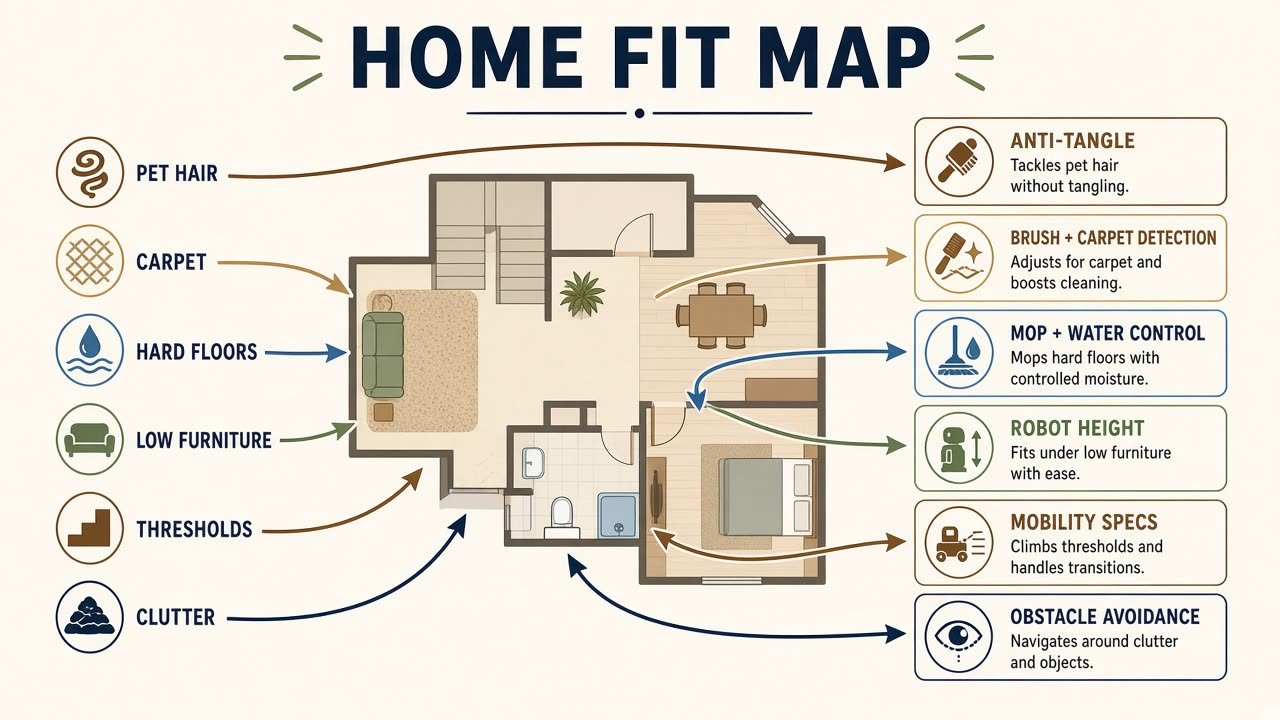
Mixed homes (hard floors plus rugs plus carpet) should prioritize detection, mop lift or automatic pad removal, room settings, no-mop zones, and transitions. Carpet-heavy buyers should prioritize brush contact, detection, and anti-tangle—and should not overpay for advanced mop docks they will rarely use. Mop lift is not guaranteed dry carpet: pile, rug thickness, saturation, lift height, and route all matter. Automatic mop removal can be worth money when you mop hard floors and still vacuum carpets in the same mission; skip it if you will not mop.
Navigation and Obstacle Avoidance
Is LiDAR better than camera navigation? Not as a universal rule. LiDAR, visual systems, structured light, ToF, 3D, and hybrids are hardware labels. Hardware is not proven map accuracy, route quality, or docking reliability. Obstacle systems may help with cables, socks, shoes, toys, and pet items; they still miss objects. Floor prep still matters. Cameras are also a privacy choice: some buyers want visual recognition; others prefer less camera-dependent layouts. Check official docs for RGB cameras, image processing, remote viewing, cloud functions, and account rules. Do not infer local-only processing unless documented. An obstacle camera is not a security camera—live view, recording, and surveillance are separate features if they exist at all.
Robot Height, Furniture and Thresholds
Measure actual under-furniture clearance. Product height is not the practical minimum; leave tolerance. Do not pay a low-profile premium if nothing is that low. Example implementations, not rankings: Roborock lists the Saros 10R at 3.14 inches; eufy lists the X10 Pro Omni at 4.47 inches. If the home has raised transitions, read the exact climb claim. Specs depend on height, step geometry, edge shape, material, and traction. A maximum is not success on every threshold. Dynamic chassis or lifting legs are not stair climbing. Level homes should not overpay for climbing hardware.
Battery, Recharge and Multi-Floor Maps
How important is battery life? Use manufacturer-rated maximum runtime only. It is not real-home runtime and not a square-foot guarantee. Runtime moves with suction, carpet, mopping, navigation, battery condition, and floor plan. For larger homes, recharge-and-resume plus room maps and self-empty often matter more than a huge rating. Verify resume in the manual. See best robot vacuums for large homes for that job, not as a second buying guide. Multi-floor maps store layouts; they do not make the robot climb. The dock stays on one floor. Carry the robot upstairs and dock-dependent empty, wash, refill, and mop-removal features stay downstairs until it returns physically.
Self-Emptying and Dock Automation
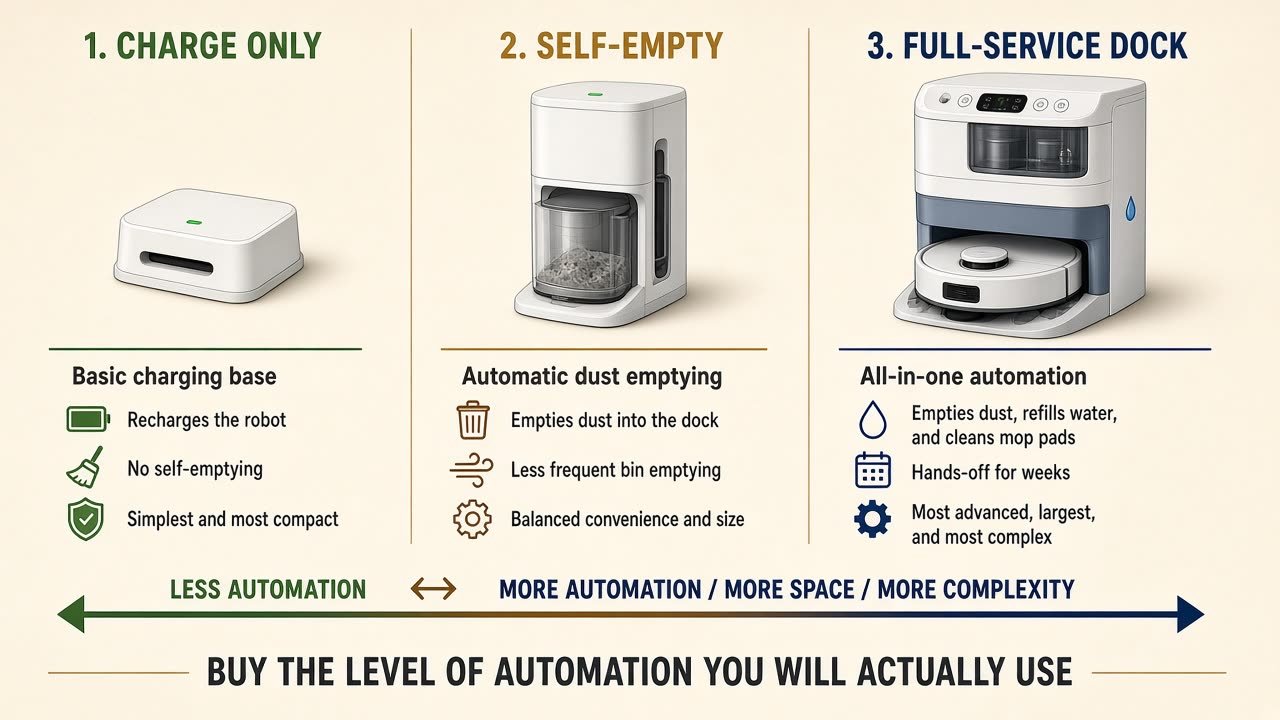
Is self-emptying worth it? Charge-only, self-empty, and full-service docks are not equivalent. Charge-only is smaller and simpler, with manual bin and mop work. Self-empty helps pets, frequent schedules, and larger debris loads; it is not maintenance-free. Bagged docks reduce direct debris handling and add bag purchases. Bagless docks skip bags and need more bin/filter work. Neither wins universally. “Up to X days” bag claims are manufacturer estimates. Full-service docks may add mop wash, dry, refill, detergent dosing, and tray routines—useful if you mop a lot; costly in size, price, complexity, and parts. Self-cleaning is not maintenance-free: trays, tanks, filters, brushes, mops, and sensors still need you. Hot-water wash is not sterilization; hotter is not automatically better. Heated drying can reduce moisture; it does not promise no smell, mold, or bacteria. Auto refill is not unlimited water—tank docks still need filling. Plumbing inlet/drain kits are optional where they exist; verify U.S. compatibility and install rules; do not assume they are in the box. Measure width, depth, height, and documented placement clearance before you buy. Photos shrink stations. Apartments should prioritize robot and dock size, navigation in tight rooms, obstacle behavior, noise controls, and value—not a giant unused dock. Auto-empty can sound different from cleaning; we will not invent dB. If noise matters, look for Do Not Disturb, delayed empty, or quiet-hour settings (eufy documents DND blocking auto-empty on some models). See best robot vacuums for apartments.
Apps, Smart Home and Privacy
Useful app work is maps, rooms, zones, no-go areas, schedules, room-specific and carpet settings, and dock controls. Feature count is not app quality; more menus do not prove easier or more reliable software. Verify Alexa, Google, Siri, Matter, or a native assistant separately. Matter, if present, does not replace every native-app function. Check Wi-Fi bands and whether an account/cloud is required—Roborock states the Saros 10R supports 2.4 GHz Wi-Fi, not 5 GHz. Do not assume every robot behaves the same on 5 GHz. Check whether core cleaning needs a paid subscription; do not assume yes or no for every brand.
Maintenance, Consumables and Total Ownership Cost
Expect robot work (main brush, side brush, filter, wheels, sensors, bin, mop) and dock work (bag or bin, tanks, tray, filters, detergent) as equipped. Anti-tangle is not no brush maintenance. App reminders may estimate life; they are not always physical wear sensors. Before buying, check that bags, filters, brushes, mop pads or rollers, and detergent exist for that model. Proprietary parts are an ongoing cost; third-party parts are not proven equal. Total cost = purchase + bags + filters + brushes + mops + detergent + other parts. No invented yearly dollars. Warranty is model-specific; premium price does not prove a longer U.S. limited warranty. Check that common wear items are sold now; do not invent a support horizon.
What robot-vacuum features are actually worth paying for? After you know what to look for when buying a robot vacuum, spend at current street price, not launch MSRP. A newer midrange can inherit last year’s flagship empty or mop wash; an older flagship can be discounted without being a bargain. Compare live features, support, consumables, and New price. Most expensive is not the best buy. Entry-level can be enough for a small, mostly hard-floor, low-clutter, no-pet home. Midrange is often the balance of maps, cleaning, and automation—verify today’s examples. Premium can make sense when you will frequently use obstacle sensing, low-profile access, anti-tangle, mop automation, self-empty, water automation, or real threshold hardware. Do not buy a brand name: check model, generation, and bundle. Pro, Max, Ultra, Omni, Complete, Plus, Master, and generation numbers do not transfer specs. A Complete kit may add bags and pads without changing the robot. See are expensive robot vacuums worth it.
If you buy on Amazon, verify exact U.S. model, generation, NEW condition, robot plus intended dock, bundle contents, and ASIN. Do not treat Renewed as New. Do not click a dock, filter, bag, brush, battery, or mop kit as the robot. As an Amazon Associate I earn from qualifying purchases. Affiliate Disclosure. One midrange illustration—not a winner: the eufy X10 Pro Omni (B0CPFBBHP4, New, T2351 robot + Omni station) listed at $479.99 New on September 12, 2026 versus $899.99 on eufy’s U.S. store. Recheck the live listing.
Robot Vacuum Buying Checklist
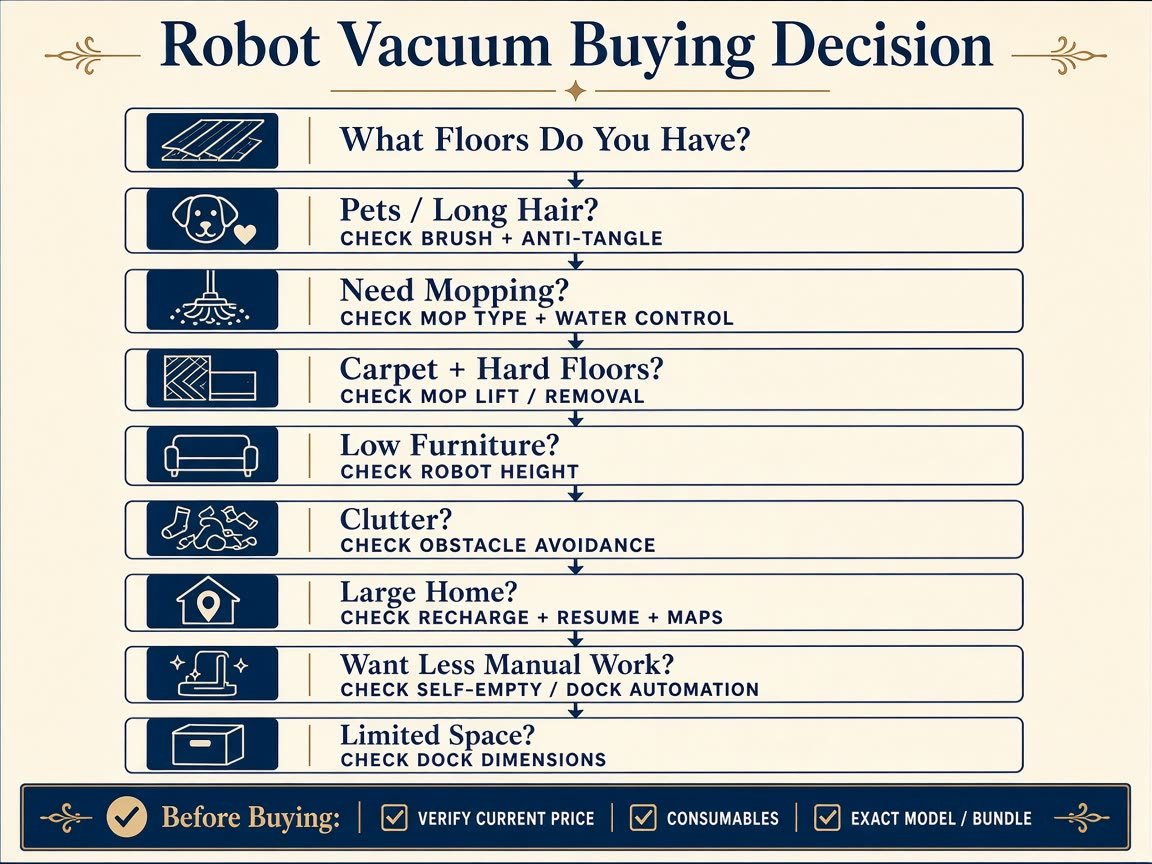
Before you click, confirm this what to look for when buying a robot vacuum list: floor types; pets / long hair; main brush; anti-tangle; robot height vs measured furniture; thresholds; navigation; obstacle avoidance; mop architecture; carpet strategy; dock type; dock dimensions; bag vs bin; water and detergent rules; multi-floor maps; recharge and resume; app and Wi-Fi; privacy; consumables; warranty; current New price; exact model / bundle / ASIN.
Decision path: pets/long hair → brush + anti-tangle (+ auto-empty if debris is heavy). Mostly carpet → brush + detection; skip fancy mop spend. Mostly hard floors → mop type + water control. Mixed → lift or removal. Low furniture → height. Thresholds → exact climb claims. Clutter → obstacle hardware. Large home → resume + maps + auto-empty. Apartment → dock measure + DND. Want less handling → dock automation, still with tanks and parts.
Final Verdict
The point of what to look for when buying a robot vacuum is match, not maximum. Buy from floors, hair, furniture, thresholds, clutter, size, mopping need, maintenance tolerance, and budget—not the biggest number or the longest list. The best robot vacuum is the one whose hardware, automation, and ownership cost fit the actual home. Recheck current U.S. New price and the exact bundle on the day you buy.
FAQ
What to look for when buying a robot vacuum? Home problems first, then brush, height, nav, mop strategy, dock, maps, consumables, and today’s price.
How much suction do I need? There is no universal Pa target. Do not buy from Pa alone.
Is LiDAR better than camera navigation? Not automatically. Sensor type is not a performance score.
Is self-emptying worth it? Often with pets and frequent runs; often not in small low-debris homes. Still not maintenance-free.
Are robot vacuum mops worth it? If you will mop compatible hard floors on a schedule and accept water rules. Architectures differ; none is universally best.
What should pet owners look for? Brush and anti-tangle, then empty and obstacle sensing. Fur pickup is not a health claim.
How much battery life do I need? Rated max is a lab-or-spec number. Resume and maps can matter more than the largest rating.
Do robot vacuums work on multiple floors? Maps can store floors. They do not climb stairs. The dock stays put.
How much should I spend on a robot vacuum? Enough for features you will use at current New street price—not a universal cutoff.