
Moon Picke independently researches products. If you buy through our links, we may earn a commission at no extra cost to you. Read our affiliate disclosure.
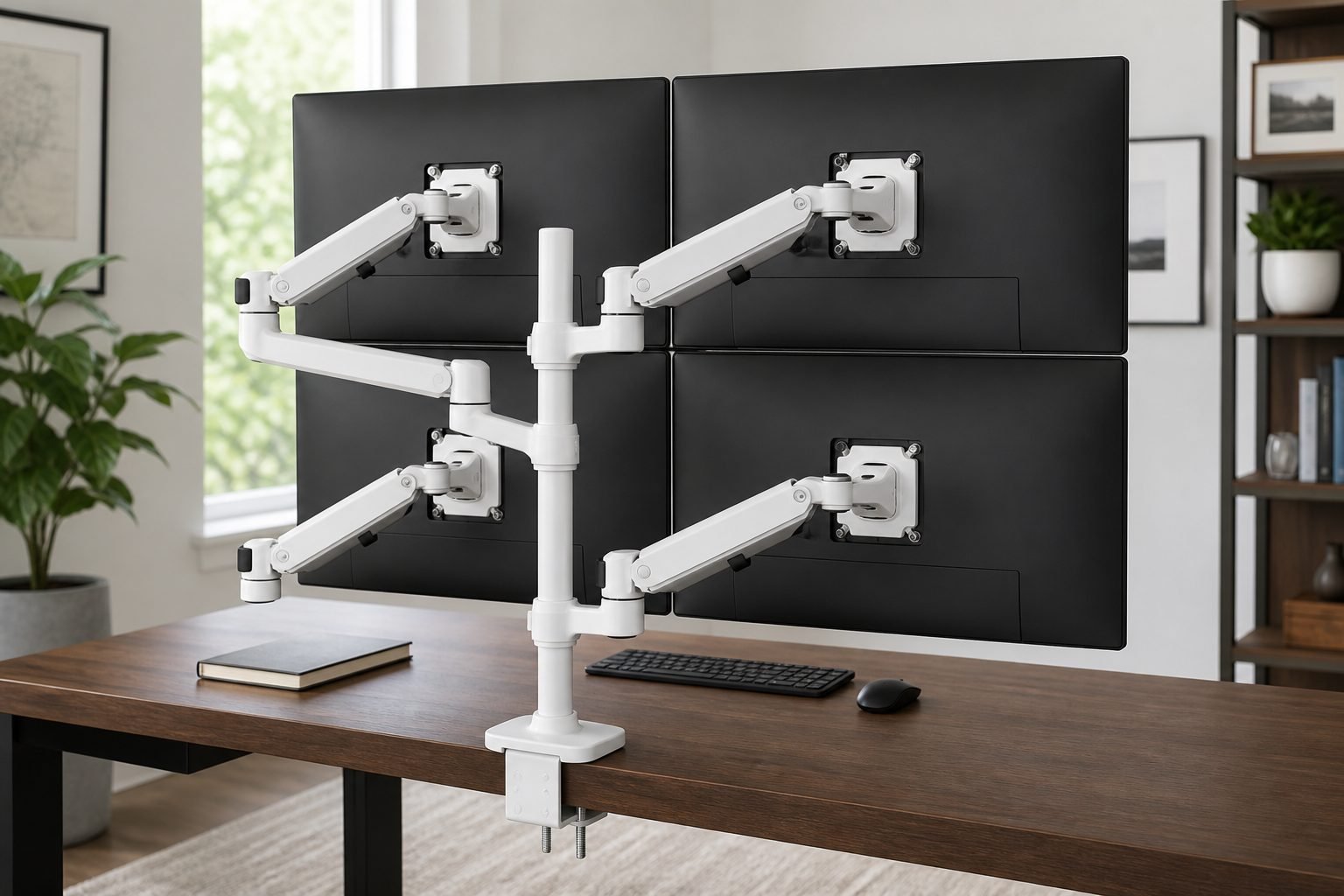
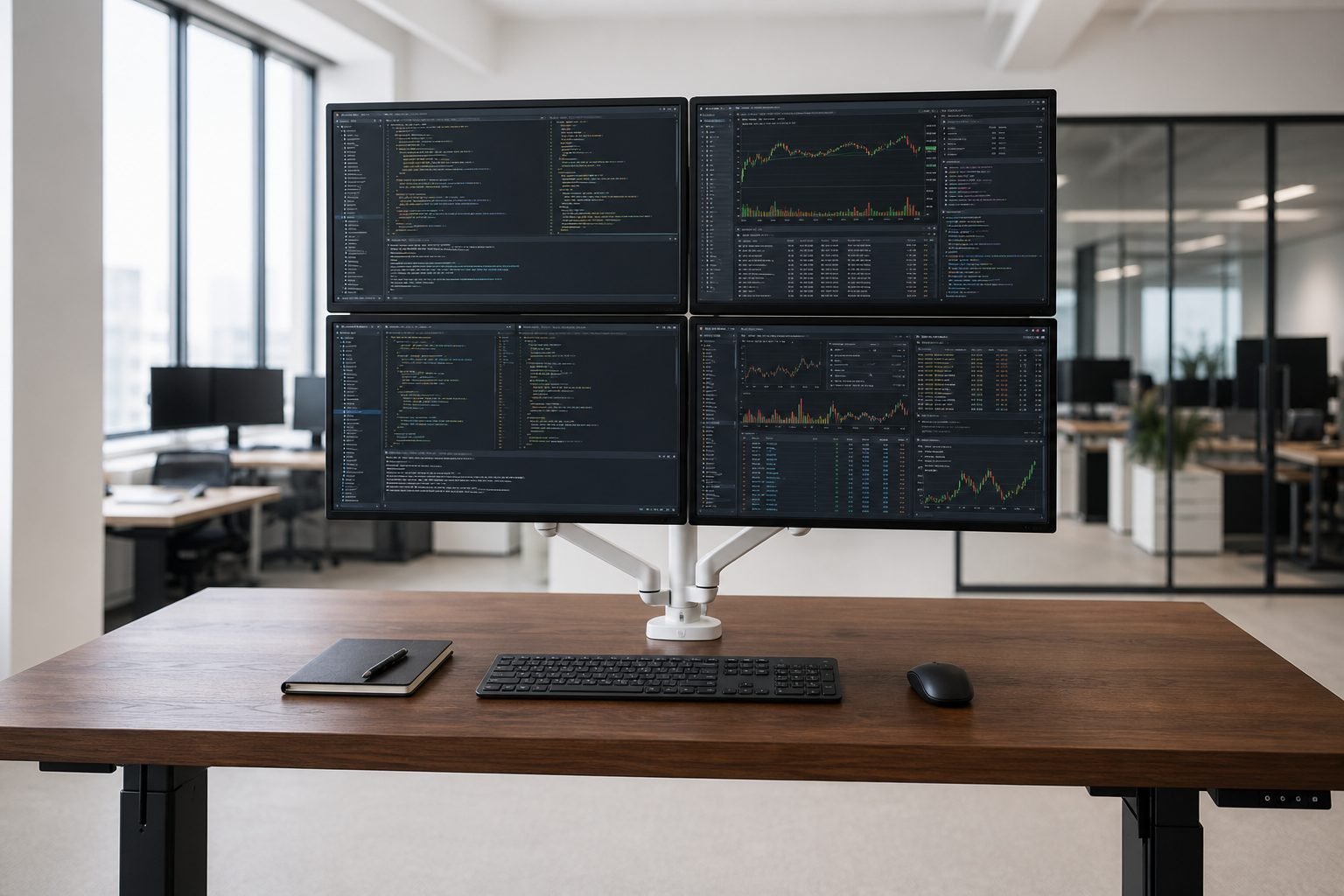
This Ergotron LX Quad review covers Ergotron’s current white four-monitor desk arm for home office, professional office, and multi-monitor workstations. The ideal buyer needs four independently adjustable VESA screens on one tall pole, not one heavy ultrawide. The strongest feature is the documented 23-inch tall pole plus Constant Force arms that lift 13 inches and extend up to 25 inches. The biggest limitation is the four-monitor weight cap: 7 to 11 pounds per display, with depth above 3.5 inches able to reduce capacity. It is a stacked quad mount, not a 49-inch ultrawide arm.
Moon Picke checked Ergotron’s tall-pole specifications, dimensional drawings, and the live Amazon listing for ASIN B0CTD5JBWQ. We did not mount monitors or measure sag. Fit depends on weight, VESA, depth, center of gravity, and a desk that can take the clamp or grommet—not screen size alone.
As an Amazon Associate I earn from qualifying purchases.
Quick recommendation
Choose this white LX Quad kit if four light VESA monitors, a solid desk edge or grommet, and stacked positioning matter more than a single heavy ultrawide. Skip it if any screen sits outside 7–11 lb in a four-arm layout.
Ergotron LX Quad review: quick verdict
Is the Ergotron LX Quad worth buying? Yes if you are building a four-display workstation with light, VESA 75×75 or 100×100 monitors and a desk that accepts Ergotron’s heavy-duty clamp or grommet. The strongest reason to consider it is one 23-inch pole that can stack four Constant Force arms instead of four factory stands. The trade-off is a tight per-screen weight range in four-monitor mode and geometry that is much less generous than the family’s “typical LCD up to 40 inches” line. Buy it for trading, development, or monitoring walls with light panels; skip it for a single 40-inch ultrawide.
Ergotron LX Quad
Is the Ergotron LX Quad worth buying? Yes if you are building a four-display workstation with light, VESA 75×75 or 100×100 monitors and a…
- True four-arm architecture on one 23-inch pole, with official 7–11 lb per-screen ratings instead of a vague “holds four monitors” slogan.
- Documented motion: 13-inch lift, up to 25-inch extension, 75-degree tilt, 360-degree pan and rotation.
- VESA 75×75 and 100×100 on every pivot, which covers most office panels in this weight class.
Affiliate link. Moon Picke may earn a commission from qualifying purchases.
What is the Ergotron LX Quad?
What is the Ergotron LX Quad in this Ergotron LX Quad review? The Amazon listing is Ergotron’s LX Dual Stacking Arm, Tall Pole in white (part 45-509-216) plus two LX Arm, Extension and Collar Kits (98-130-216) on one 23-inch pole. Each arm is a gas-spring Constant Force LX segment with a VESA pivot. The tall-pole family lists a typical LCD size up to about 40 inches, with VESA FDMI MIS-D 75×75 mm and 100×100 mm. Mounting is a heavy-duty two-piece dual desk clamp plus a grommet plate. Use it to stack or stagger four light office screens and fold the arms when you need the desk.
Key specifications
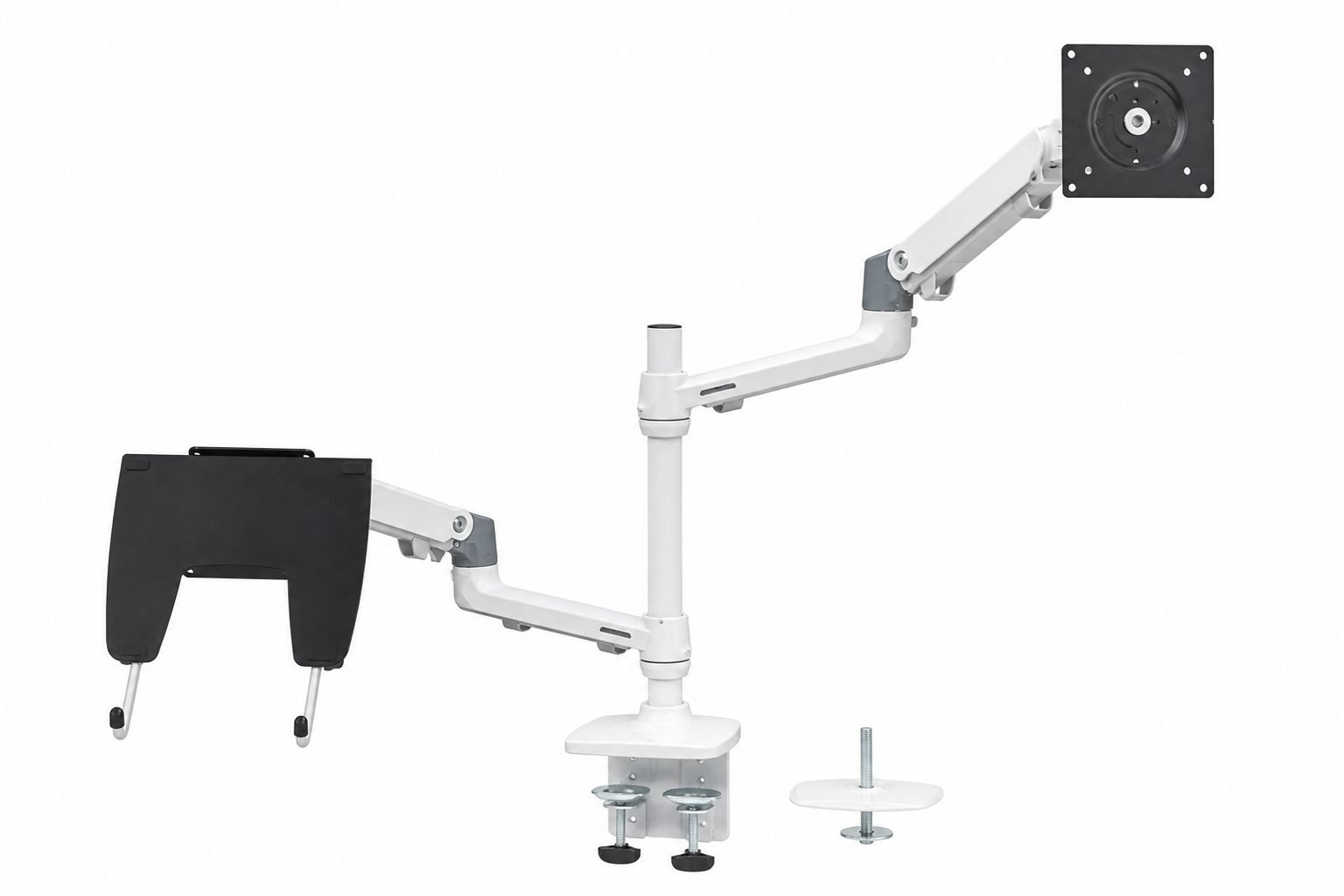
| Exact configuration | White LX Dual Stacking Arm, Tall Pole (45-509-216) + two Arm/Extension/Collar Kits (98-130-216); Amazon ASIN B0CTD5JBWQ |
|---|---|
| Monitor arrangement | Four independent arms on one 23″ (58 cm) pole |
| Typical LCD size (family) | ≤ 40″ diagonal (approximation; weight still governs) |
| Weight capacity (4 monitors) | 7–11 lb (3.2–5 kg) each; combined 28–44 lb |
| VESA support | 75×75 mm and 100×100 mm (MIS-D); no 200×200 adapter in this kit |
| Mount type | Heavy-duty 2-piece dual desk clamp and grommet mount plate |
| Desk thickness (clamp) | Three official positions: ≤0.63″; 0.5–1.63″; 1.42–2.6″ |
| Grommet | Through-hole 0.31–2.0″; surface thickness up to 3″ |
| Height adjustment | 13″ (33 cm) lift; Amazon lists screens rising 31.7″ from the desktop |
| Extension | ≤ 25″ (64 cm) |
| Tilt / pan / rotation | 75° tilt (↑70° / ↓5°); 360° pan; 360° rotation |
| Cable management | Clips/channels along the arms; route slack for full motion |
| Warranty | 10 years (Ergotron); 10,000-cycle motion test claimed by manufacturer |
Four-arm ratings apply to this Amazon kit. The same tall pole is rated 7–22 lb per screen with only two arms. Moon Picke did not weigh monitors or desks.
See the Ergotron LX Quad on Amazon →
Monitor size, weight and VESA compatibility
A monitor can sit inside a “typical LCD size” line and still be incompatible. Ergotron states that LCD size is an approximation and that size may be exceeded only if weight stays inside the mount’s maximum. For this quad kit, the governing number is 7–11 lb per screen, not 40 inches.
VESA is MIS-D only: 75×75 mm and 100×100 mm. No 200×100 or 200×200 adapter is included. A larger pattern fails even if the diagonal looks modest. Depth, a camera bar, or mass far from the plate increases leverage at the same listed weight. Ergotron warns that depth greater than 3.5 inches (89 mm) may diminish capacity—a manufacturer note, not a Moon Picke sag test.
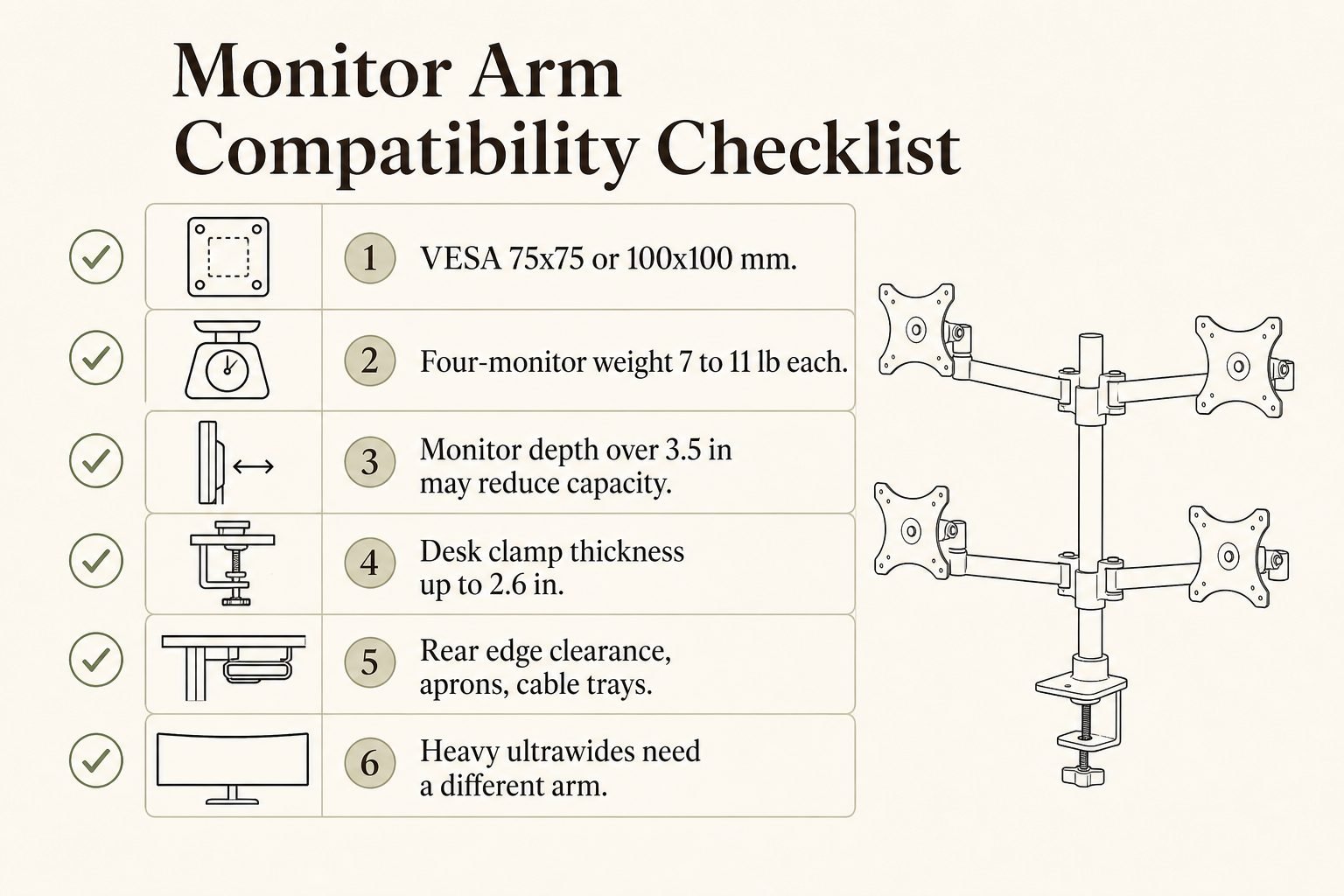
Minimum weight is 7 lb per arm. A panel below that window may not balance even if VESA matches. Use the monitor’s weight without the factory stand; remaining chassis mass still counts.
Is it good for ultrawide monitors?
Can the Ergotron LX Quad support an ultrawide monitor? Not as a heavy 34- to 49-inch class display in this four-arm configuration. Ergotron documents four-monitor capacity at 7–11 lb each and, on the dimensional drawing, a much tighter maximum width when four same-size screens sit at maximum arm spacing: 13.7 inches (348 mm) wide, with curved four-monitor width listed at 12.20 inches (310 mm). A typical 34-inch ultrawide is far wider than that, and many 40-inch productivity panels weigh well above 11 lb without the stand.
Moon Picke’s Dell UltraSharp U4025QW review covers a 39.7-inch 21:9 hub monitor whose panel without the stand is documented around 18.4 lb—above this kit’s 11 lb ceiling. Curvature, VESA, and how far the glass sits from the plate still change leverage. Ergotron documents deep 1000R 49-inch examples on a different HX SKU, not this LX Quad listing. If you want one ultrawide, this four-arm pole is the wrong cart.
Adjustment range and everyday positioning
Height
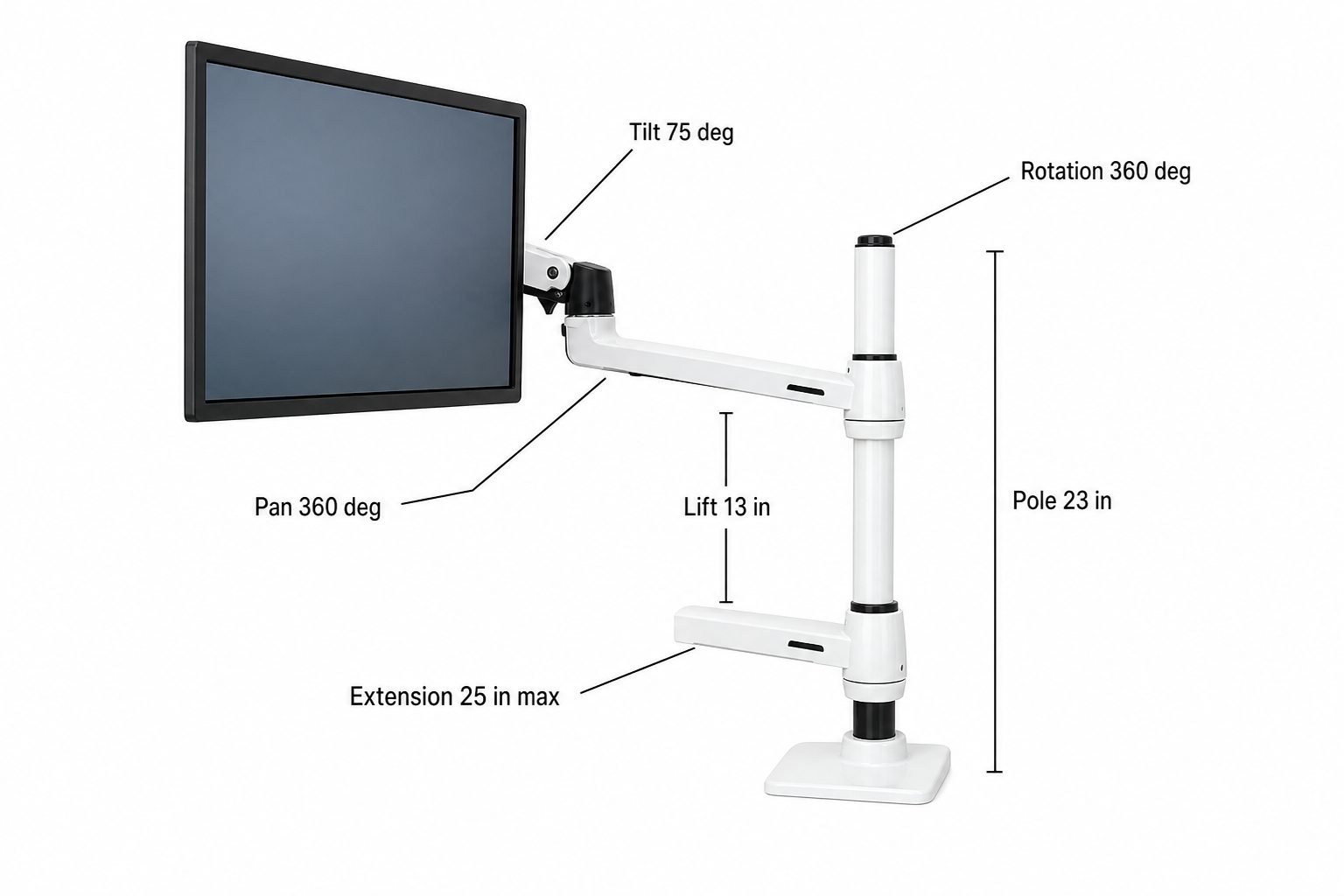
Each LX arm has 13 inches of Constant Force lift. Amazon states screens can rise 31.7 inches above the desktop. Set collar height on the 23-inch pole; the spring then moves through that 13-inch window. This is positioning range, not a medical posture claim.
Extension
Maximum extension is 25 inches per arm—closer for detail work, or folded back to clear paper and a keyboard. Four arms will collide if every segment is fully forward. That is a per-arm maximum, not four 27-inch panels at full reach in a flush 2×2.
Tilt and swivel
Tilt is 75 degrees (70 up / 5 down). Pan is 360 degrees at the arm; the drawing also shows 180 degrees at the base. Independent pivots let you angle one screen without moving the whole cluster as a rigid bow.
Rotation
Rotation is 360 degrees, so portrait is supported at the pivot if the monitor allows it. Mixed orientations can change Ergotron’s max width/height versus four identical landscape panels at maximum spacing.
Desk clamp, grommet mount and desk fit
Monitor-arm compatibility is two problems: the display and the desk. The tall-pole kit includes a heavy-duty two-piece bracket with dual mounting clamps, plus a grommet plate. Official clamp positions cover thin, mid, and thick tops: no more than 0.63 inch in the highest hole set, 0.5–1.63 inches in the middle set, and 1.42–2.6 inches in the lowest set. Amazon summarizes the clamp as 0.63–2.6 inches; use the drawing if your top sits near a boundary.
Grommet install uses a 0.31–2.0-inch surface hole and up to 3 inches of thickness. A rear apron, cable tray, or beveled edge can still block the clamp. Glass, hollow-core, and thin engineered wood may not be appropriate. Use Ergotron’s hardware only—do not add homemade reinforcement.
A sit-stand frame does not automatically qualify. The Vari Electric Standing Desk 60×30 review covers a 30-inch-deep lift top, but the rear edge, solid grommet material, and wall clearance when the desk rises still have to be checked. The Bestar Logan 66W review covers a deep U or L top where hutch posts and returns can help or block a tall pole.
Stability, tension and heavy displays
Ergotron rates four-arm capacity at 7–11 lb each (28–44 lb combined). The same weight can load the elbow differently on a shallow 24-inch panel versus a deeper 32-inch housing. Depth over 3.5 inches may reduce capacity. Moon Picke did not measure wobble or sag.
Constant Force is a counterbalance spring. Set tension so the screen floats: too light and it climbs; too heavy and it drops. Four collars mean the pole and dual clamp carry the stack. A flexing standing desk will not get stiffer because the arm is premium. Treat 11 lb as a specification check, not a dare.
Desk space and workstation benefits
Four factory stands consume a large rectangle of desk. One pole reclaims that patch for a keyboard, paper, or laptop. That is a footprint change, not a guaranteed productivity gain. Ergotron lists software development, call centers, and trading floors as tall-pole use cases. A chair still matters; see the Steelcase Gesture review for all-day sitting. The arm does not fix a desk that is too shallow for four screens.
Cable management and setup
LX arms use clips along the segments. Four DisplayPort or HDMI cables, four power leads, and any USB-C leads must follow 13 inches of lift, 25 inches of reach, and 360 degrees of pan. Leave slack at the VESA head and the desk edge. Do not pinch cords in the clamp.
Assembly and daily adjustment
The Amazon kit includes the tall pole, four arms via two expansion kits, dual clamp, grommet hardware, collars, caps, and monitor screws. Mount the base, stand the pole, add collars, hang arms, attach VESA plates, then set tension. Moon Picke did not time assembly. Four screens on a 23-inch pole are easier with a second person, especially near 11 lb. After that, daily moves should be light-touch once tension matches each panel.
View the current LX Quad listing on Amazon →
What it does well — and its main limitations
What it does well
- True four-arm architecture on one 23-inch pole, with official 7–11 lb per-screen ratings instead of a vague “holds four monitors” slogan.
- Documented motion: 13-inch lift, up to 25-inch extension, 75-degree tilt, 360-degree pan and rotation.
- VESA 75×75 and 100×100 on every pivot, which covers most office panels in this weight class.
- Clamp and grommet in the box, with published thickness and hole ranges.
- 10-year Ergotron warranty and a manufacturer 10,000-cycle motion test claim.
Important limitations
Four-monitor weight is only 7–11 lb each; depth over 3.5 inches may cut that further. Typical LCD ≤40 inches does not mean four 40-inch ultrawides. At maximum four-arm spacing, max width is 13.7 inches per screen (12.20 inches curved). The dual clamp loads the rear edge; glass, hollow-core, thin tops, aprons, and cable trays can fail the desk half of compatibility. Tension is per arm. The pole needs rear clearance. No 200×200 VESA adapter is included. The kit is expensive, and hanging four displays is easier with assistance.
Monitor arm vs standard monitor stand
| Factor | Monitor arm | Factory stand |
|---|---|---|
| Desk footprint | usually smaller | usually larger |
| Positioning | often broader | model-dependent |
| Installation | requires mounting | usually simple |
| Desk compatibility | must be checked | not relevant |
| Monitor compatibility | VESA/load limits | designed for that monitor |
| Cost | additional | included |
| Cable routing | potentially cleaner | varies |
A monitor arm is not universally better. Four stands that already fit, on a desk you cannot clamp, are the correct answer for some rooms.
Who is the Ergotron LX Quad best for?
This Ergotron LX Quad review is aimed at full-time workers who need four light VESA 16:9 panels, compact stations that must reclaim factory-stand footprints, and sit-stand users with a solid clamp or grommet edge who actually reposition screens.
Who should skip it? Anyone whose monitors lack 75×75 or 100×100 VESA. Any panel outside 7–11 lb in a four-arm layout, or deeper than 3.5 inches without Ergotron confirmation. Heavy ultrawide owners. Glass or unsupported desks. Desks with no clamp or grommet zone. Users who never move a factory stand and do not need four screens.
Is the Ergotron LX Quad worth buying?
Worth considering if each monitor fits VESA and the 7–11 lb four-arm window, the desk supports the dual clamp or grommet, 13 inches of lift and 25 inches of reach are useful, desk space matters, and a long-lived four-screen setup justifies the kit. Skip if compatibility is uncertain, factory stands already work, or you only wanted one large ultrawide. An Ergotron LX Quad review has to stay conditional on those checks, not on a marketing diagonal.
Check current availability on Amazon →
Final verdict
This Ergotron LX Quad review supports a conditional buy for professionals who need four light, independently aimed office monitors on one 23-inch pole. The strongest advantage is documented Constant Force motion plus clamp and grommet hardware with published desk ranges. The biggest limitation is the four-monitor 7–11 lb cap, the 3.5-inch depth warning, and four-arm width geometry that is far stricter than a casual “up to 40 inches” reading. If those constraints match your panels and desk, it is a coherent premium quad mount—not a Moon Picke lab test, and not the arm for a heavy ultrawide.
Frequently asked questions
Is the Ergotron LX Quad worth buying?
Yes if four monitors each weigh 7–11 lb, use 75×75 or 100×100 VESA, and your desk can take the dual clamp or grommet. Skip it for heavy ultrawides.
Can it support an ultrawide monitor?
Not as a typical 34–49-inch heavy ultrawide in this four-arm kit. Weight, width, curvature, and depth all have to match Ergotron’s four-monitor limits.
What monitor weight does it support?
7–11 lb (3.2–5 kg) per display in the four-monitor configuration. Two-arm use on the same tall pole is rated 7–22 lb each.
Does it support VESA 100×100?
Yes. Ergotron specifies VESA FDMI MIS-D 100×100 mm and 75×75 mm. Larger patterns are not in this kit.
Will it fit my desk?
Only if clamp thickness matches the official positions up to 2.6 inches, or a grommet hole 0.31–2.0 inches on a surface up to 3 inches, with rear-edge clearance. Glass, hollow-core, thin tops, aprons, and cable trays need extra checks.
Does it use a clamp or grommet mount?
Both are included: a heavy-duty two-piece dual desk clamp and a grommet mount plate.
Does it work with a standing desk?
Ergotron notes the tall pole can sit higher for standing. The desk still must accept the clamp or grommet, and cables need sit-stand slack. Moon Picke did not test a specific frame.
Specifications were checked against Ergotron’s LX Dual Stacking Arm, Tall Pole product page, the LX Dual Stacking Arm spec sheet, the dimensional drawing, and the live Amazon listing for ASIN B0CTD5JBWQ.