
Dash cam hardwire kit vs OBD cable is not a contest with one universal winner. A hardwire kit usually offers the most direct integration with a camera’s parking-mode controls, while a compatible OBD cable can make the power connection much easier to install and remove. The right choice depends on the exact dash cam, its approved accessories, your vehicle, and how much parking coverage you expect.
Dash Cam Hardwire Kit vs OBD Cable: Quick Answer
Choose a hardwire kit when the manufacturer supports it, you want a clean long-term installation, and reliable ACC-plus-constant-power signaling is important for parking mode. It is usually the deeper integration, but installation is more involved and may be better handled by a qualified installer.
Choose an OBD cable when the exact camera and official or approved cable are compatible, you want parking-mode power without working in the fuse panel, and easy removal matters. It simplifies the power connection, but it occupies the diagnostic port and does not eliminate the need to route the camera cable safely.
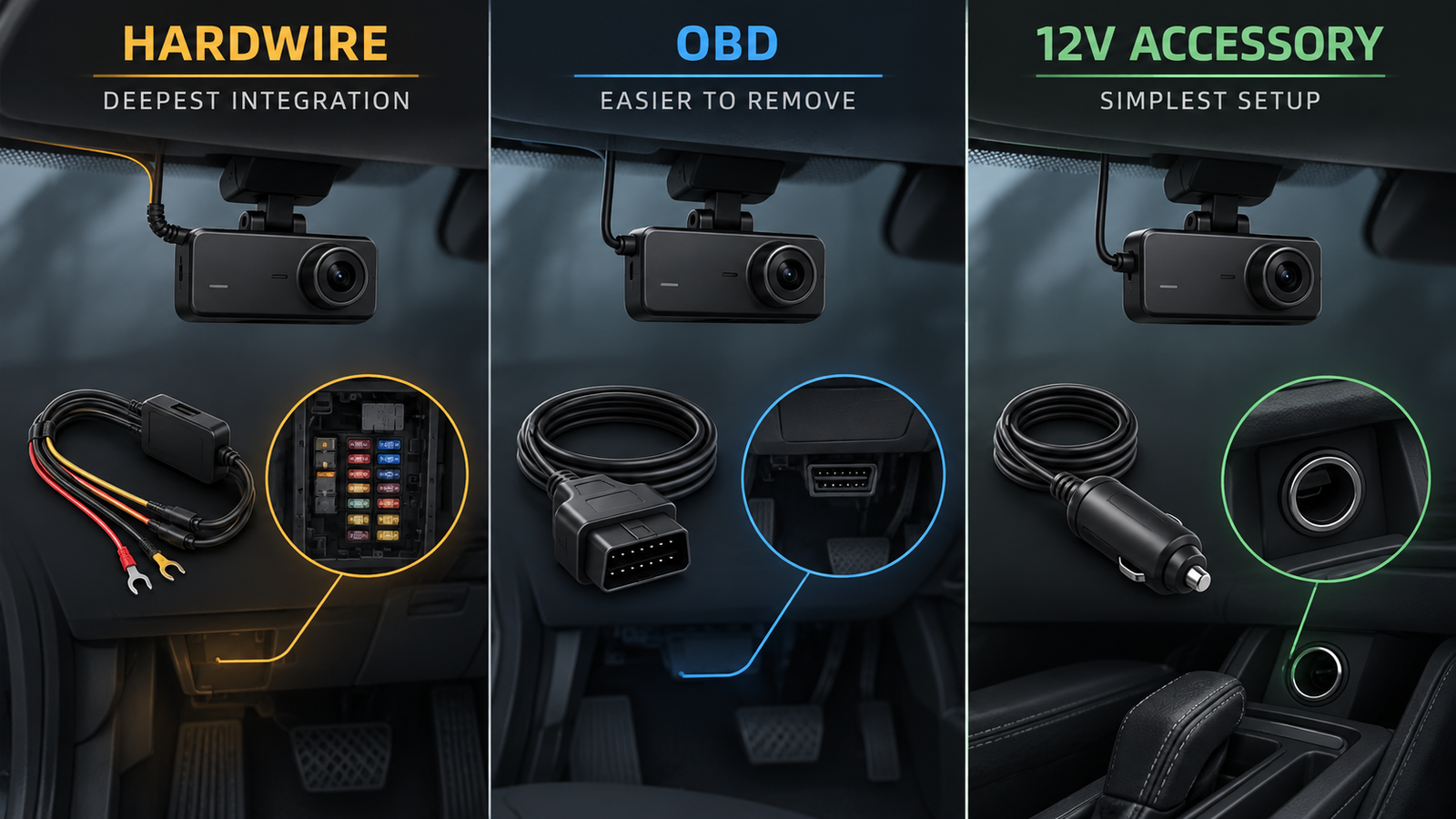
Choose 12V accessory power when you mainly want driving footage and your camera does not need power after the ignition is switched off. Outlet behavior varies by vehicle, so verify whether the socket is switched or always live.
| Factor | Hardwire kit | OBD cable |
|---|---|---|
| Installation | More involved | Usually simpler |
| Fuse-box access | Commonly required | Generally not required |
| Parking mode | Strong when supported | Camera/cable dependent |
| Low-voltage cutoff | Kit or camera dependent | Cable or camera dependent |
| Removal | Less convenient | Easier |
| OBD port use | No | Yes |
| Compatibility | Must be verified | Must be verified |
| Best fit | Permanent integrated setup | Simpler reversible setup |
VIOFO HK4 hardwire cable
How Premium Dash Cams Use These Power Options
- Drivers who rely heavily on parking mode and whose camera officially supports a three-wire kit.
- Owners planning to keep the camera in one vehicle for a long time.
- Premium front/rear users who want a fully concealed installation.
Affiliate link. Moon Picke may earn a commission from qualifying purchases.
Thinkware OBD-II power cable
How Premium Dash Cams Use These Power Options
- Drivers who rely heavily on parking mode and whose camera officially supports a three-wire kit.
- Owners planning to keep the camera in one vehicle for a long time.
- Premium front/rear users who want a fully concealed installation.
Affiliate link. Moon Picke may earn a commission from qualifying purchases.
How a Dash Cam Hardwire Kit Works
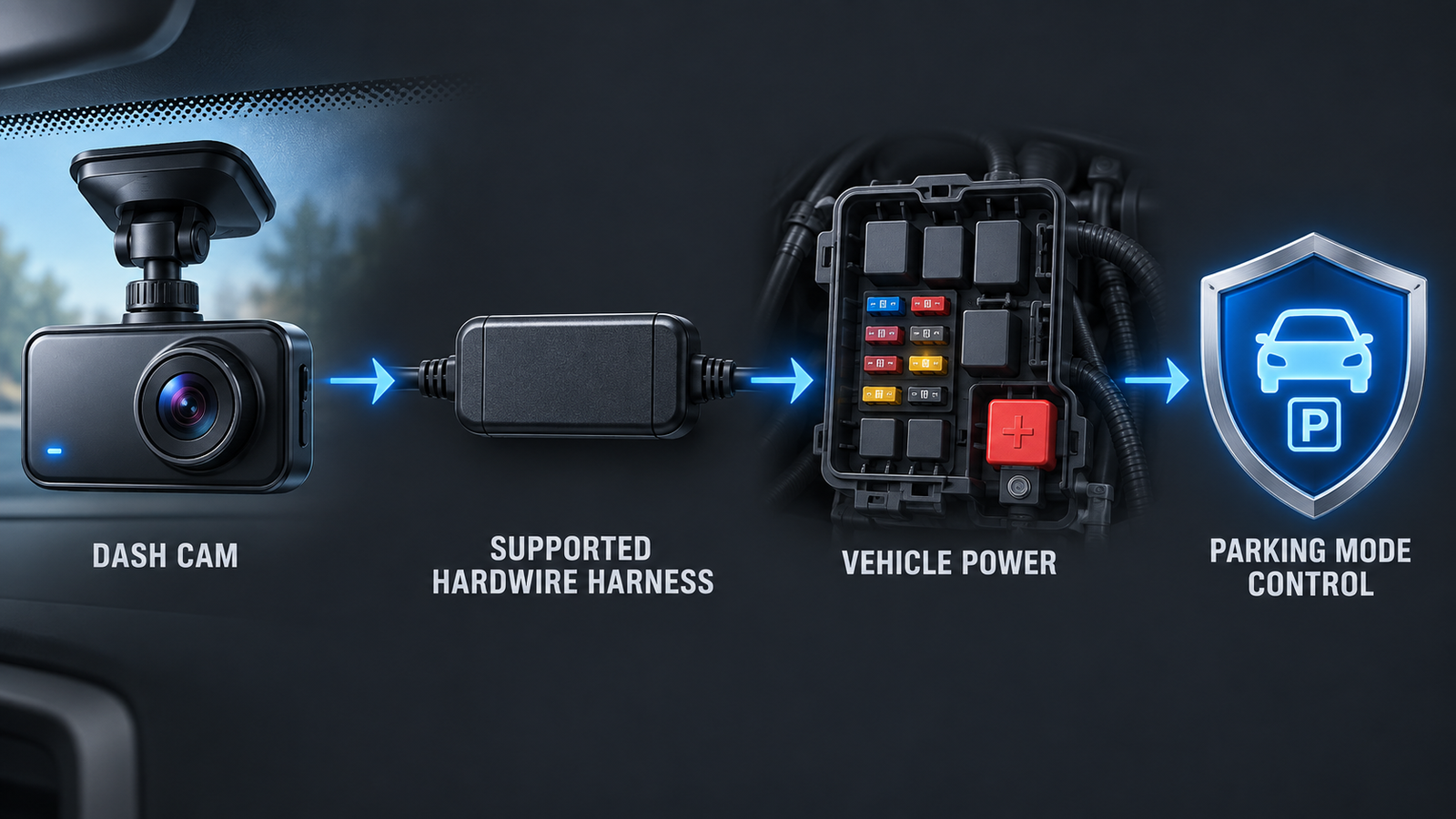
A typical three-wire dash cam hardwire kit connects to constant power, switched or accessory power, and ground. The constant feed can keep an approved camera available after the vehicle is turned off. The ACC connection tells a compatible camera when ignition state changes, allowing it to move between normal driving recording and parking mode. Ground completes the circuit.
This description is conceptual, not an installation recipe. Fuse locations, circuit behavior, fuse types, and trim routes vary among vehicles and model years. The camera manufacturer’s instructions and the vehicle documentation should govern the job. Thinkware’s own guidance says professional installation is recommended because vehicle electrical layouts differ and incorrect work can damage the vehicle or camera.
How an OBD Dash Cam Cable Works
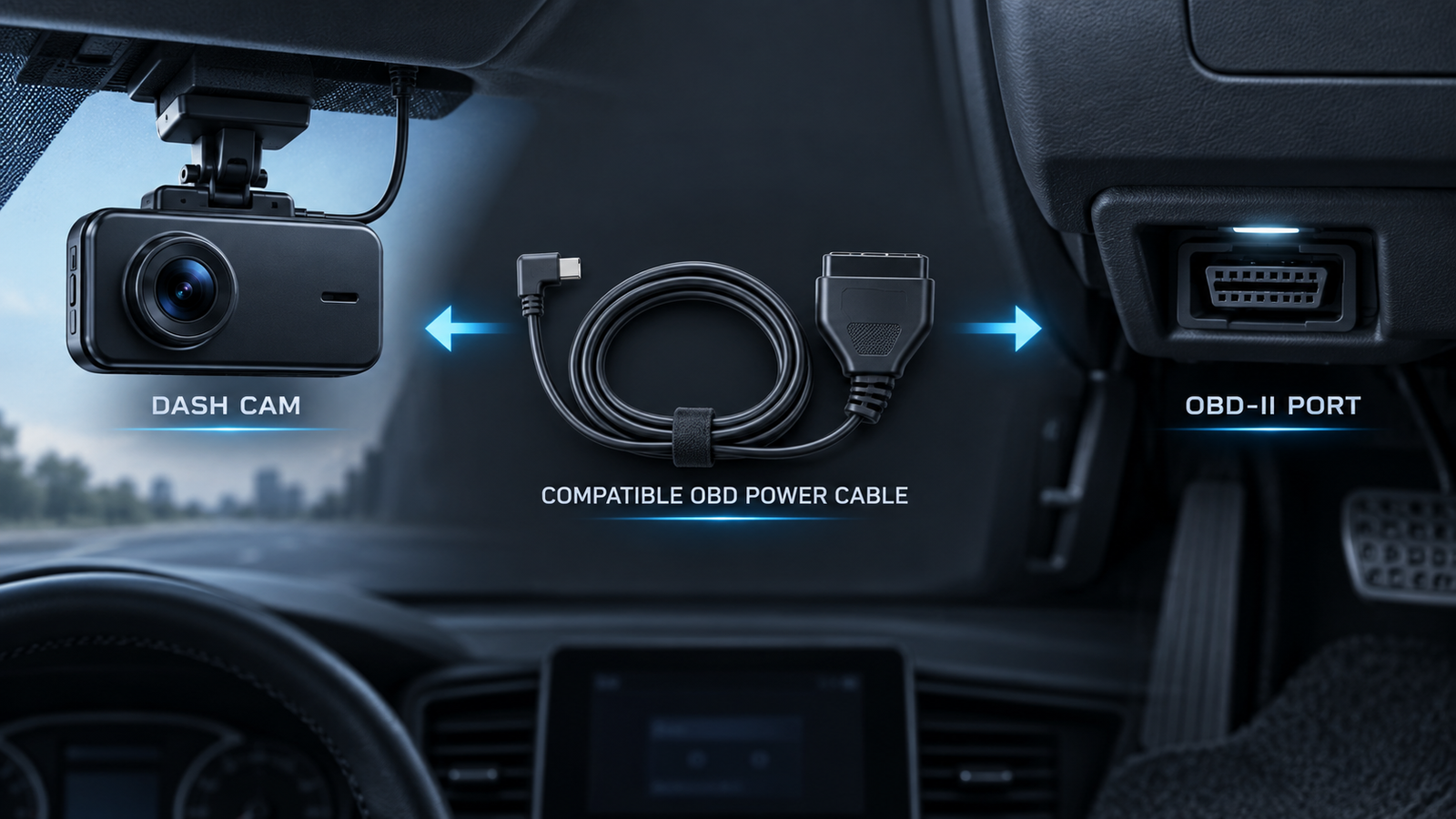
An OBD dash cam power cable plugs into the vehicle’s OBD-II diagnostic port and routes power to a compatible camera. The port is primarily intended for diagnostics, but a purpose-designed accessory can use its available electrical connection according to that accessory’s design. Some supported cables also detect vehicle state and let the camera enter parking mode after the engine is turned off.
The attraction is obvious: there is usually no fuse-panel connection to make. For example, Thinkware describes its compatible OBD-II cable as a plug-and-play way to enable supported parking modes, while the BlackVue OBD-II cable manual describes parking-mode switching for compatible BlackVue equipment. Those are system-specific examples, not proof that any OBD cable works with any camera.
Which Is Better for Parking Mode?
Neither connection type is automatically better for every parking-mode setup. The best option is the method officially supported by the exact camera and vehicle combination. A hardwire kit often supplies separate ACC and constant-power information. A compatible OBD cable may achieve similar automatic switching with less electrical installation. Firmware and selected recording mode remain part of the system.
Thinkware states that its compatible hardwire cable, OBD-II cable, and iVolt battery pack can enable parking mode and associated settings, while its standard 12V cable does not provide the necessary ACC signal. BlackVue documentation likewise distinguishes models and accessories: some supported OBD and three-wire arrangements can switch modes with ignition state, while requirements differ across camera generations.
Parking behavior can include motion-and-impact recording, time-lapse recording, buffered events, or energy-saving modes. Powering the camera is only one requirement. The selected camera must support the mode, the relevant option must be enabled, and the power accessory must deliver the signals that model expects. For camera-level selection, see our Best Dash Cam for Parking Mode guide.
Answer block: Is hardwiring better than OBD for parking mode? It can be better for a permanent, manufacturer-supported installation with dedicated ACC and battery connections. A supported OBD cable can be the better ownership choice when easy installation and removal matter more.
Battery Protection and Low-Voltage Cutoff
Power source and battery protection are separate buying questions. A cable can supply parking power without guaranteeing how or when that power stops. Before buying, identify whether low-voltage cutoff is controlled by the cable, a hardwire module, the dash cam, or an external battery pack.
VIOFO’s HK4 documentation, for example, describes continuous parking power until the vehicle battery reaches the configured threshold. BlackVue describes cutoff and timer behavior in supported hardwired systems. Those features belong to specific hardware and cameras; they should not be generalized to every product bearing the words “hardwire” or “OBD.”
A cutoff is intended to reduce excessive discharge, not guarantee that a vehicle will always start. Available parking time changes with battery condition and capacity, camera power draw, temperature, cutoff selection, recording mode, and how frequently the vehicle is driven. An aging battery on a cold day can behave very differently from a healthy battery in mild weather.
Answer block: Can a hardwire kit drain a car battery? Any parking system consumes energy. A correctly matched kit with verified cutoff protection is designed to stop drawing power under defined conditions, but it cannot create unlimited recording time or guarantee starting power.
Which Is Easier to Install?
An OBD cable is usually easier at the power-connection stage. You locate the accessible OBD-II port, connect the approved cable, and route it toward the camera according to the manufacturer’s instructions. It is generally easier to reverse when transferring the camera to another vehicle.
Hardwiring commonly requires access to the fuse area, identification of appropriate constant and switched circuits, a sound ground connection, correct fuse protection, and careful reassembly. That adds time, vehicle-specific judgment, and potential professional labor. This article intentionally does not provide a fuse-tap procedure: using the wrong circuit or routing wire through an airbag deployment zone can create a safety problem.
Answer block: Is an OBD dash cam cable easier to install? Usually yes for the power connection. It does not simplify camera placement, headliner routing, rear-camera wiring, or every vehicle-specific clearance issue.
Which Gives the Cleaner Installation?
Both can look factory-clean when routed properly. Much of the visible result depends on the windshield and pillar cable route. Hardwire favors a tucked-away long-term connection; OBD can also hide neatly when the plug has clearance. Neither option justifies crossing an airbag deployment path or leaving slack near controls.
For two-channel systems, the long rear cable often determines most of the installation effort. Our Best Front and Rear Dash Cam guide explains why channel layout and vehicle shape matter beyond the power lead.
What Are the Downsides of Using the OBD Port?
The main trade-off is occupation of a diagnostic connection. A service technician, scan tool, fleet device, or insurance device may need that port. Multiple devices cannot simply share it unless a supported solution exists, and random splitters should not be treated as universally compatible.
Physical clearance also matters. Some ports sit where a plug can protrude near trim or the driver’s knees. Vehicle sleep behavior and accessory behavior can differ, so confirm that the specific cable supports the vehicle, model year, region, and intended parking function. Compatibility lists can contain exclusions; Thinkware, for example, publishes camera and vehicle limitations for its OBD accessory.
An OBD cable is not inherently harmful to diagnostics, nor does it universally interfere with vehicle systems. The practical limitation is that the port is occupied while the cable is connected and must usually be made available when diagnostics are required.
What Are the Downsides of Hardwiring?
Hardwire installation asks more of the owner or installer. The job is vehicle-specific, removal is less convenient than unplugging an OBD or 12V cable, and professional labor can add cost. Moving the camera between cars may mean leaving the installed harness behind or repeating installation with another compatible kit.
The ownership distinction is useful: hardwire may be the technically cleaner long-term solution while being less convenient for a driver who changes vehicles frequently. OBD can be the easier ownership solution even when it is not the most integrated electrical solution.
Hardwire vs OBD vs 12V Accessory Power
Standard 12V accessory power is the baseline. It is often included, familiar, and quick to remove. In many vehicles the socket loses power when the ignition turns off, so parking mode is unavailable. Some sockets remain live; in that case leaving a camera connected can continue using the vehicle battery unless the exact camera or power system provides appropriate management.
| Factor | Hardwire | OBD | 12V accessory |
|---|---|---|---|
| Setup effort | Highest | Medium to low | Lowest |
| Parking support | Often strongest | Model dependent | Often limited |
| Reversible | Moderate | High | High |
| OBD port occupied | No | Yes | No |
| Long-term integration | Strong | Moderate | Basic |
| Best fit | Advanced parking setup | Convenience with compatibility | Driving-only recording |
How Premium Dash Cams Use These Power Options
Premium systems show why camera-level compatibility matters. Thinkware lists hardwire and OBD-II power for U3000 Parking Surveillance. BlackVue documents both methods for compatible equipment, while noting that generations can differ in ignition detection. VIOFO’s HK4 provides ACC support and configurable cutoff behavior only for its defined camera list. A familiar connector or an accessory that worked with an older camera does not prove compatibility.
As an Amazon Associate I earn from qualifying purchases.
Check the VIOFO HK4 hardwire cable on Amazon — verify the exact camera model and whether the required fuse taps are included before ordering.
Check the Thinkware OBD-II power cable on Amazon — review Thinkware’s current vehicle and dash-cam exclusions before purchase.
Who Should Choose a Hardwire Kit?
- Drivers who rely heavily on parking mode and whose camera officially supports a three-wire kit.
- Owners planning to keep the camera in one vehicle for a long time.
- Premium front/rear users who want a fully concealed installation.
- Buyers who can use a qualified installer when the electrical work exceeds their experience.
- Users who have confirmed where cutoff protection and parking-mode switching are managed.
Hardwire is the stronger default when long-term integration is more important than transferability. It is not automatically the safest option; safety depends on correct accessory selection, correct installation, and appropriate battery management.
Who Should Choose an OBD Cable?
- Drivers whose exact camera and vehicle support the manufacturer-approved OBD accessory.
- People who want parking mode but prefer to avoid fuse-panel work.
- Users who change vehicles or want easier removal.
- Owners whose OBD port has adequate clearance and is not occupied by another device.
- Lease users who have checked their agreement and accessory rules.
Answer block: Does an OBD cable support parking mode? Some do, with specific compatible cameras and vehicles. Treat parking support, ignition detection, and low-voltage protection as features to verify separately—not automatic properties of every OBD cable.
Dash Cam Power Setup Decision Checklist
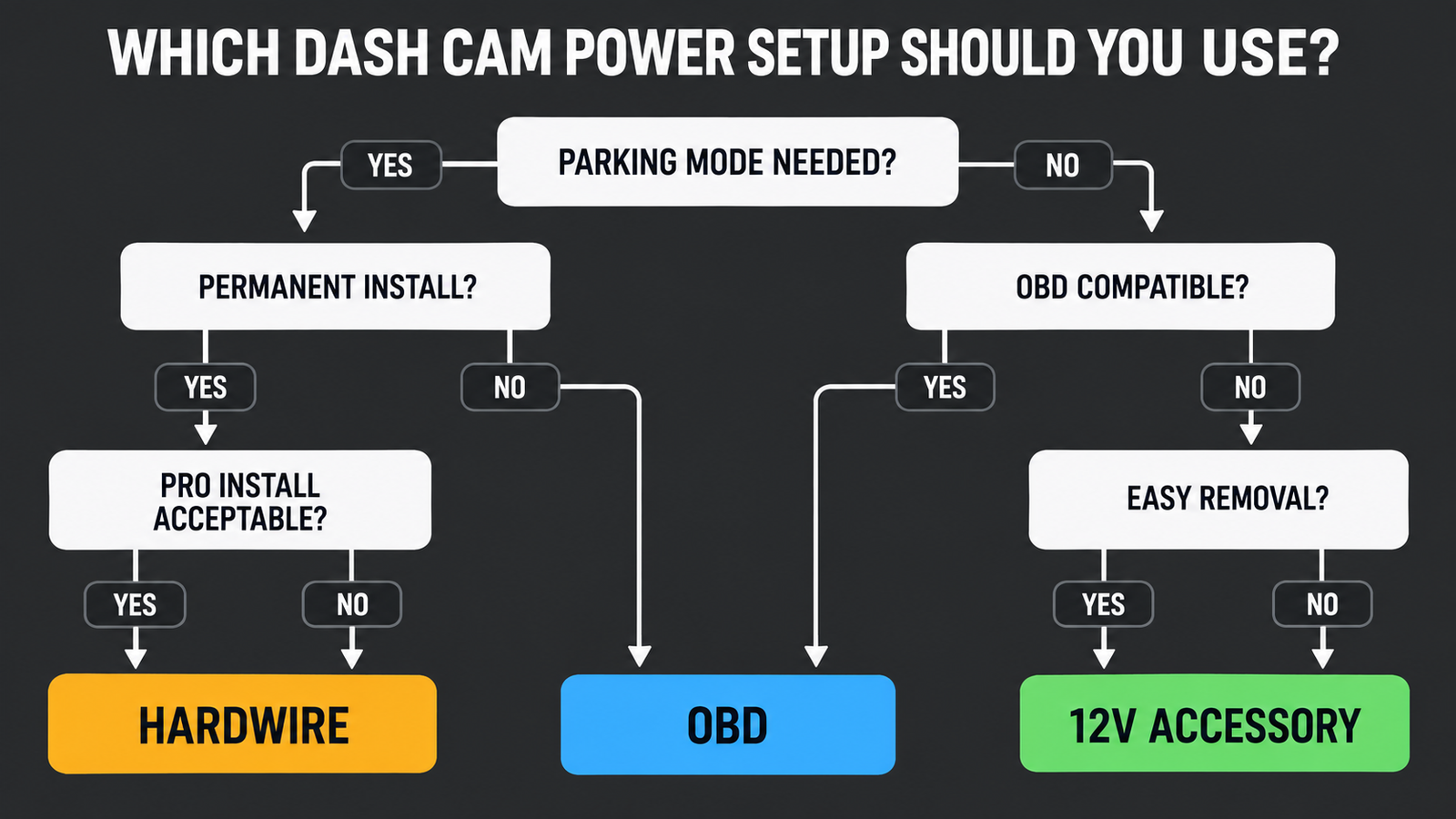
- Define the recording need. If you only record while driving, 12V accessory power may be enough. If parking footage matters, continue.
- Check the camera manual. Identify the supported hardwire, OBD, or battery-pack accessories for the exact model and region.
- Locate battery protection. Confirm whether cutoff logic lives in the camera, cable, module, or external battery.
- Check the vehicle. Consider model year, OBD compatibility, port clearance, outlet behavior, fuse-panel access, and existing devices.
- Choose an ownership model. Favor hardwire for long-term integration or OBD for easier removal when both are supported.
- Plan the entire cable route. Power connection is only one part of mounting and front/rear cable routing.
- Escalate safely. Follow official instructions and use a qualified installer when circuit identification or trim routing is uncertain.
For a broader camera shortlist, use our Best Dash Cams pillar. If avoiding recurring cloud fees is also part of the decision, compare models in Best Dash Cam Without Subscription.
Frequently Asked Questions
Is a hardwire kit better than an OBD cable for a dash cam?
A hardwire kit is often better for a permanent installation with dedicated constant-power and ACC connections. A compatible OBD cable is often better for simpler installation and easier transfer. Official camera and vehicle compatibility decides which choice is valid.
Does an OBD dash cam cable support parking mode?
Some manufacturer-supported OBD cables do. Parking behavior depends on the cable, camera model, firmware, vehicle, and selected settings. Do not assume a generic OBD power adapter enables parking mode.
Can a dash cam hardwire kit drain the battery?
Parking recording consumes battery energy. Verified low-voltage cutoff and timer features can limit consumption, but recording duration still depends on battery health, temperature, camera draw, mode, and vehicle use.
Does an OBD cable drain the battery?
It can draw power while the vehicle is off if that is how the supported parking system operates. Confirm the cable or camera’s cutoff behavior. “OBD-powered” does not itself guarantee protection.
Does hardwiring a dash cam void a warranty?
Not automatically. Warranty implications depend on manufacturer terms, installation quality, resulting damage, jurisdiction, and modifications made. Check the relevant vehicle and dash-cam documentation.
Can I move an OBD-powered dash cam between vehicles?
Physical removal is usually easier, but the new vehicle and camera still need to be compatible. Some cables may require setup or recalibration after moving; follow the accessory manual.
Do I need professional installation for a hardwire kit?
Not every owner does, but professional installation is sensible when you cannot confidently identify appropriate circuits, ground points, fuse protection, or safe trim routes. Manufacturer guidance takes priority.
Final Verdict
For most buyers comparing a dash cam hardwire kit vs OBD cable, the decision is integration versus convenience. Choose hardwire when the exact camera supports it, parking-mode control is central, and you want a clean long-term installation. Choose OBD when the exact cable is approved, the vehicle is compatible, and quick installation or transferability matters more.
Use 12V accessory power when driving-only recording meets the need. Whichever route you choose, verify low-voltage protection separately, plan the full cable path, and avoid universal claims about battery safety or warranty coverage. The correct setup is not the cable that sounds most advanced; it is the manufacturer-supported system that fits your camera, vehicle, parking requirements, and ownership plans.