
Moon Picke independently researches products. If you buy through our links, we may earn a commission at no extra cost to you. Read our affiliate disclosure.
The real LTE dash cam vs WiFi dash cam difference is the job each radio is doing. Wi-Fi on a dash cam is usually a short-range local link between your phone and the camera for settings, preview, and clip download. LTE is cellular internet so some models can reach a manufacturer cloud while you are away from the vehicle. LTE is worth paying for only when that remote connectivity is a workflow you will actually use.
Moon Picke is not ranking “best LTE dash cams” here. This is a connectivity decision: local-first access versus vehicle-away access.
LTE Dash Cam vs Wi-Fi Dash Cam: Quick Answer
Compared as LTE dash cam vs WiFi dash cam, the choice is retrieval, not image quality. Choose Wi-Fi if local clip access is enough, you do not need remote vehicle monitoring, and lower ongoing complexity matters. A dash cam with WiFi is usually a nearby-phone tool, not a cloud monitor.
Choose LTE if remote alerts matter, parked-car monitoring matters, a cloud-connected workflow matters, and data plus service costs are acceptable. A dash cam with LTE can add a cellular path. It does not automatically add unlimited cloud, and it does not replace parking power.
They change how you retrieve what the camera already stored. Neither radio replaces a microSD card.
What is the difference between LTE and Wi-Fi on a dash cam?
Wi-Fi is typically phone-to-camera local access. LTE is a cellular path to the internet so supported remote features can run while you are away. A camera can include Wi-Fi without LTE, and LTE hardware is not the same thing as unlimited cloud service.
Does an LTE dash cam need a SIM card?
Often yes, but the form varies: a physical nano SIM, a manufacturer SIM, or a module SIM. Carrier bands and regions are not universal. BlackVue’s NA DR970X-2CH LTE Plus II page lists a nano SIM that is not included and names specific supported carriers.
Does an LTE dash cam require a subscription?
Not one bundled “LTE subscription.” You may need a cellular data plan plus a separate manufacturer cloud account or paid cloud plan. BlackVue documents Cloud and SIM data as separate services.
Can a Wi-Fi dash cam be viewed remotely?
Usually not by Wi-Fi alone. Remote viewing needs an internet path the manufacturer supports. VIOFO’s A329S manual describes the app connecting over Wi-Fi within about 10 meters for settings, live preview, playback, and files.
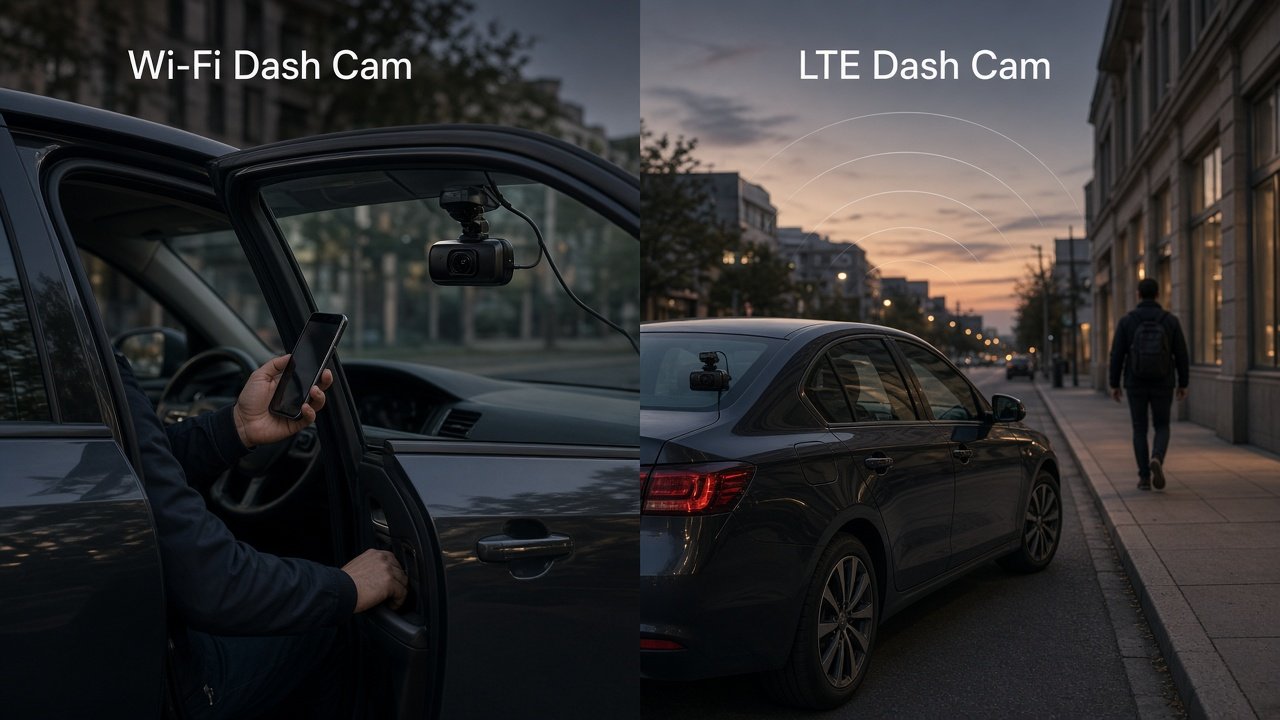
What Wi-Fi Does on a Dash Cam
On most consumer dash cams, Wi-Fi means the camera creates or joins a local wireless link so a phone app can talk to it. Typical jobs are changing settings, checking a live preview, downloading clips, and handling firmware or app pairing.
That is not cloud connectivity. It does not automatically mean internet, remote notifications, or LTE. Unless the exact product routes Wi-Fi through another internet source, treat Wi-Fi as local camera access.
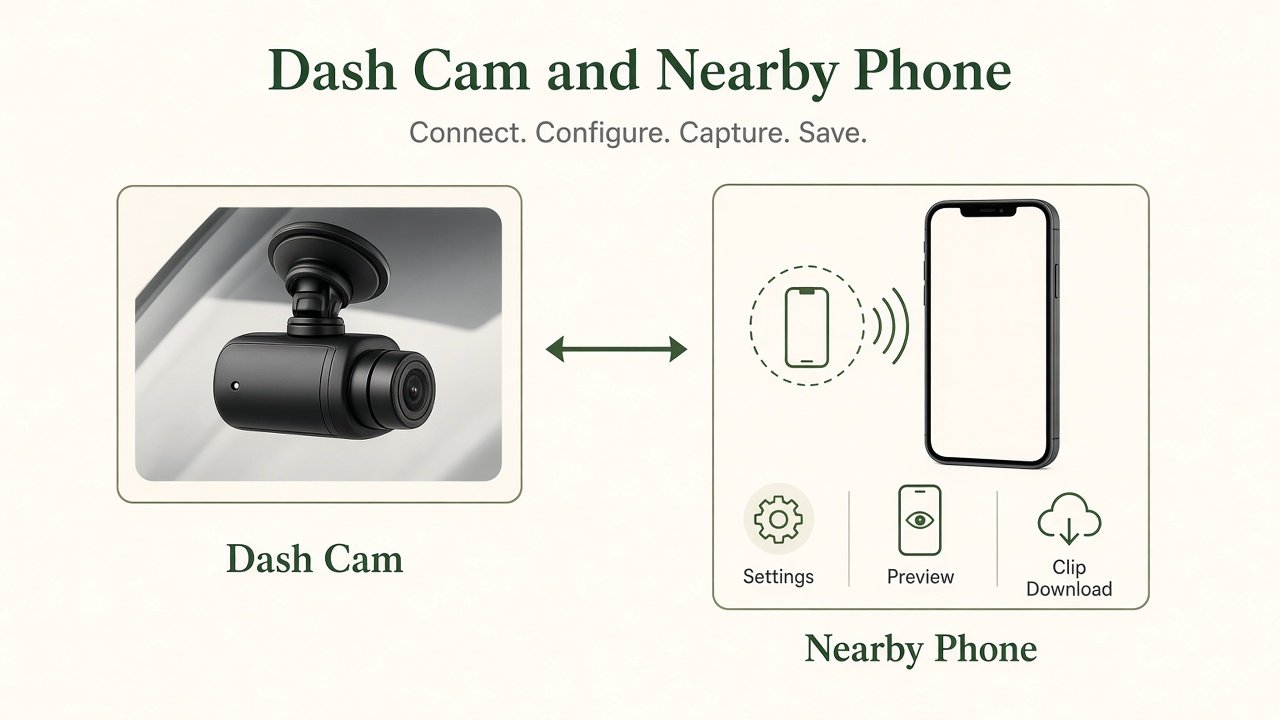
The local-first workflow is simple: the camera records to the card, you walk to the car, the phone connects, you review or download, then you save or share. Advantages are no cellular plan for normal use, simpler ownership, and direct control of files. The trade-off is distance. You usually need to be near the vehicle.
What LTE Adds
LTE, or a cellular dash cam path, means the unit can reach a mobile network through a built-in modem, an external LTE module, a SIM, an eSIM, or another manufacturer-supported accessory. Documented remote functions can include event notifications, remote live view, location, cloud uploads, remote playback, and parked-vehicle monitoring—only where that exact product lists them.
LTE hardware is not unlimited cloud. Signal, data, the cloud service, account setup, latency, and plan limits sit between the camera and your phone. A remote access dash cam is only as useful as those layers.
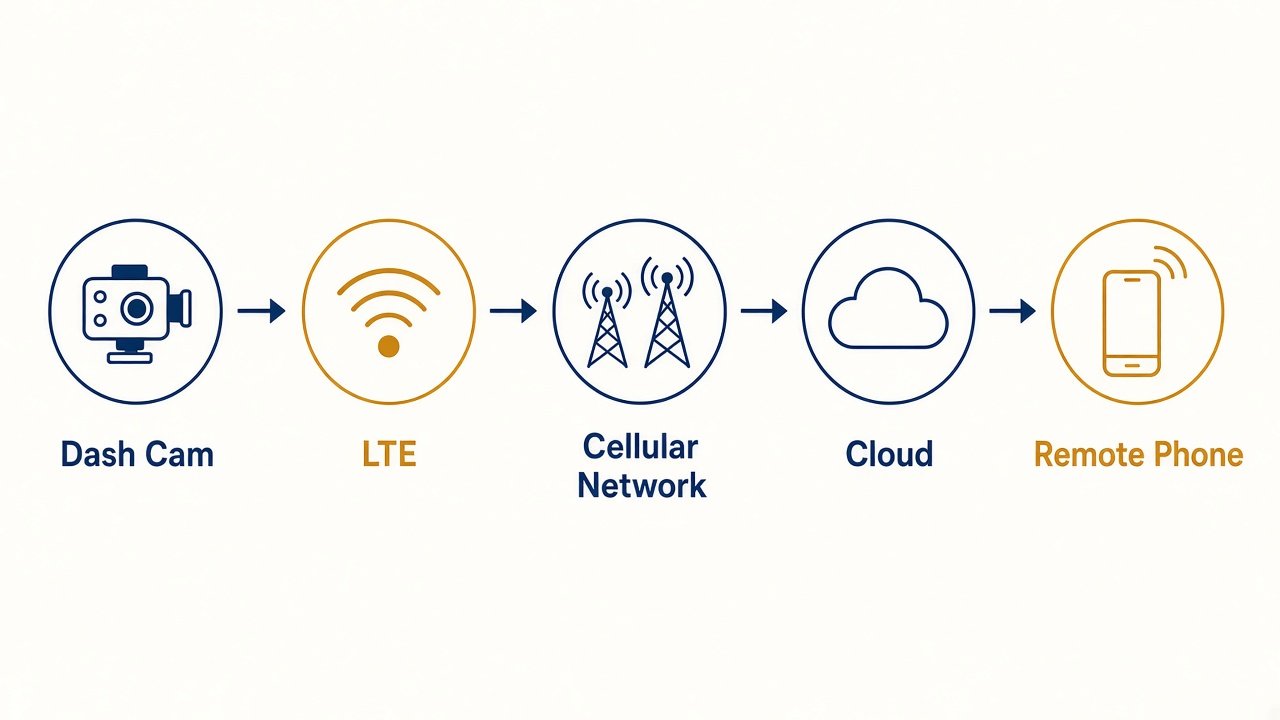
The remote workflow is camera → cellular network → cloud or remote service → your phone. Value shows up when you need vehicle-away visibility. Limitations show up with weak signal, exhausted data, plan caps, or high-temperature Cloud limits some manuals warn about. BlackVue documents local Live View over Wi-Fi Direct separately from Cloud Live View that needs internet.
LTE vs Wi-Fi: Key Differences
Use this table as a buyer map, not a promise that every Wi-Fi model or every LTE model behaves identically.
| Factor | Wi-Fi Dash Cam | LTE Dash Cam |
|---|---|---|
| Typical connection | local phone-camera | cellular internet |
| Near vehicle required | usually yes | no for supported remote features |
| SIM/data plan | usually no | commonly yes |
| Remote alerts | generally no | possible where documented |
| Cloud access | product-dependent | commonly central to the pitch |
| Local recording | yes | yes |
| microSD still needed | commonly yes | commonly yes |
| Ongoing cost | usually lower | potentially higher |
| Setup complexity | lower | higher |
| Best fit | local evidence workflow | remote connected workflow |
Caveats: some Wi-Fi cameras can use a hotspot or add-on for cloud. Some LTE cameras still use local Wi-Fi for in-car setup.
Built-In LTE vs External LTE Module
Built-in LTE puts the modem in the camera or kit. The practical advantage is fewer extra boxes and fewer extra cables for the cellular path. The trade-offs are product cost, carrier dependence, and hardware tied to that cellular ecosystem. Our BlackVue DR970X-2CH LTE Plus II review covers a built-in example: LTE, Wi-Fi, and GPS in the camera, with a nano SIM you supply for North America and carrier limits listed on the official product page.
External LTE keeps cellular optional. THINKWARE’s CONNECTED LTE Module for cameras such as the U3000 PRO puts the SIM in the module. THINKWARE documents that the LTE module and the interior IR cabin camera share a USB-C port, so you cannot run both at once. Optional cellular costs more hardware and more install work.
Built-in is not universally better. Choose whether remote connectivity is mandatory on day one or an accessory you might add later.
SIM Cards, Data Plans and Cloud Plans
This is the section that prevents the most expensive buyer mistake. A dash cam with SIM card still has three different bills in many ecosystems—not one.
SIM or eSIM is the identity the modem presents to a carrier. Do not assume any SIM works, all carriers work, LTE works globally, or roaming is included. BlackVue’s NA LTE Plus II page lists USA support centered on T-Mobile and excludes AT&T and Verizon for that SKU, with Canada listed as Rogers and Telus.
A cellular data plan pays for mobile-network data. Without it, the modem has no path even if the SIM slot is filled.
A cloud plan governs manufacturer cloud features, storage, and limits. BlackVue’s Cloud page describes a free Cloud account with limited daily Live View minutes, storage, and download caps, plus paid Smart plans that expand those limits. SIM data plans are a separate purchase from Cloud. A buyer can need hardware + SIM/data + cloud account + optional paid cloud plan.
Do not oversimplify with “LTE dash cams require one subscription.” A cloud connected dash cam still fails if either the data layer or the cloud layer is missing when you try to open a parked-car event away from the vehicle.
Which Is Better for Parking Mode?
LTE is not automatically better at recording while parked. Parking recording can run locally with no cellular radio at all. LTE is better for parking only if you need documented remote features: impact notification, a remote event clip, parked-car status, or location—and only if the camera plus power setup can actually stay on.
Our Best Dash Cam for Parking Mode guide is the parking-hardware decision. This page is the connectivity overlay. LTE is worth it for parking only when remote notification or remote event access is why you are shopping.
LTE also does not replace parking power. A dash cam still needs a hardwire kit, battery pack, or other supported source while parked. Connectivity and power are separate systems. LTE will not fix battery drain or low-voltage cutoff. Pair connected parking with a real power path—see Dash Cam Hardwire Kit vs OBD Cable.
Notifications are alerts, not theft prevention and not proof by themselves. They can arrive late, fail in a garage with poor signal, or fire on a minor bump.
Local Recording vs Remote Monitoring
Local recording stores evidence for later retrieval. Remote monitoring lets you know about, or access, certain events while away. Those are different workflows, not different quality levels.
Live View, where documented, still depends on network, plan, and product limits. BlackVue’s Cloud overview lists remote Live View, playback, GPS location, push notifications, and event upload—not unlimited livestreaming, zero delay, or HD at all times. Manuals also note Cloud features can fail in high interior temperatures or slow LTE.
Cloud storage is not “all footage automatically in the cloud.” Services often upload events, selected clips, or manual uploads. Loop recording on the card remains the primary archive. Do LTE dash cams still need microSD cards? On Moon Picke’s reviewed examples, yes. Treat the card as the recorder. Treat the cloud as a possible off-car copy of selected files.
What Does LTE Cost Over Time?
Wi-Fi / local-first ownership is usually camera + microSD + optional hardwire or accessories. That is still real money, but it is mostly hardware you buy once.
LTE ownership can add SIM/data, a cloud or connected service plan, and the same parking-power accessories. There is no honest universal monthly price. LTE is not only an upfront hardware decision. It is an ongoing service decision. That is the core LTE dash cam vs WiFi dash cam ownership difference.
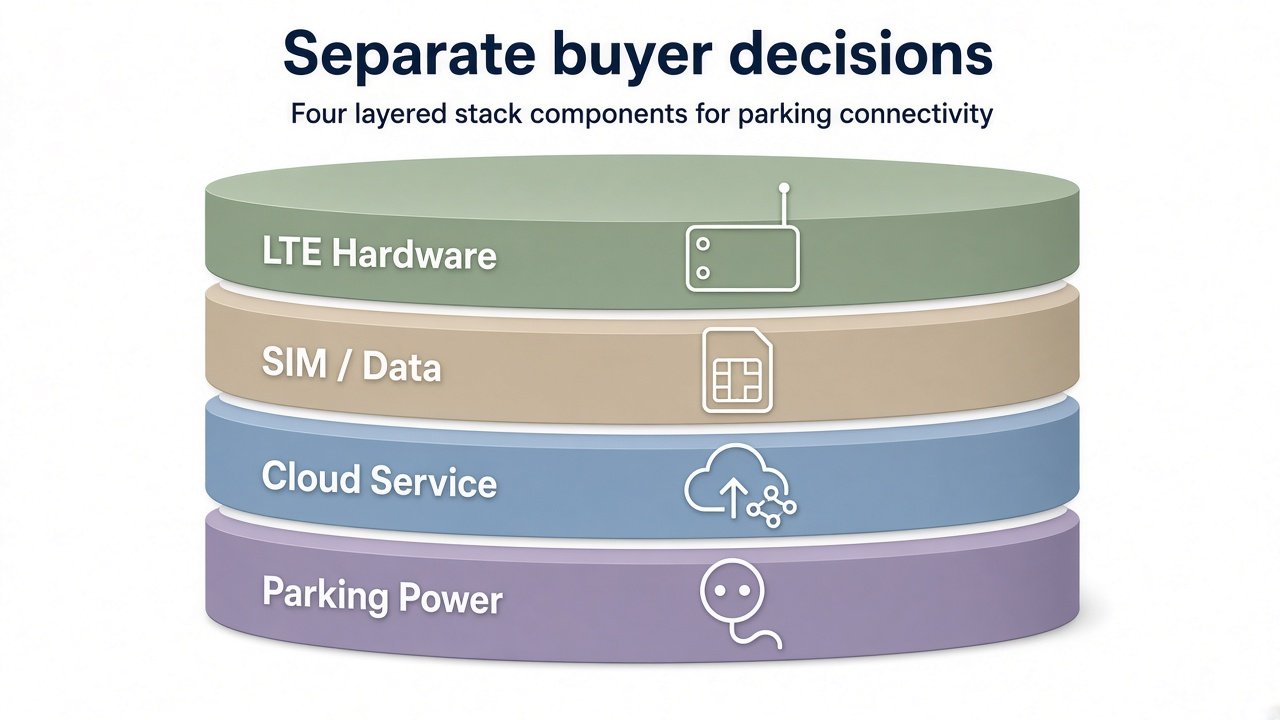
Budget the stack as layers: LTE hardware, then SIM/data, then cloud service, then parking power. A modem with no data plan is extra cost without remote access. A cloud account with no parking power is an app staring at a camera that already shut down.
Connected cameras may involve account credentials, GPS, cloud video, remote access, and cellular service. Use a strong unique password, enable supported account security, review privacy settings, and keep firmware and apps current. This article does not grade any brand as secure or insecure without a dedicated audit.
Wi-Fi Dash Cam Example: VIOFO A329S
The VIOFO A329S review is our local-first example, not a second full review. Official materials describe Wi-Fi 6 on 2.4 and 5 GHz and an app workflow within about 10 meters. There is no built-in LTE. That is a local evidence connectivity profile, not a “best Wi-Fi dash cam” ranking.
As an Amazon Associate I earn from qualifying purchases.
Check VIOFO A329S 2CH pricing on Amazon →
Confirm the exact channel bundle before you buy.
LTE Dash Cam Example: BlackVue DR970X LTE
The DR970X LTE family is the built-in cellular example, not a rewrite of the product review. Official NA copy for the LTE Plus II lists built-in LTE, Wi-Fi, GPS, a nano SIM that is not included, and Cloud functions such as Live View, location, and event-related remote access when the network and Cloud account cooperate. Parking mode still needs power. Stay on the BlackVue DR970X-2CH LTE Plus II review for hardware.
Check BlackVue DR970X-2CH LTE Plus II pricing on Amazon →
Confirm region, SIM, and carrier notes on the manufacturer page, not from a marketplace title alone.
Who Should Choose Wi-Fi vs LTE?
Choose Wi-Fi / local-first if you mainly want evidence after an incident, you will review footage near the car, you do not need remote parking alerts, you want fewer ongoing services, or you prefer simpler ownership. Pair that path with Best Dash Cam Without Subscription if avoiding recurring cloud fees is the actual priority. Those intents are related, not identical.
LTE may be worth it if you park away from home often, you want remote event alerts, you want remote access to parked-vehicle events, and you accept data plus cloud setup. LTE is not required for normal dash-cam recording. Rideshare drivers may want parked-car alerts between shifts, but cabin coverage still matters more for active passenger recording. Consumer LTE cameras do not replace commercial telematics.
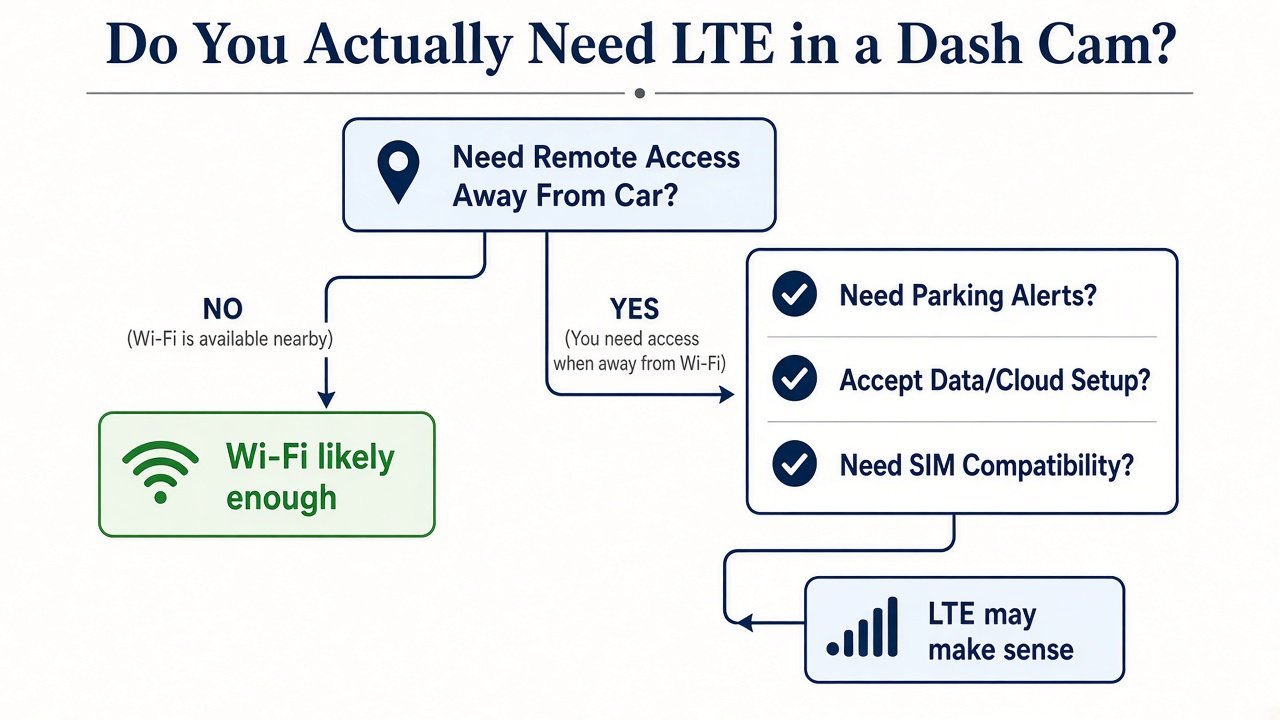
LTE Dash Cam vs WiFi Dash Cam: Which Should You Buy?
Do not let feature count drive the decision. Ask whether you will actually use remote access when you are away from the vehicle. If no, LTE may add complexity and cost you will not use. If yes, LTE can solve a real workflow problem—provided SIM compatibility, parking power, and cloud limits are acceptable.
For overall camera shortlists that are not this connectivity question, use Best Dash Cams 2026. Come back here when the remaining question is local Wi-Fi versus cellular remote access.
Final Verdict
On LTE dash cam vs WiFi dash cam, buy the radio that matches the retrieval job. Wi-Fi is the local evidence tool. LTE is the vehicle-away tool, and only when the exact model’s SIM, data, cloud, and power pieces are in place. There is no score that makes LTE “more camera.” There is only a workflow you will or will not pay to keep running.
FAQ: LTE vs Wi-Fi Dash Cams
What is the difference between LTE and Wi-Fi on a dash cam?
Wi-Fi is typically local phone-to-camera access. LTE is cellular internet for supported remote features. They solve different problems.
Does an LTE dash cam need a SIM card?
Usually some form of SIM or manufacturer cellular identity is required. Compatible carriers and regions are model-specific. Not every SIM or country will work.
Do LTE dash cams require a data plan?
Remote cellular features need mobile data. Local recording to the card does not.
Does LTE require a cloud subscription?
Not always the same product as the data plan. Some remote extras sit on a free cloud tier with limits; others need a paid cloud plan. Confirm both bills.
Can a Wi-Fi dash cam be viewed remotely?
Not by local Wi-Fi alone. You need another internet path the manufacturer supports.
Does an LTE dash cam still record without cellular service?
Typically yes, to the microSD card, if the camera has power. You lose the remote path, not the basic recorder.
Is LTE worth it for parking mode?
Only if you need remote alerts or remote event access. Parking recording itself does not require LTE. Local recording still commonly needs a microSD card.
Sources: BlackVue DR970X-2CH LTE Plus II (NA); BlackVue Cloud; BlackVue LTE Plus II manual; VIOFO A329S manual; THINKWARE CONNECTED LTE Module.