
Moon Picke independently researches products. If you buy through our links, we may earn a commission at no extra cost to you. Read our affiliate disclosure.
The best dash cam for rideshare drivers is the one that records the road and cabin you actually need, then lets you find a clip before loop recording overwrites it. A rideshare dash cam is not a generic commuter camera: cabin documentation, shift-length storage, and privacy rules sit beside front-road evidence. As a framework—not a law—3 channel dash cam for rideshare (front + rear + cabin) is the practical starting point. A 4 channel dash cam for rideshare helps only when a second interior or extra exterior angle has a job. Moon Picke has not installed these units in a rideshare vehicle.
As an Amazon Associate I earn from qualifying purchases.
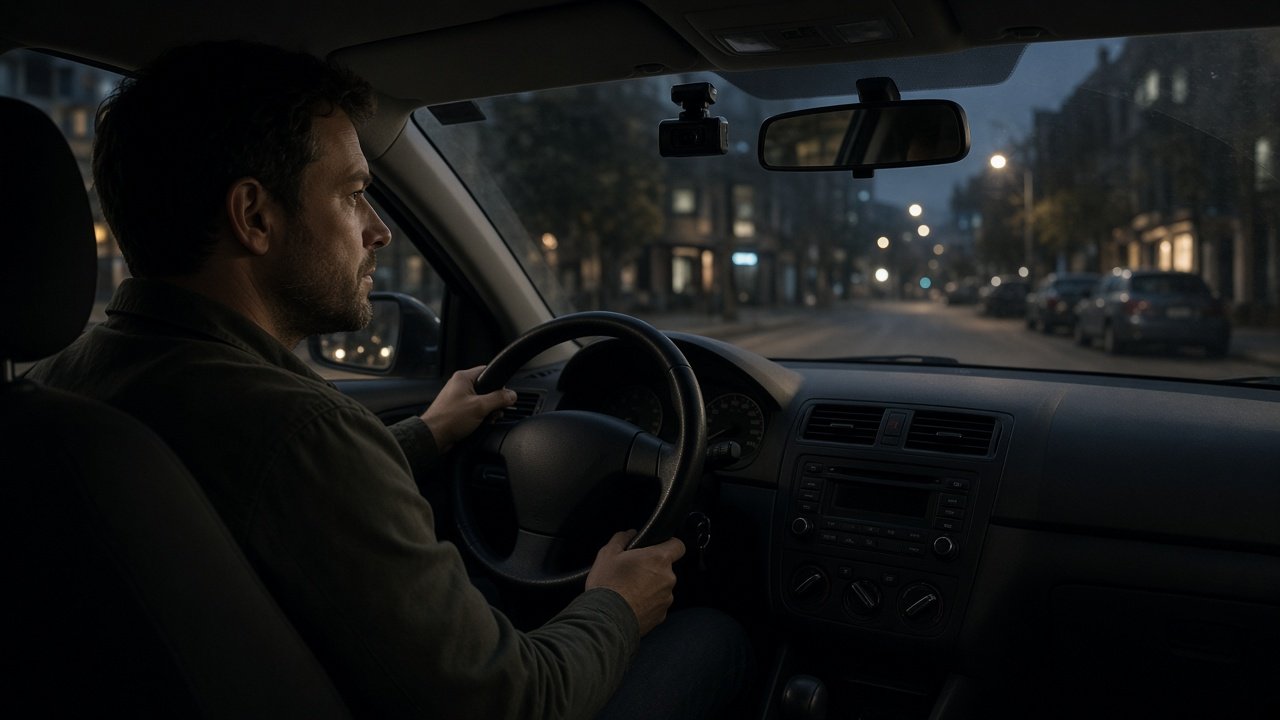
Best Dash Cam for Rideshare Drivers: Quick Picks
Use-case roles only. Not a scored “#1 overall” ranking. Verify the exact SKU: channel count is not camera position.
| Use case | Product | Why it fits | Main trade-off |
|---|---|---|---|
| Maximum multi-angle / cabin-heavy | Vantrue N5S (4CH) | Front road + front cabin + rear cabin + rear road, IR on both cabin lenses | More install, storage, and privacy load |
| Balanced 3CH + local storage | VIOFO A329S 3CH | 4K front + 2K IR fisheye cabin + 2K rear; microSD and optional SSD | 3CH mode is not the 4K/60 front-only spec |
| Remote / LTE connectivity | BlackVue DR970X-2CH LTE Plus II | Built-in LTE/cloud on a 2CH road kit | Typical 2CH kit does not replace a cabin camera |
For general hardware filters (not rideshare-specific), see Best Dash Cams for 2026.
What Should Rideshare Drivers Look for in a Dash Cam?
What dash cam setup is best for rideshare drivers? Start with cabin coverage if passengers are the gap in your evidence, then add the road cameras you will actually mount, then check low-light (road HDR vs cabin IR), storage for long shifts, how you will download a clip, parking power, install complexity, and consent rules. Do not buy on a 4K badge alone. A 4K front camera does not fix a missing or weak cabin file if interior events are the priority. Check each channel’s resolution, not only the front headline.
Not every driver needs four cameras. Vehicle, shift length, parking, local recording law, budget, and install tolerance change the kit. “Every rideshare driver needs 4 cameras” is not a specification.
Put the checklist in this order. Cabin: do you need a file of the passenger area? Road: do you need front context, rear-impact context, or both? Low light: cabin IR and exterior HDR are different cameras. Storage: will overnight overwrite eat a dispute you notice the next morning? Retrieval: can you pull one channel from the app, a card reader, or an SSD without sitting in the car for an hour? Parking: will the car sit in public between shifts? Install: how many separate pucks will you actually route? Privacy: audio on or off, and who must be told? If a product fails the items you marked “must have,” skip the higher resolution badge.
2CH vs 3CH vs 4CH for Rideshare
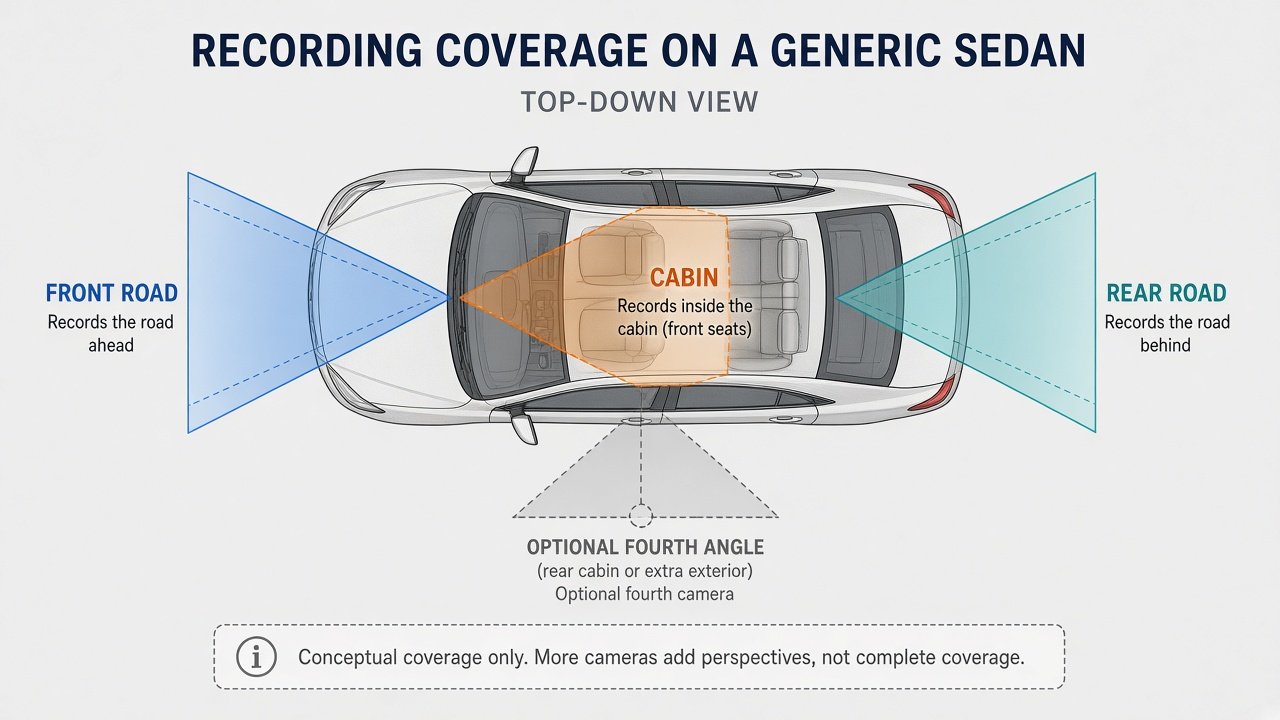
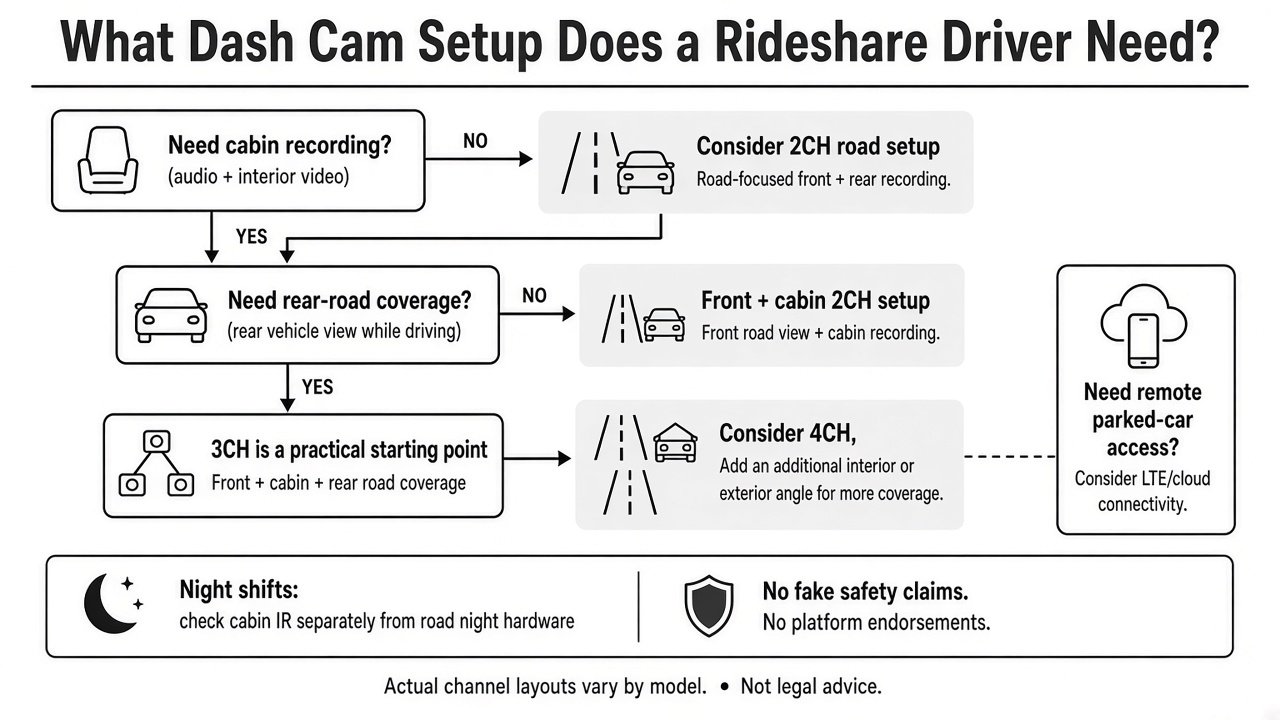
Channel count is one independently recorded feed. It does not guarantee where the lens points. A 2CH kit may be front + rear road, or front + cabin. Confirm the diagram on the SKU you buy.
| Typical rideshare map | What you often get | Limitation |
|---|---|---|
| 2CH | Front+rear or front+cabin | Usually missing either rear-road or cabin |
| 3CH | Front road + rear road + cabin | Still not complete spatial coverage |
| 4CH | Extra cabin or extra exterior, depending on architecture | More files, cables, cost, privacy |
A well-aimed 3CH system can beat a 4CH kit whose extra lens records an unused angle. That is why this page is not a “best 3-channel dash cam” roundup. Sedan windshields, SUV headliners, and van cabins change what a cabin lens actually sees. Headrests, tint, and a high spoiler can hide events even when the brochure shows three cones. Effectiveness is mount + vehicle, not channel count.
Why Cabin Recording Matters
Do Uber drivers need a cabin camera? Only if interior documentation is part of your evidence plan. Cabin video can record passenger-area events, disputes, or items left in the car. It does not guarantee legal protection, insurance acceptance, or platform dispute outcomes. Cabin coverage is documentation, not a legal result. A cabin dash cam for Uber or other platforms still has to be lawful and disclosed where required.
A dash cam for Lyft drivers faces the same interior-vs-road split. If you never want passenger faces on a card, do not buy a cabin SKU and tape over the lens. If cabin is the point, aim the lens so seats are in frame and test a parked recording at night with IR on Auto. Audio is a separate toggle on the N5S, A329S, and BlackVue units Moon Picke cites—leave it off when conversation recording is not allowed.
Infrared Cabin Cameras for Night Shifts
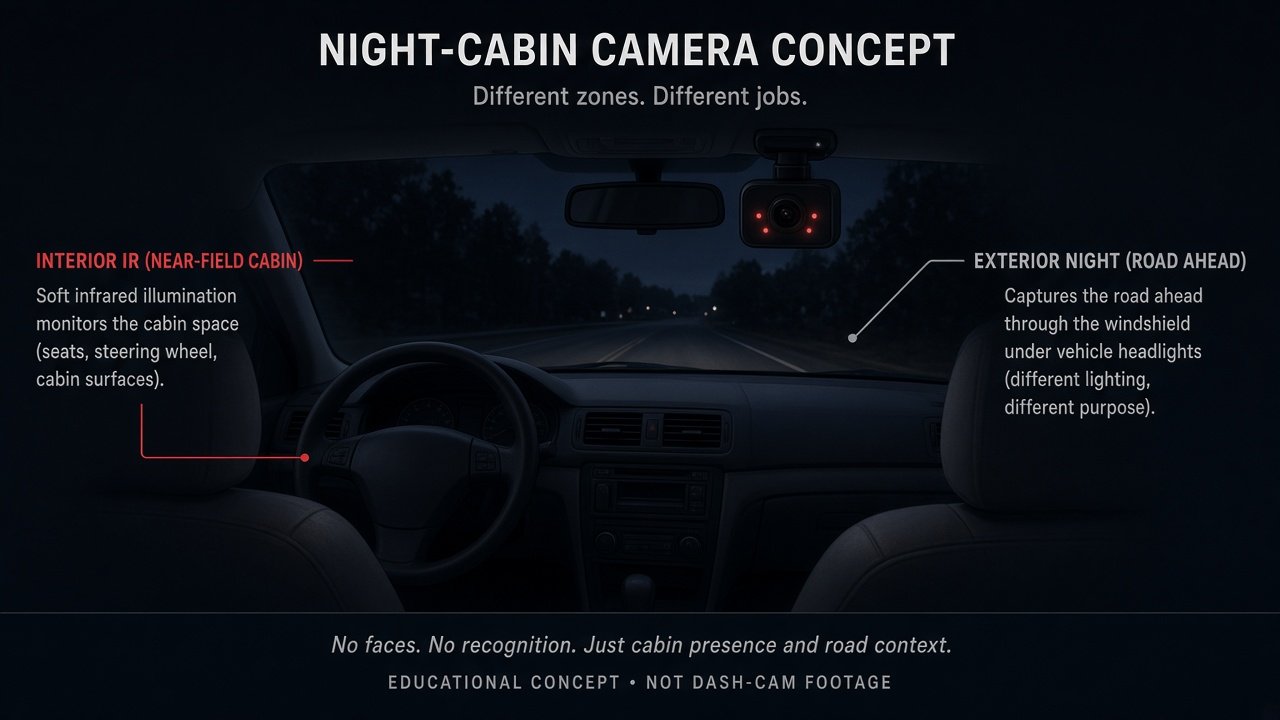
Do rideshare dash cams need infrared? If you run night trips and want interior files in a dark cabin, look for documented IR LEDs or a cabin night mode on the interior camera. IR is near-field cabin illumination. It is not road-facing night performance. Do not expect guaranteed facial identification or full-color cabin video unless the maker documents that mode. Exterior night hardware (sensor, HDR, bitrate) is a different job—see best dash cam for night driving for the road-night intent this page does not own.
Front and Rear Road Coverage Still Matters
Do not pick a rideshare front rear cabin dash cam solely because the cabin lens looks impressive. Front-road files document traffic context. Rear-road files document rear impacts and events behind the car. A rear camera is useful for many drivers; it is not mandatory for every shift. Category shopping for two-direction road kits lives on best front and rear dash cam.
Best for Maximum Multi-Angle Coverage — Vantrue N5S
Vantrue’s Nexus 5S (N5S) is a 4-channel kit: front road + front cabin + rear cabin + rear road at up to 1944P + 1080P + 1080P + 1440P (30 fps) together, per Vantrue’s manual. Both cabin cameras have IR LEDs (Auto/Off/On). Storage is microSD 32 GB–1 TB, U3 or faster, card not included. Audio uses a built-in mic that can be managed in settings. GPS and 2.4/5 GHz Wi-Fi are built in. Parking modes are documented; a hardwire kit is required for proper parking power (Vantrue-class ACC kit sold separately). Optional LTE is a separate module, not the base Amazon 4CH kit (ASIN B0F8BWJHW4).
Why it fits: two cabin angles plus both road cameras. Limitation: more footage, more install, more privacy surface. Skip it if you will never use the second cabin lens. Full product discussion: Vantrue N5S review.
Check the Vantrue N5S 4-channel configuration →
Best for Balanced 3CH Local Recording — VIOFO A329S 3CH
Buy the A329S 3CH SKU (Amazon B0FFT52P6R), not a front+rear-only 2CH box, if cabin evidence is required. VIOFO documents 4K 30 fps front + 2K cabin + 2K rear with STARVIS 2 on all three, a 210° fisheye cabin camera with four IR LEDs, HDR on the channels VIOFO lists, Wi-Fi 6, GPS, voice control, microSD up to 512 GB, and optional external SSD up to 4 TB. Parking modes (including low-power impact) need an HK4/HK6-class hardwire, sold separately. In 3CH, do not assume the 4K/60 front-only marketing mode is running.
Why it fits: classic front/rear/cabin map plus local expansion via SSD. Limitation: still more cables than 2CH; fisheye cabin needs aiming. Moon Picke’s VIOFO A329S review is the product-family page—match the 3CH listing if you need interior recording.
Check the VIOFO A329S 3CH (front + cabin + rear) →
Best for Remote Connectivity — BlackVue DR970X-2CH LTE Plus II
The current Plus II LTE 2CH kit (example Amazon B0FHJTNN3M) is a connected front and rear road camera with built-in LTE for cloud features BlackVue documents (live view, remote playback, alerts—plan, SIM, and region dependent). That is useful between shifts if you want parked-vehicle notifications without standing next to the car. It does not replace a cabin camera in the standard 2CH road configuration. An IR interior module is a different SKU/port choice, not this 2CH box by default.
Who should choose it: drivers who already accept 2CH road coverage and will pay for connectivity. Skip it as a complete rideshare cabin solution. Product page: BlackVue DR970X-2CH LTE Plus II review. LTE vs Wi-Fi as a category is reserved for a later Moon Picke article.
Check the BlackVue DR970X-2CH LTE Plus II listing →
Storage: How Much Capacity Should a Rideshare Driver Plan For?
There is no honest universal GB number. Hours on a card depend on channel count, resolution, bitrate, codec, loop length, and locked events. More channels usually write more data, but not a fixed 3× or 4× multiplier. Long shifts plus 3CH/4CH can overwrite a small card before you notice a dispute. Plan capacity from the manufacturer’s supported card/SSD list, format in-camera, and keep an overwrite window longer than your longest gap before you copy files. High-endurance cards are often recommended for loop recording; they can still fail. Moon Picke does not publish a universal GB/hour chart here.
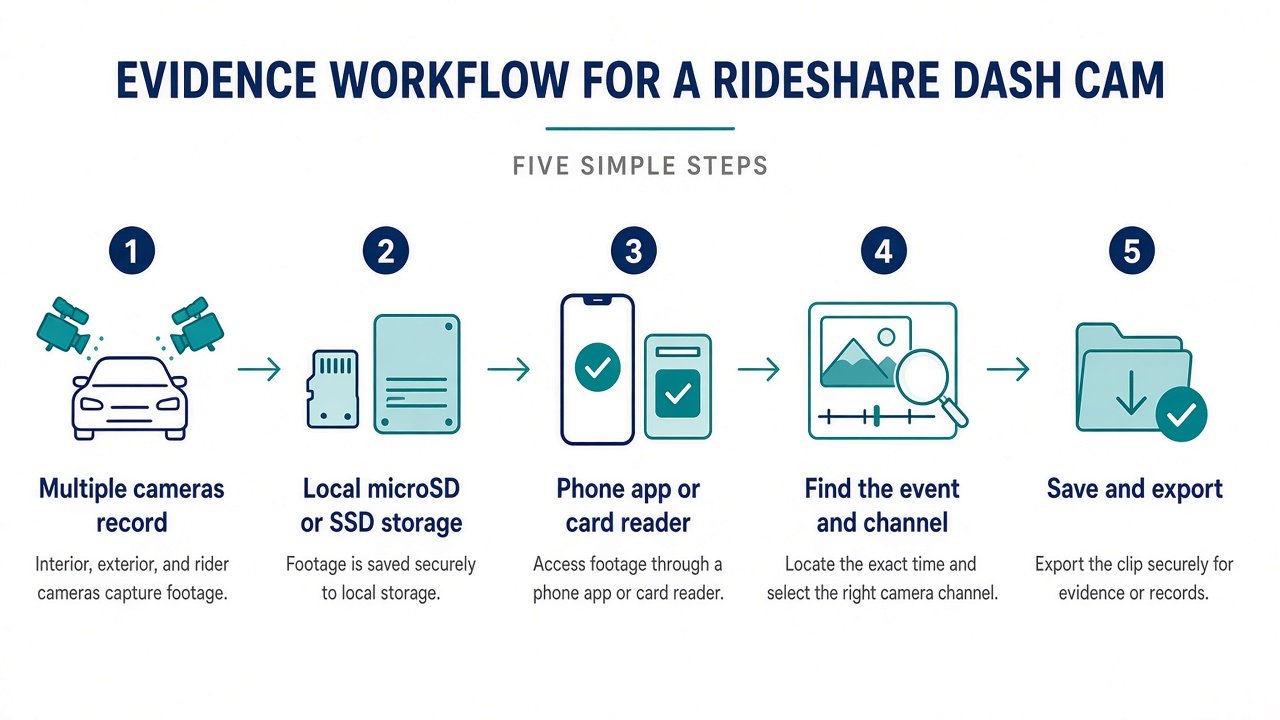
Evidence workflow is record → find the timestamp → pick the channel → download → keep a copy off the loop. Wi-Fi 6 on the A329S 3CH is documented as a faster local transfer path; N5S uses dual-band Wi-Fi and a screen on the unit; BlackVue adds cloud when LTE and a plan are active. Moon Picke has not timed those apps. For rideshare, a camera you cannot export from in a parking lot is weaker than a slightly softer file you can copy. Local-first ownership (card/SSD) avoids a network dependency. Connected systems add remote alerts and extra accounts. Neither model of ownership wins for every driver.
Parking Mode and Between-Shift Protection
Parking mode does not prevent theft. It may record an impact or motion if power, firmware, and the active channels cooperate. Multi-channel units may not keep every camera live in every parking mode. Hardwire or another always-live feed is typically required; see best dash cam for parking mode. Power method (hardwire vs other always-live feeds) is vehicle-specific. LTE alerts are optional extras, not a substitute for a local file. Between-shift parking in a public lot is a power-and-cutoff problem first: a 4CH camera left in high-sensitivity motion mode can fill a card with leaf movement, while a 2CH unit with a high voltage cutoff may simply stop. Match parking firmware to how long the car sits, then confirm which lenses stay active.
Vantrue parking hardwire kit (N5S-class ACC, sold separately) →
Privacy, Audio and Passenger Recording
Cabin cameras can capture faces, talk, and GPS-stamped location. Recording and consent rules vary by place. Audio rules can be stricter than video. Many cameras let you disable the microphone—use that control when required. This is not legal advice. Do not record secretly where prohibited. Check local law, any signage/disclosure rules, and current rideshare platform policies. Moon Picke does not claim what Uber or Lyft “allows everywhere.” A sticker or in-app notice does not automatically make recording lawful. If a passenger asks you to stop audio, treat that as an operational decision plus a legal question for counsel in your area—not something a buying guide can close.
Installation: When Professional Setup Makes Sense
More physically separate cameras generally mean more mounts and cable runs. Do not run cables across curtain-airbag paths or block the driver’s view. Follow the manufacturer and the vehicle. A 4CH two-piece kit (N5S-style) is a different job than a 2CH rear cable. Professional installation is reasonable when you are not sure about power, airbags, or rear-glass routing. A cabin camera that works in a compact sedan can miss rear-seat faces in a long van. Recheck aim after seats move.
Which Rideshare Dash Cam Setup Should You Buy?
Choosing the best dash cam for rideshare drivers is matching cameras to the incidents you actually review. Occasional/private trips: a simpler 2CH may suffice if you knowingly skip cabin or rear. Regular passenger work: 3CH is often the practical road-plus-cabin starting point. Maximum multi-angle: 4CH only if the extra lens is used. Remote parked-car access: LTE/cloud if you accept the plan. Always verify the physical map on the SKU.
Final Verdict
The best dash cam for rideshare drivers is a coverage-and-workflow choice. Cabin files matter when interior events are the gap; they are not a courtroom guarantee. 3CH is a useful default architecture; 4CH is optional extra angle. Storage must survive the shift. Privacy and audio are local-rule problems. Buy the cameras that record useful areas, then confirm you can export a clip the same day—not the marketing channel count.
FAQ
What is the best dash cam setup for rideshare drivers?
There is no single best dash cam for rideshare drivers SKU. Usually front road + cabin, plus rear road if you will install it. Exact SKUs vary. 3CH is a common starting map, not a universal winner.
Do rideshare drivers need a cabin camera?
Only if you want interior documentation and local rules allow it.
Is 3-channel enough for Uber or Lyft?
Often, when the three feeds are actually front, rear, and cabin. It is not “enough” if a needed angle is missing. Not legal advice and not a platform policy.
Is a 4-channel dash cam worth it for rideshare?
Only if you will use the extra view. Otherwise it is extra cost and footage.
Do rideshare cameras need infrared?
For dark-cabin interior files, documented IR (or another cabin night mode) helps. It is not road night vision.
How much dash cam storage does a rideshare driver need?
Enough that loop overwrite is slower than your review cycle. No single GB figure fits every bitrate and shift.
Does a rideshare dash cam need LTE?
No. Local recording can be enough. LTE helps remote alerts if you accept the account and data plan.