
The best AI receptionist for HVAC companies answers inbound heating and cooling calls while techs are on jobs, captures usable service details, books only on a live calendar or documented field-service path, and routes exceptions to a human — not software that claims to diagnose equipment or dispatch a qualified technician by itself. Moon Picke did not place test calls. Facts below come from official pages checked on 19 September 2026.
Best AI Receptionist for HVAC Companies: Quick Comparison
Moon Picke may earn a commission if you purchase through some links on this page, at no additional cost to you. Read the affiliate disclosure. Smith.ai when you need published ServiceTitan or Housecall Pro paths plus an optional live-agent add-on. Local Call AI when Connected Jobber or JobNimbus filing matters. Asisly when SMS on-call plus Google Calendar matches an owner-op shop. Dialzara Pro when after-hours warm transfer is the gap. Goodcall when unique-customer billing fits long FAQ calls. Frontdesk when you want bundled voice, chat, SMS, and an in-product CRM without a verified HVAC dispatch connector. See how we evaluate software.
| Product | HVAC Buyer Fit | Answering Model | Booking | Human Handoff | Pricing Basis | Main Limitation |
|---|---|---|---|---|---|---|
| Smith.ai AI Receptionist | ST / HCP paths + live add-on | Hybrid (AI-first) | Calendly; ST Scheduling Pro; HCP booking link | Warm transfer; per-call live add-on | Free 25 calls; Pro from $150 per-call | Per-call meter; Jobber path needs SKU confirmation |
| Local Call AI | Contractor HVAC; Connected CRM filing | AI-only; Concierge live-transfer | Google Calendar or Cal.com on Standard | On-call SMS; live-transfer on Concierge | $297 / 250 min; $0.35 overage | Jobber/JobNimbus on Connected ($497), not Standard |
| Asisly | Owner-op HVAC; SMS on-call + Google Calendar | AI-only + message/forward | Google Calendar estimate slots | SMS to on-call tech — not a VR bureau | Solo $39 / 60 credits; $0.39 overage | ST / HCP / Jobber Q3 roadmap |
| Dialzara | After-hours answering; warm transfer from Pro | AI-only | Google/Outlook from Pro | Blind on Lite; warm from Pro | Lite $29 / 60 min | No verified native HVAC FSM |
| Goodcall | Long FAQ / repeat callers | AI-only | Confirm calendar via Zapier | Operator transfer to directory contacts | $79 or $66 annual; unique customers | Not a dispatcher |
| Frontdesk | Bundled voice/chat/SMS/CRM | AI-only | Vendor booking copy; Zapier | Transfer as an agent action | $99 or $79 annual; 200 voice min | No verified ST / HCP / Jobber native |
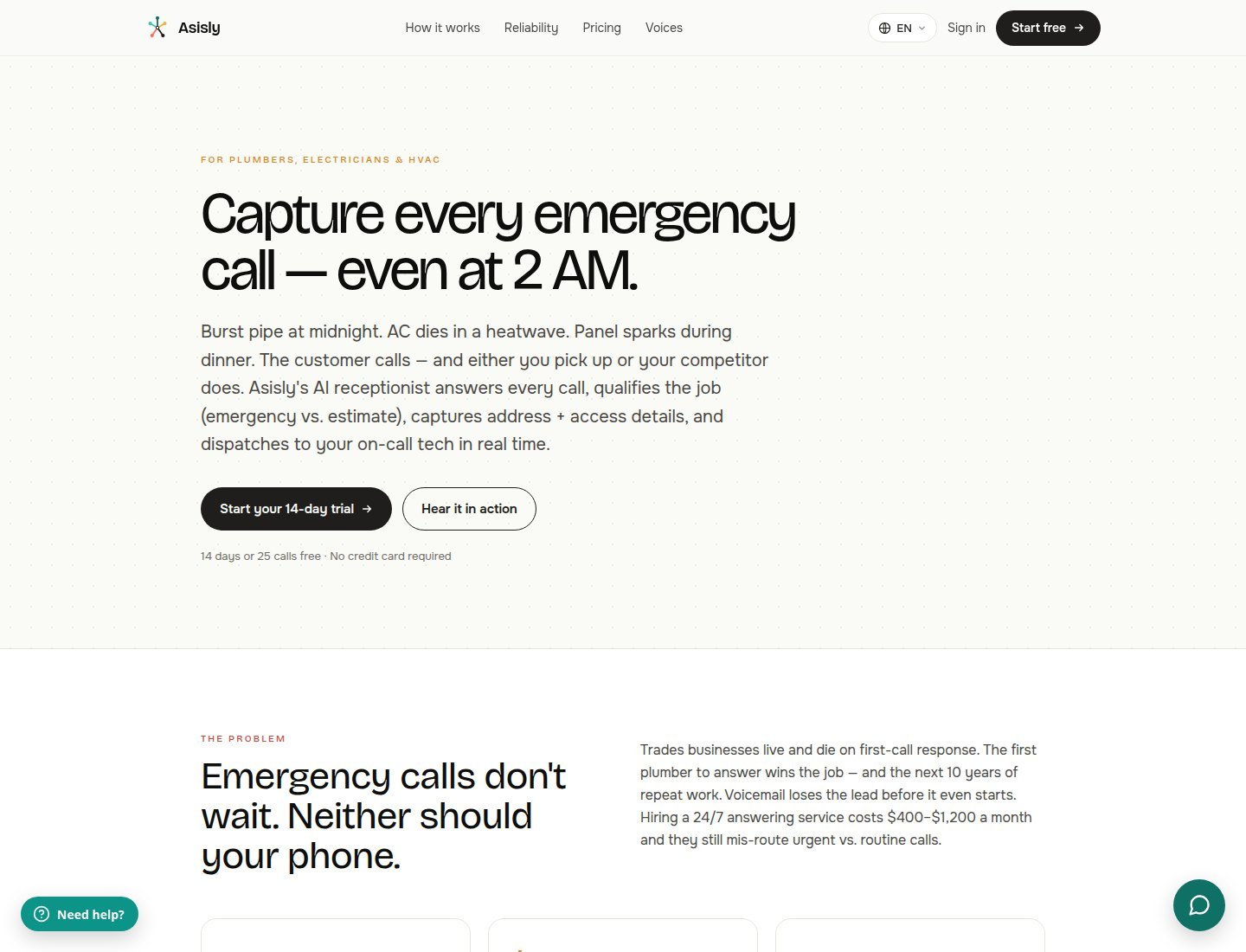
See whether Asisly fits your business
What an HVAC Company Actually Needs From an AI Receptionist
A one-truck owner, a dispatcher shop, and a maintenance-plan company do not share one workflow. Name, callback, service address, heat vs cool, a short description, preferred window, and existing-customer status are buyer requirements — claim those fields only if intake supports them. Structured capture is not a generic summary. Calendar availability is not skill, territory, travel time, parts, or job pricing. An HVAC AI answering service is not 911. See editorial standards.
No-cooling and no-heat: the AI may answer, collect configured details, and notify staff or hold a calendar slot. It cannot declare equipment safe or promise a same-day tech. Maintenance: FAQs plus a live calendar can book a window — that is not assigning a licensed technician. Estimates: capture contact details; open-ended equipment quotes belong to a human unless only configured fees are documented. Existing-customer follow-up: confirm record matching (Smith documents ServiceTitan matching; Local Call Concierge markets returning-customer recognition). After-hours: “24/7 AI” is not a standing tech; Dialzara hits voicemail at zero minutes. Service area and hours work only if you keep that copy current. Gas odor, a carbon-monoxide alarm, or another immediate hazard: callers should use emergency services or their gas utility. The AI must not diagnose leaks, give hazardous repair steps, or guarantee arrival.
What is the best AI receptionist for HVAC companies? There is no single score. Match Smith.ai for documented field-service connectors plus optional live agents, Local Call AI for Connected Jobber filing, Asisly for HVAC SMS on-call and Google Calendar, Dialzara Pro+ for after-hours warm transfer, Goodcall for unique-customer billing, or Frontdesk for a bundled front office.
How We Evaluated These AI Receptionist Platforms
This HVAC-specific look at the best AI receptionist for HVAC companies is not a generic small-service roundup with “HVAC” pasted in. Official product, pricing, and help pages — not a bake-off. We checked inbound and after-hours answering, intake vs summary, booking vs dispatch, transfer vs live add-on, forwarding vs porting, native vs Zapier vs API vs roadmap, and meters. Affiliates did not pick the list. Process: about Moon Picke.
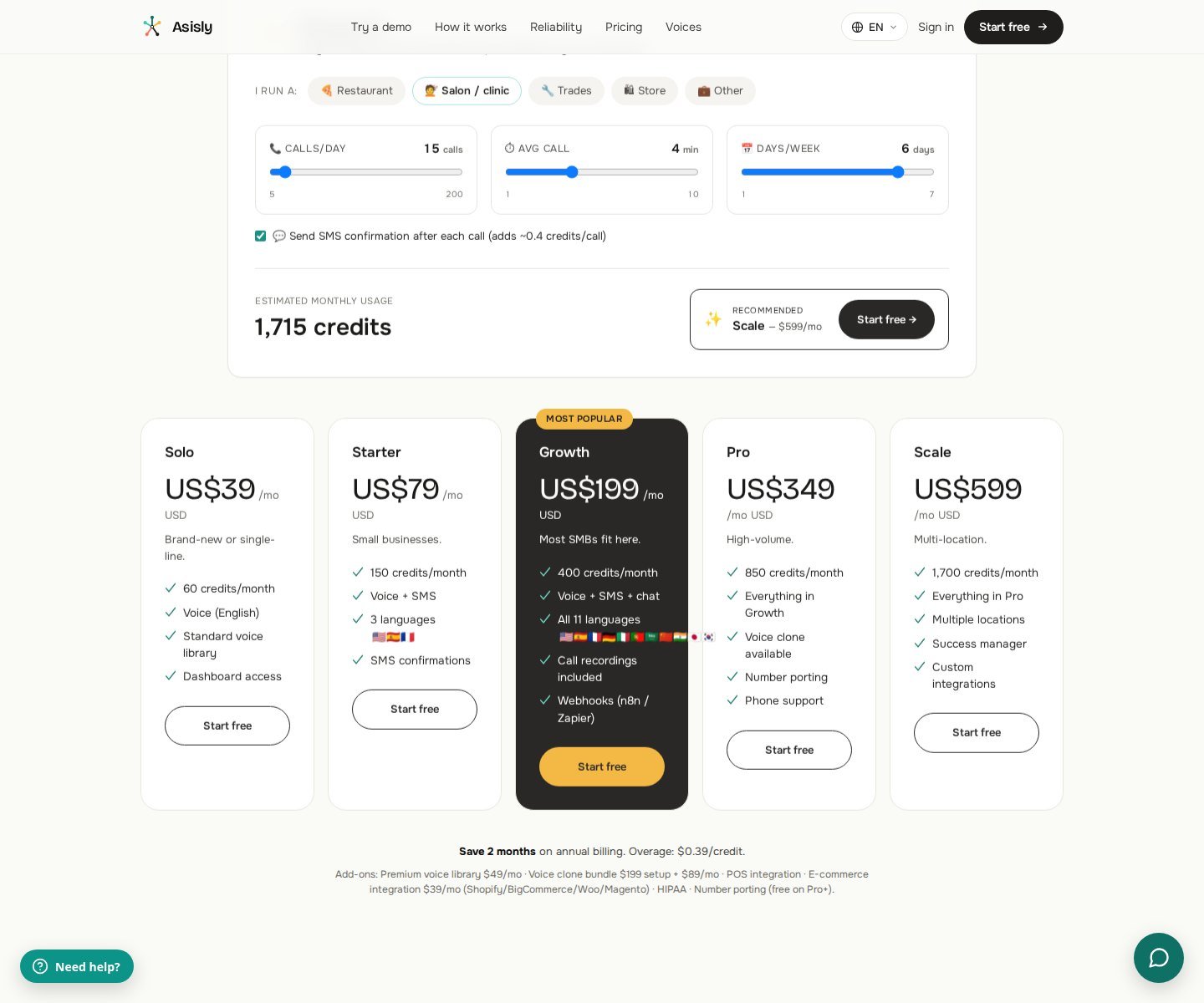
Pricing checked in September 2026; plans and usage limits may change.
AI Receptionist Platforms to Consider for HVAC
Smith.ai AI Receptionist — HVAC shops that need published field-service paths and optional live agents
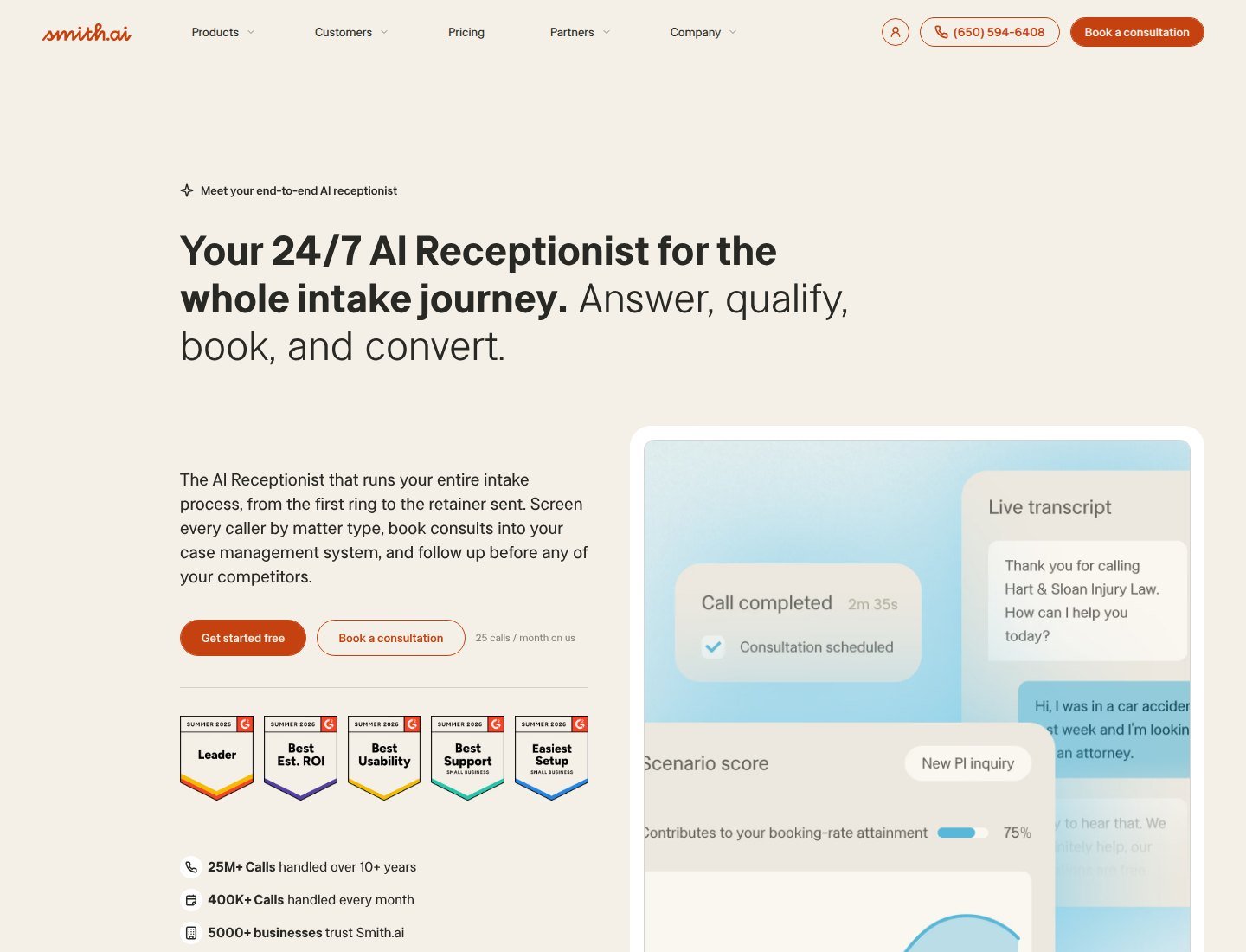
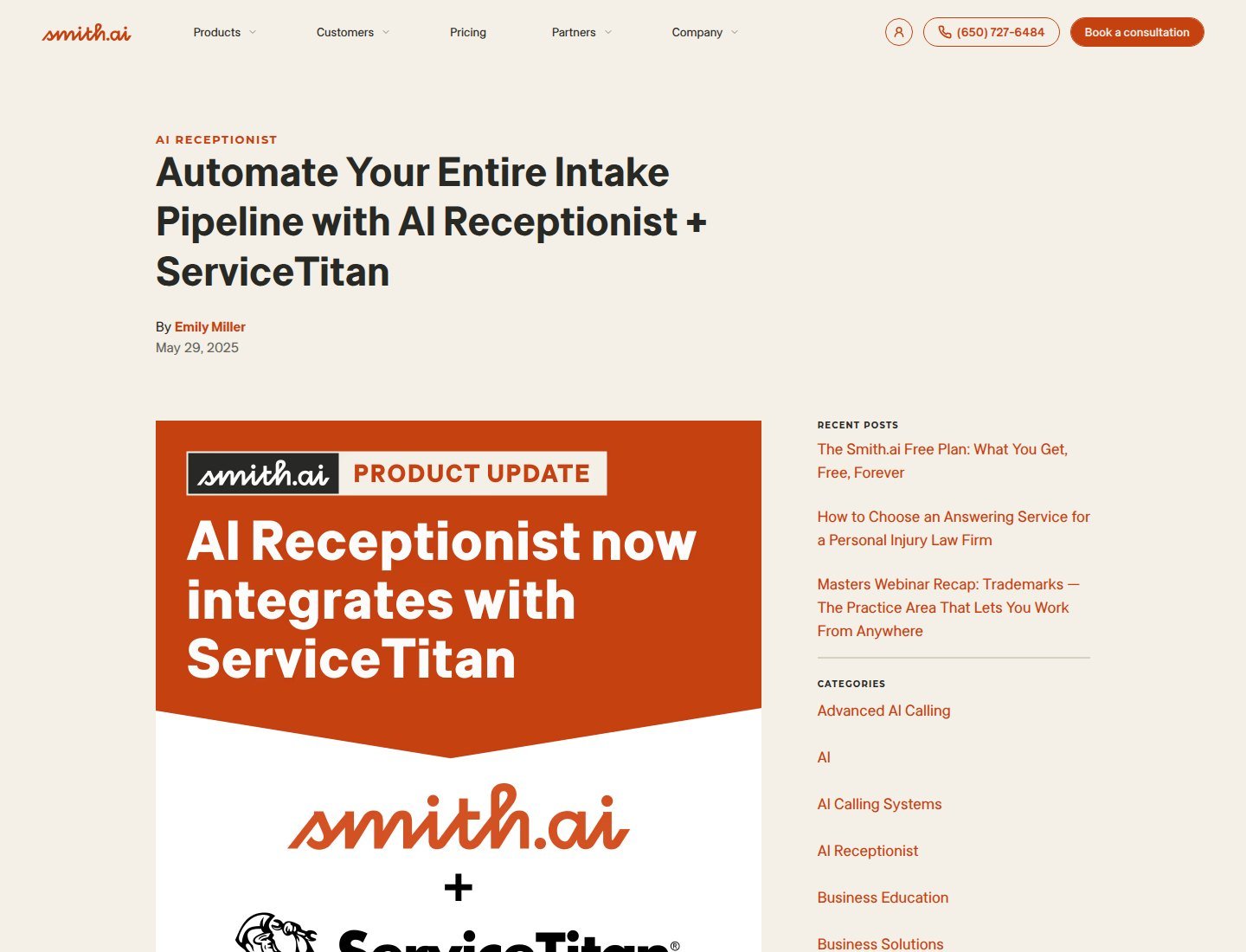
Smith.ai AI Receptionist is AI-first, not Smith’s separately priced human-first SKU. Official copy covers 24/7 handling, spam screening, recording, transcription, summaries, qualification, warm transfers, EN/ES, playbooks, and a dedicated number. Live agents are a per-call add-on. A 29 May 2025 blog still lists ServiceTitan customer match, call logging, and Scheduling Pro. Housecall Pro help books via HCP’s online-booking link — HCP’s scheduler, not independent assignment by Smith. Smith’s Jobber page lists a sharing-link booking path plus Zapier client create; confirm AI vs virtual-receptionist SKU. Free $0 / 25 calls then $3.00/call; Pro from $150/month at $2.00/call (~2–3 calls/day on the card); Enterprise from $500. Skip it if you only wanted credit-priced AI. See current Smith.ai AI Receptionist plans
Local Call AI — HVAC contractors who want trade-trained intake and plan-gated CRM filing
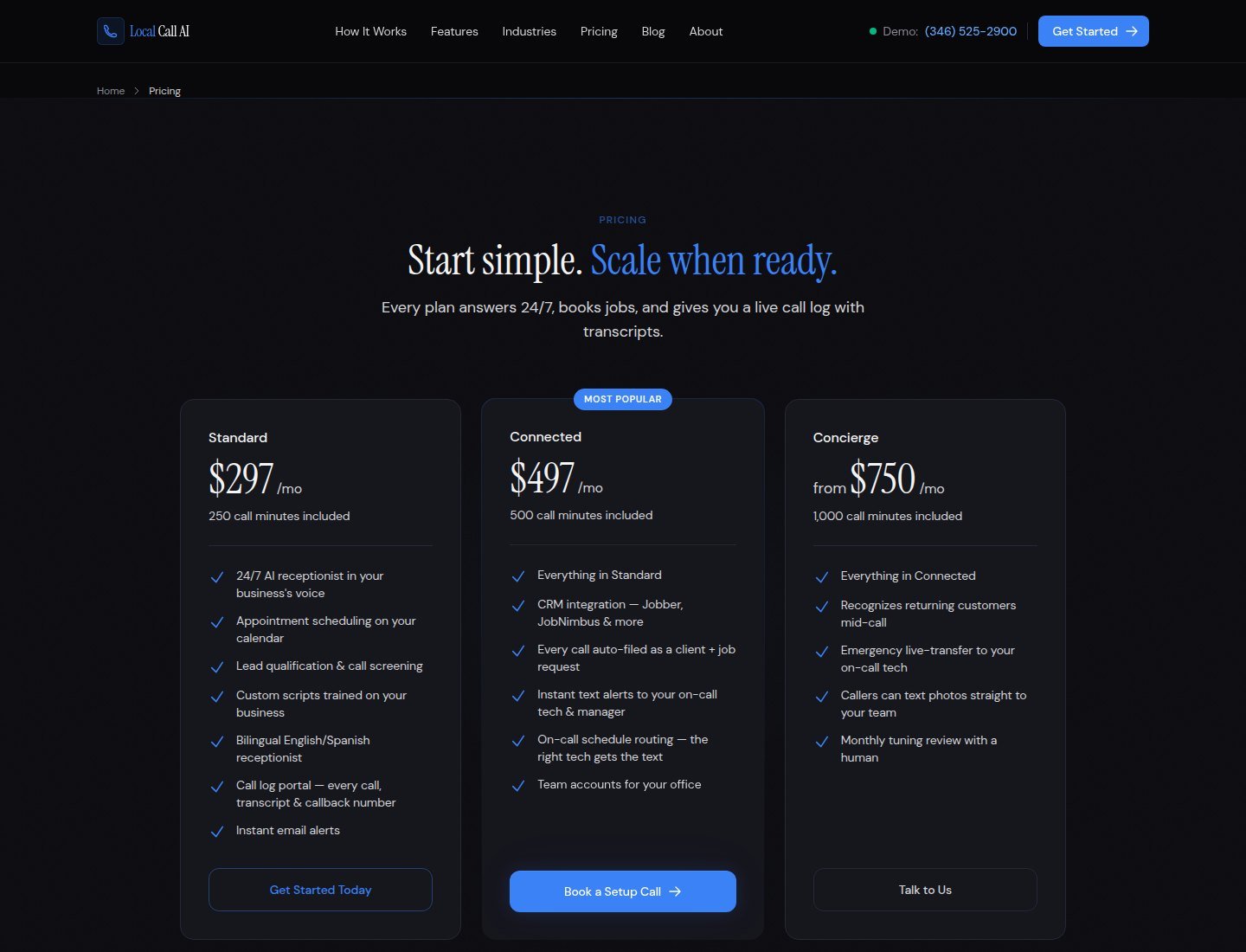
Local Call AI markets contractor HVAC intake. Standard $297 / 250 minutes: Google Calendar or Cal.com, EN/ES, transcripts, email alerts. Connected $497 / 500 minutes: Jobber, JobNimbus & more, job-request filing, SMS to on-call techs. Concierge from $750 / 1,000 minutes: live-transfer to your on-call tech. Overage $0.35/min; 30-day money-back. Pricing FAQ: Jobber and JobNimbus on Connected; other CRMs during onboarding. Connected/Concierge may quote onboarding. Skip Standard if you assumed ServiceTitan sat in the $297 plan. See current Local Call AI plans
Asisly — Owner-operated HVAC teams using SMS on-call and Google Calendar
Asisly is inbound AI voice, SMS from Starter, chat from Growth. The plumber/HVAC page documents playbooks you set, address/access capture, SMS to an on-call tech, Google Calendar estimate slots, and quoting of configured fees. Official FAQ: v1 is SMS + Google Calendar; ServiceTitan, Housecall Pro, and Jobber are Q3 roadmap. Vendor “dispatch” means that SMS path. *92 forwarding; porting on Pro+. 1 credit = 1 voice minute, 5 SMS, or 10 chat. 19 September 2026 homepage cards: Solo US$39 / 60 credits; Starter US$79 / 150; Growth US$199 / 400. Confirm currency at checkout. Overage $0.39/credit. Trial: 14 days or 25 calls, no card. Skip it if you need live native ServiceTitan today. Check current Asisly plans
Dialzara — After-hours HVAC answering with plan-gated warm transfer and Outlook
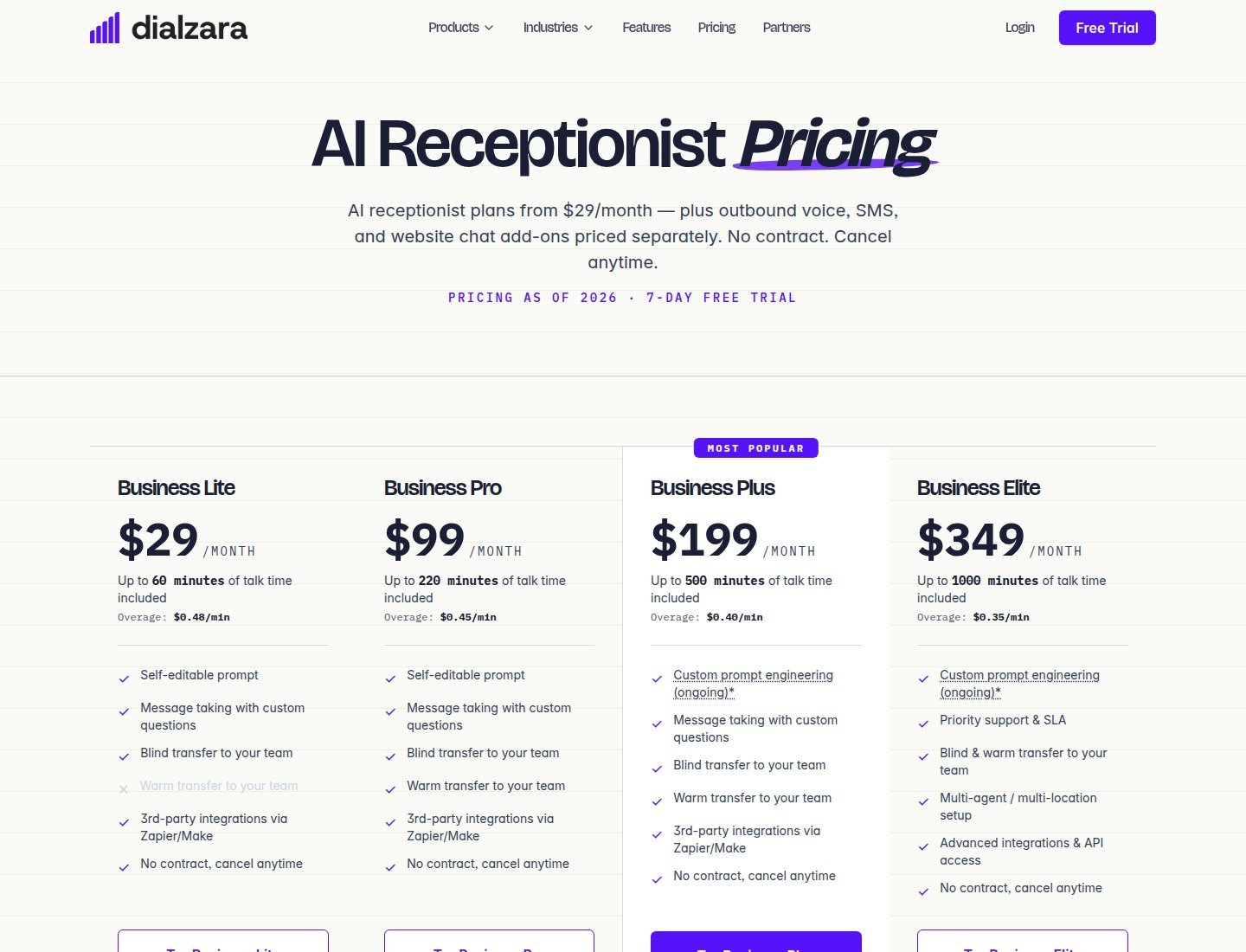
Dialzara is inbound AI by talk-time. Lite $29 / 60 min / $0.48: custom questions and blind transfer; no calendar or warm transfer on the compare table. Pro $99 / 220 / $0.45 adds warm transfer, after-hours rules, EN/ES, Google/Outlook. Plus $199 / 500; Elite $349 / 1,000 with API. Recordings, summaries, post-call notices, 7-day trial. At zero minutes, callers hit voicemail. Local $3; toll-free $5. Forward or port. CRM is Make/Zapier/API — no verified native ST/HCP/Jobber on the pricing page.
Goodcall — Repeat HVAC callers billed as unique customers
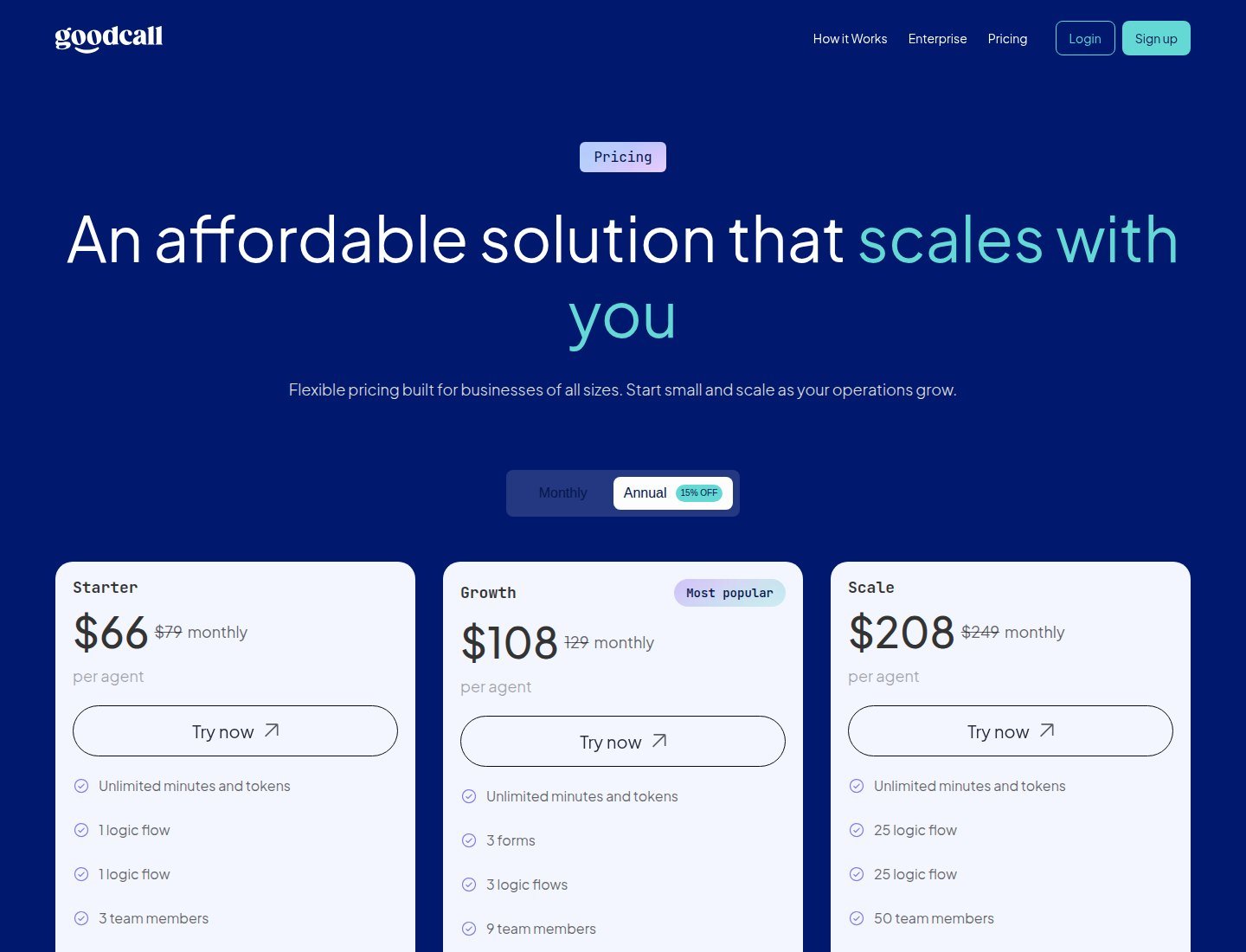
Goodcall bills unique customers who speak, not minutes — useful for long no-heat FAQs. Annual 15% off: Starter $66 vs $79 (100 uniques); Growth $108 vs $129; Scale $208 vs $249. Overage $0.50/unique. New number; keep yours with conditional forwarding (not porting). Operator transfer is not a receptionist bureau. CRM via in-app Zapier. Skip it if you need staffed humans or documented Jobber native.
Can an AI receptionist book HVAC service appointments? Only on a documented path: Asisly Google Calendar; Dialzara Google/Outlook from Pro; Smith Calendly, ServiceTitan Scheduling Pro, and Housecall Pro’s booking link; Local Call Google Calendar or Cal.com on Standard. A booked slot is not technician assignment.
Frontdesk (My AI Front Desk) — Bundled front office without a verified HVAC dispatch connector
Business-in-a-Box is $99/month or $79 billed annually: 200 voice minutes, 100 chatbot conversations, 400 SMS, Zapier, verified outbound number, in-product CRM. Partner/Enterprise is custom (API). Overage: 1 credit = $0.01; voice 25 credits/minute. Transfer is an agent action. Homepage stars are vendor marketing. Skip Frontdesk if you need a verified ServiceTitan native.
Routine HVAC Calls vs Urgent Service Requests
Maintenance and estimates can often use FAQs you supply and a calendar hold. No-cooling and no-heat still need a human path. “24/7 AI” is not a standing licensed tech. For gas odor, CO alarms, or other immediate hazards, send callers to emergency services or the gas utility. Asisly and Local Call document playbooks you define; Smith documents playbooks and optional live agents.
Can an AI receptionist handle emergency HVAC calls? It can answer, capture details you configure, and escalate if transfer or SMS notify is set up. It cannot diagnose a gas leak, interpret a carbon-monoxide alarm, give hazardous repair instructions, or guarantee arrival.
Appointment Booking vs Technician Dispatch
Booking ≠ assigning a qualified technician. Calendar availability ≠ field-service dispatch. Google Calendar does not provide skill matching, territory, travel time, parts, job pricing, or dispatch optimization. Smith’s ServiceTitan path uses Scheduling Pro; Housecall Pro AI scheduling uses HCP’s booking URL. Local Call Standard books a calendar or takes a callback; Connected files Jobber/JobNimbus requests for staff to confirm. Asisly v1 is SMS + Google Calendar. Zapier, an API, or a Q3 roadmap item is not a ready-made HVAC dispatch workflow.
How an AI Receptionist Connects With Your Existing HVAC Phone Number
Homeowners dial the number on trucks and Google Business Profile. Forwarding keeps that number; porting moves it. Asisly: *92 forward; port Pro+. Goodcall: new number plus conditional forwarding. Dialzara: forward or port. Smith: dedicated number on AI plans; carrier forwarding is typical, while porting is not clearly published on the AI-first cards. Local Call describes the existing number ringing the AI and mentions Twilio forwarding/porting — confirm the method. Transfer to a tech ≠ Smith’s live-agent add-on ≠ Local Call Concierge live-transfer.
Can an AI receptionist work with my existing business number? Often via forwarding (Asisly *92; Goodcall conditional forward; Dialzara forward or port). Porting is separate where published.
HVAC CRM and Field-Service Software Integrations
Native ≠ Zapier ≠ webhook ≠ custom onboarding ≠ roadmap. Smith documents ServiceTitan (Scheduling Pro), Housecall Pro (client mapping; AI scheduling via booking URL), plus HubSpot/Salesforce/Clio and Zapier/Make. Jobber on Smith’s page is a sharing-link booking path plus Zapier client create — confirm the SKU. Local Call names Jobber and JobNimbus on Connected. Asisly: Google Calendar live; ST/HCP/Jobber Q3. Dialzara: Google/Outlook from Pro; Make/Zapier/API. Goodcall and Frontdesk: Zapier; Frontdesk API on Partner. A general sales CRM such as the SalesCrunch CRM review is not HVAC field-service software. More digital tools help only if you will connect them.
| Product | Included Calls/Minutes | Overage | Existing Number Support | Relevant Integrations |
|---|---|---|---|---|
| Smith.ai AI Receptionist | Free 25 calls; Pro billed per call | $3.00/call after Free; Pro $2.00/call | Dedicated number; forward/port not clearly on AI cards | ServiceTitan, Housecall Pro, Calendly, Zapier; Jobber confirm SKU |
| Local Call AI | 250 / 500 / 1,000 min | $0.35/min | Existing-number answering; confirm method | Google Calendar/Cal.com; Jobber & JobNimbus on Connected |
| Asisly | 60 / 150 / 400 credits | $0.39/credit | *92 forward; port Pro+ | Google Calendar; ST/HCP/Jobber roadmap |
| Dialzara | 60–1,000 min | $0.48–$0.35/min | Forward or port | Google/Outlook from Pro; Zapier/Make/API |
| Goodcall | 100–500 unique customers | $0.50/unique | Conditional forwarding | Zapier |
| Frontdesk | 200 voice min + chat/SMS | 25 credits/voice min | Not clearly published on the pricing table | Zapier; API on Partner |
How Much Does an HVAC AI Receptionist Cost?
Cost for the best AI receptionist for HVAC companies is not the sticker. Per-call (Smith) ≠ per-minute (Dialzara, Local Call, Frontdesk voice) ≠ unique-customer (Goodcall) ≠ credits (Asisly). Monthly ≠ annual (Goodcall 15% off; Frontdesk $79 vs $99). Free plan (Smith 25 calls) ≠ 7-day trial (Dialzara) ≠ 14-day or 25-call trial (Asisly) ≠ 30-day money-back (Local Call) ≠ “Start for Free” (Frontdesk). Storm-season no-cooling can empty minute buckets. No invented “500 HVAC calls = $X” invoices.
When an AI Receptionist Is Not Enough
Use a human — dispatcher, on-call tech, or live-agent add-on — for warranty fights, commercial quotes, insurance talk, unsafe-equipment conversations, and incomplete intake. An AI receptionist for heating and cooling businesses does not replace a licensed technician.
How to Choose for Your HVAC Business
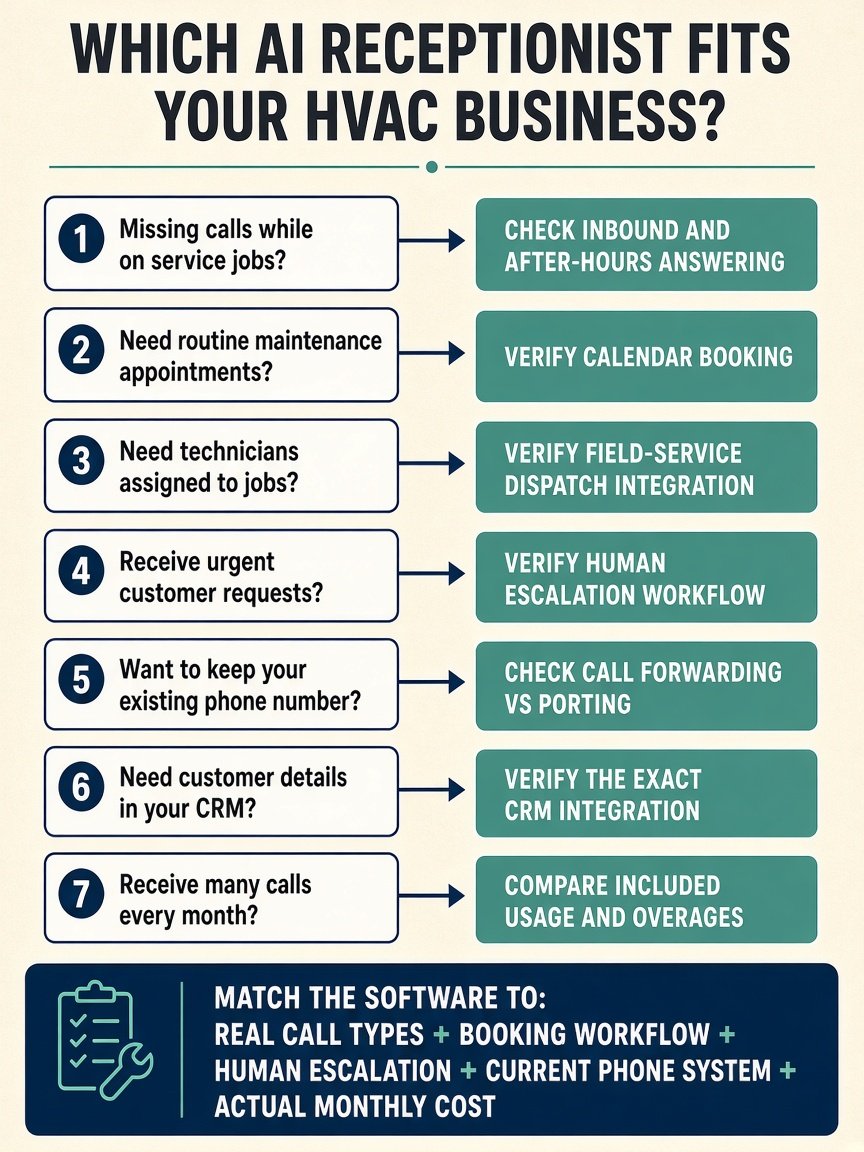
List the mix: maintenance, no-heat, no-cool, estimates, after-hours. Write required fields. Decide calendar holds vs a named FSM connector. Separate forwarding from porting. Price July and January meters.
Final Buying Guidance
Pick the best AI receptionist for HVAC companies by gap: field-service connectors plus optional live agents (Smith.ai), contractor Connected filing (Local Call AI), HVAC SMS on-call with Google Calendar (Asisly), after-hours warm transfer (Dialzara Pro+), unique-customer math (Goodcall), or a bundled front office (Frontdesk). No universal winner.
FAQ
What does an AI receptionist do for an HVAC company? Answer inbound calls, collect configured details, use FAQs you supply, and — where documented — book a slot or notify staff. It does not replace emergency response or dispatch.
Can an AI receptionist answer HVAC calls after business hours? Vendors market 24/7 AI availability — not 24/7 human support and not 100% uptime.
Can it collect heating and cooling service requests? If you configure intake. Check the builder for structured fields.
Can it schedule an HVAC technician? It may book a window. Assignment lives in field-service software when that integration is live.
Can it transfer urgent calls to staff? Blind transfer, warm transfer, SMS notify, and a live-agent add-on differ. Dialzara warm transfer starts at Pro. Smith offers optional live agents. Local Call live-transfer is Concierge.
Can it connect to an existing business phone number? Often via forwarding. Porting is separate.
Does it integrate with HVAC field-service software? Smith publishes ServiceTitan and Housecall Pro paths; Jobber needs SKU confirmation. Local Call names Jobber/JobNimbus on Connected. Asisly lists those three as Q3. Others are Zapier/API or not clearly published.
When should an HVAC business use a human receptionist instead? Complex commercial work, unsafe-equipment conversations, and any call you would not trust to a script.