
This SalesCrunch CRM review is a 2026 buyer check, not a hands-on lab log: SalesCrunchCRM is a browser CRM aimed at ACT! refugees and small sales teams who want a familiar contact card, a visual pipeline, and a 14-day trial at $30 per user per month after. It can fit a founder-led or small team that wants that layout plus Crunchy, the built-in assistant. It is a weaker fit if you need HubSpot-class marketing automation, a large native integration catalog, or a published iOS/Android app. Moon Picke did not run a sales team inside the product. Facts below are from SalesCrunch’s live site and official walkthrough/UI evidence captured 19 September 2026.

SalesCrunch CRM Review: Quick Verdict
Moon Picke may earn a commission if you purchase through some links on this page, at no additional cost to you. Read the affiliate disclosure.
Best for: small sales teams and former ACT! users who want contacts, opportunities, tasks, and mail merge in a browser. Main strength: one published CRM price ($30/user/month) plus a documented 14-day trial with $0 charged today. Main limitation: a narrower public integration story than HubSpot, Pipedrive, or Salesforce, and no native mobile apps on the marketing site. Who should skip: enterprises that need deep ecosystems, advanced forecasting models, or marketing-automation suites.
SalesCrunch CRM at a Glance
| Area | SalesCrunch CRM |
|---|---|
| Best for | ACT!-style contact + pipeline work for small sales teams |
| Pricing model | $30/user/month (one published CRM plan) |
| Free trial / free plan | 14-day trial; no free plan published |
| Pipeline management | Kanban opportunities; drag between stages; header totals |
| Automation | Alarms, recurring activities, Crunchy lookups/drafts (with send approval) |
| Email tools | Gmail connect, templates/merge tokens, bulk email, print/mail merge |
| Reporting | Reports module (contact, phone list, directory, activity, history summary) |
| Integrations | Native Gmail; import (ACT! .dbf, GoldMine, Outlook .pst); no Zapier directory found |
| Mobile support | Web app; native iOS/Android apps not listed |
| Main limitation | Smaller public ecosystem than established CRMs; SaaS pricing can change |
Official product name on the site is SalesCrunchCRM. Positioning: “The ACT! 4.0 you remember, rebuilt for 2026.” Related product MigrationCrunch is a separate migration tool, not the CRM subscription.
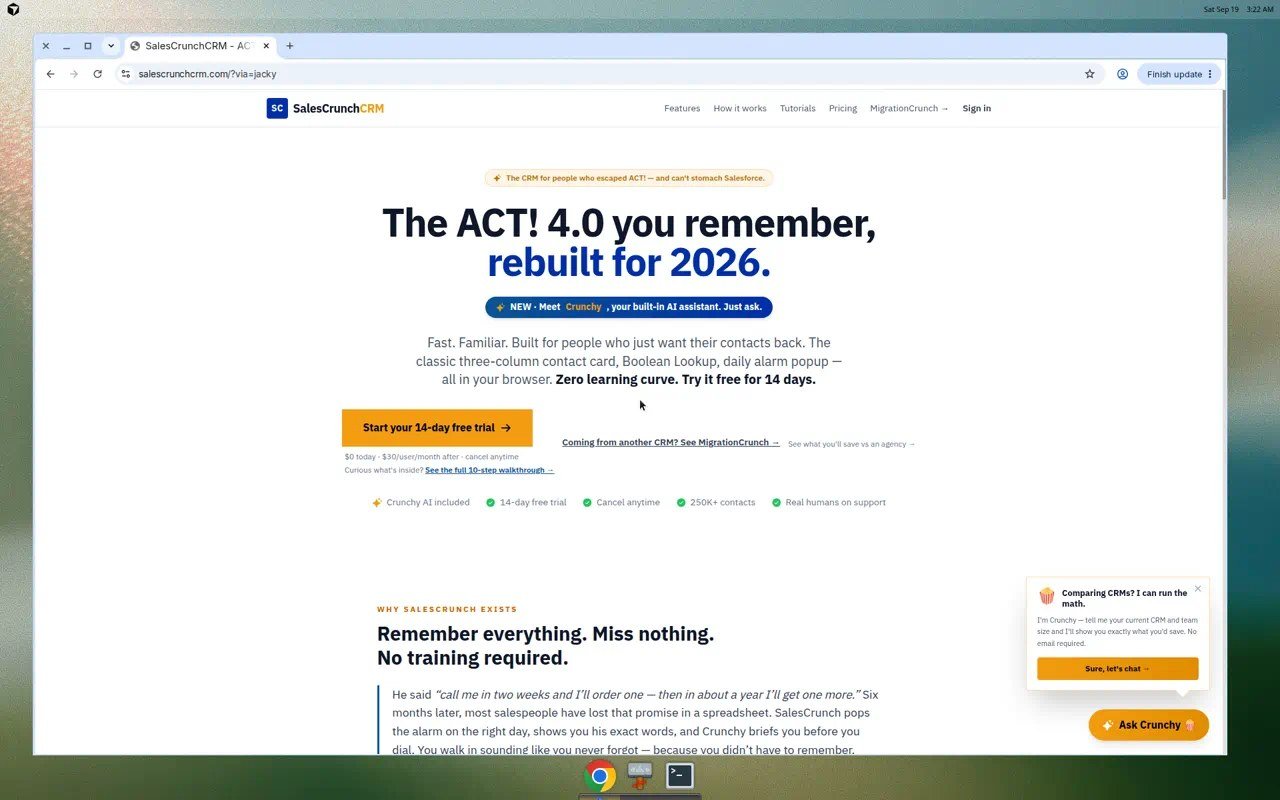
What is SalesCrunch CRM? A web CRM from SalesCrunchCRM that stores contacts, opportunities on a pipeline board, tasks/calendar, reports, and mail merge, with Crunchy as a built-in assistant. It is marketed to people leaving ACT! who do not want Salesforce-scale complexity.
What Is SalesCrunch CRM?
SalesCrunch currently presents itself as a sales CRM and contact manager, not as a generic “all-in-one business platform.” Homepage copy emphasizes a three-column contact card, Boolean Lookup, a daily alarm popup, and “all in your browser.” Nav includes Features, How it works, Tutorials, Pricing, MigrationCrunch, and Sign in.
The official walkthrough says there is no 400-page onboarding: after sign-in you see the contact card (Business Card, Address, Status + User Fields) and an orange toolbar (New / Call / Meeting / Note / Email / Save / Delete). That is SalesCrunch’s claim about familiarity — not a Moon Picke usability test. See how we evaluate software pages.
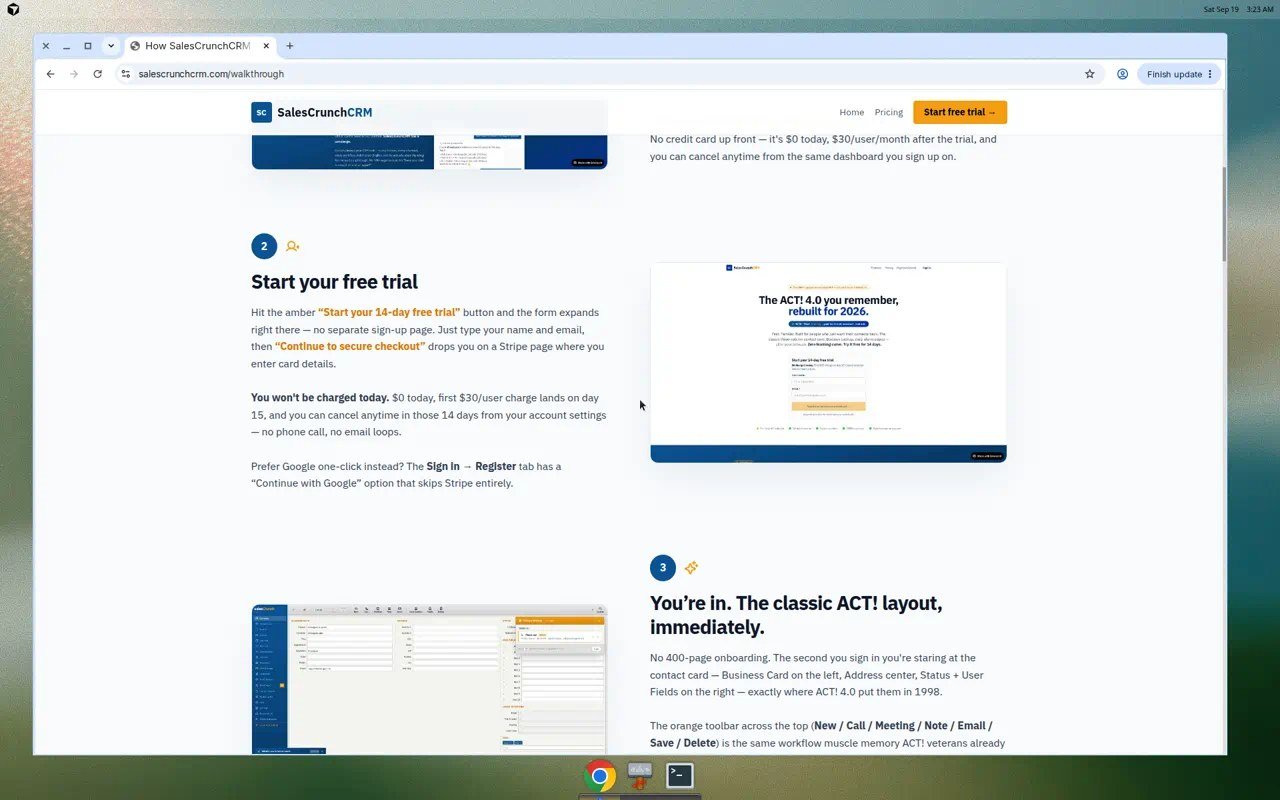
Caption context: the walkthrough is official product explanation, not a private customer tenant. Demo names on official UI posters are SalesCrunch’s sample records.
Sales Pipeline and Deal Management
The live product UI (official tutorial posters) shows a Sales Pipeline under Opportunities. Columns are stages; cards are deals linked to contacts. Documented stage examples include Lead, Qualified, Proposal, and Negotiation, with Won/Lost in SalesCrunch’s public walkthrough language. You can add a deal with title, dollar value, stage, close date, linked contact, and notes. Drag-and-drop between stages is shown. A header total such as “23 deals · $1,250,000 in pipeline” is pipeline value, not an advanced forecast model. SalesCrunch’s own walkthrough copy says there are no forecasting models and no probability juggling — column totals, not HubSpot-style forecast categories.
Multiple named pipelines are not clearly published as a first-class feature. Do not assume enterprise multi-pipeline architecture.
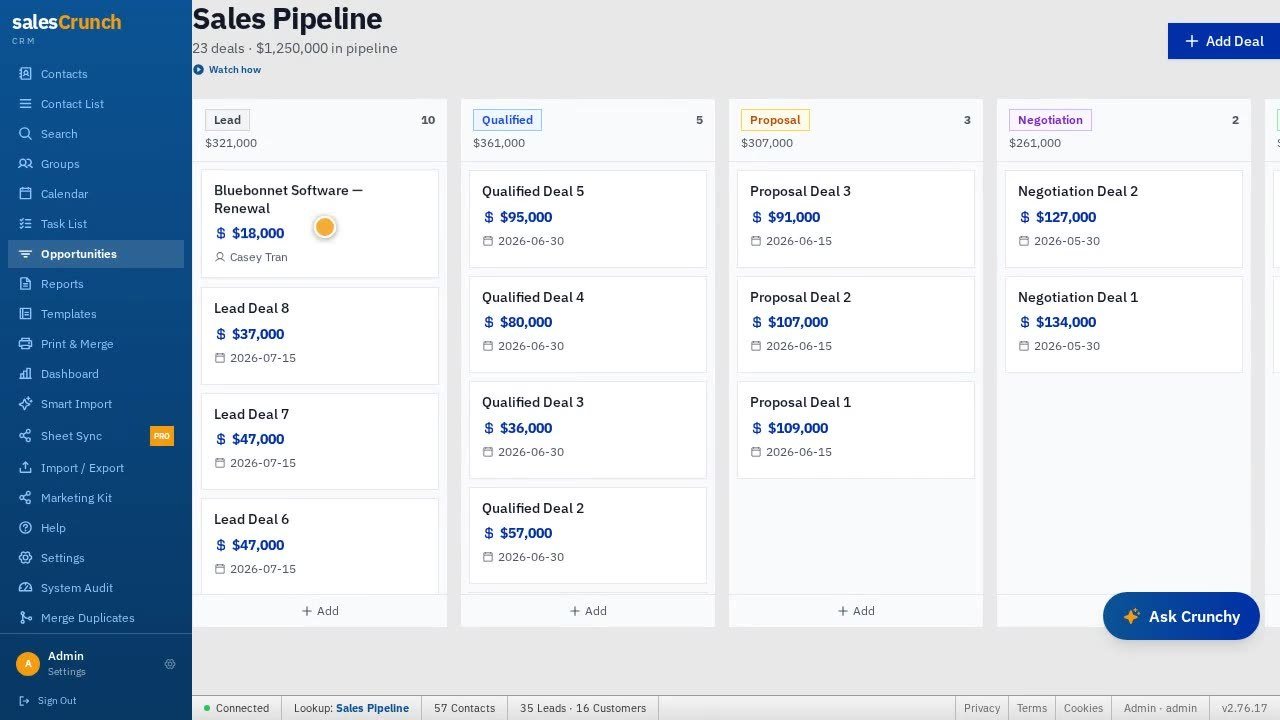
Official SalesCrunch pipeline screenshot from current product tutorial media. Sample deal names are on-screen demo data, not Moon Picke customers.
Contacts, Leads and Everyday CRM Workflow
Contacts are first-class. The contact card includes name, company, title, phone, email, address, ID/Status (example: Lead), referred-by, and numbered user fields. Sidebar items on current UI include Contact List, Search, Groups, Calendar, Task List, Opportunities, Reports, Templates, Print & Merge, Dashboard, Smart Import, Sheet Sync (Pro badge), Import / Export, Marketing Kit, Help, Settings, System Audit, and Merge Duplicates.
Leads are not a totally separate object in the marketing copy; status on the contact card is how “Lead” appears. Lookup/Boolean filters, Smart Groups that re-run a query, frozen groups, tags on the contact card, duplicate merge, contact-to-contact links (referred by, colleague, spouse), CSV export of all fields, and Quick Add (Ctrl+K in product copy) are documented. Import copy lists messy CSV mapping, ACT! .dbf, GoldMine, and Outlook .pst. Capacity language on the homepage: “250K+ contacts,” with a comparison table claiming lookup at 250K contacts “under 1 second.” That speed figure is SalesCrunch’s published claim, not a Moon Picke benchmark.
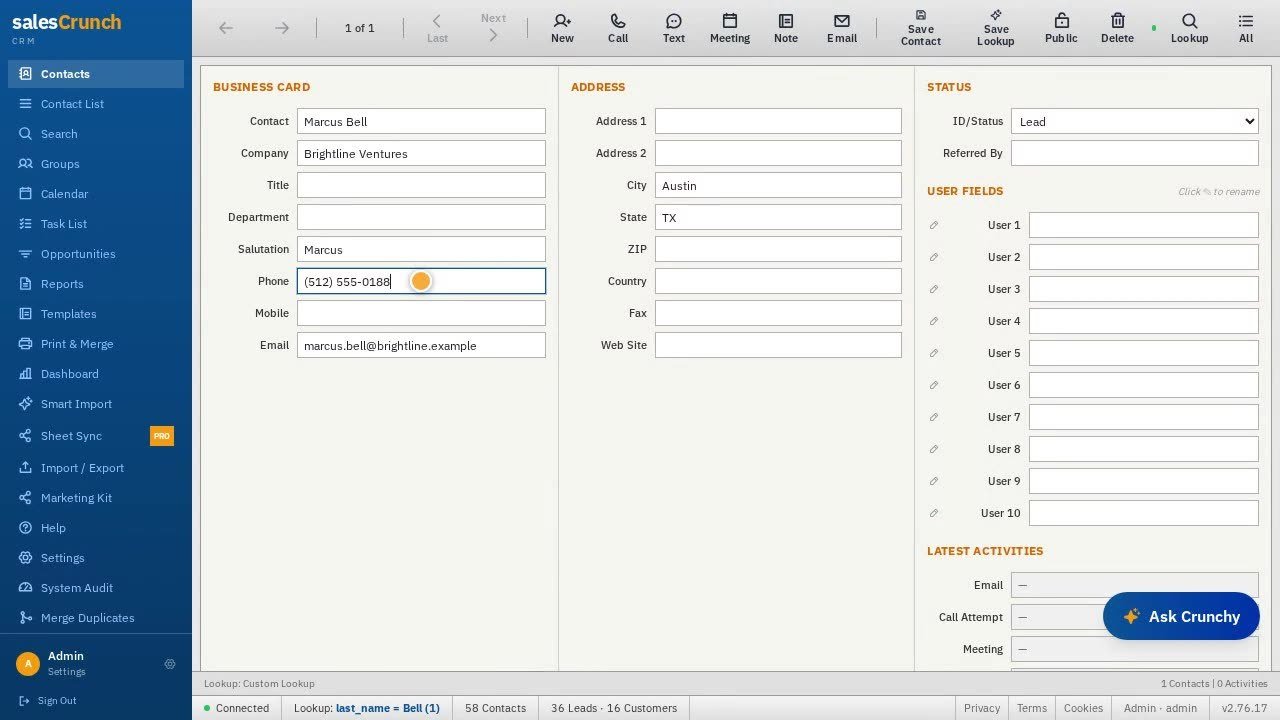
Official contact-card screenshot from SalesCrunch tutorial media. Phone/email use example-style sample data on the recording.
Automation and Follow-Up Features
Do not equate “it is a CRM” with HubSpot workflows. What SalesCrunch currently documents:
- Daily alarm popup / ACT!-style alarms (overdue vs today).
- Tasks with due date, priority, notes; completion logged to history.
- Recurring activities (product copy: daily through yearly, up to 52 instances in walkthrough language).
- GhostBuster: flags deals with no touch in 14 days and drafts a re-engagement email from notes, one click to the composer.
- Crunchy: can search/filter, schedule activities, and draft bulk email; walkthrough says bulk email waits for your Send approval.
That is assistant- and reminder-style automation, not a proven visual workflow builder with unlimited branching. Crunchy is marketed as included, powered by Claude Sonnet 4.5, with 150 messages/month included and extra messages sold in packs (product UI: 200 extra messages as a $15 one-time pack). Hitting the limit is a real constraint for heavy AI use.
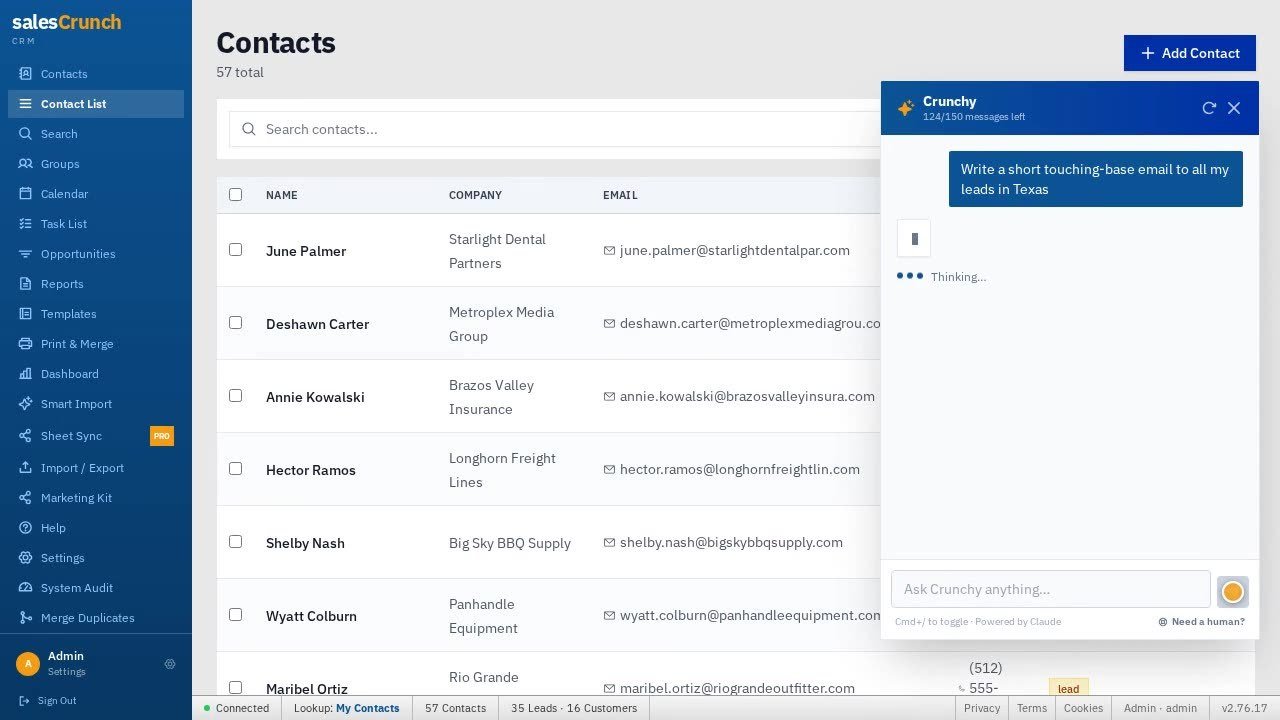
Official Crunchy / contact-list screenshot from SalesCrunch tutorial media. “Powered by Claude” appears on the drawer in that recording.
Does SalesCrunch CRM have automation? Yes, in a limited documented sense: alarms, recurring tasks, GhostBuster drafts, and Crunchy actions with send approval. It is not documented as a full marketing-automation platform.
Email, Communication and Sales Workflow
Email sending is not the same as marketing automation. SalesCrunch documents:
- Gmail connect in Settings; sends can use connected Gmail (product copy: 500/day limit, replies in Gmail) or a SalesCrunch domain picker on Print & Merge / Crunchy bulk email.
- Templates with merge tokens for name and company, used in mail merge, bulk email, and one-off sends.
- Mail merge / Print & Merge for letters, labels, and envelopes — an ACT!-era workflow, not a drip-sequence product.
- Crunchy drafts campaigns from a sentence; nothing sends until you click Send, per current copy.
Classic email sequences (multi-step timed cadences with exit criteria) are not clearly published as a separate module. Tracking opens/clicks as a dedicated sequencer is not verified here. Calendar and tasks sit beside email as activity tools.
Reporting and Analytics
A Reports area exists. Official tutorial UI lists report types: Contact Report, Phone List, Contact Directory, Activity History, and History Summary, with filters (status, tag) and Lookup-aware reporting (“Lookup active: status = Lead”). Pipeline headers show deal counts and dollar totals. SalesCrunch tells buyers this is not probability-weighted forecasting. Moon Picke’s view: useful operational lists for a small team; not a BI suite.
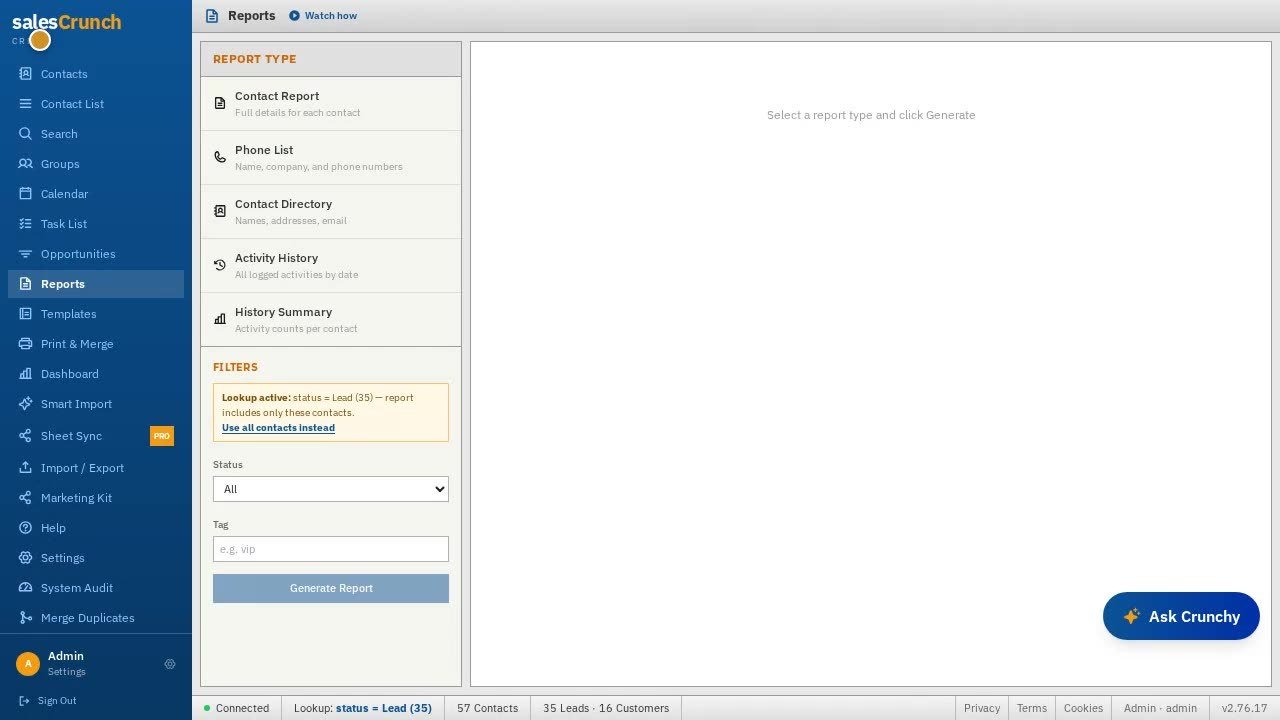
Official Reports screenshot from SalesCrunch tutorial media. This shows report types, not a live analytics benchmark.
Integrations and App Ecosystem
Separate native connections from name-drops.
Documented in-product connections: Gmail; AI-assisted import; Sheet Sync (Pro in the sidebar); CSV import/export; workspace JSON backup of custom fields, dropdowns, and templates.
Not found on a public Zapier-style directory: Zapier, Make, or a customer REST API catalog. Internal /api/ routes power the web app; that is not a published no-code integration platform.
Crunchy “AI tool map” copy mentions Gamma (slides), ElevenLabs (voice), Fathom (notes), and Loom (video) as tools Crunchy can point you to — not verified native two-way CRM sync. Do not read that as “integrates with everything.”
Mobile: the product is a web app. Native iOS and Android apps were not listed on the public marketing site on 19 September 2026. Real-time sync is described as WebSocket-powered between assistant and desktop — still not an App Store listing.
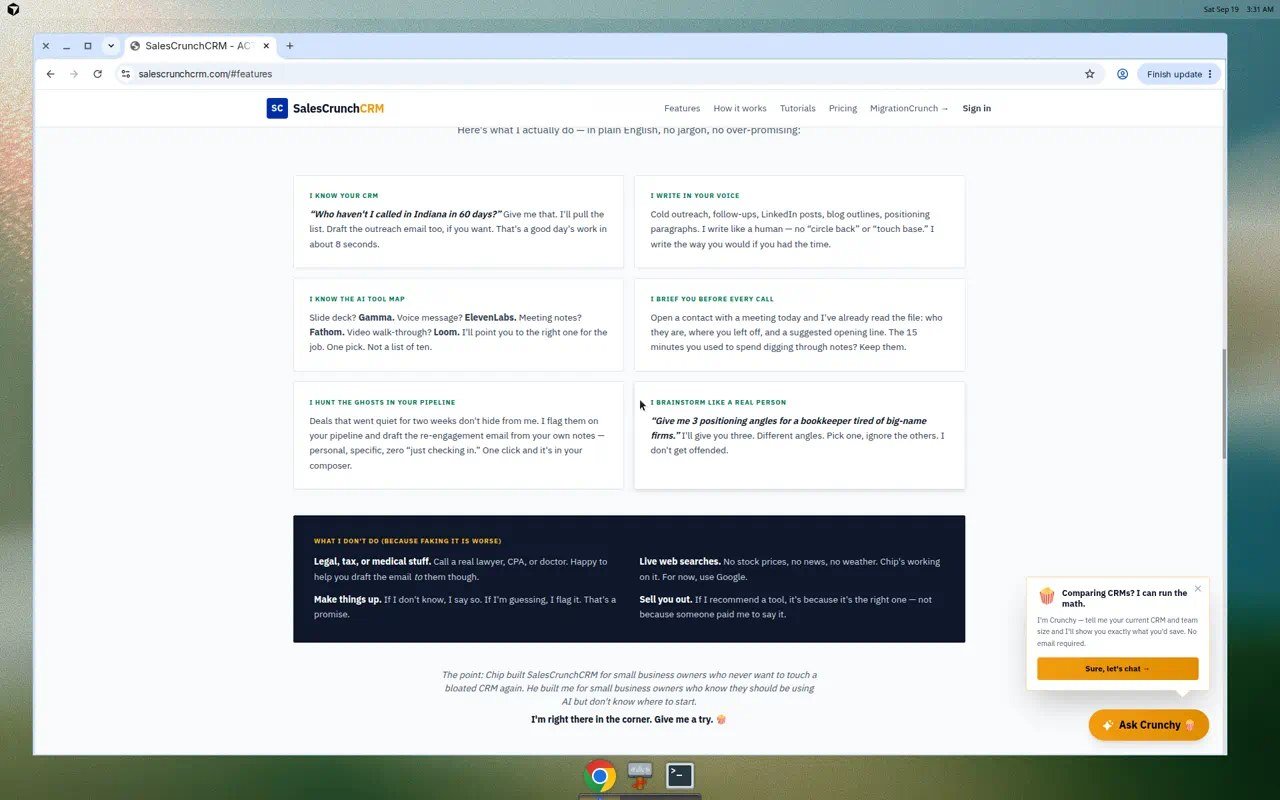
SalesCrunch Features section captured 19 September 2026. Tool names in Crunchy copy are not a native integration marketplace.
SalesCrunch CRM Pricing in 2026
Pricing verified 19 September 2026 from the live homepage, walkthrough, and #pricing comparison. SaaS prices change.
The CRM is one published plan: $30/user/month. Homepage: Crunchy included, 14-day trial, cancel anytime, 250K+ contacts, human support. Walkthrough: $0 today; first $30/user charge on day 15; cancel from account settings; Google Register can skip Stripe. No free plan. Ten users is not $30; their 10-user annual estimate is $3,000. Competitor columns are labeled February 2026 public list prices — not a Moon Picke audit. Legal copy mentions monthly or annual billing at the signup rate; marketing emphasizes $30/user/month. Do not invent an unpublished annual discount. Crunchy message packs and MigrationCrunch one-time SKUs are not the CRM seat. Homepage CRM copy still offers free migration onto SalesCrunchCRM, which is different from paying MigrationCrunch to land in Salesforce or HubSpot.
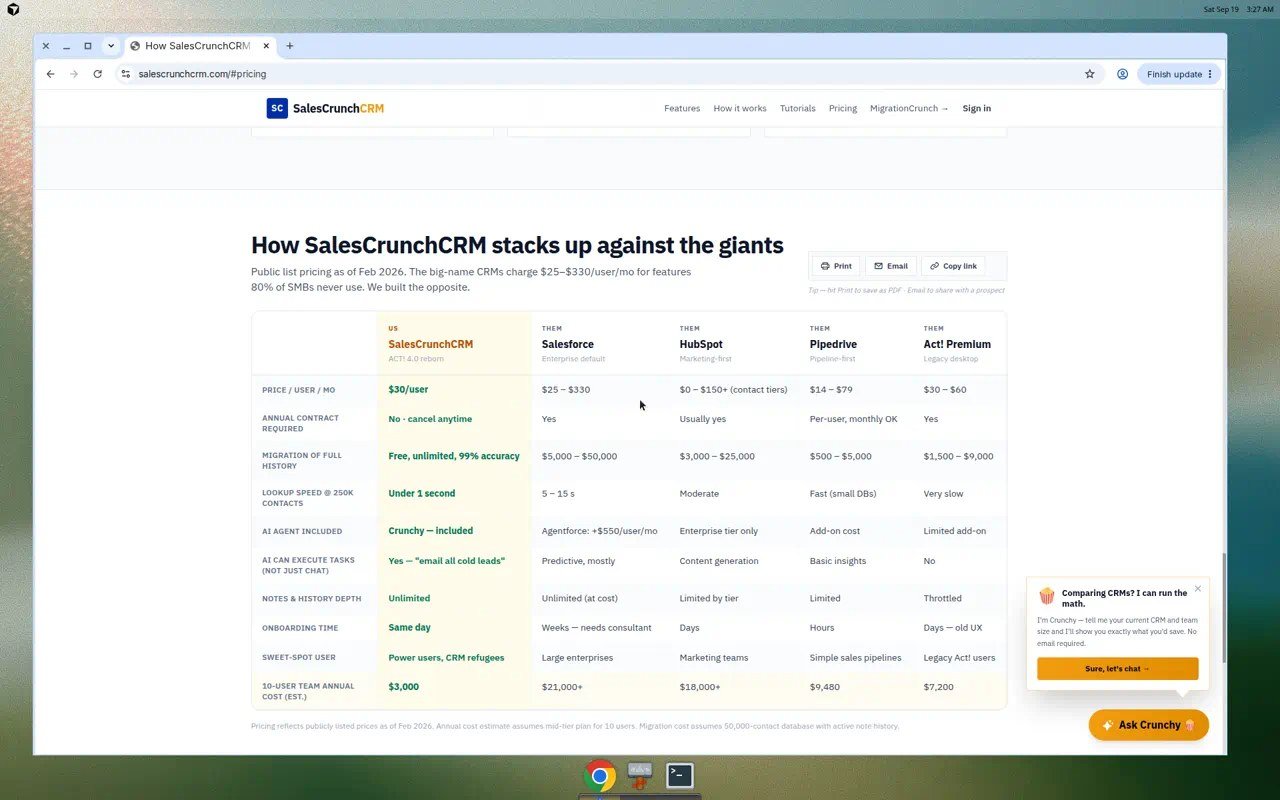
SalesCrunch pricing shown at the time of review; SaaS pricing can change. Comparison table on-page is dated February 2026 for public list prices.
How much does SalesCrunch CRM cost? As of 19 September 2026, SalesCrunch publishes $30 per user per month after a 14-day trial with $0 charged today. No free plan was listed. Per-user cost scales with seats.
What SalesCrunch CRM Does Well — and Where It Falls Short
Does well (evidence-based): a complete small-team CRM loop — contacts, opportunities, calendar/tasks, reports, merge/print — without a maze of published editions. The ACT!-shaped card and toolbar are explicit product design. Crunchy and GhostBuster are named, limited AI features, not a vague “AI-powered CRM” sticker. Trial terms are written in plain numbers. Export/backup language reduces lock-in anxiety.
Falls short (real trade-offs): no published native mobile apps; no Zapier directory found; reporting is operational rather than forecast modeling; automation is reminders + assistant drafts, not a marketing cloud; Crunchy is capped at 150 included messages/month; Sheet Sync is marked Pro on the UI, so not every sidebar item is clearly in the $30 story without checking Settings; the brand is smaller than HubSpot/Salesforce, which usually means a thinner third-party ecosystem even when the core workflow is complete. “Zero learning curve” is marketing, not a measured onboarding study.
Privacy/security: Stripe checkout (“we never see your card”) is stated. GDPR-style notice language appears in legal copy. SOC 2 was not found. Do not infer a certification. That limitation set is why this SalesCrunch CRM review stays conditional.
This is context, not a full comparison article. HubSpot CRM still wins buyers who need a huge app marketplace and marketing hub. Pipedrive is the pipeline-first incumbent with a long integration list. Zoho CRM and Freshsales compete on suite pricing and native modules. SalesCrunch’s counter is a single $30 seat, ACT! muscle memory, included Crunchy, and migration storytelling. Smaller is not automatically worse; larger is not automatically the right process. If you already live in HubSpot or Salesforce, switching cost is the story — not a feature grid. Other Moon Picke software reviews, such as the SparkReceipt review and receipt management software for small business, follow the same “fit over brand size” rule. Editorial process: editorial standards.
Who Should Use SalesCrunch CRM — and Who Should Skip
Use it if: you are a solo seller or founder-led team leaving spreadsheets or ACT!; you want contacts + a dollar pipeline + mail merge without buying a marketing cloud; $30/user/month and a 14-day trial match budget; you will work in the browser. Check current SalesCrunch plans
Skip it if: you need enterprise sharing, CPQ, or multi-pipeline sales ops; you require native mobile apps; you need Zapier/Make as a documented connector; you want advanced forecasting or a full email-sequence product; you are already standardized on HubSpot/Salesforce and only needed a feature checklist. About Moon Picke and Digital Tools collect how we label software pages.
Is SalesCrunch CRM good for small businesses? It can be, when the ACT!-style contact/pipeline workflow and $30/user/month plan match the team. It is a poor default if the business actually needs a larger CRM ecosystem.
Is SalesCrunch CRM Worth It in 2026?
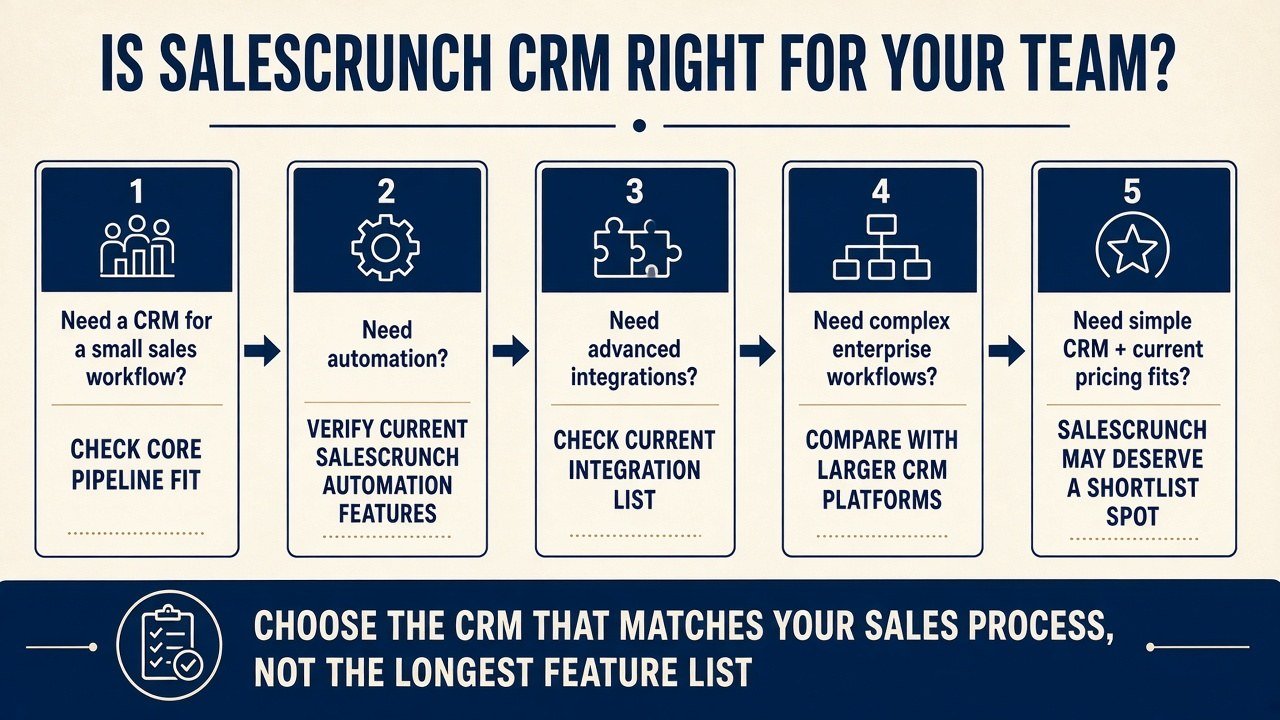
Conditional. This SalesCrunch CRM review’s 2026 verdict: worth a shortlist for small U.S. sales teams who want a familiar CRM at a published $30/user/month with a 14-day $0-today trial — especially ACT! refugees. It is not worth forcing if you need mobile apps, a wide native integration catalog, or marketing automation. Ask whether it matches your process and budget, not whether the feature list is the longest. Affiliate links did not decide that conclusion.
FAQ
What is SalesCrunch CRM? SalesCrunchCRM is a browser CRM positioned as ACT! rebuilt for 2026, with contacts, opportunities/pipeline, tasks, reports, and Crunchy.
Who is it best for? Small sales teams and ACT!/CRM refugees who want that layout more than an enterprise suite.
How much does it cost? $30/user/month after the trial, as published 19 September 2026. Per-user, not a flat workspace fee.
Does it have a free plan? No free plan was published. There is a 14-day free trial.
Does SalesCrunch CRM offer a free trial? Yes. 14 days; $0 charged today per current walkthrough copy.
What integrations does it support? Gmail connect and file imports are documented. Zapier was not found. Crunchy mentions third-party AI tools; those are not verified native syncs.
Is it good for small teams? Pricing and workflow are aimed there. Confirm Gmail, browser-only access, and Crunchy’s 150-message cap before you treat any SalesCrunch CRM review as a buy.
What are the main alternatives? HubSpot CRM, Pipedrive, Zoho CRM, and Freshsales — for ecosystem depth rather than ACT! familiarity.