

Quick verdict: HostArmada is a credible shared-hosting option for small businesses, WordPress users, and site owners who value managed support, daily backups, free migrations, and a choice of global server locations. Its entry pricing is competitive, but the strongest discounts require a long billing term and renewal rates are much higher. For most growing sites, Web Warp is the practical middle ground; Speed Reaper makes sense when LiteSpeed and dynamic caching matter.
Affiliate disclosure: Moon Picke may earn a commission if you purchase through links in this review, at no extra cost to you. This does not affect our editorial assessment. Prices and plan details were checked on October 12, 2026 and can change; verify the checkout page before paying.
Check HostArmada Shared Hosting Plans
1. What is HostArmada shared hosting?
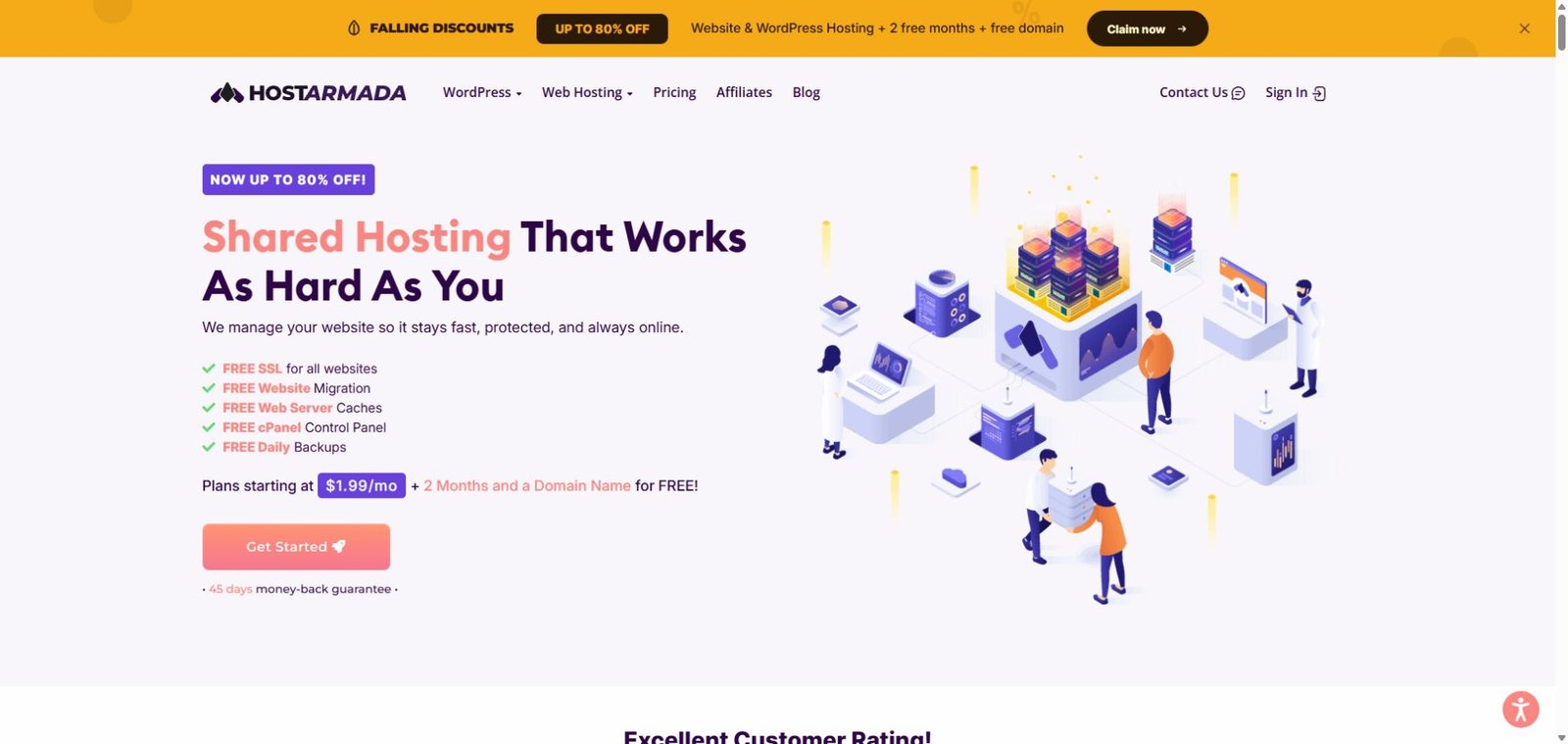
HostArmada sells managed cloud-based shared hosting aimed at people who want cPanel convenience without running a server themselves. The company handles the underlying platform while customers manage domains, files, email, databases, and WordPress from familiar tools. Shared hosting means several customers use the same physical infrastructure, so it is best suited to blogs, portfolios, local businesses, and modest ecommerce projects rather than resource-heavy applications.
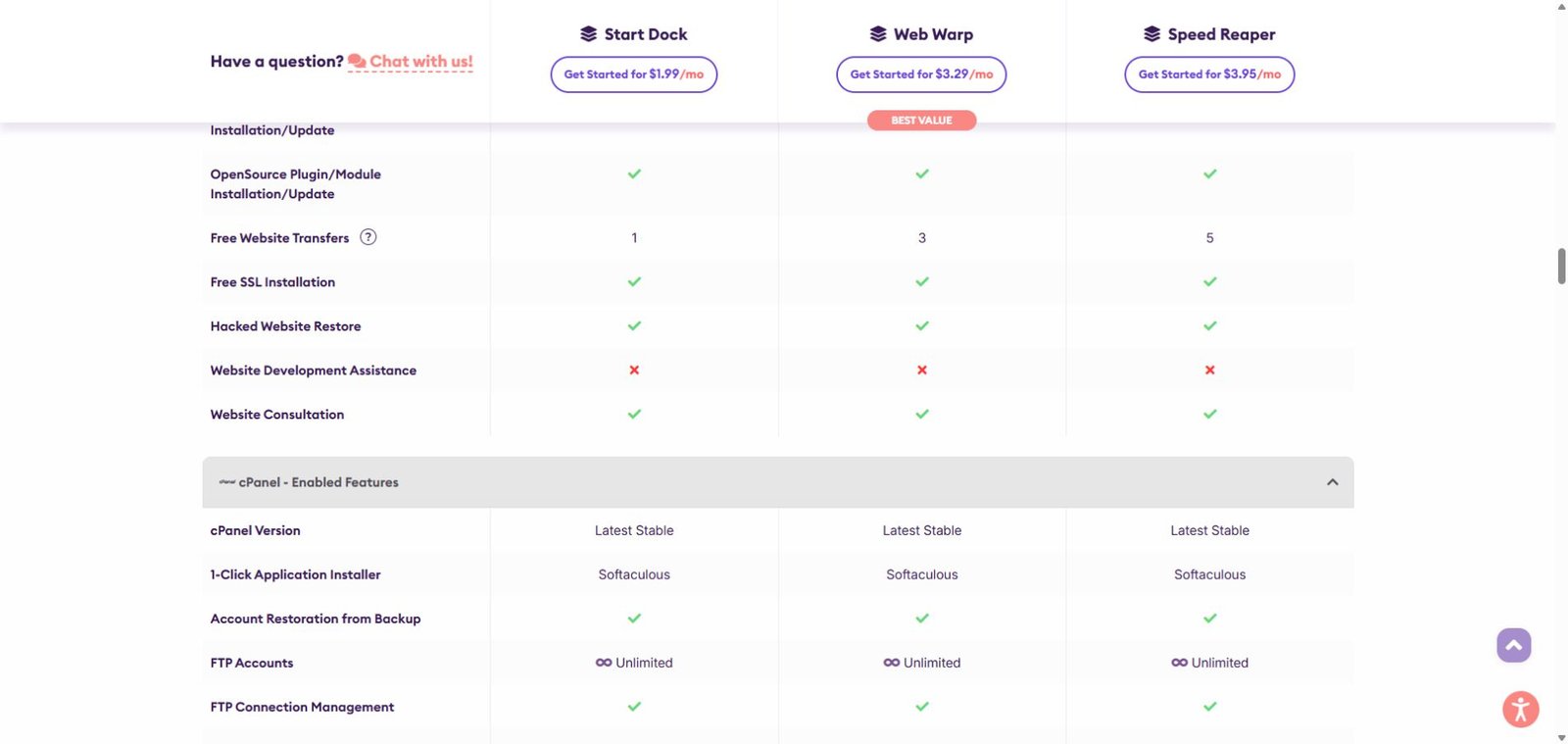
The current lineup is Start Dock, Web Warp, and Speed Reaper. All three include free SSL for hosted sites, daily backups, malware scanning and removal, a web application firewall, email hosting, and access to support. HostArmada also advertises nine global data-center locations. Location choice can reduce latency for a geographically concentrated audience, although a CDN may still help visitors far from the selected server.
2. HostArmada plans and current pricing
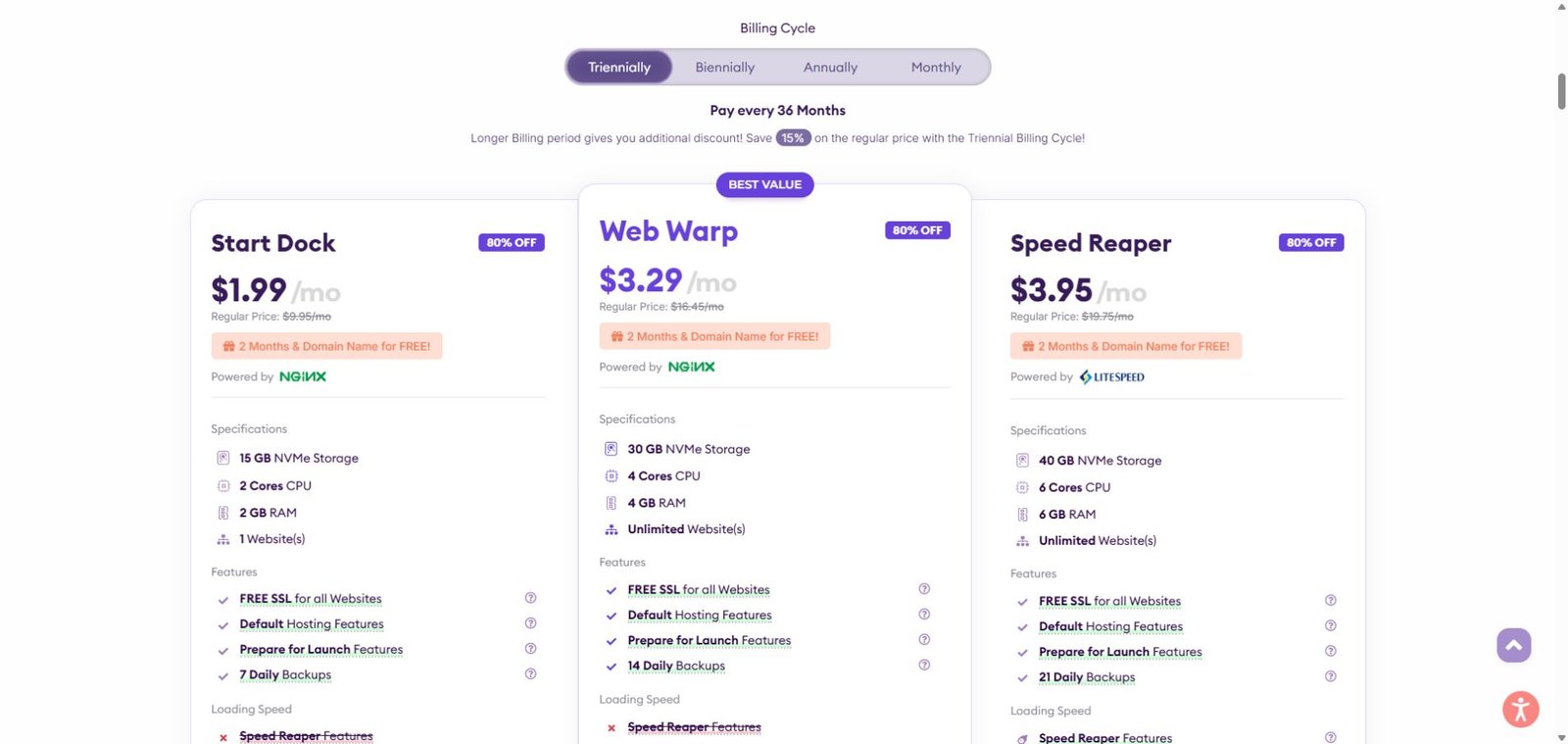
The headline prices below are promotional monthly equivalents for a 36-month billing cycle, not month-to-month bills. At the time of review, HostArmada also advertised two free months and a free domain with qualifying long-term purchases. Exact checkout totals, taxes, domain extensions, and eligibility may vary, so treat the table as a comparison—not a quote.
| Plan | Intro price | Regular/renewal | Storage | Websites | Daily backups |
|---|---|---|---|---|---|
| Start Dock | $1.99/mo | $9.95/mo | 15 GB NVMe | 1 | 7 |
| Web Warp | $3.29/mo | $16.45/mo | 30 GB NVMe | Unlimited* | 14 |
| Speed Reaper | $3.95/mo | $19.75/mo | 40 GB NVMe | Unlimited* | 21 |
*“Unlimited” sites do not mean unlimited server resources. CPU, RAM, storage, and acceptable-use thresholds still apply.
The advertised 36-month equivalents imply roughly $71.64, $118.44, or $142.20 before any free-month adjustment, taxes, or add-ons. Because the promotion can change how checkout is calculated, confirm the actual amount due on the order screen. The renewal jump is material and should be included in a multi-year budget.
View Current HostArmada Pricing
3. Which plan is best?
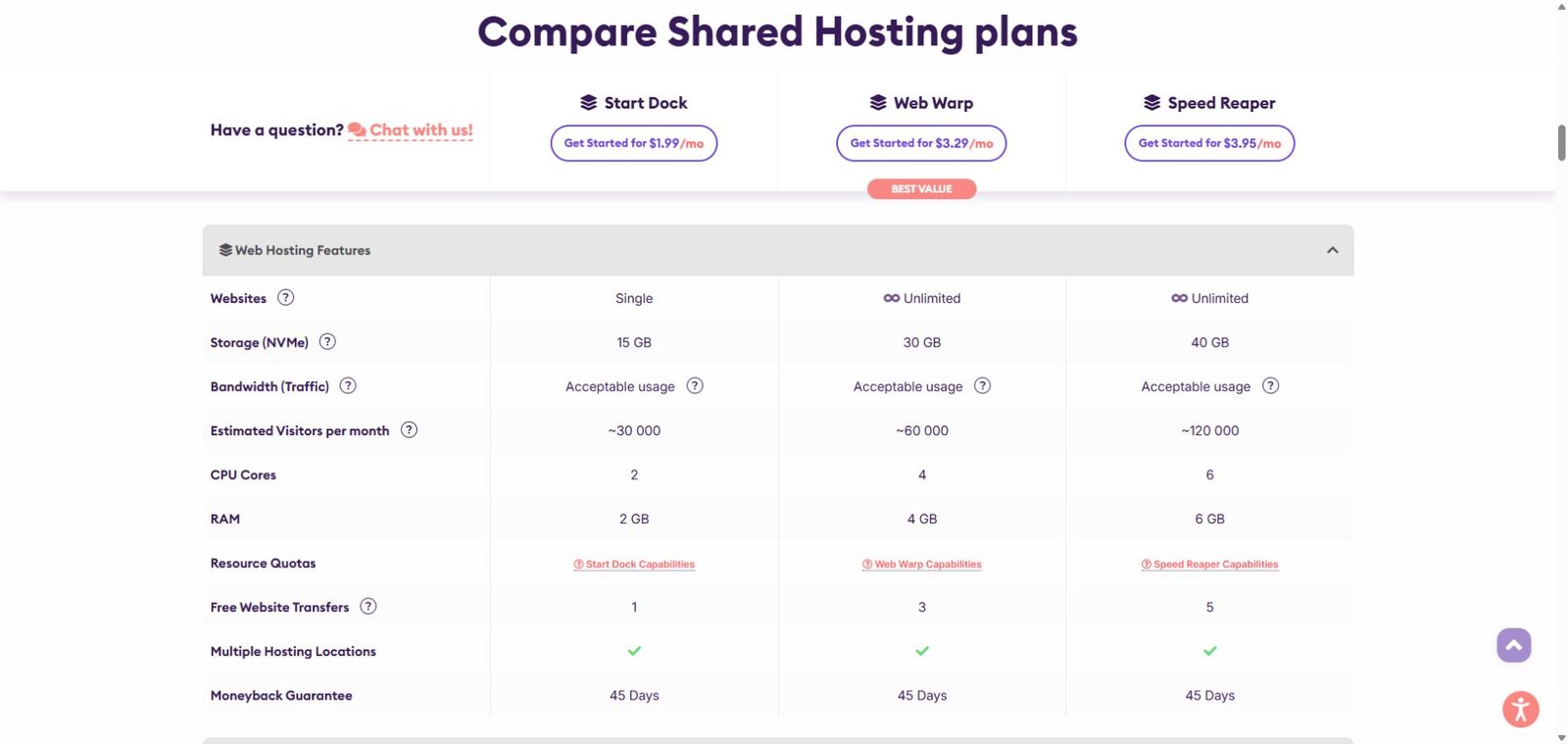
Start Dock is the economical choice for one new website. Its 15 GB storage, two CPU cores, 2 GB RAM, one free transfer, and seven daily restore points are reasonable for a small brochure site or personal blog. The single-site limit is the main constraint.
Web Warp is the best fit for most buyers in this comparison. It doubles storage to 30 GB, raises resources to four CPU cores and 4 GB RAM, supports multiple sites, includes three free transfers, and retains 14 daily backups. It gives agencies and owners of several modest sites more room without paying for the top tier.
Speed Reaper is for performance-oriented WordPress or ecommerce projects. It adds LiteSpeed, static-and-dynamic caching, HTTP/3, six CPU cores, 6 GB RAM, five transfers, and 21 daily backups. Those features can improve the platform’s ceiling, but application design, plugins, images, traffic patterns, and CDN configuration still affect real-world speed.
4. Performance and traffic limits
HostArmada describes shared-plan bandwidth as “acceptable usage” rather than a metered overage product. Its comparison page gives estimated monthly visitor guidance of about 30,000 for Start Dock, 60,000 for Web Warp, and 120,000 for Speed Reaper. These are planning estimates, not guarantees. Traffic quality, page weight, cache hit rate, PHP work, and concurrent users can change actual capacity substantially.
The host also publishes traffic guidance of 30 GB, 60 GB, and 90 GB respectively. It says a threshold is not an automatic bill or instant suspension, but sustained heavy use may prompt intervention or an upgrade recommendation. Buyers expecting campaign spikes should ask support how acceptable-use policies apply to their workload.
5. WordPress, migration, email, and control panel
Every shared plan includes cPanel and a one-click application installer. WordPress users can install the CMS, manage PHP versions, create databases, and use WP-CLI or Git where appropriate. Email accounts, forwarders, webmail, IMAP/POP3/SMTP, and standard authentication records are included, subject to plan resource policies.
Free website transfers scale from one on Start Dock to three on Web Warp and five on Speed Reaper. That is useful for moving established sites, but confirm the migration scope, timing, and any unsupported source configuration before changing DNS. For domain purchasing context, see our NameSilo review.
6. Security and backups
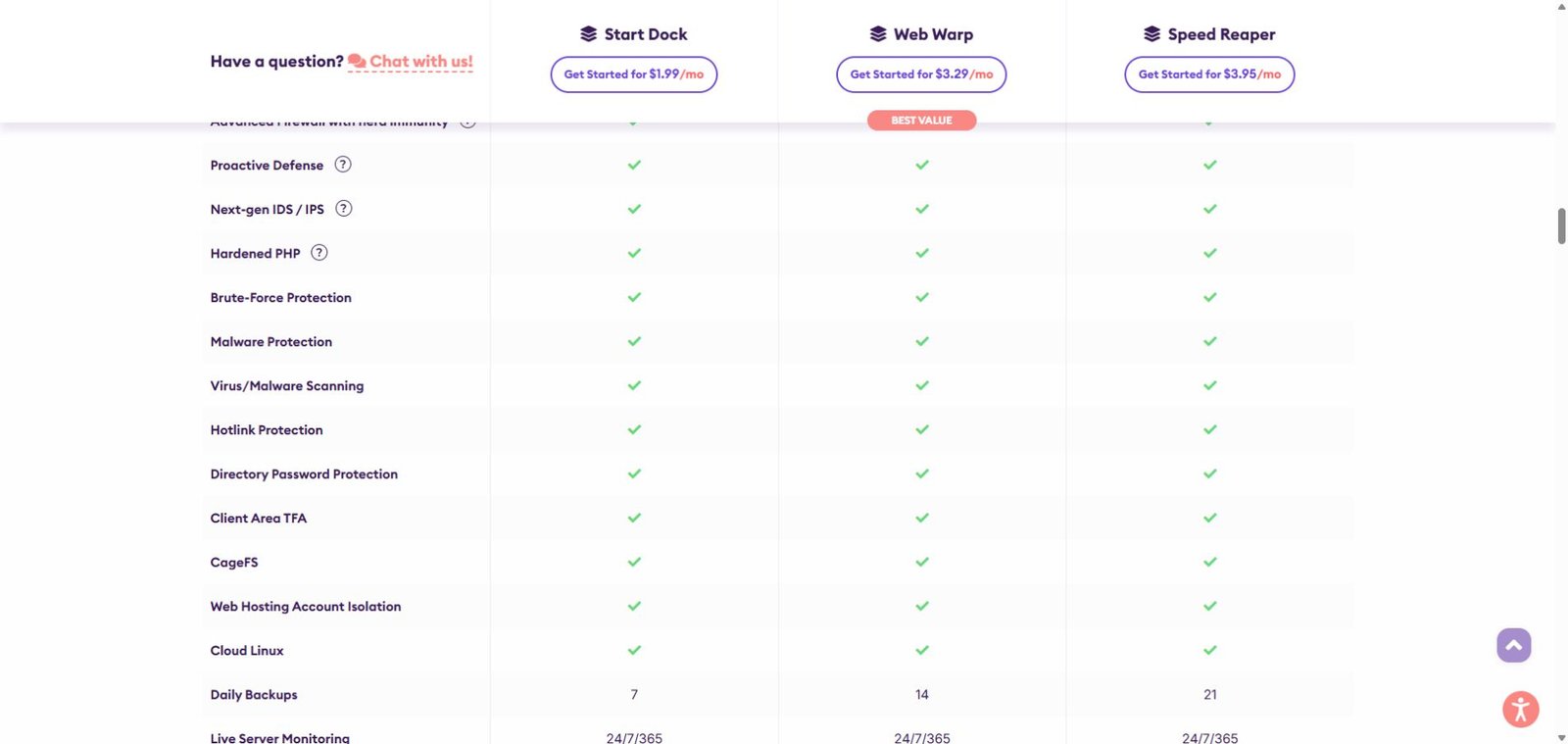
HostArmada lists free SSL, account isolation, network and application firewalls, brute-force protection, malware scanning, and malware removal across the lineup. Daily backups are retained in different quantities by plan: seven, 14, or 21. More restore points can help when a problem is discovered late, but customers should still keep independent off-site copies for important sites. Host backups are not a substitute for a tested disaster-recovery plan.
7. Support and money-back policy
Support is advertised as available 24/7/365 through tickets, chat, and phone, with help for open-source application installation, SSL, hacked-site restoration, and general website consultation. Support does not include full website development.
The shared-hosting page advertises a 45-day money-back guarantee. HostArmada’s billing knowledge base says eligible customers must cancel within the first 45 days and choose immediate cancellation. Domain registrations and add-ons are excluded, and other conditions can apply. Read the current cancellation policy before ordering—especially if a free domain is included—rather than assuming every charge is refundable.
Explore HostArmada Hosting Options
8. Pros and cons
Pros
- Low introductory pricing for long commitments
- Free SSL, email, cPanel, migration allowance, and daily backups
- Security features and malware removal included
- Nine global data-center choices
- Clearer CPU and RAM allocations than many shared-hosting offers
Cons
- Renewal prices are substantially higher than introductory rates
- Best discount requires a 36-month commitment
- “Unlimited” sites remain bounded by storage and resource policies
- LiteSpeed and dynamic caching are reserved for Speed Reaper
- No independent performance benchmark was conducted for this review
9. HostArmada vs alternatives
HostArmada stands out when managed migration, daily backup depth, cPanel, and multiple data-center choices matter. Hostinger may appeal to buyers who prefer a proprietary control panel and a large ecosystem. SiteGround is often considered for its WordPress tooling and support but can be more expensive at renewal. Namecheap may suit budget-focused buyers who want domains and hosting under one account. Compare the exact term, renewal price, storage, backup retention, email allowances, and migration scope rather than headline price alone. Our GTHost review covers a different infrastructure-focused option.
10. Google Ads and affiliate-policy note
This article is an editorial review, not a guarantee of ad approval. Google Ads destination rules require a working, navigable page with original value and a final URL that behaves transparently. HostArmada’s published affiliate terms prohibit brand bidding and appear to restrict direct linking, while a separate HostArmada PPC guide discusses nonbrand campaigns and deep links. Because those documents can be read as conflicting, obtain written confirmation from the affiliate manager before launching paid search. Use nonbrand keywords only if explicitly allowed, add HostArmada brand variants as negatives, and never represent the landing page as HostArmada’s official site.
11. Final verdict
HostArmada is worth shortlisting for a small or growing website when hands-on support, cPanel, migration assistance, daily backups, and security features are higher priorities than the absolute lowest long-term cost. Start Dock fits one lightweight site; Web Warp is the balanced recommendation for multiple sites; Speed Reaper is the performance tier. The main buying decision is whether the included management and backup depth justify the renewal price after the introductory term.
Frequently asked questions
Is HostArmada good for WordPress?
It can be a good fit for small and medium WordPress sites that value cPanel, managed support, migrations, SSL, security, and daily backups. Speed Reaper has the strongest caching stack.
Does HostArmada include a free domain?
The reviewed promotion advertised a free domain with qualifying long-term plans. Extension eligibility, renewal cost, and refund treatment should be checked at checkout.
Is HostArmada really unlimited?
No hosting is unlimited in every dimension. Web Warp and Speed Reaper allow unlimited websites, but storage, CPU, RAM, traffic guidance, and acceptable-use rules still apply.
How long is the refund period?
Eligible shared-hosting purchases are advertised with a 45-day money-back guarantee. Domains, add-ons, billing cycles, and cancellation method can affect eligibility.
Which HostArmada plan should I choose?
Choose Start Dock for one small site, Web Warp for several growing sites, and Speed Reaper when LiteSpeed, dynamic caching, and higher resource allocations justify the extra renewal cost.