
The job is smaller than “make an AI video” and different from “pick a stock presenter.” You already have a picture. It might be a portrait, a half-body shot, a drawing, or a mascot. You want that picture to speak. The mouth should follow a script or a recording, and the result should be a video. That product category is an AI talking photo generator.
On 5 October 2026, four products had a documented still-image input, a speech input, and speech-driven mouth motion, with enough public limits to compare. Hedra Character-3 starts from an image and audio. HeyGen Avatar IV starts from a photo and a script, an uploaded audio file, or a recording. D-ID’s Talks API starts from an image URL and either text or audio. Sync’s sync-3 model can start from a still instead of a video, and it is the only Sync model that does. Moon Picke did not upload the same photo or the same audio to any of them. There is no realism score and no lip-sync score in this article.
Quick picks
- Best match for a photo plus your own audio: Hedra Character-3. The API requires a start image and audio. Leaving duration empty makes the video as long as the recording, up to about 10 minutes. Singing and multi-speaker selection are documented on that model.
- Best when the photo should become a presenter: HeyGen Avatar IV. The product page accepts a portrait, half-body, or full-body photo, then a script, an audio upload, or a microphone recording, and it describes expressions and hand gestures. Plan limits and credits are a separate meter from a per-second model price.
- Best classic talking-head API: D-ID. One image and either text or audio become a talk. Studio dollar prices were not in the public HTML checked the same day, so this pick is about the documented workflow, not a cheap-plan claim.
- Best when a lip-sync model is what you already want: Sync sync-3. A still image plus audio or text is supported only on this model. The cheaper Sync models take video, not a photo.
Comparison table
| Tool | Best for | Own photo | Own audio | Face / body | Character types | Max output | Starting price |
|---|---|---|---|---|---|---|---|
| Hedra Character-3 | A still that performs a recording | Yes, start image | Yes, required on the API | Generated performance from the still; full-body preservation not specified | Photo, illustration, cartoon, painting, mascot, on the talking-photo page | Audio 0.5–600 seconds | API from 2.5 cents/second at 540p; studio Basic $20/month |
| HeyGen Avatar IV | A photo presenter with a script | Yes | Yes on the product page; the photo-avatar API example uses a script and a voice | Expressions and hand gestures documented; full-body input is named | Human, anime, and animal on the Avatar IV page | Avatar IV: 1 minute on Free, 30 minutes on paid rows | Free, then Creator $29/month |
| D-ID Talks | One face, text or audio, via API | Yes, JPEG or PNG URL | Yes, script type audio | Talking head; full-body not documented | A face image; art-style notes exist, not a character catalog | Audio up to 10 minutes for talks, 5 minutes for clips | Plan dollars not printed on the page fetched |
| Sync sync-3 | A still inside a lip-sync model | Yes, JPEG, PNG, or WebP | Yes, or text | Lip movement documented; body animation not documented for the image path | A face image; illustrated-character support not separately specified | Plan caps 1–30 minutes; free sync-3 is 15 seconds | $5/month plus usage |
Workflow table
| Tool | Photo + text | Photo + audio | Talking portrait | Full body | Singing | API |
|---|---|---|---|---|---|---|
| Hedra Character-3 | Studio copy mentions a script; the API schema requires audio | Yes | Yes | Not verified | Yes | Yes |
| HeyGen Avatar IV | Yes | Yes on the product page | Yes | Full-body input is named; exact body preservation is not | Not verified | Yes, photo avatar |
| D-ID Talks | Yes | Yes | Yes | Not verified | Not verified | Yes |
| Sync sync-3 | Yes, text input | Yes | Yes | No | Not verified | Yes |
How we chose the best AI talking photo generators
A finalist had to take a still the user supplies, take speech as text or as audio, move the mouth with that speech, and export a video. A stock avatar library failed that gate by itself. So did a generic image-to-video model that only moves the camera. So did blink-and-smile photo animation, face swap, motion transfer, voice cloning, and dubbing. Those can sit beside a talking photo. They are not the product.
Search on 5 October 2026 for “best AI talking photo generators” mixed four neighboring jobs: make my photo talk, build an AI presenter, lip-sync existing footage, and generate a new clip from an image. The phrase still matches the core question, so it stays the focus keyword. “Make a photo talk” intent is strong. Avatar, lip-sync, and generic image-to-video results overlap, and the last of those was not promoted into this list. If the picture is only a reference for a new shot, start with Moon Picke’s published best AI video generators guide.
Ranking follows the documented path from picture to speech to video: whether your own audio is required or optional, whether a script and a voice library exist, whether more than one person in the picture can take more than one audio, whether singing is named, and how duration, resolution, and price are billed. Mouth quality was not ranked.
What is an AI talking photo generator?
An AI talking photo generator starts with a still and produces a video in which a face performs speech. The speech can begin as text, which a voice engine reads, or as audio you already have. The visible part is mouth motion tied to that speech. Some systems also move the eyes, jaw, brows, head, or hands. Hedra describes a face following a recording. HeyGen Avatar IV describes expressions and hand gestures. D-ID describes an image plus text or audio. Sync sync-3 describes lip movement from a static face. Those are four descriptions, not one shared feature list.
A talking photo is not an avatar platform
An avatar platform often starts with a stock presenter or a digital twin. A talking photo starts with a picture you already have. HeyGen does both, and those inputs are not interchangeable. Choosing a stock face is not proof that your photo can talk. Hedra’s page draws the same line: a talking avatar is often a generated character, while a talking photo animates a specific picture. This article scores the photo path.
A talking photo is not lip sync of an existing video
Lip sync changes mouth motion so it matches a soundtrack. On a moving video, the face is already in motion. On a still, the tool has to invent the motion. Sync can do the video job and, on sync-3 only, the still job. HeyGen’s lipsync API takes a source video. That endpoint is not the photo-avatar endpoint. Hedra Character-3 and D-ID’s Talks flow start from an image. If the footage already moves, you are in a different purchase.
A talking photo is not generic image-to-video or photo animation
Image-to-video can pan, zoom, and move a subject without anyone speaking. Photo animation can add a blink, a smile, or a parallax push. Neither is a talking photo unless speech drives the mouth. Hedra’s app separates an Avatar mode, where a person performs speech from a reference image, from general video generation. Face swap and motion transfer move identity or movement. They do not, by themselves, make the picture say a sentence.
1. Hedra Character-3: Best for a photo that performs your audio
Hedra is a multi-model video platform. The talking-photo page also names Hedra Avatar, ByteDance OmniHuman 1.5, and Kling AI Avatar v2. Those other models are not this ranking. Their duration caps were not copied from their own model pages in this check, and the talking-photo page says other models cap shorter than Character-3. The numbers below are Character-3 only.
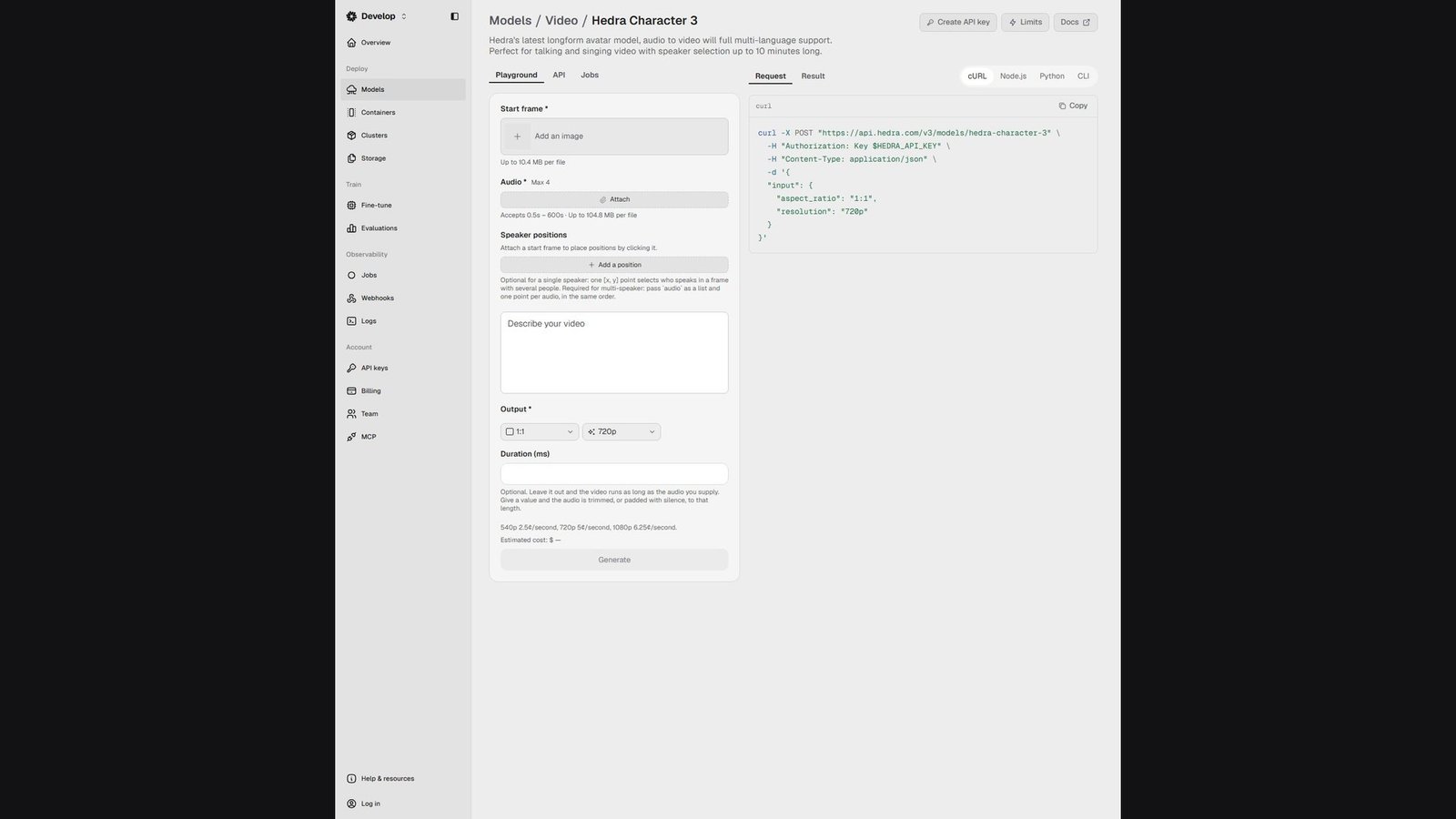
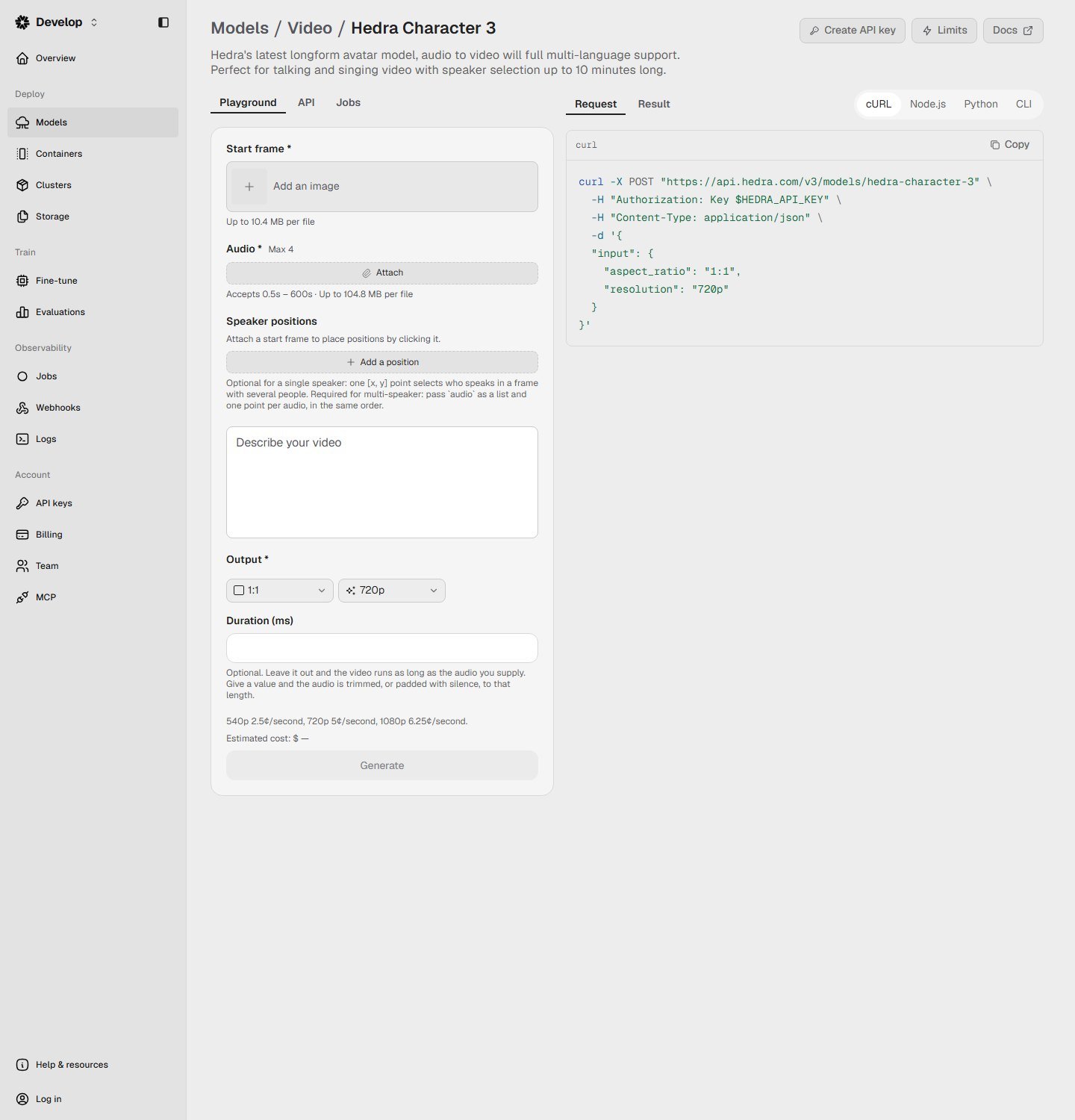
Character-3 is an image-to-video model aimed at speech. The API requires a start image, audio, a prompt, an aspect ratio, and a resolution. There is no existing-video field on that schema. Audio may run from 0.5 to 600 seconds, about 10 minutes, and up to about 104.8 MB. The playground captured the same day shows a start-frame cap of about 10.4 MB and an audio control marked Max 4. Leaving duration empty makes the video as long as the audio. Setting a duration trims the audio or pads it with silence. Output is 540p at 2.5 cents a second, 720p at 5 cents, or 1080p at 6.25 cents. Aspect ratios on the model page include 1:1, 4:3, 3:4, 16:9, 9:16, 9:21, and 21:9. A 30-second clip at 720p is $1.50 of API usage. A five-minute clip at 1080p is $18.75. Those figures are Moon Picke’s multiplication of the published rates. They are not studio credits.
The model card calls Character-3 a fit for talking and singing, with speaker selection. One point can choose who speaks when several people are in the frame. Multi-speaker is explicit: pass audio as a list and one point per audio, in the same order. That is separate audio per face on a still. It is not a filmed conversation, and it is not automatic. The playground’s Max 4 is the visible cap on how many audio inputs that form offers. Head motion, blinks, and expression are part of generating a performance. They are not a mouth-only edit. A prompt is required. Hedra’s model guidance says to use it if the generation adds gesture you did not want. That is a control note, not a quality score. Full-body preservation is not specified. The talking-photo page asks for a clear, legible face pointed roughly at the viewer.
Character types are broader than a headshot. The talking-photo page says photographs, illustrations, cartoons, 3D characters, stop-motion puppets, paintings, and mascots can be the picture, and that the face follows the waveform rather than a language list. Uploaded audio is the language support. Do not turn that into a translation catalog. Text-to-speech is mentioned on the marketing page as one way to supply the recording, including a cloned voice. The Character-3 API schema still requires audio. Voice cloning is optional and is not the lip sync. The studio pricing page showed Basic at $20 a month, billed monthly, and a $75 a month plan. The middle plan’s dollar amount did not come through, so it is not printed. Commercial use is named on the enterprise list. A general commercial grant for the $20 plan was not in the captured text. The same talking-photo page says to send only pictures and voices you have the rights to animate.
Advantage: the workflow is the article’s workflow, with a published per-second price, a song path, and a real multi-speaker selector. Limitation: the API will not accept a script in place of audio, full-body behavior is unspecified, and the studio price card was only partly legible. Skip if you need a stock presenter, a built-in translation, or a mouth edit of footage that already moves.
2. HeyGen Avatar IV: Best when the photo is a presenter
HeyGen is an avatar platform. Avatar IV is the photo path inside it, dated May 2025 on HeyGen’s own timeline. The product page says you upload a portrait, a half-body photo, or a full-body photo, then type a script, upload audio, or record. It describes lip sync, expressions, and hand gestures, and human, anime, and animal styles, including tilted heads. Those are vendor descriptions. They are not a measured identity score, and they do not prove the original clothes, background, or hands survive unchanged.
The photo-avatar API is a second door. Docs say you upload a PNG or JPEG, train a photo avatar, then render a video with a script and a voice ID. That example is text-to-speech. It does not show an audio-file field on the call that was checked. Own audio is verified on the Avatar IV product page and the academy “Photo to Video” steps. It is not verified as that API example. Image guidance on the API is a clear, front-facing portrait, good light, a neutral expression, and a 32 MB cap on the simple upload. The product page is more permissive about angle and full body. Read the surface you are actually using.
Resolution is three sentences, not one. The Avatar IV marketing page says 1280p or higher. The photo-avatar API lists 4k, 1080p, or 720p as a resolution argument. The pricing page lists 1080p export on Creator and 4K export on Pro. A 4K plan export is not, by itself, a 4K Avatar IV render. Confirm the resolution on the job.
Plan prices on the pricing page the same day: Free is $0, up to 3 videos a month, up to 1 minute, with Avatar IV access and up to 3 photo avatars. Creator is $29 a month, or $24 a month billed annually, with 600 credits, 1080p export, unlimited photo avatars, watermark removal, and 175+ languages and dialects. The free card lists 30+ languages. Pro starts at $49 a month and 1,000 credits, with 4K export. Business is $149 a month plus $20 a seat. The Avatar IV duration row is 1 minute on the free column and 30 minutes on the paid columns. A 60-minute business video cap is a general video row, not that Avatar IV row. Credits vary by model, duration, and complexity. This article does not convert a credit into a talking-photo minute.
Voice cloning is optional. The comparison table lists cloning as one clone, then expanded usage, then maximum usage. The free card does not mention cloning. An older credit-help article has disagreed with other HeyGen pages about how many clones Creator includes. This article does not pick a count. Singing is not documented for Avatar IV. A control that gives each person in a group photo a separate audio file was not documented. Watermark removal is a paid line. Free resolution was not printed on this pricing page. Custom-avatar consent steps were not re-copied. A technical upload is not permission to impersonate someone.
Advantage: a photo can become a reusable presenter, with a script, a large voice library, named gesture, and a free plan that includes short Avatar IV videos. Limitation: the credit cost of one talking photo is not a published per-second rate, and the API example is text-to-speech rather than an audio file. Skip if you only have a recording and you do not want an avatar account around it.
3. D-ID: Best for a single talking head from text or audio
D-ID’s Creative Reality Studio and Talks API are built around a still face. The speaking-portrait page says you input an image and either text or an audio file. The API quickstart posts an image URL and a text script with a Microsoft voice ID, then polls until the talk is done. The result URL in that quickstart is valid for 24 hours. The create-talk schema also accepts script type audio. Audio files are limited to 15 MB, with length limited to 5 minutes for clips and 10 minutes for talks. Images are JPEG or PNG, up to 10 MB, on the FAQ. Studio is described as available on desktop and mobile. Stock presenters exist. They are not a substitute for the image URL.
Billing on the studio pricing FAQ is in minutes, rounded up to the next 15 seconds. A 1-minute-10-second video consumes 1 minute and 15 seconds. Unused minutes do not roll over. An older FAQ still describes a credit as up to 15 seconds of video. Those two units were both on D-ID pages. Do not add them together. The help center lists a 14-day trial, then Lite, Pro, and Advanced, plus a separate API plan family. The trial is not a free-forever plan. Trial videos get a full-screen watermark. Lite videos are watermarked. D-ID ties that watermark to an ethics manifesto. Dollar amounts for Lite, Pro, and Advanced were not in the HTML fetched on 5 October 2026, so none are printed here.
The speaking-portrait page says personalized video in over 120 languages. That is a speech claim, not a phoneme count, and it is not the same thing as accepting any uploaded audio. Voice clones on one FAQ are one voice on Pro and API Launch, and three on Advanced and API Scale. Cloning is optional. Full-body input, singing, and multi-speaker audio were not documented on the pages checked. API minutes come out of the same balance as the studio, according to the pricing FAQ.
Advantage: one image plus text, or one image plus audio, is the documented product, with a public talks endpoint. Limitation: the public pricing page did not yield plan prices, and the motion described is a talking head rather than a full-body performance. Skip if you need a published dollar-per-second rate before you choose, or a song, or several people speaking in one picture.
4. Sync sync-3: Best when the still is a lip-sync input
Sync Labs, from Synchronicity Labs, is a lip-sync product. Most of its models take video. sync-3 is the exception that also takes a still. The docs say you pass one image, JPEG, PNG, or WebP, plus audio or text, and the model generates a video whose lip movement follows that audio. lipsync-2, lipsync-2-pro, and the legacy lipsync-1.9.0-beta do not take images. react-1 is a separate expressive model and is not the image path documented here. There is no stock avatar library.
Published sync-3 usage at 25 frames per second is $0.107 to $0.133 a second, with 4K native face output on the model page. A one-minute still is $6.42 to $7.98 of usage before the plan fee. That arithmetic is Moon Picke’s. On 5 October 2026 the plan cards showed Hobbyist at $5 a month and videos up to 1 minute, Creator at $19 and 5 minutes, Growth at $49 and 10 minutes, and Scale at $249 and 30 minutes. Usage sits on top of the plan. Free accounts get one sync-3 generation a month, up to 15 seconds, inside a broader free allowance of 3 generations up to 20 seconds. The quickstart warns that audio over 300 seconds fails, while paid plans list longer video. Treat those as two documented limits. Direct upload on the API overview is 20 MB. Audio formats in the quickstart are WAV or MP3.
Languages on sync-3 are listed as 95 or more, and lipsync is described as language-agnostic if the audio exists. Dubbing into 29 languages is a separate feature. Do not use 95 as the dubbing catalog or 29 as a limit on uploaded audio. Text-to-speech and voice clones are optional partner features. For a still with several faces, you pass coordinates. Auto-detect is rejected on images. That selects one face. It does not assign a separate audio file to each person. Singing is not documented. Body animation is not documented for the image path. The docs describe lip movement, not a gesture system. Original room tone under a new voice is not described. Consent rules were not copied from a dedicated policy page. The practical rule still applies.
Advantage: if you already think in audio-in, mouth-out, the still is a supported input on the default model, with a per-second price. Limitation: it is not a presenter studio, the cheaper models cannot take the photo, and singing and full-body motion are not part of the documented image path. Skip if you want a script, a voice library, and hand gestures in one editor.
Which job gets which tool
A recording: Hedra Character-3, or Sync sync-3 if you want the lip-sync model. A script and a presenter: HeyGen Avatar IV. An image URL in an app: D-ID, priced at checkout. A song or several speakers: Hedra. Speech on the others is not a song tool, and a group photo is not a conversation unless you can assign audio. A free start: HeyGen’s free plan is a monthly allowance of short Avatar IV videos. Sync’s free sync-3 clip is 15 seconds, once a month. D-ID’s 14-day offer is a trial. Hedra’s page title mentions a free plan; the plan text captured started at $20.
Pricing and limits
Pricing, AI models, generation limits, output resolution, and credit systems were checked on 5 October 2026 and may change. Check each provider’s current specifications before purchasing.
| Tool | Plan price | What you spend | Length | Resolution note |
|---|---|---|---|---|
| Hedra Character-3 API | Separate from studio | 2.5, 5, or 6.25 cents a second | Audio 0.5 to 600 seconds | 540p, 720p, 1080p |
| Hedra studio | Basic $20/month; a $75/month plan was also shown | Credits, not the API’s cents | Not copied from the plan card | Not copied |
| HeyGen Free | $0 | 3 videos a month | Avatar IV up to 1 minute | Not printed on this pricing page |
| HeyGen Creator | $29/month, or $24/month billed annually | 600 credits | Avatar IV up to 30 minutes | 1080p plan export |
| HeyGen Pro | From $49/month | From 1,000 credits | Avatar IV up to 30 minutes | 4K is a plan export |
| D-ID Studio | Dollars not in the HTML fetched | Minutes, rounded up to 15 seconds | Talks audio up to 10 minutes | Not restated as a talking-photo 4K spec |
| Sync Hobbyist | $5/month plus usage | sync-3 about $0.107 to $0.133 a second | 1 minute on the plan | sync-3 documented at 4K face output |
HeyGen credits are not Sync seconds and not Hedra cents. D-ID’s minute, rounded to 15 seconds, is a third unit. A HeyGen talking photo cannot be given the same dollar figure from the pages checked, because the credit cost depends on the model and the job.
How to choose
If you already have the recording, start with Hedra, or with Sync sync-3 if you want that lip-sync model. If the photo should be a reusable presenter, start with HeyGen. If you are embedding one face, D-ID’s talks endpoint is the documented shape, and the price is at checkout. Text-to-speech exists on HeyGen, D-ID, and Sync. Hedra’s API wants the audio already made. Singing, extra speakers, and hand motion count only where a page names them.
How to make a photo talk
Confirm you have the right to use the face and the voice. Use a clear picture and read that vendor’s image rules. Upload the still. Select the face if the tool asks. Enter a script or upload audio, not both by assumption. Pick a voice only if you are using text-to-speech. Generate a short stretch first. Watch the mouth against the words, then the eyes, the hair, anything covering the mouth, and the background. If the tool generates head or hand motion, that motion was not in the still. Export, and say the picture was altered when the context calls for it.
Using your own audio
Own audio is separate from a voice library. Hedra’s schema requires it. HeyGen’s Avatar IV page offers an upload or a recording beside the script. D-ID’s script object can be type audio, within the size and length caps above. Sync accepts WAV or MP3, or text. A noisy track or two people talking at once is not supported just because an upload button exists. Singing is documented for Hedra and is not inferred for the others.
Full-body photos and group photos
HeyGen’s Avatar IV page names portrait, half-body, and full-body input, and it names hand gestures. That is not a promise that a distant full-body photo keeps every finger. Hedra asks for a legible face and does not publish a full-body mode in the schema checked. D-ID and Sync document a face, not a body performance. A group photo is also narrower than it looks. Hedra can assign audio to more than one face if you place the points. Sync can select one face with coordinates and does not auto-detect on images. Several people in the frame do not mean several speakers unless the product says so.
When a talking photo struggles
These are properties of the picture, not a failure rate. A tiny face, a hard profile, a hand over the mouth, a mask, heavy facial hair, and a low-resolution crop give the model less to see. Text and logos can change even when you wanted them kept. Hands are a weak point when the model invents gesture. Fast speech and singing are different mouth problems. An old family photo can be a legitimate input. It does not remove the need to think about who is depicted.
Consent, likeness, and ads
A talking photo can make a real person appear to say something they never said. Use the image and the voice only when you have permission or another lawful basis. A public figure’s face being accepted by the tool is not permission. Do not build a fake endorsement or call an AI actor a real customer. Voice cloning, where a plan offers it, needs its own consent and is not required to make a photo talk. D-ID watermarks trial and Lite videos. HeyGen lists watermark removal on paid plans. Platforms do not share one disclosure rule.
What was left off
Viggle was not included. Motion transfer is not a speech-driven talking photo unless the current product documents that path, and it was not established here. Elai and TheInfluencer.ai were not included. An AI influencer or a stock avatar that talks is not this article’s subject. Synthesia, Magic Hour, Kling as its own app, Runway, CapCut, Vidnoz, and AKOOL were considered from search results or from a model name on Hedra’s page. They did not get a complete first-party talking-photo record here, so they are not used to fill a number. Generic image-to-video, face swap, and blink-only photo animation stay out for the same reason.
FAQ
What is the best AI talking photo generator?
For a still and a recording you already have, including a character or a song, Hedra Character-3. For a photo that should become a presenter with a script, HeyGen Avatar IV. For a single talking-head API, D-ID. For a lip-sync model that also accepts a still, Sync sync-3. “Best” means the documented workflow, not a measured mouth score.
How do I make a photo talk?
Upload a still you have the right to use, then add a script or an audio file. The tool generates mouth motion, and sometimes a wider performance, and exports a video. Generate a short stretch before a long one.
Can I use my own audio?
Yes on all four, with different shapes. Hedra’s API requires audio. HeyGen’s Avatar IV page accepts an upload or a recording. D-ID accepts an audio script. Sync accepts audio or text. A voice library is not the same feature.
Can a full-body photo talk?
HeyGen’s Avatar IV page says it accepts full-body photos and can add hand gestures. The other three document a face more clearly than a body. Accepting a full-body file is not the same as preserving the body.
Can several people in one photo talk?
Hedra can, if you place a point and pass an audio for each speaker. Sync can select one face in a group image. A group photo does not by itself create a conversation.
Can a cartoon or anime character talk?
Hedra’s talking-photo page includes illustrations, cartoons, and paintings. HeyGen’s Avatar IV page includes anime and animals. D-ID and Sync were not given the same character claim in this check. A vendor demo is not a guarantee for every drawing style.
Can a photo sing?
Hedra’s Character-3 page says the model is for talking and singing video. Speech support on the other tools is not a singing mode.
What is the difference between a talking photo and an AI avatar?
A talking photo starts from your still. An avatar video often starts from a stock or custom digital presenter. HeyGen sells both. The others here are not stock-avatar studios.
What is the difference between a talking photo and lip sync?
Lip sync matches mouth motion to audio. On a still, the tool also has to invent the motion, because the photo was not already speaking. Sync’s image path is that overlap. Hedra, HeyGen Avatar IV, and D-ID are talking-photo products first.
Do I need permission to animate someone else’s photo?
The upload button is not a legal opinion. You need an appropriate right to use that person’s likeness and to make them appear to say the words. Do not use the result as a fake endorsement.
Final verdict
Match the tool to the still and to the speech you already have. Hedra Character-3 is the closest fit for a picture plus a recording, including a character or a song, at a published per-second rate. HeyGen Avatar IV is the fit when that picture should become a presenter with a script, a voice library, and gestures, paid in credits. D-ID is the fit for a talks endpoint that takes one image and either text or audio, with the price confirmed at checkout. Sync sync-3 is the fit when a lip-sync model is what you wanted and the source happens to be a still.
None of this is a same-photo test. A clean frontal sentence does not predict a profile, a covered mouth, or two people. Generate a short stretch, and do not put words in a real person’s mouth unless you have the right to do it.