
Moon Picke independently researches products. If you buy through our links, we may earn a commission at no extra cost to you. Affiliate disclosure.
Most iPhone 18 Pro accessories are optional. A new phone is not a shopping list. Apple’s iPhone 18 Pro is USB-C, supports MagSafe and Qi2 wireless charging up to 25W, and ships with a USB-C Charge Cable (1 m)—no wall adapter. Standardized USB-C and many MagSafe/Qi2 accessories can stay useful across devices. Cases, glass, lens covers, and fitted cages are exact-fit only. Buy an accessory only when it solves a real problem. Moon Picke did not invent drop, magnet, charging, or audio tests. Process: how we evaluate and editorial standards.
iPhone 18 Pro Accessories: What Do You Actually Need?
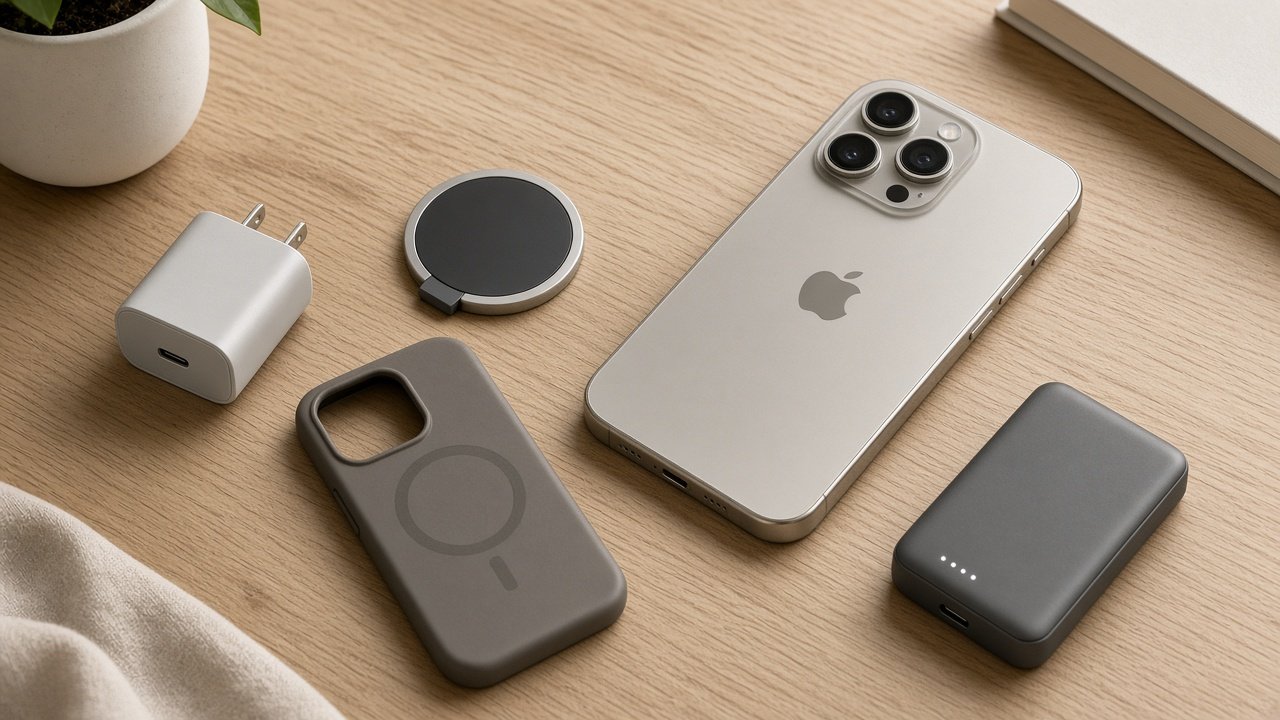
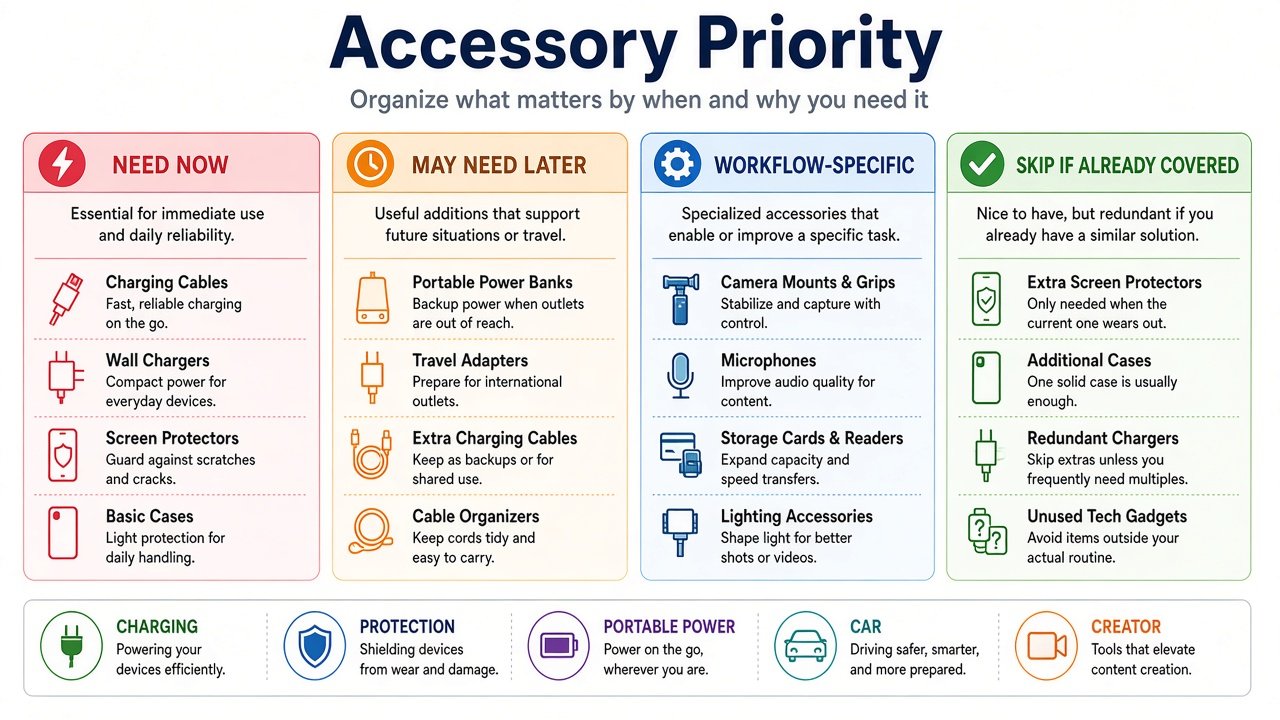
What accessories do you actually need for iPhone 18 Pro? Often none on day one if your USB-C charger already works and you accept an uncovered phone. This table of iPhone 18 Pro accessories is a need/skip map, not a product catalog. Hardware context: iPhone 18 Pro vs iPhone 17 Pro. More Digital Tools explainers: Digital Tools.
| Accessory | Who actually needs it | Who can skip it | Main thing to verify |
|---|---|---|---|
| USB-C power adapter | No suitable USB-C PD brick, or you want Apple’s documented 15-minute wired path | Existing charger already satisfies you | USB-C PD; wattage is charger capability, not iPhone draw |
| USB-C cable | Second location, car, power bank, SSD/data | The 1 m in-box cable covers charging | Power rating vs USB 3 data (up to 10 Gb/s) |
| MagSafe charger | Desk/nightstand snap-on charging | Wired charging is enough | Compatible ≠ newest 25W peak |
| Power bank | Travel, commute, days away from outlets | The phone lasts your day | Wh, USB-C PD, Qi2 watts if magnetic |
| Case | Edges, grip, MagSafe stack | You prefer bare phone and accept the trade-off | Exact iPhone 18 Pro SKU |
| Screen protector | Sacrificial glass, privacy, matte | You accept display risk | Exact 18 Pro cut; case-friendly edges |
| Car charger / mount | Navigation, long drives, wireless CarPlay dock | The car already charges and holds the phone | Power vs position vs both |
| Creator gear | A named bottleneck (audio, frame, storage) | Casual Camera-app clips | USB-C port competition; rig payload |
| Tripod / stand | Hands-free framing, calls, product shots | You rarely need a third hand | Stand ≠ tripod; magnetic ≠ charging |
| Wireless microphone | Talking-head, interviews, distance from the phone | Built-in audio is enough | USB-C kit, not Lightning; feature count ≠ quality |
Before You Buy Anything, Check What You Already Have
No problem means no accessory purchase. First 24 hours: open the box (phone, USB-C Charge Cable 1 m, documentation). Check the USB-C charger you already own. Decide whether physical protection matters to you. Use the phone before buying convenience items. Add MagSafe, a power bank, a car dock, or creator gear only when a need appears. First week, buy early only if you lack a working charger or you want a case/glass. Wait on stands, banks, mounts, and mics until the use case shows up. This is not a rigid kit. If the phone lasts until bedtime on Wi-Fi and you never film interviews, you are not behind.
Does iPhone 18 Pro need a new charger? Only if you lack USB-C Power Delivery, or you specifically want Apple’s ~15-minute wired claim with a 60W-capable Ahttps://moonpicke.com/iphone-18-pro-vs-iphone-17-pro/ adapter and a capable cable.
Do you need MagSafe? No. It is convenience, not a requirement.
Should you buy a case and screen protector? Protection is personal. Fit is not. Only iPhone 18 Pro SKUs.
Can you reuse older USB-C accessories? Often, if the standard still matches. Not cases or glass.
Charging Accessories: Start With the Adapter and Cable You Already Own
Apple’s documented wired fast-charge path uses a 60W-capable adapter or higher with Adjustable Voltage Supply plus a USB-C charging cable. Everyday charging can use an existing USB-C PD brick. 60W, 100W, or 140W labels describe the charger, not continuous iPhone draw. Who may need a new adapter: no USB-C brick, multi-device/laptop travel, or that advertised 15-minute path. Who may skip: overnight charging already works. MagSafe/Qi2 up to 25W is listed on the phone; an older puck may still attach without matching peak wireless. MagSafe is optional for desk or StandBy-style use. Skip it if a cable on the nightstand is enough. USB-C shape is not data speed and not power rating. Extra cable is for a second room, car, bank, length, or SSD—not because the included 1 m lead is “inadequate” for ordinary charging. Specialist charging and MagSafe roundups belong on dedicated pages, not here. A 3-in-1 watch dock is wasteful if you only charge the phone.
As an Amazon Associate I earn from qualifying purchases.
Apple’s 30W USB-C Power Adapter (A2164) remains a simple desk brick if you have none and do not need the Ahttps://moonpicke.com/iphone-18-pro-vs-iphone-17-pro/ 60W-class path. Apple’s MagSafe Charger (1 m, A3502) is the official puck class Apple used in 18 Pro wireless testing—buy for snap-on convenience, not because a new phone appeared.
See Apple 30W USB-C Power Adapter (A2164) listings on Amazon →
See Apple MagSafe Charger (1 m, A3502) listings on Amazon →
Power Banks: Useful for Travel, Optional at Home
A power bank solves days away from outlets, commuting, navigation, and long camera sessions. Skip it if the phone lasts your day and desks have USB-C. 5K, 10K, and 20K classes trade stored energy for weight and bulk—not fake “number of iPhone charges.” Magnetic packs add Qi2/MagSafe-compatible convenience at the pack’s watts, often below the phone’s 25W ceiling. Bigger is not better daily carry. A 20K laptop-class bank is excess for a pocket top-up. Prefer a current supported model and a clear warranty over untraceable cheap lithium. Anker MagGo Power Bank (10K, Slim) A1664 is a representative 10K magnetic/USB-C pack for people who already know they need portable power—not a default gift with every 18 Pro. Home-only users can wait indefinitely.
See Anker MagGo Power Bank (10K, Slim) A1664 listings on Amazon →
Cases and Screen Protectors: Protection Is Personal, Fit Is Not
A case solves edges, drops, grip, kickstands, and MagSafe stacking. Skipping a case is a valid preference, not a moral failure. Compatibility is objective: buy only products that name iPhone 18 Pro. Do not infer an iPhone 17 Pro case will fit. Similar 150.0 × 71.9 × 8.75 mm class dimensions do not prove camera plateau, Camera Control, buttons, USB-C opening, or magnet alignment. “Military-grade,” drop-height, and magnet-strength marketing are claims to read, not tests we ran. Screen protectors are a sacrificial layer, privacy filter, or matte texture—not a universal “everyone needs glass” rule. Same diagonal inches are not the same cut. Check bezels, corners, sensors, and case lips. A good case plus good glass can still clash at the edge. Stockpiling 18 Pro glass for a future phone is speculation. Exact-fit accessories should not be bought for the next generation in advance. Pro Max glass is the wrong SKU even when the marketing inches look close.
Car Accessories: Do You Need Power, Mounting or Both?
Split the job. Power only: USB-C PD 12V adapter plus a cable you already own. Position only: a mount that does not charge. Power plus position: a charging mount. Frequent navigation, long drives, and wireless CarPlay docking are the usual needs. Skip if the car already holds and feeds the phone. Wired CarPlay may already occupy the cable; a second wireless charging mount can be redundant. Wireless CarPlay users may value a charging dock more. Vehicle USB ports vary; do not assume the CarPlay jack is a maximum-rate PD charger. A magnetic car mount is still a physical fit problem even when charging is USB-C. This is not a CarPlay tutorial. Specialist car-charger pages own product picks.
Creator Accessories: Buy for the Bottleneck
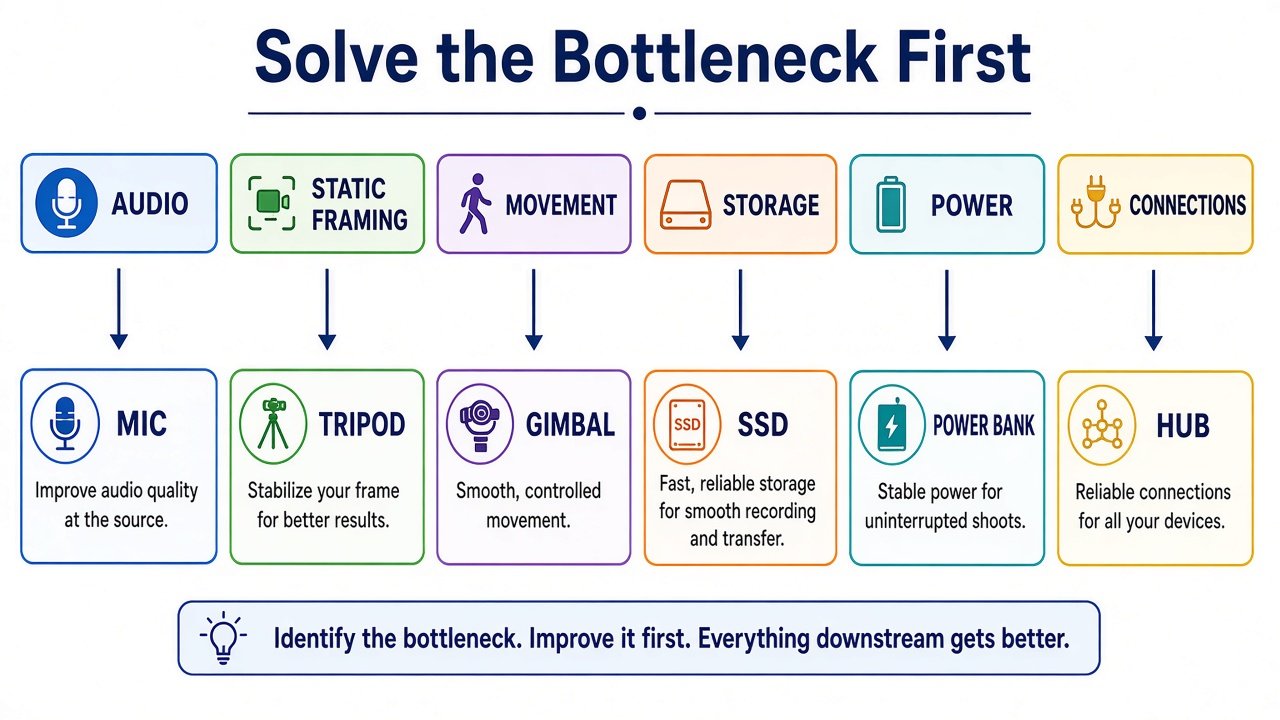
Do not ask what creator kit to buy. Ask what is failing: audio, movement, static framing, storage, light, power, or connectivity. Audio → microphone. Static framing → tripod. Movement → gimbal only if justified. Storage → SSD. Port limit → hub. Lighting → light. Power → bank. Each item can work with iPhone 18 Pro while the system fails: a case blocks a USB-C receiver, an SSD occupies MagSafe, a mic takes the only USB-C port, a hub needs power, a gimbal exceeds payload. Phone compatibility is not full-rig compatibility. USB-C supports charging, DisplayPort, and USB 3 up to 10 Gb/s when the cable does. Not every buyer needs an SSD or hub. Do not start with lights and cages if the actual problem is voice.
Tripods and Wireless Microphones: When They Become Worth It
A desk stand supports a table. A tripod adds height and legs. MagSafe is an attachment method, not proof of charging. Need a stand or tripod for self-recording, calls, group photos, product shots, static video. Skip if you almost never need hands-free framing. A wireless mic helps talking-head, interviews, and distance from the phone. Skip if built-in audio is enough. 32-bit float, onboard recording, noise reduction, and 400 m range are workflow features—not automatic “better sound.” USB-C receivers occupy the port; Lightning kits are the wrong connector. Two transmitters are for two speakers, not a value upgrade for solo talking-head.
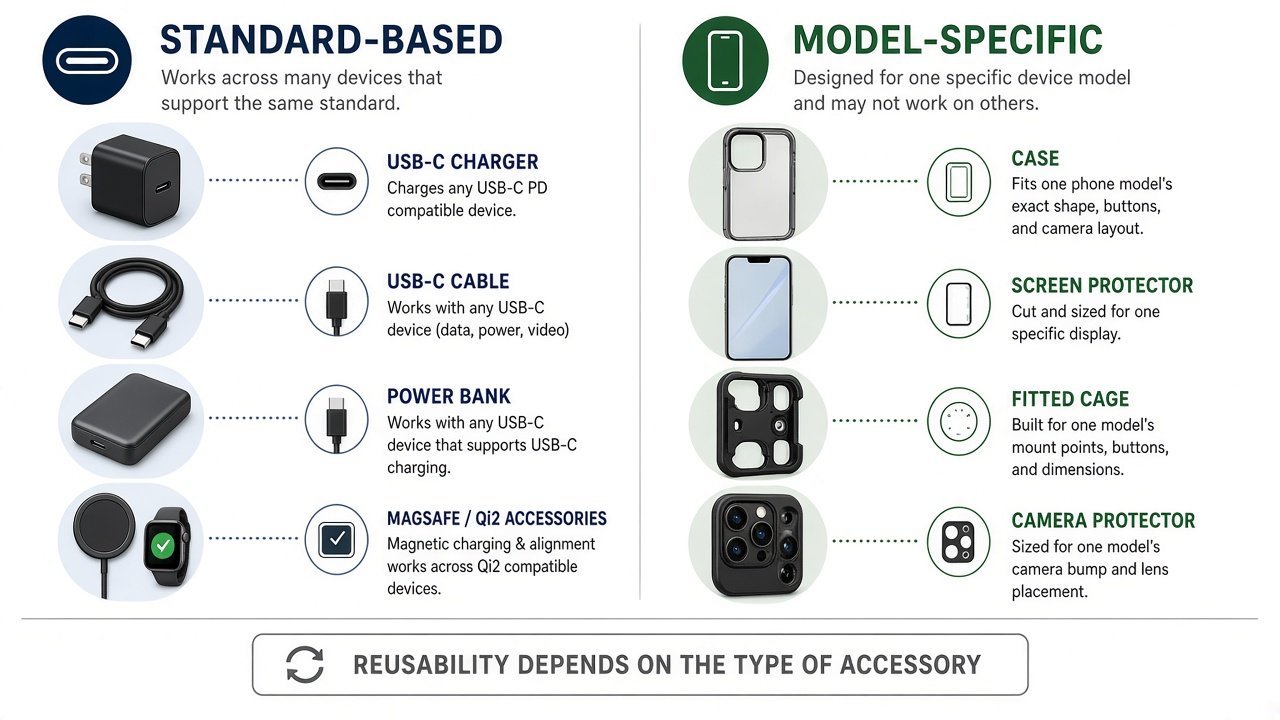
Which Accessories Can You Reuse Across iPhone Generations?
| Often standard-based | Usually model-specific |
|---|---|
| USB-C charger | Case |
| USB-C cable | Screen protector |
| Power bank | Fitted cage |
| Some MagSafe/Qi2 chargers | Lens protector |
| Car charger (electrical) | Exact-fit shell |
Buy the standard, not the marketing year. An iPhone 17-era USB-C PD charger can remain useful on iPhone 18 Pro if the protocol still matches. A 17 Pro case is not an 18 Pro case. Do not call anything future-proof. Say it uses a broadly adopted standard and may remain useful on other USB-C devices (iPad, MacBook) if support continues. Car mounts still have a physical layer. Magnetic banks still depend on case thickness. Reuse is a capability check, not a clearance hunt. Older lithium packs deserve extra warranty/seller scrutiny.
Accessories You Probably Shouldn’t Buy Yet
Skip a second wall charger when the first already charges the phone the way you like. Skip a 20K brick if you live near outlets. Skip a 3-in-1 dock if you only charge an iPhone. Skip a 240W cable for ordinary charging. Skip a creator rig before you name a bottleneck. Skip unconfirmed “will fit 18 Pro” 17 Pro leftovers. Skip MagSafe because a keynote showed a puck. Premium is not automatically better for you; cheap is not automatically value. A rugged case can be too thick; a tiny 5K bank can be too small for travel. Spend first on the actual problem, documented compatibility, and a standard you can reuse—then look at price. Do not replace working USB-C gear just because iPhone 18 Pro launched.
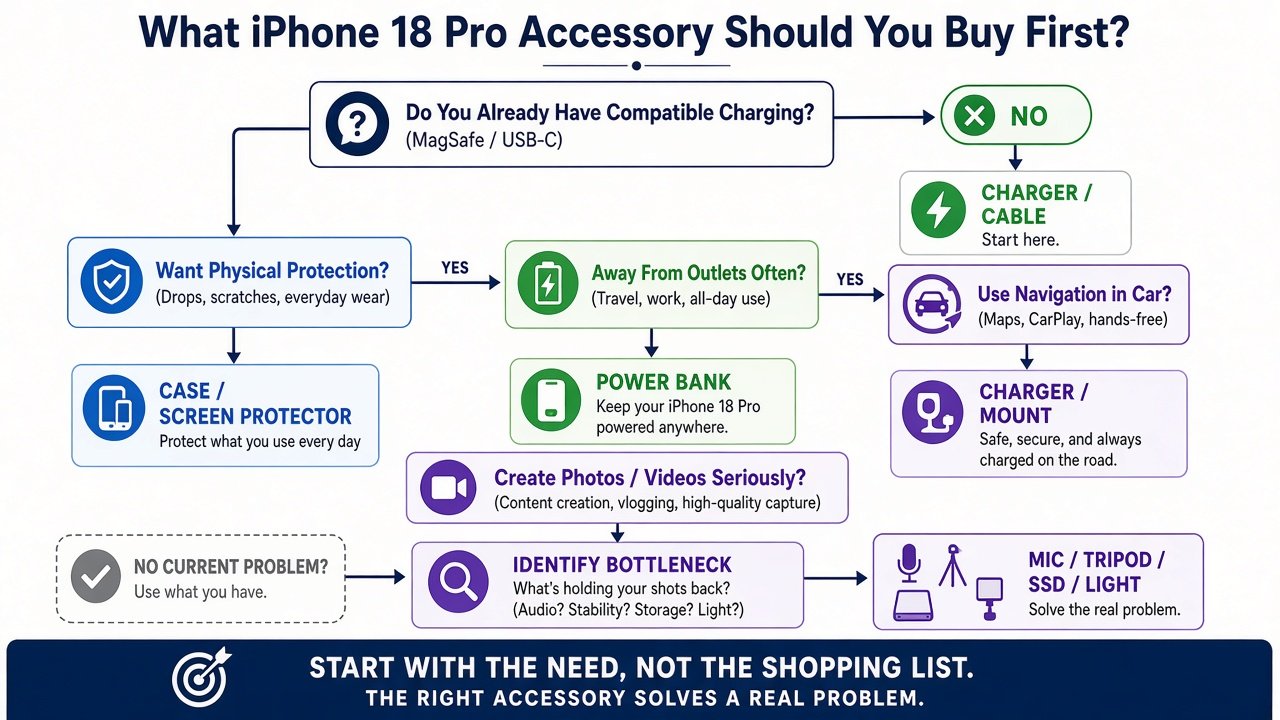
What to Buy First: 4 Buyer Profiles
| Buyer type | Start with | Probably skip initially |
|---|---|---|
| Everyday | Case and/or glass if you want protection; existing charger/cable | Creator gear, car dock, huge bank |
| Traveler | Power bank and a compact USB-C charger/cable if missing | Desk 3-in-1 station |
| Driver | Power, mount, or charging mount—pick the job | Full creator rig |
| Creator | The one bottleneck (mic, tripod, SSD, light, power) | Random accessories |
No profile is a mandatory bundle of iPhone 18 Pro accessories. An everyday user who never drops a phone can skip a case. A creator who only posts talking-heads may need a mic and nothing else. A driver who uses wireless CarPlay still might skip a mount if the car already has a licensed holder.
How to Choose an Accessory Without Wasting Money
- What problem does it solve?
- Is it exact-fit or standard-based?
- Does current gear already solve it?
- Does it require another accessory (adapter, cable, hub, case)?
- Is iPhone 18 Pro compatibility documented?
- Is today’s price justified by actual use—not launch-year hype?
Which iPhone 18 Pro accessories you buy first should follow the problem, not a bundle. Standardized chargers, cables, and banks can serve iPhone, iPad, and MacBook. That is long-term utility, not a guarantee. The best setup may be one or two items. If the answer to “what fails today?” is nothing, the purchase is later—or never.
Final Verdict
The right iPhone 18 Pro accessories setup is not the longest cart. Start with the box cable and any USB-C PD charger you already trust. Add a case or screen protector only if protection is your preference—and only for iPhone 18 Pro. Add MagSafe, a power bank, car hardware, or creator tools when the use case appears. For many buyers, protection plus existing charging is enough. More products are not more useful. Specialist product picks belong in category guides on Digital Tools when those pages are live, not as a 20-item farm on this hub.
FAQ
What accessories do I need for iPhone 18 Pro? Only those that solve a problem you have. Many owners need nothing extra on day one.
Does iPhone 18 Pro need a new charger? Not if USB-C PD already charges it to your satisfaction. Apple’s fastest advertised wired path is a separate, documented adapter class.
Do I need a MagSafe charger? No. Optional convenience.
Should I buy a case? If you want body protection. Use an 18 Pro-named case only.
Do I need a screen protector? If you want a sacrificial or specialty surface. Exact cut, and check the case lip.
Can I use my old USB-C charger? Often yes for charging. Compatible is not automatically Apple’s newest maximum wired claim.
Is a power bank necessary? Only if you regularly leave outlets. Capacity class is a size/energy trade-off.
What should creators buy first? The bottleneck: usually audio or a stand, not a full rig.