
Wireless CarPlay vs Wired CarPlay is a convenience-and-charging decision, not a sound-quality contest. Wireless Apple CarPlay is more convenient when it reconnects as designed. Wired CarPlay can be simpler when you want one cable for data and (sometimes) power. Neither is universally better. Many current head units support both, so the useful question is often which mode to use on this trip. Specs below are from Apple-facing product language and manufacturer U.S. pages as of September 11, 2026. Moon Picke did not measure latency, dropouts, or battery drain.
Read How We Evaluate, our editorial standards, and the Affiliate Disclosure. This is a connection-mode guide, not a wireless-head-unit roundup, not a large-screen ranking, and not an older-car retrofit list.
Wireless CarPlay vs Wired CarPlay: Quick Answer
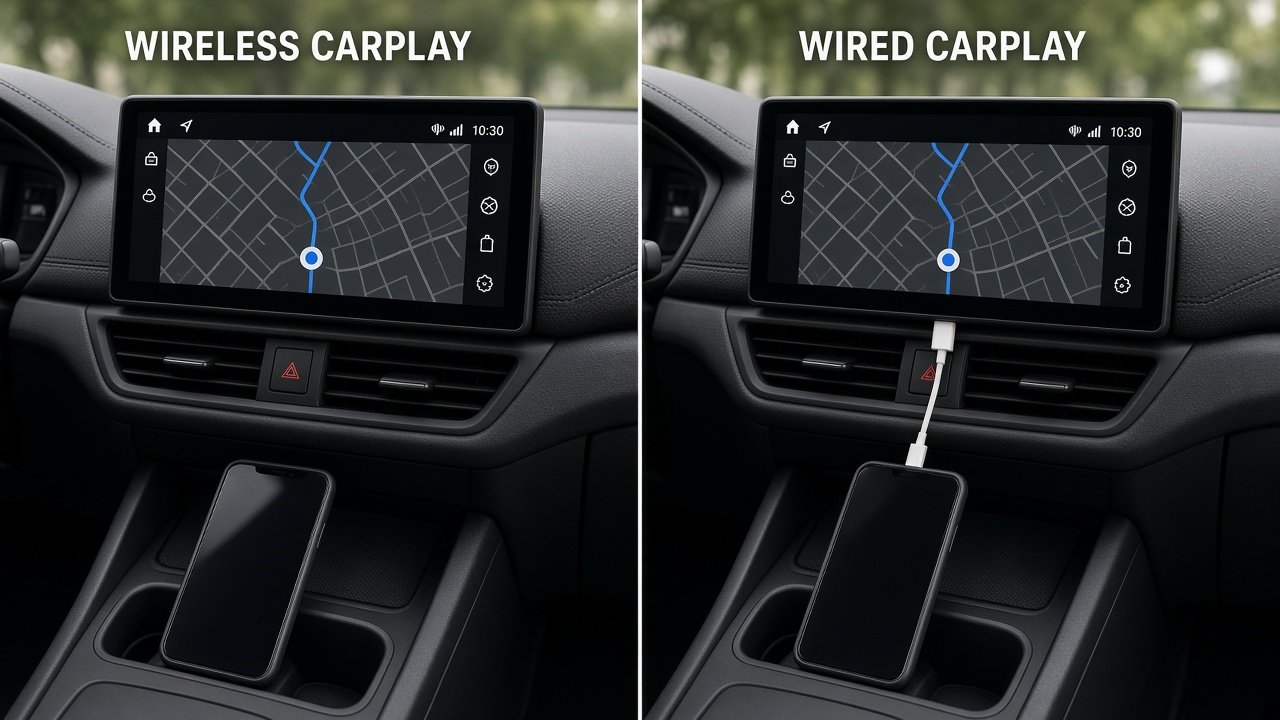
Prefer wireless for short trips and less plugging. Prefer wired when the phone is low on battery and the USB port actually charges, or when you want to take the wireless link out of the diagnosis. If the receiver does both, you do not have to pick forever. That is the practical Wireless CarPlay vs Wired CarPlay verdict.
| Factor | Wireless CarPlay | Wired CarPlay | Buyer Impact |
|---|---|---|---|
| Convenience | Phone can stay in a pocket; may reconnect when supported | Plug in each trip | Preference, not a speed score |
| Cable use | No CarPlay data cable; you may still charge | USB required for CarPlay | Wireless ≠ automatically cable-free |
| Phone charging | Not included; USB, Qi, or MagSafe separately | Depends on that USB port’s power | CarPlay data ≠ fast charging |
| Connection architecture | Typically Bluetooth setup + Wi-Fi session | USB between iPhone and head unit | Not “Bluetooth audio” |
| Startup workflow | Can connect automatically when configured | Starts after a working cable | No universal reconnect timer |
| Troubleshooting | Wi-Fi, Bluetooth, firmware, saved devices | Cable, port, settings, firmware | Neither is failure-proof |
| Multi-driver use | Which paired phone connects can get messy | Who plugs in is obvious | Check switching, don’t assume |
| Phone heat | Wi-Fi + apps + optional wireless charging can add load | Cable heat/load still possible | No invented temperatures |
| Head-unit compatibility | Only if the unit lists wireless CarPlay | Only on a CarPlay USB port | Not every USB jack is CarPlay |
As an Amazon Associate I earn from qualifying purchases.
How Wired and Wireless CarPlay Actually Connect
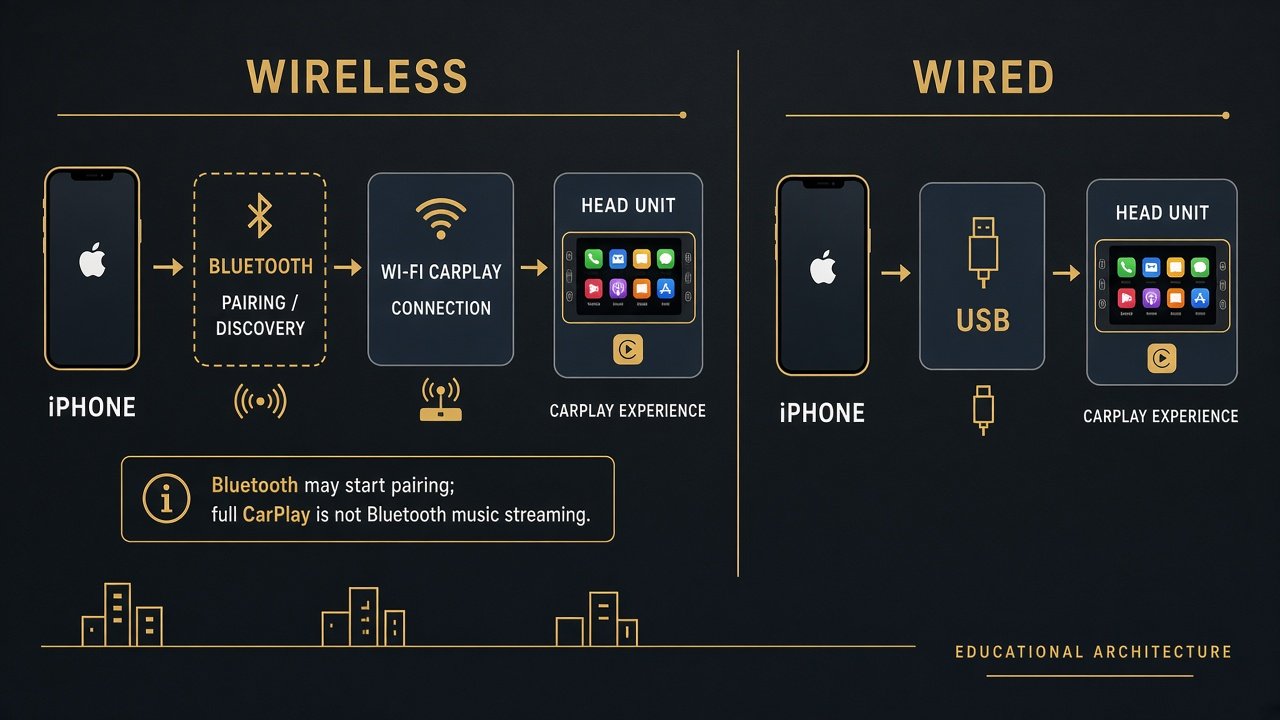
Wired CarPlay is a physical USB path from iPhone to the head unit. Current iPhones use USB-C; the receiver may still expose USB-A or USB-C. Connector type is not the connection mode: USB-C on the radio does not mean wireless CarPlay, and USB-A does not forbid it. Not every USB port on a dash or receiver is a CarPlay port — use the one the maker documents. A data cable can fail: frayed wires, debris, a loose plug, a cheap cable that does not negotiate USB data. Wired is not failure-proof. Keep a known-good cable in the glove box even if you live on wireless; it is the fastest way to isolate a radio-link problem.
Wireless CarPlay is not Bluetooth music streaming. Bluetooth commonly participates in discovery and pairing. The CarPlay session itself typically rides a higher-bandwidth Wi-Fi link once the vehicles/head unit and iPhone are set up. Sony’s XAV-AX8500 footnotes even state Wi-Fi is available for Apple CarPlay (and Android Auto) only — a manufacturer confirmation that CarPlay wireless is a Wi-Fi path, not “Bluetooth audio.” Do not import generic Bluetooth codec arguments. Keep Bluetooth and Wi-Fi enabled on the phone; follow the head-unit pairing steps. Firmware on both ends still matters. We will not invent protocol packet diagrams beyond that.
Convenience: Wireless Wins for Short Trips
Wireless CarPlay can let the phone stay in a pocket or bag. It can connect automatically when the system is supported and already paired — not “instantly,” and not on every firmware combination. Frequent short trips and lots of in-and-out make the plug-in ritual more annoying; that is preference, not technical superiority. Wired CarPlay is still convenient for people who like a deliberate connect, who always charge on the same cable, or who would rather skip wireless setup. USB ports wear with repeated cycles; wireless reduces that motion. We will not invent connector lifespan. A cleaner dash is aesthetic: if you still dangle a charger, wireless did not make the cabin cable-free. Buyers who already keep a cable on the seat will not feel a lifestyle change. Buyers who currently plug in for a three-minute errand will. Do not pay a wireless premium if your habit is “cable every time anyway.”
Charging: Wired Has an Important Advantage — Sometimes
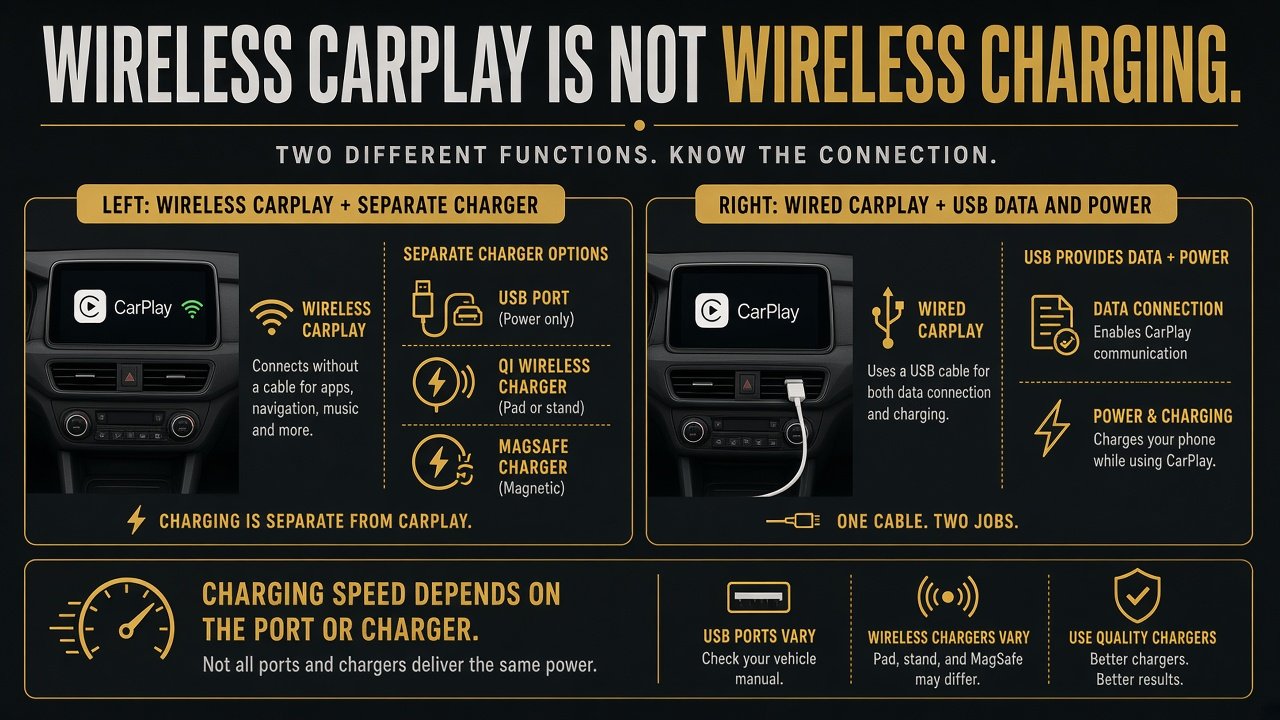
Wireless CarPlay is not wireless charging. Qi, MagSafe, and CarPlay are separate features. You can have wireless CarPlay and still need USB, a 12 V charger, or a wireless charging mount. Wireless plus a dedicated wired charger is a valid hybrid: CarPlay over Wi-Fi, power on a high-output port. Wireless plus Qi/MagSafe can cut cable handling; trade-offs can include heat, alignment, and slower charging than a good cable — we will not invent watts.
Wired CarPlay may carry data and some charging on one cable if that port supplies useful current. Fast charging is not a CarPlay requirement. USB-C on the radio is not USB-PD by default. Sony documents the XAV-AX8500 USB-C as Hi-Speed with 3.0 A maximum and notes a regular phone Type-C cable is not in the box — useful charging, not a secret “CarPlay fast-charge” spec. If the CarPlay USB is a low-current data jack, you can still run wireless CarPlay and charge on a different, higher-output socket. Long trips make phone power the real constraint: plug into the CarPlay USB if it charges enough, or run wireless CarPlay plus a separate charger. Cellular data use depends on Maps, music, and podcasts — not on wired versus wireless CarPlay. Offline maps are a phone-app choice, not a CarPlay-mode feature. Use a data-capable cable; charge-only cables are a classic wired-CarPlay failure.
Is Wireless CarPlay Less Reliable?
Not universally. A cable removes one radio-network variable. Real reliability still depends on the head unit, iPhone, firmware, cable quality, the correct USB port, and the wireless environment. Wireless failure points include pairing, Wi-Fi, interference, phone settings, and several saved phones fighting for the session. We will not claim dropout rates. Radio interference can exist; we will not call dropouts “common” without tests. OEM versus aftermarket does not automatically decide reliability — implementation does. A factory wireless system can still glitch; a well-supported aftermarket unit can be uneventful. High-level wired checks: cable, the documented CarPlay USB port, iPhone Settings, reboot, firmware. Wireless: Bluetooth and Wi-Fi on, forget/re-pair if needed, head-unit firmware, CarPlay device list. That is not a service manual. If two phones are in the car, start by seeing which one actually owns the session before you blame “wireless being flaky.”
Does Wired CarPlay Have Better Audio Quality?
Do not assume it does. Do not assume wireless CarPlay sounds compressed like ordinary Bluetooth streaming. CarPlay audio is not the same pipeline as a Bluetooth A2DP headphone. Touchscreen “feel” also comes from the receiver’s display and software, not only the USB versus Wi-Fi path. We did not run listening tests or latency benches, so there is no millisecond winner and no audiophile ranking. Navigation accuracy is not “wired GPS versus wireless GPS”; maps still run on the iPhone with whatever sensors and software that trip uses.
Is wireless CarPlay slower?
Wireless transport can add complexity. User-visible lag varies by phone, head unit, and firmware. We will not invent wired-versus-wireless millisecond numbers or reconnect times. After startup, wireless CarPlay may come back on its own when configured; wired starts when the cable enumerates. Both can feel slow if the unit or phone is busy. If something feels off, a cable is a useful way to remove the wireless-link variable — diagnosis, not proof that wireless is always slower.
Battery and Phone Heat
Wireless CarPlay can increase battery use versus an idle phone because Wi-Fi, Bluetooth, navigation, and apps may stay active. We will not quote percent per hour. Wired mode can still drain the phone if USB power is weak — a “charging” cable that barely holds Maps is a port-output problem, not proof that wired CarPlay is inefficient. Combined wireless CarPlay, navigation, and wireless charging can raise thermal load on the phone; we will not invent temperatures. That is phone heat, not dash-cam cabin heat. Frequent heat and charging cycles can age lithium cells in general; that is not “wireless CarPlay ruins batteries.” Plan a charger on long days either way. If the phone is already hot on the dash in sun, a MagSafe pad can add more load; a cable in the shade may be the calmer setup that day.
Which Is Better for Shared Cars?
Wireless CarPlay can get complicated with multiple paired iPhones: who auto-connects, who has to tap Switch, whether a leftover phone in a bag wins. Some receivers document device lists; we will not generalize every brand’s priority logic. Wired CarPlay is blunt: the phone on the cable is the CarPlay phone. Families who hate surprise connections may like that. Privacy is modest: a previously paired phone can reconnect; users can delete cars and phones in settings. Do not overstate risk. Rideshare and household cars are the same logic: either teach people the wireless switch or leave a cable in reach.
Why a Head Unit With Both Modes May Be the Best Choice
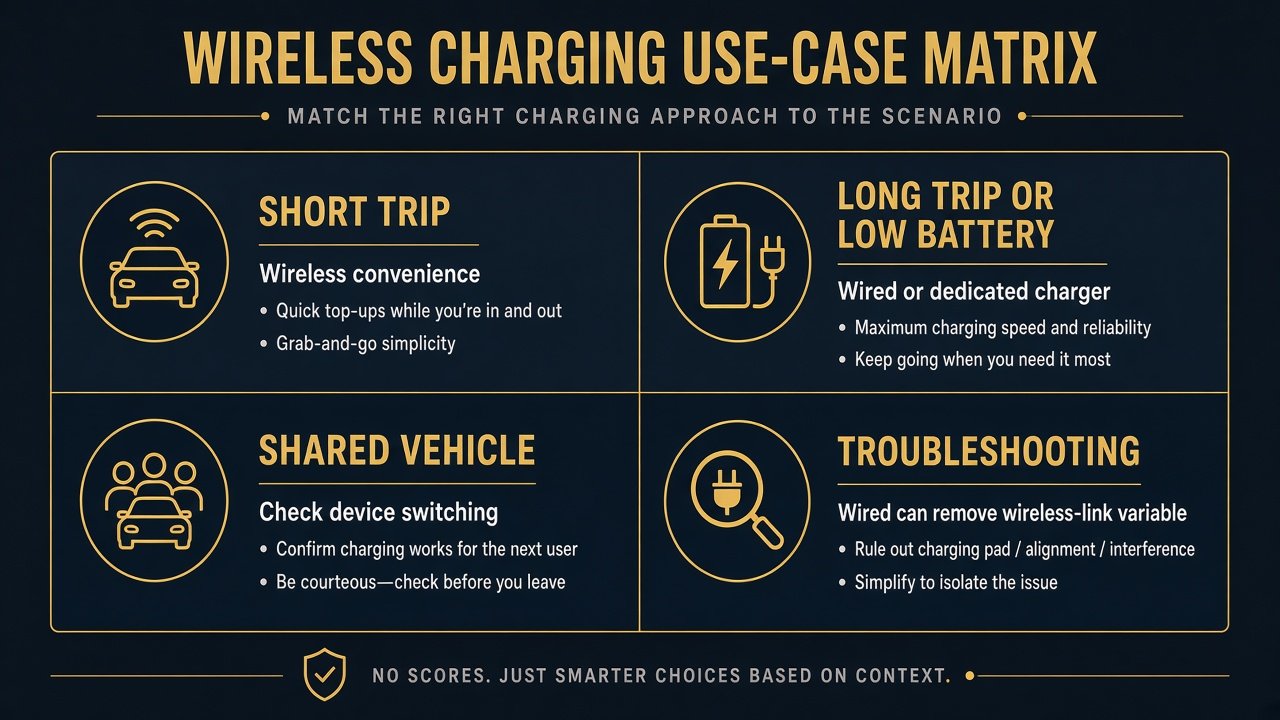
A lot of current aftermarket receivers list wired and wireless Apple CarPlay. Then Wireless CarPlay vs Wired CarPlay is a daily workflow, not a permanent SKU. The Sony XAV-AX8500 is a current U.S. example: Sony documents wireless and wired CarPlay (and Android Auto), USB-C at up to 3.0 A, and Wi-Fi for CarPlay. Screen size and DIN fit are other articles (single DIN vs double DIN; Sony XAV-AX8500 review). The smaller Sony XAV-AX6000 is another current unit that documents both connection modes on a 6.95-inch face — see the Sony XAV-AX6000 review for that chassis, not a wireless ranking. Sony.com lists the AX8500 at $799.99. Amazon ASIN B0CXF7H2Z4 — New, AX8500. Do not buy it only because it says wireless. Check chassis, clearance, harness, and cameras first. Some other Sonys in the same family are wired-CarPlay-only; connection mode is one checkbox among screen, controls, audio, cameras, fit, and firmware.
Android Auto can exist on the same radio; dual-platform shopping belongs later. Older cars can use whichever mode the chosen receiver supports — this is not a retrofit guide. See Sony XAV-AX8500 (ASIN B0CXF7H2Z4; both wired and wireless CarPlay) →
What about wireless CarPlay adapters?
Some dongles turn a wired-only CarPlay USB port into a wireless session. That is extra hardware, extra boot order, and extra compatibility — not the same as native wireless CarPlay in the head unit. This page is not an adapter roundup and will not rank dongles. If a receiver already does wireless natively, an adapter is usually the wrong layer. If it is wired-only, an adapter is a separate purchase decision with its own firmware risk.
When to Use Wireless — and When to Plug In
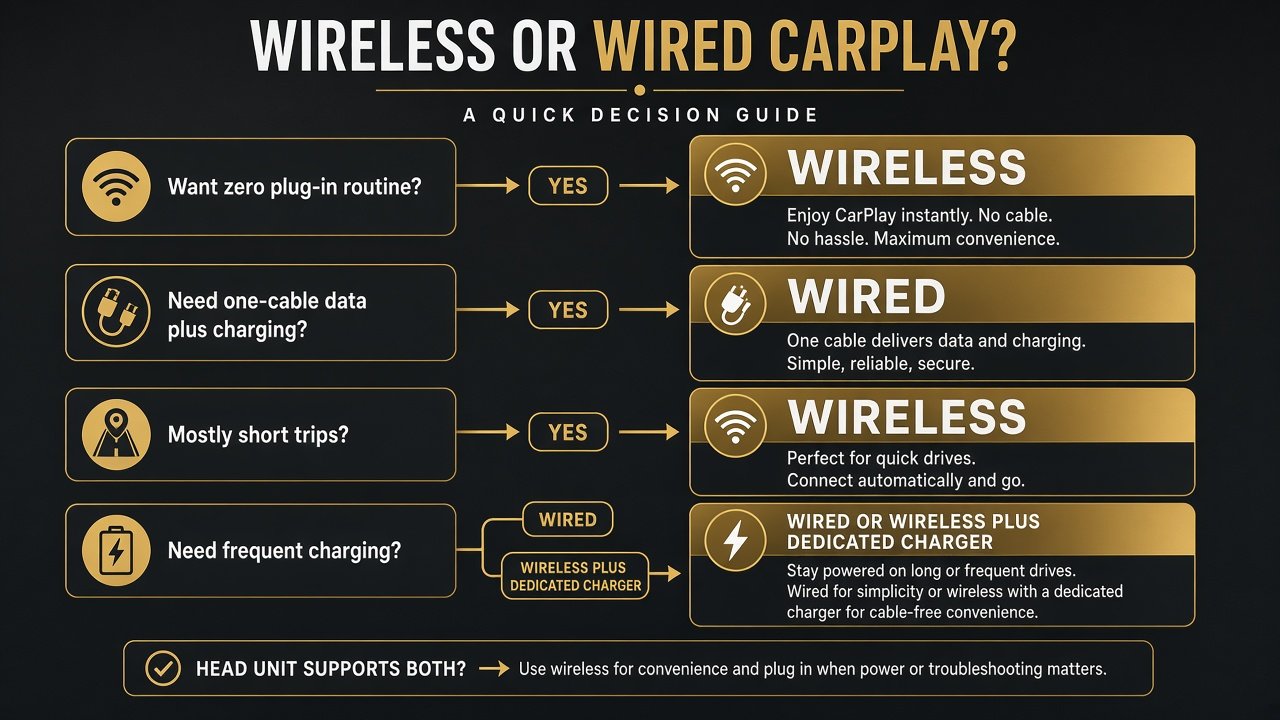
| If You Prioritize… | Better Fit |
|---|---|
| Short-trip convenience | Wireless |
| One-cable data + charging | Wired (if USB power is enough) |
| No plugging/unplugging | Wireless |
| Remove wireless-link dependency | Wired |
| Flexible daily use | Head unit with both |
| Shared-vehicle simplicity | Depends: cable vs device list |
Dislike plugging in every trip? Wireless likely adds real convenience. Need charging while driving? Wired or wireless plus a dedicated charger. Mostly short hops? Wireless is more valuable. Several people share the car? Watch device switching. Head unit supports both? Use wireless for convenience; plug in when the battery is low or when you are troubleshooting. iOS and CarPlay continue to change; we will not promise every future iPhone forever. Use a data-capable cable the maker accepts — not an expensive “audiophile CarPlay” cord. Long, poor cables can hurt USB data; follow the supplied extension when one is in the box. Aftermarket buyers should still judge screen, physical controls, audio, cameras, vehicle integration, and firmware — “wireless” on the box is not a complete spec. Factory CarPlay in a new car and a DIN receiver in an older dash can both be wired, wireless, or mixed; the mode logic is the same even when the install is not.
Final Verdict
Wireless CarPlay vs Wired CarPlay is not a permanent winner. Wireless is mainly a convenience upgrade. Wired stays useful for charging, simplicity, and diagnosis. For many buyers, a head unit that supports both — and a habit of switching modes by trip — is the actual best answer. Do not pay extra for wireless if you will always plug in anyway. Do not skip wireless if short trips are your whole week and you still have a charger for long days. Convenience, charging needs, shared-phone habits, and whether the radio even offers both modes decide more than any slogan about which is “better.”
FAQ
Is wireless CarPlay better than wired CarPlay?
It is better for convenience when it connects as designed. Wired can be better for charging or diagnosis. Neither wins on invented audio or latency scores.
Does wireless CarPlay use more battery?
It can, versus an idle phone, because radios and apps stay busy. We will not quote a percent. Plan charging on long drives.
Does wireless CarPlay sound worse?
Do not assume that. It is not ordinary Bluetooth music streaming. We did not test a sound winner.
Does wired CarPlay charge your phone?
Only if that USB port supplies useful power. CarPlay data does not equal fast charging. Sony’s AX8500 lists 3.0 A max on USB-C — check your unit.
Is wireless CarPlay slower?
Maybe, maybe not, depending on the implementation. No millisecond table here.
Can you use wired CarPlay on a wireless CarPlay head unit?
Often yes, when the unit lists both. That is the flexible setup.
Is a wireless CarPlay adapter the same as native wireless CarPlay?
No. An adapter is extra hardware. Native wireless is built into the receiver.