
This dash cam buying guide starts with the driver, not the box. Coverage, parking, imaging, power, storage, climate, and connectivity decide a useful system. Resolution alone is not enough. Moon Picke did not test plate capture, parking reliability, night footage, or heat endurance. Specs cited as examples follow manufacturer documentation patterns as of September 11, 2026.
Read How We Evaluate. Use this dash cam buying guide before comparing products. It is a decision framework, not a best-dash-cams roundup.
Dash Cam Buying Guide: The 10 Things That Actually Matter
| What to Evaluate | Why It Matters | Common Mistake |
|---|---|---|
| Channels (front vs front + rear) | Defines what incidents you can show | Calling 2CH “360° protection” |
| Sensor + lens + processing | Sets detail potential in real light | Treating STARVIS branding as a guarantee |
| Resolution per channel | More pixels can mean more crop headroom | Assuming “4K” applies to every camera |
| HDR / exposure language | Helps mixed light; still not a plate scanner | Treating every WDR label as multi-exposure HDR |
| Parking architecture | Buffered, impact, motion, and time-lapse differ | Buying “parking mode” as one standardized feature |
| Power plan | Parking needs hardwire or a supported pack | Thinking a supercapacitor powers parking |
| Storage / microSD | Loop recording overwrites unprotected clips | Inventing “128GB = X hours” for every camera |
| Temperature ratings | Operating and storage envelopes are different | “Heat-proof” marketing or mixing the two specs |
| Wi-Fi vs cloud vs LTE | Local app access is not remote cloud | Assuming Wi-Fi includes cellular backup |
| Total ownership cost | Card, kit, rear camera, LTE, and labor add up | Comparing camera stickers as complete systems |
| Buyer Priority | What to Focus On | Dedicated Guide |
|---|---|---|
| Parking | Mode type + power architecture | Best dash cams for parking mode |
| No subscription | What still works unpaid | Best dash cams without a subscription |
| Front + rear | Both cameras, cabling, storage | Best front and rear dash cams |
| Night | Sensor, HDR, glass — not 4K alone | Best dash cams for night driving |
| 2K vs 4K | Crop vs files vs the rest of the system | 2K vs 4K dash cam |
| Hot weather | Thermal specs, parking, card rating | Best dash cams for hot weather |
1. Start With Coverage: Front-Only or Front + Rear?
Front-only is simpler, cheaper as a system, easier to install, and writes less video. Front + rear adds context behind the vehicle — parking bumps, follow-on collisions, rear-end claims — at the cost of cabling, storage, and usually a higher kit price. A typical two-channel setup records front and rear. It still has side blind areas. Do not call it full 360-degree protection. Hatchbacks and SUVs make rear routing more involved because the hatch moves; pickups may need a longer rear lead than the box includes. If you need both cameras, evaluate the pair, not the front box. Product ranking for two-channel kits belongs in the front and rear dash cam guide.
2. Resolution: 1080p, 2K or 4K?
Common recording classes are 1080p, 2K / 1440p (often 2560 × 1440), and 4K / UHD (often 3840 × 2160). Higher resolution means more detail potential, not guaranteed better evidence. Ask whether “4K” is native 4K on the front only, 4K front plus a lower-resolution rear, or an upscaled output. 4K can add crop headroom and spatial detail. It also tends to mean larger files and more storage demand. Usefulness still depends on sensor, bitrate, HDR, light, and exposure. Do not buy 4K because the box is loud. The full 2K versus 4K trade-off is in the 2K vs 4K dash cam article — this page stops at the buying question.
3. Sensor, HDR and Frame Rate Matter Too
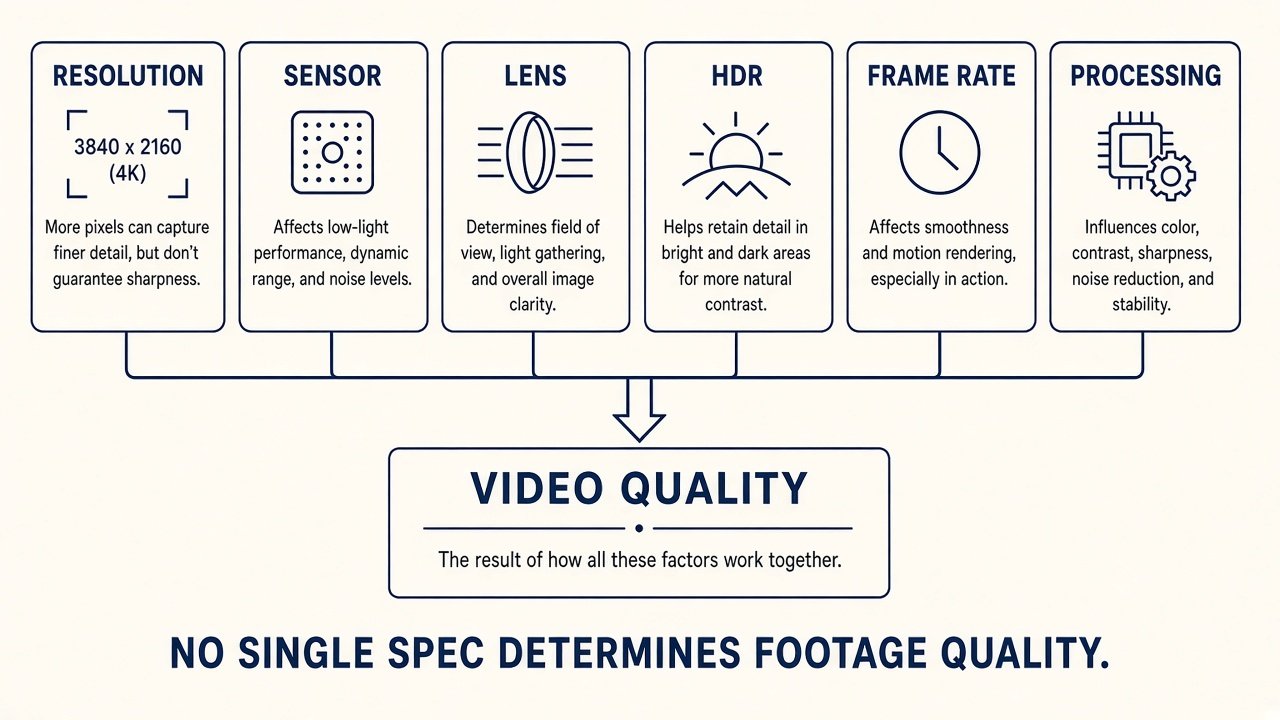
Footage is an imaging system: sensor generation and size, lens, processor, HDR or maker-specific wide-dynamic language, bitrate, and firmware. Sony STARVIS and STARVIS 2 appear on many current spec sheets; branding is one variable, not a quality guarantee. A wider aperture can admit more light; do not rank cameras by F-number alone. Manufacturers use HDR and WDR inconsistently — do not treat every WDR badge as multi-exposure HDR. HDR can help headlights, dark pavement, tunnels, and reflective plates. It does not guarantee a readable plate. Dash cams are not automatic license-plate scanners. Readability depends on distance, relative speed, angle, lighting, motion blur, exposure, weather, and plate reflectivity. Common frame rates are 30 fps and 60 fps. Higher frame rate means more temporal samples. 60 fps is not a guaranteed clearer plate, and at night shorter exposure can trade light for motion. Do not prescribe a universal setting. Vague “AI” labels may mean driver alerts, event tagging, or cloud classification — they do not automatically improve base video. Dash-cam ADAS (lane or collision chimes) is not a replacement for factory driver-assistance.
4. Night Driving Changes the Priorities
Low light depends on sensor, lens, HDR, exposure, processing, scene lighting, and glass condition. Resolution does not decide night performance by itself. Dirty glass creates haze, reflections, and glare; footage problems are not always camera problems. Clean the windshield before blaming the camera. A circular polarizer (CPL) can cut some reflections and also cuts some incoming light, so it is not automatically a night upgrade — follow the maker. For night-first shopping, use the night driving dash cam guide instead of stretching this section into a roundup.
5. Parking Mode Is More Than “Motion Detection”
Parking is not one feature. Makers implement buffered event recording, impact (G-sensor) detection, motion detection, time-lapse, and low-bitrate continuous recording differently. Buffered parking can preserve footage from before a trigger, depending on implementation — we will not invent buffer length. Motion is scene movement. Impact is a G-sensor event. They are not identical. You can have motion events with no impact, and an impact with little visible motion in frame. “24/7 parking” without a power explanation is a marketing red flag. Mode comparisons and product roles live in the parking mode dash cam guide.
6. Parking Mode Needs a Power Plan
Parking recording needs a manufacturer-supported power path: a hardwire kit, a dedicated battery pack, or another listed solution. A supercapacitor is not parking-mode power. It is typically better suited to automotive heat than a small internal lithium backup cell, and its job is power-loss handling and file finalization — not hours of recording. A hardwire kit can supply parking power and low-voltage protection depending on the system. Low-voltage cutoff reduces starter-battery discharge risk. It does not eliminate all battery risk; exact cutoffs are vehicle- and kit-specific — we will not prescribe a universal voltage. A dedicated pack can separate some parking demand from the starter battery, with extra cost, installation, and its own thermal limits. It is not mandatory.
7. Storage Matters More Than Most Buyers Expect
Most dash cams loop: when the card fills, oldest unprotected clips are overwritten. Capacity is how much history you keep, not a trophy number. Duration depends on resolution, bitrate, channels, codec, audio, and event files. Do not use a universal “128GB = X hours” chart. Verify the camera’s maximum supported card size — a larger card does not always work. Continuous video writing is demanding; follow the maker on high-endurance microSD. Some units recommend periodic formatting or show card-health warnings; do not invent an interval. Unreliable recording can be a worn card, unsupported card, corrupted filesystem, power, or the camera. Card failure is not automatically camera failure.
8. Hot Weather Changes What You Should Buy
Verify operating temperature, storage temperature, supercapacitor or internal-cell design, parking use, and memory-card rating. Operating temp is the running envelope. Storage temp is for sitting unpowered. They are not the same, and the maximum published number is not unlimited survival. 4K does not automatically overheat; higher-resolution systems need processing, but thermal design varies by manufacturer. Do not trust “heat-proof” or unspecified “military-grade” claims. Cabin-heat shopping belongs in the hot weather dash cam guide.
9. Wi-Fi, Cloud and LTE Are Different
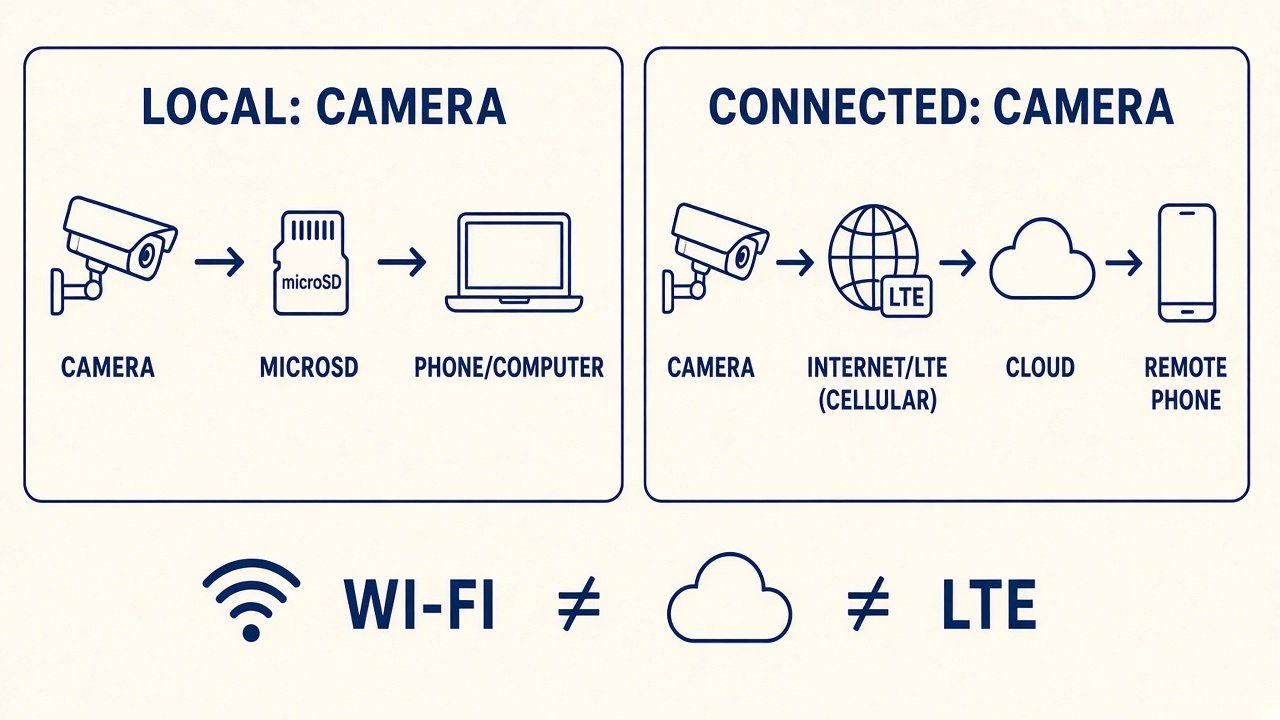
Wi-Fi usually means the phone talks to the camera locally for settings, playback, or file transfer. Wi-Fi is not cloud. Cloud may add remote event alerts, remote video, backup, or location — depending on the system — and may need internet, an LTE module, a hotspot, and a paid plan. LTE adds hardware, SIM or data, and service cost; cellular is not free by default. GPS may log coordinates, speed, and route metadata, built-in or via an external module. GPS speed is not a legal-proof guarantee. Footage is only useful if you can retrieve it: pull the microSD, use Wi-Fi/app transfer, or a USB/card reader as the product allows. Confirm an app exists and which OS it supports; do not call an app “great” from a product page. Local-only versus cloud systems have different privacy trade-offs — microphone, GPS, accounts, and remote access — without declaring one universally more private. Cabin audio can often be disabled in settings; this is not state-specific consent-law advice.
10. Subscription-Free Does Not Mean Feature-Free
Ask what still works without paying. Local loop recording on a card is different from cloud storage, remote alerts, LTE, and extended online history. A free account is not a recurring plan. A 30-day, 90-day, or one-year trial is not long-term no-fee ownership — check what dies after expiration. “No subscription” copy that hides cloud limits is a red flag. If you refuse monthly fees, shop local-first in the dash cams without a subscription guide rather than treating this pillar as that roundup.
11. Installation Can Change the Best Choice
Front-only is the simpler mount. Front + rear needs a rear cable. Parking often needs hardwire or a pack. Route cables so they do not interfere with curtain airbags or other safety systems; complex routing is a reason to use a professional. Do not treat adhesive versus suction as a universal winner — stability, removability, heat, and the maker’s mount design all matter. Mount for a clear road view, minimal driver obstruction, power access, and local windshield-obstruction rules (this is not state-by-state legal advice). Unknown generics that shout “8K,” dual 4K, giant screens, or ultra-low prices without manuals, firmware, and support are poor framework fits. Check current firmware, app, and manuals; do not promise how long a model will stay supported.
12. Calculate the Total Cost, Not Just Camera Price
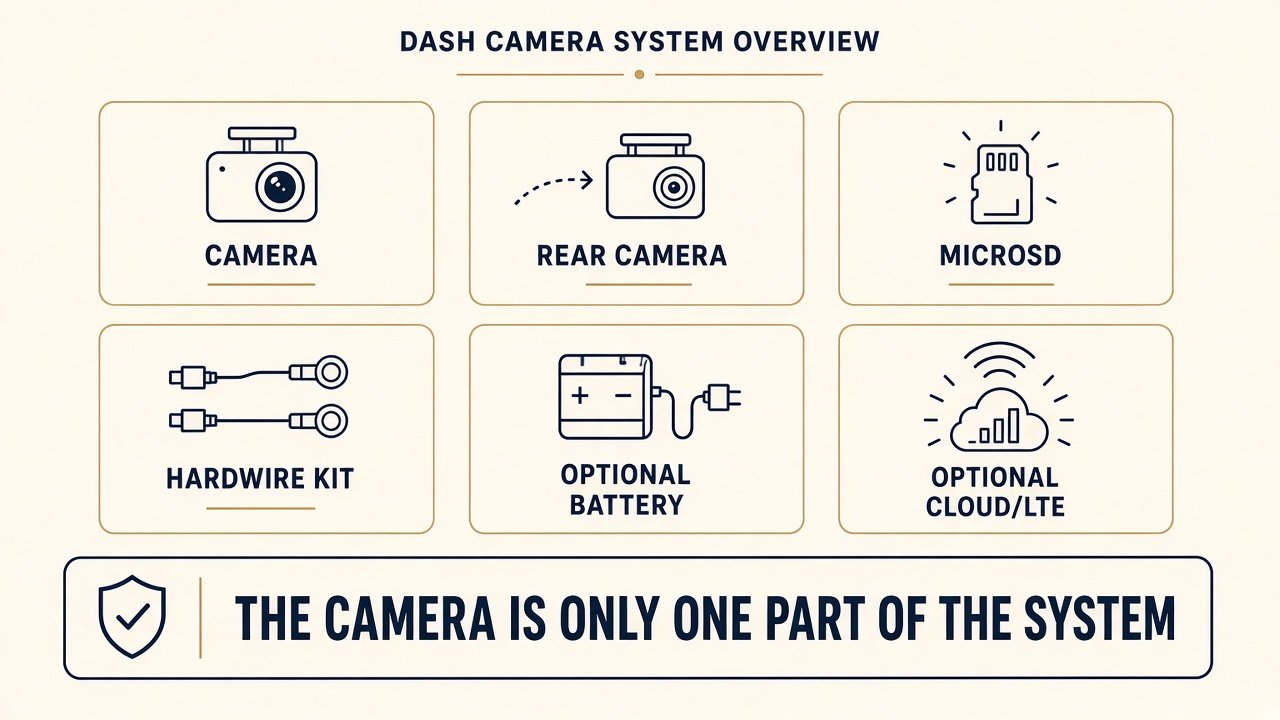
System cost can include the camera, rear camera, microSD, hardwire kit, battery pack, CPL, LTE module, subscription, and installation. Camera price is not total ownership cost. A cheap front unit can become expensive once you add a rear module, card, kit, and cloud. A dearer bundle may already include those pieces — normalize bundles before you call one a bargain. On marketplaces, confirm front-only versus front + rear, whether a card or hardwire or CPL or LTE module is in the carton, the exact generation, and New condition. Cosmetic screens and unused cloud features are not automatically value.
Which Dash Cam Features Matter for Your Use Case?
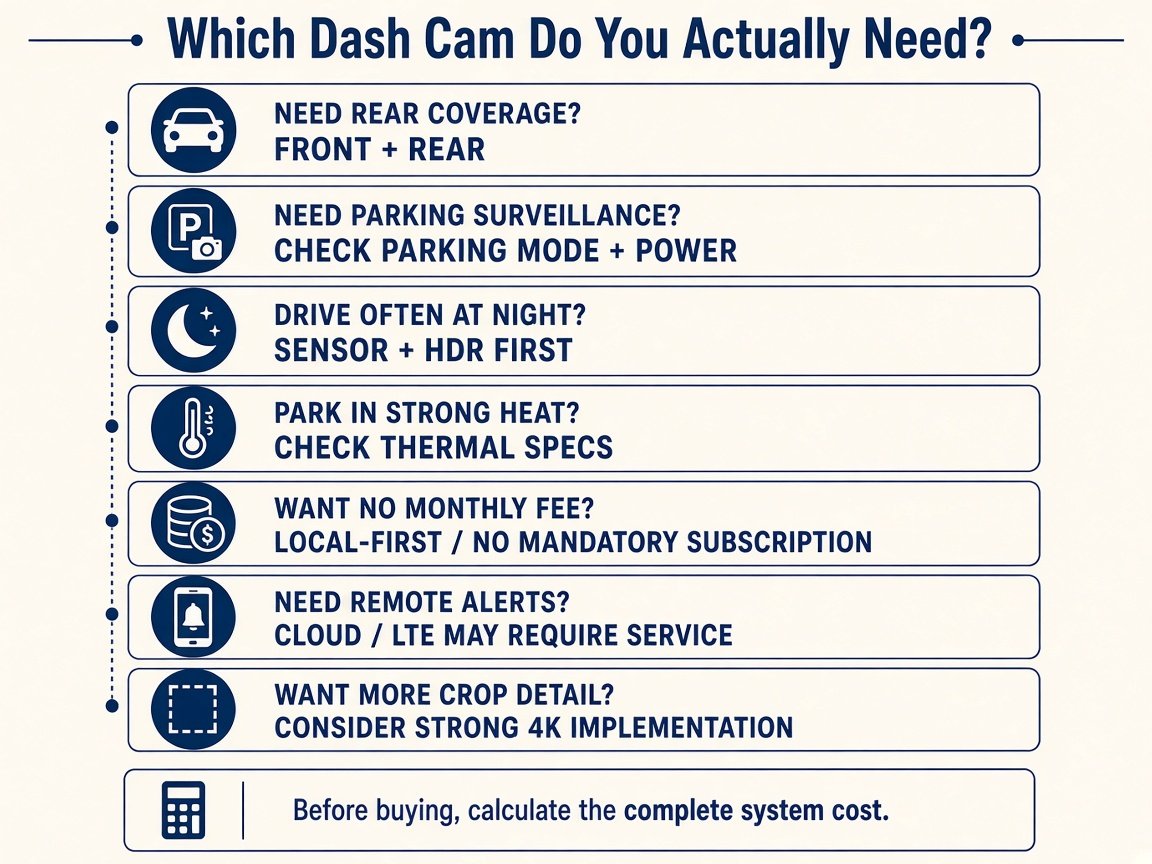
There is no best dash cam in isolation. Parking-first buyers prioritize parking architecture and power. No-fee buyers stay local-first. Night drivers prioritize sensor and HDR, not resolution alone. Hot-climate buyers verify thermal design. Front + rear buyers evaluate both cameras. Detail-first buyers examine a strong 4K implementation versus a strong 2K system. Remote-alert buyers accept that cloud or LTE may require service. Moon Picke’s default priority order is coverage, parking, imaging, power, storage, climate, connectivity, installation, current support, then total cost — shuffle it for your driving. This dash cam buying guide routes those jobs to child pages instead of crowning one camera.
Dash Cam Buying Checklist
Before you buy, treat this checklist as the working end of a dash cam buying guide: (1) Front-only or front + rear? (2) Do I need parking mode? (3) How will parking get power? (4) What are the actual sensor, resolution-per-channel, and HDR specs? (5) What card capacity is supported? (6) Do I drive mostly at night? (7) Will the camera face extreme heat? (8) Do I need cloud or LTE? (9) Is a subscription mandatory for anything I care about? (10) What is the total system cost? (11) Is the exact model still supported? (12) Is the exact bundle correct? Skip unknown “8K” or “night vision” boxes that never explain a resolution or an imaging chain.
Final Verdict: What Actually Matters?
A useful dash cam buying guide ends where shopping should start: use case before headline spec. Choose coverage, parking, imaging, power, storage, climate, and connectivity, then compare labels. The best dash cam is the system that matches your driving, parking, climate, storage, budget, and willingness to manage cloud — not the biggest number on the box.
FAQ
What should I look for when buying a dash cam?
Start with coverage and parking, then imaging, power, storage, climate, and connectivity. Specs only rank after those questions.
Is 4K worth it for a dash cam?
Only if the 4K channel is real and the rest of the system can use the extra pixels. Larger files are the usual trade-off. See the 2K vs 4K guide.
Is a front and rear dash cam worth it?
Yes when you need rear context. No if you want the simplest, cheapest install. 2CH is not 360° coverage.
Do I need parking mode? Does it drain the car battery?
Need it if you want parked-vehicle incidents. It needs a power plan. Hardwire with cutoff reduces battery risk; it does not erase it.
Does a dash cam need a subscription?
Not for local card recording on many cameras. Cloud, LTE, and remote alerts often do. Trials are not forever-free ownership.
Is a supercapacitor better than a battery?
For cabin heat and file-safe shutdown, often the better internal design. It is not a parking battery.
How much storage does a dash cam need?
Enough history for how you drive and how many channels you record. There is no universal hour chart. Stay inside the camera’s supported card list.
Is Wi-Fi the same as cloud?
No. Wi-Fi is usually a local phone link. Cloud and LTE are separate, and LTE is typically a paid data path.