
The useful question is not “which tool can dub a video” and not “which avatar can read a script.” It is narrower. You have speech, and you have a face, in a moving video, a still, or an avatar. You want the mouth to match that speech. That job is AI lip sync. Translation, a new voice, and a talking photo can sit next to it. They are not the same purchase.
This comparison keeps that line. On 5 October 2026, three products had a documented speech-driven mouth workflow and enough public limits to compare: Sync Labs, HeyGen, and Hedra Character-3. Sync takes an existing video plus audio. HeyGen documents a video-plus-audio lipsync API and, separately, photo avatars and translated video. Hedra Character-3 starts from a still image plus audio, including a documented singing path and a multi-speaker image path. It does not take an existing video as the face. Moon Picke did not run the same clip or the same audio through any of them. There is no sync-accuracy score in this article.
Quick picks
- Best for existing video: Sync Labs. The API takes one video and one audio or text track. sync-3 is the default model and also accepts a still image. lipsync-2 does not.
- Best when lip sync sits inside a larger avatar or translation product: HeyGen. The lipsync API takes a source video and replacement audio. Photo avatars and video translation are separate workflows on the same platform.
- Best for a still, a character, or a song: Hedra Character-3. Official docs require a start image and audio, document singing, and let you point at more than one face with a separate audio each. This is not an existing-video editor.
- Best free start: Sync’s free account, documented as 3 generations a month, 20 seconds each, with one sync-3 generation capped at 15 seconds. HeyGen’s free plan exists, but two official pages disagree on whether those videos are 720p or 1080p.
Comparison table
| Tool | Best for | Existing video | Image / avatar | Own audio | Multi-speaker | Max output | Starting price |
|---|---|---|---|---|---|---|---|
| Sync Labs | Re-sync a real video to new audio | Yes | Image on sync-3 only | Yes, or text to TTS | Speaker selection documented for multi-face images; active-speaker detection is a plan feature | Plan cap 1 to 30 minutes | $5/month plus usage |
| HeyGen | Video lipsync, photo avatars, or translated speech | Yes, on the lipsync API | Photo avatars and stock avatars | Yes | Precision mode is described for speaker switches; separate audio per face not verified | Plan videos up to 30 or 60 minutes; not the same as one lipsync job | Free plan, then Creator $29/month |
| Hedra Character-3 | Image plus audio, including singing | No | Start image required | Yes, 0.5 to 600 seconds | Yes: one point and one audio per speaker | Up to the audio, documented to 10 minutes | API from 2.5 cents/second at 540p; studio Basic $20/month |
Workflow table
| Tool | Video + audio | Image + audio | Avatar + script | Translation + lip sync | API |
|---|---|---|---|---|---|
| Sync Labs | Yes | Yes, sync-3 only | Not an avatar library | Dubbing is a separate feature, listed as 29 languages; lipsync itself is described as language-agnostic | Yes |
| HeyGen | Yes | Yes, photo avatar | Yes | Yes, as video translation, priced apart from lipsync-only | Yes |
| Hedra Character-3 | No | Yes | The image is the character | Not a translation product | Yes |
How we chose the best AI lip sync generators
A finalist had to do one real thing: take speech and a face and generate mouth motion that follows that speech. Text-to-speech alone failed. Voice cloning alone failed. Subtitles failed. A character that dances to a motion reference failed, because motion transfer is not audio-driven lip sync. An avatar that merely “talks” was not enough unless the vendor documented audio or script driving the mouth.
Search on 5 October 2026 for “best AI lip sync generators” mixed four jobs: re-sync existing footage, animate a still, drive an avatar, and dub a video so the mouth changes too. That mix is why the phrase stays as the focus keyword. The article then splits the jobs. Existing-video intent is strong. Talking-photo intent is strong. Avatar and dubbing results overlap, which is why those workflows are labeled instead of folded into one score. If you need a new shot rather than a mouth matched to audio you already have, start with Moon Picke’s published best AI video generators guide.
Ranking uses documented inputs, whether the face starts as video, image, or avatar, whether you can bring your own audio, whether more than one face can take more than one audio, and how duration, resolution, and price are actually billed. Mouth quality was not scored.
What is AI lip sync?
AI lip sync uses the speech and the face to generate or change mouth movement so it lines up with the sound. Some systems also move the jaw, cheeks, chin, or a wider expression. Some add head motion. Some only rewrite the mouth and try to leave the rest of the frame. Sync’s sync-3 page says the model preserves cadence and expression and can open silent lips. HeyGen’s lipsync API is framed as dubbing or replacing audio on a video. Hedra Character-3 generates a new talking video from a still. Do not assume every tool edits only the mouth, and do not assume every tool keeps the original performance.
Lip sync is not dubbing, translation, voice cloning, or text-to-speech
Dubbing replaces or adds spoken audio. Lip sync changes what the mouth does. A Spanish voice laid under an English video is a dub. If the mouth still shapes the English words, there is no visual lip sync. If the mouth is regenerated for the Spanish audio, both happened. Sync can do the visual step on audio you supply. Its pricing page lists dubbing into 29 languages as its own feature. HeyGen’s video translation API is the combined path, and the docs also offer audio-only translation that keeps the original picture when lip sync is not the point.
Translation changes meaning. It does not move a mouth. Voice cloning copies a voice. It does not, by itself, redraw lips. Text-to-speech turns text into audio. Sync and HeyGen can chain text into speech and then into mouth motion. That chain is two steps. Hedra’s required input for Character-3 is audio plus an image, so speech already exists before the face is generated. You do not need a cloned voice to lip sync. Uploaded audio is enough on all three.
Existing video, talking photo, and avatar are three workflows
Existing-video lip sync starts with a clip that already moves. The tool detects a face and rebuilds mouth motion against a new track. Talking-photo lip sync starts with a still. The motion, including any head turn or blink, is generated. Avatar lip sync starts with a stock or custom digital person and a script or audio. A product can do more than one. HeyGen does. Sync’s image path is sync-3 only, and it is not an avatar catalog. Hedra’s image path is the product. Calling a talking photo an “existing-video lip sync” would be wrong, and calling an avatar video proof that any uploaded footage can be re-synced would also be wrong.
1. Sync Labs: Best for existing-video lip sync
Sync Labs, from Synchronicity Labs, is a lip-sync product with a web studio, an API, an Adobe Premiere plugin, and a ComfyUI node. The generation request takes one visual input and one audio or text input. Video plus audio is the existing-footage path. Image input works only on sync-3. lipsync-2, lipsync-2-pro, and the legacy lipsync-1.9.0-beta are video models. react-1 is documented as expressive lip sync with facial expressions and head movement, capped at 15 seconds.
sync-3 is the default. The model page says it outputs at 4K native face resolution, handles close-ups, profile angles, and obstructions such as hands or microphones without a manual occlusion switch, and can open lips that were silent. Earlier models process in 2-second chunks and render the face at 512×512, which the docs say is usually enough inside a 1080p frame and can look soft if the face is very large. lipsync-2-pro is the diffusion detail model in that 512 family, described for beards, teeth, and fine features. Those are vendor descriptions of what the model is built to do. They are not a measured teeth score.
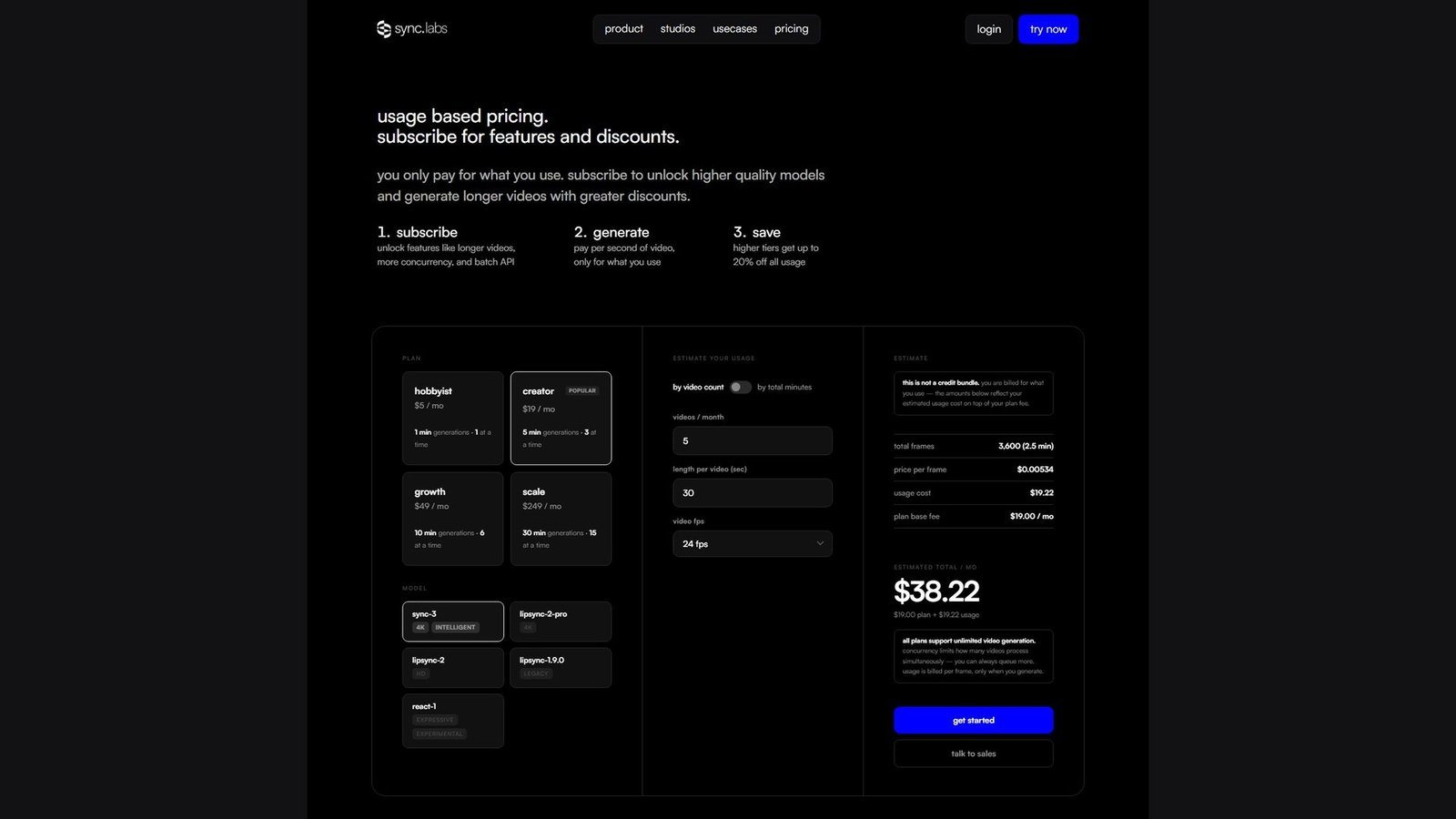
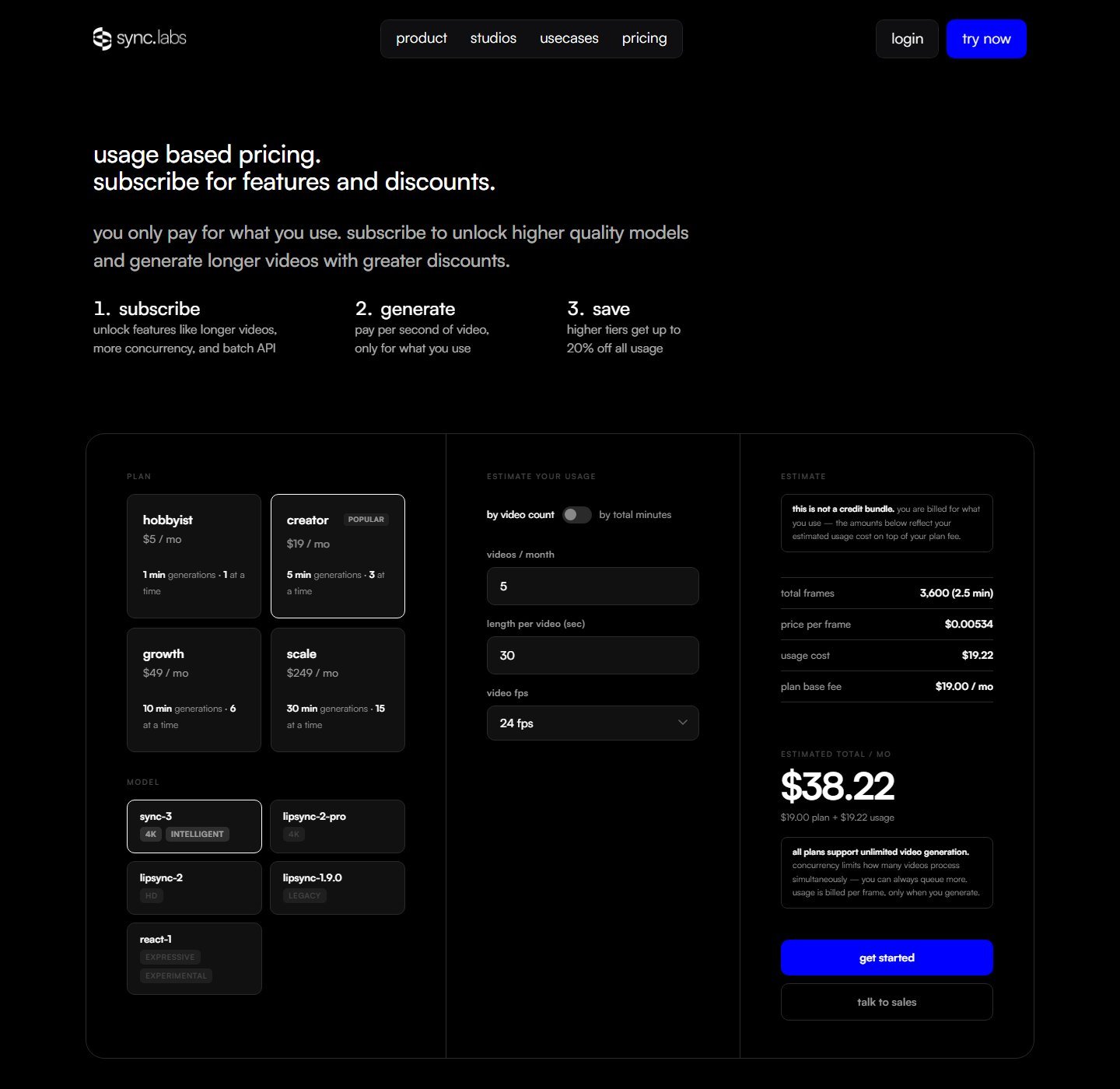
Published usage, at 25 fps, is $0.04 to $0.05 per second for lipsync-2, $0.067 to $0.083 for lipsync-2-pro, and $0.107 to $0.133 for sync-3. The pricing page also shows a per-frame estimate and says this is not a credit bundle: you pay the plan plus usage when you generate. A one-minute sync-3 job at the published 25 fps band is $6.42 to $7.98 of usage before the plan fee. That arithmetic is Moon Picke’s, using Sync’s published range, not the estimator widget.
On 5 October 2026 the plan cards showed Hobbyist at $5 a month, videos up to 1 minute, one job at a time. Creator was $19 a month, 5 minutes, three jobs, active-speaker detection, and no watermark in the feature text fetched with the page. Growth was $49 a month, 10 minutes, six jobs, a 5 percent usage discount. Scale was $249 a month, 30 minutes, 15 jobs, a 20 percent discount, and batch API. The page says higher tiers discount usage. It does not say the subscription includes unlimited free seconds. Free accounts, in the quickstart, get 3 generations a month up to 20 seconds, and only one of those may be sync-3, up to 15 seconds. Direct file upload on the API overview is listed at 20 MB. A public URL or an uploaded asset is the other path. The quickstart also warns that audio over 300 seconds fails, while paid plans list lipsynced video up to 5, 10, or 30 minutes. Treat the 5-minute audio note and the plan video caps as two documented limits, and confirm which one your account actually enforces.
Languages on sync-3 are listed as 95 or more, and the translator page says the lipsync is language-agnostic: if the audio exists, the mouth can follow it. Dubbing into 29 languages is a separate line on the pricing feature list. Do not use 95 as the size of the dubbing catalog, and do not use 29 as a limit on uploaded audio. Text-to-speech and voice clones are partner features, with clone counts of 3, 5, 15, or 50 by plan. Voice cloning is optional. For a still with several faces, the sync-3 docs say you pass coordinates and that auto-detect is not available on images. Active-speaker detection is a Creator-and-above feature. That is not the same as giving every person in a conversation a separate audio file. Segments in the API can carry reference IDs. This article does not upgrade that into a verified multi-track dialogue product.
Original audio is replaced by the audio you submit. The docs do not describe keeping the room tone under a new voice. sync_mode, defaulting to bounce, is how video and audio durations are reconciled. It is ignored for stills. There is no avatar library and no translation engine that writes the new script for you. Consent and likeness rules were not copied from a dedicated policy page in this check. The practical rule still applies: do not put words in a real person’s mouth without the right to do it.
Advantage: video plus your own audio is the core product, with named models and a per-second price. Limitation: the interesting model is the expensive one, image lip sync is not on the cheaper models, and the 5-minute audio warning does not match the longest plan caps. Skip if you need a stock avatar, a built-in translation, or a song performed by an illustrated character.
2. HeyGen: Best when lip sync is one part of an avatar platform
HeyGen is an avatar and localization platform that also documents a lipsync API. Those are different doors. The API endpoint takes a source video and a replacement audio. Precision mode is described for frame-accurate mouths on longer or harder footage. Speed mode is the faster, cheaper path. The product page says Speed is for a front-facing single speaker, at 6 credits a minute in the app, and Precision is for side profiles, camera changes, speaker switches, and objects in front of the mouth, at 10 credits a minute. Pay-as-you-go API rates on that same page are $0.84 a minute for Speed and $1.74 a minute for Precision, with batches up to 100 videos. A one-minute Precision API job is $1.74. That is a lipsync-only price. It is not a translation price.
Video translation is the other meter. Developer docs price Speed translation at $0.05 a second and Precision at $0.10 a second, and they show a 60-second video in nine languages costing $27 or $54. The same docs say you can translate the audio and leave the picture alone when lip sync is not required. Dynamic duration can stretch or compress a line so the new audio fits, and a flag can strip background music. Those controls belong to the translation and lipsync jobs. They are not proof that every HeyGen export rewrites a mouth.
Photo and avatar work is a third door. Avatar IV is documented as a still plus a script, an upload, or a recording, producing lip sync, expressions, and gestures. The page cites 1280p or higher for that talking photo, not 4K. Stock avatars and a custom digital twin are separate from “upload any footage.” A talking avatar does not prove the lipsync API, and the lipsync API does not prove you are animating a still. Voice cloning is optional and sits on the voice side. One official FAQ says Creator includes one clone. The credit help article says Creator includes up to 40 clones and Pro up to 70. Both sentences were on HeyGen pages. This article does not pick one.
Plan prices checked the same day: Free, then Creator at $29 a month or $24 a month billed annually, with the help center listing 600 credits, videos up to 30 minutes, and 1080p export. Pro starts at $49 a month and 1,000 credits, with 4K listed as a plan export and higher credit tiers at checkout. Business was listed at $149 a month plus $20 a seat on one FAQ. The free plan is described as up to 3 videos a month, about one minute each. One page says 720p with a watermark. Another says 1080p. Read the checkout you actually see. Credits are not seconds, and they are not the API’s per-minute dollars. A 4K badge on Pro is not, by itself, a 4K lipsync output. The API can keep the source format. Confirm the resolution on the job.
Language counts also split. The lipsync marketing page says 177 or more languages. Translation docs say 175 or more. Those numbers describe speech and localization on HeyGen, not a lab result that every phoneme set was tested. Uploaded audio can drive a mouth even when you are not using the translator. Multi-face support is only partly specified: Precision is described as handling speaker switches. A control that assigns a different audio file to each face was not documented on the pages checked. Custom-avatar consent steps were not re-copied from the consent flow. Do not treat a technical upload as permission to impersonate someone.
Advantage: one vendor documents video lipsync, photo avatars, and translation-with-lipsync, and prices the first and the third differently. Limitation: free resolution, clone counts, and what a credit buys are not consistent across HeyGen’s own pages. Skip if you only need a per-second lipsync on footage you already shot and you do not want an avatar suite.
3. Hedra Character-3: Best for a photo, a character, or a song
Hedra Character-3 is an image-to-video model. The API requires a start image, audio, a prompt, an aspect ratio, and a resolution. There is no existing-video input on that schema. Leaving duration empty makes the video as long as the audio. Setting duration trims the audio or pads it with silence. Audio may be 0.5 to 600 seconds, about 10 minutes, and up to about 100 MB. The image file cap on the model card is about 10 MB. Output prices on the model card are 2.5 cents a second at 540p, 5 cents at 720p, and 6.25 cents at 1080p. A one-minute 720p clip is $3 of API usage. That is Moon Picke’s multiplication of the published 720p rate. It is not a studio-plan credit.
The same card calls the model a fit for talking and singing, with speaker selection. One point can pick who speaks when several people are in the frame. Multi-speaker is explicit: pass audio as a list and one point per audio, in the same order. That is separate audio per face, on a still, not on a filmed conversation. Head motion, blinks, and expression are part of generating a performance from a photo. They are not a mouth-only edit of a video you already shot. A prompt is required. Use it to restrain gesture if the model adds body motion you did not ask for. That advice is on Hedra’s model page. It is not a quality ranking.
The studio pricing page showed Basic at $20 a month, billed monthly, and a $75 a month plan. The middle plan’s dollar amount did not come through in the text captured here, so it is not printed. An earlier search snippet listed different studio prices. The live page’s $20 and $75 are the figures used. Credits on the studio side are a different unit from the API’s cents per second. Commercial use is named on the enterprise list. A general commercial grant for the $20 plan was not in the text captured. Singing is documented. A specific music-rights policy was not.
Advantage: a still, your audio, a documented song path, and a real multi-speaker selector. Limitation: it does not re-sync an existing video, and the studio price card was only partly legible as text. Skip if the face is already moving in a shot you need to keep.
Which job gets which tool
Existing video: Sync Labs. HeyGen’s lipsync API is the other documented video-plus-audio route, useful if you already live in HeyGen or you want Precision called out for profiles and speaker switches. Talking photo: Hedra when the deliverable is a generated performance, including song and multi-face stills. HeyGen Avatar IV when the photo should become a presenter inside HeyGen. Sync’s sync-3 image path when you want the same vendor as your video lipsync and you accept that the cheaper models do not take stills. Avatar library: HeyGen. Sync and Hedra are not stock-avatar studios. Dubbing plus a new mouth: HeyGen’s translation API if you want translation, voice, and lipsync quoted together. Sync if you already have the translated audio and only need the mouth. Those prices are not interchangeable. API: all three. Sync bills per second or per frame on top of a plan. HeyGen bills lipsync minutes and translation seconds separately. Hedra bills Character-3 by output second and resolution. Budget specialist: Sync Hobbyist at $5 plus usage, if one-minute generations are enough. Free: Sync’s short free generations are the clearest documented free lip sync. HeyGen’s free videos are real and internally inconsistent on resolution.
Pricing and limits
Pricing, AI models, lip-sync limits, supported languages, and credit systems were checked on 5 October 2026 and may change. Check each provider’s current specifications before purchasing.
| Tool | Plan price | Usage price | Length | Resolution note |
|---|---|---|---|---|
| Sync Hobbyist | $5/month | From about $0.05/second on the card, model bands differ | 1 minute | Depends on model |
| Sync Creator | $19/month | Usage on top | 5 minutes | sync-3 documented at 4K face output |
| Sync Growth | $49/month | 5% off usage | 10 minutes | Same models |
| Sync Scale | $249/month | 20% off usage | 30 minutes | Batch API |
| HeyGen Creator | $29/month, or $24/month billed annually | 600 credits; lipsync page says 6 or 10 credits a minute | Videos up to 30 minutes on the plan | 1080p plan export |
| HeyGen Pro | From $49/month | From 1,000 credits | 30 minutes on the plan | 4K is a plan export, not automatically a lipsync output |
| HeyGen lipsync API | No subscription required on the pay-as-you-go line | $0.84 or $1.74 a minute | Not restated as a separate cap | Option to keep source format |
| Hedra Character-3 API | Separate from studio | 2.5, 5, or 6.25 cents a second | Audio 0.5 to 600 seconds | 540p, 720p, 1080p |
| Hedra studio | Basic $20/month; a $75/month plan was also shown | Credits, not the same as API cents | Not copied from the plan card | Not copied |
A 5-minute sync-3 job at $0.107 to $0.133 a second is $32.10 to $39.90 of usage, plus the plan that allows a 5-minute generation. A 5-minute HeyGen Precision API job at $1.74 a minute is $8.70, and that figure is lipsync-only. A 5-minute HeyGen translation in Precision, at $0.10 a second, is $30 in one language before you multiply by extra languages. A 5-minute Hedra clip at 1080p is $18.75. These are Moon Picke’s multiplications of published rates. They are not a checkout, and the translation number is not a lipsync-only number.
How to choose
Start with the face you already have. If it is a moving video, Sync or HeyGen’s lipsync API. If it is a still or a drawn character, Hedra or a HeyGen photo avatar, or sync-3 if you want that model’s image path. If it is a stock presenter, HeyGen. Then decide whether you already have the audio. All three accept it. Text-to-speech is a convenience, not the lip sync. Then decide whether anyone must be translated. That is a second product on HeyGen and a 29-language dubbing feature on Sync, not a property of every mouth model. Then read the cap that matches the job: seconds of usage, minutes of plan length, and credits are three units.
How to lip sync an existing video
Confirm you have the right to change what that person appears to say. Use a clear face and clean speech. Upload the video and the target audio. Select the face if the tool asks. Generate a short stretch before the full file. Watch the mouth against the words, then the profile turns, anything covering the mouth, cuts, and a second person who starts talking. Listen for whether the original room sound survived. Sync replaces the audio with the track you send. HeyGen can strip music when that flag is on. Export, then say the picture was altered when the context calls for it.
How to lip sync a photo
A photo workflow is image plus audio or script, then a generated performance. Hedra asks for the image, the audio, and a prompt. HeyGen Avatar IV asks for the photo and a script, a file, or a recording. sync-3 asks for the image and audio or text. The head, eyes, and hands you see were not in the still. That is more invention than a mouth edit on footage. Multi-person stills need an explicit selection on Hedra and on sync-3. Do not assume the model picked the right face.
Translated video is a separate switch
If the English mouth stays on screen and only the Spanish voice changes, you dubbed. If the mouth is rebuilt for the Spanish audio, you also lip synced. HeyGen sells that second step inside translation, at a per-second rate, and also sells lipsync without translation. Sync will move the mouth to a translated track you upload, in any language the audio uses, and separately offers dubbing in 29 languages. Hedra does not translate the video. It speaks whatever audio you give the still.
When lip sync struggles
These are properties of the shot, not a failure rate. A face in profile, a fast head turn, a hand or microphone over the mouth, a beard, a mask, a tiny face, motion blur, and a low-resolution crop give the model less to see. Fast speech, a whisper, a shout, and singing are different mouth problems. Singing is documented for Hedra and is not automatically included because speech works. Overlapping speakers and a cut to a new angle break a sync that looked fine on the first sentence. An illustrated face is not a photographic face. Sync’s sync-3 page says profiles and obstructions are in scope. That is a capability claim, not a promise for your clip.
Consent, likeness, and ads
Lip sync can make a person appear to say words they never said. Use a face and a voice only when you have permission or another lawful basis. A public figure’s face being technically accepted is not permission. Do not build a fake endorsement, a fake testimonial, or a customer who does not exist and call them real. Voice cloning, where a plan offers it, needs its own consent. It is not required for lip sync. Watermarks and synthetic labels differ by product. Sync removes the watermark on paid plans that include that switch. D-ID’s ethics note, seen while checking a tool that did not make this list, is a reminder that a watermark can be a disclosure choice. It is not a rule that every platform uses the same label.
What was left off
Viggle was not included. Character motion transfer is not audio-driven lip sync unless the current product documents speech driving the mouth, and that was not established here. Elai and TheInfluencer.ai were not included. An avatar that talks is not, by itself, this article’s subject. Synthesia, D-ID, Captions, Runway, Kling, and Rask were considered. D-ID’s pricing page did not yield plan prices in this pass, and an existing-video lipsync control was not confirmed on it. The others did not get a complete first-party lipsync record here, so they are not used to fill a number. Dubbing tools that only replace audio belong in a localization article, not in this ranking.
FAQ
What is the best AI lip sync generator?
For an existing video and your own audio, Sync Labs. For a still or a song, Hedra Character-3. For avatars plus an optional translation that also moves the mouth, HeyGen. “Best” means the documented workflow, not a measured mouth score.
Can AI lip sync an existing video?
Yes. Sync and HeyGen’s lipsync API both take a video and new audio. Hedra does not. A talking photo is a different input.
Can I upload my own audio?
Yes on all three. Text-to-speech is optional on Sync and HeyGen. Hedra’s Character-3 schema requires audio.
What is the difference between lip sync and dubbing?
Dubbing changes the voice. Lip sync changes the mouth. You can dub without moving the mouth, and you can move the mouth to audio you already recorded without translating anything.
Can AI lip sync a translated video?
HeyGen’s translation API can include lip sync, at a different price from lipsync-only. Sync can lipsync translated audio you upload. Translation languages and lipsync languages are not the same list.
Can it handle more than one speaker?
Hedra can, on a still, with one audio and one point per person. Sync documents manual face selection on multi-face images and an active-speaker feature on higher plans. Several faces in frame do not prove each person gets a separate track.
Does it work in any language?
Sync describes lipsync as language-agnostic and lists 95 or more languages on sync-3, while its dubbing feature is 29 languages. HeyGen’s speech and translation counts are in the 175 to 177 range on the pages checked. An uploaded audio track is not the same thing as a translation catalog.
Can AI lip sync singing?
Hedra’s Character-3 page says the model is for talking and singing video. Speech lip sync on Sync or HeyGen is not automatically a song tool.
Do I need a cloned voice?
No. Your own audio is enough. Cloning is a separate feature, with its own consent, on plans that offer it.
Is it legal to lip sync someone else’s face?
The tool accepting a file is not a legal opinion. You need an appropriate right to use that person’s likeness and to make them appear to say the words. Do not use it for a fake endorsement or to impersonate someone.
Final verdict
Match the tool to the face you start with. Sync Labs is the specialist for an existing video and a new audio track, with sync-3 as the default and a published per-second price that sits on top of a small monthly plan. HeyGen is the platform when the same vendor must also drive a photo avatar or translate a video and move the mouth, and when you are willing to keep lipsync minutes, translation seconds, and subscription credits in separate columns. Hedra Character-3 is the still-image model, including song and a real multi-speaker selector, and it is the wrong tool if the footage already exists.
None of this is a same-clip test. A clean preview on a frontal sentence does not predict a profile, a hand over the mouth, or two people talking over each other. Generate a short stretch, watch the mouth against the audio, and do not put words in a real person’s mouth unless you have the right to do it.