
An AI video prompt generator turns a rough idea, a still image, or a scene note into the instruction you paste into a video model. The useful output is text: subject, action, environment, shot, camera, light, and how the picture changes over time. It is not the video, not a YouTube script, and not a storyboard.
Searches for the best AI video prompt generators also surface the generators themselves, static prompt lists, and general chatbots. Moon Picke kept this guide on the instruction. US results, official model guides, and the tools below were checked on 5 October 2026. Three products cleared the gate: Aituts’ AI Video Prompt Generator, Runway Enhance Prompt, and PromptShotAI’s video prompt form. None of them was ranked for the look of a finished clip. Moon Picke did not send one scene through every tool and then into Veo, Runway, or Kling.
Quick picks
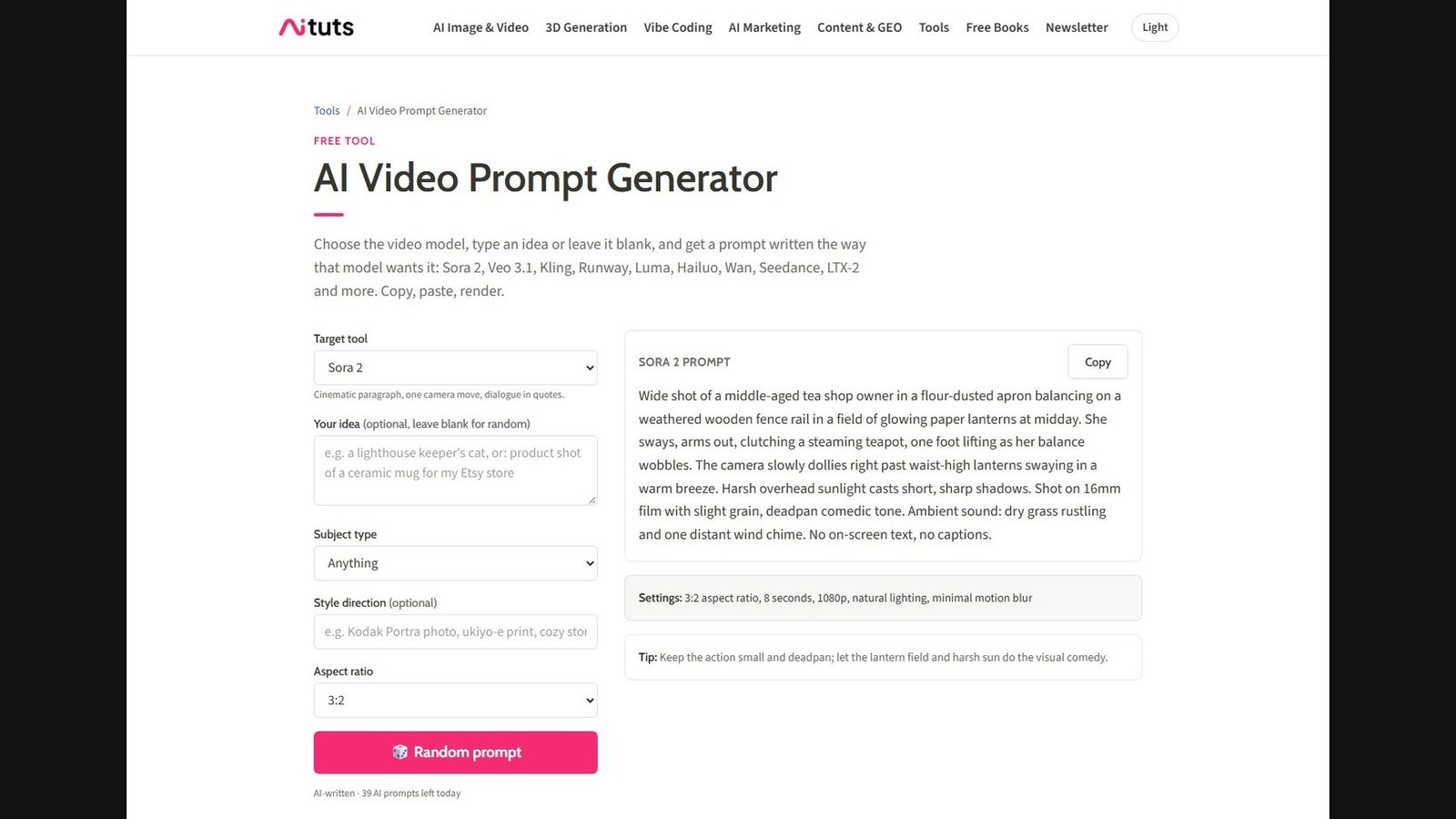
- Best dedicated prompt generator: Aituts. You pick a target tool, optionally type an idea, and get a cinematic paragraph plus a copy button. The page does not render the video.
- Best first-party enhancer: Runway Enhance Prompt. A help article says a star control rewrites your text with camera, lighting, texture, motion, and mood language for Runway’s image and video models.
- Best structured builder: PromptShotAI. The form has scene, motion, style, a camera-movement menu, a platform list, duration chips, and an optional audio or mood line. It assembles a prompt. It does not make the clip.
- Best documented free start: Aituts labels the tool free. The captured page also showed “39 AI prompts left today,” while an FAQ on the same page says generation is unlimited. Those two statements conflict.
- Not awarded: a best Sora prompter. OpenAI discontinued the Sora web and app on 26 April 2026, and its deprecation page lists the Videos API and Sora 2 model IDs for removal on 24 September 2026. A best image-to-prompt tool and a best script-to-prompt tool were also not awarded. None of these three documented an image upload or a script-breakdown step.
These labels are workflow fit. They are not scores for prompt adherence, camera accuracy, motion, or video quality.
Comparison table
AI video models, prompting features, model versions, pricing, and usage limits were checked on 5 October 2026 and may change. Check each provider’s current documentation before relying on model-specific prompt syntax.
| Tool | Best for | Video-specific | Image input | Script input | Model-specific | Camera / motion | Free access |
|---|---|---|---|---|---|---|---|
| Aituts | Idea to a copyable video prompt | Yes. The page’s job is the prompt | Not on this tool | Not verified | A target-tool menu. Dialects are the vendor’s claim | The page says one camera move per clip. That is wording, not a model control | Labeled free. UI also showed a daily remainder |
| Runway Enhance Prompt | Rewriting a prompt inside Runway | Yes, for Runway image and video models | Not documented for the enhancer itself | Not verified | Runway only | Help says it adds camera, lighting, and motion language | Runway Free is $0 with 125 credits. Enhancer credit cost not listed |
| PromptShotAI | Filling shot fields | Yes. Output is a prompt | Not on the form | Scene box only. No shot breakdown | Platform chips. “Syntax each model expects” is the site’s claim | Menu of camera words, including zoom | FAQ: free, daily limit, no signup |
How we chose the best AI video prompt generators
The reader already knows the scene. They need help describing it so a video model has a subject, an action, a place, a shot, and a change over time. A finalist had to create, structure, or rewrite that instruction. Generating the pixels did not qualify a product. A blog of example prompts did not qualify. A blank chatbot was not ranked first.
US results for “best AI video prompt generators,” “text to video prompt generator,” “image to video prompt generator,” and model-name queries were reviewed on 5 October 2026. The primary phrase still matches the intent, so the title keeps it. Many pages are static lists or SEO tools whose model cards still feature Sora and conflict with current vendor limits. Those were not used for syntax, duration, or rankings. ChatGPT, Claude, and Gemini can draft a prompt if you ask. This pass did not find a dedicated video-prompt control on them, so they stay off the ranked list. Prompt libraries such as searchable example galleries were classified as libraries.
What is an AI video prompt generator?
A video prompt is the instruction a video model reads. A useful one names who or what is in frame, what they do, where they are, how the camera observes them, how the light looks, and what moves. An image prompt can stop at a single frozen description. A video prompt has to survive several seconds.
A script is spoken or narrative writing. “A lone astronaut walks through an abandoned lunar station” can be a script line. A video prompt for the same idea specifies the shot, the walk, the camera, and the environment’s motion. A storyboard is a sequence of frames. A shot list is a production plan. Either can inspire a prompt. Neither is the prompt.
AI video prompt generator vs an AI video generator
An AI video generator spends a model to make frames. A prompt generator spends its effort on the words you will give that model. Runway does both: Enhance Prompt rewrites text, and the same account then generates. This article ranks the rewrite, not Gen-4.5’s picture quality. Aituts and PromptShotAI stop at the text. You paste it somewhere else, and that somewhere else has its own price.
Video prompt vs image prompt
An image prompt describes a still. A video prompt adds time. Subject motion is what the person or object does. Camera motion is how the viewpoint moves. Environmental motion is rain, cloth, fog, or traffic. Those are three different instructions. Stacking all three at once, plus a second event, is a common way to confuse a short clip.
Prompt generator vs prompt enhancer
A generator starts from an idea, or from empty fields, and writes a prompt. An enhancer starts from a prompt you already typed and expands or rewrites it. Aituts and PromptShotAI are generators, and PromptShotAI is specifically a form that assembles fields. Runway Enhance Prompt is an enhancer. A template with blanks can still qualify when it produces a usable video prompt. A page of copied examples does not.
1. Aituts: best dedicated AI video prompt generator
Aituts is a tutorial site with a browser tool whose only job on this page is a video prompt. It made the list because you can choose a target, add an optional idea, and copy a finished paragraph without rendering a clip. The company lists a San Diego address. The tool is on the web. Windows, macOS, iOS, and Android apps were not verified.
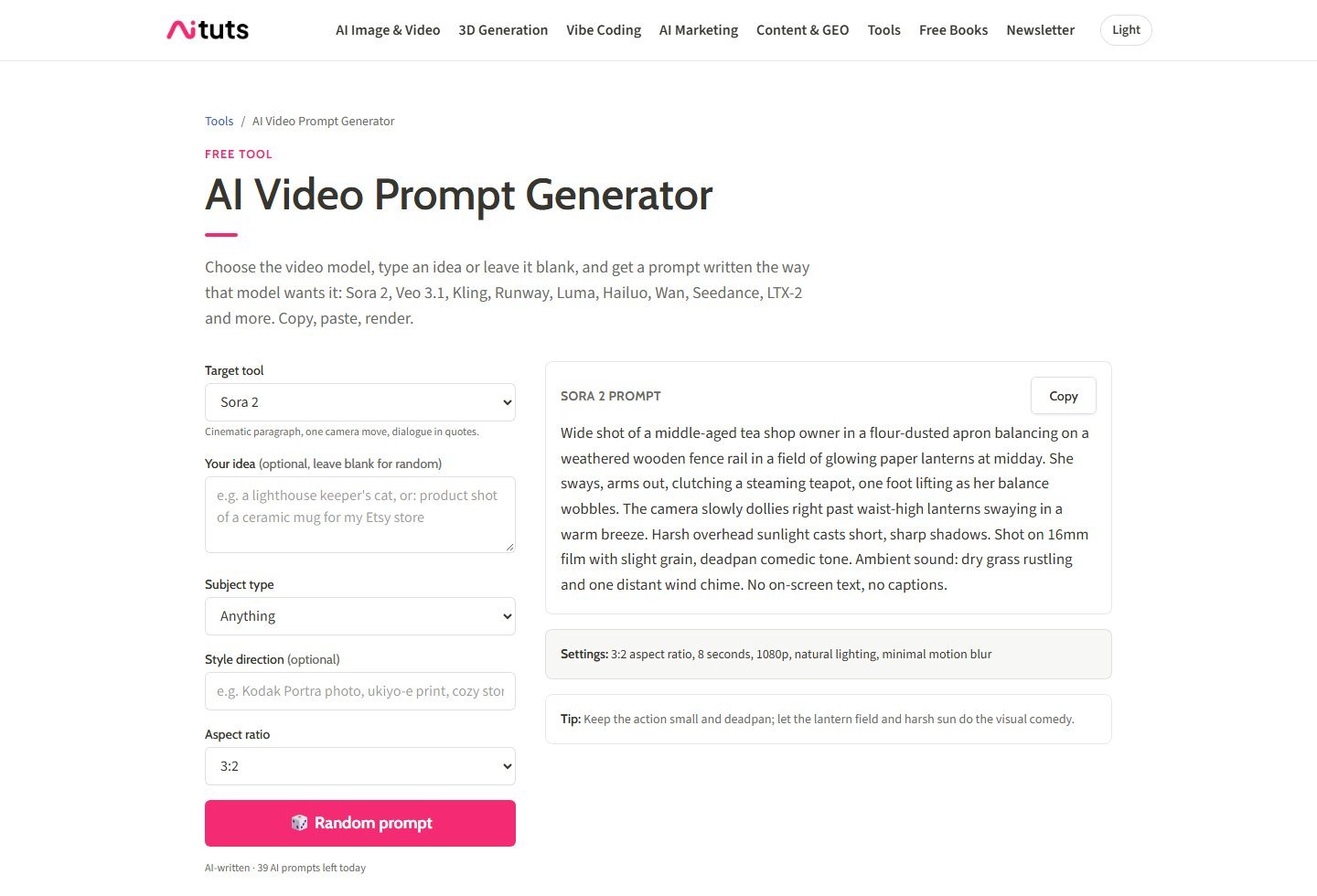
Who it is for. Someone who wants a first draft of a cinematic paragraph and will paste it into a current video model. It is a weak fit if you need the prompt locked to a reference photo, or if you need a script broken into one prompt per shot.
Workflow. The captured form has a target-tool menu, an optional idea, a subject type, an optional style direction, and an aspect-ratio menu. A button generates a prompt. The output panel has a Copy control, a settings line, and a tip. On 5 October 2026 the default target was Sora 2, and the visible subtitle under that menu said “Cinematic paragraph, one camera move, dialogue in quotes.” The intro text also names Veo 3.1, Kling, Runway, Luma, Hailuo, Wan, Seedance, and LTX-2. An FAQ on the page says each model gets its own format. Moon Picke did not verify those formats against each vendor’s current guide. Treat them as Aituts’ claim. Do not treat the settings line inside a Sora 2 sample, such as a duration or a resolution, as a live Sora control. The Sora web and app ended on 26 April 2026, and OpenAI’s deprecation table lists the Videos API and the Sora 2 model IDs for removal on 24 September 2026.
What is verified, and what is not. Idea input, a subject menu, a style note, an aspect-ratio menu, one generated paragraph, and copy are on the page. Image upload, a script field, a PDF, a URL, prompt history, and a saved library were not on the captured tool. The page points still-image work to a separate art prompt generator, then tells you to describe that scene here. That is not image-to-video, and it is not an image-to-prompt upload. Negative prompts and audio lines were not separate fields. A sample output can mention sound. That mention is text in the prompt. It does not mean the downstream model will generate audio. The FAQ says prompts are generated in the browser and that the page does not render video. The same page says the tool is unlimited, while the capture showed “39 AI prompts left today.” Report both. A separate paid plan was not listed.
The biggest advantage is a prompt you can copy without paying for a render. The biggest limitation is model freshness: the default example still targets Sora 2, and the per-model dialects are not independently documented here. Skip it if you need Runway’s own rewrite, or a form where you set the camera wording yourself.
2. Runway Enhance Prompt: best first-party prompt rewriter
Runway is a video and image studio. It qualifies because Enhance Prompt is a documented rewrite of the text you are about to generate with, not a blog of sample prompts. The help article says the control is available after you enter text for a supported image or video model. You click a star icon in the input field. Runway rewrites the text to be more detailed. You review it, edit it, and then generate if you want a clip. The article says the rewrite adds specificity such as camera angles, lighting, texture, motion, and mood. That is an enhancer. It is not a multi-model exporter.
Who it is for. A Runway user who already has a short intention and wants the editor to expand it before a Gen-4.5, or other Runway, generation. Skip it if the prompt must be formatted for Kling or Veo. The help article does not say the rewrite is portable.
How Runway wants the underlying prompt written. Runway’s text-to-video guide, written for Gen-4.5, says a prompt needs a visual description and a motion description. It does not require every component. It suggests, as an optional organization method, a camera shot of a subject doing an action in an environment, plus supporting detail. It also says there is no ideal length, that order does not matter, and that overly long prompts can conflict. Natural language is preferred to a pile of keywords. The image-to-video guide, also aimed at Gen-4.5, says the prompt should focus on motion rather than redescribing the still. A suggested shape is: the camera does something as the subject does something. Timestamps in plain language are described as one way to order events. None of that is a proprietary code. Typing “slow dolly in” is a sentence. It is not proof of a separate camera-rig control.
Image upload belongs to image-to-video generation, which is a different job from the enhancer. The enhancer article starts from text. A script field, negative-prompt field, and audio-prompt field were not in the Enhance Prompt article. Do not add dialogue instructions for Gen-4.5 on the strength of this guide. Runway’s own pages, in the pricing capture, list other models inside Runway, including Veo 3.1. Those models keep their own prompting rules. Enhancing a prompt inside Runway does not convert it into a verified Veo prompt.
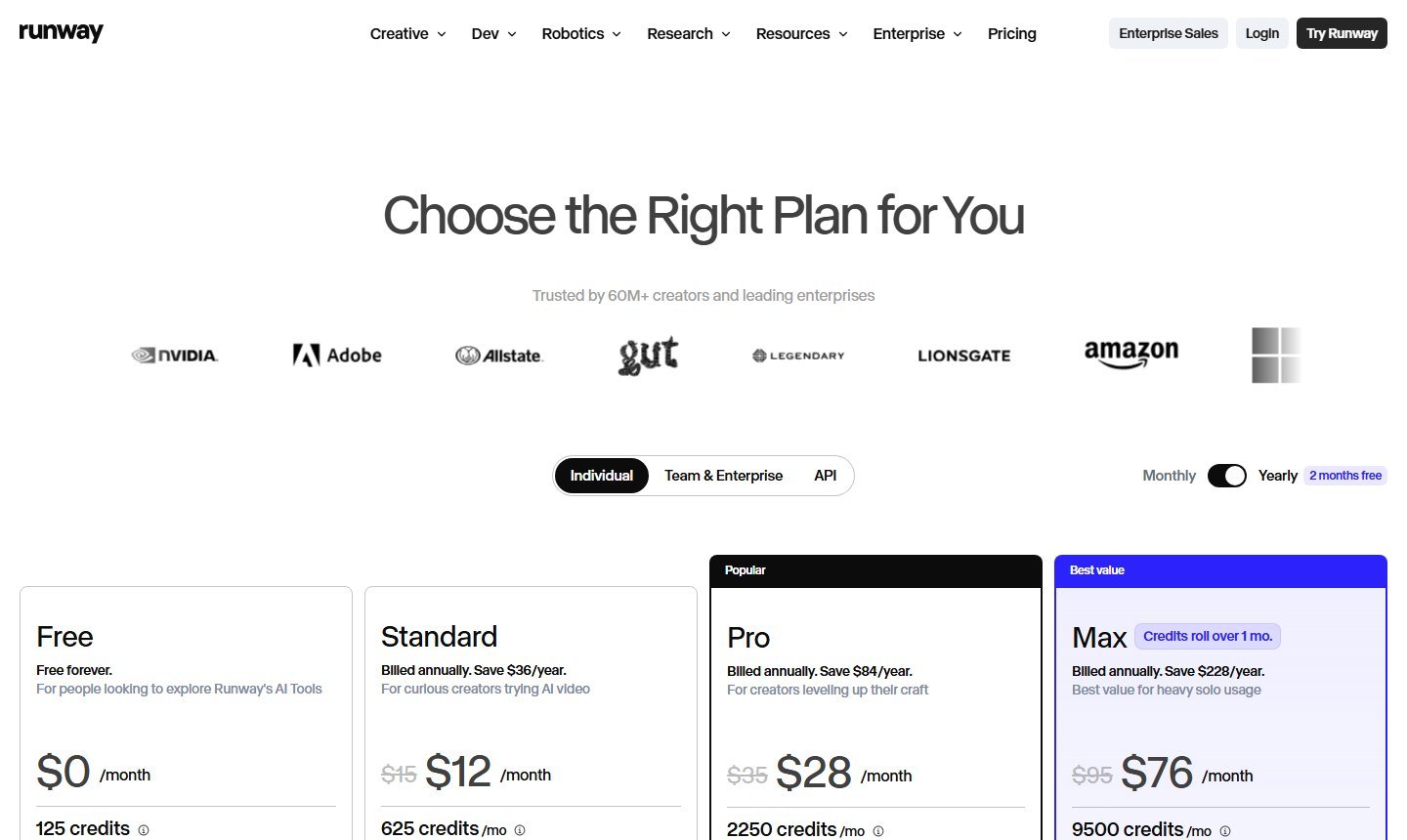
Pricing. With the yearly toggle on, the individual plans showed Free at $0 per month with 125 credits, Standard at $12 per month billed annually (a struck $15 beside it, “save $36/year”) with 625 credits a month, Pro at $28 per month billed annually (struck $35, “save $84/year”) with 2,250 credits, and Max at $76 per month billed annually (struck $95, “save $228/year”) with 9,500 credits. Max notes that credits roll over one month. The yearly control also said “2 months free.” The monthly toggle was not captured, so a month-to-month price is not stated beyond the struck figures sitting on the yearly cards. Those credits are generation credits. The enhancer article does not say a rewrite spends one. Using Runway still means a Runway account. Video generation is a separate cost from the words.
The biggest advantage is a rewrite documented by the company that runs the model, aimed at the current Gen-4.5 prompting guides. The biggest limitation is the lock-in: the star button does not hand you a checked prompt for every other model, and this research did not capture the star icon itself, only the help article and the plan cards. Skip it if you are not generating in Runway.
3. PromptShotAI: best structured video-prompt form
PromptShotAI is a web form that builds a prompt from fields. It qualifies as a rule-based builder, not as proof that an AI model rewrote your idea. The page says the form turns scene, subject motion, camera movement, pacing, and duration into a prompt, and that it does not generate the video.
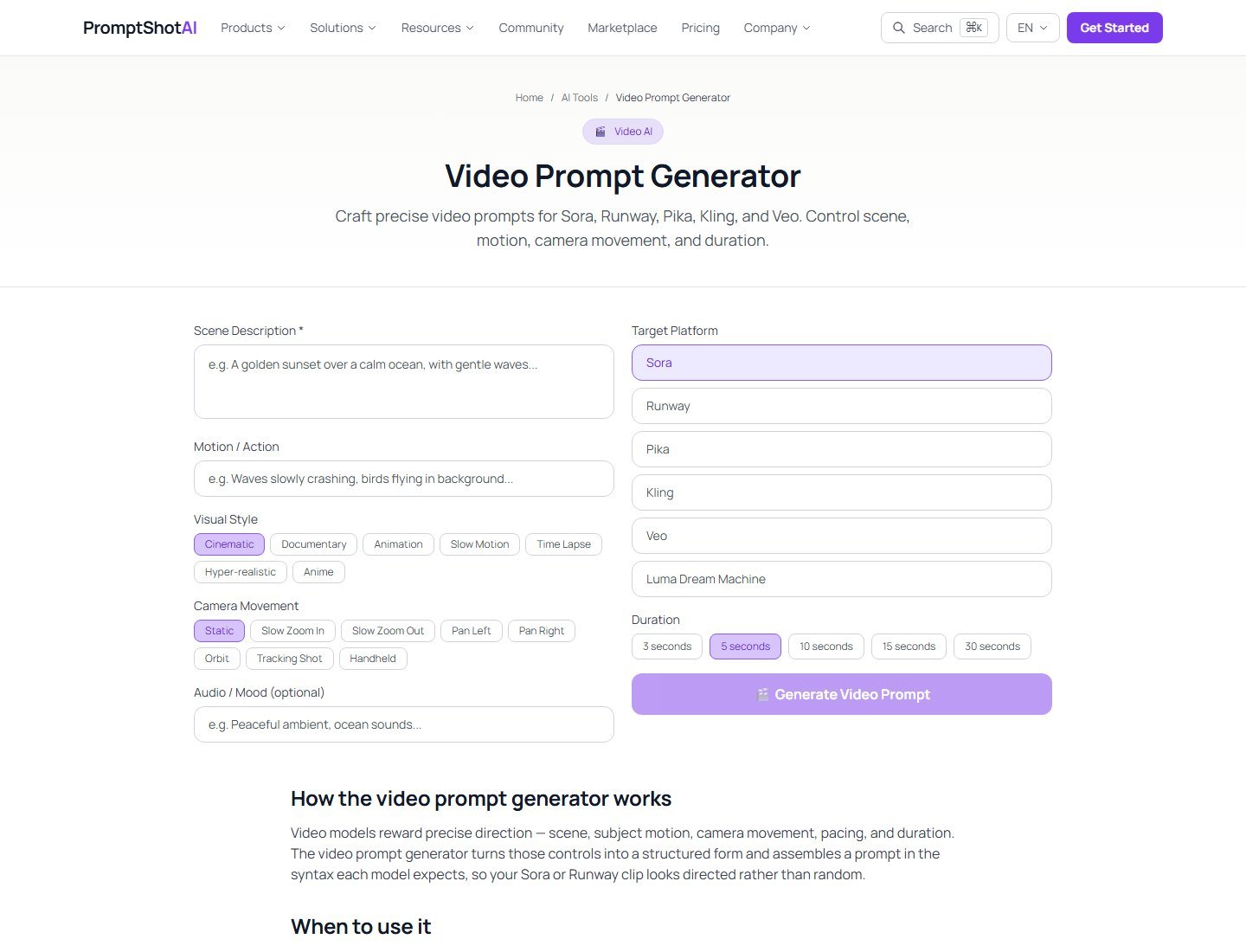
Who it is for. A beginner who wants the parts of a shot sitting in labeled boxes: scene, motion, style, camera wording, platform, and duration. It is a weak fit if you believe the platform chip silently applies a verified grammar. The page says the prompt is assembled “in the syntax each model expects.” That is PromptShotAI’s claim. This article does not adopt it.
Fields on the form. Scene description is required. Motion or action is its own box, which is the right split for a video prompt. Visual style chips include cinematic, documentary, animation, slow motion, time lapse, hyper-realistic, and anime. “Cinematic” by itself is vague. The camera menu is more useful, and it is still only wording: Static, Slow Zoom In, Slow Zoom Out, Pan Left, Pan Right, Orbit, Tracking Shot, and Handheld. Zoom is grouped there with camera moves. Optically, a zoom changes the lens field of view. A dolly moves the camera toward or away from the subject. They are not the same shot. Choosing “Slow Zoom In” asks the prompt to say zoom. It does not operate a lens.
Target platforms on the capture were Sora, Runway, Pika, Kling, Veo, and Luma Dream Machine. Sora is the problem already noted: the consumer product is discontinued. Duration chips were 3, 5, 10, 15, and 30 seconds, with 5 selected. Those chips are prompt text. They are not the duration control of Veo, which Google documents as 4, 6, or 8 seconds for Veo 3.1, or of any other model. An optional audio or mood field can add a line about sound. Putting sound in the prompt does not mean the selected model generates audio. Image upload, script splitting, negative prompt, history, and export beyond the generated text were not on the form. The FAQ says the tool is free, with a daily limit and no signup. A dollar price was not on the page.
The biggest advantage is that subject motion, camera wording, and duration are separate boxes, so a short idea is less likely to forget the action. The biggest limitation is the unverified claim of model syntax, plus a platform list that still leads with Sora. Skip it if you need Runway’s documented enhancer or a prompt grounded in a photo.
Best cinematic prompts, image-to-video prompts, and script-to-prompt
Aituts is the closest of the three to a cinematic paragraph: the Sora 2 subtitle on the form says one camera move and dialogue in quotes, and the output is a single scene description. “Cinematic” still needs a shot size, an angle, a light, and an action. The word alone does not direct anything.
No finalist documented an image upload that becomes a video prompt. For image-to-video, follow the model that will render. Google’s Veo best-practice page says the still already holds the subject, scene, and style, and that the prompt should ask for camera movement, subject animation, and environmental change rather than redescribing the picture. Runway’s Gen-4.5 image-to-video guide says the same thing in its own words: describe the motion. PromptShotAI’s scene box can hold a motion note you write while looking at a still. That is you doing the image reading, not the form.
No finalist documented a script broken into one prompt per shot. You can paste a scene into Aituts’ idea box or PromptShotAI’s scene box. That is one field, not a shot extractor. A script and a prompt stay different documents.
Camera wording and motion
PromptShotAI’s menu and Runway’s enhancer both deal in camera language. Neither one was verified as a dedicated camera rig inside the video model. A sentence can request a move. A control would be a separate slider or preset that the model exposes. Kling’s own text-to-video guide, dated 24 November 2025, makes this split: camera language, such as a close-up or a low angle, is not the same thing as camera motion control.
The words themselves are ordinary cinematography. A pan rotates the camera left or right. A tilt rotates it up or down. A dolly moves the camera closer to or farther from the subject. A truck moves it sideways. An orbit moves it around the subject. A zoom changes focal length while the camera stays put. A static shot leaves the camera fixed. PromptShotAI lists zoom inside “Camera Movement.” Use the menu if you want the prompt to say zoom. Do not describe that choice as a dolly.
Subject motion, camera motion, and environmental motion can be combined, and they can also cancel each other. A runner moving toward the lens, a camera dollying in, and rain blowing across the frame is three jobs in one short clip. If a generation ignores one of them, change one instruction and try again. Better wording can influence the result. It does not guarantee temporal consistency, a stable face, believable physics, or a product that matches a reference package.
How current models want to be prompted
There is no universal syntax. A Moon Picke practical framework, not an official template, is subject, action, environment, shot, camera, lighting, style, and temporal motion. Use it to organize a note. Then adapt it to the model you will actually run.
Google Veo 3.1. Google’s Cloud prompting guide for Veo 3.1 uses a formula of cinematography, subject, action, context, and style and ambiance. The Gemini API docs describe 8-second clips, with the enterprise card also listing 4, 6, and 8 seconds, plus 16:9 or 9:16. Audio is part of Veo 3.1: dialogue in quotation marks, sound effects, and ambient noise, preferably in their own sentences. The API documents image-to-video, up to three reference images, and a first-and-last-frame interpolation. A negative-prompt field was not in the guides used here. Do not add one by habit.
Runway Gen-4.5. Natural language, visual plus motion for text-to-video, motion-first for image-to-video, no required order, no ideal length. Enhance Prompt can expand a short intention inside Runway. Audio instructions were not in those two prompting guides.
Kling, as of the 24 November 2025 guide. The published formula is subject and subject description, subject movement, scene, then optional camera language, lighting, and atmosphere. That page describes 5-second and 10-second clips and Standard versus Professional modes, and it says the formula is optional. It is a 2025 text-to-video note. It is not automatically the grammar of every newer Kling mode. A later Kling marketing page discusses other controls. This article does not merge that marketing into the 2025 formula.
Sora. Not a current target. OpenAI’s help center says the Sora web and app ended on 26 April 2026. The API deprecation table lists 24 September 2026 as the shutdown date for the Videos API and the Sora 2 model IDs, with no replacement model named. Tools that still offer a Sora chip are describing a discontinued product.
Example prompt created by Moon Picke, for illustration only. It is not an official Veo, Runway, or Kling template:
A woman in a yellow raincoat walks toward the camera through a quiet alley at night while rain falls. Medium shot. The camera moves slowly backward. Warm shop lights reflect on the wet pavement. Cool ambient night light fills the shadows.
The same idea, organized with the Moon Picke framework rather than as required syntax: subject, a woman in a yellow raincoat; action, walking toward the camera; environment, a rainy alley at night; shot, medium; camera, slow backward move; lighting, warm storefront light and cool night fill; environmental motion, rainfall and reflections; style, cinematic realism. Drop any line the target guide says to omit. For an image-to-video run, Google’s and Runway’s current guides both say to keep the prompt on the motion if the still already shows the coat, the alley, and the light.
Pricing
These are not the same meter. Aituts’ page is a prompt tool. Its FAQ says unlimited and in-browser, and the capture also showed a daily remainder of 39. No dollar plan was listed. PromptShotAI’s FAQ says free with a daily limit and no signup. No dollar plan was listed. Runway’s prices buy generation credits on a video and image platform that happens to include Enhance Prompt. They are not a prompt-only subscription, and they are not the price of Veo or Kling used somewhere else.
- Aituts: free label, plus a visible daily counter. Conflict unresolved.
- PromptShotAI: free with a daily limit, per its FAQ. No monthly price found.
- Runway, yearly toggle: Free $0 and 125 credits; Standard $12 per month billed annually and 625 credits; Pro $28 per month billed annually and 2,250 credits; Max $76 per month billed annually and 9,500 credits. Enhancer credit cost: not listed.
Commercial use of a prompt tool was not verified for Aituts or PromptShotAI. A right to use Runway’s editor is not, by itself, a statement of rights in the video Runway generates. Read the video model’s terms before you publish a clip. Rights in the prompt text and rights in the frames are different layers.
How to choose an AI video prompt generator
Choose from the destination model. If you will generate in Runway, start with a short intention and use Enhance Prompt, then edit the rewrite against Runway’s Gen-4.5 guides. If you want a labeled form and you will delete any Sora-specific line, PromptShotAI makes the shot parts explicit. If you want a single cinematic paragraph and a copy button, Aituts is the dedicated generator, provided you switch the target off a discontinued model and you do not trust an unverified dialect. If the job is a photo that must move, none of these three reads the photo for you. Write the motion yourself, using the target model’s image-to-video guide.
How to write a good AI video prompt
Define the subject and what it does. Define the place. Choose a shot size and an angle. Choose one camera move, or say the camera is static. Separate the subject’s movement from the environment’s movement. Add light and a style only where they change the picture. Add a time order only when two beats must happen in sequence. Add a reference image only where the model accepts one. Add audio only where the model documents audio. Remove contradictions. Generate. If the clip misses the point, change one major variable and save the version that worked. Longer is not automatically better. Runway says an overly long prompt can conflict. Google’s image-to-video note says redundant description can confuse the model. Keyword piles such as “8K, masterpiece, ultra detailed” are an image-model habit. The video guides cited here ask for a coherent scene instead.
Common prompting mistakes
The usual failures are no clear subject, no action, two camera moves that fight, a zoom described as a dolly, a still-image adjective list, and too many events for a clip of a few seconds. Other drafts request on-screen text, a negative prompt, or dialogue on a model whose guide does not offer those fields. Some prompts redescribe a reference image the model was told to treat as given. Some assume the wording will repair identity drift, product mismatch, or broken physics. It will not. Iterate the instruction. Change models only when you also change the prompt to that model’s guide.
FAQ
What is the best AI video prompt generator?
For a dedicated page that writes a copyable video prompt and does not render the clip, Aituts is the strongest fit in this set. For a rewrite inside the tool that will generate, Runway Enhance Prompt is the documented first-party option. The answer is the workflow, not a quality score.
What is an AI video prompt generator?
It turns an idea or a set of shot fields into the text instruction a video model reads. The output is a prompt. A video generator is the next step, on a separate product, unless the enhancer lives inside that studio the way Runway’s does.
Can ChatGPT write AI video prompts?
ChatGPT, Claude, and Gemini can draft a prompt if you specify the subject, action, camera, and target model. That is freeform help. This pass did not find a video-prompt product surface on them, so they are not ranked. Check the draft against the target model’s current guide. Model knowledge in a chatbot can be stale. Sora is the obvious example.
How are video prompts different from image prompts?
An image prompt can describe one frame. A video prompt also needs change over time: what the subject does, what the camera does, and what the environment does. Those three are not interchangeable.
How do I prompt camera movement?
Name one move in ordinary language, and say the direction. A pan turns the camera sideways. A tilt turns it up or down. A dolly moves the camera in or out. A zoom changes the lens and is not a dolly. A menu that inserts those words, as on PromptShotAI, is a prompt field. It is not a camera control in the video model unless that model documents one.
How do I write an image-to-video prompt?
For Veo and for Runway Gen-4.5, current first-party guides say the still already establishes the picture, so the prompt should emphasize motion. Do not assume every model wants that. Read the guide for the model you are running. None of the three tools here was verified to analyze an uploaded frame and write that motion prompt for you.
Do different video models need different prompts?
Yes. Veo 3.1 documents audio, references, and first and last frames. Runway Gen-4.5 documents natural language and a motion-first image-to-video prompt. Kling’s 24 November 2025 guide documents a subject-movement-scene formula and 5- or 10-second clips. A platform chip is not proof that a tool applied those rules.
Should AI video prompts be long, and should I use a negative prompt?
Runway says there is no ideal length and warns against conflicting detail. Do not treat “always longer” or “always add a negative prompt” as a rule. A negative-prompt field was not documented in the Veo or Runway guides used here. Add one only where the current model exposes it.
Can AI turn a script into video prompts?
Not as a verified workflow on these three tools. You can paste one scene into an idea or scene field. That does not split a script into shots. A script remains the spoken or narrative document. The prompt remains the generation instruction.
What is the best free AI video prompt generator?
Aituts is labeled a free tool and does not show a dollar plan. The captured page also showed a daily remainder, which conflicts with its unlimited FAQ. PromptShotAI says free with a daily limit and no signup. Runway has a $0 plan with 125 generation credits. That free plan is for the studio, not a counted pile of prompt rewrites. The enhancer’s own credit cost was not published.
Final verdict
Three tools write or reshape a video prompt, and they do not replace the model that makes the frames. Aituts is the dedicated generator: a target menu, an idea, a paragraph, and a copy button, with no render. Its default sample still says Sora 2, and its per-model dialects stay unverified. Runway Enhance Prompt is the first-party rewriter, documented beside Gen-4.5’s natural-language guides, priced only as part of Runway’s generation plans. PromptShotAI is the structured form, with separate scene, motion, and camera-wording fields, a free daily limit, and a platform list that still includes a discontinued Sora.
Chatbots were left off the ranking because a general prompt is not a video-prompt product. Video generators were left off except where the prompt step is a real control, which is why Runway’s enhancer is here and a one-click renderer is not. Nothing was scored for adherence, camera accuracy, or clip quality. Those were not tested. Use the model’s current guide, keep dolly and zoom apart, and treat every prompt as a draft you can edit before you spend a generation credit.