
An AI video script generator turns an idea, title, brief, product, or source into a script someone can speak. The useful output is writing: a hook, an outline, narration or dialogue, scene notes, and a call to action. It is not a finished video, a blog post, a caption, a storyboard, or a transcript of footage you already shot.
That line is easy to miss in 2026. Searches for the best AI video script generators also surface general chatbots, marketing writers, teleprompters, and tools that generate the video itself. Moon Picke kept this guide on the written script. Live US results, official product pages, and help articles were checked on 5 October 2026. Three products cleared the gate: vidIQ Script Writer, Fliki’s AI Script Generator, and Simplified’s Riley.
Disclosure: Moon Picke may earn a commission if you purchase through links on this page, at no additional cost to you.
Quick picks
- Best overall and best long-form YouTube: vidIQ Script Writer. The product is the script. A help article documents length choices of 5, 10, 15, 20, or 30 minutes, then an intro, sections, and a CTA.
- Best scene-by-scene scripts, and best short-form: Fliki. The script page documents an idea, brief, or blog URL, duration bands up to 15 minutes, and scene-by-scene narration with on-screen text.
- Best named multi-format agent: Simplified Riley. The script page says Riley writes for YouTube long-form, TikTok, Instagram Reels, and video ads from a topic, format, tone, audience, and approximate length.
- Best documented free start: vidIQ Free, which the credits article lists at 150 credits a month. Script Writer spends 1 credit per minute of the length you select.
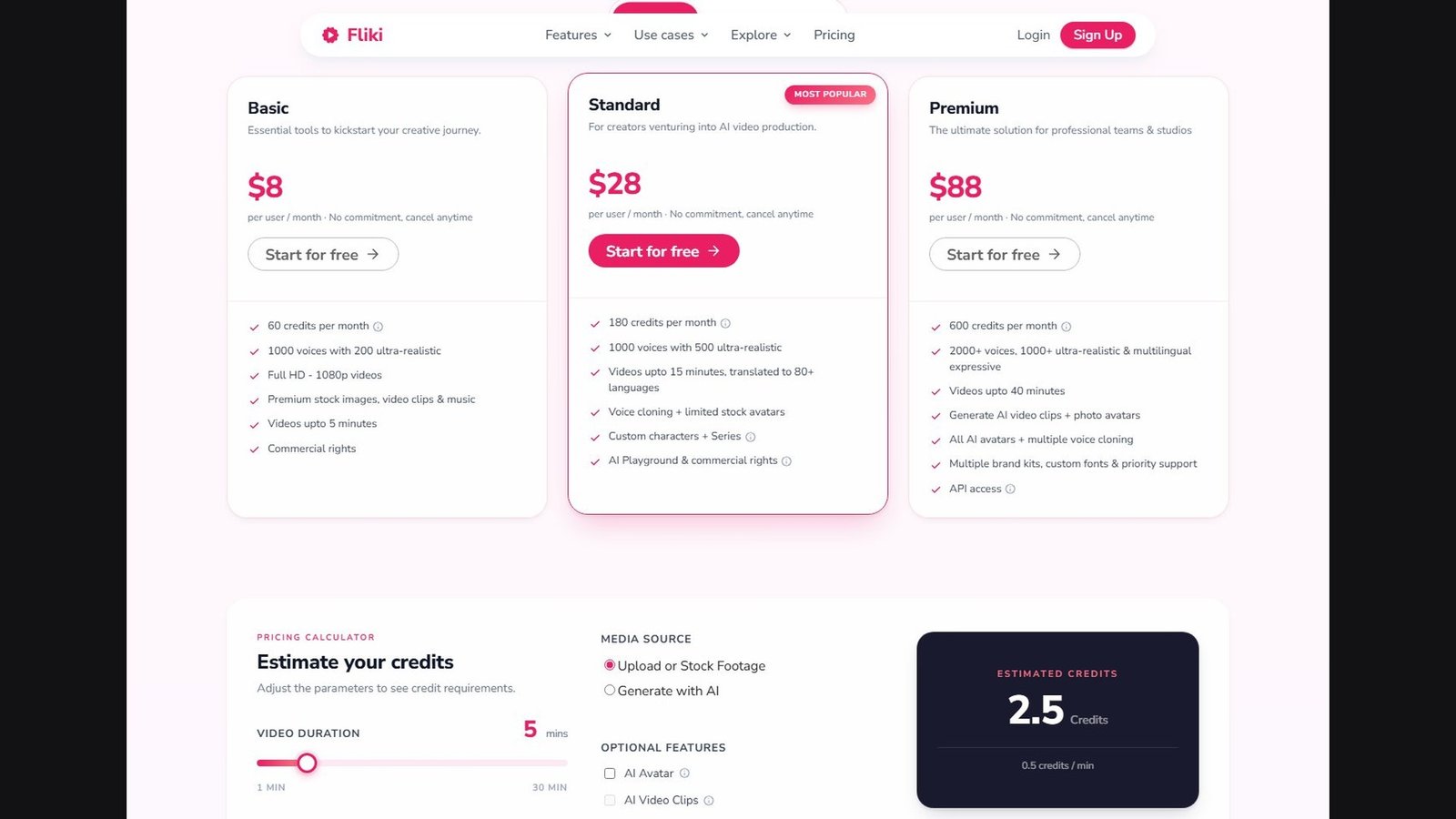
- Best verified monthly entry price: Fliki Basic at $8 per user per month on the pricing page captured the same day. vidIQ’s paid dollar prices were not visible, so they are not ranked on price.
- Not awarded: best research, best source-grounded scripting, and best UGC scripts. None of the three documented source links, inline citations, or a dedicated UGC-testimonial workflow.
These labels describe verified workflow fit. They are not scores for writing quality, hooks, retention, virality, or factual accuracy. Moon Picke did not run a same-prompt test.
Comparison table
Pricing, models, research features, usage limits, and script tools were checked on 5 October 2026 and may change. Check each provider’s current specifications before purchasing.
| Tool | Best for | Source input | Web research | Scene structure | YouTube | Shorts | Video ads | Starting price |
|---|---|---|---|---|---|---|---|---|
| vidIQ Script Writer | Long-form YouTube scripts | Topic or working title | Vendor claim only: similar YouTube videos. No source links documented | Sections. Scene-by-scene not verified | Yes. Dedicated 5, 10, 15, 20, or 30 minutes | Help center: use a manual 1-minute draft or trim a 5-minute script. Marketing FAQ also claims 60-second Shorts | Not documented | Free plan, 150 credits/month. Paid dollar prices not verified |
| Fliki AI Script Generator | Scene scripts from an idea or blog URL | Idea, brief, or one blog URL | No. Reading one URL is not web search | Yes. Scene narration and on-screen text | Named long-form format. Script page max 15 minutes | Named YouTube short, TikTok, and Reels | Named ad format | $8 per user/month, Basic |
| Simplified Riley | Named formats, including video ads | Topic plus format, tone, audience, and approximate length | Not verified | Not verified | Named YouTube long-form. Length is something you tell Riley | Named TikTok and Reels | Named video-ad format | $19/month billed annually on Pro, yearly toggle on. Monthly toggle not captured |
Script features
Yes means the current official page or help article documents that behavior. Prompt-based means you can ask in ordinary language, which is not the same as a dedicated control. Not verified means this research pass did not find it.
| Tool | Hook | Outline | Scene-by-scene | Visual notes | B-roll notes | CTA | Source citations |
|---|---|---|---|---|---|---|---|
| vidIQ Script Writer | Yes, as the intro. Multiple hook variants not verified | Yes, sections | Not verified | Not verified | Not verified | Yes | Not verified |
| Fliki | Yes, opening hook | Yes, through scenes | Yes | Yes, on-screen text. Shot directions not verified | Yes, as written suggestions on the long-form YouTube format. Not B-roll generation | Yes. The editor can swap the CTA | Not verified |
| Simplified Riley | Yes. Multiple hooks are claimed as part of the output | Yes, key points | Not verified | Not verified | Not verified | Yes | Not verified |
What you can put in
| Tool | Topic or title | URL | Article | PDF or file | YouTube URL | Product input | Web research |
|---|---|---|---|---|---|---|---|
| vidIQ Script Writer | Yes. Topic or working title | Not verified | Not verified | Not verified | Not verified | Not verified | Vendor claim of analyzing similar YouTube videos. No citations documented |
| Fliki | Yes. Idea or brief | Yes. One blog URL on the script page | Yes, when that article is the blog URL | Not on the script page. The pricing page says videos can start from PPTs. That is not the same control | Not verified | Not separately verified | No |
| Simplified Riley | Yes | Not verified | Not verified | Not verified | Not verified | Not separately verified. A video-ad format exists | Not verified |
How we chose the best AI video script generators
The reader this article is for already knows the video. They need help turning a topic, brief, product, URL, or notes into a script they can revise and then record or hand to an editor. Ranking followed that job.
A finalist had to generate the script itself and support at least one video-specific behavior that is actually documented: YouTube scripting, short-form scripting, video-ad scripting, scene structure, a duration control, hooks and CTAs, visual directions, or source-to-script. A blank chatbot can be asked to write a script. That alone did not qualify a product. A tool that hides the script inside a one-click video also did not qualify, because this list is about writing you can see and change.
US search results for “best AI video script generators,” “AI video script generator,” “AI YouTube script generator,” “AI Shorts script generator,” “AI TikTok script generator,” and “AI video ad script generator” were reviewed on 5 October 2026. The primary phrase still matches the intent, so the title keeps it. YouTube, short-form, and ad-script intents all appear, and they are treated as separate jobs below. Third-party roundups were not used for prices, model names, or rankings.
ChatGPT, Claude, and Gemini were considered. They can draft narration from a prompt. This pass did not find a duration picker, platform template, or scene editor, and no current model name is claimed. A teleprompter, a faceless assembler, and a text-to-video tool were set aside unless the written script is a controllable step. Several other video products, including affiliate ones, did not have a documented script workflow in this pass. They are not listed. Affiliate status did not decide the ranking.
What is an AI video script generator?
A video script is writing meant to be heard, usually with a plan for what the viewer sees: a hook, sections or scenes, narration or dialogue, visual cues, on-screen text, and a CTA. A single undifferentiated paragraph is a text generator with a video label. The job starts with an idea, brief, product, or source, then an angle, a hook, an outline, the spoken words, visual notes, and a CTA. The script is the deliverable. Voiceover and a timeline can come later.
AI video script generator vs a general AI writer
A general writer produces posts, emails, ads, and captions. A video-script template can qualify if it asks for platform, duration, and structure, and if the output separates a hook, a body, and a CTA. A dedicated duration choice, a named YouTube or TikTok format, and a scene rewrite are product behavior. Typing “make it 60 seconds and add a hook” is a prompt instruction. Both can be useful. This article does not call the second one a control.
AI video script generator vs an AI video generator
An AI video generator produces pictures that move. A script generator produces the words and, sometimes, notes about those pictures. Fliki can hand a finished script to its editor. That handoff is optional, and it is not the ranking basis. Faceless video generators assemble a video. They belong here only when the script is independently useful. Turning a finished video into clips is a different job, covered by AI video repurposing tools. Written B-roll notes are not an automatic B-roll insert. Script length is not video length. People speak at different speeds. Any word-count conversion below is a Moon Picke estimate or the vendor’s own rule of thumb.
1. vidIQ Script Writer: best for long-form YouTube scripts
vidIQ Script Writer is a YouTube-specific writing tool inside vidIQ, a channel-analytics product. It made the list because the deliverable is a script, with documented length choices, sections, a CTA, and revision controls. Official workflow notes are in vidIQ’s Script Writer help article, written by Megan and dated 19 February 2026, and on the AI script generator marketing page. Where those two disagree, this article follows the help article for controls and treats the marketing page as vendor claims.
Who it is for. A YouTube creator who has a topic or a working title and wants a long script structured as an intro, sections, and a CTA. It is a weak fit if you need a documented Shorts, TikTok, Reels, or video-ad template, or if the script must be grounded in a PDF or a URL you supply.
Workflow. You enter a topic or working title, choose 5, 10, 15, 20, or 30 minutes, and choose Casual, Informative, Persuasive, Storytelling, or a custom tone. The help article says the tool asks about the angle, offers three concepts, and returns an intro, sections, and a CTA. It also says Script Writer analyzes stylistically similar YouTube videos. That is a vendor description of context, not a citation list, and not evidence the facts are correct. The three concepts are directions, not documented alternate first lines. Scene lines, shot directions, and B-roll notes are not documented. A step is labeled fact-check, with no source links, so it is not treated as a finished fact check.
Duration. Those minute choices are dedicated controls. The help article says Script Writer is best for long-form, and that Shorts mean a manual one-minute draft or a trimmed five-minute script. The marketing FAQ says it also works for 60-second Shorts, adjusts length automatically, and offers rules of thumb: about 100 to 250 words for Shorts, 1,000 to 1,500 words for 8 to 10 minutes, and 2,000 or more for an in-depth video. Those counts are vidIQ’s, not a Moon Picke measurement. This guide treats the help-center lengths as the verified controls.
Inputs, revision, and export. A product URL, web URL, article, YouTube URL, PDF, or file upload is not documented. The similar-video claim is not web research with citations. You can rewrite any section, regenerate the intro or the full script, and apply a tone prompt. Export is copy, a .txt download, and revert. Tone is a preset or a custom note for that script. Persistent brand voice, project memory, collaboration, Docs export, and a Script Writer API were not verified.
Pricing. vidIQ’s credits article, dated 3 September 2026, prices Script Writer at 1 credit per minute of the length you select. A 10-minute selection costs 10 credits under that published rate. Monthly pools: Free 150; Pro (one channel) 1,000; Boost 2,000, 2,500, or 3,000 for one, two, or three channels; Max 6,000, 8,000, or 10,000; Coaching 6,000. Credits refresh monthly, do not roll over, and are shared with AI Coach, Thumbnails, Clipping, and the Shorts Generator. Those features do not spend the same unit, so the balances are not interchangeable. Top-ups are limited to Max and Coaching, and are unavailable on Free or Boost or when billing runs through Apple or Google. Dollar prices for Boost and Max were not verified: the plans page returned a 403. Free is $0. Commercial terms, desktop and mobile apps, and the underlying model were not verified. There is no documented model picker.
vidIQ’s marketing page describes retention and time savings. Those are vendor claims. This article does not adopt them. The biggest advantage is a real long-form YouTube script control, from a minute picker through section rewrites to a text download. The biggest limitation is the narrow input: a topic or title, without a documented source file, URL, citation, or scene-and-visual script. Skip it if the job is a 15-second ad, a TikTok, or a script that must follow a report you upload.
2. Fliki: best for scene-by-scene scripts and a blog URL
Fliki is an AI video studio. It qualifies here because its AI Script Generator documents a script you can read, rewrite, and export into the editor only if you want a video. The script is the reason it is on this list. Voice quality and stock footage are not.
Who it is for. A creator who wants a structured short or a chaptered YouTube script, including someone turning a single blog URL into scenes. It is also the closest fit here for a named YouTube short, TikTok, Reel, ad, explainer, or tutorial script.
Workflow. Start from a one-line idea, a brief, or a blog URL, then pick a duration band: under 1 minute, 1–2, 2–5, 5–10, or 10–15 minutes. The stated maximum on that generator is 15 minutes. Named formats include a YouTube short, TikTok, Reels, an ad, an explainer, a tutorial, long-form YouTube, a faceless TikTok, a sales script, and blog-to-video. Those names are formats, not proof of retention or conversions. Fliki’s “under five minutes” line is a vendor claim. The documented output is an opening hook, scene-by-scene narration, on-screen text, and a closing CTA. Long-form YouTube adds chaptered scenes and B-roll suggestions. Those suggestions are writing. They do not select or insert footage. You can rewrite a sentence, regenerate scenes, change tone, swap the CTA, or paste your own copy. The script stays visible before any handoff to Fliki’s editor for voice and visuals.
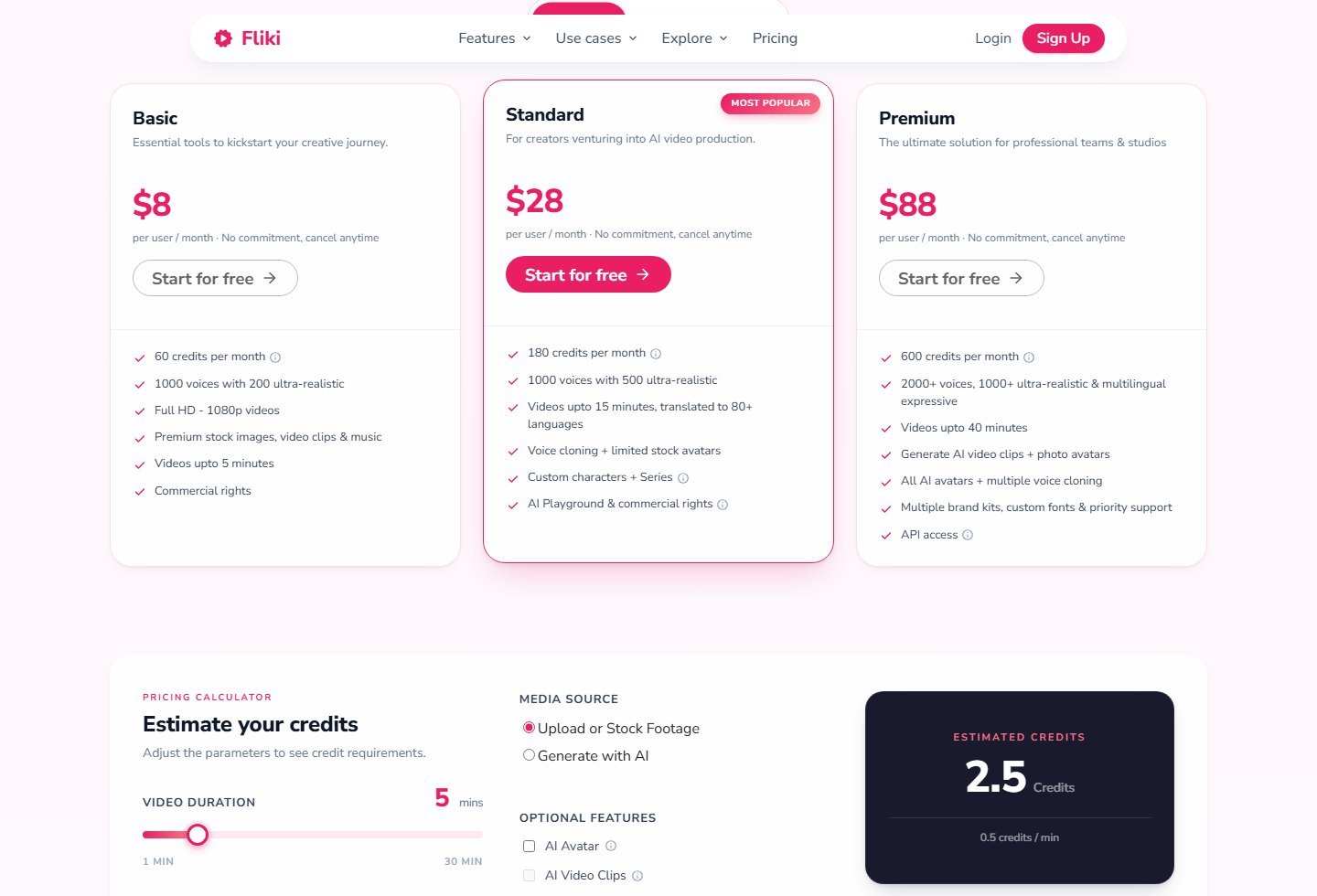
URL and price. A blog URL means Fliki reads that page. It does not search the web or cite it. PDF, YouTube URL, and product-URL fields were not on the script page. A PPT line on the pricing page is a video path, not a confirmed script control. Pricing cards describe rendered length, not the script bands: Basic up to 5 minutes, Standard up to 15, Premium up to 40. A FAQ said Premium maxes at 30 minutes. Both were live the same day. Prices per user per month: Basic $8, 60 credits, commercial rights; Standard $28, 180 credits, voice cloning, and “AI Playground & commercial rights”; Premium $88, 600 credits, API listed. Each card said “Start for free.” Other text said a Free tier of 3 credits a month. A FAQ said 5 minutes. Do not treat those as the same meter. The calculator estimated 2.5 credits for 5 minutes of upload or stock at 0.5 credits per minute, including voiceover. The script page says 80+ languages in the browser. A script API, Docs export, and annual prices were not verified. Commercial rights do not clear claims or footage you did not make.
Open Fliki if you want the scene editor and the blog-to-script path. The biggest advantage is a visible scene script with a real duration band and named short-form formats. The biggest limitation is the 15-minute cap on the script generator itself, plus no documented web research or citations. Skip it if you need a 20 or 30 minute YouTube script as a first-class length, which is vidIQ’s documented range, or if you need the draft locked to a PDF.
3. Simplified Riley: best for named YouTube, short-form, and ad scripts
Simplified is a broad AI marketing workspace. Riley qualifies because the AI script generator page describes a named script agent, not a generic paragraph box. You give Riley a topic, a format, a tone, an audience, and an approximate length. The page says the output includes hooks, key points, transitions, and a CTA, with format-specific structure for YouTube long-form, TikTok, Instagram Reels, and video ads. Podcast and presentation scripts were not confirmed on that page in this pass, so they are not claimed.
Who it is for. A marketer or solo creator who wants one agent that can be pointed at a YouTube video, a short, or a video ad, and who already knows the approximate length. It is a weaker fit if you need a minute dropdown, scene blocks, a source URL, or citations.
Workflow and inputs. Format, tone, audience, and approximate length are things you tell Riley. Length is prompt-based, not a 15-second or 10-minute control. Hooks, in the plural, key points, transitions, and a CTA are named outputs. Scene blocks, on-screen text, shot directions, and B-roll notes were not verified. A named TikTok format is not the same as a claim that the draft is optimized for TikTok. Topic is the documented input. URL, article, YouTube URL, PDF, file upload, web research, and citations were not verified. Describing a product in the brief is not a product-URL import.
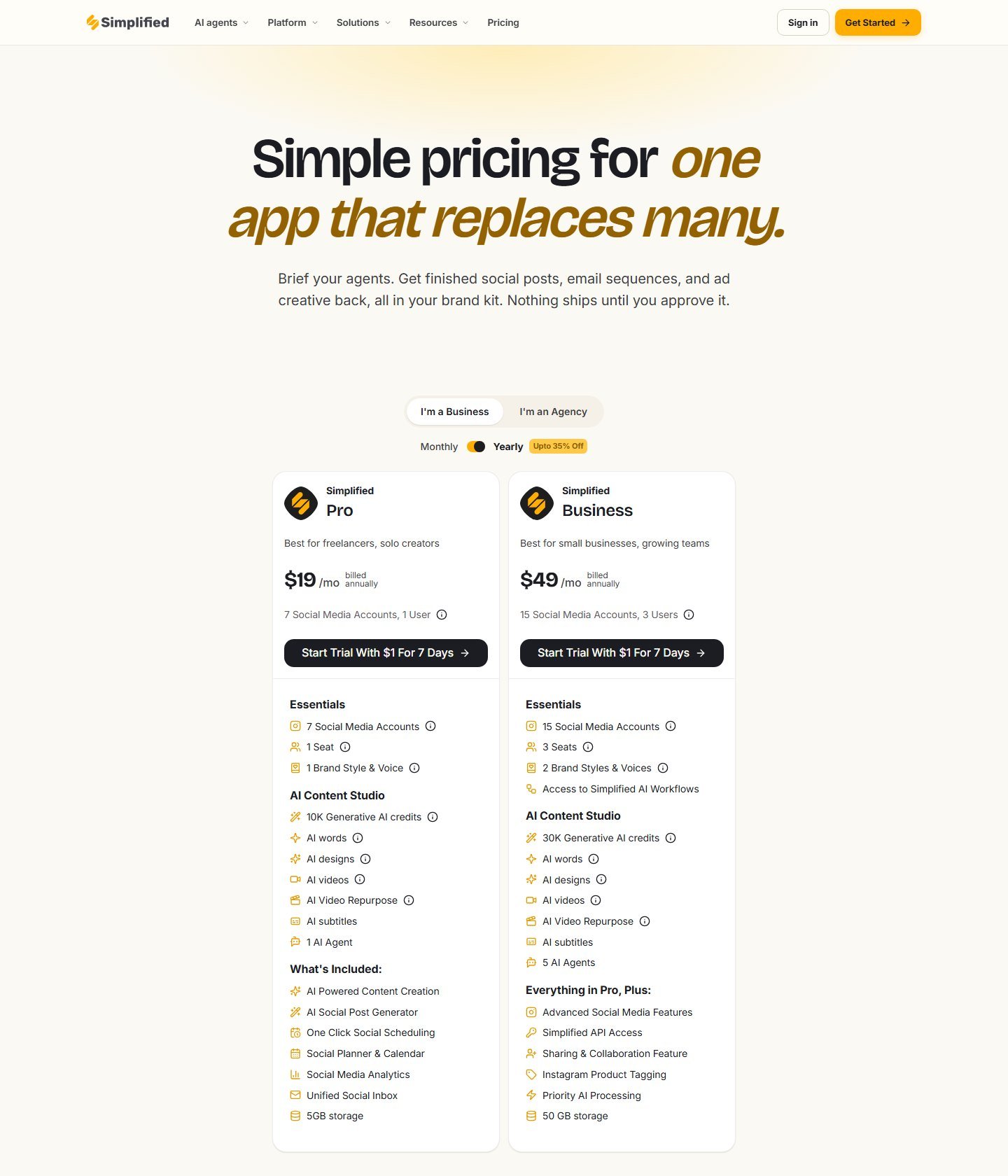
Brand, team, and price. Pro lists “1 Brand Style & Voice,” a plan-level kit. The script page documents tone as an instruction for that script. This article does not claim every Riley script inherits the kit. Partial hook or scene rewrite was not verified. Business lists 3 users, sharing, and API access. Comments, version history, and a script-specific API bill were not verified. A subscription credit balance is not an API balance. With the yearly toggle on, Pro is $19 per month billed annually: 7 social accounts, 1 user, 10K generative AI credits, and a $1 trial for 7 days. Business is $49 per month billed annually: 15 social accounts, 3 users, 30K generative AI credits, and the same trial. The monthly toggle was not captured. The script page has also described a free plan. The pricing screenshot showed no $0 card. Confirm the live offer. Generative AI credits are not script credits, and they are not Fliki or vidIQ credits.
The biggest advantage is a single agent with named YouTube, TikTok, Reels, and video-ad structures, plus a team tier that actually lists seats. The biggest limitation is how much of the script structure stays inside the prompt: no verified duration control, source file, scene editor, or citations. Skip it if you want the length locked to a control, which vidIQ and Fliki both document in different ranges.
Best for YouTube and long-form
vidIQ Script Writer is the long-form YouTube pick: 5 to 30 minutes, an intro, sections, and a CTA. That choice does not prove the draft will hold attention. Fliki adds scenes and written B-roll notes, and stops at 15 minutes on the script generator. Simplified takes a YouTube format and a length you type.
Best for Shorts, TikTok, and Reels
Fliki is the short-form pick. YouTube short, TikTok, and Reels are named formats, with bands under 1 minute and 1–2 minutes, plus a hook, scene narration, on-screen text, and a CTA. A short script is not automatically optimized for a platform. vidIQ’s help center tells Shorts users to write a one-minute draft or trim a five-minute script. Its marketing FAQ claims 60-second support. Simplified names TikTok and Reels and takes an approximate length.
Best for video ads
Simplified is the video-ad script pick: a named ad format with hooks, key points, transitions, and a CTA. Fliki is the better scene-by-scene ad draft, with an ad format and a sales script. Neither documented AIDA, PAS, a product-URL field, or a UGC structure. A “high-converting” line, if you see one, is the vendor’s claim. Do not present generated testimonial language as a real review, and do not let the draft invent features, prices, or results.
Research-based videos and source-grounded scripts
No finalist earned a research or source-grounded award. vidIQ says it looks at stylistically similar YouTube videos and shows a step labeled fact-check. It does not document source links. Fliki can read one blog URL you supply. That is source input, not web research, and not fact-checking. Simplified’s web and file inputs were not verified. For a documentary, finance, health, science, or history video, collect the sources yourself. Pasting notes into a brief does not mean the model will stay inside them. Check every claim, number, and quotation. A quotation needs a speaker, a source, a date, and context. If you cannot find the line, cut it.
Pricing and limits
These products do not sell the same unit. vidIQ charges Script Writer at 1 credit per selected minute, from a pool shared with other vidIQ AI features. Fliki’s visible credits are a video and audio meter, illustrated at 0.5 credits per minute in the calculator. Simplified sells generative AI credits, 10K on Pro and 30K on Business under the yearly toggle. A vidIQ credit, a Fliki credit, and a Simplified credit are not interchangeable. “Unlimited” was not the published offer on any of the three.
- vidIQ Free: 150 credits a month. A 10-minute selection costs 10 of them at the published rate. Paid dollar prices were not verified on 5 October 2026.
- Fliki: Basic $8, Standard $28, Premium $88 per user per month. A free allowance is described in page text, but the credit count and the minute count do not agree.
- Simplified: Pro $19 per month billed annually, Business $49 per month billed annually, yearly toggle on, plus a $1 trial for 7 days. That trial is not a free plan. Monthly prices were not captured.
Fliki Basic is the lowest verified monthly price. It is the budget pick only if you need Fliki’s scene workflow. A YouTube-only user inside 150 credits a month may spend nothing on vidIQ Free. Those are different budgets. API lines exist on Fliki Premium and Simplified Business. Neither was verified as a script API. A subscription balance is not an API balance. Commercial-use language was explicit on Fliki Basic and Standard. vidIQ and Simplified script terms were not verified on the pages used here.
How to choose an AI video script generator
Choose from the job. For YouTube of 5 minutes or longer with a length control, start with vidIQ. For scenes, a short-form format, or one blog URL, start with Fliki. If you move between YouTube, TikTok, Reels, and video ads and you will state the length, start with Simplified. None of the three documented a PDF, a product URL, or cited sources. A 20-minute vidIQ selection costs 20 credits under the published rule, shared with other vidIQ AI features. Rendering a Fliki script spends video credits. Simplified spends generative credits across the workspace.
How to write a video script with AI
Use the tool for structure and a first draft. Keep the editorial decisions. Define the goal, the audience, the platform, and a target duration. Gather sources you trust before you ask for facts. State the angle in one sentence. Generate more than one hook and keep the one the video can deliver. Check the outline, then draft by section or by scene. Add scene boundaries if the draft is one block of prose. Add visual and B-roll notes as writing. They are a shot list, not footage. Add on-screen text only where a muted viewer needs it. Add one CTA that matches the goal. Check claims, quotations, and product statements. Read the script aloud and cut anything you would not say.
A Moon Picke estimate, not a product feature: at 150 spoken words per minute, 1,500 words is about 10 minutes before pauses and B-roll. At 130 words per minute it is closer to 11.5 minutes. Use that only to spot a draft that is wildly long or short.
How to write a YouTube script with AI
Start from the audience question. Put the promise in the opening, then context, main sections, examples, transitions, a payoff, and a CTA. vidIQ’s sectioned output matches that shape most closely. Fliki’s chaptered scenes help when you also need a visual plan. Avoid a long throat-clearing intro, and avoid claiming a retention formula. Title text, thumbnail text, and the first spoken line are different lines. vidIQ’s three concepts are directions. Write the spoken hook yourself if the intro could fit any channel.
How to create short-form scripts with AI
One short usually carries one idea: a hook, a short body, notes for visual changes, a payoff, and a CTA only if you need one. Fliki’s under-1-minute and 1–2-minute bands are the dedicated controls. A tutorial, a joke, and a product demo can all be 20 seconds and still be structured differently. Do not add a fake personal story to make the opening feel native.
How to create video ad scripts with AI
Write the product, audience, problem, angle, hook, claim, demonstration, benefit, and CTA before you generate. Proof belongs in the script only when you have it. Simplified’s video-ad format and Fliki’s ad and sales formats can draft the sequence. They cannot supply the proof. UGC-style language is a writing style, not a customer. If the draft says someone bought the product and it changed their life, either a real person said that or you delete it. The same rule covers before-and-after results and invented star ratings.
How to turn research into a video script
Keep this order for evidence-based videos: question, source collection, source evaluation, fact notes, a claim map, an outline, a script, a fact check, then the final script. AI can help with the outline and the spoken draft. Fliki’s blog URL is the only verified source input among these three, and it covers one page. If your sources are a PDF and two papers, prepare a short fact sheet and paste that into the brief, then read the script against the fact sheet.
Common AI scripting mistakes
The usual failures are generic hooks, hype, repetition, a long introduction, fake quotes, unverified facts, invented statistics, invented product features, and a fake personal experience. Other drafts stay too formal, add a transition between every sentence, or end on a CTA nobody would say. Some are written to be read, not spoken. Some have no visual plan, so the editor invents every shot. A polished wrong sentence is still wrong.
FAQ
What is the best AI video script generator?
For a long-form YouTube script with a length control, vidIQ Script Writer is the strongest documented fit. For scene-by-scene scripts, short-form formats, or a blog URL, Fliki is the stronger fit. There is no quality score behind that split.
What is the best AI for writing YouTube scripts?
vidIQ Script Writer. It documents 5, 10, 15, 20, and 30 minute lengths, an intro, sections, and a CTA. Fliki covers long-form YouTube up to 15 minutes on the script generator, with scenes included.
Can ChatGPT write video scripts?
ChatGPT can draft a script if you specify the platform, duration, hook, sections, and CTA. That is freeform prompting. This pass did not find a dedicated video-script control, so ChatGPT is not ranked here. The same applies to Claude and Gemini. Check facts and quotes before you record.
Can AI write YouTube Shorts, TikTok, and Reels scripts?
Fliki documents all three as named formats, with duration bands under 1 minute and 1–2 minutes. Simplified names TikTok and Reels and takes an approximate length. vidIQ’s help center treats Shorts as a manual or trimmed script. Its marketing FAQ claims 60-second support.
Can AI write a video ad script?
Yes, as a draft. Simplified documents a video-ad format. Fliki documents an ad format and a sales script. You still supply true product claims and real proof. A generated script is not a testimonial.
Can AI generate a script from a URL or an article?
Fliki’s script page documents a blog URL, which can be the article. That is one supplied page, not a web search. vidIQ and Simplified did not document URL import. Reading a URL does not mean the script cites the page.
Are AI-generated video scripts accurate?
Not automatically. They can include outdated information, bad citations, invented quotes, and unsupported product claims. A fact-check label is not a finished fact check. Verify important claims before you publish.
Can I commercially use an AI-generated script?
Fliki’s Basic and Standard cards list commercial rights. vidIQ and Simplified terms for the script text were not verified here. You remain responsible for claims, quotations, trademarks, and any source material you pasted in.
What is the best free AI video script generator?
vidIQ Free is the clearest documented free start: 150 credits a month, at 1 credit per selected minute. Fliki’s pages do not agree on whether the free allowance is 3 credits or 5 minutes. Simplified’s pricing page showed a $1 seven-day trial, not a $0 plan.
How long should a YouTube script be?
Match the video you can deliver. vidIQ’s marketing page suggests about 1,000 to 1,500 words for an 8 to 10 minute video. That is vidIQ’s rule of thumb. A Moon Picke estimate at 150 words per minute puts 1,500 words near 10 minutes before pauses and cutaways.
Final verdict
Three tools earned a place, and they do not do the same job. vidIQ Script Writer is the best documented long-form YouTube script generator: a topic or title, a 5 to 30 minute control, sections, a CTA, section rewrites, and a text download. Its paid prices were not visible, its source inputs are narrow, and its Shorts guidance conflicts between the help center and the marketing FAQ. Fliki is the best scene-by-scene and short-form script generator, and the only one here with a documented blog URL, at $8 per user per month on Basic. The script generator stops at 15 minutes, and its credits are a video meter. Simplified Riley is the best named multi-format option, covering YouTube, TikTok, Reels, and video ads, at $19 per month billed annually on Pro with the yearly toggle on. It does not document a duration control, a source file, or citations.
General chatbots were considered and left off the ranking because a prompt is not a video-script product. Video generators were left off unless the script is a step you can edit, which is why Fliki is here and a one-click faceless assembler is not. Nothing was ranked for writing quality, hook strength, retention, or research accuracy. Those were not tested. Treat every fact, quote, and product claim as unverified until you check it.