

InterServer is worth it in 2026 for a small US site that needs ordinary web hosting, email, and a WordPress installer, if you budget the renewal and not the first-month price. On 7 October 2026, InterServer’s Standard Web Hosting page listed $2.50 for the first month and $7 per month after that on the monthly plan. The same page listed longer prepay terms and their renewals. A feature table still prints the words “Price Lock Guarantee.” The pricing block does not lock $2.50. Buy the plan if $7 a month, DirectAdmin, and shared-hosting limits fit the site. Skip it if you need a measured speed claim, a data-center picker on this plan, or a default cPanel account.
Moon Picke may earn a commission if you buy through the InterServer link below. The verdict follows the prices and limits on InterServer’s own pages, which is the method described on how we evaluate products. Read the affiliate disclosure before you use a shopping link.
See InterServer’s current plans
InterServer at a glance
Best for: a personal site, a small business site, or a straightforward WordPress site whose visitors are mainly in the United States, and whose owner wants a monthly bill with the renewal printed in advance.
Skip it if: you need the introductory price to stay the renewal price, you want cPanel as the included panel, you need to choose a shared-hosting city, or the site will outgrow a shared account’s file and CPU caps.
What holds up
- The monthly renewal is printed: $7 after a $2.50 first month, checked 7 October 2026 on the Standard Web Hosting page.
- Twelve months is listed at $30 up front and $84 at renewal. Six months is $15, then $42. Twenty-four months is $60, then $168.
- The plan includes DirectAdmin, a WordPress installer, weekly backups, free SSL, free migration, and a free Cloudflare CDN, as listed by InterServer.
- The terms allow a full refund of web hosting within 30 days of signup for the named shared packages, including Standard.
- Technical support is described as 24/7. InterServer’s goal is a reply in one to three hours, and the terms say that speed is not guaranteed.
What does not
- $2.50 is not the ongoing price. Treating old “price lock” reviews as current would misstate this plan.
- “Unlimited” storage and transfer sit next to a 400,000-inode cap, a 20 percent server-resource cap, and a possible $0.15 per GB storage fee for use InterServer calls unreasonable.
- Weekly backups do not remove your own backup duty. The terms say InterServer is not responsible for deleted files.
- InterServer states a 99.9 percent uptime guarantee. Moon Picke did not measure uptime, TTFB, or WordPress speed.
- The Standard page uses DirectAdmin. cPanel is a separate product path, and this review does not treat them as the same plan.
What InterServer is
InterServer is a US hosting company whose own site says it has offered infrastructure since 1999. The current public lineup is wider than one shared plan. The homepage groups managed web hosting, cloud compute and VPS, bare metal servers, GPU servers, colocation, and storage. The web hosting menu also lists reseller hosting, ASP.NET hosting, email hosting, cPanel hosting, nonprofit and student hosting, a website builder, and ecommerce hosting.
This review stays on Standard Web Hosting, the plan InterServer presents for websites, stores, blogs, and email when you do not want to manage a server. Cloud VPS starts at $3 per month on the homepage and is a different product, with different refund rules. A VPS decision needs its own review. A head-to-head with another shared host is also a different article. Hostinger is a common alternative in this search, and it is mentioned only as context here.
Current Standard pricing
The numbers below are from InterServer’s Standard Web Hosting page on 7 October 2026. They are the published plan prices, not a checkout total. Tax, a domain, and add-ons can change what you pay.
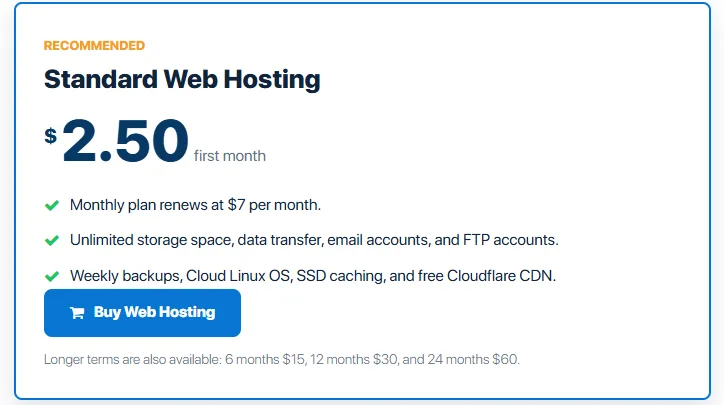
| Billing term | First charge | Renewal InterServer prints |
|---|---|---|
| 1 month | $2.50 | $7 per month |
| 6 months | $15 | $42 |
| 12 months | $30 | $84 |
| 24 months | $60 | $168 |
The first month at $2.50 is a promotional opening price on the monthly plan. It is not a rate you keep by staying month to month. If you pay monthly for a full year after that opening month, eleven renewals at $7 plus the first $2.50 come to $79.50 before tax and extras. The 12-month option is $30 for the first year and $84 for the next year. Monthly billing is the flexible choice. The annual term is the cheaper way to keep the same plan for a year, if you are willing to prepay.
The same page says you can register or transfer a domain for $7.99 with the purchase of any web hosting package. The terms say that promotional domain price can change at the domain’s annual renewal, and that if you leave InterServer you agree to pay the yearly domain fee listed on the site. A domain is not included in the $2.50 hosting price.
A banner on that hosting page, the same day, read “exclusive offer to viewers $.01 first month” and showed the coupon code TRYINTERSERVER. That banner is not the pricing table. This review does not treat $0.01 as the plan price, and the shopping link below does not promise that coupon. Confirm the code in the cart if you want to use it. The price to budget, unless a coupon changes only the first bill, is the renewal in the table.
Check InterServer’s current pricing
Renewal and the price-lock label
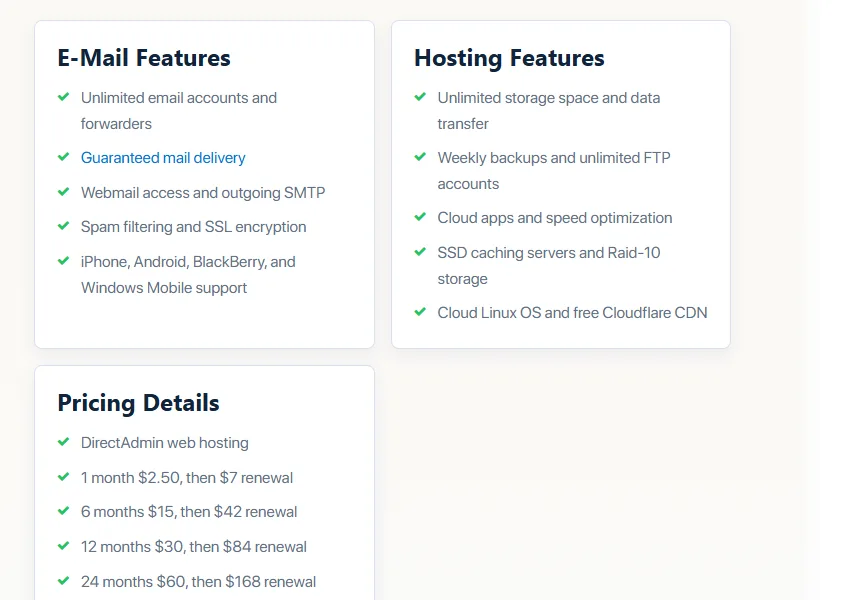
Older reviews often say InterServer never raises the price you sign up at. That is not what the Standard pricing block says now. The monthly plan renews at $7. The annual plan renews at $84. Those are increases from the introductory charges.
A separate technical-details table for the standard monthly plan still lists “Price Lock Guarantee” as included, next to the 30-day guarantee and the 99.9 percent uptime line. The page does not define that label as “$2.50 forever,” and it does not show a $5 locked plan in the pricing details checked on 7 October 2026. When a feature label and a price list disagree, use the price list for the bill. Do not buy Standard because a 2022 review said the intro rate was locked.
Third-party writeups from 2026 describe a separate Price Lock product around $5 a month. This review does not recommend that product. It was not a priced plan on the Standard page fetched for this article. If a cart shows a different renewal, that cart is the offer in front of you. The public Standard renewal, as printed, is $7 a month or the matching longer-term renewal above.
Refunds and cancellation
InterServer’s terms, checked 7 October 2026, limit refunds to web hosting accounts in the packages Standard, Windows, Boost2/4/X, and WordPress. You may request a refund within 30 days after signup, and the terms say the refund is the full amount paid. After 30 days you may cancel and stop future charges, and you forfeit the money already paid.
That window does not cover every InterServer product. The terms say dedicated, colocation, and IP transit refunds are for orders before service starts. The Cloud VPS page says there is no trial and no money-back guarantee on VPS, and that VPS is billed month to month so you can cancel later billing. Do not assume a shared-hosting refund applies to a server order.
Cancellation of future shared-hosting charges is allowed after the refund window. It does not claw back a prepaid 12-month or 24-month term once those 30 days have passed.
Resources and the word unlimited
The Standard marketing list says unlimited storage, data transfer, email accounts, and FTP accounts, plus unlimited websites, parked domains, and subdomains on the details table. InterServer’s own hosting FAQ explains the limit in plain language: unlimited hosting is for websites and email, not for backup storage, movie or file storage, or reselling. Storage hosting and reseller packages are the products named for those jobs.
The terms add hard shared-hosting rules. No single shared account may use more than 20 percent of the server resources at a time. A single account is limited to 400,000 inodes, which is a file-and-folder count, not a gigabyte cap. InterServer may charge $0.15 per GB when it decides an account is using an unreasonable amount of storage. The terms also bar some site types on shared hosting, including tube-style clones, adult content, file archives, email archives, mirror sites, and image or file upload sites.
The Boost comparison page restates the Standard baseline in more detail: 1 CPU core, 2 GB memory, 1,024 IOPS, 100 processes, 30 entry processes, 4 SQL cores, 200 emails per hour, and 400,000 inodes. Those figures are the useful reading of “unlimited.” A brochure site can live inside them. A site with hundreds of thousands of small files, or a mailbox that is never cleaned, can hit the inode or mail cap while the storage meter still says unlimited.
Boost is the step up inside shared hosting. The same comparison page describes higher inode, mail, process, memory, and CPU figures for the larger Boost packages. This review does not repeat third-party dollar prices for Boost, because those prices were not on the Standard pricing block. If the site already knows it needs more than one core and 2 GB, read the Boost page before you assume Standard is enough.
WordPress on this plan
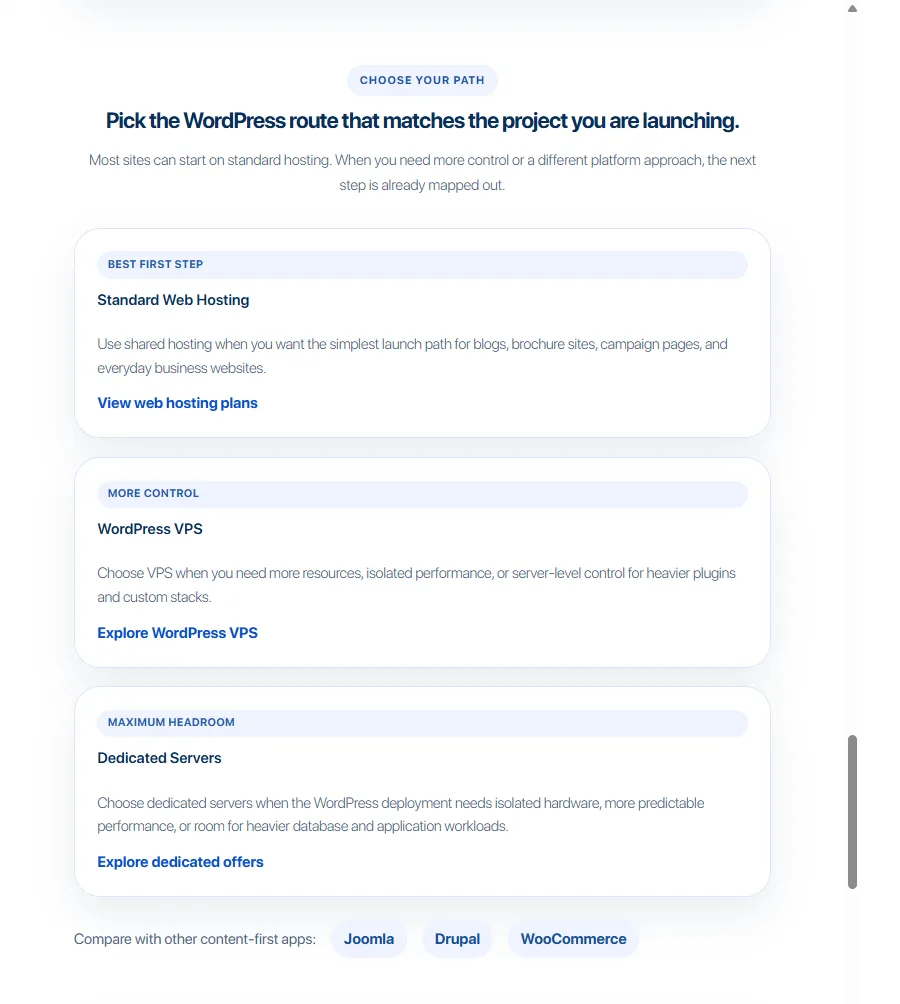
Standard is not a separate managed-WordPress brand. WordPress is one of the apps InterServer lists. The details table says the plan includes an easy WordPress installer, weekly backups, automatic updates, and the ability to use any plugin. The hosting page also says the app library covers common CMS and store scripts, and a WooCommerce page points store owners at the same hosting account for files, databases, SSL, email, and the store app.
What that list does not say is also the point. It does not document a staging site, a WordPress-specific cache product you can toggle by name beyond the general LSCache and Inter-Proxy notes, or a performance score. Automatic updates are listed. The terms still tell you to keep your own backups. A hacked WordPress site can be cleaned under the feature InterServer calls Inter-Insurance, including cleanup during migration. That is a repair offer, not a promise that a compromised site cannot happen.
DirectAdmin is the panel on this plan. You can install WordPress, manage files, databases through phpMyAdmin, cron jobs, and SSL from that panel. If your bookmarks and tutorials assume cPanel, budget time to relearn the screens, or look at InterServer’s separate cPanel hosting path and price that path on its own page. This Standard review does not fold cPanel into the $2.50 plan.
Free migration is documented for a site move, including content and, on the migration page, databases, email, and custom setups, with support by chat, phone, or ticket. “Little to no downtime” is InterServer’s description of that service. It is not a measurement from this review.
Performance, stated rather than tested
Moon Picke did not run a speed test, an uptime monitor, or a WordPress benchmark on InterServer. There is no TTFB, LCP, or PageSpeed number in this review, because none was measured here.
What InterServer states is narrower. The standard feature table lists a 99.9 percent uptime guarantee, LiteSpeed, CloudLinux, SSD caching, RAID-10, a free Cloudflare CDN, and Inter-Proxy caching that mentions RAM caching, LSCache, and QUIC. Those are platform claims. They explain what the company says is on the server. They do not tell you how fast a particular theme and plugin stack will feel.
Shared hosting can also get slow for reasons that are not a marketing failure: the 20 percent resource cap, a heavy plugin set, or a site that should be on VPS. InterServer’s own page says some sites outgrow shared hosting and can move to cloud VPS or a dedicated server. That is the honest performance boundary. If a published independent test matters to you, read that test’s date and method, and do not treat it as Moon Picke’s result.
Security and backups
InterServer describes InterShield as an in-house system that uses data from its servers to detect attacks and apply protection rules. The hosting page also says compromised accounts can be cleaned, restored, and hardened. Email is described as leaving through smart hosts, with spam scrubbing, rather than straight off the web server. Free SSL is on the details table. Spam filtering and SSL for mail are on the email list. DDoS protection is mentioned on the company homepage as a network path. This review does not turn that sentence into a shared-hosting DDoS specification.
Backups are weekly on the Standard feature list, and the control-panel table includes backup and restore. The terms still say clients are responsible for backing up their own files, and that InterServer is not responsible if files are deleted. Weekly backups are not a retention promise, an instant-restore promise, or a reason to skip your own copy. How many weeks InterServer keeps, and whether every restore is self-serve, was not spelled out on the pages checked. Keep a copy off the account, especially before plugin updates.
VPS and dedicated servers, the terms say, do not run backups by default. That line matters if you later upgrade. The shared-hosting weekly backup does not automatically follow you onto a VPS.
Data centers
InterServer’s homepage says customers can deploy in the New York City metro area, Dallas, or Los Angeles, depending on audience and workload. A VPS page is more specific: VPS can be deployed from the West Coast in Los Angeles or the East Coast in Secaucus, New Jersey, and it says a closer location can reduce latency. The Standard Web Hosting page checked for this review does not offer a city picker. Do not assume a shared account lets you choose Dallas or Los Angeles.
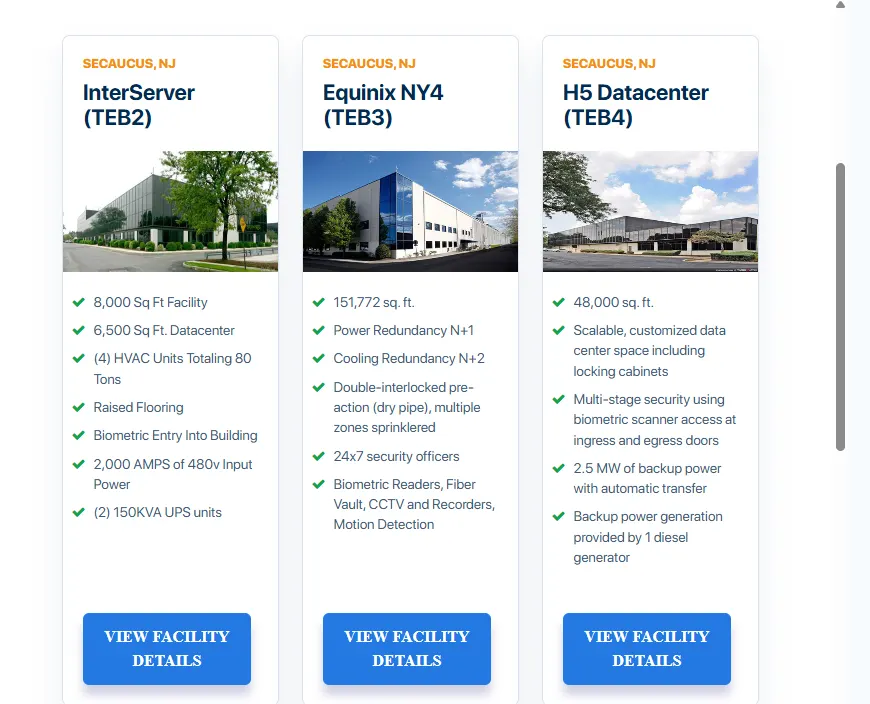
For a US audience, a US facility is a reasonable default. It is not a speed guarantee. Visitors far from that region still depend on the CDN InterServer includes and on the site’s own weight. InterServer does not advertise a long list of continents for this shared plan. A site whose visitors are mostly outside the United States should treat location as an open question and ask before buying, rather than infer a global network from the US cities above.
Support
InterServer offers a 24/7 technical support department. The terms set a goal of answering in one to three hours and say no guarantee is made for the speed of a reply. Tickets are limited to covered technical support. Third-party software should go to that software’s seller first. Billing, sales, and development are separate from support and do not run 24/7. The standard details page prints the phone line as (877) NJ-COLO-1. The migration page also lists live chat and tickets.
Availability is documented. Quality is not. This review does not call the support fast or excellent, because Moon Picke did not open a ticket and did not time a reply. The useful fact for a buyer is that technical help is offered around the clock, the stated response goal is hours rather than minutes, and billing questions are not on that same 24/7 desk.
The panel you will actually use
Day to day, Standard means DirectAdmin: websites, email, databases, DNS, FTP, and SSL. The details table also lists cron jobs, a file manager, backup and restore, phpMyAdmin, and visitor stats. Developer items on that table include SSH, PHP 8 as well as older PHP lines, Python, Perl, Ruby on Rails, and node.js marked beta. Those are available tools, not a promise that every script will be installed for you.
DirectAdmin is less familiar than cPanel to many WordPress tutorials. That is a real switching cost, not a moral failing of the panel. If you already know you will follow cPanel screenshots for every task, price the cPanel product separately before you assume this $7 renewal includes it.
VPS and the rest of the catalog
InterServer’s cloud VPS is the product for a site that needs a private slice, a choice of panel, or a server you administer. The homepage lists it from $3 per month. The VPS page says billing is monthly, with no quarterly or yearly discount, and no money-back guarantee. A panel license on a VPS is a separate purchase from Standard Web Hosting. Location choice is documented for VPS in a way it is not documented for Standard.
Dedicated and bare metal servers, GPU servers, colocation, reseller hosting, and storage are separate lines. They matter when shared caps are the problem. They are not reasons to buy Standard, and they are not fully priced in this article. If you are choosing between a virtual server and a whole machine, start with a general comparison such as dedicated server versus VPS, then read the provider’s current order page. Do not use this shared-hosting review as a VPS buying guide.
Who should use InterServer
Standard fits a US-focused personal site, a small business brochure, a blog, or a modest WordPress or WooCommerce site that can live inside one CPU core, 2 GB of memory, 400,000 inodes, and 200 emails an hour. It fits an owner who wants the renewal written down, a 30-day refund on this package, and help moving a site. It fits someone who will keep their own backup and will learn DirectAdmin.
The annual term fits when you already know the site will stay a year and you want the $30 first-year charge instead of drifting into $7 months. The monthly term fits when you might leave soon and you accept $7 after month one.
Who should skip it
Skip Standard if the only attraction is a price that never moves. That is not what the current renewal block says. Skip it if your workflow is cPanel and you do not want another panel. Skip it if the audience is global and you need a shared-server city on another continent. Skip it if the site is a file dump, a mirror, or an upload service the terms restrict. Skip it if you expect Moon Picke, or InterServer’s feature list, to prove the site will be fast. Skip the shared plan if you already need isolated CPU for an app. That is a VPS or dedicated question, and the refund rules change.
Alternatives, briefly
Hostinger shows up beside InterServer when people compare cheap shared hosting. The right comparison is intro price, renewal, panel, data-center choice, and backup rules side by side, not a slogan. That comparison is outside this review. SiteGround, DreamHost, Bluehost, and Namecheap appear in the same buying searches for different reasons: renewal jumps, a familiar panel, or a domain bundle. None of those brands is scored here. Use InterServer’s printed $7 renewal as the number you compare, not the $2.50 first month and not a coupon banner.
FAQ
Is InterServer good?
InterServer is a reasonable shared host for a small US website when you accept DirectAdmin, a $7 monthly renewal, and the file and CPU caps in the terms. “Good” here means the plan matches that job. It is not a performance award, because this review did not benchmark the servers.
Is InterServer legit?
InterServer is an operating company with a public site, a client portal, published terms, and a hosting plan you can order. The company dates its infrastructure to 1999 on its own homepage. Legit does not mean every marketing word is unlimited in practice. Read the inode and resource rules before you pay.
Is InterServer worth it in 2026?
Yes, for a small site whose owner will pay $7 a month after the first month, or $84 after a $30 first year, and does not need cPanel or a choice of shared data center. No, if you need the signup price to be the renewal price, or you are buying it as a fast managed-WordPress platform. Those are different products from the Standard plan checked on 7 October 2026.
How much does InterServer cost?
Standard Web Hosting was $2.50 for the first month, then $7 per month, on 7 October 2026. A 12-month term was $30, then $84. A domain registration or transfer with hosting was listed at $7.99, with renewal able to change. A viewer banner also showed a $0.01 first-month coupon. Budget the printed renewal unless the cart shows something else.
Does InterServer raise the price at renewal?
On the Standard plan, yes. The monthly plan moves from $2.50 to $7. The 12-month plan moves from $30 to $84. A feature table still says “Price Lock Guarantee,” but that table does not show a locked $2.50 rate. Use the renewal line on the pricing page.
Is InterServer good for WordPress?
It includes a WordPress installer, automatic updates, weekly backups, SSL, and plugin installs on the Standard plan. That is enough for many small WordPress sites. It is not documented as staged, managed, or speed-tested hosting. Keep your own backups, and do not expect cPanel tutorials to match DirectAdmin screen for screen.
Does InterServer include free migration?
Yes. InterServer’s migration page says the move is free and can include the site, databases, email, and custom setup, started by chat, phone, or ticket. The page also describes little downtime. That description is the company’s, not a timed result from this review.
Does InterServer include backups?
Standard lists weekly backups and a backup-and-restore tool in the panel. The terms still say you are responsible for your own copies and that InterServer is not liable for deleted files. Retention length was not stated on the pages checked. VPS and dedicated servers do not back up by default.
Where are InterServer’s servers?
InterServer describes US locations in the New York City area, Dallas, and Los Angeles. VPS documentation names Los Angeles and Secaucus, New Jersey, as deploy options. The Standard shared page does not show a location chooser. Ask if a specific city is required for a shared account.
Who should avoid InterServer?
Avoid the Standard plan if you need a locked intro price, cPanel included at this price, a shared server outside the United States, or resources beyond one core, 2 GB, and 400,000 inodes. Also avoid it as a substitute for a VPS. The VPS product has no money-back guarantee.
Final verdict
InterServer Standard Web Hosting is worth buying for a small US website when the $7 monthly renewal, or the $84 annual renewal, is an acceptable bill and DirectAdmin is acceptable software. The first month at $2.50 is a real published discount. It is not a lifetime rate. The plan’s weekly backups, WordPress installer, free migration, 30-day refund, and printed limits are the reasons it can be a practical starter host. The inode cap, the 20 percent resource cap, the lack of a shared-location picker, and the absence of any Moon Picke speed test are the reasons to stop if your site is already bigger than that.
Order from the current plan page, read the renewal in the cart, and keep a backup that does not live only on the account.