
This Revid AI review is a buyer decision based on Revid’s live website, pricing page, tools, features, FAQ, official LLM documentation, and Terms as of 5 October 2026. Moon Picke did not run hands-on generation tests. Revid is currently sold as a short-form creation platform: it can write a script from a prompt, URL, or source, generate or assemble visuals, add voice and captions, edit in a timeline, then publish to TikTok, YouTube, and Instagram. That is a different job from a single cinematic text-to-video model. For the wider map of AI video products, see Moon Picke’s published best AI video generators roundup. Pricing, credits, and plan names can change; confirm on Revid before you pay.
Quick verdict
Revid AI is an end-to-end short-form video workspace, not a five-second toy and not a one-series faceless autopilot. Best for creators and marketers who want script, visuals, voice, captions, editing, and direct publishing in one web app, plus optional Auto-Mode workers. Paid plans on the live pricing page start at $39/month (Hobby and Growth cards; Growth is marked as a locked-in discount from $99). Yearly Growth is $32/month equivalent, billed yearly at $384. There is no forever free creation plan: you can sign up without a card, new accounts get free credits, and a free account can search viral videos. Regular creation uses monthly paid credits. Core workflow: pick a tool → supply prompt, script, URL, audio, or images → choose media type and models → generate → edit → export or publish. Biggest advantage: one pipeline that includes both assembled script-to-video and named generative models (Low/Pro/Ultra, Google Veo3, OpenAI Sora 2 on official docs). Biggest limitation: credit cost scales with model, duration, and resolution, and unused plan credits do not roll over. Buy if you will actually use 100+ tools, publishing, and credits. Skip if you only need a cheap series autopilot or a raw model playground.
Disclosure: Moon Picke may earn a commission if you purchase through links on this page, at no additional cost to you. Read the affiliate disclosure.
Revid AI at a glance
| Category | Revid AI |
|---|---|
| Best for | Short-form social video: script, visuals, voice, captions, edit, publish |
| Primary workflow | Tool → source → script/scenes → media + voice + captions → editor → export/publish |
| Starting price | $39/month on live Hobby and Growth cards (5 Oct 2026) |
| Free option | No forever free plan. Signup without a card + new-account free credits + free viral search |
| Script generation | YES (prompt/URL/source → script; custom script/URL on faceless tools) |
| AI visuals | YES (stock, moving AI images, AI video, motion graphics, uploads, gameplay/static) |
| Text-to-video | YES (Prompt to Video + named T2V models) and also script-to-assembled-video |
| Image-to-video | YES (Image to Video Effect; also animate uploaded images in media settings) |
| Faceless video | YES (dedicated Faceless tool + Voiceover to Video) |
| AI voice | YES (ElevenLabs, 70+ languages on official docs) |
| Captions | YES (16 presets documented; auto captions) |
| Editing | YES (timeline after generate; text-based scene edits on Features) |
| Repurposing | YES (YouTube Clip Maker; URL import from YouTube, TikTok, X, LinkedIn, Reddit, articles, audio) |
| Scheduling | YES (documented schedule / queue) |
| Auto-publishing | YES (TikTok, YouTube, Instagram; Auto-Mode can auto-publish) |
| Output resolution | 720p, 1080p, 4K (beta, 10 credits) on editor docs |
| Watermark | NOT LISTED as a paid-plan video watermark toggle on live pricing |
| Main limitation | Credits do not roll over; premium models cost far more per second |
What is Revid AI?
Revid’s live homepage headline is “Where short-form creators grow.” Official LLM overview (updated June 2026, still linked from the FAQ in October 2026) describes a platform that turns text, prompts, articles, music, and images into ready-to-publish short-form videos for TikTok, Instagram, and YouTube. Humans use the web app. Agents can use a REST API, MCP server, and npm CLI. The company behind Terms is TMAKER; Terms were last updated 31 May 2024 on the page checked for this review.
That mix is easy to mislabel. Revid is not only a raw text-to-video model: Prompt to Video can call AI video models, but many tools assemble a script, stock or AI images, voice, and captions. It is not only a traditional editor: generation comes first, then a timeline. It is not only a fully autonomous faceless channel: Auto-Mode workers can generate (and optionally publish) one video per day per worker, but you still configure the tool, source, and settings. Treat Revid as a short-form creation and publishing platform with generative models inside it.

How Revid AI works
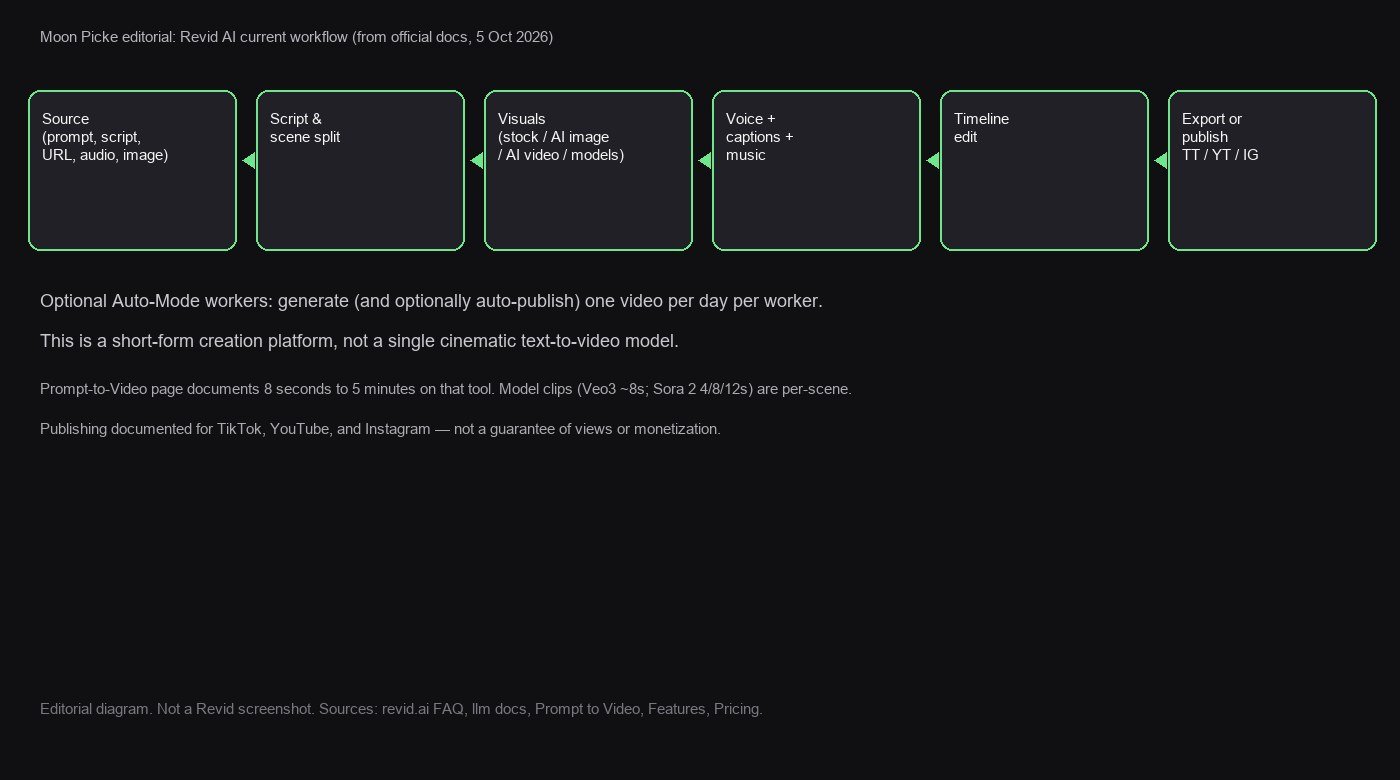
According to Revid’s FAQ and how-to documentation, the current creation flow is:
- Open Create New Video or a specialized tool (Prompt to Video, Faceless, Music, YouTube Clip Maker, and 100+ others).
- Provide a source: prompt, script, URL, audio file, PDF, product page, or your own media, depending on the tool.
- Choose visuals (stock, moving AI images, AI video Low/Pro/Ultra/Veo3/Sora 2 where enabled), a voice, captions, and music.
- Check the estimated credit cost, then generate. Official copy: the AI writes or segments the script, creates visuals per section, generates voice-over, and syncs captions.
- Open the timeline editor to change text, media, timing, captions, and audio, then export or publish.
Generation is described as asynchronous (a few minutes depending on models). That is Revid’s documentation, not a Moon Picke stopwatch. Prompt to Video’s public page says that tool can run from 8 seconds to 5 minutes. YouTube Clip Maker documents clips from 10 seconds to 2 minutes, up to three extracts. Do not collapse those into one universal duration cap.
What parts of video creation does Revid cover?
| Workflow Stage | Revid Support | What Revid Does | User Control | Main Limitation |
|---|---|---|---|---|
| Idea | YES | Prompt tools, viral-search marketing, channel-watch on paid cards | You pick niche and source | No views guarantee |
| Research / source | YES | URL import (YouTube, TikTok, X, LinkedIn, Reddit, articles, Spotify/Suno/SoundCloud) | Summarize / keep as-is | Source rights stay yours |
| Script | YES | AI script from prompt/URL; paste custom script | Line breaks, [visual notes], pauses | Quality not lab-tested here |
| Visuals | YES | Stock, AI images, AI video, motion graphics, uploads, gameplay | Media type, model, presets | Credits scale with model |
| Voice | YES | Library + record yourself; clone on Ultra live card | Speed, stability, language | Clone gated on live Ultra copy |
| Captions | YES | Synced captions; 16 presets in docs | Style, alignment, fonts | Not independently scored |
| Music | YES | Library (179+ tracks in music docs) or AI music (20 credits) | Upload / link on music tool | Do not call it royalty-free here |
| Assembly | YES | Generate builds the cut | Tool + settings | Not one universal T2V render |
| Editing | YES | Timeline: text, media regen, split, audio, captions, ratios | Per-slide and tracks | Not Premiere-class NLE |
| Export | YES | 720p / 1080p / 4K beta; MP4 or GIF | fps, compression, upscale (credits) | 4K costs extra credits |
| Publishing | YES | TikTok, YouTube, Instagram; schedule; webhooks | Connect accounts | Not Facebook/LinkedIn/X post documented |
What inputs does Revid accept?
| Input | Supported? | What Revid does with it |
|---|---|---|
| Prompt | YES | Prompt to Video writes a script and generates visuals/voice/captions |
| Script | YES | Faceless / Voiceover tools speak the script; line breaks make scenes |
| Article / blog URL | YES | FAQ: paste a link; extract and format; summarization preference |
| YouTube / TikTok URL | YES | Import or YouTube Clip Maker (long → shorts) |
| X / LinkedIn / Reddit | YES (as source) | Tools directory: Tweet/X to Video, LinkedIn Post to Video, Reddit Post to Video |
| Image | YES | Image to Video Effect; uploads as custom media; style transfer (docs) |
| Video | YES | Custom media, clip maker, face swap / motion transfer (docs) |
| Audio / music link | YES | Music Video Generator: MP3/WAV or paste a link; Audio to Video listed in FAQ |
| YES (docs/homepage mix) | Listed as a source type in official overview |

Script generation
Revid currently supports both AI-written scripts and your own script. Prompt to Video tells users the AI will generate a script from the prompt. Faceless and Voiceover tools ask for a narrator script “exactly as you want it spoken,” or a URL to import. Official script tips: a new line starts a new scene; [bracket notes] guide visuals and are not spoken; pause tags time the voice; short punctuated sentences help TTS. This review does not grade writing quality.
AI visuals and video generation
Visuals are a picker, not one mechanism. Media types include AI video, animated AI images, motion graphics, stock videos, your own media, and static/gameplay. Official media docs (August 2026) add scraped media from source pages, 40+ style presets, and consistent characters (200 credits for LoRA in credit docs).
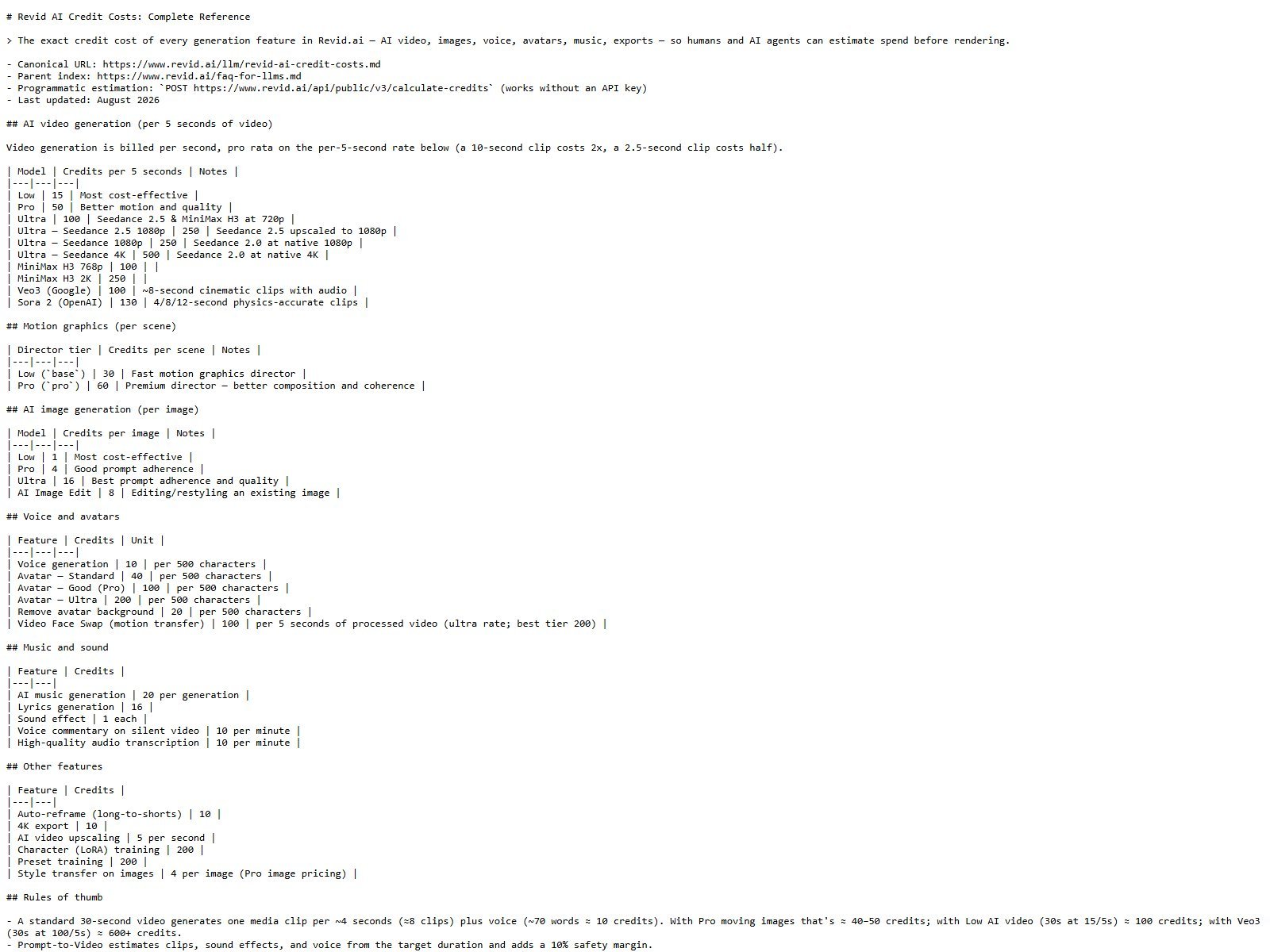
Named video models on current official credit documentation: Low (15 credits / 5s), Pro (50), Ultra (100 at 720p; Seedance 1080p 250; native 4K 500), Google Veo3 (100, ~8s clips), OpenAI Sora 2 (130, 4/8/12s). Image tiers: Low 1 / Pro 4 / Ultra 16. Image models named in the overview include Flux, Seedream, GPT-Image, and Recraft. Growth’s live card says “Seedance 2.5 & more, up to 4K.” Prefer the August 2026 credit markdown plus live pricing cards over the older blog table that still lists Elite.
Text-to-video vs script-to-video
Revid offers both. Prompt to Video is generative. Faceless / Voiceover-to-Video is classic script-to-assembled-video. Calling the whole product a pure text-to-video model would be wrong. Calling it “only slideshows” would also be wrong once Veo3/Sora 2/Ultra AI video are selected.
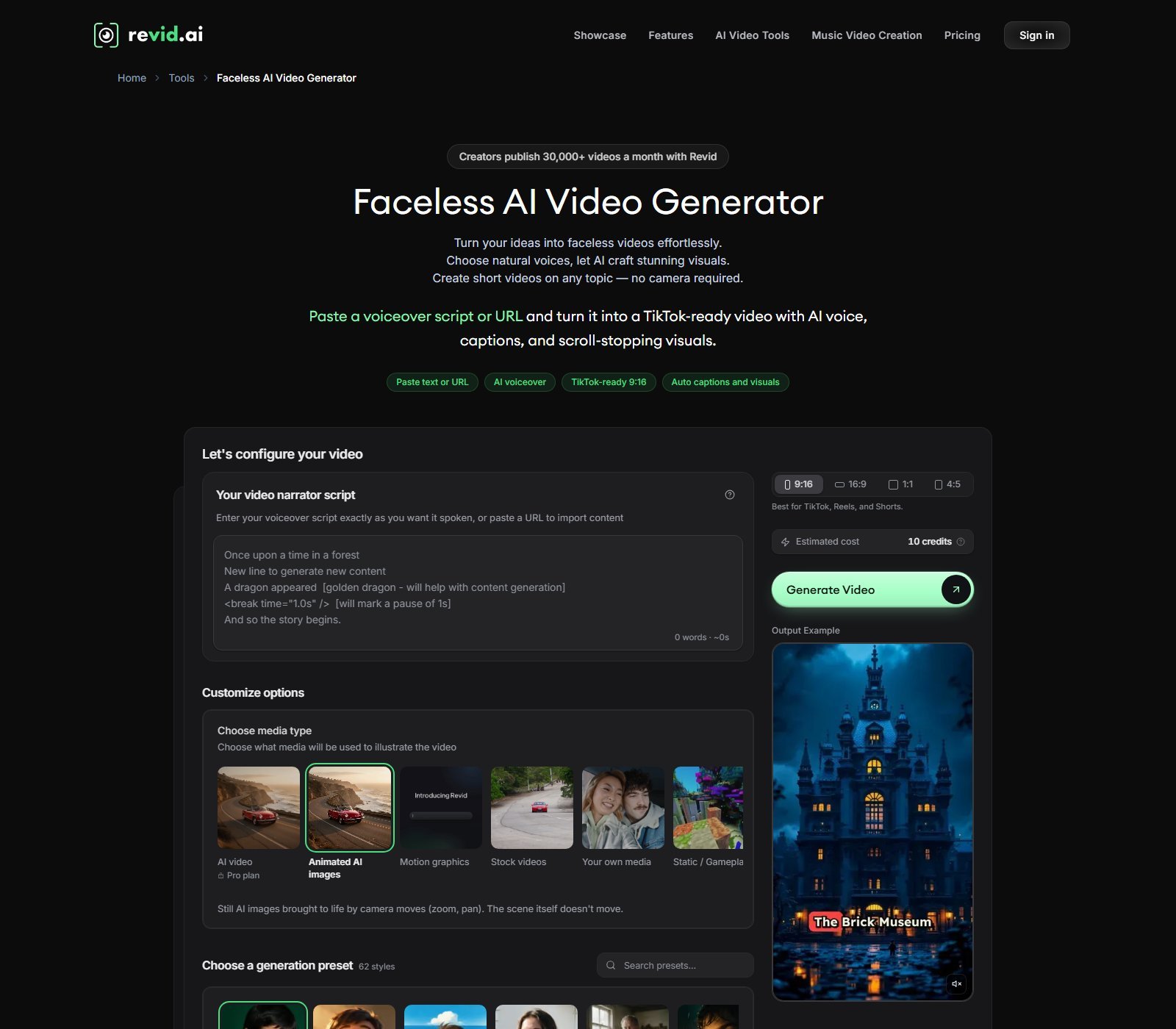
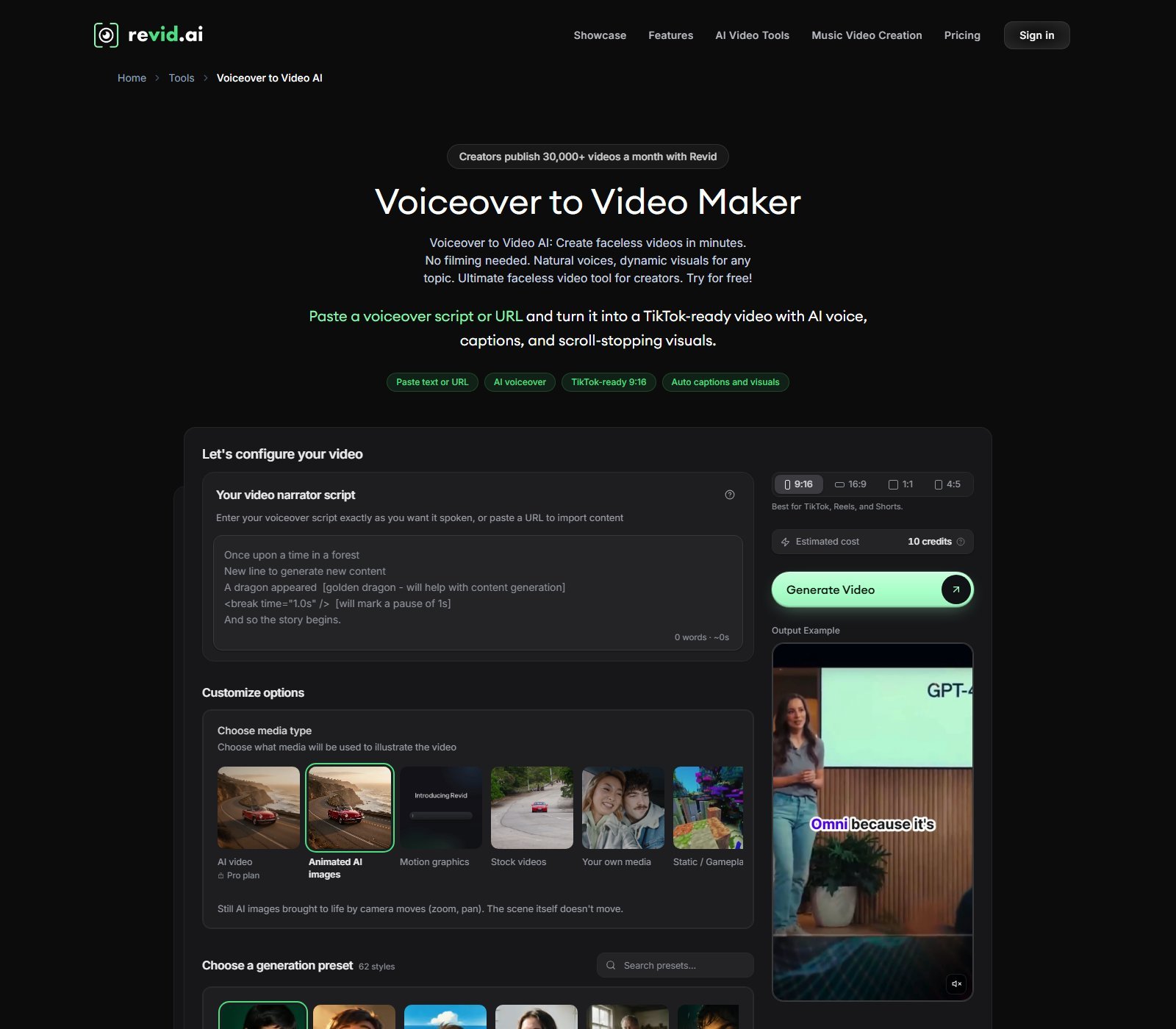
Image-to-video
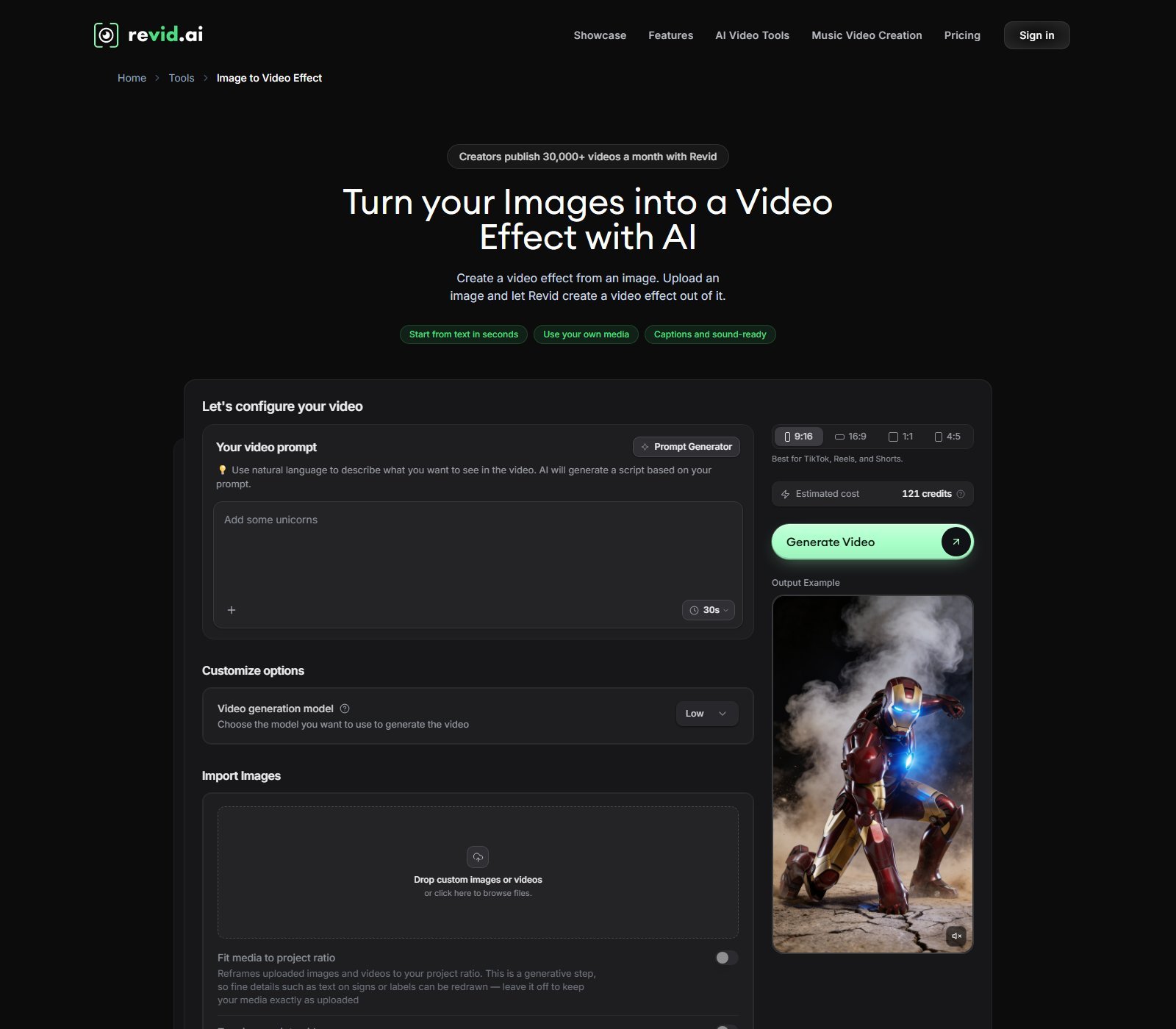
Yes, with a precise meaning. The Image to Video Effect tool asks for a prompt, a video-generation model (Low shown on the public form), and uploaded images or videos. Copy: upload an image and Revid creates a video effect. Media docs also describe turning uploaded images into motion when custom media is placed in a video. Fit-to-ratio can reframe uploads and may redraw on-image text if enabled.
Video repurposing
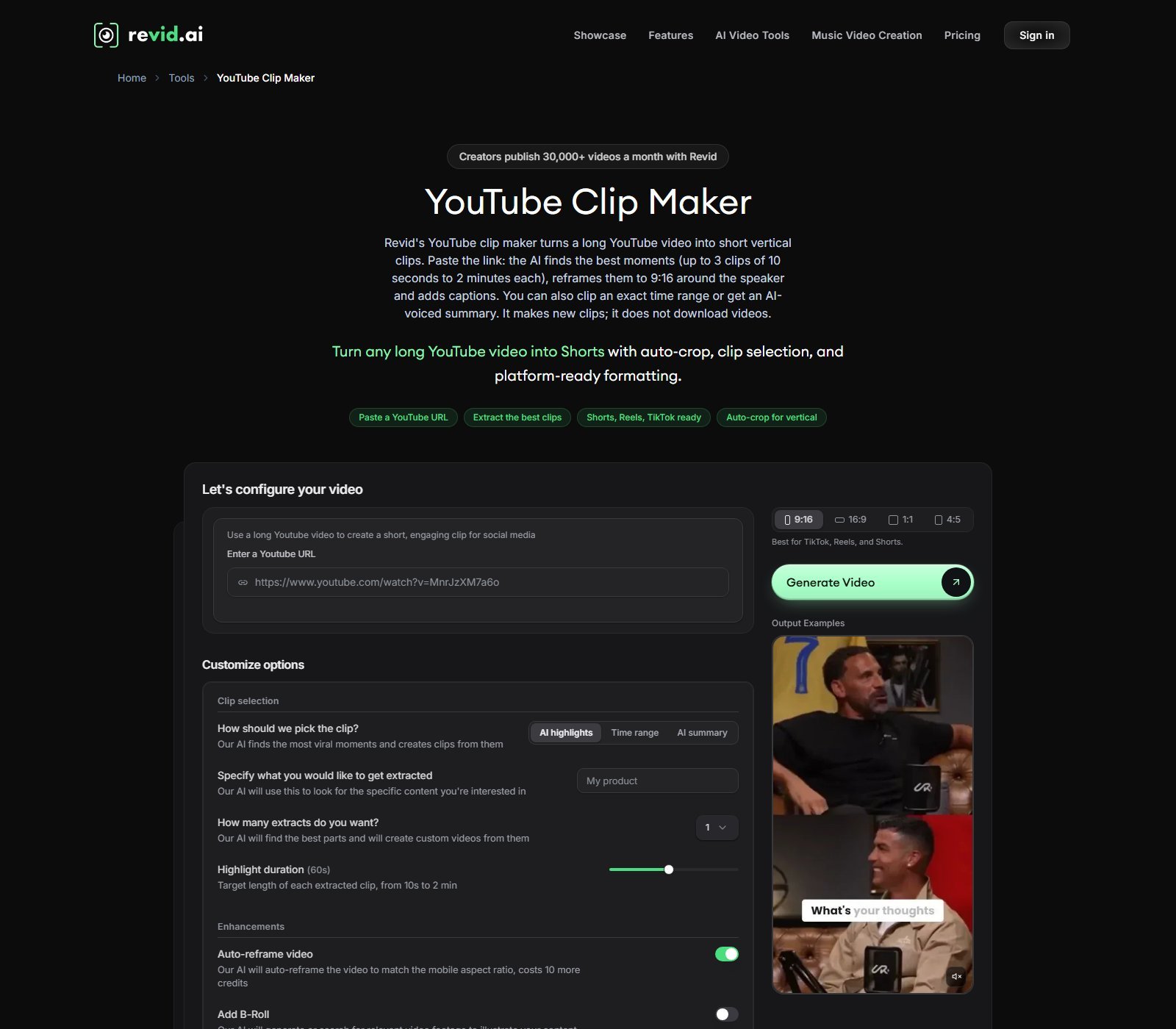
Current verified options include: article/URL → video; social posts → video (X, LinkedIn, Reddit tools); long YouTube → Shorts via YouTube Clip Maker (AI highlights, time range, or AI-voiced summary; auto-reframe costs extra credits on that form); audio/music → video. Auto-Mode marketing also lists YouTube channels, social accounts, news, and blogs as recurring sources. Revid’s Clip Maker copy says it makes new clips and does not download the original videos.
AI voices
Official voice docs: ElevenLabs library, 70+ languages, filters for gender, age, accent, and use case. Speed 0.7x–1.2x. Stability: stable / balanced / expressive. You can record yourself with a teleprompter. Voice generation costs 10 credits per 500 characters. Live Ultra pricing copy includes “Create & clone your own voices.” LLM pages still mention Elite for cloning; the live October 2026 cards do not show an Elite SKU, so this review treats cloning as Ultra-gated on the public pricing table. Do not read that as “indistinguishable from a human studio.”
Captions, music, and audio
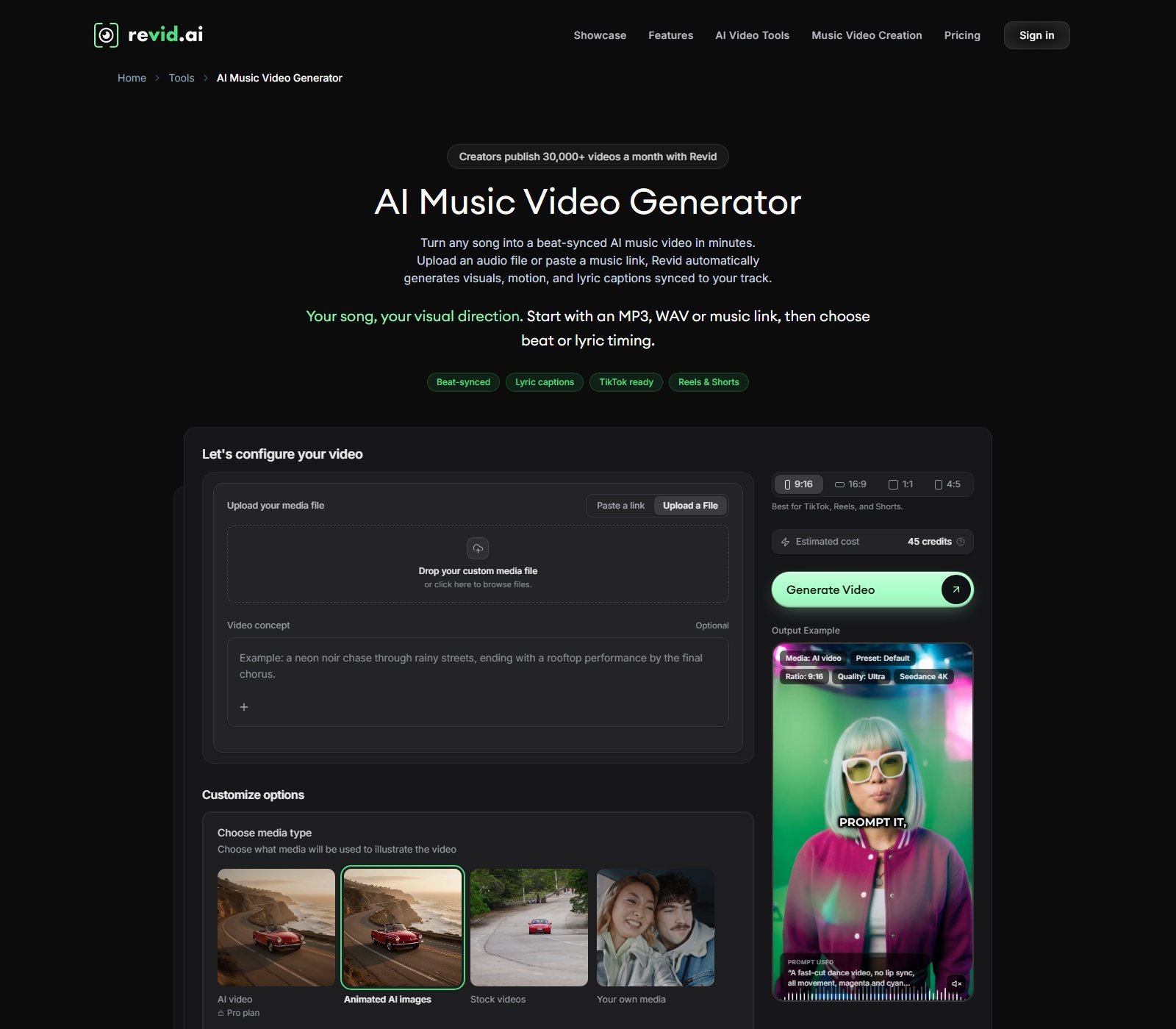
Captions: FAQ lists 16 presets, top/middle/bottom alignment, and font/color customization. Add Caption to Video transcribes uploaded video in 100+ languages. Music Video Generator accepts a file or a music link, beat-sync or lyric captions. Docs also list a background-track library and AI music at 20 credits; sound effects at 1 credit. This article does not call that library copyright-free or monetization-safe.
Editing and creative control
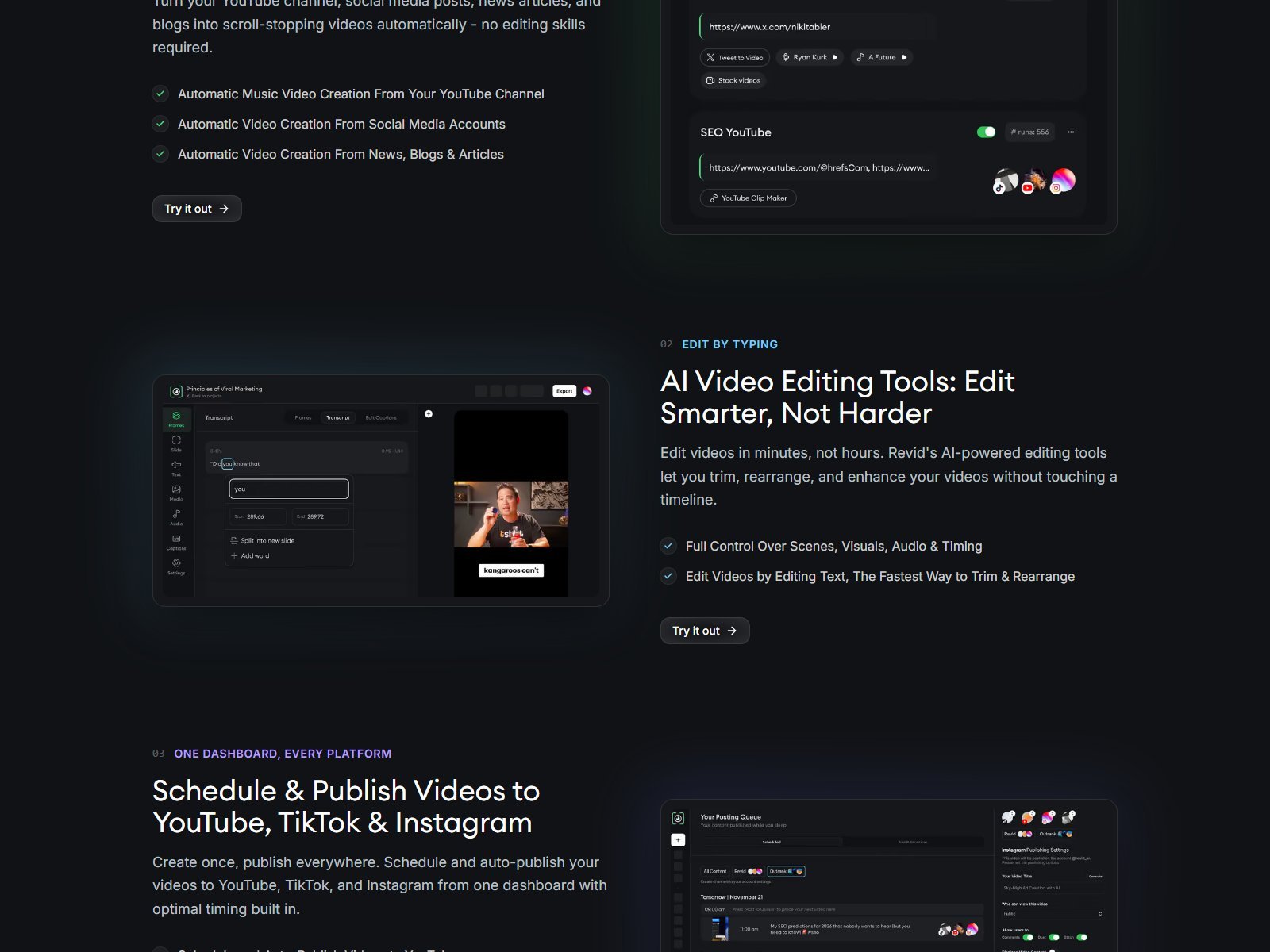
After generate, official editor docs describe a timeline: frames/slides, text and duration edits, regenerate media from a prompt, batch media, split frames, music/voice/SFX tracks, caption presets, safe zones, and aspect switching (9:16, 16:9, 1:1 documented there; Prompt to Video also shows 4:5). Features marketing adds “edit by typing.” That is generation-plus-timeline, not a full NLE.
Templates and specialized tools
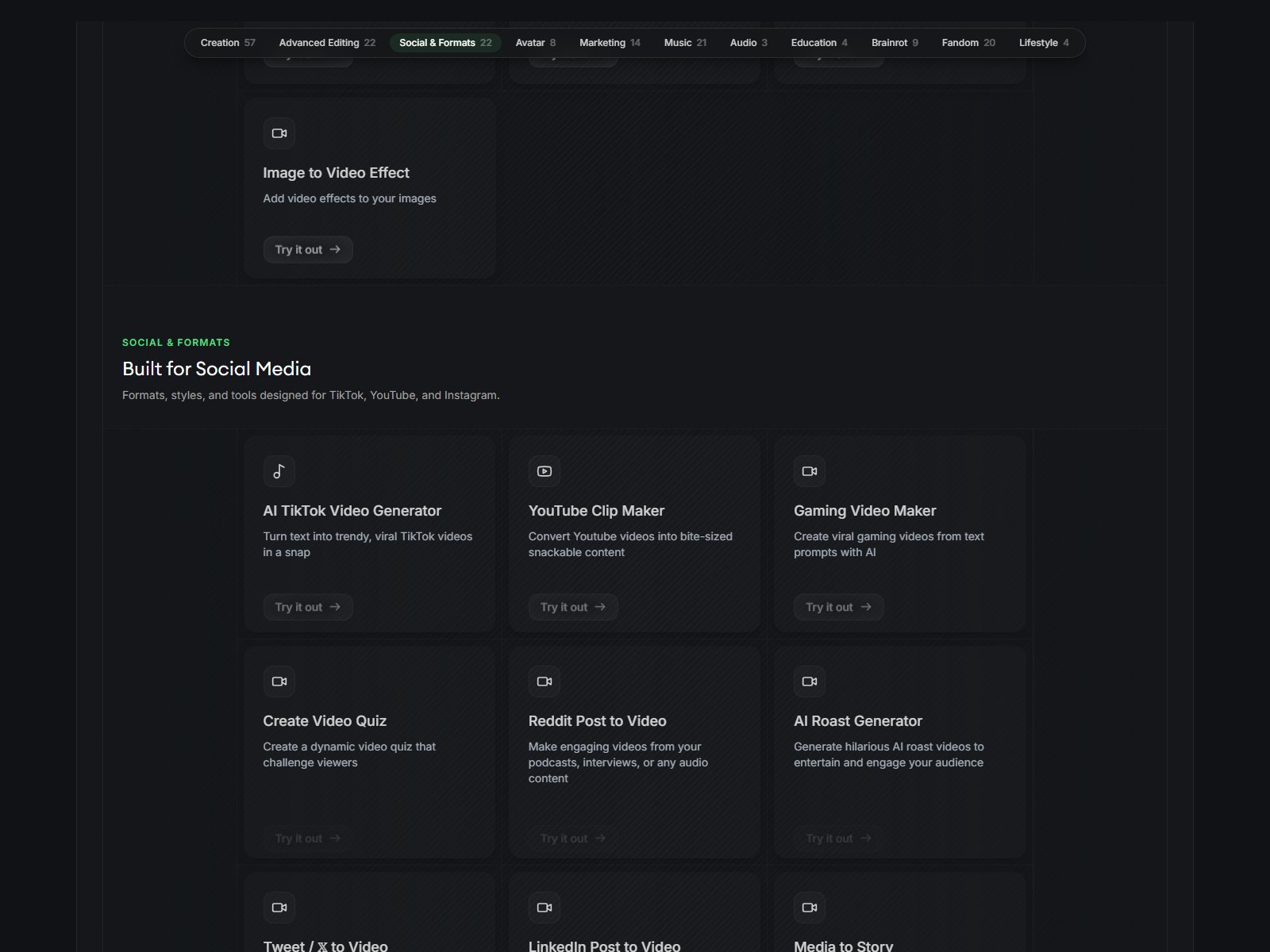
The tools directory is large (Creation 57, Advanced Editing 22, Social & Formats 22, plus Avatar, Marketing, Music, Brainrot, and others on 5 October 2026). Grouped by catalog: social shorts; faceless/script; generative video; repurposing; music; avatars/UGC-adjacent. They share the same credit wallet.

Social media workflow
Format chips: 9:16, 16:9, 1:1, 4:5. Direct publishing is documented for TikTok, YouTube (Shorts and standard), and Instagram (Reels), including schedule. Facebook, LinkedIn, and X are verified as content sources, not documented publish destinations. Publishing does not consume generation credits.
Export, scheduling, and publishing
| Platform | Format | Direct publishing | Scheduling |
|---|---|---|---|
| YouTube / Shorts | YES | YES | YES |
| TikTok | YES | YES | YES |
| Instagram / Reels | YES | YES | YES |
| NOT LISTED as publish | NOT SUPPORTED (public docs) | NOT LISTED | |
| LinkedIn / X | Source tools YES | NOT LISTED as publish | NOT LISTED |
Export: 720p, 1080p, or 4K (beta, 10 credits), 30 or 60 fps, MP4 or GIF. Video watermark on free vs paid: NOT LISTED on live pricing cards.

Is Revid good for faceless videos?
Yes, as a faceless production stack, not as a passive-income machine. Script, visuals, voice, captions, music, assembly, editing, and TikTok/YouTube/Instagram publishing are documented. Auto-Mode can keep a daily cadence if you configure a worker. None of that guarantees views, subscribers, or platform monetization. Faceless means you do not have to film a face. It does not mean unattended profit.
Revid AI pricing in 2026
Pricing, credits and plan limits were checked on 5 October 2026 and may change. Check Revid’s current pricing before purchasing.
Live cards show Hobby, Growth (Best Value), and Ultra. LLM markdown still describes Elite at $89. The Elite SKU was not on the live pricing table this date.

| Plan | Price | Credits / allowance | Key features | Best for | Main limit |
|---|---|---|---|---|---|
| Hobby | $39/month. Yearly $32/month equivalent, billed $384 yearly | Credit number NOT LISTED on the card | Text or links, remix library, editable shorts | Light, hands-on tries | No printed 2,000-credit pool |
| Growth | $39/month (promo from $99). Yearly $32/month equivalent, billed $384 yearly | 2,000 AI credits / month; 3 Auto-Mode workers | Publish TT/IG/YT, Seedance 2.5 up to 4K, 100+ tools, 70+ language VO, API/MCP/CLI | Most creators (Revid’s label) | Credits do not roll over |
| Ultra | $199/month. Yearly $166/month equivalent, billed $1,992 yearly | 12,000 credits (slider to 30k–200k) | 10 workers, create/clone voices | Agencies / multi-niche | Credit burn on Veo/Sora/4K |
Ultra volume FAQ prices: 30,000 credits $459/month; 50,000 $749; 100,000 $1,459; 200,000 $2,799. Boost packs do not expire. Plan credits refill and do not stack.


How Revid credits work
Credits are spent on generation and some exports, not on publishing. Official August 2026 table (per 5 seconds of AI video, pro rata per second): Low 15, Pro 50, Ultra 100 (1080p Seedance 250, 4K 500), Veo3 100, Sora 2 130. Images 1/4/16. Voice 10 / 500 characters. Avatars 40/100/200 / 500 characters. Music 20. 4K export 10. Auto-reframe 10. Character LoRA 200.
Revid’s pricing FAQ: a typical 30-second video with Pro moving images and a voiceover costs about 40 to 80 credits, so 2,000 credits cover roughly 25 to 50 of those videos. Full AI video models cost more per second. The editor shows an estimate before render.
Moon Picke calculation (Growth, Revid’s 40–80 credit example only): $39 / 25 videos ≈ $1.56 per video; $39 / 50 videos ≈ $0.78 per video, if every job stays in that Pro moving-image band. That is not a cost for Veo3, Sora 2, 4K Seedance, or avatar videos.
Which Revid plan makes sense?
Trying the product: sign up without a card and use new-account credits. That is not a dated trial and not a free plan.
Regular short-form with publishing: Growth, if you need the printed 2,000 credits, 3 workers, and social publish. Hobby is the same $39/month on the card but does not print a credit pool.
Voice cloning + volume: Ultra on the live table.
Yearly saves versus monthly if you will stay a year. Quote it as “$32/month equivalent, billed yearly at $384,” never as $32 month-to-month.
Revid strengths
- Full short-form loop: script, visuals, voice, captions, editor, publish.
- Both assembled faceless video and named T2V models in one wallet.
- Broad inputs: prompt, script, URL, audio, image, long YouTube.
- Auto-Mode workers for daily generation (optional auto-publish).
- API, MCP, and CLI on paid-plan copy.
- Public credit table and on-screen estimates.
- Aspect chips include 9:16, 16:9, 1:1, and 4:5.
Revid limitations
- No forever free commercial exporter; signup credits are a taste.
- Plan credits do not roll over; premium seconds get expensive fast.
- Live pricing vs older Elite/blog tables can disagree.
- Timeline is not a professional NLE.
- Direct publish is three platforms, not every network.
- Terms: payments generally non-refundable, with a narrow discretionary exception if little credit was used.
Pros and cons
| Pros | Cons |
|---|---|
| Script-to-publish plus Veo3/Sora 2 access in docs | $39 floor; Hobby/Growth price overlap is confusing |
| Faceless tool + Auto-Mode daily workers | Credits expire each cycle |
| URL/audio/image inputs are real product pages | Elite $89 still in older docs, missing on live cards |
| Schedule + publish to TT/YT/IG | Video watermark rule NOT LISTED |
| 4K export exists (paid in credits) | Not a cinematic-only model studio |
| Card copy: 100% content ownership | Stock/music/model licenses still need a Terms read |
Revid vs a traditional AI video generator
A traditional generative video model takes a prompt or image and returns a clip. Revid can do that and wrap it in script, voice, captions, a timeline, and social publish. Platform vs model is the point of this Revid AI review.
| Revid | Traditional generative video model | |
|---|---|---|
| Primary purpose | Finished short-form posts | Generate a clip |
| Script generation | Built in | Usually you bring the script |
| Video generation | Optional per scene / tool | The core product |
| Voice | Library + clone (Ultra card) | Often none |
| Captions | Yes | Rarely native |
| Editing | Timeline after generate | Usually regenerate |
| Social workflow | Publish TT/YT/IG | Export file |
| Best for | Channel/social production | Shot invention |
| Main trade-off | Credits + broader UI | You still assemble the post elsewhere |
Revid vs AutoShorts: what’s the difference?
AutoShorts, on its live site in 2026, is sold as a faceless Series autopilot: one series SKU, script-to-video on a cadence, with auto-post to TikTok, YouTube, and Instagram, and paid plans commonly shown at $19 / $39 / $69 with a 90-second-class cap in current packaging. Revid is a credit workspace with 100+ tools, a timeline editor, Prompt-to-Video and YouTube Clip Maker, Auto-Mode workers (3 on Growth, 10 on Ultra), and API/MCP/CLI. Visuals can be stock, moving images, or named models including Veo3 and Sora 2. Revid’s live paid floor is $39/month; AutoShorts’ Starter is cheaper if you only want one automated series. Revid fits people who will pick tools, models, and edits. AutoShorts fits people who want one recurring faceless show with less editor surface. This is not a full head-to-head. Moon Picke’s dedicated AutoShorts review is not linked here because it is still a draft.
Who should use Revid?
Short-form creators who need more than a single model box. Faceless operators who still want a timeline. Marketers turning URLs, products, and posts into Reels/Shorts/TikToks. Teams that will use Auto-Mode or the API. Musicians using the music-video tool. People who will actually burn 2,000+ credits a month.
Who should skip Revid?
Editors who need a deep NLE. Filmmakers who only want a dedicated cinematic model playground. Character-animation buyers. Anyone expecting a completely autonomous content business or guaranteed income. Very low-volume users who will not use $39 of credits. Shoppers who only wanted a $19 series autopilot.
Revid alternatives
StoryShort — Faceless script-to-post with Series auto-post. Paid Starter is also $39/month on Moon Picke’s published StoryShort AI review. See StoryShort
Fliki — Script/blog-to-video studio with a documented forever free plan (watermarked) and Standard at $28/user/month on the published Fliki AI review. See Fliki
AutoShorts — Cheaper faceless Series autopilot if you do not need Revid’s editor/model menu. See AutoShorts
Short.ai — Lower Basic floor for faceless + captions + social posting. See Short.ai
FAQ
What is Revid AI? A short-form AI video platform that can generate or assemble videos from prompts, scripts, URLs, audio, and images, then edit and publish to TikTok, YouTube, and Instagram.
Is Revid AI free? You can sign up without a card. New accounts get free credits; free accounts can search viral videos. Regular creation uses paid monthly credits. Not a forever free plan.
How much does Revid AI cost? Live cards: Hobby and Growth $39/month; Ultra $199/month. Yearly Growth is $32/month equivalent, billed $384 yearly. Ultra yearly is $166/month equivalent, billed $1,992 yearly. Checked 5 October 2026.
Is Revid AI worth it? Worth $39/month if you will use credits, tools, and publishing. Weak if you needed a $19 autopilot or a single T2V playground.
Can Revid create faceless videos? Yes. Dedicated Faceless and Voiceover tools, plus Auto-Mode.
Does Revid support text-to-video and image-to-video? Yes: Prompt to Video and named AI video models, plus Image to Video Effect. Many tools are still script-to-assembled-video.
Can Revid turn existing content into videos? Yes: URLs, social posts, YouTube Clip Maker, audio/music links.
Does Revid include AI voices? Yes. Official: ElevenLabs, 70+ languages. Cloning is listed on the live Ultra card.
Can Revid create YouTube Shorts and TikTok videos? Yes for format and for direct publish to YouTube, TikTok, and Instagram. No reach promise.
Does Revid add a watermark? NOT LISTED on live pricing as a video watermark toggle.
Can Revid videos be used commercially? Pricing cards say 100% content ownership; FAQ says you keep ownership of videos you made. Terms still govern stock, music, and models. Not a “copyright-free” slogan. New exports may require an active subscription. Moon Picke is not your lawyer.
What are practical Revid alternatives? StoryShort, Fliki, AutoShorts, and Short.ai.
Final verdict: is Revid AI worth it?
Revid makes most sense if you want one paid seat to turn ideas, URLs, and scripts into editable short-form videos and then push them to TikTok, YouTube, and Instagram—optionally on Auto-Mode. It is less compelling if you only needed a cheaper faceless Series bot, a forever free exporter, or a model playground with no social wrapper. Its strongest differentiator is the mix: assembled faceless workflow and named generative models, plus publishing and agent APIs. Its biggest trade-off is credit complexity and a $39 monthly floor with no rollover. At the current Growth promo ($39/month, 2,000 credits), it is a production purchase, not a casual toy. Recheck Revid’s live plans before you pay. Moon Picke did not generate test videos for this review.
Research date: 5 October 2026. Official sources: revid.ai, /pricing, /tools, /features, /faq, /llm credit and product markdown, Terms. Method: how we evaluate.