
InVideo AI review for September 2026: InVideo is worth paying for if you need a prompt- or script-to-assembled video workflow—scenes, stock, generated clips, voice, captions, and a timeline—not if you want a cinematic shot generator like Runway or Kling. This page evaluates documented assembly, model access, credits, and limits. Moon Picke did not benchmark script, voice, or stock-match quality. Methods: How We Evaluate and editorial standards.
InVideo AI Review: Quick Verdict
Is InVideo AI worth it? Conditionally. It fits creators who will accept automated assembly, then review script, media, and voice. It is a weak fit if you need frame-level generative control or a traditional NLE as the product. InVideo AI pricing, plans, and model access were verified in September 2026. What is InVideo AI best for? Complete-video assembly. This InVideo AI review is not a clip-quality scorecard. See current InVideo AI plans.
| InVideo AI Review Snapshot | Verdict |
|---|---|
| Best for | Creators who need script-to-export assembly more than a single hero shot |
| Platform type | Complete video builder (agent + stock + models + editor) |
| Current pricing model | Per-seat subscription + monthly credits; annual $ on captured cards |
| Prompt-to-video | Agent Two (conversational) or Autopilot (single-shot), plus “Use my script” |
| Stock media | Premium allotments plus agent-placed iStock/Shutterstock-class libraries |
| Generative video | Plan-gated partner models (Seedance, Kling, Veo listed); API-priced credits |
| Voice | TTS / narrator settings; clones and AI Twins documented with consent steps |
| Editing | Prompt/agent edits plus a full timeline (manual timeline edits do not spend credits) |
| Long-form fit | Assembled scenes, not one continuous generative reel |
| Best workflow | Prompt/script → plan → stock and/or AI media → voice/captions → edit → export |
| Main limitation | Credits, plan-gated models, and automated media that still need review |
| Free access | Limited credits, weekly reset, no card required; export/watermark follow the plan |
| Commercial use | Terms licence Outputs; Licensed Content (stock) stays on third-party licence terms |
| Overall value | Pays off when assembly time saved beats the loss of shot-level control |
This InVideo AI review sits under best AI video generators for creators, beside the Higgsfield AI review and Runway review. Ads, Shorts, and faceless-YouTube roundups are not this page.
What Is InVideo AI in 2026?
Official positioning is an AI video platform for assembled creative work: Agent Two plans and builds from a brief; invideo Editor is the timeline; partner models generate specific shots or images. Do not review it as if it were only a text-to-video model. The platform is the agent, stock pipeline, captions, voice, and editor. Models such as Seedance, Kling, Veo, and Nano Banana are access layers priced at “original API pricing” per the pricing FAQ. More models do not automatically mean a better finished video; script, stock choice, pacing, voice, and captions still decide the cut. A cinematic model may output one short clip. InVideo’s job is script, scenes, media, narration, music, captions, edit, export. Multiplayer seats and storage scale by plan. See Guides and AI & Digital Products.
How InVideo AI Turns a Prompt Into a Video
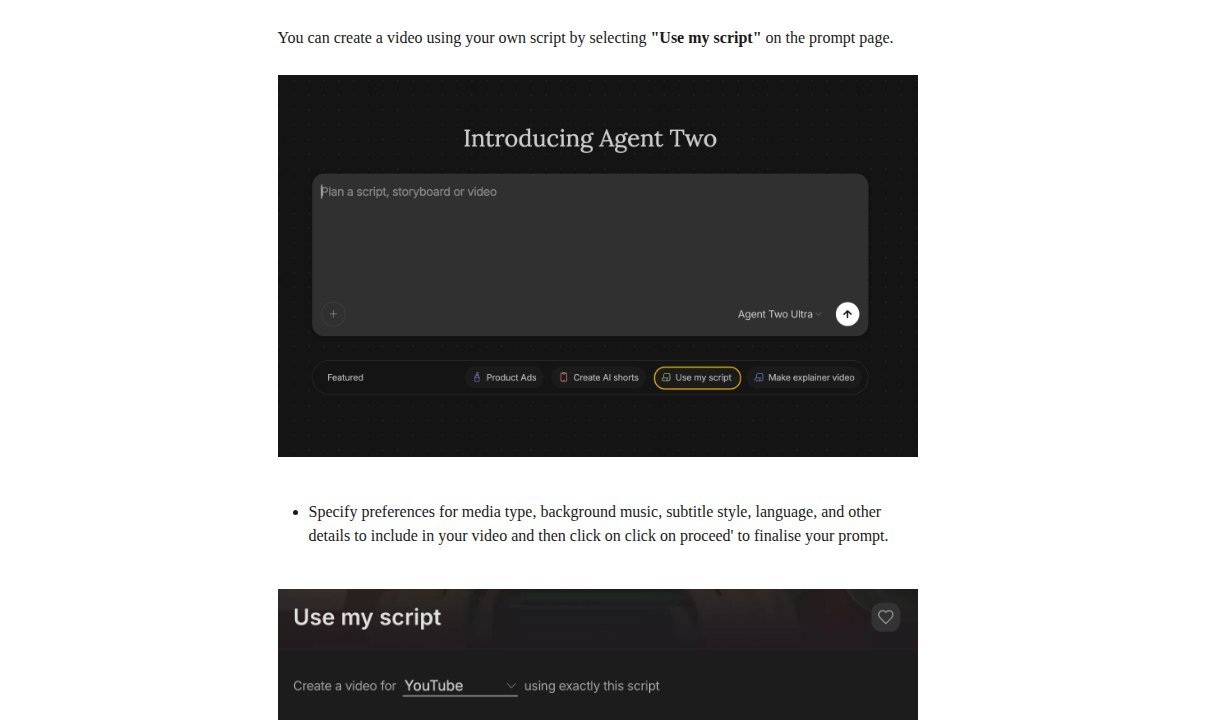
Documented start: type a brief into Agent Two (“Plan a script, storyboard or video”), attach files if needed, pick a workflow chip such as Product Ads, Create AI shorts, Use my script, or explainer, and choose an agent tier (Lite / Pro / Ultra where the plan allows). Help: Explainer and Script to Video on the Agent Two page now run as a conversation; Autopilot is the single-shot path. Agents can script, storyboard, generate media, and assemble a cut. Then open Editor to inspect the sequence. Screenshots of help UI stills prove those controls exist—not speed, script quality, or “perfect” stock.
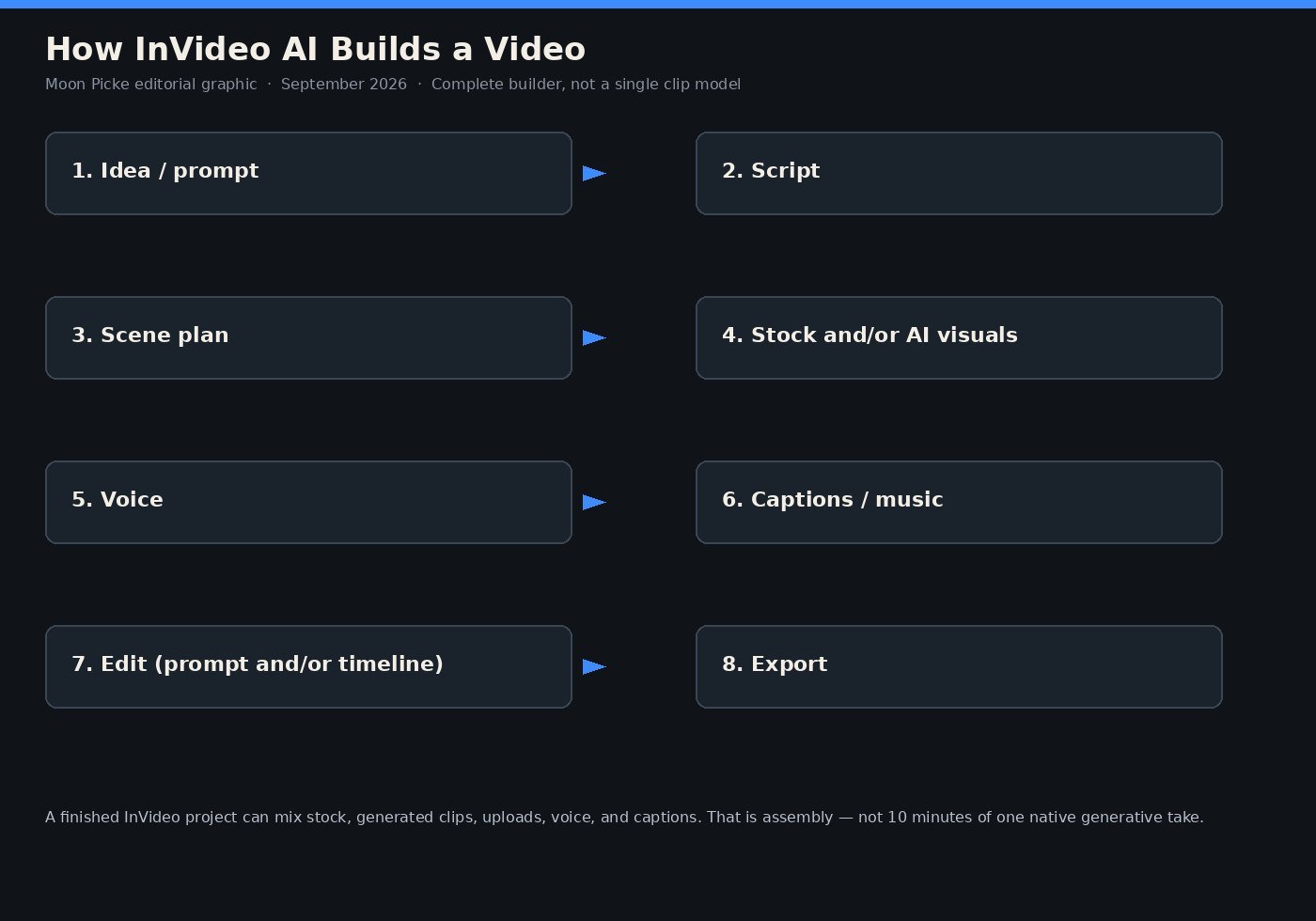
Editorial interpretation: automation reduces first-assembly work. It does not remove review. AI scripts can be wrong; stock can miss the beat; captions and voice still need a pass. Prompt editing (“change scene 2,” “add subtitles”) is not the same as dragging clips on a timeline.
Scripts, Scenes, Stock Footage and AI-Generated Media
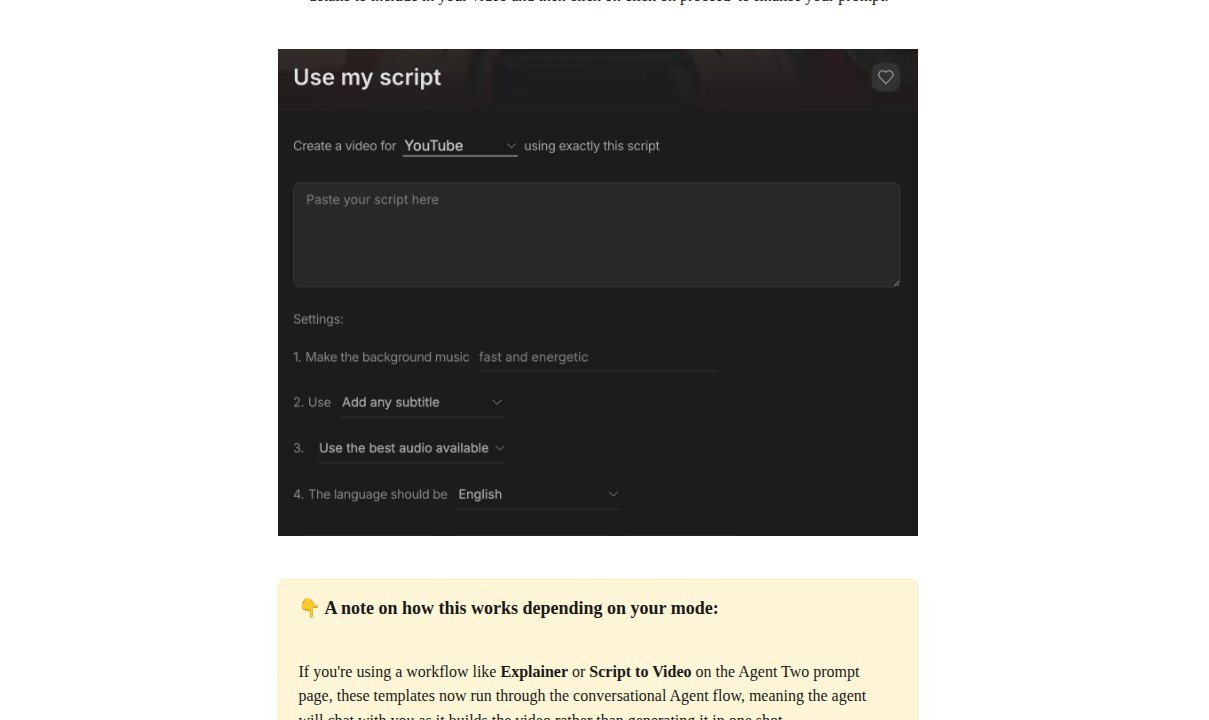
Script control is a workflow, not a literary score. “Use my script” lets you paste copy, pick a destination such as YouTube, and set music, subtitles, audio, and language before generate. You can also tell the agent to follow a script exactly. Editability matters more than an untested “excellent writing” claim. Fact-check informational scripts; InVideo’s own Terms warn Outputs may contain inaccuracies.
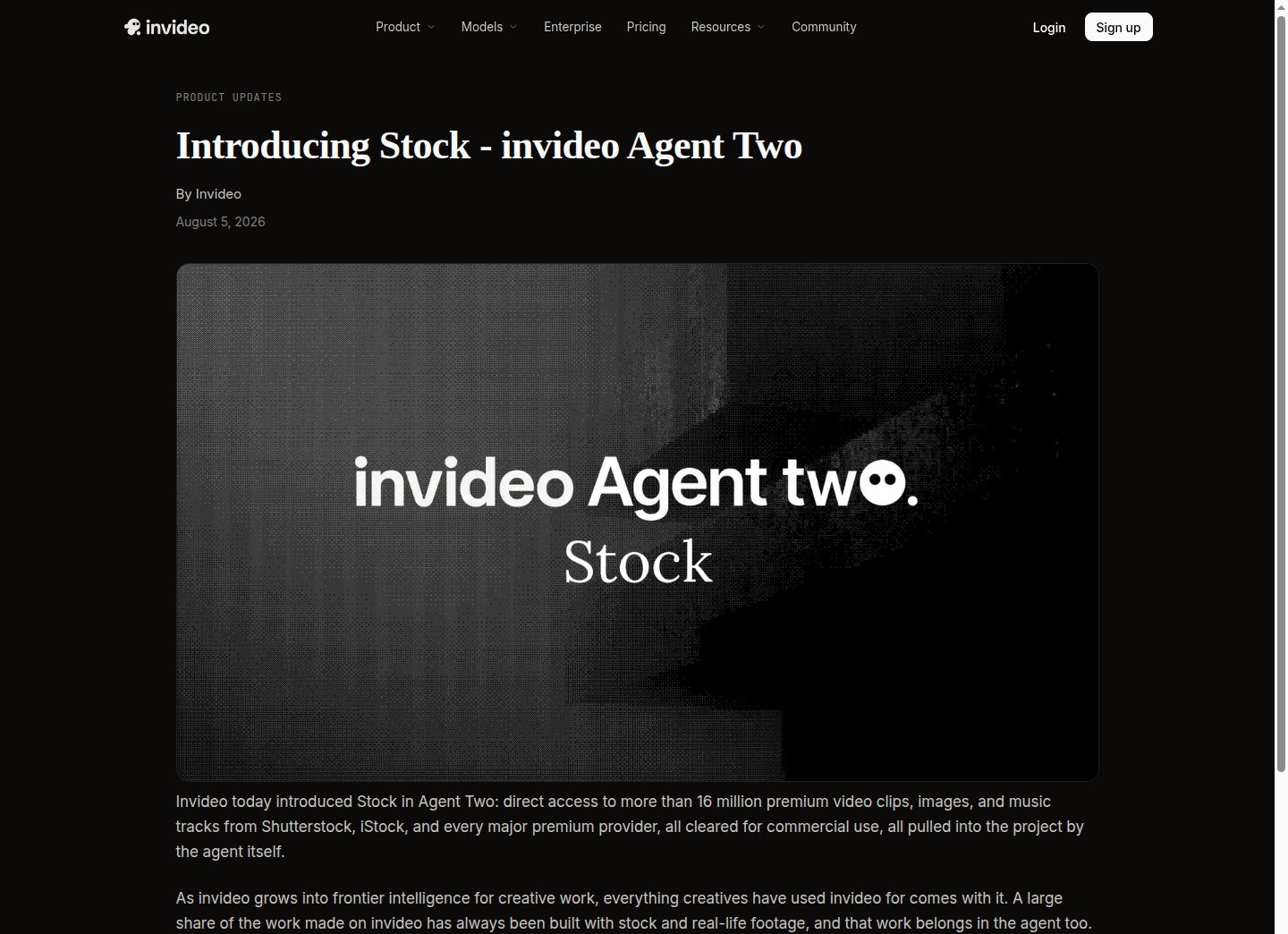
Visuals are mixed on purpose. Official stock copy (August 2026): Agent Two can pull premium clips, images, and music from Shutterstock, iStock, and other providers and place them—including a music bed—without a manual library hunt. Help: AI may incorporate Storyblocks, Shutterstock, and iStock; iStock counts against a monthly quota on export; Storyblocks/Shutterstock can replace iStock if you cap it. Plan cards captured September 2026 listed 100 / 200 / 500 “Premium stock footage” on Starter / Plus / Max. That is stock, not generated video. Generative shots use named partner models and spend credits per second (resolution, input, and audio change the rate). Direct model generation is for a specific asset; the editor is where assets become a sequence. Do not imply a 10-minute “AI video” is ten minutes of native generative footage.
Voice, Captions and Localization
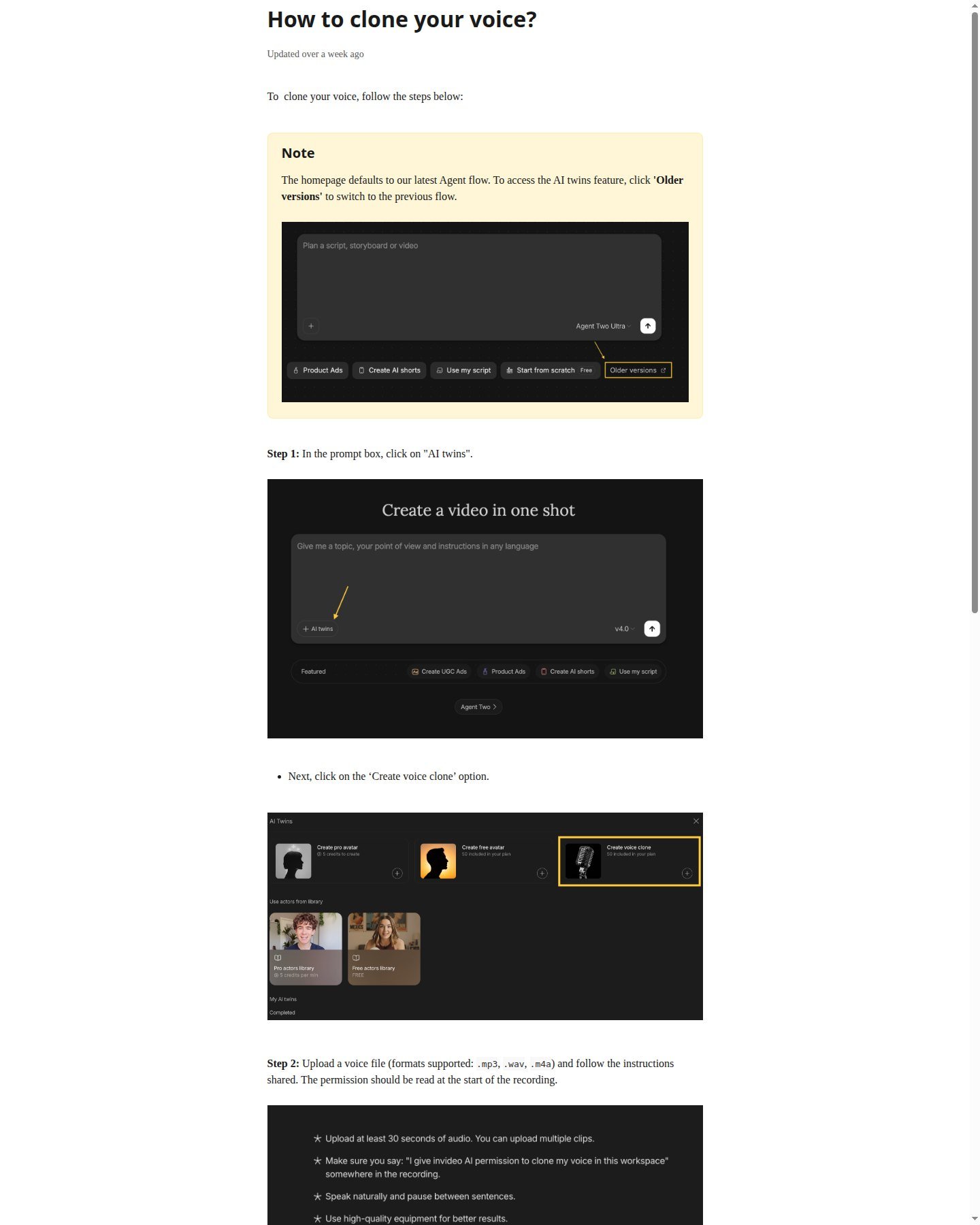
Script settings include narrator/subtitle/language controls. Dynamic Text help: transcribe and animate captions word-by-word in 50+ languages and 10+ styles, with transcript review before export (up to 4K on that tool). That documents capability, not caption accuracy. Magic Box-class prompts historically included “add subtitles” and “change video format to Vertical” for 9:16—confirm the live agent/editor. Voice cloning: upload audio, read a permission line at the start of the recording, tick consents; help requires that permission statement. Do not clone a voice without rights. AI Twins / Human or Pro actors are documented as extra credit (help: +200 credits per minute on top of the selected model). Localization workflows exist on Agent Two’s workflow list; do not claim translation accuracy.
How Much Editing Can You Actually Do?
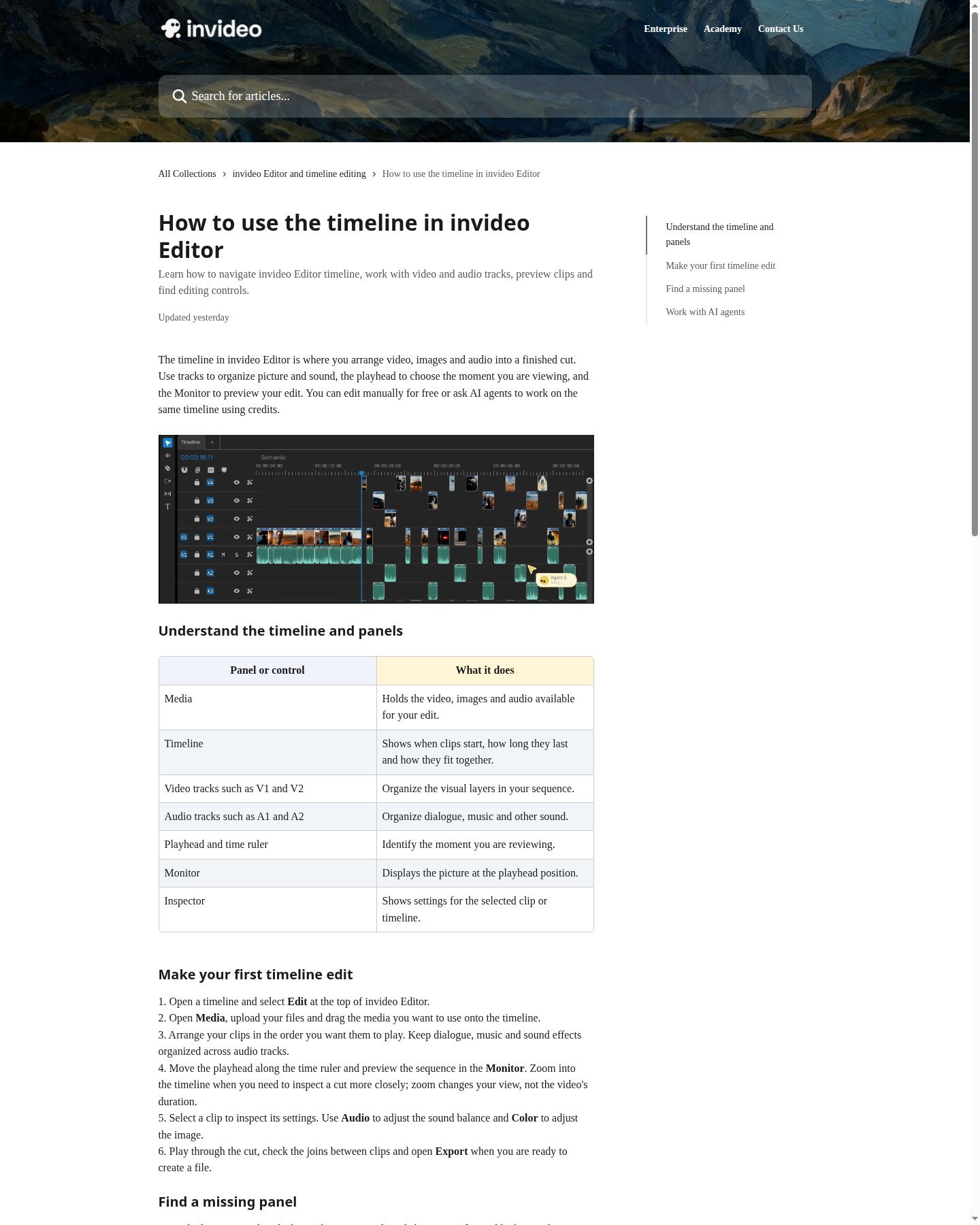
Can InVideo AI replace a video editor? For social, explainers, and simple marketing assembly, it may replace much manual first-cut work. It is not a universal Premiere/DaVinci replacement for multicam, advanced mix, or frame-level finishing. Help: invideo Editor has Media, Timeline, video tracks (V1/V2), audio tracks (A1/A2), playhead, Monitor, Inspector; you upload, arrange, mix, and grade. Manual timeline edits are free of AI credits. Agent work and model generation spend credits. Prompt/agent edits change the cut in language; timeline edits change clips directly. Paid plan cards list Color, Audio, and 3D tools on Starter through Max. Export: H.264 MP4 with resolution, frame rate, quality, and loudness; audio-only and PNG stills exist. Allowances and watermarks follow the plan. Preview watermarks can remain until export; old free exports keep watermarks until re-exported after a paid plan.
Is InVideo AI Good for YouTube, Shorts and Faceless Videos?
Is InVideo AI good for YouTube? The documented stack—script, scenes, stock B-roll, narration, captions, 16:9, export—matches a faceless or explainer pipeline at a high level. It is not this cluster’s faceless-YouTube guide. Can InVideo AI make faceless videos? Yes as assembly: stock plus voice plus captions, with optional generated inserts. Shorts: help and prompt chips include AI shorts and vertical format instructions; confirm 9:16 in the live project. Product ads: workflow chips and performance-ads pages exist; do not claim catalog-perfect products. Avatars/UGC-style twins are a side path, not the core builder. Long-form is assembled scenes; confirm duration in the live UI rather than assuming one generative take.
InVideo AI Pricing, Credits and Usage Explained
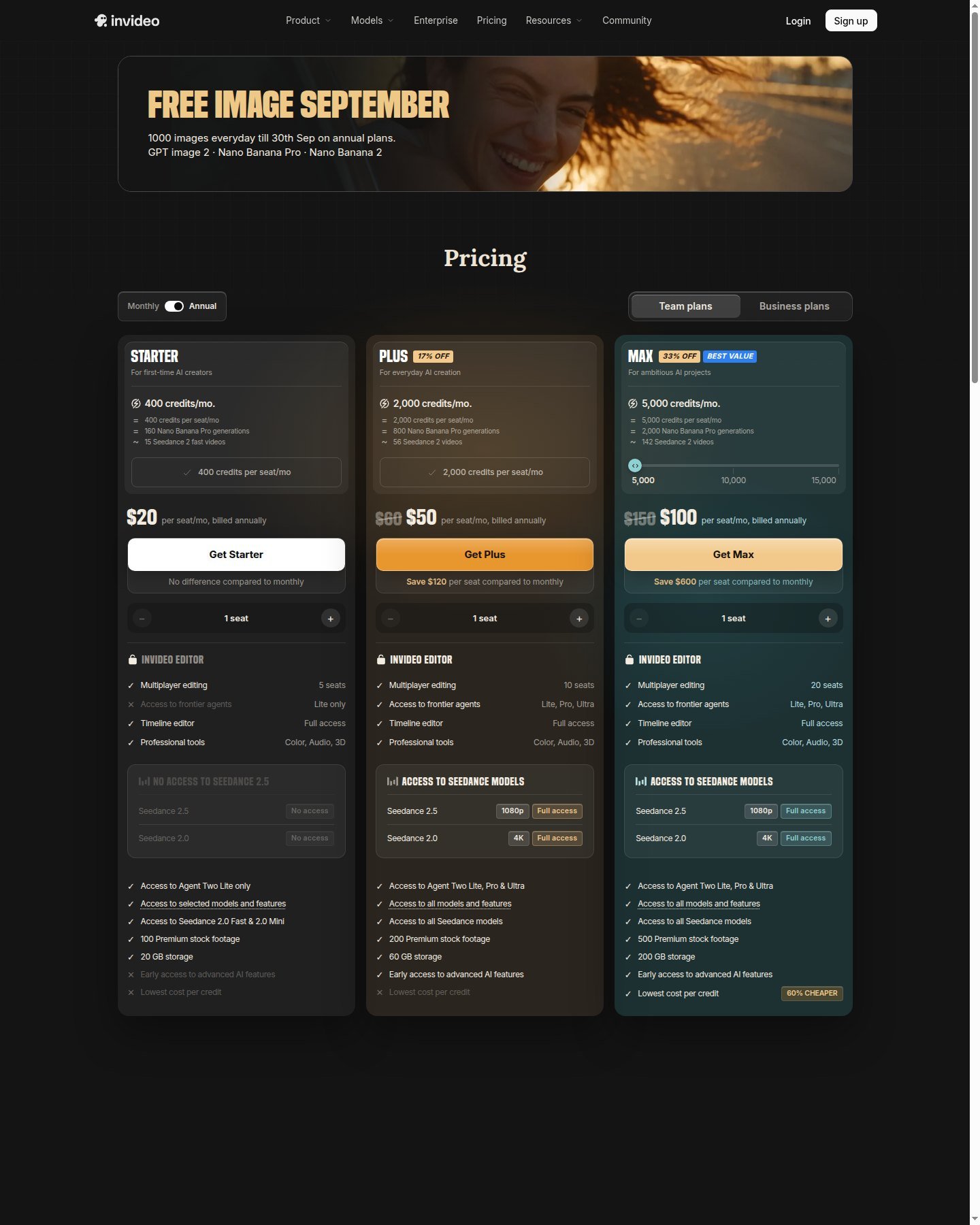
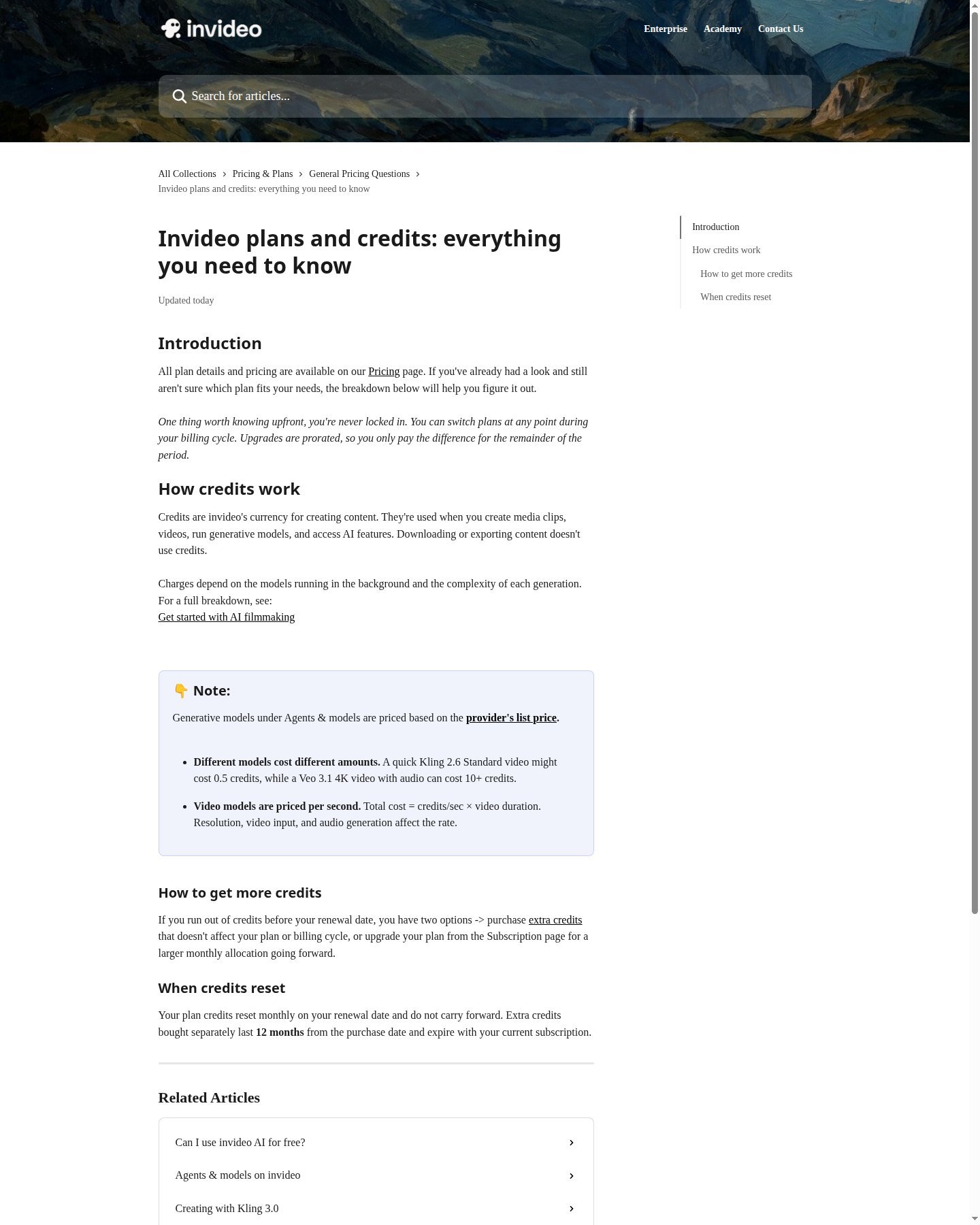
How do InVideo AI credits work? Credits pay for creation, agents, and models—not downloads. Models are billed at provider list/API rates; help examples include a cheap Kling clip versus a Veo 3.1 4K+audio generation at 10+ credits. Video models are per second. Autopilot quality (Basic / Pro / Ultra) changes spend. Unused plan credits do not roll over; extra purchased credits last 12 months and expire with the subscription. Yearly Individual/team-style cards Moon Picke captured on 12 September 2026 (Annual toggle): Starter $20 per seat/month billed annually (no monthly discount), 400 credits, Agent Two Lite only, Seedance 2.0 Fast & Mini only (no 2.5 / no 2.0), 100 premium stock, 20 GB; Plus $50 per seat/month billed annually (struck $60), 2,000 credits, Lite/Pro/Ultra, Seedance 2.5 at 1080p and Seedance 2.0 at 4K on the card, 200 premium stock, 60 GB; Max $100 per seat/month billed annually (struck $150), 5,000 credits, 500 premium stock, 200 GB. Do not quote struck figures as the annual price. A Seedance 2.5 marketing page still said “coming soon” the same day—confirm the live model list at checkout. Check current InVideo AI pricing.
| Plan (Annual cards, Sep 2026) | Current price | Usage / credits | Model access | Best for | Main limitation |
|---|---|---|---|---|---|
| Free | $0 | Limited credits, weekly reset | Selected models | Trying the UI | Plan-gated export/watermark; not a production budget |
| Starter | $20/seat/mo billed annually | 400 credits/mo, no rollover | Lite agent; Seedance Fast/Mini | Light assembly | No Seedance 2.5 / 2.0 on that card |
| Plus | $50/seat/mo billed annually | 2,000 credits/mo | Lite/Pro/Ultra; Seedance 2.5 listed | Regular YouTube/social | Credits still expire monthly |
| Max | $100/seat/mo billed annually | 5,000 credits/mo | All Seedance on that card | Generative-heavy teams | Highest sticker; still not a full NLE |
Stock-heavy projects spend more iStock quota and fewer generative seconds. Generative-heavy projects burn credits per second and per retry. Do not convert a plan into “X finished videos.” Iteration—first assemble, script tweak, media swap, model retry, voice change, export/rebuild—hits the same monthly wallet. Light creators: Starter if Lite plus Fast/Mini is enough. Frequent or Seedance 2.5 buyers: Plus or Max on those cards. Free: no card; weekly UTC reset. Paid cards advertise unlimited watermark-free exports—verify the export panel. Other public InVideo pricing URLs have shown different individual ladders; this InVideo AI review sticks to the Annual Starter/Plus/Max capture from 12 September 2026.
InVideo AI’s Biggest Strengths
It is built as a complete assembler, not a clip toy. Stock plus generated media plus uploads is explicit. Voice, captions, and a real timeline sit next to the agent. Manual timeline work does not spend credits. According to current Terms, Invideo grants a perpetual, worldwide, royalty-free licence to commercialise Outputs, assigns whatever rights it can, and separately limits Licensed Content to third-party stock terms—not one vague “all commercial rights.” Terms also say Outputs may not be unique and may be inaccurate.
Where InVideo AI Falls Short
Shot-level cinematic control still lives in generators like Runway or Kling. Credits and API-priced models are easy to misread; Starter gates Seedance 2.5/2.0. Automated stock still needs replacement—help even documents prompting to cut iStock. The timeline is not a guarantee of feature-film finishing. Stock-heavy cuts can look generic. Generative volume gets expensive. Agent replies can spend credits on thinking plus media, not only the finished clip. Marketing speed claims (“4x faster”) are vendor copy, not a Moon Picke clock.
InVideo vs Runway, Higgsfield and Kling
Moon Picke may earn a commission if you purchase through some links on this page, at no additional cost to you. Affiliate Disclosure. InVideo: prompt/script → assembled video. Runway: generation plus creative production. Higgsfield: multi-model workspace—explore Higgsfield if engines matter more than assembly. Kling: generation-first clips. This is not the Kling review or an ads roundup.
Who Should Use InVideo AI?
Use this InVideo AI review if you are a YouTube or faceless maker who will fact-check scripts; a social marketer who needs 9:16 assembly; a small team without a dedicated editor; or a business that wants explainers with stock and voice. The subscription is buying fewer tool switches for that stack—not a guaranteed look. Explore InVideo AI if saving assembly steps is the bottleneck.
Who Should Skip InVideo AI?
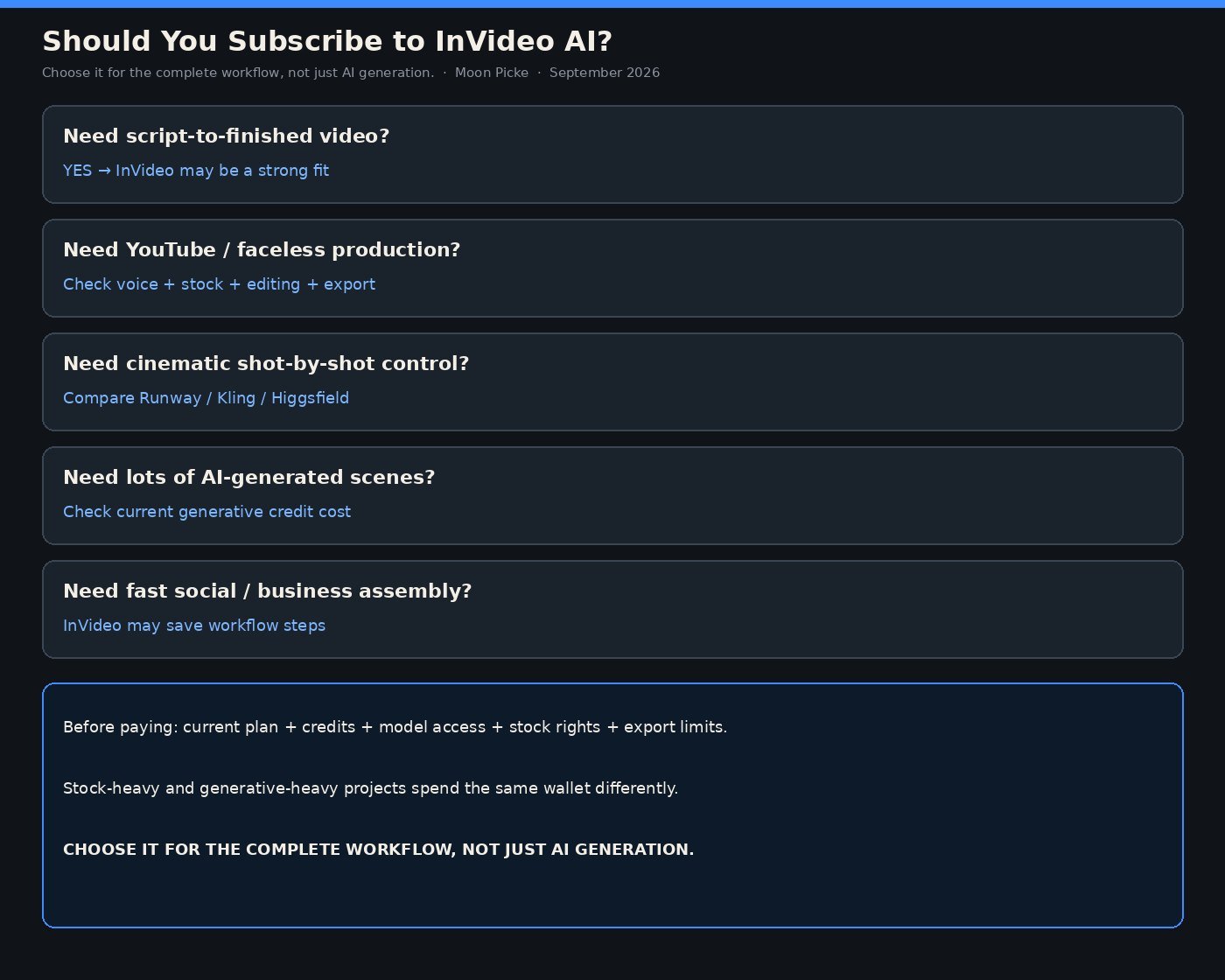
Skip filmmakers who need precise generated shots. Skip buyers who only want one model’s native site. Skip advanced NLE users who will not use the agent. Skip cinematic-only generative work. Skip idle low-volume users if Free’s weekly credits cover experiments. Skip anyone who will not budget iteration or read stock vs Output licences.
Final Verdict
This InVideo AI review does not ask whether InVideo makes the best AI clip. Ask whether automated scripting, media, voice, captions, and assembly save more work than you lose in fine-grained control. Pay if that workflow is your job. Skip if you needed a generator. Recheck live plans. View current plans and features.
FAQ
Is InVideo AI worth it in 2026? Yes for complete-video assembly; no for shot-first generation.
Is InVideo AI free? Yes, limited weekly credits, no card; export/watermark follow the plan.
Does InVideo AI use stock footage? Yes, alongside generated media and uploads.
Which AI models does InVideo use? Partner access (Seedance, Kling, Veo, Nano Banana listed); plan-gated; not all proprietary.
Is InVideo good for YouTube or faceless channels? The assembly stack can fit; this is not the dedicated roundup.
Can InVideo replace Runway? Different jobs. Do not swap them from one trailer.
Can InVideo videos be used commercially? According to current Terms, Outputs may be commercialised under Invideo’s licence; stock Licensed Content stays on licensor terms. Not legal advice.
Does InVideo AI have a watermark? Paid cards advertise unlimited watermark-free exports; help says check the plan and re-export old free projects.