
The job starts after the story already exists. You have a script, a transcript, a voiceover, a talking-head recording, a podcast, or a rough edit. You need supporting footage that illustrates a line, covers a jump cut, or shows a place, product, or process. That supporting footage is B-roll. An AI B-roll generator is a tool that helps you find it, generate it, or place it against that existing narrative.
On 5 October 2026, live US-oriented results for “best AI B-roll generators” mixed three different products: editors that match stock clips to a transcript and drop them on a timeline, generators that synthesize a new clip from a prompt, and short-form or clipping tools that include B-roll as one feature. The phrase still matches the question above, so it stays the focus keyword. Three products had a public B-roll workflow specific enough to compare without padding the list: Submagic, OpusClip, and Vizard. Moon Picke did not upload the same script or the same talking-head video to any of them. There is no relevance score and no time-saved measurement in this article.
Quick picks
- Best overall: Submagic, for transcript Magic B-rolls, per-line add, keyword search, upload, and separate prompt-generated AI B-roll.
- Best automatic insert on a short: Submagic Magic B-rolls. OpusClip’s one-click control is the same class of feature on a clipping timeline.
- Best stock allowance: OpusClip Pro, unlimited Pexels. Submagic Pro lists Storyblocks.
- Best published generative meter: Submagic, 3 AI credits per generated clip.
- Best named-model hybrid: Vizard, Storyblocks plus Pexels plus AI Studio. Dollar prices were not in the HTML.
- Best long-YouTube source: OpusClip Pro. The broader clipping job is the published AI video repurposing guide.
- Best free: none verified. OpusClip’s free row excludes B-roll. Vizard’s free credits were not tied to AI B-roll. Submagic’s cards start at paid Starter.
Comparison table
| Tool | Best for | B-roll source | Transcript analysis | Auto insert | Generate video | User control | Starting price |
|---|---|---|---|---|---|---|---|
| Submagic | Short-form video that already has speech | Hybrid: stock, generated, upload | Yes, Magic B-rolls uses the transcript | Yes, Magic B-rolls applies clips in the edit | Yes, AI B-roll from a prompt | Replace by search, upload, prompt, and timing on the API | $19/month, or $12/member/month billed yearly |
| OpusClip | B-roll on clips cut from a long video | Hybrid: Pexels stock, Agent Opus video on Pro, upload | Yes, a sentence can be selected | Yes, one-click Auto generate B-Roll | Yes on Pro, named Agent Opus | Move, trim, reframe, regenerate, revise prompt | $15/month for limited stock; video B-roll at Pro $29/month |
| Vizard | Stock plus a multi-model studio | Hybrid: Storyblocks, Pexels, generated, upload | Yes, voiceover and visuals are named inputs | Yes, the page says it overlays selected B-roll | Yes, AI Studio; model list is inconsistent on the page | Upload your own image or video; finer timeline controls not verified | Free tier exists; B-roll dollar price not verified |
Source table
| Tool | Stock | AI stock search | Generative B-roll | Upload own media | Hybrid |
|---|---|---|---|---|---|
| Submagic | Yes | Yes, transcript match and keyword search | Yes | Yes | Yes |
| OpusClip | Yes, Pexels | Yes, auto and sentence selection | Yes on Pro, via Agent Opus | Yes | Yes on Pro |
| Vizard | Yes, Storyblocks and Pexels | Yes, automatic selection from context | Yes, AI Studio | Yes | Yes |
How we chose the best AI B-roll generators
A finalist had to analyze a script, transcript, or video and return footage, place footage in the edit, generate a clip meant as B-roll, or offer stock and generation in one project the user can still swap. A stock library, a general editor, a faceless-video builder, or a text-to-video model failed that gate unless the documented path is supporting footage for a narration that already exists. A finished faceless video belongs on the published AI faceless video generators guide. OpusClip and Vizard appear here only as B-roll inside a clipping job, which is the published repurposing guide linked above.
Ranking follows whether the tool sees a transcript or a sentence, whether it inserts or only suggests, whether you can replace or regenerate, and how stock clips, AI credits, and processing minutes are metered. Those meters are not interchangeable. No controlled comparison was run, so visual taste is not ranked. Fliki, Revid, Short.ai, Vidofy, Descript, Captions, VEED, CapCut, InVideo, Pictory, and Runway were considered and left off. None had a complete first-party B-roll record, checked the same day, for an existing narrative. That is a research limit, not a quality verdict. Affiliate status did not decide the list. This page has no affiliate links.
What is B-roll?
A-roll carries the speaker, the interview, the principal action, or, in a voiceover, the audio itself. B-roll is the supplementary picture: the thing being named, the place, a process, a cutaway over an edit, or an example that makes an abstract line easier to follow. The editor still chooses the in-point, the duration, whether the speaker stays visible, and whether the clip’s audio is heard.
What “AI B-roll” actually means
The label covers six mechanisms, and this article keeps them apart. AI-selected stock reads context and searches footage that already exists. The AI did not create those pixels. Automatic insertion identifies a moment, chooses or generates a clip, and places it. Suggestion alone is not insertion. Generative B-roll synthesizes a new clip from a prompt. Hybrid mixes library footage, generated footage, and your upload, which only helps if you can tell the sources apart. Search returns candidates you still place. A full video tool qualifies here only for its B-roll path. OpusClip and Vizard are clipping products. Their clip-scoring features stay outside this ranking.
AI-selected stock B-roll vs generative B-roll
Stock is a clip already in a library: a real street, hand, or machine, selected quickly, without generative artifacts. The limit is the catalog. A specific intersection or product port becomes the nearest generic office. Generative B-roll is a new clip for a scene the library lacks, including an unusual concept or a style you describe. The limits are length, credit cost, style drift, broken hands and text, and a rights grant that depends on the plan. A generated city is not footage of that city. A generated product is not a photograph of the product. A real place usually wants stock or your own camera. A hypothetical line may want a generated shot. Submagic, OpusClip Pro, and Vizard each open both doors. The plan decides which door is unlocked.
B-roll suggestion vs automatic insertion
Manual search is a keyword you type. Semantic search turns a spoken line into a query and still leaves the pick to you. Transcript search builds that query from the transcript, which is how Submagic’s stock suggestions and OpusClip’s sentence selection work. Auto suggestion proposes a moment or a clip and waits. Auto selection picks the clip and may still leave placement to you. Auto insertion picks the clip and puts it on a time range. Submagic’s Magic B-rolls and OpusClip’s one-click control are insertion. A tool that only recommends search terms is a search assistant. In this article, “auto insert” means the vendor describes placement in the edit.
AI B-roll generator vs AI video editor
An AI video editor also does captions, silence removal, reframing, music, and export. This comparison scores only the B-roll control. A text-to-video model counts as generative B-roll only when you can aim it at a line you already wrote and cut the result into the edit. A faceless app that writes, speaks, and covers the whole video is assembling a film, which is a different product from an editor that leaves your voice in place. New generation belongs on the published best AI video generators guide.
Submagic: best for automatic B-roll on a short
Submagic made the list because its public B-roll feature is a workflow, not a stock tab. You upload a video. The product captions it. On the B-roll surface, Magic B-rolls can insert clips it considers relevant to the transcript in one click. You can also press add on a single subtitle line, search by keyword, change layout between full frame and a rounded insert, add zoom and sound effects, or upload your own clip. A separate help article, updated 11 January 2026, describes AI B-roll and AI images as prompt-generated media inside that same B-roll tab, distinct from stock.
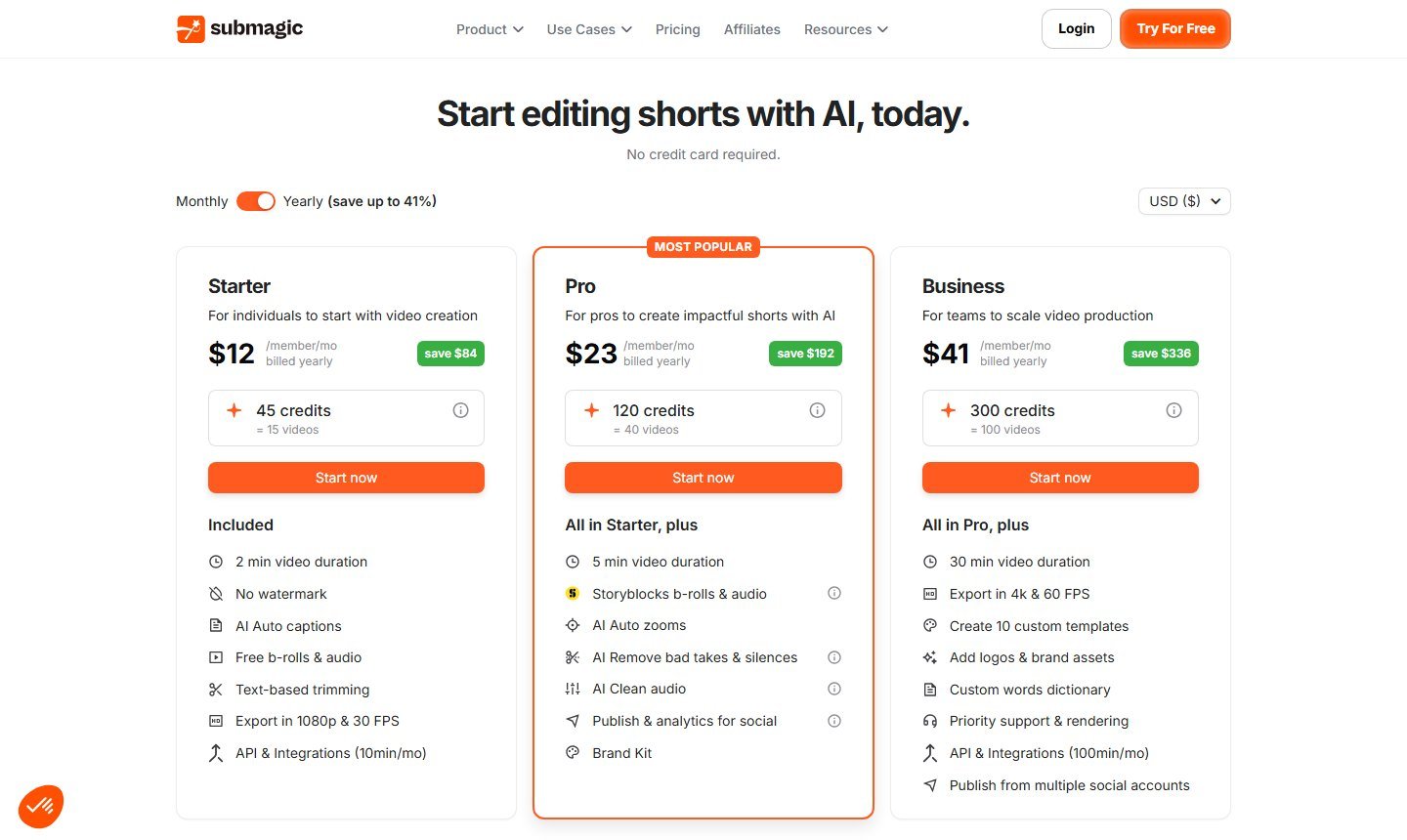
That last point matters. The pricing cards captured the same day do not say which plan includes Magic B-rolls. The feature exists on the product page and in the API as magicBrolls, including a percentage control. This article does not assign it to Pro or Business only. If you are buying for the one-click insert, confirm the plan toggle in the current editor before you pay.
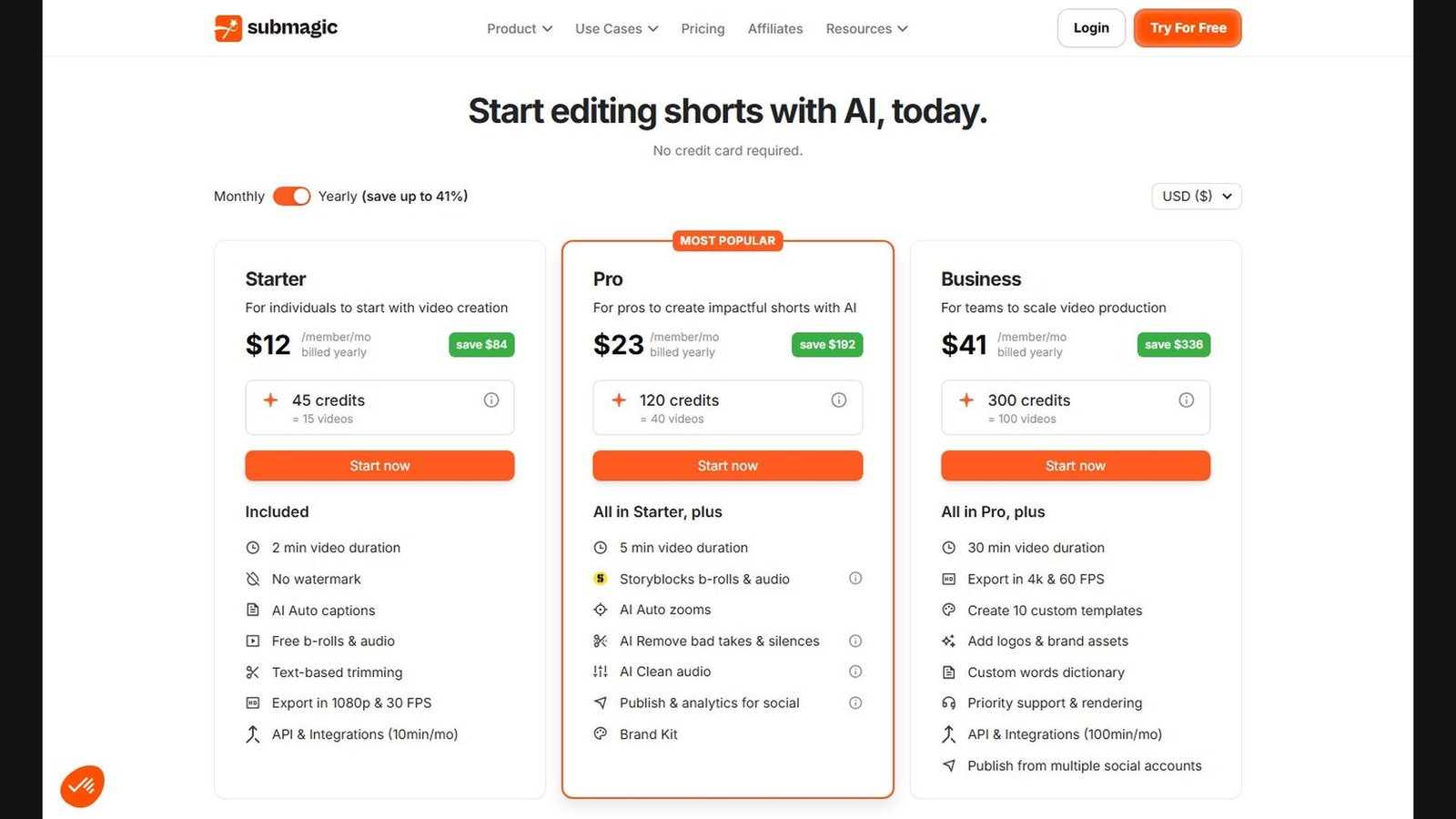
Who it is for, and what it reads. Short talking-head or voiceover videos. Yearly cards cap source length at 2 minutes on Starter, 5 on Pro, and 30 on Business. Context is the transcript, a keyword, or a prompt of 1 to 2,500 characters. The API also sets start and end on a generated insert. That is timing control. It is not a claim that the model understands scenes outside the transcript and the prompt.
Stock source. Pro lists “Storyblocks b-rolls & audio.” Starter lists “Free b-rolls & audio.” A FAQ also names Pexels, Pixabay, and Videezy as royalty-free websites. Storyblocks is the library on the paid card. The other three are external sites in the FAQ, not a contract that every suggestion comes from all of them. A library clip is selected stock, not a generated frame. The credit-spending AI B-roll control is the generated path.
Controls and export. You can add B-roll on one line, search again, upload a replacement, or prompt a generated clip. Layout and zoom are documented. The API exposes start and end for an AI B-roll item. Per-clip trim, slip, and volume for every stock insert were not fully specified. Sound effects are mentioned. A default mute was not documented. Export on the yearly Starter and Pro cards is 1080p at 30 fps. Business lists 4K and 60 fps. “No watermark” starts at Starter. Those are export settings, not a measured native resolution for generated B-roll, which was not published.
Price, in two units. On 5 October 2026, yearly billing showed Starter at $12 per member per month (45 credits, called 15 videos), Pro at $23 (120 credits, 40 videos), and Business at $41 (300 credits, 100 videos), with savings up to 41%. The help article updated 30 September 2026 lists month-to-month prices of $19, $39, and $69 for the same 15, 40, and 100 uploads. A separate AI-credit table, updated 4 March 2026, charges 3 credits per AI B-roll, 1 per AI image, and 3 for Avatar Studio, with 6 AI credits a month on Pro and 15 on Business. Starter was absent from that table. Credits reset monthly. Video credits and AI credits are different wallets.
License. “Royalty-free” in Submagic’s FAQ is a payment structure, not a claim that copyright is gone. Storyblocks on Pro and the external sites named in the FAQ keep their own grants. Generated-output rights were not quoted. You are responsible for footage you upload. The credit arithmetic for generated clips is in the pricing section.
Advantage. Stock, upload, and prompt generation sit on the transcript of a short you already filmed, and the generated path has a published credit price.
Limitation. The cards do not say which plan includes Magic B-rolls. The AI-credit budget is small. Starter’s source cap is 2 minutes. Submagic’s own TikTok tip of a new visual every 3 to 5 seconds, and its “save hours” language, are vendor copy. They are not a Moon Picke rule or a measured time saving.
Skip Submagic for a long podcast or a desktop project file. Native Windows, macOS, iOS, and Android apps were not verified. The API is documented, with Magic B-rolls and AI B-roll, at 10 minutes per month on yearly Starter and 100 on Business.
OpusClip: best for B-roll on clips from a long video
OpusClip is on this list for the page at opus.pro/ai-b-roll, not for its clip-scoring reputation. That page documents a one-click Auto generate B-Roll and a custom mode. Custom mode lets you upload your own B-roll or select a sentence and generate. The stock source named there is Pexels. Paid plans that include the feature can move, reframe, extend, or trim. Stock cannot be extended past the original clip. Regeneration opens on the selected B-roll: revise the prompt, then regenerate. That is insertion plus replacement. How OpusClip ranks clips belongs to the repurposing guide.
The fit is a long recording that becomes shorts with supporting footage. Pro imports YouTube from a verified account, plus Drive, Vimeo, Zoom, Rumble, Twitch, Facebook, LinkedIn, Twitter, Loom, Riverside, and StreamYard. Audio-only podcasts are not the documented path. Languages on the B-roll page start with English, German, Spanish, French, and Portuguese, plus 20 more. Context is a sentence you select, or whatever the one-click control chooses.
On 5 October 2026 the table split three lines. Free at $0 excludes AI image and stock B-roll, adds a caption watermark, limits export to a 3-day window and 1080p, and is 9:16 only. Starter at $15 per month includes 3 AI image clips and 3 stock clips per month, with no Agent Opus video. Export is watermark-free, 30-day, at the highest resolution available, which is not stated as 4K. Pro at $29 per month includes 50 AI image clips per day, unlimited stock, and Agent Opus video, plus upload, a timeline, 9:16, 1:1, 16:9, local files to 30 GB, and API, MCP, and Zapier up to 300 credits per month. Business is custom and adds 4K scheduling and download.
Agent Opus is the name OpusClip publishes. The page did not name Sora, Kling, or another foundation model, so this article does not rename it. Generated duration and native resolution were not published. The FAQ’s 7-day Pro trial (90 processing minutes, about 30 downloadable clips) and the later 60 minutes per month are clipping time. They do not add stock B-roll to the free row.
The FAQ says paid stock is “copyright free,” then tells you to follow the provider and the terms. The provider is Pexels. Copyright-free would mean no copyright. Pexels footage is licensed work. Royalty-free, when that is the actual grant, is a payment structure. This article does not adopt “copyright free.” Agent Opus commercial terms were not quoted. Default mute of B-roll audio was not stated. The pricing page’s hours-saved calculator is OpusClip’s widget, not a result from this article.
The advantage is unlimited Pexels inserts on Pro, sentence-level control, and a generative path on the same timeline. The limit is that useful stock starts at 3 clips on the $15 plan, video generation starts at $29, and generated length is unpublished. Skip OpusClip if the short is already cut and you only want B-roll.
Vizard: best hybrid of stock libraries and named models
Vizard’s AI B-roll page says the tool reads the voiceover, the visuals, the sound, and abstract concepts, then selects and overlays B-roll. That is insertion language. Named stock sources are Storyblocks and Pexels. You can upload an image or a video. AI Studio generates what the page calls HD video and images from prompts. Library footage and generation are both first-party claims on that page.
One section names Sora, Kling, Veo, Nano Banana Pro, Qwen, and Imagen. The FAQ names Veo, Sora, Kling, and Wan. Both lists are printed as found. No version, duration, or native resolution is copied from those vendors. “HD” is not verified native 4K. Image-model names in that list are not proof of image-to-video B-roll. Podcasts and webinars are named inputs. Audio-only RSS was not established.
The pricing HTML had no dollar amounts. Visible facts: 60 free credits per month, 1 credit per uploaded minute, 720p on that tier, watermark removal on a paid line. Creator and Business start from 600 credits, list 4K export, 600-minute uploads, and 30 GB. AI B-roll is a comparison row without a plan checkmark in the fetch. Do not treat the free credits as AI B-roll. A 2025 alternatives price was not used. A Vizard credit does not convert into Submagic AI credits or OpusClip stock clips.
Upload and overlay are documented. Trim, mute, and regenerate were not specified at OpusClip’s level of detail, so those controls stay unverified. Storyblocks and Pexels each have their own license, and Vizard did not restate them. Generated terms can also follow whichever model Studio used. Record the model name, because the page lists more than one set. You are responsible for reference images. A generated product can mis-draw a logo or a port. The advantage is the widest hybrid claim on one page. The limit is unpublished dollars, an unlocked-plan gap, and an inconsistent model list. Skip Vizard if the price must be public before you create an account.
Best automatic B-roll tool
Submagic Magic B-rolls is the insertion pick for a finished short. OpusClip’s one-click control is the insertion pick on a long source. Vizard states an overlay with less timeline detail. Placement still needs a human review.
Best stock B-roll tool
OpusClip Pro publishes unlimited Pexels stock with move, trim, and reframe. Submagic Pro is the Storyblocks card. Vizard names both libraries and no clip cap. This compares published deals, not a match rate.
Best generative B-roll tool
Submagic publishes 3 AI credits per generated clip, with a prompt and API start and end times. OpusClip Pro generates inside the clip timeline under the Agent Opus name, duration unpublished. Vizard is the named-model menu, with the inconsistent list above. A separate text-to-video product can render a shot you then import. It does not read this timeline by itself.
Best hybrid tool
Vizard claims Storyblocks, Pexels, upload, and a multi-model studio on one page. Submagic is the hybrid with separate published meters. OpusClip joins stock and Agent Opus at Pro.
Best for talking-head videos
Submagic fits a talking-head short, with full-frame or rounded insert. OpusClip fits a talking-head that must be cut down first. Original audio and framing after an automatic pass were not observed.
Best for YouTube
OpusClip Pro imports YouTube from a verified account and can add B-roll to the clips. That is a clips workflow, not a long essay timeline and not a performance promise. Submagic’s duration caps cover a section. Pro there is 5 minutes. Business is 30.
Best for short-form
Submagic is the shorts editor, with 1080p30 on the lower yearly cards. OpusClip’s free tier is 9:16 only. Pro adds 1:1 and 16:9. Vizard’s free export figure is 720p, with 4K on paid rows that list it.
Best for podcasts
Vizard names podcasts and webinars. OpusClip Pro lists Riverside and StreamYard. Submagic covers an excerpt inside its duration cap. An audio-only feed was not a documented input. A pictureless podcast needs a video canvas first.
Best for professional editors
None of the finalists round-trips a Premiere or Resolve project. Submagic Business publishes 4K60, brand assets, and 30 minutes. OpusClip Pro publishes a timeline, reframe, and 16:9. Upload on all three lets you replace the insert. Submagic and OpusClip Pro document APIs. Vizard mentions API rate limits.
Best for beginners
Submagic Starter lists free B-roll, no watermark, 1080p, and a 2-minute cap, at $19 per month or $12 per member per month billed yearly. Confirm Magic B-rolls in the editor. The cards do not name it. OpusClip Starter is 3 stock clips and 3 image clips per month.
Best budget and best free
OpusClip Starter is the lowest published monthly price with stock B-roll, at $15 and 3 clips. Submagic Starter is $19 month-to-month, or $12 per member per month billed yearly, with free B-roll and no printed clip cap. The yearly figure is a yearly price. No best-free badge: OpusClip’s $0 row excludes B-roll, its 7-day Pro access is a trial, Vizard’s 60 credits are upload minutes, and Submagic’s priced plans start at Starter.
Pricing comparison
Pricing, AI models, stock libraries, generation limits, licensing terms, and B-roll features were checked on 5 October 2026 and may change. Check each provider’s current specifications and licensing terms before purchasing.
| Tool | Monthly | Yearly effective | Free | B-roll unit |
|---|---|---|---|---|
| Submagic | Starter $19, Professional $39, Business $69, from the 30 September 2026 help article | $12, $23, and $41 per member per month on the cards | No free B-roll plan verified | Upload credits, separate from 3 AI credits per generated B-roll |
| OpusClip | Free $0, Starter $15, Pro $29, Business custom | Not taken from a yearly toggle | No B-roll on the free row; 7-day Pro trial | Stock and image clips; processing minutes are separate |
| Vizard | Dollars not in the HTML | Not verified | 60 credits; 1 credit = 1 uploaded minute; 720p | Uploaded minutes; generated clip cost not verified |
Keep the units apart. Five generated Submagic inserts cost 15 AI credits, which is Business’s entire monthly AI-credit grant in the March 2026 table, or two clips from Pro’s 6 credits if each clip costs 3. Five stock inserts can use Submagic’s free B-roll line and exceed OpusClip Starter’s 3-clip cap. They fit inside OpusClip Pro’s unlimited stock line. Agent Opus and Vizard do not print a dollar cost for those five generated inserts. This arithmetic is labeled as a Moon Picke calculation from published tables. It is not a timed edit.
Stock and generative licensing
| Tool | B-roll source | Commercial use | Stock license | Generated output terms |
|---|---|---|---|---|
| Submagic | Hybrid | See terms | Storyblocks on Pro; FAQ also names Pexels, Pixabay, and Videezy as external royalty-free sites | Not quoted on the pages checked |
| OpusClip | Hybrid on Pro | See Pexels and OpusClip terms | Pexels; the FAQ’s “copyright free” wording is not adopted here | Agent Opus terms not quoted |
| Vizard | Hybrid | See terms | Storyblocks and Pexels named; full grant not restated | Follows the model used; the model list disagrees with itself |
Royalty-free means you are not paying a royalty each time the clip airs. A copyright owner and a license still exist. Editorial-only clips, recognizable brands, and footage of private people need a check of that clip, not of the plan name. Paid-ad permission is separate from permission to post on YouTube. Generated output adds the model’s plan terms. Submagic’s “no watermark” line is an export claim. Content credentials such as C2PA were not verified for any finalist. A reference image you upload has to be yours to upload. Generation does not clear a copyrighted character or an unreleased product photo.
How to choose an AI B-roll generator
Match the file first. A talking-head under two minutes fits Submagic Starter if stock is enough, and it needs Pro or Business AI credits when several lines need a scene the library does not have. A long YouTube video or a recorded show fits OpusClip, after you decide whether 3 stock clips a month are enough. A project that must name both Storyblocks and a list of generative models fits Vizard’s page, after you read the live price inside the product.
Then decide what automatic includes. Placement plus a delete or replace control is the bar for insertion. A search box is enough when you only want ideas. Write down aspect ratio, maximum source length, and export size before you pay. A 720p free export and a 4K master are different plans.
How to automatically add B-roll to a video
- Prepare the A-roll and mark which audio is the narrative.
- Generate or import the transcript.
- Correct names, products, and places.
- Let the tool mark opportunities, or select the sentences yourself.
- Review suggested moments before a batch insert.
- Label each candidate as stock, generated, or your file.
- Check the license, including ads and client work.
- Preview the picture against the spoken line.
- Replace clips that match one noun and miss the point.
- Generate only where the library failed.
- Move the insert to the line’s start and end.
- Trim. Do not stretch stock past its real length.
- Watch the cuts back to the speaker.
- Match aspect ratio on purpose.
- Check color and time-of-day continuity.
- Set B-roll audio. Mute it unless the sound is part of the story.
- Recheck captions after the picture changes.
- Check logos, product shape, and brand color.
- Watch the full timeline with the sound up.
- Export at the resolution the plan allows.
How to generate custom B-roll with AI
Take the line “Electric vehicles are changing how cities think about transportation.” Separate prompts might ask for urban EV traffic, a curb charger, a city street, or a battery detail. Write distance, time of day, and the object that must be visible. Submagic uses its AI B-roll prompt. OpusClip Pro uses Agent Opus. Vizard uses whichever Studio name is on screen, so record it. Match the timeline’s aspect ratio. Add a reference image only when that control exists and you have the rights. This brief is not a promise that a current model will render the street reliably.
When to use stock B-roll vs generative B-roll
Use stock when a camera has filmed something close enough and the plan includes the inserts, as on OpusClip Pro’s unlimited stock line or Submagic’s free B-roll line. Use generation when the sentence is hypothetical or so specific that search returns the wrong industry. Use your own camera for your product, your office, or your customer. Label generated shots in the project so a later editor does not treat them as archival footage.
How much B-roll should you use?
There is no universal cut rate. A fast short can change pictures often. Submagic’s own guidance mentions a new visual every few seconds for TikTok-style edits. That tip is not a rule for a tutorial, a conversation, or a documentary scene. Frequency depends on format, pace, audience, narrative, platform, shot length, A-roll strength, and channel style. A cut should support a meaning. A generic clip that only raises the tempo makes the video busier.
Common AI B-roll limitations
Stock search often returns a literal object or a generic office. Generative shots often break text, logos, hands, and faces, and they drift between prompts. Product shots can invent ports and packaging. A historical or geographic scene can look plausible and be wrong. Vertical defaults fight horizontal timelines. Short duration caps and small credit grants stop a revision early. Licenses differ per clip. No failure rate is assigned here, because no shared footage was run through these products.
Factual and documentary use
If the video claims to show a real event, place, or person, generative B-roll is the wrong material unless you tell the viewer it is a synthetic illustration. A generated street is not footage of that street. Stock can also mislead when a clip from another year is presented as the event. Keep news footage inside its license, which may be editorial-only.
Product and ecommerce use
Do not publish generated footage that changes a product’s design, size, color, features, ports, buttons, packaging, logo, or performance. Viewers treat B-roll as the product. Film the object, or animate a manufacturer image you are allowed to use, and check that motion did not redraw it. None of the three pages published a measured product-fidelity guarantee.
FAQ
What is the best AI B-roll generator?
For a short you already recorded, Submagic has the fullest public path. For clips from a long video, use OpusClip. One winner does not cover both jobs.
Can AI automatically add B-roll to a video?
Yes, when the product chooses a clip and places it. Submagic Magic B-rolls, OpusClip’s one-click control, and Vizard’s overlay description all claim that. A keyword list is not insertion.
Can AI find B-roll from a transcript?
Submagic ties suggestions and Magic B-rolls to the transcript. OpusClip can generate from a selected sentence. Vizard says it uses the voiceover. Finding a clip and inserting it are separate steps.
Can AI generate custom B-roll footage?
Yes. Submagic AI B-roll takes a prompt. OpusClip Pro uses Agent Opus. Vizard’s AI Studio takes prompts and names several models. A stock clip from search is not generated footage.
What is the difference between stock B-roll and AI-generated B-roll?
Stock is an existing library clip. Generated B-roll is a new clip from a model. Choosing stock is not painting the frames.
Can AI add B-roll to talking-head videos?
Yes. Submagic documents that use, including full-frame and rounded layouts. OpusClip and Vizard can do it when the talking-head file is the source.
What is the best AI B-roll tool for YouTube?
OpusClip Pro, for importing a YouTube video and adding B-roll to clips. It is not a long-essay timeline and it promises no performance gain.
Can AI create B-roll for podcasts?
Vizard names podcasts. OpusClip can import show files from tools such as Riverside. The verified path has a picture and a transcript. Audio-only input was not documented.
Can I commercially use AI-generated B-roll?
Only under current plan terms, and on Vizard under the model that rendered the clip. Stock use is a separate license. The pages checked did not quote the full grants.
Is royalty-free B-roll copyright-free?
Royalty-free describes payment. Copyright and license rules remain. OpusClip’s FAQ says “copyright free” and also points paid users to Pexels. Follow Pexels.
Final verdict
Choose Submagic when the video is already a short and the transcript should drive stock inserts, uploads, and the occasional generated shot at a published 3-credit price. Choose OpusClip when a long video must become clips that need Pexels B-roll, with Agent Opus reserved for Pro. Choose Vizard when you want Storyblocks, Pexels, and a named-model studio in one overlay workflow, and you can confirm the live price and the AI B-roll plan row. Leave text-to-video models, faceless builders, and general editors for the jobs they actually do. Watch the insert, name the source, and read the license before you publish.