
An AI video generator for YouTube is a tool that can take a topic, a script, an article, or a presenter and help assemble a video you can upload. The useful result is a project with narration, visuals, and an export, usually 16:9. It is not a five-second clip from a text-to-video model, and it is not only a Shorts clipper.
US results for the best AI video generators for YouTube mix those jobs together. Some pages rank cinematic clip models. Some rank faceless Shorts apps. Some rank editors that start from footage you already filmed. Moon Picke kept this guide on the path from an idea or a source to a YouTube-ready file. Official pricing pages, help articles, and product pages were checked on 5 October 2026. Three tools cleared the gate: Fliki, Pictory, and HeyGen. A broad AI video generator roundup is a different question. So is a faceless video list, and so is a repurposing list that starts from a video you already have.
Quick picks
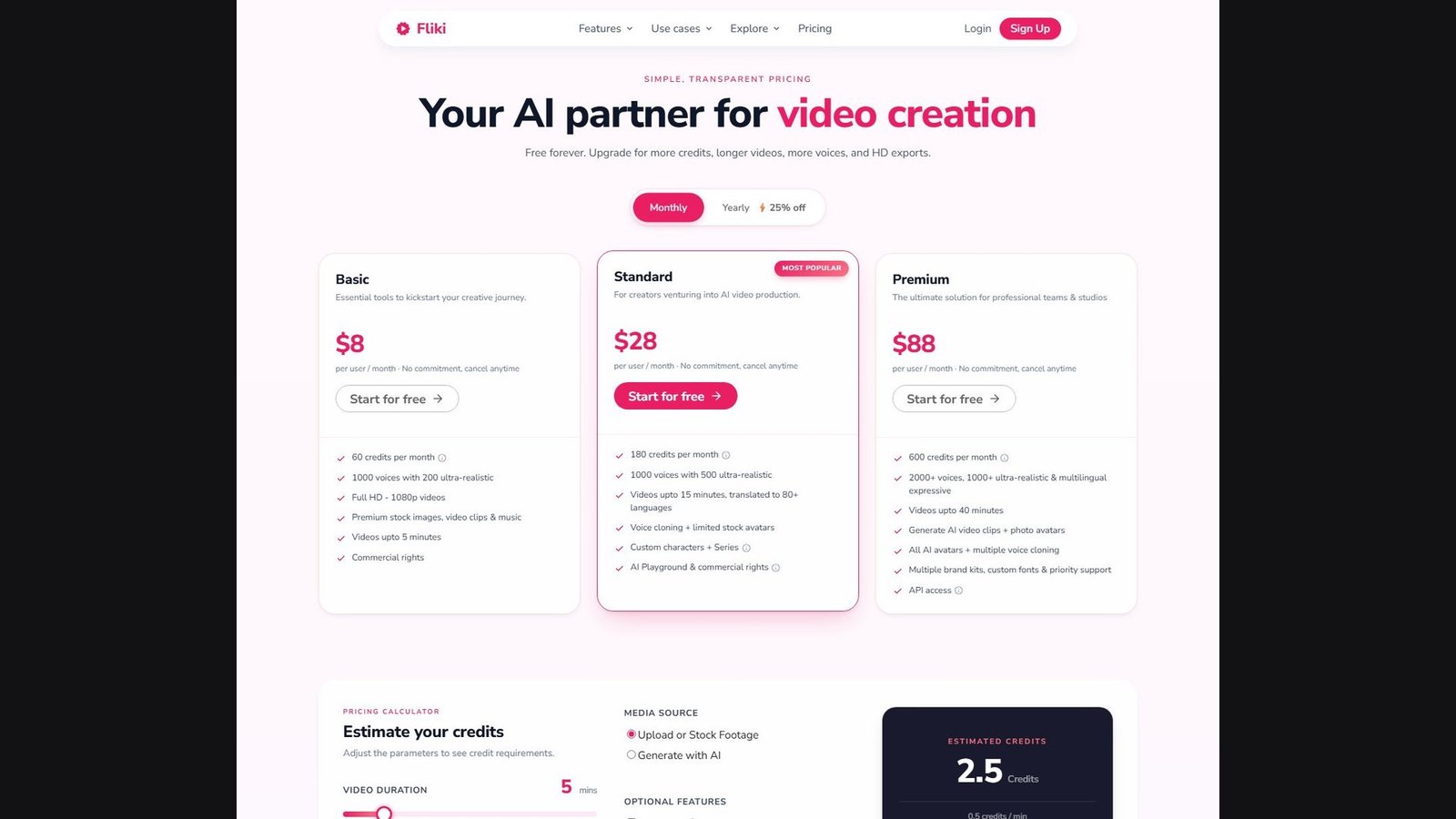
- Best overall YouTube workflow: Fliki. The pricing compare names idea-to-video, script-to-video, blog-to-video, and PowerPoint-to-video. Paid cards list 1080p, voice, stock, and export lengths of 5, 15, or 40 minutes depending on the plan. Fliki’s own YouTube page also describes 16:9, burned-in captions, an SRT file, and publishing from the product.
- Best for an article or blog URL: Pictory. Help and docs describe turning a blog or news URL into scenes with voiceover. Professional and Team list a 30-minute cap for text, URL, images, and PowerPoint. Export is an MP4 you download.
- Best for an on-screen presenter: HeyGen. You type a script and an avatar delivers it. Creator lists videos up to 30 minutes and 1080p. That is a presenter video, not a faceless stock edit.
- Not awarded: a best Shorts-only tool. Short-form apps were reviewed and left off this ranking because a 9:16 clip is not a long YouTube video. A separate guide covers AI video generators for YouTube Shorts. A best free unlimited plan was also not awarded.
These labels are workflow fit. They are not scores for video quality, voice realism, retention, click-through rate, or the chance a video will be monetized.
Comparison table
Pricing, AI features, video limits, export resolutions, and plan allowances were checked on 5 October 2026 and may change. Check each provider’s current specifications before purchasing.
| Tool | Best for | Long-form | Script-to-video | Voice | Visuals | Captions | 16:9 | Starting price |
|---|---|---|---|---|---|---|---|---|
| Fliki | Idea, script, blog, or PPT into a narrated video | Plan card: 5, 15, or 40 minutes. A FAQ on the same page says Premium is 30 minutes | Named on the pricing compare | Yes. Credits include voiceover on the calculator example | Stock on Basic. AI video clips listed on Premium | Burned-in and SRT/VTT on Fliki’s caption page | Yes, on Fliki’s YouTube and editor pages | Basic $8 per user/month on the monthly toggle |
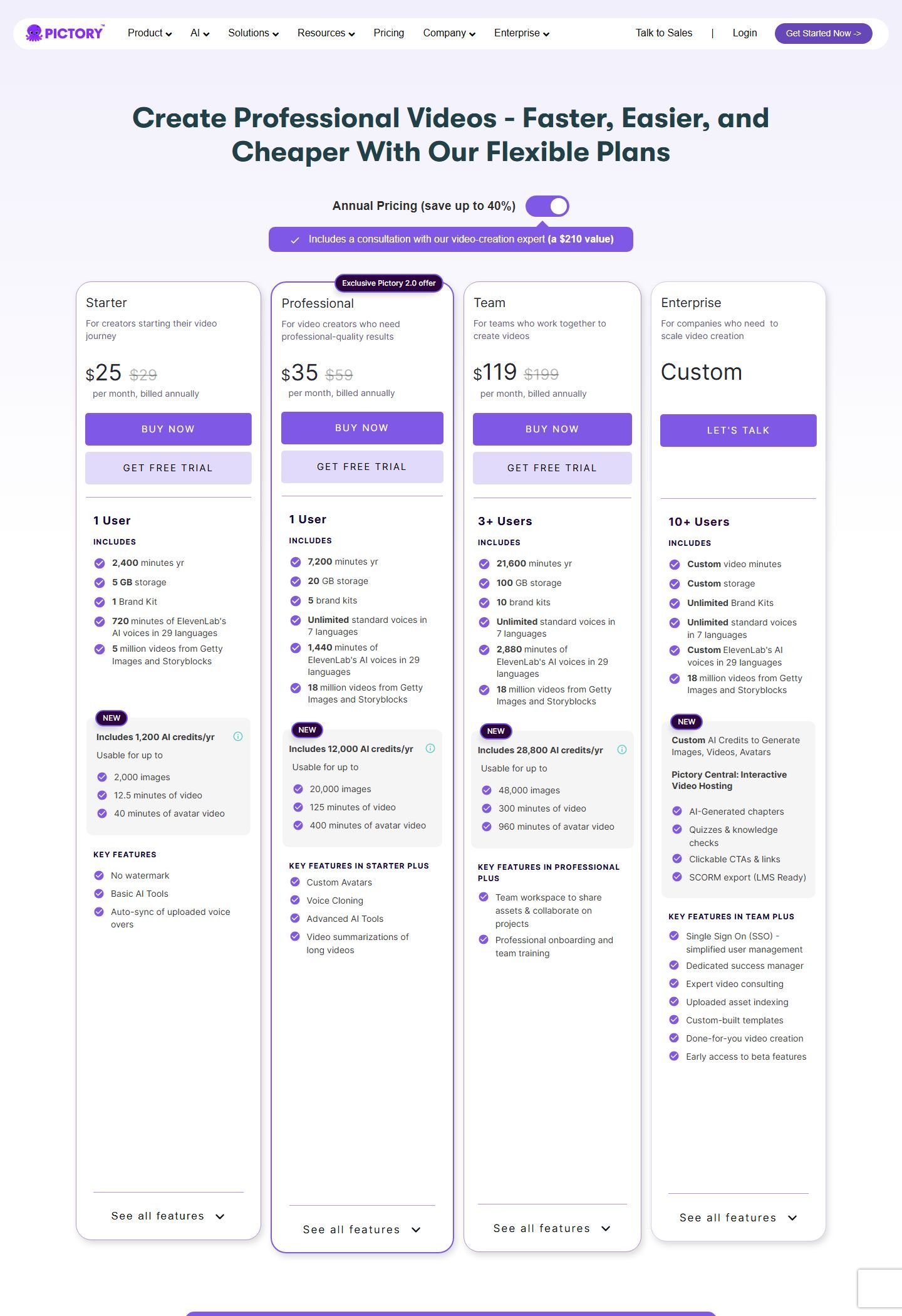
| Pictory | Blog URL or script into a stock edit | Text, URL, images, and PPT: up to 5 minutes on Starter, up to 30 on higher plans | Yes. Script and URL are documented | Yes. Standard voices and a separate ElevenLabs minute pool | Getty and Storyblocks stock. Generative minutes are a separate AI-credit pool | Automatic subtitles, plus SRT, VTT, and TXT on download | Yes. Help center and API | $25 per month billed annually for Starter. $29 is struck beside it |
| HeyGen | Script read by an AI avatar | Free: up to 1 minute. Creator and Pro: up to 30. Business: up to 60 | Yes. You type the script the avatar speaks | Yes. Voice library. Voice cloning on Creator | Avatar, not a stock B-roll assembly | Not verified this pass | API documents 16:9. Studio control not captured | Free $0, 3 videos a month. Creator $29 a month |
How we chose the best AI video generators for YouTube
The reader wants a video they can upload to YouTube. A finalist had to help create that video, not only write a script, cut a clip out of someone else’s upload, or render one generative shot. Meaningful support had to show up in several of these: a script or source, scenes, a voice or an avatar, visuals, captions, a 16:9 path, and an export. A chatbot that can be asked for a script did not qualify. A text-to-video model that makes a short clip did not qualify as a YouTube production tool. An editor that assumes you already have the footage did not qualify. A Shorts generator with no verified long project did not qualify for the main rank.
Searches on 5 October 2026 included the primary phrase plus long-form, faceless, script-to-video, article-to-video, and Shorts variants. The primary phrase still matches, so the title keeps it. Faceless is one format here. Shorts are a side path. Third-party roundups were not used for prices or rankings. InVideo’s pricing pages did not resolve to one current table, so it is not ranked. Short-form autopilots, clip models, repurposing tools, and editors that start from footage you already have were set aside.
What is an AI YouTube video generator?
It is software that helps turn source material into a video file shaped for YouTube. A practical path is a topic or a script, then scenes, then a voice or a presenter, then pictures or footage, then captions, then a 16:9 export you upload yourself or, where the product actually offers it, publish from the tool. Stock footage selected to match a sentence is not the same thing as a model generating every frame. An avatar on screen is not a faceless video. A script is not the video.
AI YouTube video generator vs a general AI video generator
A general AI video generator is often judged on how a clip looks. A YouTube tool is judged on whether you can finish a video: length, narration, scenes, captions, aspect ratio, and a file you can upload. A beautiful eight-second shot can still leave you without a ten-minute episode. This article does not rank generative picture quality.
1. Fliki: best overall workflow for a YouTube video
Fliki is a web studio that starts from text and builds a narrated video. It made the list because the pricing page itself names the YouTube-relevant inputs, and Fliki’s YouTube and editor pages describe 16:9, captions, and publishing. The deeper product walkthrough is the Fliki review. This section only scores the YouTube production path.
Disclosure: Moon Picke may earn a commission if you purchase through links on this page, at no additional cost to you.

Who it is for. A creator who has a topic, a script, a blog post, or a PowerPoint and wants narration, stock or generated visuals, and a horizontal video. It is a weak fit if you need a verified 20-minute script as a first-class control with no conflict between Fliki’s own pages, or if the job is an avatar-only presenter with HeyGen’s duration table.
Workflow. The pricing compare lists rows for idea to video, script to video, blog post to video, and PPT to video. The checkmarks on those rows did not come through as text, so this article does not assign each row to a specific plan. Fliki’s YouTube page says you can start from a topic, get a script, a voice, visuals, and burned-in captions, then export 16:9 or resize to 9:16. The same page says you can connect a channel and publish, or download an MP4 and upload it yourself, and that an SRT can be exported for YouTube’s caption track. A v5 post on Fliki’s blog also describes a scene-by-scene review of voiceover text, visual prompts, on-screen headlines, and subtitles before render, plus direct YouTube publishing. Those are Fliki’s descriptions of the product. They are not a test.
Length. On the monthly cards, Basic lists videos up to 5 minutes, Standard up to 15 minutes, and Premium up to 40 minutes. The compare table repeats 5, 15, and 40. A FAQ on the same pricing page says Standard is up to 15 minutes and Premium is up to 30 minutes. Both lines were live on 5 October 2026. A 10-minute export fits the Standard card. A 20-minute export fits the Premium card’s 40-minute line and does not fit the FAQ’s 30-minute line. Do not treat “unlimited videos” as a length. Fliki does not say unlimited length.
Voice, visuals, and captions. The credit calculator, set to 5 minutes of upload or stock footage, estimates 2.5 credits at 0.5 credits per minute and says that estimate includes the AI voiceover. Basic lists premium stock images, video clips, and music. Premium lists generating AI video clips and photo avatars. Stock selection is not frame-by-frame generation. The optional AI-video toggle on the calculator is a different credit path. Fliki’s caption page describes burned-in captions and a separate SRT or VTT file. Burned-in words and a YouTube subtitle file are different deliverables. The page’s accuracy percentage is Fliki’s claim and is not repeated here as a measurement.
Resolution, watermark, and YouTube. The compare table lists 1080p for Basic, Standard, and Premium. 4K does not appear on that pricing page. Fliki’s YouTube landing page says paid plans include 4K and describes a free 1080p export. Those two pages disagree, so neither 4K nor a free 1080p export is treated as verified. A FAQ says a free tier can generate 5 minutes of audio and video a month. The monthly cards do not show that tier as its own plan. Another FAQ says watermark removal comes with a paid subscription. The cards do not name a watermark. Publishing from Fliki is not the same as pasting a YouTube URL to import media. The editor page describes that import as an input.
Price and rights. Monthly toggle: Basic $8 per user per month, 60 credits; Standard $28, 180 credits; Premium $88, 600 credits. Buttons say “Start for free.” That button is not a separate free-plan price. A FAQ calls Standard’s 180 credits “180 minutes of credits” and estimates six 10-minute videos, while noting edits change the usage. The calculator’s 0.5 credits per minute is a different sentence. This article does not convert credits into minutes. Basic lists commercial rights. A FAQ says subscription plans include a commercial license to publish on YouTube if your text is original and does not conflict with someone else’s copyright. That is Fliki’s license language. It is not eligibility for the YouTube Partner Program. Voice cloning is listed on Standard and above. Clone only a voice you have the right to use.
Open Fliki if this input list matches the video you are trying to finish. The biggest advantage is one workspace that names script, blog, and slides, plus a documented 16:9 and caption path. The biggest limitation is Fliki’s own length conflict on Premium, 40 minutes on the card and 30 in the FAQ, and the gap between the YouTube landing page and the pricing table on 4K. Skip it if you need Pictory’s export-minute accounting or an avatar that is the whole video.
2. Pictory: best for a script or a blog URL
Pictory is a web editor that turns writing into a stock-led video and can also summarize a long recording. It qualifies here for the creation path: script, article URL, voice, stock scenes, captions, 16:9, and an MP4 download. Summarizing a video you already uploaded is repurposing. That feature exists. It is not why Pictory is on this list.
Who it is for. Someone who already has a script or a blog post and wants scenes, a voice, and stock footage in a horizontal video up to the plan’s cap. It is a weak fit if you want the tool to publish straight to a YouTube channel. Direct publishing was not documented. You download an MP4 and upload it yourself.
Inputs. Pictory’s FAQ says articles must be blogs or news in HTML, and that PDF, Word, and Google Docs are not supported for that path. A blog URL is the article, not a YouTube link. PowerPoint-to-video is a separate feature, with a slide allowance that changes by plan. A YouTube URL was not verified as a creation input. The help center describes a storyboard, an aspect-ratio control, and a download from that storyboard. This pass did not open a logged-in project.
Length. The pricing compare and the help FAQ agree on creation length. Text to video, URL to video, images to video, and PPT to video: up to 30 minutes, and the compare table shows a 5-minute max on the first paid column and 30 minutes on the columns after it. Starter is that 5-minute creation cap. Professional and Team are the 30-minute cap. A 10-minute or 20-minute text or URL video is inside Professional and Team, and outside Starter. The same FAQ gives a different cap for the AI video editor, which starts from a recording: 15 minutes on the trial, 1 hour on Starter, 3 hours on Professional and Teams. That editor cap is not the cap for building a video from a script. “Unlimited standard voices” is not unlimited video length.
Voice, stock, and generative minutes. Starter’s annual card lists 720 minutes a year of ElevenLabs voices in 29 languages and 5 million Getty and Storyblocks videos. Professional adds unlimited standard voices in 7 languages, 1,440 ElevenLabs minutes, 18 million stock videos, custom avatars, and voice cloning. Voice minutes are not export minutes. Annual export minutes are 2,400 on Starter, 7,200 on Professional, and 21,600 on Team. A FAQ says those yearly minutes arrive up front and are spent on export, not preview. AI credits are a third pool. Starter lists 1,200 a year, usable for up to 2,000 images, 12.5 minutes of generated video, or 40 minutes of avatar video. That generative allowance is not the stock library. “Add B-Rolls” means adding footage, primarily from those libraries.
Picture format and files. A help article dated 12 February 2024 says the storyboard can export 720p or 1080p, with 1080p as the default. A September 2024 article describes changing aspect ratio from the storyboard, including landscape and portrait. The API lists 16:9, 9:16, 1:1, and 4:5. The October 2026 pricing page still describes 1080p for platform exports. 4K is not listed. 1440p is not listed. Download help says the file is MP4, and that you can also export the text as SRT, TXT, or VTT, plus an MP3 of the mix. Automatic subtitles are listed on the plan compare. SRT and burned-in captions are not the same control. The download notes describe a subtitle file. They do not, by themselves, prove a styled burned-in caption preset.
Price, trial, and rights. With annual pricing on, Starter is $25 per month billed annually, Professional is $35, and Team is $119 for 3 or more users. Struck prices on those cards are $29, $59, and $199. Enterprise is custom. Each self-serve card has a free-trial button. A FAQ describes a 14-day trial and 3 video projects. That is a trial, not a free plan. Starter lists no watermark. The trial’s watermark was not stated on the pages used here. A FAQ says Pictory has already licensed the clips, music, and voiceovers it supplies, so you do not pay a separate royalty to Pictory for those assets. You can also upload your own music on the plans that list that row. A license inside Pictory does not clear a song, a face, or a logo you upload, and it does not decide YouTube monetization. Voice cloning is on Professional. Use only a voice you are allowed to clone.
The biggest advantage is a documented article URL path plus an export-minute number you can read, with creation length stated separately from the editor’s hour-long cap. The biggest limitation is the 5-minute creation cap on Starter, and the lack of a verified YouTube publish button. Skip it if the video should be an avatar talking for 30 minutes with almost no stock cutaways. That job is closer to HeyGen.
3. HeyGen: best for an avatar presenter
HeyGen is an avatar studio. It qualifies because a script becomes a presenter video with a voice, a duration cap measured in minutes, and an export resolution on paid plans. It does not qualify as a faceless stock editor. An avatar is a visible presenter. A local browser session on 5 October 2026 was redirected to the Vietnamese pricing URL, so this section uses the English pricing page and the public API docs, not that redirected screenshot.
Who it is for. A creator who wants a person on screen to deliver a script, a lesson, or a channel update without filming. It is a weak fit if the video should be voiceover plus B-roll and no presenter. It is also a weak fit on the free plan if the video must run longer than one minute.
Workflow. HeyGen’s FAQ describes choosing an avatar, typing a script, and submitting a video. The pricing table lists a studio editor, stock avatars (500+ on Free, 700+ on paid), photo avatars, and custom avatars. PowerPoint and PDF rows appear, but their checkmarks were not clear, so imports are not claimed. Captions and music were not verified. Direct YouTube publishing was not verified. The export this article will stand behind is a file you upload yourself. The API lists MP4 as the default output.
Length and picture. The pricing table lists a maximum duration per video of 1 minute on Free, 30 minutes on Creator, 30 minutes on Pro, 60 minutes on Business, and no duration maximum on Enterprise. Avatar IV’s own row lists the same 1 / 30 / 30 pattern and stops at 30 minutes even on Business. A 30-minute HeyGen video is one presenter generation up to that cap, not proof of a 30-scene stock timeline. A 10-minute or 20-minute presenter video fits Creator’s 30-minute line. It does not fit Free. Export resolution on the table is blank for Free, up to 1080p on Creator, and up to 4K on Pro, Business, and Enterprise. A separate FAQ says the free plan is 1080p. The table and that FAQ disagree, so free resolution stays unresolved. “Up to 4K” is the plan’s label. This article does not know whether that 4K is a native render or an upscale. The API documents aspect ratios including 16:9, 9:16, and 1:1, and resolutions including 720p, 1080p, and 4K. That is the API, not a screenshot of the studio menu.
Price. Free is $0: 3 videos a month, up to 1 minute each. Creator is $29 a month with 600 credits, watermark removal, and voice cloning. The FAQ also says $24 a month if you pay annually. That annual card was not captured, so $24 stays a FAQ figure. Pro starts at $49 a month with 1,000 credits. Higher Pro tiers add credits, not features. Business is $149 a month plus $20 per extra seat, with 1,500 credits. Credits vary by model and duration. They are not minutes. The FAQ says unused monthly credits roll over for one month, annual credits last until renewal, and credits do not survive cancellation.
The biggest advantage is a duration table that states 30 minutes for a presenter video on Creator, at 1080p, with the watermark removal listed on that plan. The biggest limitation is the format: you get an avatar performance, not a documented stock B-roll assembly, and captions were not verified. Skip it if the channel is faceless. Voice cloning is on Creator. Clone only a voice you have permission to use.
Best for long-form, faceless, explainers, and Shorts
For a video past a few minutes, read the cap before the brand. Pictory Professional and Team document up to 30 minutes from text, a URL, images, or PowerPoint. Fliki Standard documents 15 minutes, and Premium’s card documents 40 while its FAQ says 30. HeyGen Creator documents 30 minutes of avatar video. None of these numbers means one generative model rendered a half-hour in a single shot. Fliki and Pictory assemble scenes. HeyGen generates a presenter clip up to the stated maximum.
Faceless, in this article, means narration over stock or generated images without a presenter. Fliki and Pictory can be used that way. HeyGen’s avatar path is the opposite: the presenter is the point. Faceless is also not a monetization category. YouTube’s monetization rules, linked below, care about original value and repetition, not about whether a face is in frame.
An explainer needs a source, a script you can edit, a voice or a presenter, and pictures that follow the point. Pictory is the closer fit when the source is a blog URL and the pictures are stock. Fliki is the closer fit when you also want a topic-to-script step and a YouTube publish path described by the vendor. HeyGen fits when the explainer is a person talking, with slides only if you confirm the import on your plan. None of the three was verified to draw a custom diagram from a sentence.
Shorts are 9:16. Fliki’s YouTube page describes resizing the same project to 9:16. Pictory’s help and API include portrait. HeyGen’s API includes 9:16. A Shorts-only autopilot is a different product, covered in the Shorts guide linked above. Turning a finished long video into clips is repurposing, not the job these three were ranked for.
Pricing and limits
These products do not sell the same unit. Fliki sells credits, and its calculator example prices a stock video with voiceover at 0.5 credits per minute. Pictory sells export minutes, and separately sells ElevenLabs minutes and AI credits for generated images, generated video, and avatar video. HeyGen sells credits that the FAQ says vary by model, duration, and complexity. A “minute” on one invoice is not a credit on another.
- Fliki, monthly toggle: Basic $8 per user per month, 60 credits, up to 5 minutes, 1080p. Standard $28, 180 credits, up to 15 minutes. Premium $88, 600 credits, up to 40 minutes on the card and 30 minutes in the FAQ. Yearly dollars were not captured. A FAQ describes 5 minutes a month on a free tier that is not its own card in the monthly screenshot.
- Pictory, annual toggle: Starter $25 per month billed annually, 2,400 export minutes a year, creation cap 5 minutes. Professional $35 per month billed annually, 7,200 export minutes a year, creation cap 30 minutes. Team $119 per month billed annually, 21,600 export minutes a year. Trial: 14 days and 3 projects, not a free plan.
- HeyGen: Free $0, 3 videos a month, up to 1 minute. Creator $29 a month, or $24 a month annually according to the FAQ, 600 credits, up to 30 minutes, 1080p. Pro from $49 a month, 1,000 credits, 4K listed, up to 30 minutes. Business $149 a month plus $20 a seat, up to 60 minutes.
Commercial use of the tool’s own library, where the vendor states it, still does not clear music you upload, a trademark in a slide, or a voice you do not own. It also does not mean YouTube will run ads on the result.
How to choose an AI video generator for YouTube
Start from the video you actually post. If it is a narrated faceless video from a topic, a script, or a blog, start with Fliki or Pictory and compare the length cap to the episode you want. If the source is a URL of an article, Pictory documents that path and also documents what it will not accept: PDF, Word, and Google Docs. If a person must appear and speak the script, start with HeyGen and ignore stock-library size. If you only need 9:16 clips from a video that already exists, leave this list and use a repurposing tool. If you only need a prettier B-roll shot, leave this list and use a clip model, then edit.
How to make a YouTube video with AI
Pick one audience and one format, long horizontal or a Short, before you open a tool. Gather sources you trust. Outline the video. Write or edit the script in your own words where the facts matter. Check names, numbers, and quotes against those sources. An AI script can invent a statistic or a quotation. Split the script into scenes. Choose a voice or a presenter. Add the main visuals. Add B-roll only where a new shot helps the sentence. Add music only if the license covers your use. Add captions, and decide whether they are burned into the picture or uploaded as a subtitle file. Watch the full export. Export 16:9 for a standard YouTube video, at 1080p where the plan actually offers it. Write the title, description, and chapters yourself. Upload. Disclose realistic synthetic footage where YouTube requires it. Cut Shorts later only if the long video earned them.
A faceless cut skips the presenter and uses voiceover plus stock or generated visuals. An avatar cut puts the presenter first. An article cut starts from the post and still needs a human pass on anything the summary dropped.
Can AI-generated videos be monetized on YouTube?
YouTube does not ban AI video as a category, and it does not promise that an AI video will be monetized. The Partner Program has its own eligibility rules. A tool’s commercial-use clause is a license between you and the vendor. It is not a decision by YouTube.
YouTube’s help page on channel monetization policies, updated in the 15 July 2025 note that renamed “repetitious content” to “inauthentic content,” says monetized content should be original and authentic, not mass-produced or interchangeable from video to video. The examples include AI-generated videos that use a generic template without the creator’s own insight. The page on what you can monetize also says you need the rights to the visuals and the audio. The spam policy disallows using automated tools to flood YouTube with similar videos, and it gives an example of repeated AI imagery and an AI script over the same music.
Disclosure is a separate rule. YouTube’s page on disclosing GenAI content requires a label when AI makes a real person appear to say or do something they did not do, alters footage of a real event or place, or generates a realistic scene that did not occur. Creators set that in YouTube Studio. The help page says creators who consistently skip the disclosure can face removal or suspension from the Partner Program. A cartoonish or clearly non-realistic edit is not the same case as a photoreal avatar of a real person. Read the current page before you upload. Nothing in Fliki’s, Pictory’s, or HeyGen’s license text guarantees ads, views, or a ranking in search.
Common mistakes
The usual mismatch is buying a cinematic clip model when the job is a ten-minute episode, or reading “unlimited voices” as unlimited minutes. Other drafts ship a generic script without checking facts, repeat the same stock shot, add a song the license does not cover, or invent a product test the creator did not run. Too many caption styles, no visual change, and a pile of near-duplicate videos are production problems and, under the policies above, monetization problems. Confusing a commercial license with Partner Program eligibility is the last one. Fix the video a viewer would notice. Then apply the disclosure YouTube actually asks for.
FAQ
What is the best AI video generator for YouTube?
For a topic, script, blog, or slide deck that should become a narrated 16:9 video, Fliki is the broadest fit in this set. For a blog URL and a stated export-minute allowance, Pictory is the closer fit. For a presenter reading a script, HeyGen is the closer fit. The answer is the workflow, not a quality score.
What is the best AI for long YouTube videos?
Pictory Professional and Team document up to 30 minutes from text, a URL, images, or PowerPoint. HeyGen Creator documents up to 30 minutes for an avatar video. Fliki Standard documents 15 minutes, and Premium’s pricing card documents 40 minutes while a FAQ on the same site says 30. Starter plans are shorter: Pictory Starter is 5 minutes for those creation types, and HeyGen Free is 1 minute.
Can AI turn a script or an article into a YouTube video?
Yes, as a production step, not as a guarantee of accuracy. Fliki’s pricing compare names script-to-video and blog-to-video. Pictory documents a script path and an HTML blog or news URL, and it says PDF, Word, and Google Docs are not article imports. You still need to check the script. A URL of a YouTube video is a different input. Pictory was not verified to create a new video from a YouTube link. Fliki’s editor page describes YouTube URL import as bringing media in, which is not the same as publishing out.
Can AI make YouTube Shorts?
Fliki, Pictory, and HeyGen each document a vertical ratio, on a product page, in help or the API. That is not the same as a Shorts autopilot. This article does not rank short-form-only tools. Making a Short from a finished long video is repurposing.
Does YouTube allow AI-generated videos, and do I have to disclose them?
YouTube allows AI-assisted video and restricts inauthentic, repetitive, or misleading uses, especially for monetization. You must disclose realistic AI that fabricates a real person’s actions, alters real footage, or shows a realistic scene that did not happen. The control is in YouTube Studio. Disclosure does not by itself make a video eligible for ads.
What is the best free AI YouTube video generator?
HeyGen’s free plan is a real $0 plan: 3 videos a month, each up to 1 minute, with watermark removal reserved for paid plans. Fliki’s FAQ describes 5 minutes a month of free audio and video, but that tier is not a card on the monthly pricing screenshot, and a paid FAQ is what mentions watermark removal. Pictory’s button is a 14-day trial with 3 projects, not a free plan. None of these is unlimited.
Can AI create a 20-minute YouTube video?
Pictory’s higher creation plans list a 30-minute maximum for text, URL, images, and PowerPoint, so 20 minutes is inside that cap and outside Starter’s 5-minute cap. HeyGen Creator lists 30 minutes for an avatar video. Fliki’s Premium card lists 40 minutes and a FAQ lists 30, so a 20-minute Fliki export is inside both of those Premium lines and outside Standard’s 15-minute line. None of this was timed in a Moon Picke export.
Final verdict
Three tools can help finish a YouTube video, and they do not do the same job. Fliki is the broadest production path in this set: a topic, a script, a blog, or slides, a voice, stock or optional generated clips, 1080p on the paid compare table, and a vendor-described route to 16:9, captions, and YouTube publishing. Its Premium length and its 4K marketing do not match every Fliki page checked the same day, so those two claims stay qualified. Pictory is the article-and-script editor with the clearest export minutes, a 30-minute creation cap on Professional and Team, stock from Getty and Storyblocks, and an MP4 plus subtitle files. It does not show a verified publish-to-YouTube button. HeyGen is the presenter: a script, an avatar, up to 30 minutes on Creator at 1080p, and a file you upload. It is not a faceless B-roll timeline, and captions were not verified.
Clip models, Shorts autopilots, and footage editors were left off because they answer a different question. Nothing here was scored for watch time, clicks, or voice quality. Those were not tested. Check the script against a source, keep stock footage distinct from generated footage, and treat YouTube’s inauthentic-content and synthetic-disclosure pages as the monetization rules, not the vendor’s commercial-use line.