
A TikTok video generator, in the sense this guide uses the phrase, is a tool that can take an idea, a script, a link, or media you already have and return a vertical short you could actually post. The reader behind “best AI video generators for TikTok” is usually trying to finish that job: a hook, a short script, a voice or a faceless visual, captions, a 9:16 frame, and an export. A cinematic text-to-video clip, a caption-only app, or a long-video clipper can help a step of that job. Each one leaves the rest of the job elsewhere.
Three tools cleared that bar on 5 October 2026. Revid is the strongest match for a script or a link turned into a 9:16 voiceover short, and its Growth plan lists publishing to TikTok. StoryShort is the strongest match for a faceless series, with auto-post on every paid plan. Fliki is the lowest published monthly price for a script, stock footage, and a voice, with 9:16 available as an export ratio. Pricing, AI features, usage limits, export options and social integrations were checked on 5 October 2026 and may change. Check each provider’s current specifications before purchasing.
Quick picks
- Best overall: Revid, for a script or URL, a selected 9:16 ratio, voice, visuals, and a listed TikTok publish line on Growth.
- Best faceless TikTok: StoryShort, for idea or script, generated or stock visuals, voice, and series auto-post.
- Best script, stock, and voice on a lower monthly card: Fliki Basic at $8 per user per month.
- Best if you will upload the file yourself: Fliki. Direct TikTok publishing is a claim on Fliki’s TikTok use-case page, and it does not appear on the pricing screenshot.
- Best free finished-video plan: none of the three. Revid gives new accounts free credits. Fliki’s pricing FAQ describes 5 minutes of free audio and video a month. StoryShort lets you preview before rendering spends credits.
There is no UGC winner, product-URL winner, TikTok Shop winner, or repurposing winner here. Those jobs are covered by the published AI UGC, product video, faceless video, and repurposing guides. This page stays on creating a short vertical video for TikTok.
Comparison table
| Tool | Best for | 9:16 | UGC | Product URL | AI actor | Voice | Captions | Starting price |
|---|---|---|---|---|---|---|---|---|
| Revid | Script or link to a vertical short | Yes, selected in the generator | Not the TikTok form | No | Avatars listed on Growth | Yes, 70+ languages on Growth | Advertised; style panel not open | Growth $39/month |
| StoryShort | Faceless series | Yes, stated as the vertical export | Influencer and Ultra only | No | Talking avatar is a separate credit type | Yes | Word-by-word, burned in, per the tool page | $39/month, or $23/month billed yearly |
| Fliki | Script, stock, and voice | Yes, as an export option | Not verified | No | Avatars on Standard and Premium | Yes | Yes, including highlight settings in the API | $8/user/month |
Workflow table
| Tool | Idea to video | Script to video | Product to video | Faceless | Repurposing | Editor | Direct TikTok |
|---|---|---|---|---|---|---|---|
| Revid | Yes, on the Growth card | Yes | No | Yes | Limited, via a link input | Editable shorts are listed; timeline not shown | Yes, listed on Growth |
| StoryShort | Yes | Yes | Limited, UGC on higher plans | Yes | No | Page mentions an editor; timeline not shown | Yes, auto-post is on every paid plan |
| Fliki | Yes | Yes | No | Yes, when no avatar is used | No | Web editor claimed; timeline not shown | Claimed on the TikTok use-case page |
Media table
| Tool | Stock | Generated video | Generated images | Product media | B-roll | Avatar or actor |
|---|---|---|---|---|---|---|
| Revid | Yes, a media type | Yes, AI video, marked Pro plan on the form | Yes, animated stills | Your own media | Stock is a separate choice from AI video | Avatars listed on Growth |
| StoryShort | Yes, named on the tool page | Yes, AI video clips | Yes, AI images | Not verified | Stock selection and generated clips are separate | Talking avatar costs 270+ credits |
| Fliki | Yes | Yes, on Premium and as an API option | Yes, when visuals are set to AI | Library image URLs in the API | Stock footage and AI video clips are separate controls | Stock avatars on Standard; photo avatars on Premium |
How we chose the best AI video generators for TikTok
US results for “best AI video generators for TikTok” and the close variants mix editors, avatar tools, clippers, and clip models such as Kling, Runway, Pika, and Seedance. Vendor roundups invent tests and view counts. None of that was used as a price or a rank. The primary phrase still matches the intent, so the H1 keeps it. A finalist had to finish a vertical short: 9:16, a script or idea, voice, visuals, captions, and an export. A chatbot, a clip-only model, a caption-only app, or a clipper failed that bar. Affiliate status did not change the order.
CapCut was the main non-affiliate candidate. On 5 October 2026 its public AI video page was a Seedance prompt, a promo card covered part of the screen, and the help center points new subscribers to in-app prices. That is not a documented script-to-9:16 project with a public dollar card. MakeUGC documents product-in-hand video, but its public pricing pages disagreed on prices and credit units, and the product is framed as ads. Clippers stayed out because they start from a long video.
What is an AI TikTok video generator?
An AI TikTok video generator assembles a short vertical video from text or media: a script, visuals, captions, and a 9:16 export. Idea to video starts from a topic. Script to video starts from words you paste. A product URL means a product page, Shopify, Amazon, or a TikTok Shop item. A general link field only imports text. A 9:16 control on the generator is a direct ratio. A crop of a 16:9 timeline is a different control. Generated clip length, project length, and export length are different numbers too.
AI TikTok video generator vs a general AI video generator
A general AI video tool makes a clip from a prompt, often a few seconds and often 16:9. The broad AI video generator ranking covers that market. This ranking asks whether the product can finish a short vertical post. A YouTube workflow is often 16:9 and long. A TikTok workflow is 9:16, short, and built around an opening line and on-screen text. A tool can serve both. A YouTube feature set does not place it here.
AI TikTok video generator vs an AI UGC generator
UGC, in the product-video sense, is one TikTok format: an AI actor or avatar, a script, a product image, sometimes a person holding the item, a voice, and captions. TikTok also includes faceless narration, teaching, listicles, demos, and clips from longer videos. An AI actor is a synthetic person. An avatar is often a presenter. A product photo in the timeline is a display. Holding or demonstrating the product has to be a named feature. An ad workflow builds TikTok Ads creative. An organic workflow builds a profile post. A Shop workflow would need a catalog or a Shop export, which these three did not document.
Original creation vs repurposing
Original creation starts from an idea, a script, or stills. Repurposing starts from a long video, reframes a moment to 9:16, and captions it. This query is the first path. Revid and StoryShort create from text and can also read a link as source text. Fliki’s API URL field is a blog or article used as the script. A TikTok URL pasted into a tool is an input. Publishing is a separate feature.
1. Revid: Best for a script or link turned into a 9:16 TikTok
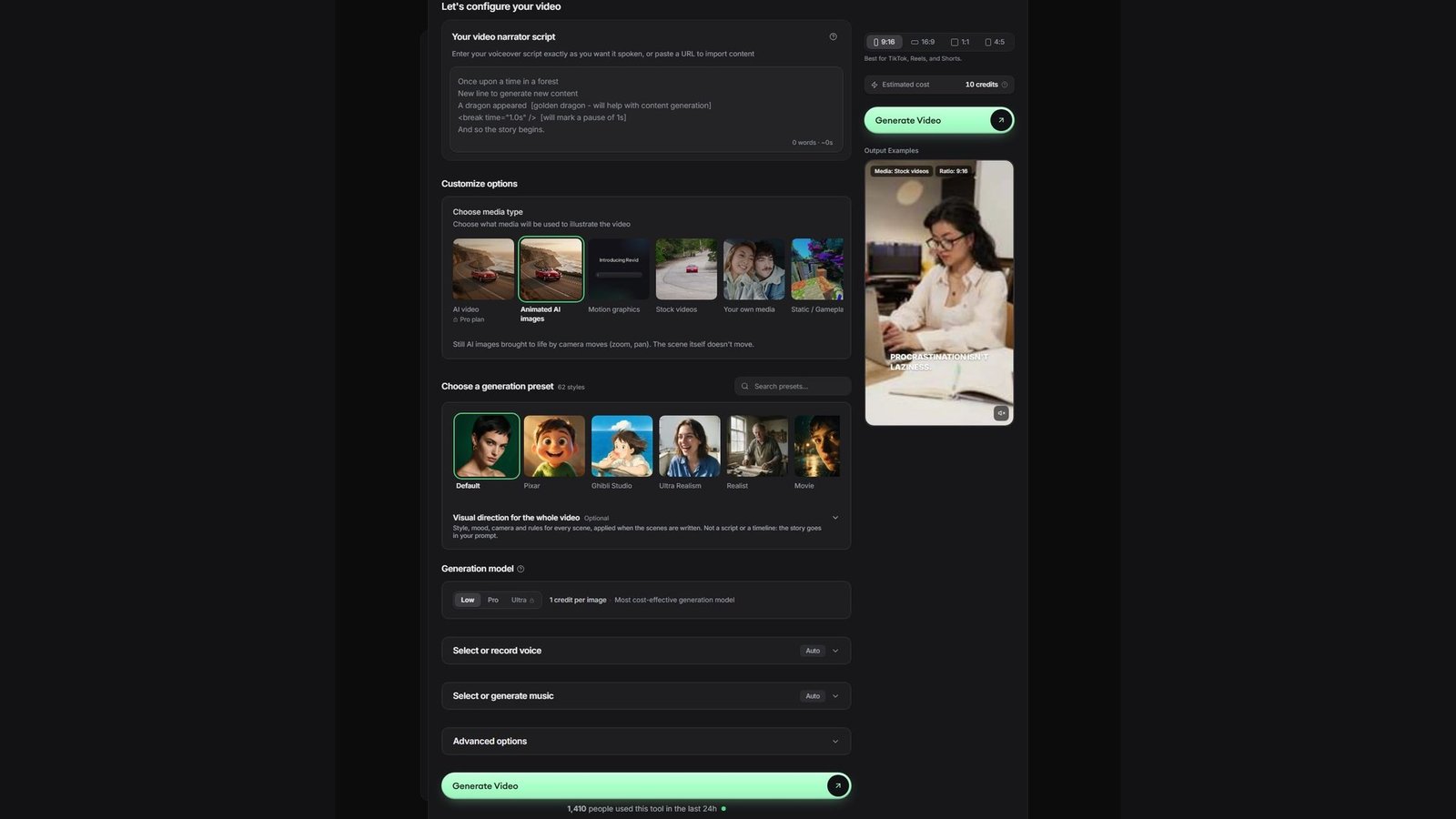
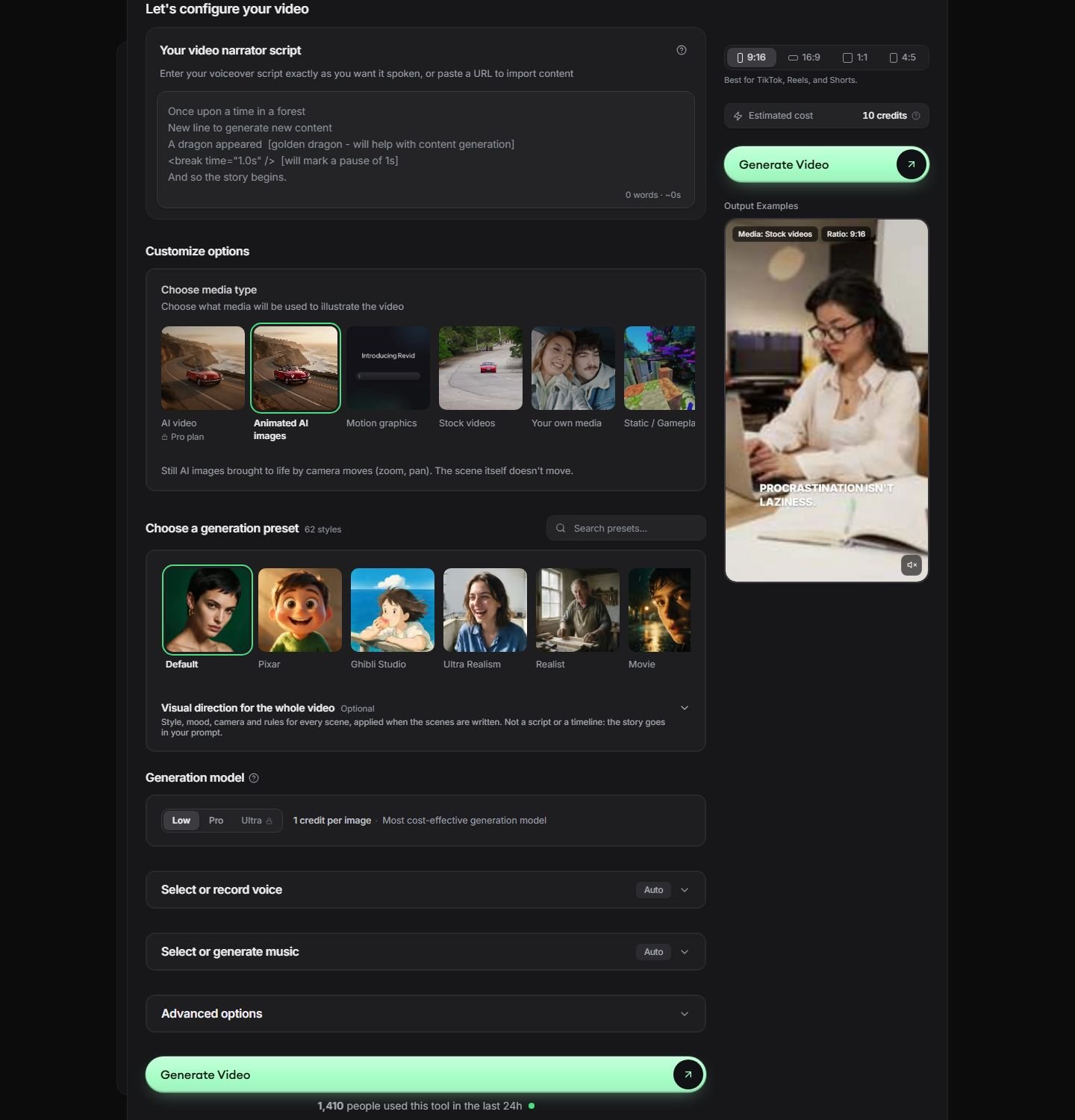
Revid, at revid.ai, is a web short-form generator. The TikTok tool page is a single form: paste a narrator script or a URL, pick a ratio, pick visuals, pick a voice, and generate. On 5 October 2026 the ratio control had 9:16 selected, with 16:9, 1:1, and 4:5 beside it, and the note “Best for TikTok, Reels, and Shorts.” That is a direct output ratio on the generator, not a 16:9 timeline cropped afterward. A safe-area overlay was not on the form.
Disclosure: Moon Picke may earn a commission if you purchase through links on this page, at no additional cost to you.
The form is why Revid leads. Media types are separate buttons: AI video, marked “Pro plan” on the tile; animated AI images; motion graphics; stock videos; your own media; and static or gameplay. The animated-image note says stills move with zoom and pan and the scene itself does not move. Stock and generated video are different choices. The sample was labeled stock video at 9:16 and showed burned-in words. The headline says auto captions. Style controls sit under Advanced options, which were closed, so a caption editor was not verified on this screen. Voice and music were both set to Auto. The music control is Revid’s library or generator. TikTok’s trending-audio library was not on the page.
The script box takes spoken words or a URL. Revid describes that URL as a tweet, a LinkedIn post, a blog, or other web text. That is a content import, not a Shopify, Amazon, or TikTok Shop product import. Brackets in the sample steer visuals, and a break tag marks a pause. Growth’s card also says “Turn any idea or link into video.” A separate hook-only control was not on the form. Use it for a faceless vertical voiceover when you already have a short script or a page of text. Skip it for a person holding a product, a Shop catalog, or a clip cut from a long episode. Avatars and face swaps are listed on Growth. They were not the form that was captured.
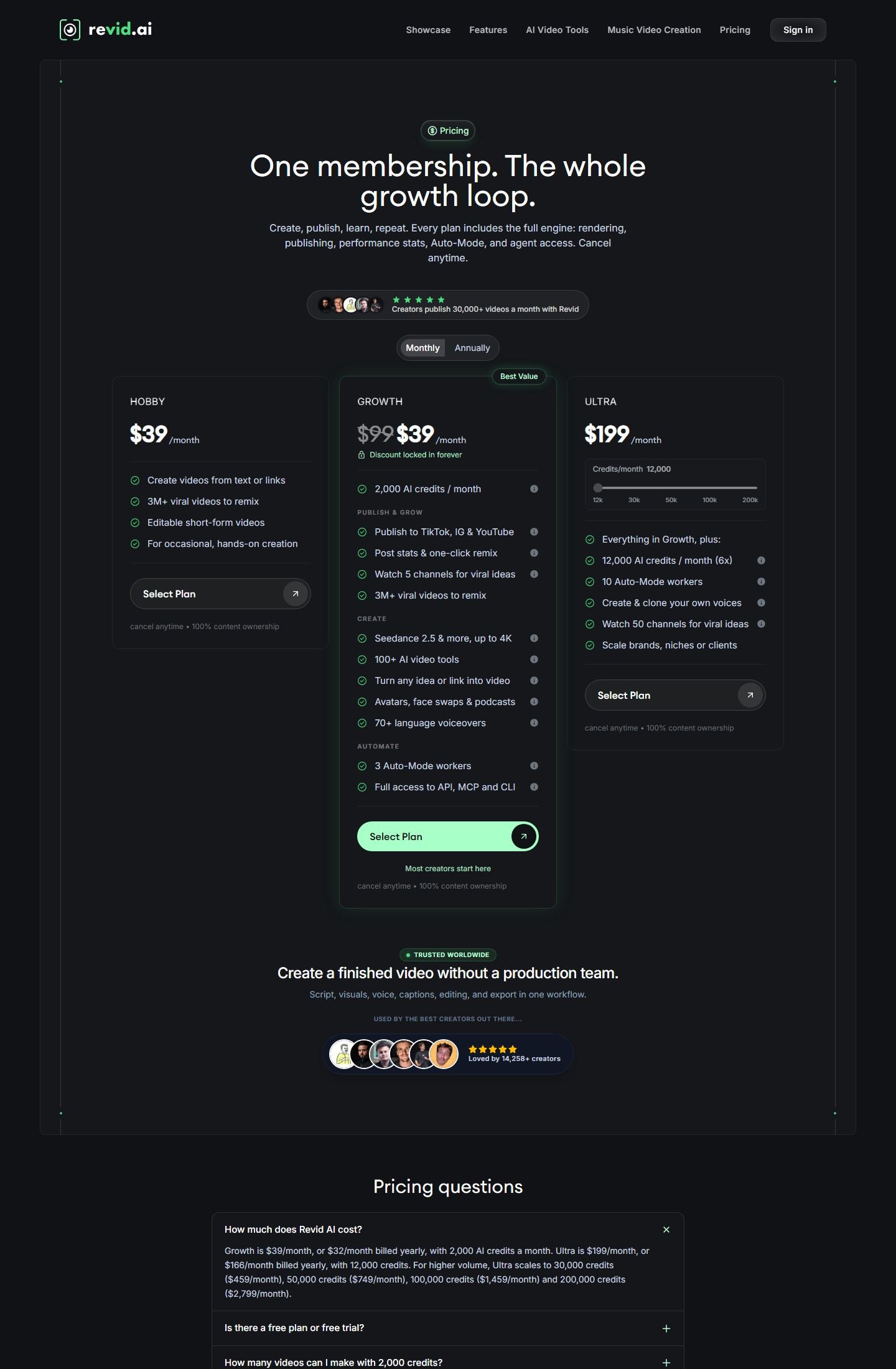
Monthly billing was selected. Hobby is $39 a month for text or links, a remix library, and editable shorts. It does not list credits or publishing. Growth is also $39 a month, with $99 struck through and “Discount locked in forever,” plus 2,000 AI credits, “Publish to TikTok, IG & YouTube,” post stats, 70+ language voiceovers, and “Seedance 2.5 & more, up to 4K.” Ultra is $199 a month for 12,000 credits, with a slider through 200k, plus voice cloning. The on-page FAQ prices Growth at $32 a month billed yearly and Ultra at $166 a month billed yearly, and the higher Ultra steps at $459, $749, $1,459, and $2,799 a month. Those yearly figures are FAQ text on the same page.
Credits are the meter. Revid’s FAQ says a typical 30-second video with Pro moving images and a voiceover costs about 40 to 80 credits, and that fuller AI models cost more per second. The form showed 10 credits for the sample and 1 credit per image on Low. Those are Revid’s figures, not a test by Moon Picke. Plan credits refill and do not stack. The FAQ lists boost packs from 1,000 credits for $49 up to 100,000 for $1,900. There is no $0 card. New accounts can get free credits without a card, and regular creation uses a paid plan. “Up to 4K” is attached to named models, not to every export. A watermark line was not on the cards. 1080p was not printed as the default.
Growth and the FAQ both say direct publishing to TikTok, Instagram, and YouTube. The generator button says Generate Video. A separate download button was not in the form. Scheduling, TikTok Shop, and TikTok Ads were not on the card. “100% content ownership” is Revid’s phrase. It does not clear music, a cloned voice, or a trademark. Voice cloning is an Ultra line. Clone a voice only when you have the right to use it. A consent checklist was not on the pricing page. A mobile app was not in this capture. The public script-to-video API also lists 9:16 as that workflow’s default ratio, which matches the form.
The advantage is the visible 9:16 form plus a named publish line. The limit is the credit math: Hobby does not show credits, the AI-video tile is marked Pro, and a 30-second piece can cost far more than the 10-credit sample. Revid’s “viral videos” library and “30,000+ videos a month” line are Revid’s marketing, not a result for your post. The Revid review covers the wider product. Use Revid when this short-form path is the one you need.
2. StoryShort: Best for faceless TikTok series
StoryShort’s TikTok page says you paste a script or a topic, and it writes narration, generates visuals, adds a voice, and burns in captions as a 9:16 MP4. It also lists 16:9 and 1:1. The ratio control was in the page text, not in a clean screenshot, so 9:16 is StoryShort’s stated vertical export. The page says the script writer writes a hook-first script. That is script generation described as hook-first, not a hook score, and this guide does not repeat StoryShort’s claims about the opening seconds of a post.
Media types on the page are AI images, AI video clips, stock footage, and motion graphics. Generated clips and selected stock stay separate. Brackets in the script are visual direction and are not spoken. A break tag adds a pause. Voice selection includes a Clone tab. The pricing page did not explain consent, so clone a voice only if you control the rights. Captions are described as word-by-word and burned in. An SRT file was not listed. Background music is on every paid plan. Trending TikTok audio was not offered. The page says you can fine-tune in an editor and also says a timeline is not required to generate. A timeline and a mobile app were not captured. A maximum length and a resolution were not on the price cards. A “4K realistic” style name is a style, not an export spec. Product URL, Shopify, Amazon, and TikTok Shop were not listed. A link import is text, not a product catalog.
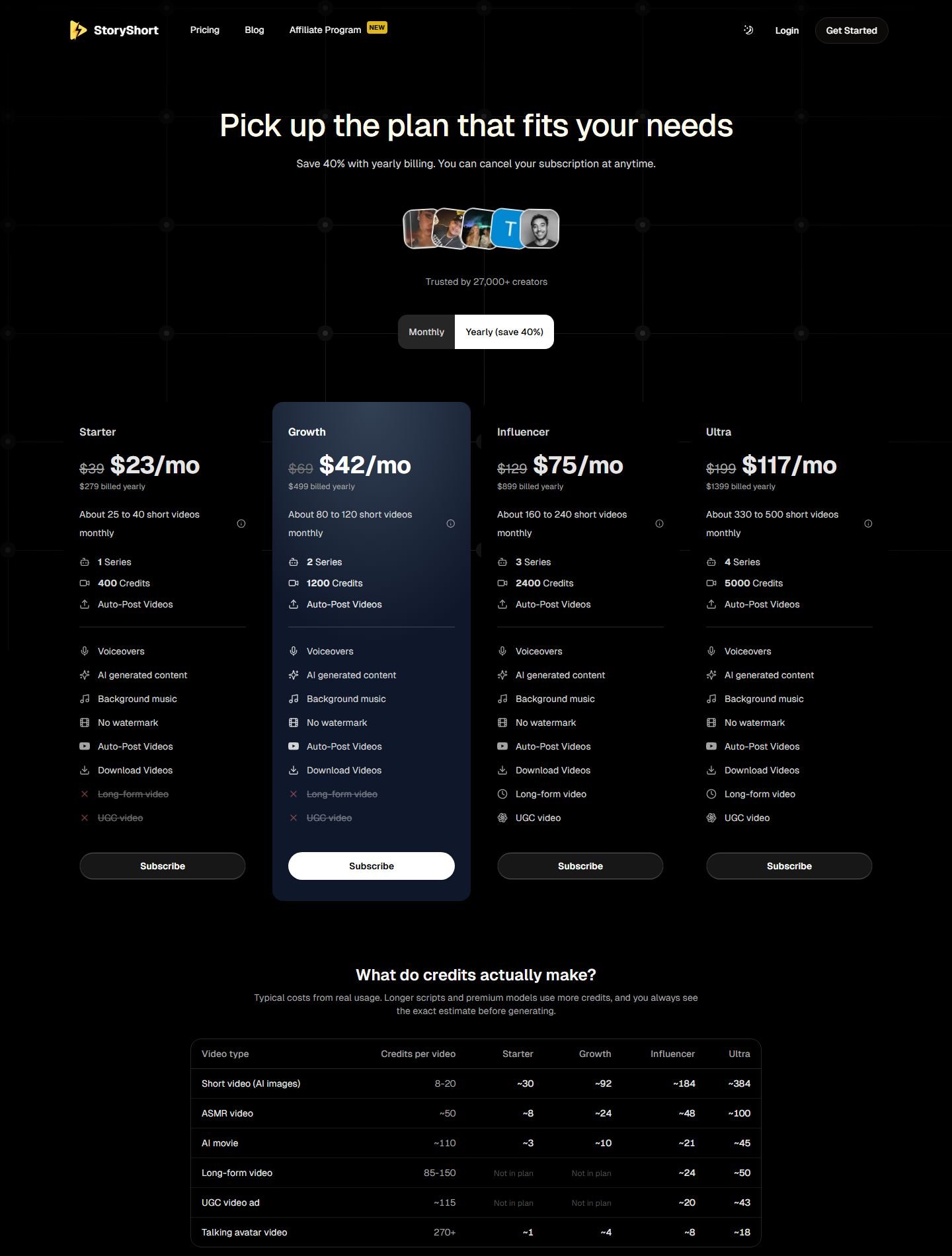
Yearly billing was selected, and the page says it saves 40 percent. Starter is $23 a month, $279 billed yearly, with $39 struck through: 400 credits, 1 series, auto-post, voice, AI content, background music, no watermark, and downloads. Long-form and UGC are off. Growth is $42 a month, $499 a year, $69 struck through, 1,200 credits, 2 series, with the same exclusions. Influencer is $75 a month, $899 a year, $129 struck through, 2,400 credits, 3 series, and long-form plus UGC on. Ultra is $117 a month, $1,399 a year, $199 struck through, 5,000 credits, and 4 series. The struck price is monthly billing. The larger figure is the yearly total.
StoryShort’s table on the same screen says a short AI-image video costs 8 to 20 credits, ASMR about 50, an AI movie about 110, long-form 85 to 150, a UGC video ad about 115, and a talking avatar 270 or more. Long-form and UGC say “Not in plan” for Starter and Growth. Ranges such as “about 25 to 40 short videos monthly” are StoryShort’s arithmetic. The page says the exact estimate appears before you generate. Auto-post is on every paid card, and the tool page says you connect TikTok and YouTube for a scheduled series. That is a vendor publish claim, not a posting test. “No watermark” is on the paid cards. Rendering spends credits, so the free path is a preview. UGC on the higher plans is a credit category. Product holding was not documented. StoryShort also says original AI videos are eligible for TikTok monetization. A software license cannot make a channel eligible for a payout program.
Choose StoryShort for a faceless series: topic, short script, voice, generated or stock pictures, burned-in captions, 9:16, and a scheduled post. Skip it for product-holding on the cheaper plans, a product-page import, or clipping. The StoryShort review covers the wider product. The plan link is StoryShort.
3. Fliki: Best for script, stock, and voice at a lower monthly price
Fliki is a script, voice, and stock tool in the browser. It is third because the monthly cards are public and the short-form pieces are real: script or idea, text-to-speech, stock or AI visuals, captions, and an export ratio that includes 9:16. The API workflow types are script, idea, and URL. The URL field is a blog or article, not a product page. API aspect ratios are 16:9, 9:16, and 1:1, and the table default is 16:9. Fliki’s TikTok feature page says videos are composed vertical-first and also describes smart-crop of 16:9 stock. A vertical export option and a crop of horizontal stock are both documented. This guide keeps them separate.
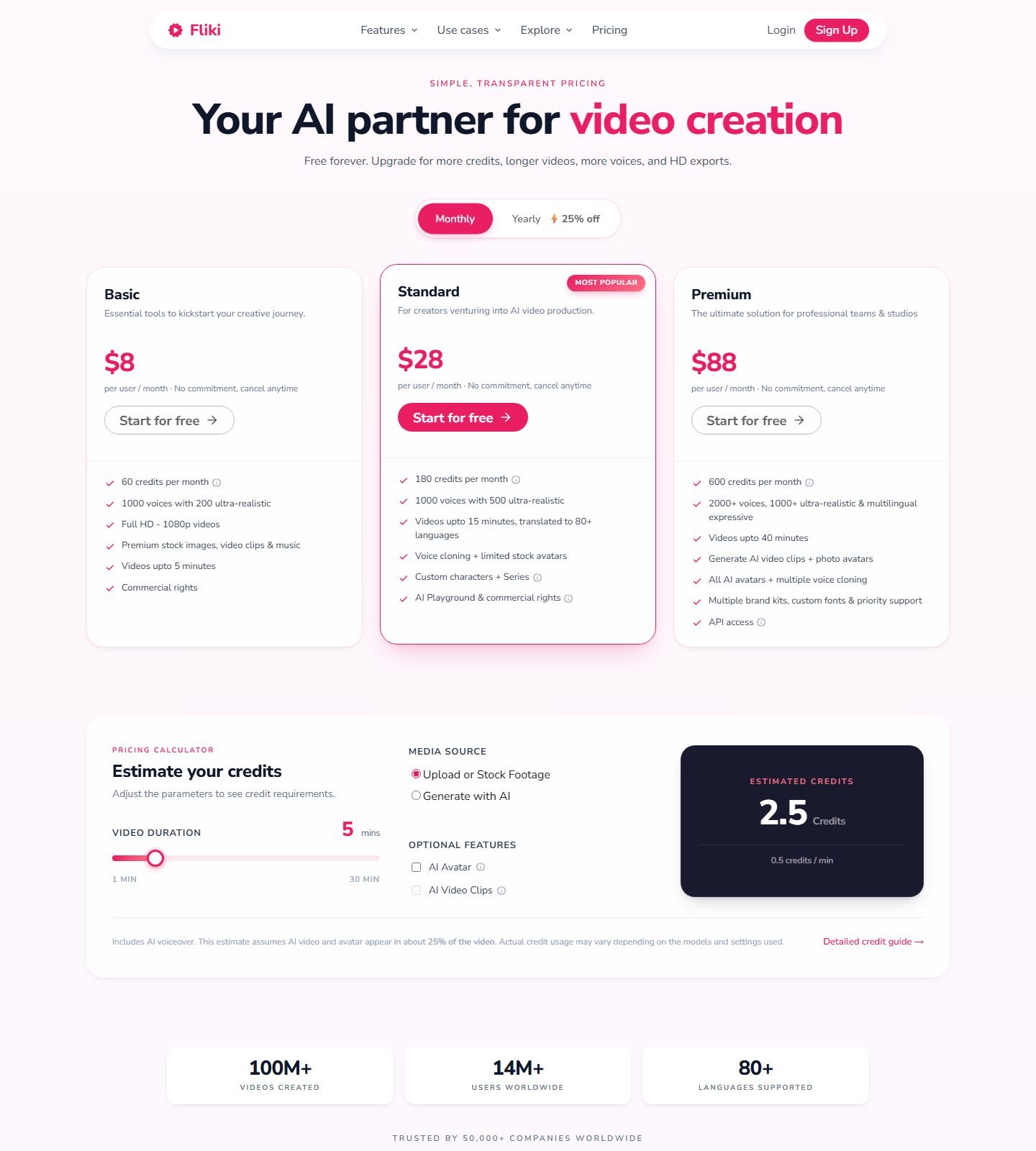
Monthly was selected. Basic is $8 per user per month: 60 credits, 1,000 voices with 200 ultra-realistic, “Full HD – 1080p videos,” premium stock images, clips, and music, videos up to 5 minutes, and commercial rights. Standard is $28: 180 credits, 1,000 voices with 500 ultra-realistic, videos up to 15 minutes in 80+ languages, voice cloning, limited stock avatars, custom characters, Series, and commercial rights. Premium is $88: 600 credits, 2,000+ voices, videos up to 40 minutes, AI video clips, photo avatars, multiple voice cloning, brand kits, and API access. The yearly toggle says 25 percent off. Yearly dollar prices were not on this monthly view. “Full HD – 1080p” is the resolution line. The header’s “HD exports” is a looser phrase.
The header says “Free forever.” Each paid card has a Start for free button. The FAQ says you can generate 5 minutes of free audio and video a month. The loaded cards are the three paid plans, with no $0 price on them. An earlier paint of the same URL briefly showed a Free card at 720p with a watermark, then replaced it with these three plans. This article uses the loaded cards. A “No watermark” row appears lower on the page, and the checkmarks were not readable as text, so watermark removal is not assigned to a plan. 4K is absent from these cards. A TikTok use-case page mentions 4K on paid plans. The two pages disagree, so 4K stays unverified.
The calculator is the usage unit. Upload or stock footage at 5 minutes showed 2.5 credits, 0.5 credits per minute, including voiceover. Generate with AI, AI Avatar, and AI Video Clips are separate controls. Stock is selected media. AI video clips are generated media. API image-animation presets include no motion and a Ken Burns-style move, which is photo motion, not a generated scene. The FAQ calls Standard’s 180 credits “180 minutes of credits” and estimates 60 to 90 minutes of video. The card says 180 credits. The calculator says half a credit per minute for the stock example. Use the on-screen estimate for the mode you will run.
Fliki’s idea-to-video page says a prompt can become a script with a hook, a body, and a call to action, plus captions and music, and that one project can export 9:16, 1:1, and 16:9. That is a described hook inside a script, not a hook-performance tool. TikTok marketing pages also say the script is tuned for the For You Page and that exports are eligible for payout programs. Those sentences are marketing. A setting cannot place a video on a feed or qualify a channel. The same pages claim direct publish, a schedule, an MP4 download, and captions in a safe zone. None of those controls were on the pricing screenshot. Treat publishing as a claim on the use-case page. The API can export MP4, MOV, MP3, or WAV when export is on.
Commercial rights are printed on Basic. The TikTok use-case page says a commercial license for TikTok Shop ads starts at $28. The two sentences disagree. Basic’s line is not a Shop integration, and Shop was not on the pricing cards. Stock music is Fliki’s library, not TikTok trending audio. Voice cloning starts on Standard. Clone a voice you have rights to use. The FAQ says Fliki runs in a browser. Phone apps were not verified. An avatar makes the video a presenter. Leaving it off is the faceless path.
Choose Fliki for the lowest listed monthly price, a 1080p card, stock plus voice, and a file you upload yourself. Skip it when you need a confirmed TikTok publish button, a product-holding actor, or a safe-area guide on the pricing screen. The Fliki review is the longer page. The plans above are at Fliki.
Best for specific TikTok jobs
Faceless: StoryShort, because series and auto-post are on the paid cards. Revid’s form is the better one-off faceless short. Fliki is faceless when the avatar stays off.
Script to video: all three. Revid is first because 9:16 was selected in the captured form. Fliki’s API has an explicit script workflow. StoryShort accepts a pasted script and can write one from a topic.
Actors and avatars: none of the three is actor-first. Revid lists avatars on Growth. StoryShort prices a talking avatar at 270+ credits. Fliki puts stock avatars on Standard and photo avatars on Premium. An avatar is a presenter, not a person holding a product.
UGC, product URL, and Shop: StoryShort unlocks a “UGC video ad” credit on Influencer and Ultra, about 115 credits, without a documented holding or demo feature. Revid and Fliki can place your own image in the video. That is display. No finalist documented Shopify, Amazon, or TikTok Shop. A pasted link becomes narration. Check product facts yourself. The published UGC and product video guides cover the holding workflow.
Captions: StoryShort’s page says word-by-word captions burned in. Revid advertises auto captions and shows burned words on a sample. Fliki’s API has a subtitle preset and a highlight toggle, which is an on-video setting, not an SRT file. A safe-area guide was not in any screenshot. Fliki’s use-case page claims one.
Repurposing, budget, mobile, and free: these three start from text. Clipping a long video is the published repurposing guide. Fliki Basic is the lowest monthly card at $8 per user, with 1080p and commercial rights on the card. Phone editors were not shown. There is no finished-video free plan: Revid offers starter credits, Fliki’s FAQ says 5 free minutes a month, and StoryShort previews before a render spends credits.
Pricing and limits
Put the meters side by side without treating them as the same unit. Revid Growth is $39 a month for 2,000 credits, or $32 a month billed yearly in the FAQ. StoryShort’s yearly view is $23 to $117 a month for 400 to 5,000 credits, against monthly prices of $39 to $199. Fliki is $8, $28, and $88 per user per month for 60, 180, and 600 credits. Fliki prints export caps of 5, 15, and 40 minutes and 1080p on Basic. Revid attaches “up to 4K” to named models. StoryShort does not print a resolution. Read the in-product estimate for the mode you will run: Revid’s 30-second range, StoryShort’s 8 to 20 credits for a short AI-image video, or Fliki’s half-credit-per-minute stock calculator are three different quotes.
How to choose an AI video generator for TikTok
Match the video. A faceless series points to StoryShort’s auto-post line. One script in a visible 9:16 form points to Revid. Stock and voice at $8 a month, uploaded by hand, points to Fliki Basic. A product in someone’s hands belongs in a UGC tool’s holding feature. A long recording belongs in a clipper. On the pricing page, confirm the export ratio, whether captions are burned in, whose music library you get, whether TikTok publishing is a button or a marketing sentence, and which unit the plan meters. Commercial rights cover that vendor’s output under its terms. They do not cover TikTok’s song library, a face you do not own, or a product claim you cannot support.
How to make a TikTok video with AI
Pick one job: a faceless explainer, a product walkthrough, a list, or a clip from something longer. Write the first line so a stranger knows the subject. Keep one idea. Choose a synthetic person or leave the frame faceless, and if it is faceless, label stock, generated stills, and generated clips separately. Add a product file only when the product must be visible. Burn in captions, then watch the export with TikTok’s buttons in mind, because these tools did not draw that overlay. Use audio you are allowed to use. Export 9:16 and watch the file before you upload. Add the platform caption, the AI label when TikTok’s rules require it, and the commercial disclosure when the post promotes a brand. Publish in TikTok, or from a button you have confirmed in the tool. Read the post’s own numbers later. The generator does not supply them.
How to make faceless TikTok videos with AI
The faceless path is a topic, an opening line, a short script, a voice, stock or generated visuals, captions, music you can license, and a 9:16 file. StoryShort puts series and auto-post on the paid cards. Revid puts 9:16 on the form. Fliki does it when the avatar is off and the ratio is 9:16. The faceless video guide compares that format beyond TikTok. A faceless short still needs an opening line and captions a phone can read.
How to make a product video, a script video, or a URL video
A product TikTok needs the product visible, one benefit, captions, and a file. An uploaded product photo is a display. Holding or demonstrating the item was not verified here. A script TikTok is the verified path: paste the words, mark pauses if the tool allows it, choose voice and visuals, burn in captions, and export 9:16. Revid and StoryShort both use brackets for visuals that are not spoken. A product URL, on these three, is a text import. A summarized page can misstate a price or a review. Check the spoken lines against the real listing.
How to repurpose a long video for TikTok
Repurposing starts with a long file, finds a moment, reframes it to 9:16, captions it, and exports it. Use a clipper when that file already exists. Use Revid, StoryShort, or Fliki when the source is an idea or a script.
Does TikTok allow AI-generated videos?
TikTok’s AI-generated content page, read on 5 October 2026, treats images, video, or audio created or modified by AI as AI-generated content. It encourages a label when a video was completely generated or significantly edited by AI. Significant editing, in that page’s words, includes real footage changed beyond minor corrections: a person shown doing something they did not do, saying something they did not say, or changed until they are no longer recognizable. Realistic AI images, audio, and video must be labeled, as the Community Guidelines explain.
The creator label reads “creator labeled as AI-generated.” Labeling an unaltered video that way violates TikTok’s terms. A TikTok effect that uses AI may already get an auto label. An additional edit from an outside tool still follows the labeling rules. An auto label can also come from Content Credentials (C2PA), and the help page says you cannot remove it. Some synthetic media is prohibited even with a label, including impersonation and other Community Guidelines violations. This is a reading of the help page, not a clearance for a specific post.
A post that promotes a brand also uses TikTok’s content disclosure setting. Your own brand is Promotional content. A third party’s brand is Paid partnership. TikTok says that switch does not change distribution, and the label cannot be edited after publishing. Music is separate. A track inside these tools is that vendor’s audio. TikTok documents commercial music on its own pages. A generated bed is not a license for every ad, business account, or country.
Common mistakes
Building in 16:9 and cropping later is a different frame from a 9:16 project. Fliki’s pages describe both a vertical ratio and a smart-crop of horizontal stock. A late opening, or three ideas in one short, fights the length. A script that invents a personal result or an unchecked product claim is a factual error. A product photo in the corner is a display, not a demo. Captions under TikTok’s buttons are hard to read. Assuming a third-party app has today’s trending sounds is a rights error. These tools can assemble a file. They do not decide who sees it.
FAQ
What is the best AI video generator for TikTok?
Revid, for a script or a link, 9:16 selected in the generator, a voice, stock or generated visuals, and a Growth plan that lists TikTok publishing. StoryShort is the faceless series tool. Fliki is the lower monthly price for stock and voice.
Can AI create TikTok videos?
These tools can export a vertical short from a script, an idea, or a link. You still label realistic AI media when TikTok requires it, disclose commercial posts, and publish from a button that exists on your plan.
What is the best AI for faceless TikTok videos?
StoryShort. Faceless narration, generated or stock visuals, burned-in captions, and auto-post are on the product. Revid’s form is the better single-video version of the same job.
Can AI make TikTok product videos?
They can place a product image you upload in a vertical video. That is display. A person holding the product was not verified. StoryShort’s higher plans sell a “UGC video ad” credit type without a holding feature on the pages checked.
Can AI turn a product URL into a TikTok video?
Not as a product-page import. The link fields turn a post, a blog, or an article into narration. Check every product claim. TikTok Shop was not listed.
Can AI turn a script into a TikTok video?
Yes. All three accept a script and can add voice, visuals, and captions, with 9:16 available. Revid shows 9:16 selected. StoryShort states a 9:16 MP4. Fliki lists 9:16 in its API and on its TikTok pages, next to a smart-crop path for horizontal stock.
Can AI repurpose YouTube videos for TikTok?
A clipper can. These three create shorts from text. A link field that reads a page is not a clip detector.
Does TikTok allow AI-generated videos?
TikTok allows AI-generated content that follows its Community Guidelines, and it requires a label on realistic AI images, audio, and video. Some synthetic media stays prohibited even with a label. Read the current help page before you post.
Do AI-generated TikToks need to be labeled?
Realistic AI images, audio, and video need the label described in the Community Guidelines. TikTok also encourages a label when a video was completely generated or significantly edited. A TikTok effect may already receive an auto label. An outside AI edit on top of that effect still follows the rules. Labeling an unaltered video as AI-generated violates the terms.
What is the best free AI TikTok video generator?
None of the three lists a $0 card for finished, watermark-free exports. Revid includes free credits on a new account. Fliki’s FAQ says 5 minutes of free audio and video a month, while the visible cards start at $8. StoryShort charges credits when you render. Use the free allowance to learn the form, then read the paid meter.
Final verdict
Revid is first because the captured form is the job: a script or a URL, 9:16 selected, stock and generated visuals as separate choices, a voice, music from Revid’s own controls, and a Growth plan that names TikTok publishing. StoryShort is the faceless series tool, with auto-post on every paid plan and UGC held to the higher tiers. Fliki is the script, stock, and voice tool with the lowest monthly card, 1080p stated on Basic, and a 9:16 option that sits next to a smart-crop of horizontal stock.
The list stops at three because the other famous names did not show a current short-form path with a public price. CapCut’s public AI page was a Seedance prompt. Clippers start from a long video. A generative model returns a clip, and the voice, captions, and export still have to happen somewhere else. UGC actor tools solve a product-ad format this query does not equal. Read the plan’s own credit estimate before you generate a batch.