
Moon Picke independently researches products. If you buy through our links, we may earn a commission at no extra cost to you. Affiliate disclosure.
Choosing the right dash cam SD card size is a recording-workload decision, not a race for the biggest number on the card. For many 1-channel or lighter-use systems, 128GB may be enough. 256GB is often a stronger middle ground for 2-channel or high-resolution recording. 512GB becomes more useful for supported high-bitrate multi-channel systems or long overwrite windows. Capacity alone is not enough: bitrate, channels, parking mode, and how long footage must remain before overwrite matter more than treating 128GB, 256GB, and 512GB as good, better, and best.
As an Amazon Associate I earn from qualifying purchases.
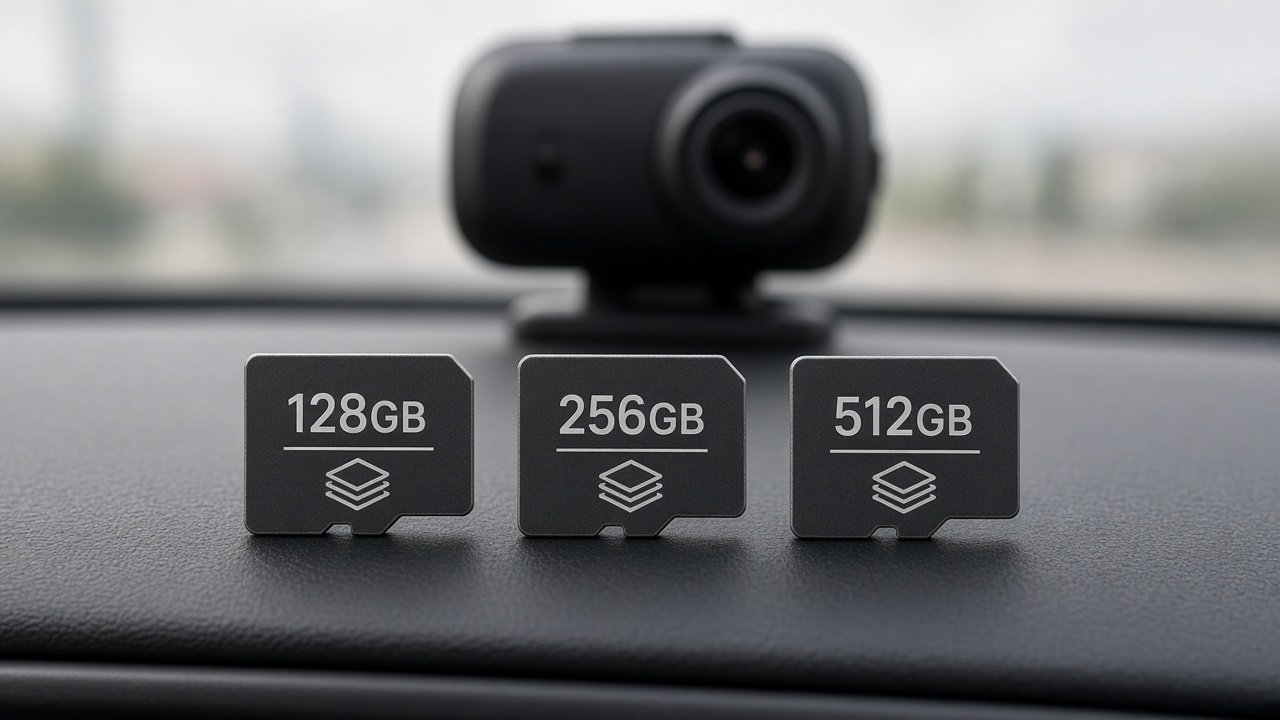
Dash Cam SD Card Size: Quick Answer
Buy storage for this camera’s configuration and the retention window you need. Maximum supported capacity is a ceiling, not a requirement. A larger card does not improve video quality; it can lengthen how far back unlocked loop footage remains available. Loop recording is why dash cam SD card size is a retention-window purchase.
| Capacity | Best Fit | Main Advantage | Main Limitation |
|---|---|---|---|
| 128GB | Lighter / 1CH use, when supported | Lower cost; shorter daily driving | Shorter overwrite window |
| 256GB | Balanced 2CH / high-res use, when supported | Larger retention without max-capacity cost | Higher cost; may still feel short with parking |
| 512GB | Heavy multi-channel / long-shift use, if supported | Longest retention of these three at a given bitrate | Compatibility, formatting, and cost |
These are buyer profiles, not universal rules. If the camera max is 128GB, do not buy 256GB or 512GB. If the camera max is 512GB or 1TB, you may still choose a smaller supported card.
What size SD card should I use for a dash cam?
Use a supported capacity that covers retention for your channels, bitrate, daily recording time, and parking. Do not start with 512GB and check compatibility later.
Is 128GB enough for a dash cam?
It may be, for many 1-channel or lower-bitrate setups with shorter driving and regular clip retrieval. It is often tight for high-bitrate 2CH/3CH plus parking.
Is 256GB enough for a 4K dash cam?
It can be a practical middle tier on cameras that support 256GB, especially 4K front plus a lower-resolution rear. Enough depends on bitrate and overwrite hours—not the word 4K alone.
Is 512GB worth it for a dash cam?
It can be, when the model officially supports 512GB and you need a longer window for multi-channel, long shifts, or long parking. It is overkill if the camera cannot use it or the workload is light.
What Actually Determines Dash Cam Recording Time?
Recording time is storage divided by how fast the camera writes data. Bitrate is the direct data-rate variable. Resolution, codec, frame rate, HDR, and audio often change that bitrate. Channel count adds streams; each stream can use a different resolution and rate. Parking mode can keep writing when the car is parked. Dash cams commonly record in segments. When normal-recording storage fills, older unlocked files are overwritten. A larger card does not improve video quality; it increases the likely retention window for unlocked footage.
Do not assume 4K always uses twice the storage of 2K. Codec and the bitrate setting the camera actually uses matter more than the marketing resolution name. See Moon Picke’s 4K vs 2K dash cam guide for the image-quality decision; this article only covers storage impact.
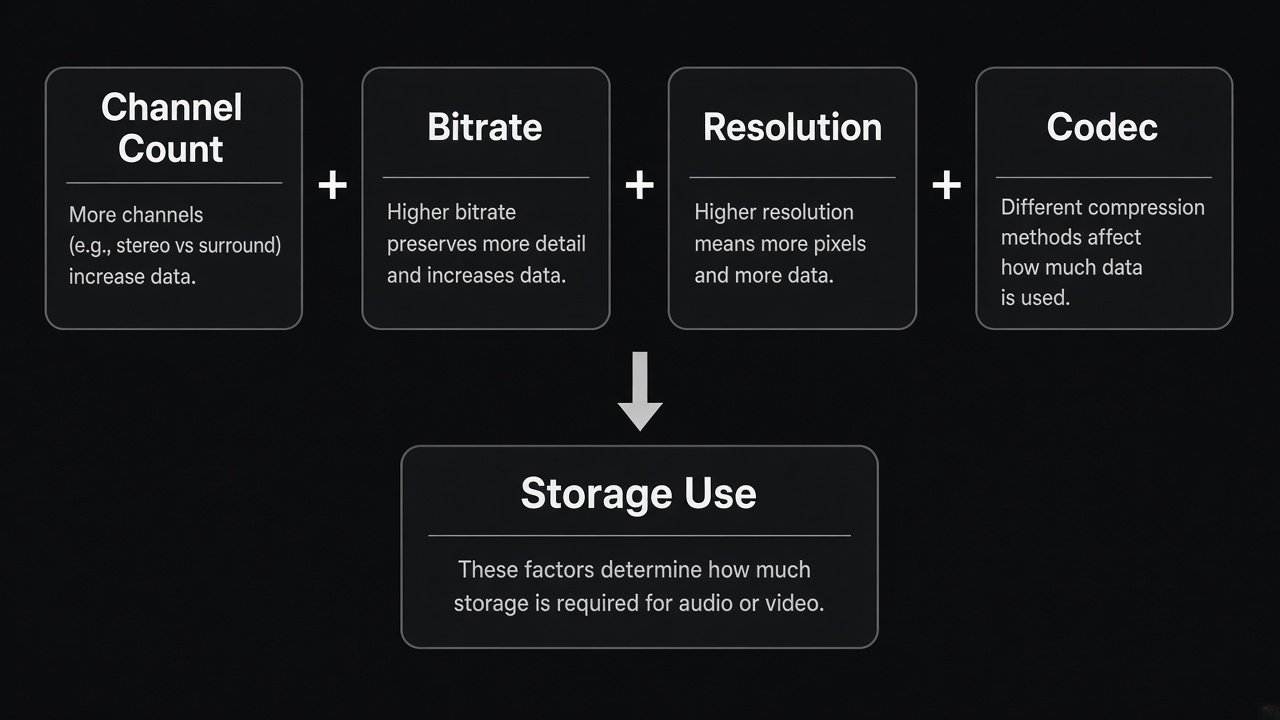
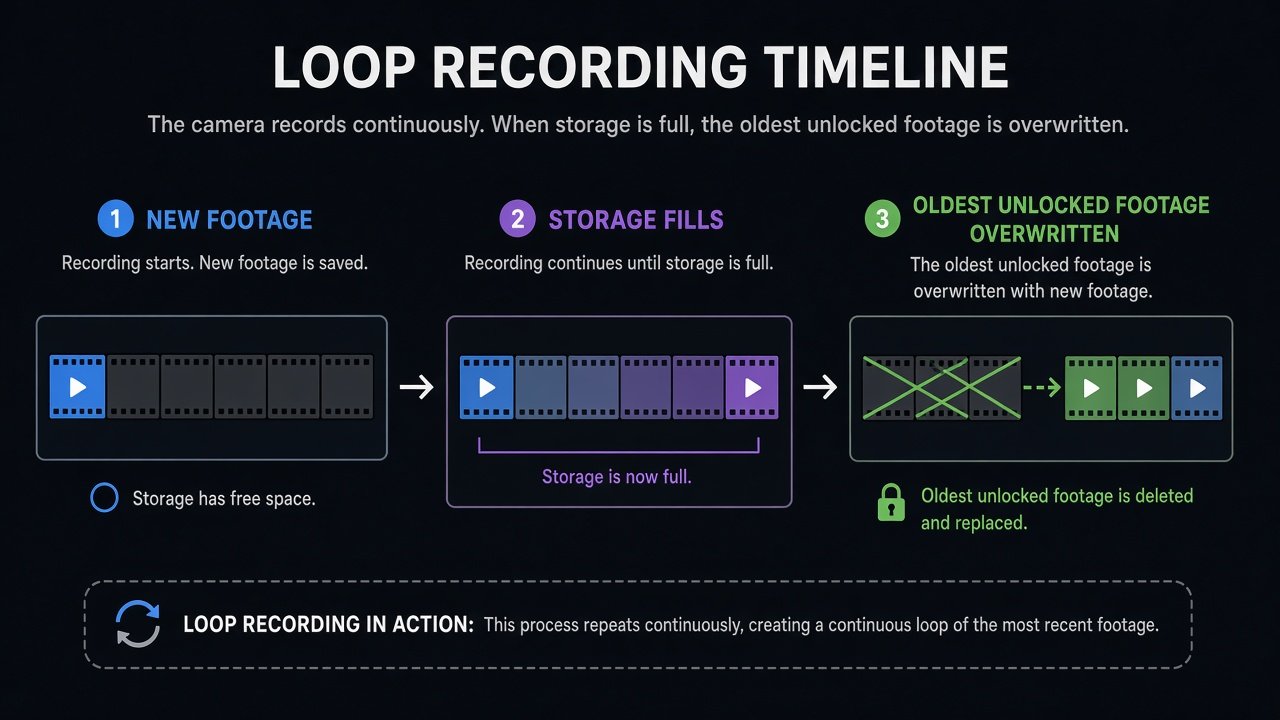
How to Estimate Dash Cam Storage
Before you pick a dash cam SD card size, estimate workload, then prefer the maker’s own recording-time table when one exists. Advertised capacity is slightly higher than usable formatted space, so real duration is somewhat lower than naive GB division.
Simple framework (approximate, configuration-specific, not guaranteed runtime):
- Add the bitrates of channels that record at the same time (Mbps).
- Convert: 1 Mbps ≈ 0.45 GB per hour of recording (decimal GB).
- Approximate hours ≈ usable storage (GB) ÷ GB per hour.
Worked example using BlackVue’s published Extreme H.265 rates for a DR970X-class 4K@30 + FHD@30 pair: 60 Mbps front + 10 Mbps rear = 70 Mbps total. 70 × 0.45 ≈ 31.5 GB/hour. Dividing 512 GB of advertised capacity by 31.5 GB/hour is about 16 hours. BlackVue Australia’s table for that setting lists about 15 hours 20 minutes on 512GB and about 7 hours 40 minutes on 256GB. The formula is close; overhead, formatting, and locked files are why neither figure is a guarantee.
Thinkware’s U3000 PRO 2-channel continuous table (4K@30 + 2K@30, or 2K@60 + 2K@30) lists about 249 minutes on 128GB, 500 minutes on 256GB, and 1,016 minutes on 512GB. Those minutes are Thinkware’s stated modes, not a universal hour chart.
VIOFO’s industrial-card page lists A329S estimates that also move with bitrate. Example only: 2CH 4K P60 + 2K P30 at Normal is listed as 4h 16m on 128GB, 8h 32m on 256GB, and 17h 4m on 512GB. At Maximum the same 2CH layout is listed as 2h 52m / 5h 44m / 11h 28m. A 3CH 4K P30 + 2K + 2K Maximum layout is listed as 4h 24m on 256GB and 8h 48m on 512GB. Moon Picke has not independently timed these cards.
Is 128GB Enough for a Dash Cam?
128GB may fit a 1-channel camera, a lower bitrate, 1080p or 2K recording, shorter daily driving, users who copy clips often, and limited parking-mode use. Limitations are the overwrite window and margin. Multi-channel, high-bitrate 4K, long commutes, or parking that keeps writing will fill 128GB sooner. That does not make 128GB “too small” for every dash cam.
When 256GB Makes More Sense
256GB is often a balanced dash cam memory card size for 2-channel systems, 4K front plus a lower-resolution rear, longer daily driving, and moderate parking recording—only when the camera officially supports 256GB. You pay more than 128GB for a wider overwrite window, not better pixels. Thinkware’s 2CH table lists about 500 minutes on 256GB versus 249 on 128GB in those modes—capacity scaling, not a quality upgrade. If a 4K 2CH camera only supports 128GB, stay at 128GB. Maximum supported is not required capacity.
When 512GB Is Worth It
512GB may fit 3-channel or 4-channel systems, high-bitrate 4K, long rideshare or commercial shifts, long parking sessions, and buyers who want a longer overwrite window. Never choose 512GB unless that exact dash cam officially supports it. The VIOFO A329S lists microSD up to 512GB. Thinkware lists U3000 PRO support for 64/128/256/512GB UHS-I. BlackVue lists DR970X-2CH LTE Plus II package options through 512GB and 1TB. Vantrue N5S lists 32GB–1TB with U3 or faster cards, so 512GB is inside that ceiling, not automatically required.
Trade-offs: higher cost, formatting and approved-card rules, and no extra protection against wear. A 512GB card still loop-records. Rideshare drivers should not assume they must buy 512GB; use shift length + channels + bitrate + needed retention. See best dash cam for rideshare drivers for the camera brief; this page only plans storage.
If you already confirmed Thinkware U3000 PRO 512GB support and want Thinkware’s listed 512GB card path:
Thinkware 512GB microSD (TWA-SMU512, ASIN B0F7PLSRX8) on Amazon →
If you already confirmed VIOFO A329S 512GB support and want VIOFO’s industrial 512GB card path:
VIOFO 512GB industrial microSD (ASIN B0C8HVSPSD) on Amazon →
How 4K Recording Changes Storage Needs
Higher resolution can increase storage demand because many cameras raise bitrate in 4K modes. That is not a fixed 2× rule. H.265 versus H.264, HDR, frame rate, and bitrate menus can move data rate more than the 4K label. BlackVue’s same 4K@30 + FHD@30 layout lists Extreme H.265 at 60+10 Mbps and Normal at 8+6 Mbps—same resolutions, very different hours. Keep the quality debate on the 4K vs 2K article; here, ask what bitrate this 4K mode actually uses.
How Multiple Cameras Change Storage Needs
1CH records one primary stream. 2CH records two. 3CH records three. 4CH records four. Total storage use is not necessarily linear. Front 4K plus rear 1080p plus cabin 1080p is not “three times 4K.” Sum the bitrates you actually enable. Vantrue’s N5S is a multi-channel example with a high official ceiling (32GB–1TB, U3 or faster); that ceiling still does not tell you whether 256GB or 512GB matches your shift. Channel architecture belongs on 1-channel vs 2-channel vs 3-channel dash cam.
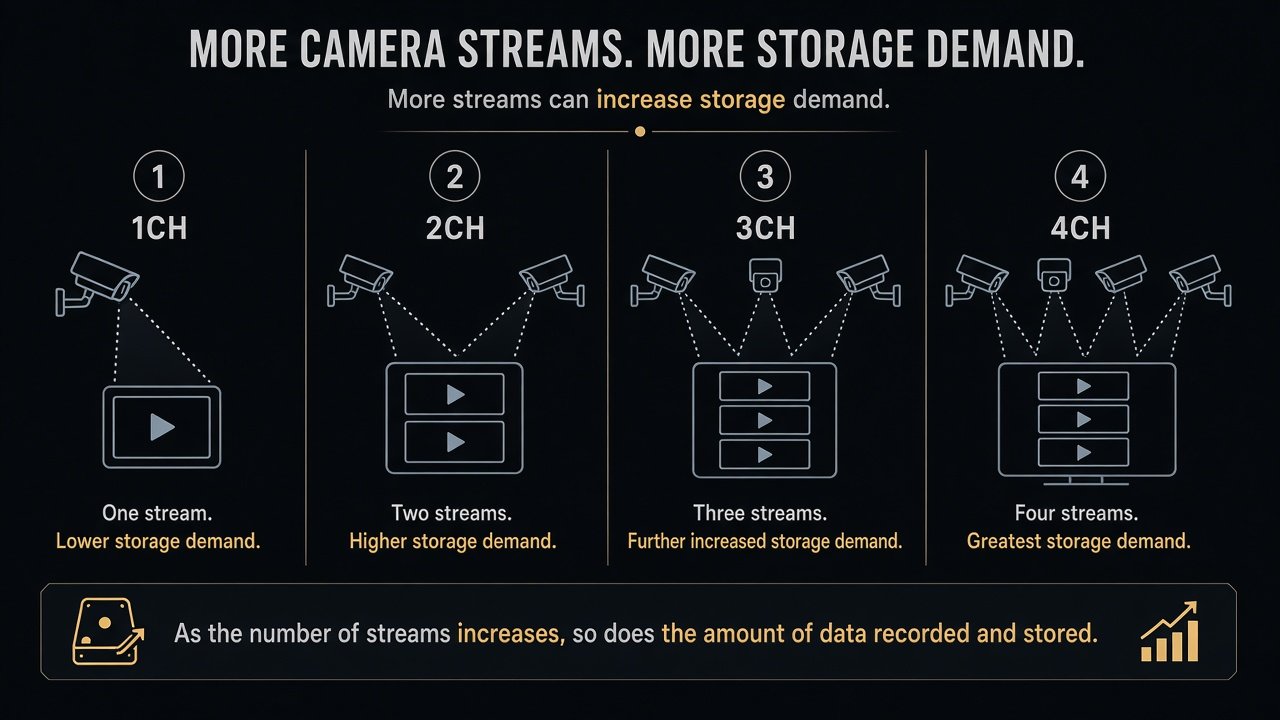
Parking Mode Can Fill Storage Too
Parking recording can consume storage when the vehicle is not driven. Impact depends on mode: motion or impact events, buffered events, time-lapse, low-bitrate parking, or continuous parking. There is no single parking GB-per-hour number. Low-bitrate parking may use less storage than full driving recording; the exact rate is manufacturer-specific. Time-lapse generally records fewer frames over calendar time, which may reduce demand; exact behavior still varies. Event files may sit in a separate folder or be protected from normal loop overwrite, but locked files are not immortal. BlackVue documents Event File Protection up to 50 event recordings on DR970X LTE-class units—a cap, not a never-overwrite promise. Some cameras allocate event partitions and later overwrite old events, or they need manual cleanup. Mode hardware lives on best dash cam for parking mode.
Why High-Endurance Cards Matter
Dash-cam workloads are unusual: record, overwrite, record, overwrite, often all day and in parking. High-endurance microSD cards are designed for repeated write cycles. That is not a claim they never fail, last a guaranteed number of years, or that standard cards always fail quickly. Use the card type the manufacturer specifies (often high-endurance, a video speed class, UHS, or an approved list). Do not assume any Class 10 card works. Hot windshields add thermal stress; high-endurance is not heatproof.
Maximum Capacity and Compatibility Matter More Than Size
A 512GB card is useless if the camera only supports 256GB or 128GB. Compatibility beats raw dash cam microSD capacity. VIOFO A329S: up to 512GB, high-endurance recommended, format in camera before first use (exFAT or FAT32 per the A329S manual). Thinkware U3000 PRO: 64–512GB, UHS-I. BlackVue DR970X-2CH LTE Plus II: package options include 64/128/256/512GB/1TB; cloud event upload does not replace the microSD as primary local loop storage. Vantrue N5S: 32GB–1TB, U3 or faster. Speed class, endurance class, and approved-card lists are camera-specific. Let the dash cam run its supported format process when the maker recommends it. Do not invent a biweekly format rule; cadence varies. FAT32/exFAT only matters when that camera’s manual says so.
LTE or cloud access still usually needs a local card. Cloud may upload events, selected files, or remote views depending on the plan. Cloud is not unlimited local storage. That split is covered in LTE dash cam vs Wi-Fi dash cam. Warning signs that storage may be involved include card errors, repeated recording failures, corruption warnings, missing clips, or restarts tied to storage errors. Then check supported card, in-camera format, firmware, and the maker’s troubleshooting. Do not diagnose all dropouts as a bad card.
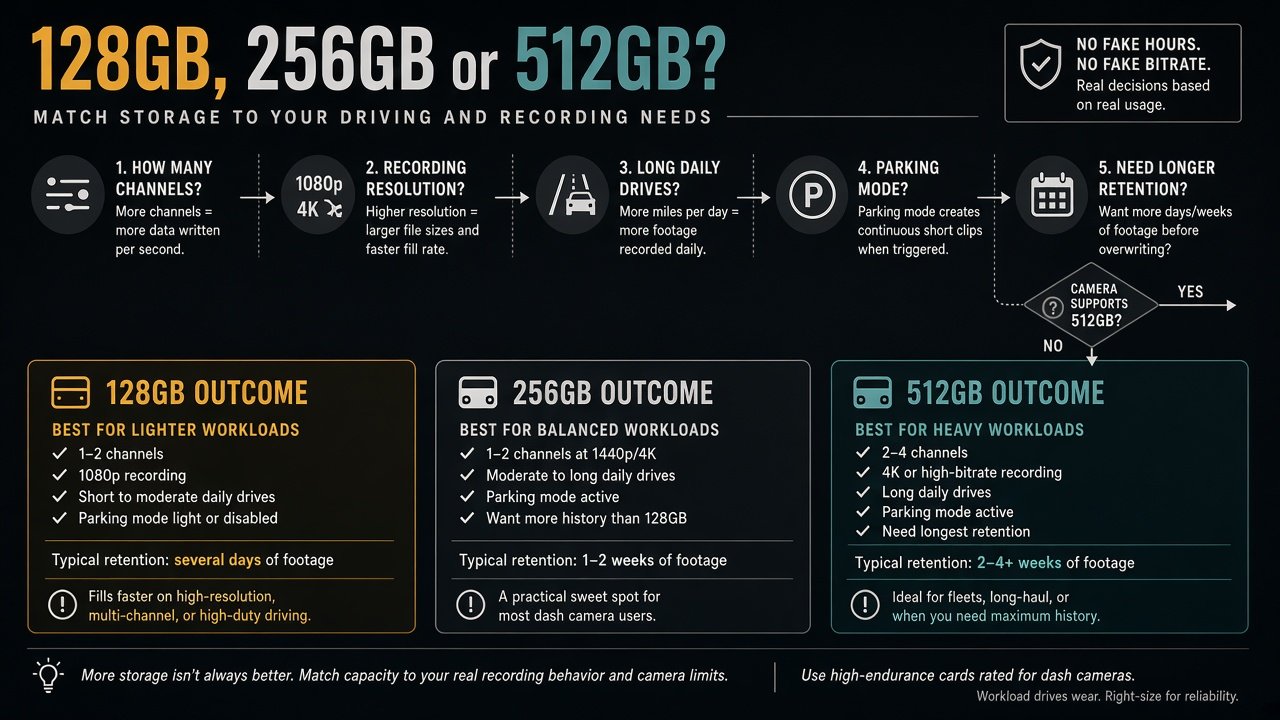
128GB vs 256GB vs 512GB: Which Should You Buy?
The useful question is not “how many GB should a dash cam have?” It is: how many hours of this camera configuration do I need to retain before older unlocked footage is overwritten?
Choose 128GB if it is supported, the camera is simpler (often 1CH), daily use is shorter, bitrate is moderate, and you retrieve files regularly. Choose 256GB if it is supported, you run 2CH or higher-resolution recording, and a wider window is useful. Choose 512GB if it is officially supported, you run multi-channel or high-bitrate recording, shifts or parking are long, and the overwrite window is why you are spending more.
Buying a 512GB card first and checking support later is backwards. Confirm maximum capacity, confirm compatible card type, understand channels, estimate workload, then choose capacity.
Dash Cam SD Card Size Buying Checklist
- Maximum supported capacity
- Card type (often microSDXC)
- Endurance requirement / approved list
- Speed class or video speed class the camera specifies
- Channels that record at once
- Bitrate or quality preset you will use
- Parking mode and how often the car sits
- Hours of this configuration you need to keep
- In-camera formatting and any maker-stated cadence
- Approved card list, if published
Final Verdict
The right dash cam SD card size is the supported capacity that covers bitrate, channels, parking load, and overwrite window. Decide 128GB vs 256GB vs 512GB by compatibility plus recording load plus retention—not “bigger is always better.” 128GB can be enough for lighter 1CH use. 256GB is often the practical middle for supported 2CH and high-resolution recording. 512GB is for supported heavy multi-channel or long-window use. A larger card does not improve video quality. Cloud does not replace the card. High-endurance does not mean unlimited life. Match the card to the workload.
FAQ
What size SD card is best for a dash cam?
The best dash cam storage capacity is the supported size that covers the retention window for your bitrate and channels. There is no universal best GB number.
Is 128GB enough for a dash cam?
It may be for lighter 1CH or lower-bitrate use with shorter driving and regular retrieval. It may be tight for high-bitrate multi-channel plus parking.
Is 256GB enough for a 4K dash cam?
Often as a middle tier if the camera supports 256GB, but 4K does not set hours by itself. You need bitrate and how long clips must remain.
Is 512GB overkill for a dash cam?
It can be, on a light 1CH camera or any camera that does not support 512GB. It can be justified on a supported 3CH/4CH or long-shift setup.
How long does a 256GB card last in a dash cam?
There is no universal hour count. You need this camera’s bitrate (or the maker’s table) and configuration. Thinkware, VIOFO, and BlackVue examples above differ by many hours on the same 256GB label.
Do 3-channel dash cams need larger cards?
They often benefit from more capacity because three streams write at once, but mixed resolutions are not “three times a 1CH card.” Check support and summed bitrate.
Can I use a 512GB card if my dash cam supports only 256GB?
No. Stay at or below the manufacturer maximum.
Do dash cams need high-endurance microSD cards?
Many makers specify high-endurance or an approved list because of continuous overwrite. That is not a lifespan guarantee.
Sources: Thinkware recording-time tables; VIOFO A329S manual and industrial microSD recording-time tables; BlackVue DR970X-2CH LTE Plus II package memory and Event File Protection; BlackVue Australia 4K+FHD bitrate and recording-time table; Vantrue N5S microSD capacity (32GB–1TB, U3+).