
An AI avatar video generator turns a script into a spoken video: you pick or create a digital presenter, choose a voice, and the platform animates the face to the speech. That is the job behind training modules, explainers, onboarding, sales enablement, and localized business updates. It is not the same purchase as a cinematic text-to-video model, a creator-style UGC ad, a virtual influencer, or a one-photo lip-sync toy.
This Moon Picke pillar ranks current US-reachable presenter platforms using official pricing pages, help docs, and product pages checked on 5 October 2026. We did not generate the same script on every tool, and we did not score realism, eye contact, or lip sync. Official demos show what a vendor can publish. They are not an average-quality test. Avatar counts are quoted only from the page that printed them, and a stock-library number is not a quality score.
Quick picks
Best overall: HeyGen — the English pricing page pairs stock video avatars, photo avatars, custom video avatars, voice cloning, and a 175-language suite on paid plans.
Best governed training: Synthesia — yearly cards show Starter at $18/month billed yearly and Pro at $64/month billed yearly, with personal avatars, credits, and SCORM on Enterprise.
Best self-serve course video: Colossyan — a free Starter, separate NEO and NEO2 minutes, and SCORM exports on Professional.
Best slide-to-presenter path: Elai.io — monthly cards list minutes, 80+ avatars, and 75+ languages, and the PPT-to-video page documents PowerPoint and PDF import.
Best split dubbing meter: AI Studios by DeepBrain — presenter video limits and AI dubbing minutes are separate rows, with photo, custom, and stock avatars distinguished.
Best low annual entry: D-ID — the annual pricing view lists Lite at $4.70/month ($56 billed annually) and separates photo avatars from video avatars.
Comparison table
| Tool | Best for | Stock avatars | Custom avatar | Speech languages | Video translation | Export | Starting paid price |
|---|---|---|---|---|---|---|---|
| HeyGen | Presenter plus localization | 500+ free; 700+ on paid cards | Video avatar plus photo avatar | 30+ free; 175+ languages and dialects on paid | Listed in the language suite; script proofreading on Pro+ | 1080p Creator; 4K Pro | Creator $29/month, or $24/month billed annually |
| Synthesia | Training governance | 125+ was on an earlier monthly extract; yearly Enterprise card says 240+ | Personal avatar; Studio is a paid add-on | Captured spokesperson page: 140+ languages and accents, and 240+ presenters. Enterprise card: 1-click into 80+ languages | Dubbing is a separate credit line | Download on paid; 4K not verified on these cards | Starter $18/month billed yearly (list $29) |
| Colossyan | Courses and SCORM | Compare table: 300+ stock | Instant custom included; studio custom is $1,000/year | 120+ on the pricing FAQ | Auto-translations are a monthly count, not the same as minutes | 1080p self-serve; 4K Enterprise | Professional $59/month with the yearly discount toggle on |
| Elai.io | Slides to a presenter | 80+ on the plan cards | Selfie avatar is an add-on; 1 included on Team | 75+ on the plan row | Automatic translation is a feature row; language count for that row was not separated | Full HD on Creator; 4K on Team | Creator $29/month |
| AI Studios | Dubbing beside the avatar | 40+ to 155+ by plan in the comparison text; a separate “AI generated avatars” row says 2,000+ | Short video plus voice; photo avatar is a different row | 30+ free; 150+ on paid voice rows. Dubbing row: 73 languages | AI dubbing with its own minute cap | 720p free; 1080p Personal; 4K Team | Personal $24/month while the annual-savings toggle was on |
| D-ID | Short clips on a small annual plan | 100+ on Trial | 1 personal avatar on Trial; more on higher cards | Not printed on the pricing cards we captured | Minutes are shared across videos, agents, video translate, and API | Not printed on the cards | Lite $4.70/month, $56 billed annually |
Business features
| Tool | PPT / PDF | Brand kit | SCORM | Collaboration | API | Interactive video |
|---|---|---|---|---|---|---|
| HeyGen | Pricing comparison lists PowerPoint and PDF import; per-plan checks were not readable in the text extract | Brand kit row on the comparison | Business and Enterprise | Comments and seats on Business | Business lists n8n, Make, HubSpot, and Zapier. A public API tier was not isolated | Quizzes, links, and branching on Business |
| Synthesia | Pricing page describes PowerPoint import | Brand kits on the Enterprise card | Enterprise card | Guests on paid cards; live team collaboration on Enterprise | An API tab exists on the pricing page; minute rates were not captured | Interactive videos on the Pro yearly card; roleplay seats are separate |
| Colossyan | Compare table lists PPT and PDF import | Brand kits on Starter | 5 streaming exports/month on Professional; unlimited on Enterprise | Commenting and shared workspaces; extra editors are $30/month | 360 minutes/year on Professional | Interactive videos are metered (10/month on Starter) |
| Elai.io | Official PPT-to-video page: PPTX and PDF become editable slides | Brand kit on Enterprise; Team lists custom images and fonts | Enterprise only | Team: 3 editors and 3 guests. Workspaces on Enterprise | Public API from Creator | Branching, buttons, hotspots, and text quizzes on the pricing matrix |
| AI Studios | Import PPT/PDF row | Brand kit row | Enterprise help doc | Shared workspaces on Team | Bulk generation is Enterprise. Interactive-avatar API is a separate plan | Interactive videos on higher rows; quizzes are Enterprise |
| D-ID | Not listed on the captured cards | Custom logo on Advanced | Not listed | Not listed on the cards | API shares the same minute pool; a separate API pricing link is on the page | Agents are a separate product from the prerecorded clip |
How we chose the best AI avatar video generators
A finalist had to take a script or slide text and produce a spoken video with a digital presenter: stock avatar, custom avatar, or a clearly labeled photo avatar, plus voice and lip movement. We separated stock presenters from custom likenesses, photo avatars from footage-trained avatars, and prerecorded clips from real-time agents. US pages had to load. Pricing had to be on the provider’s own plan page. Third-party “realism” rankings were not used as evidence.
What is an AI avatar video generator?
You write what the presenter should say. The platform selects or builds an avatar, generates or accepts speech, and moves the mouth — and sometimes the hands or torso — with that audio. Scenes, slides, captions, and a second language may sit around that core. You still need the right to the script, the music, and any face you upload. Software access is not a license to impersonate a coworker, a customer, or a public figure.
Stock avatar vs custom avatar vs digital twin
A stock avatar is a presenter the vendor already built. You license the performance; you do not own the person’s likeness. Counts such as “240+” or “700+” can mix outfits, languages, and looks. Compare the plan that actually unlocks the library.
A custom avatar is built for one account from that person’s photo or footage. A photo avatar starts from a still. HeyGen’s help center says photo avatars get generated expressions and gestures, while a video avatar is trained on recorded motion. Synthesia’s docs split “avatar from photo” (Express-2, outfits and poses) from a legacy “avatar from video.” Those are not the same product.
Digital twin is used here only when the provider uses it. HeyGen’s help docs use Digital Twin for video-based avatars and require a consent video from the same person. Synthesia’s personal-avatar docs open with “create a digital twin,” then describe photo, video, and studio paths. Elai’s voice-cloning page uses “digital twin” as marketing next to a selfie avatar. D-ID’s cards say “personal avatar,” not digital twin. Do not treat the words as interchangeable.
AI avatar video vs AI UGC
Presenter video is built for a lesson, a policy update, a product explainer, or a localized announcement. AI UGC generators are built for creator-style ads: hooks, product holds, and social testimonials. Some avatar tools can make a casual clip. That does not make them the UGC shortlist. Virtual-influencer studios, including the product in our published TheInfluencer.ai review, stay in that other lane unless they are really a script-to-presenter editor. This list does not include them.
The wider map of video jobs is the published best AI video generators guide. Prompt-to-footage and still-image animation are separate jobs.
#1 HeyGen: Best for a script, a presenter, and a language suite
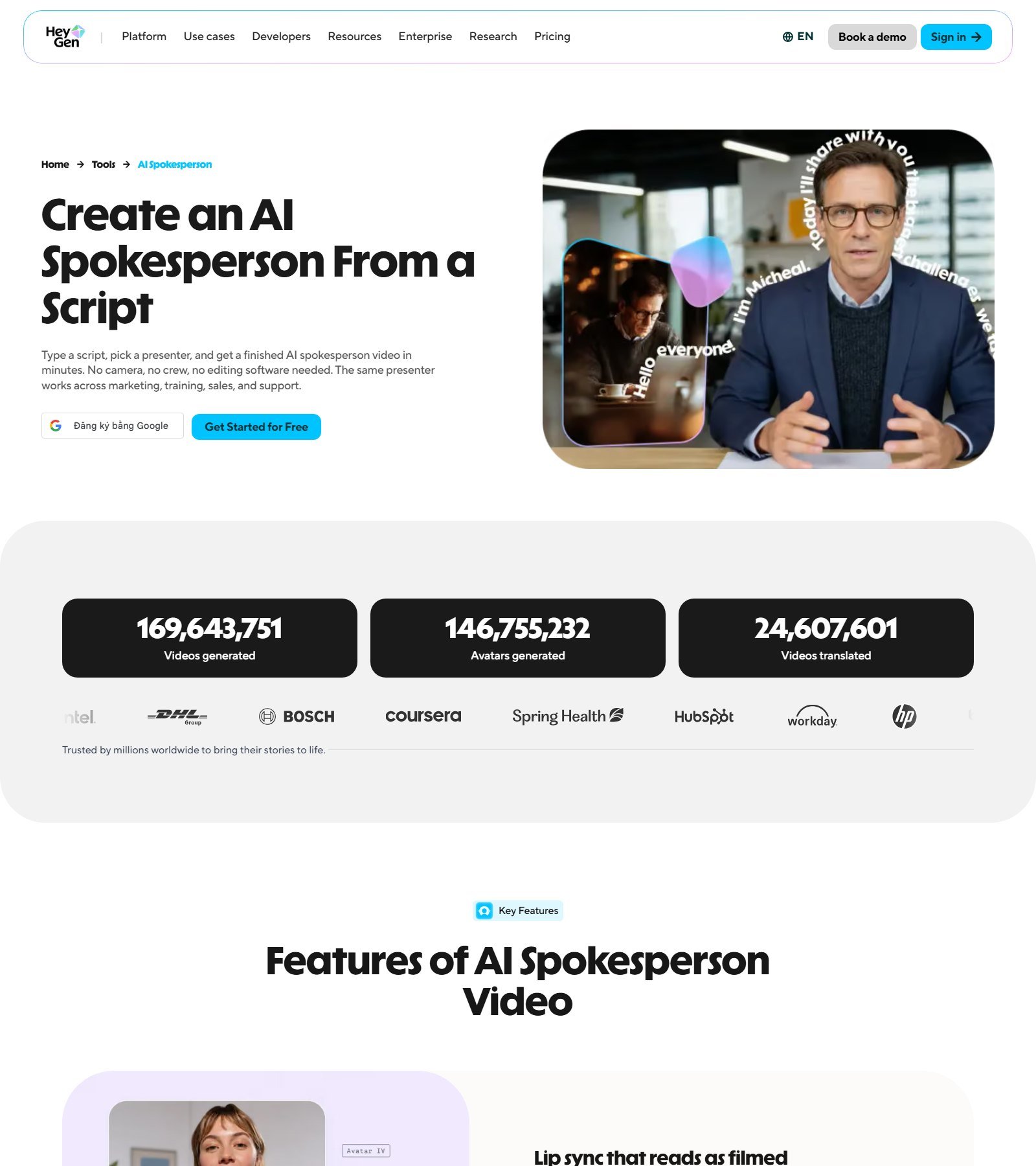
Why it made the list: HeyGen’s pricing page, fetched in English on 5 October 2026, is a full presenter stack. Free includes 3 videos a month, up to 1 minute, Avatar IV, 500+ stock video avatars, 1 custom video avatar, and 30+ languages. Creator is $29/month, or $24/month if you pay annually, with 600 credits, videos up to 30 minutes, 1080p, unlimited photo avatars, voice cloning, and 175+ languages and dialects. Pro is $49/month for 1,000 credits and 4K, plus translation-script proofreading. Business is $149/month plus $20 per extra seat, with SCORM, quizzes, branching, and 5 custom video avatars.
Avatar types: stock video avatars, photo avatars, and custom video avatars are separate rows. Help docs say a photo avatar is animated from a still, while a video avatar learns motion from footage. Digital Twin creation requires a consent video from the same person, read live, under 30 seconds. If the avatar is of someone else, that person records the consent. Screen recordings and an AI avatar reading the consent line are rejected. Photo upload is a different check: a visible face, not that consent script.
Voice and lip sync: the plan table lists 1,000+ AI voices. Voice cloning starts on Creator (one clone on the free column of the comparison, expanded on paid). Lip-sync is part of the product, including a free-plan mention of lip-sync translation as a limited trial. There is no measured accuracy number in this article. Credits are one pool. HeyGen says cost varies by model, duration, and complexity, so a theoretical 1-minute price is not printed. Do not treat 600 HeyGen credits as 600 minutes. LiveAvatar, the real-time product, has its own plans and is not included in these prerecorded quotas.
US access: the English pricing page loaded. A browser from this session was redirected toward a Vietnamese URL, so the screenshot above is the English spokesperson page, not a localized pricing card. Commercial use: Enterprise lists “commercial terms.” Lower-plan commercial rights were not fully quoted here. Best for: teams that want stock, photo, and consent-gated video avatars in one editor. Skip if: you need a published credit-per-minute rate before you buy.
#2 Synthesia: Best for training video with a credit ledger
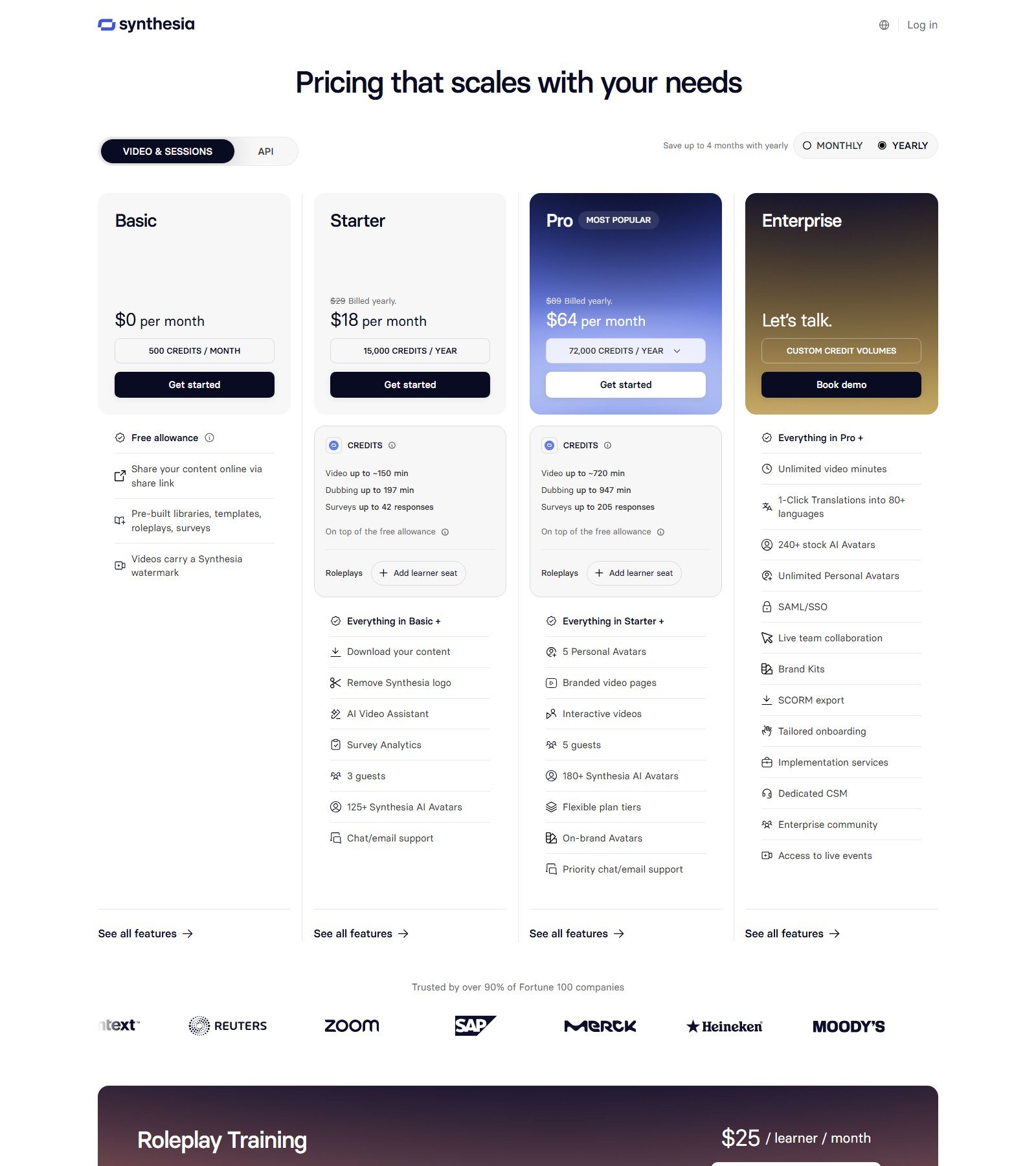
Why it made the list: the yearly pricing screen shows Basic at $0 with a watermark and 500 credits a month; Starter at $18/month billed yearly (the $29 monthly price is struck through) with 15,000 credits a year and video up to about 150 minutes on that yearly pool; Pro at $64/month billed yearly (struck-through $89) with 72,000 credits a year, 5 personal avatars, and interactive videos. Enterprise lists 240+ stock AI avatars, unlimited personal avatars, 1-click translations into 80+ languages, and SCORM export. A separate monthly text extract the same day showed Starter at $29/month billed monthly with 1,250 credits. Use the toggle you are actually looking at.
Avatars: stock presenters scale by plan. The spokesperson page captured the same day advertises 240+ presenters and narration in 140+ languages and accents. The 240+ library matches the Enterprise card, not every paid seat. Personal avatars come from a photo (Express-2, outfits and poses, ready in minutes) or from legacy video footage. Docs require a live consent recording that cannot be uploaded, and the person in the consent clip must be the person in the photo or footage. Voice cloning can be part of that flow; skipping it on a photo avatar means a Synthesia voice. Studio avatars are a different, green-screen product. The pricing FAQ describes Studio Express-1 as a $1,000/year add-on for annual-plan users, with processing up to 10 days.
Credits are not minutes from another vendor. The on-page estimator says video is about 100 credits per minute, with the first 10 minutes included on every plan, and dubbing about 76 credits per minute. Those lines are estimates. “Video up to ~150 min” on the yearly Starter card is the yearly pool, not a monthly cap. Avatar B-roll and AI images are separate from stock media. PowerPoint import is described on the pricing page; the page does not say every animation, font, and transition survives. Best for: L&D teams who will live inside credits, guests, and an enterprise SCORM tier. Skip if: you want a simple minute bundle with no shared credit math.
#3 Colossyan: Best when the course, not the ad, is the product
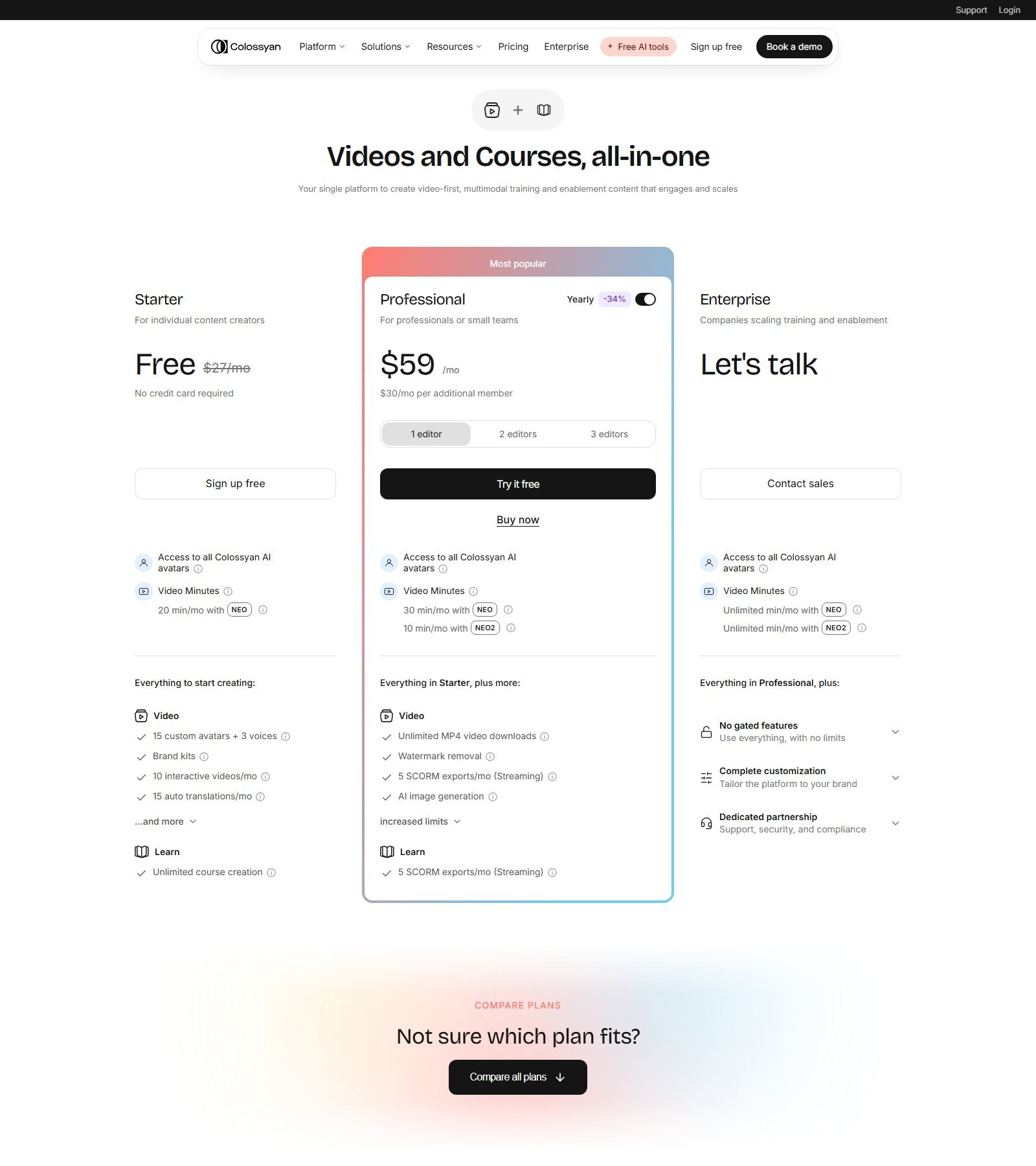
Why it made the list: Starter is free and lists 20 minutes a month with NEO, 15 custom avatars, 3 voices, brand kits, and 10 interactive videos a month. Professional, with the yearly discount switched on, is $59/month and adds 30 NEO minutes, 10 NEO2 minutes, watermark removal, and 5 SCORM exports a month. Extra editors are $30/month. Enterprise removes the minute cap and adds a custom studio avatar. The FAQ says instant custom avatars are included on an active plan, while a professionally filmed studio avatar is a $1,000/year add-on. The compare section of the same pricing page lists 300+ stock avatars, 700+ stock voices, 120+ languages, and PPT/PDF import.
NEO minutes and NEO2 minutes are not interchangeable. A video that uses a NEO2 avatar spends the smaller bucket. Drafts do not spend minutes; deleted renders are not refunded. Annual plans dump the year’s minutes up front. Auto-translations are counted separately (15 a month on Starter, 20 on Professional). The FAQ’s “lip-sync in every language” is a vendor claim, not a score. Conversational avatars are an Enterprise line (1,000 minutes) and should not be confused with the prerecorded course. Best for: a training team that wants quizzes-style interactive video and SCORM without an enterprise contract. Skip if: you need the month-to-month Professional price; that figure was not on the yearly view we captured.
#4 Elai.io: Best for turning slides into a presenter video
Disclosure: Moon Picke may earn a commission if you purchase through links on this page, at no additional cost to you.
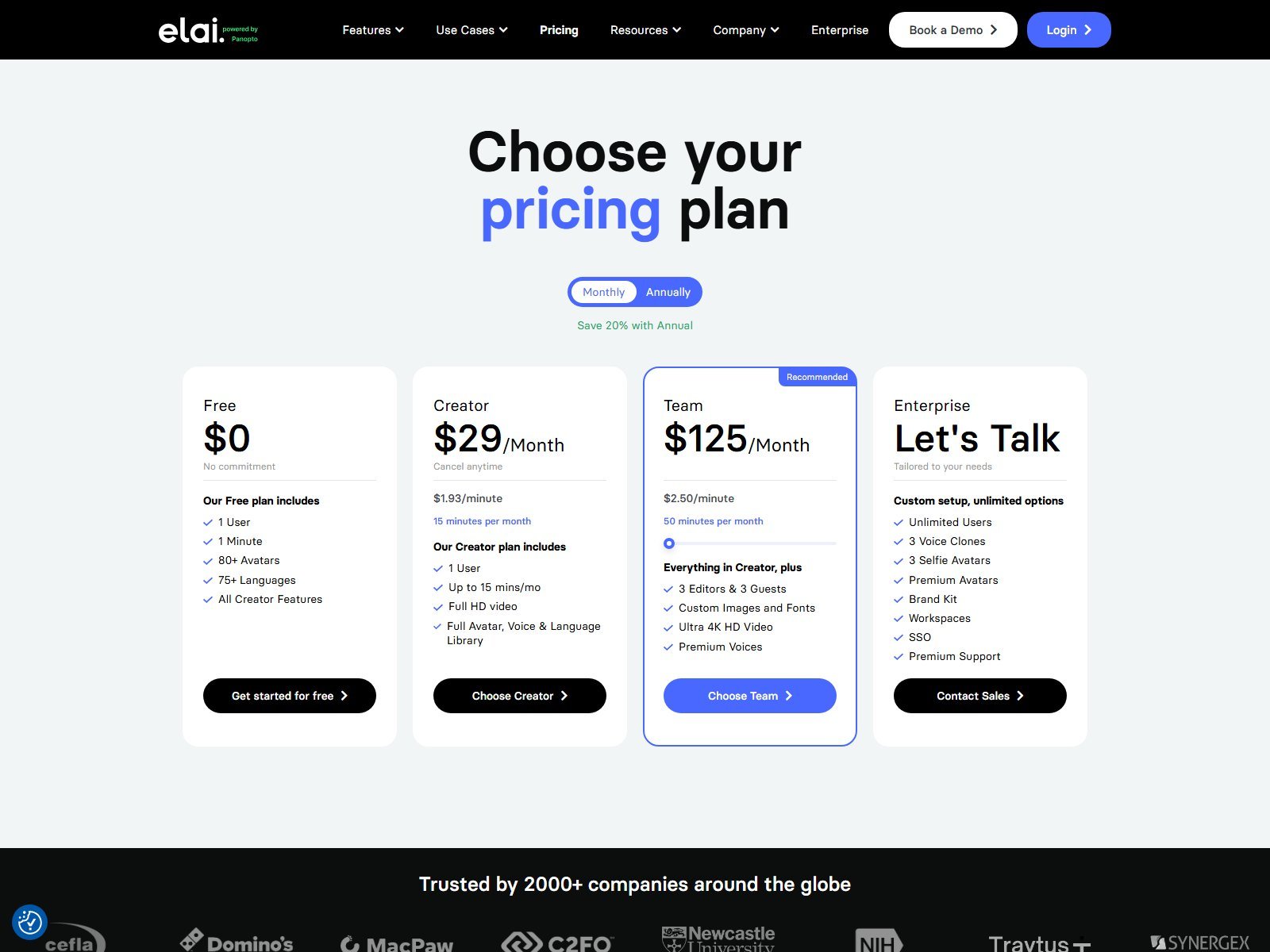
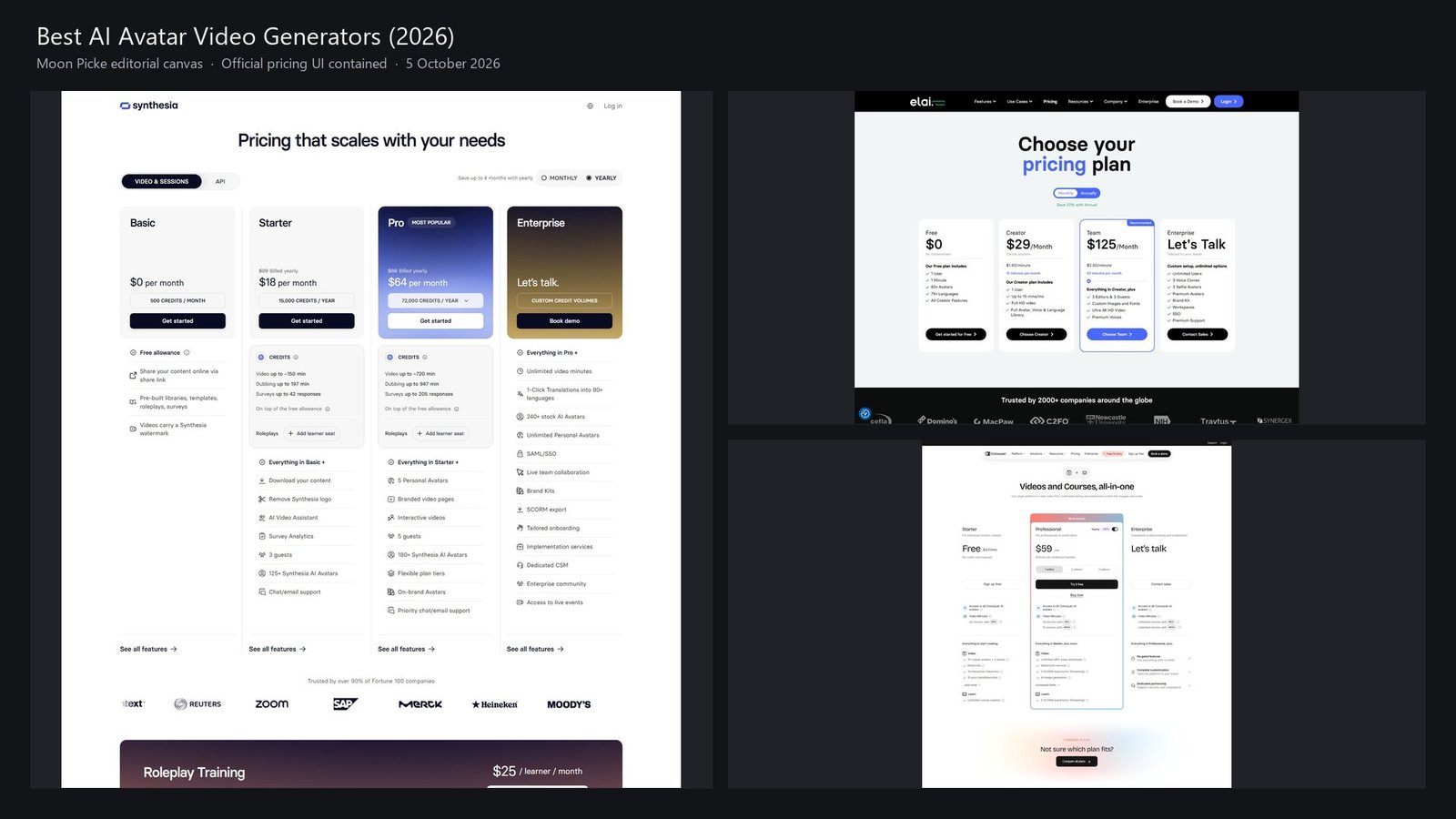
Why it made the list: Elai is a script-and-slide presenter tool, not a UGC actor app. The monthly cards show Free with 1 minute, 80+ avatars, and 75+ languages; Creator at $29/month with 15 minutes, full HD, and the avatar, voice, and language library; Team at $125/month with 50 minutes, 4K, premium voices, 3 editors, and 3 guests. Enterprise adds 3 voice clones, 3 selfie avatars, brand kit, workspaces, SSO, and SCORM. The same page’s text lists Creator at $276 billed annually. A tooltip on the language row says “over 100 languages” while the row label says 75+. This article uses 75+, the label on the card.
Workflow: the how-it-works page has you place an avatar on a slide and type the speech for that slide. The PPT page says you start from a presentation, upload PPTX or PDF, and edit the resulting slides with a presenter, stock media, and music. Import does not mean SmartArt, transitions, and embedded video are preserved. URL-to-video and an AI storyboard from documents are separate rows. Stock media, stock music, and AI images (Team) are not the same as generative B-roll.
Custom likeness: a selfie avatar is footage from a phone or webcam, listed as an add-on on Free and Creator and as one included avatar on Team. Elai’s custom-avatar guide says a teammate’s avatar requires that person’s explicit consent and that staff screen the footage. A voice clone needs about 1–5 minutes of a clean recording and is also an add-on until Team, which includes one. Rendering spends minutes even if you render the same project again. Extra minutes are $2 each on a paid plan. A five-language version is not documented as one free localization; automatic translation is a feature row, and each render can spend minutes. Public API starts on Creator. Branching, buttons, hotspots, and text quizzes are on the matrix; image-based quizzes are marked Enterprise.
US access: the pricing page lists a Pittsburgh address and loaded in this session. The affiliate link https://elai.io/?via=jacky-long returned HTTP 200 and kept via=jacky-long. Best for: turning an existing deck into a narrated presenter video with a minute budget you can read. Skip if: you need SCORM or a brand kit below Enterprise. A longer single-product walkthrough is the published Elai.io review. For a two-vendor look at training features, see Elai.io vs Synthesia.
#5 AI Studios (DeepBrain): Best when dubbing minutes are not avatar minutes
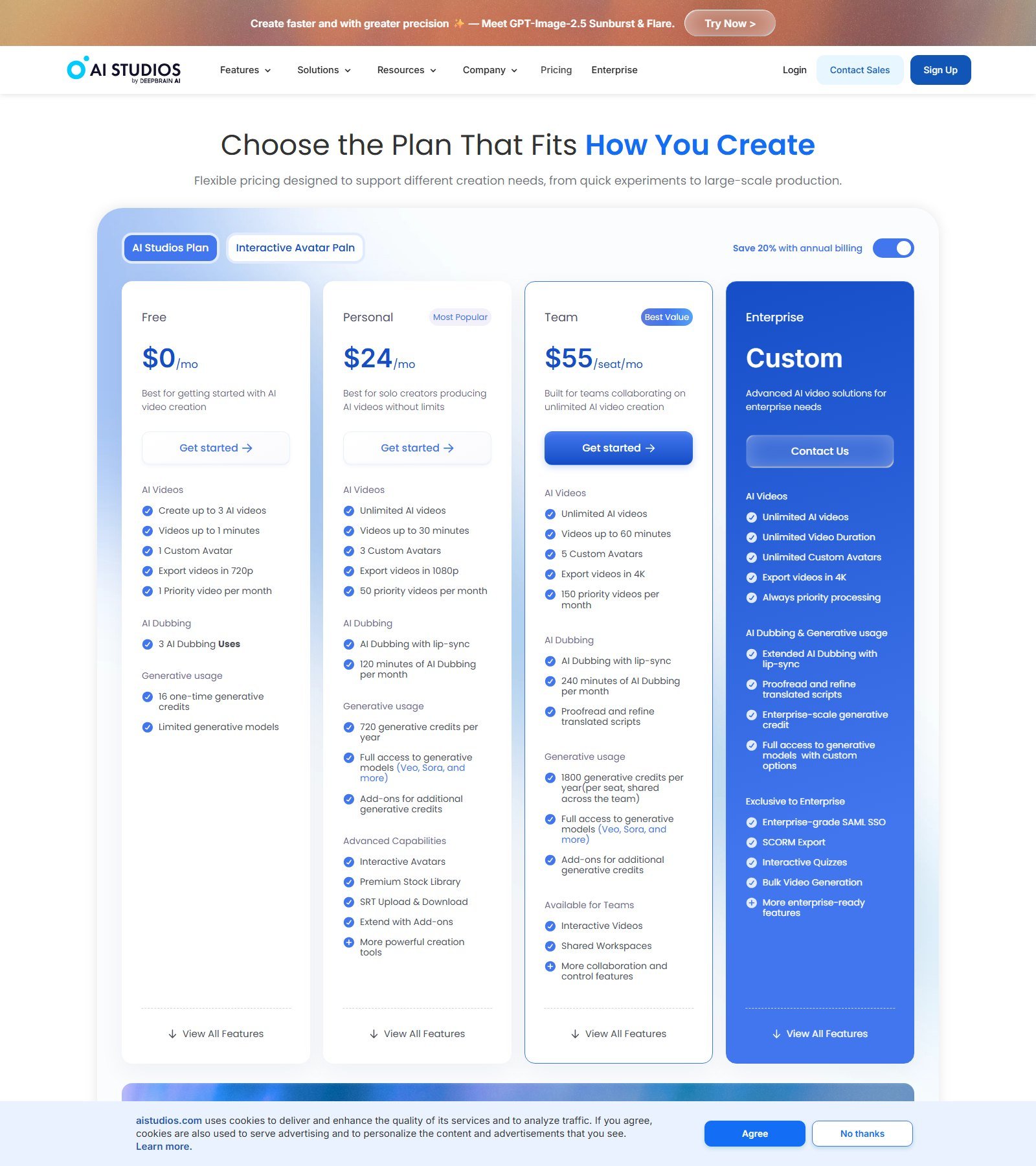
Why it made the list: AI Studios is DeepBrain’s presenter studio, with a Palo Alto address on the pricing page. Free allows 3 videos, up to 1 minute, 1 custom avatar, and 720p. Personal lists unlimited videos up to 30 minutes, 3 custom avatars, 1080p, and 120 minutes of AI dubbing. Team lists 60-minute videos, 5 custom avatars, 4K, and 240 dubbing minutes. Enterprise adds unlimited duration, SCORM, interactive quizzes, and bulk generation. The comparison text separates stock AI avatars (40+ / 100+ / 155+), a 2,000+ “AI generated avatars” row, photo avatars, and custom avatars made from a short video and a voice recording. Full-body, upper-body, and circle framing are a documented view option, not something inferred from a poster. Gesture control and multi-avatar scenes are their own rows.
Languages: voice generation is 30+ on the free column and 150+ on paid columns. Dubbing is listed as 73 languages and dialects. Those numbers are not the same feature. Generative credits (Veo, Sora, and other models) are a third meter for AI images and video, not for the talking presenter itself. One-click translation of scripts and on-screen text is another row. Interactive avatars that answer live are priced apart: a Standard interactive plan on the same site is $99/month for 100 credits, with conversation time billed separately. Do not fold that into the Personal plan’s presenter quota. Commercial use appears as a comparison row; the text extract did not make the checkmarks reliable, so confirm the row for your plan. Best for: a team that will dub existing video and also render new avatar scenes. Skip if: you only want one number called “minutes.”
#6 D-ID: Best small annual plan when photo and video avatars are labeled
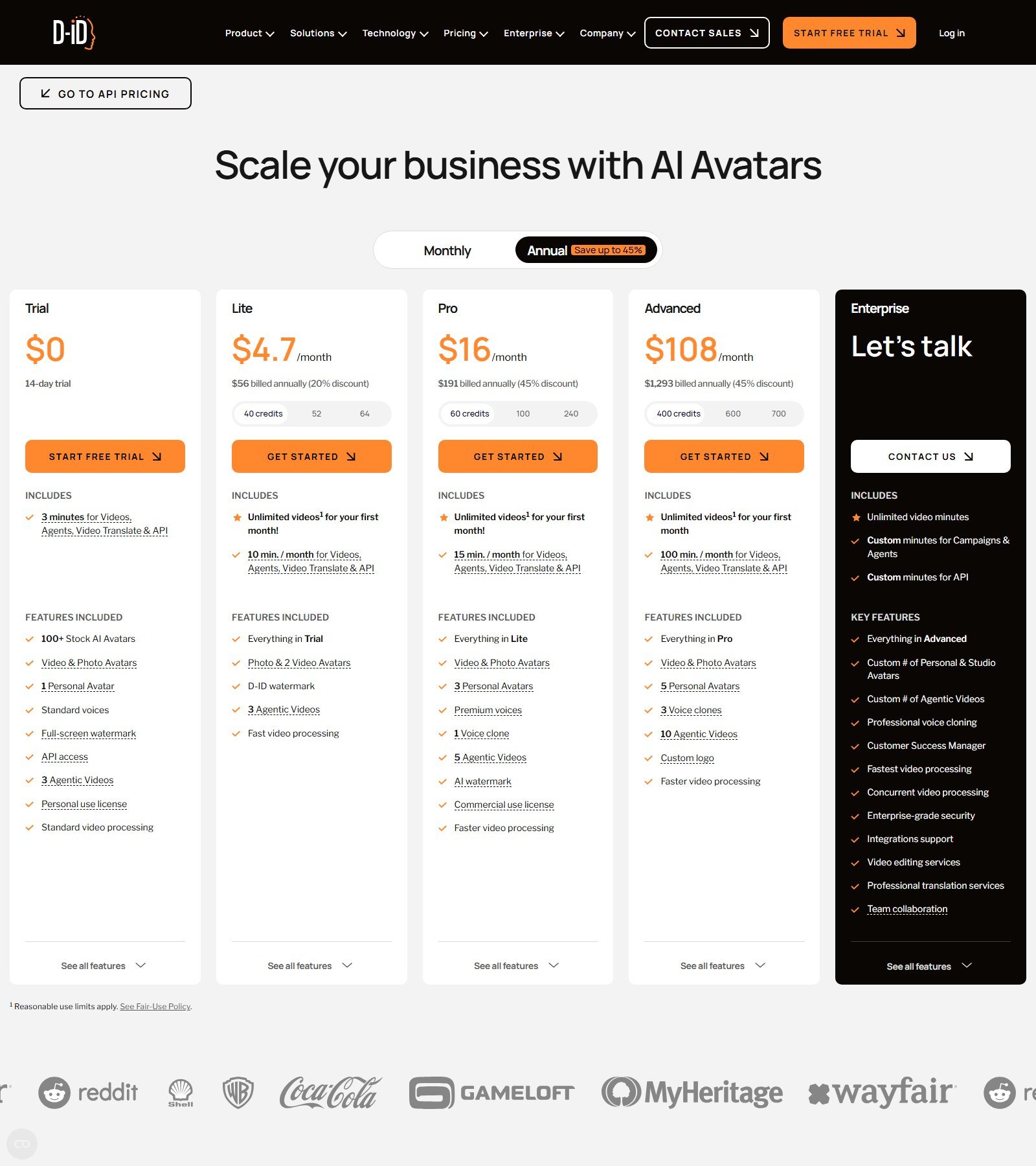
Why it made the list: the annual pricing screen is a real avatar catalog, with a hard limit. Trial is $0 for 14 days: 3 minutes shared by videos, agents, video translate, and API; 100+ stock avatars; video and photo avatars; 1 personal avatar; a full-screen watermark; and a personal-use license. Lite is $4.70/month, $56 billed annually, with 10 minutes a month, photo avatars plus 2 video avatars, and a D-ID watermark. Pro is $16/month, $191 billed annually, with 15 minutes, 3 premium avatars, and 1 voice clone. Advanced is $108/month, $1,293 billed annually, with 100 minutes, 5 personal avatars, and 3 voice clones. Minutes renew monthly and do not roll over. A 1-minute-10-second clip is billed as 1 minute 15 seconds.
Photo avatars and video avatars are named separately. A photo that talks is not a footage-trained custom avatar. Agents and real-time conversation sit in the same minute pool but are not the prerecorded training workflow this article ranks. Language counts were not on these cards. Export resolution was not on these cards. Best for: a short spoken clip when the annual Lite price is the constraint and a watermark is acceptable. Skip if: you need SCORM, slide import, or a documented language list before you pay.
Best for training, enterprise, and custom avatars
Training: Synthesia and Colossyan print the L&D extras — credits or minutes, guests or editors, and SCORM at a named tier. HeyGen puts quizzes, branching, and SCORM on Business, not on Creator. Elai’s quizzes and branching show up earlier than its SCORM export.
Enterprise: Synthesia, Colossyan, HeyGen Business, Elai Enterprise, and AI Studios Enterprise are the rows with SSO, seats, or SCORM. None of those contracts was quoted in full.
Custom avatar: HeyGen and Synthesia publish consent steps. Colossyan includes instant custom slots and prices a studio avatar at $1,000 a year. Elai sells selfie avatars as an add-on until Team. D-ID includes one personal avatar on the trial and then meters premium and personal slots by plan. A photo avatar is never described here as a studio twin.
Best for localization, API, beginners, and budget
Localization: HeyGen’s paid language suite is 175+ languages and dialects, and Pro adds translation-script editing. Synthesia prices dubbing in credits, separate from “make a new video in another language.” Colossyan counts auto-translations. AI Studios caps dubbing minutes and lists 73 dubbing languages against a larger TTS list. Elai’s automatic translation row is not a second language total.
API: Colossyan prints 360 API minutes a year on Professional. Elai’s public API starts on Creator. D-ID draws API use from the same minutes. HeyGen’s captured Business card lists automation integrations, not a credit price for a public API.
Beginners: HeyGen’s 3 free videos, Colossyan’s free Starter, or Elai’s 1 free minute. Synthesia Basic can create watermarked video; treat download rights as a paid feature because the yearly Starter card is where “download your content” appears.
Budget: D-ID Lite at $56 a year is the lowest printed annual entry. It buys about 10 minutes a month, not a training library. Elai Creator at $29/month is 15 rendered minutes. Those minutes are not HeyGen credits and not Synthesia credits.
Pricing and value
Pricing, generation minutes, avatar features and localization limits were checked on 5 October 2026 and may change. Check each provider’s current plans before purchasing.
Moon Picke calculation, only where the meter is minutes. Colossyan: a 1-minute NEO video spends 1 NEO minute; a 5-minute NEO lesson spends 5. Professional’s 30 NEO minutes are about six 5-minute lessons if you never touch NEO2. Elai: a 1-minute render spends 1 minute; Creator’s 15 minutes are fifteen 1-minute renders or three 5-minute renders, and a re-render spends the minutes again. Extra minutes are $2, so a sixth 5-minute render after the 15 are gone is about $10 before you count failed takes. D-ID Lite’s 10 minutes are the whole month for video, translate, agents, and API together. A 5-language pack is not assumed to be free on any of these plans.
HeyGen and Synthesia are credit systems. HeyGen does not print one credit cost per second on the page we used. Synthesia’s estimator is about 100 credits per video minute and 76 per dubbing minute. On that estimator, yearly Starter’s 15,000 credits are about 150 video minutes for the year, which matches the “~150 min” line on the card — if you spend the pool only on that video rate and ignore dubbing, surveys, and the separate “first 10 minutes included” note. That estimate is not the cost of a finished course.
How to choose an AI avatar video generator
If the work is a localized spokesperson video and you can live with credits, start with HeyGen’s Creator card and read the consent rules before you film anyone. If the work is a governed training catalog, price Synthesia’s yearly credits and Colossyan’s NEO minutes side by side, then check which one actually includes SCORM at the tier you will buy. If the source is already a PowerPoint, Elai’s import path is the one documented in public. If you will dub an existing recording and also generate a new presenter, use AI Studios only after you separate dubbing minutes from generative credits. If the job is a watermarked clip under 10 minutes a month, D-ID’s annual Lite card is the cheap door, not the training platform. If the job is a creator-style product ad, leave this list for the UGC guide.
How to create an AI presenter video
Write the spoken script first, including names the voice must pronounce. Pick a stock or custom avatar only after you have permission to use that face. Choose the voice and language, then set a pronunciation entry if the product has one. Add slides or scenes and your own media. Stock clips, AI images, and generative video are different controls. Preview, fix captions, and localize only after the source script is right. Check whether the extra language spends another minute or credit. A person should still approve claims before export.
Custom avatars, voice cloning, and consent
HeyGen requires a matching consent video for a video Digital Twin. Synthesia requires a live consent recording for a personal avatar and lets the avatar owner ask for deletion. Elai says custom footage needs the subject’s explicit consent and is reviewed before it is available only on that account. Voice cloning is a second permission: a cloned voice is not included just because a face was uploaded. Do not build an avatar of an executive, employee, or customer who has not agreed. Do not use these tools for fake testimonials, fake celebrity endorsements, or messages that pretend a real person said something they did not say. This is not legal advice. Read the current consent screen and the current terms before you record anyone.
What AI avatars still get wrong
These are known failure modes, not measured rates. Gestures can loop. Photo avatars can invent awkward hands. Names and mixed-language scripts are mispronounced. Lip sync can slip on fast speech; Synthesia’s photo-avatar doc says closer framing helps, which is guidance, not a score. A bad render still spends minutes or credits. Enterprise features such as SCORM are often gated. Real-time avatars are a different bill.
FAQ
What is the best AI avatar video generator?
For a US buyer who wants stock avatars, a photo avatar, a consent-gated video avatar, and a large paid language list in one product, HeyGen is the overall pick in this pass. Synthesia is the pick when training credits, guests, and enterprise SCORM matter more. There is no measured “most realistic” winner here.
What is an AI avatar video generator?
It is software that turns a script into a video of a digital presenter speaking that script, with a generated or uploaded voice and animated lip movement. Slides, captions, and translation may be included. A Ken Burns zoom and a cinematic text-to-video clip are different products.
What is the difference between a stock avatar and a custom avatar?
A stock avatar is the vendor’s presenter. A custom avatar is built from one person’s photo or video for that account. A photo avatar is not automatically a high-fidelity twin of someone’s gestures. Digital twin is a provider-specific label, used in HeyGen and Synthesia docs for particular creation flows.
Can I create an AI avatar of myself?
Yes on the platforms that publish a personal or selfie flow, and they ask for your consent. HeyGen and Synthesia require a consent recording for video or personal avatars. Creating an avatar of someone else requires that person’s participation. Do not bypass those checks.
Can AI avatars speak multiple languages?
HeyGen lists 175+ languages and dialects on paid plans and 30+ on free. The Synthesia spokesperson page captured for this article says 140+ languages and accents, while the Enterprise pricing card says 1-click translations into 80+ languages. Colossyan’s pricing FAQ says 120+. Elai’s plan card says 75+. AI Studios lists 150+ for voices and 73 for dubbing. Those are not one shared number.
Which tool is best for training videos?
Synthesia and Colossyan document SCORM, seats, and course-style interactivity at named tiers. HeyGen’s SCORM and quizzes start on Business. Elai’s in-player branching is broader than its SCORM access, which is Enterprise.
Can these tools translate an existing video?
Sometimes, and it is not the same as rendering a new avatar video in another language. Synthesia and AI Studios meter dubbing separately. D-ID puts video translate in the same minute pool as new videos. HeyGen lists translation inside its language suite and adds script editing on Pro. Check the line you will actually be billed on.
How much do AI avatar video generators cost?
On 5 October 2026, published entry prices included HeyGen Creator at $29/month ($24/month billed annually), Synthesia Starter at $18/month billed yearly, Colossyan Professional at $59/month on the yearly toggle, Elai Creator at $29/month, AI Studios Personal at $24/month on a page with an annual-savings control, and D-ID Lite at $4.70/month ($56 billed annually). Free tiers exist, and they are watermarked or minute-capped. Custom studio avatars at Synthesia and Colossyan are about $1,000 a year on top.
Can the videos be used commercially?
D-ID’s trial card says personal use. Elai, HeyGen, Synthesia, Colossyan, and AI Studios publish commercial or enterprise terms at some tier, but this article does not grant “full ownership” or “copyright-free” output. You also do not own a stock avatar’s likeness. Read the current license for avatars, voices, stock media, and music.
Do I need consent for a custom avatar?
Yes where the provider documents it. HeyGen, Synthesia, and Elai each describe consent from the real person. Voice cloning needs its own recording and permission. Consent screens are not optional instructions to work around.
Final verdict
Buy an avatar platform when a person on screen has to say a script you can edit later. Use HeyGen when the mix of stock, photo, and consent-gated video avatars plus a 175-language paid suite is the reason to pay. Use Synthesia when the yearly credit card, personal-avatar consent, and enterprise SCORM match a training org. Use Colossyan when NEO minutes, interactive videos, and a free start are enough. Use Elai when the source is a deck and you want minutes, not an opaque credit. Use AI Studios when dubbing minutes must stay visible next to new avatar scenes. Use D-ID when a short, clearly labeled photo or video avatar on a small annual plan is the whole job.
Fliki stays off this ranking: it is a broader voice and content-to-video product, and a dedicated avatar URL did not resolve as a current product page in this pass. TheInfluencer.ai stays off because it is a virtual-influencer product. Talking-photo apps that only move a mouth, and generative video models that invent a scene from a prompt, answer different questions. Check the monthly or yearly toggle before you pay.