
How to Choose a Dedicated Server: CPU, RAM, Storage & Bandwidth
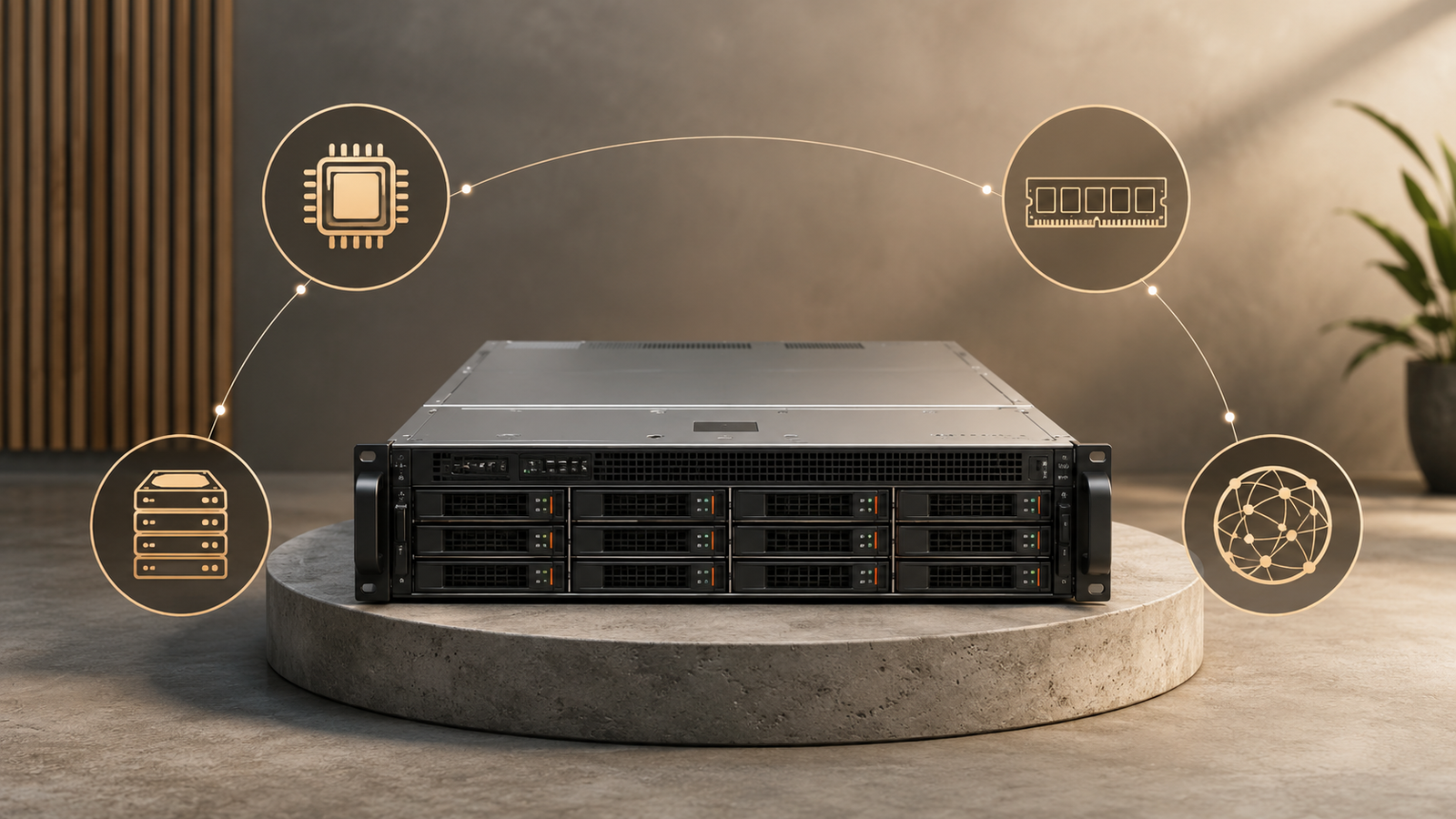
Choosing between a VPS and a dedicated server sounds straightforward until you start comparing actual hosting plans.
A VPS is cheaper. A dedicated server gives you the entire physical machine. So the natural conclusion is that a dedicated server must be the better choice once your website or application becomes “serious.”
That is not always true.
For many workloads, a properly sized VPS can remain the more efficient option for years. For others, moving to dedicated hardware can solve problems that simply buying a larger VPS will not.
The decision comes down to more than traffic or raw server specifications. You need to consider resource requirements, performance consistency, storage behavior, control, scalability, management responsibility, and total operating cost.
The useful question is therefore not:
Which one is more powerful?
It is:
When does paying for an entire physical server actually make sense for your workload?
This guide breaks down the practical differences between VPS and dedicated servers and gives you a framework for deciding when—or whether—you should upgrade.
Dedicated Server vs VPS: The Quick Answer
A VPS is usually the better starting point when you need affordable, scalable infrastructure without requiring an entire physical machine.
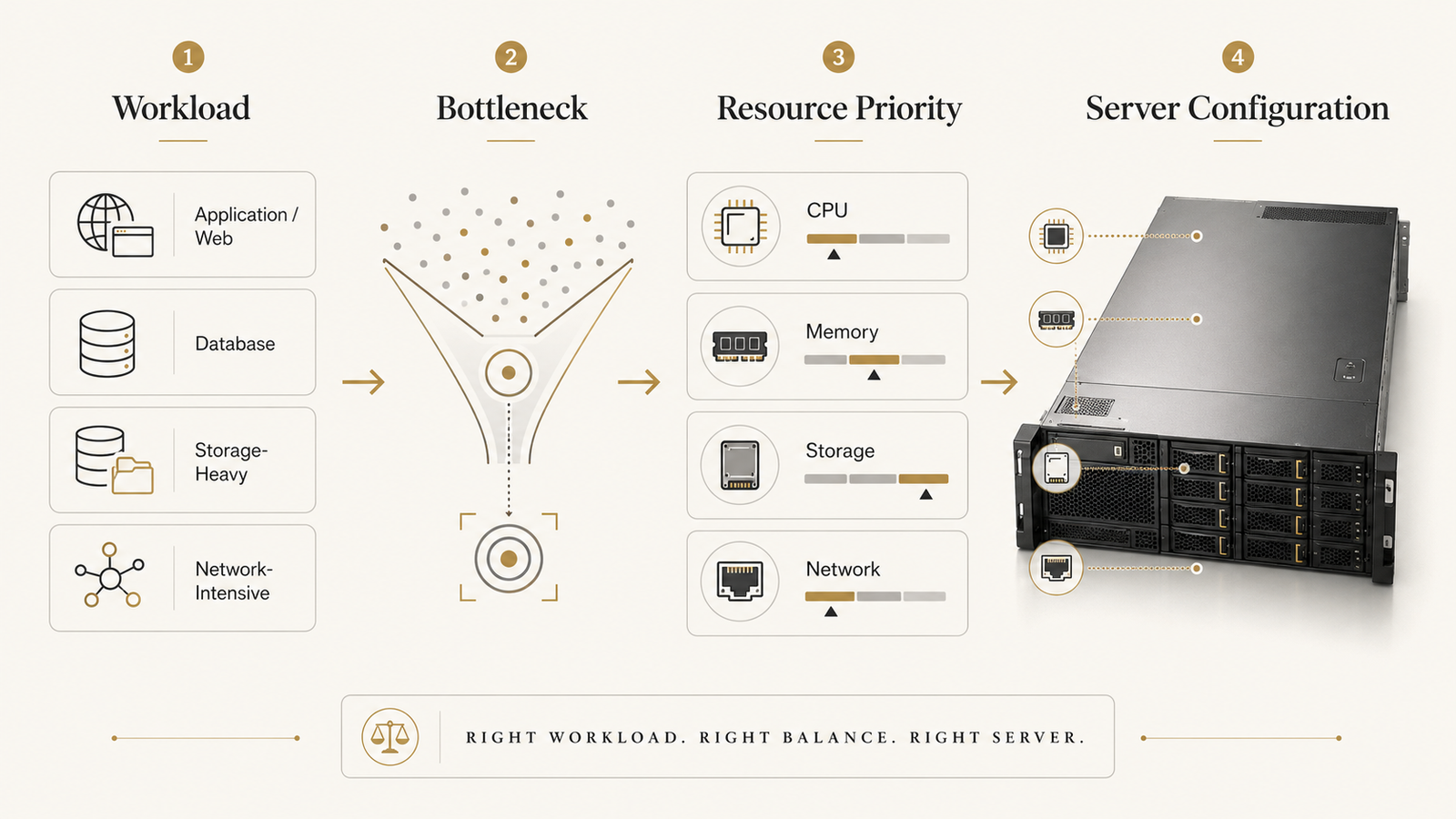
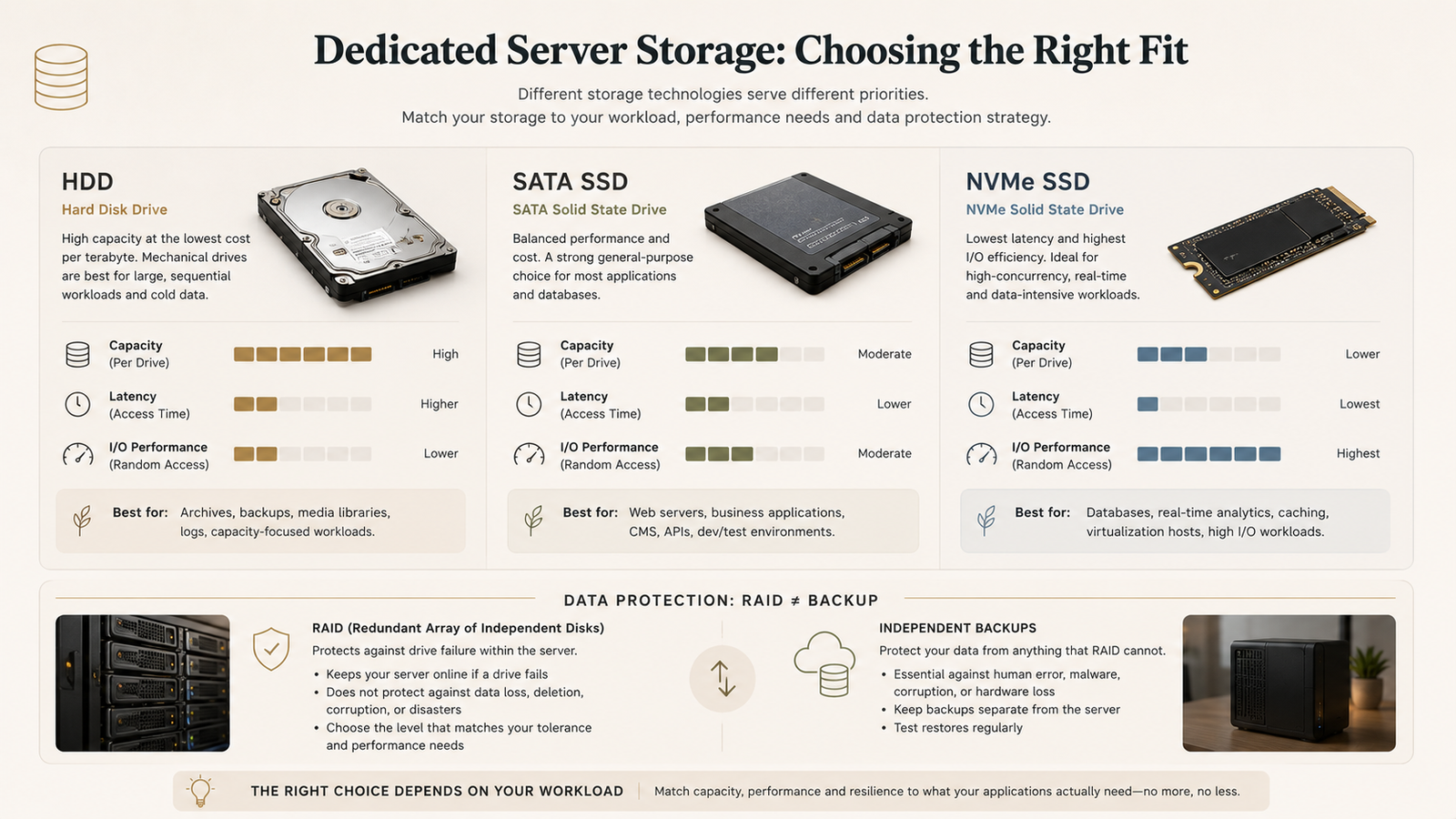
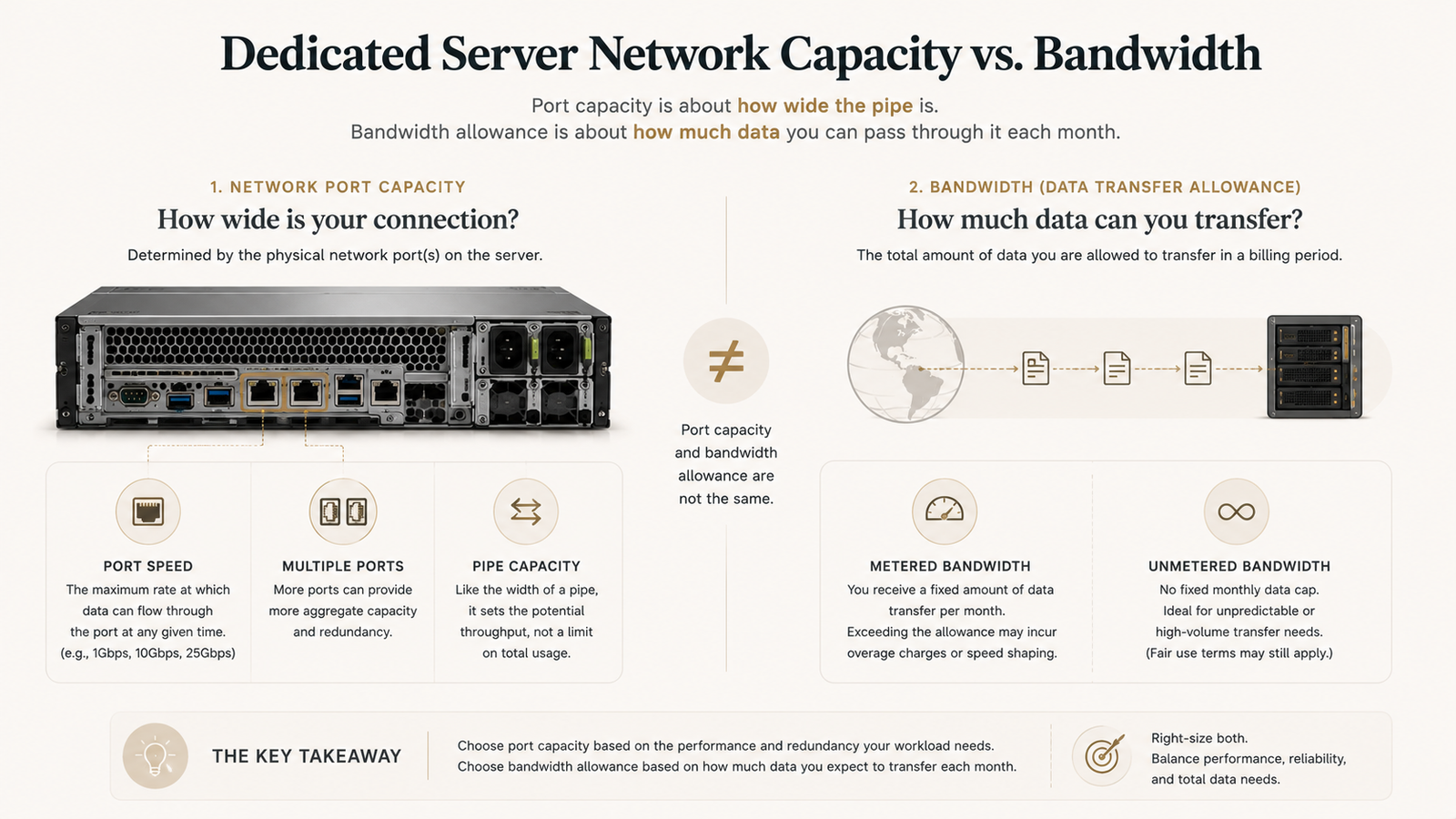
Storage is another important factor when deciding how to choose a dedicated server for databases and I/O-heavy applications.
A dedicated server begins to make more sense when your workload consistently needs substantial resources, stronger performance isolation, specific hardware characteristics, predictable storage or network behavior, or greater control over the underlying machine.
| VPS | Dedicated Server | |
|---|---|---|
| Hardware | Physical server shared through virtualization | Entire physical machine assigned to you |
| Resource isolation | Allocated virtual resources | Physical resources dedicated to one customer |
| Starting cost | Usually lower | Usually higher |
| Scaling | Often easier and faster | Usually requires hardware change or another server |
| Performance consistency | Depends partly on virtualization and provider design | Greater control over underlying hardware |
| Customization | High on many VPS plans | Very high |
| Root access | Often available | Normally available on unmanaged servers |
| Physical isolation | No | Yes |
| Management complexity | Varies | Often higher |
| Best for | Small-to-medium workloads, development, growing applications | Sustained workloads, resource-heavy applications, specialized infrastructure |
There is no universal traffic threshold where a VPS suddenly becomes inadequate.
A site with 500,000 monthly visitors might run comfortably on a VPS if the application is efficient and heavily cached. Another application with only a fraction of that traffic might benefit from dedicated hardware because it performs heavy database operations, video processing, large data transfers, or constant background computation.
Choose infrastructure based on workload behavior—not traffic count alone.
What Is the Actual Difference Between a VPS and a Dedicated Server?
The main difference is not simply “small server versus big server.”
It is how the physical hardware is allocated.
How a VPS works
A Virtual Private Server is created by dividing a physical server into multiple virtual environments using a hypervisor or another virtualization layer.
Each VPS behaves like an independent server.
Depending on the plan, you may receive allocated:
- virtual CPU resources
- RAM
- storage
- network capacity
- operating-system access
You can often install your own software, configure services, create databases, run containers, and obtain root or administrator access.
But beneath that virtual environment, other customers may still be using the same physical host.
A well-designed virtualization platform can provide strong isolation between those environments, which is why VPS hosting can support surprisingly demanding workloads.
How a dedicated server works
With a dedicated server, the entire physical machine is assigned to one customer.
If the machine contains:
- 16 CPU cores
- 128GB RAM
- two SSDs
- a dedicated network allocation
those physical resources are not being divided among several unrelated VPS customers.
You control the server operating environment subject to the provider’s network and service policies.
That can be valuable when your application needs consistent access to the underlying hardware or when you want greater control over storage, networking, virtualization, or operating-system configuration.
Why the architecture matters
The VPS model optimizes resource efficiency.
The dedicated model optimizes resource control and physical isolation.
That does not automatically make either architecture faster.
A modern VPS running on high-end NVMe storage and current-generation CPUs can outperform an inexpensive dedicated server built around much older hardware.
This is why comparing only labels is misleading.
“Dedicated” describes how hardware is allocated. It does not guarantee that the hardware itself is faster.
The actual CPU generation, storage subsystem, memory, network configuration, provider infrastructure, and workload all still matter.
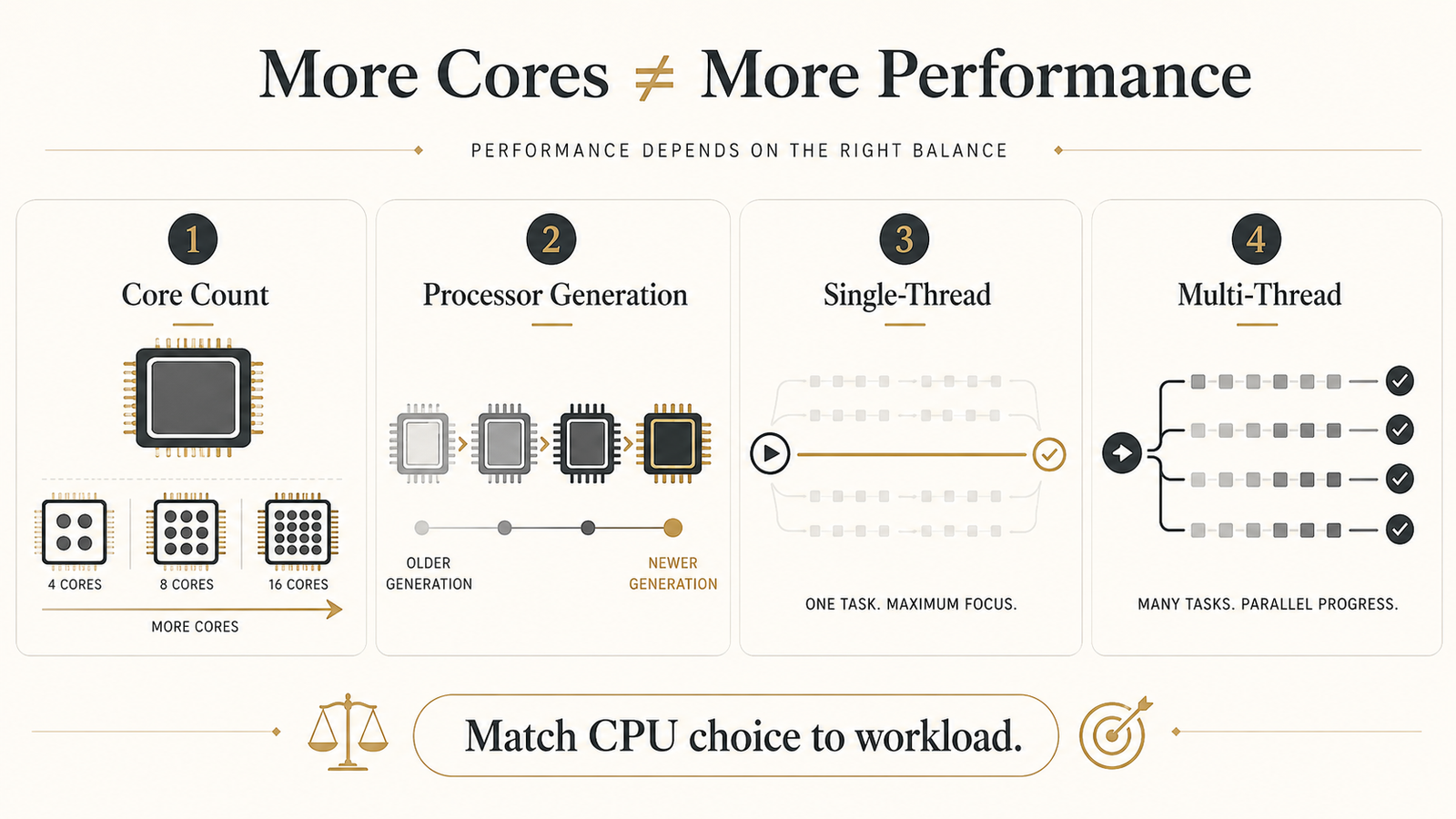
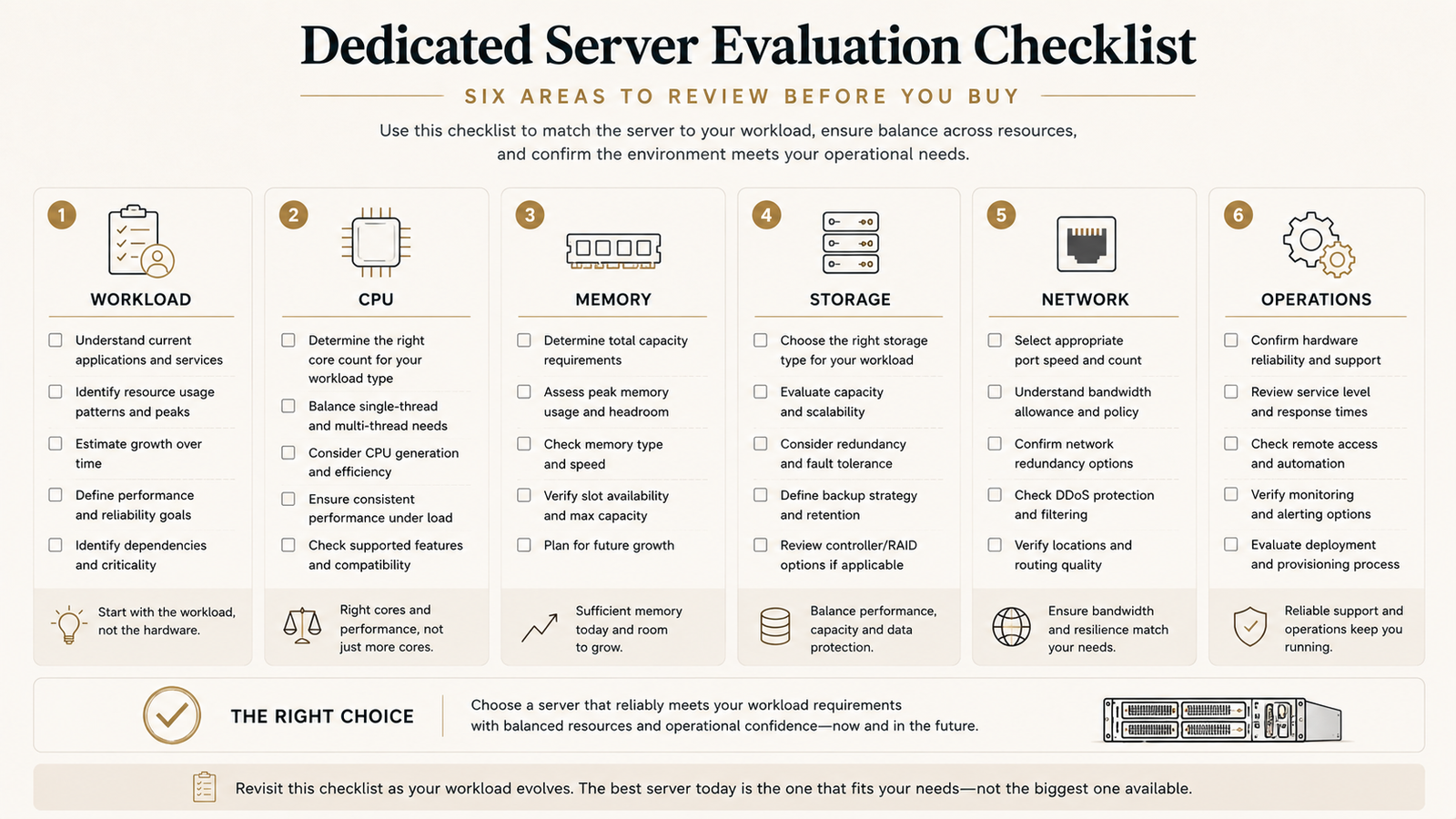
Understanding CPU requirements is a major part of learning how to choose a dedicated server for a specific workload.
Performance: Dedicated Servers Offer More Control, but VPS Can Be Enough
Performance is probably the most common reason people consider moving from VPS to dedicated infrastructure.
But performance needs to be broken into several components.
CPU and memory
A VPS gives you virtualized access to processor and memory resources.
Providers may offer dedicated vCPU allocations, shared CPU plans, burstable resources, or other models. The practical performance therefore depends on the specific VPS product rather than the word “VPS” itself.
Dedicated hardware gives you control over the machine’s physical CPU and RAM.
This becomes useful when workloads run close to capacity for extended periods.
Examples include:
- large databases
- continuous data processing
- high-volume application servers
- virtualization hosts
- CI/CD workloads
- encoding or transcoding
- game servers
- large ecommerce platforms
- computational workloads
For a typical business website running at modest utilization, however, much of that dedicated capacity could remain unused.
Paying for idle physical resources is not automatically an upgrade.
Storage I/O
Storage is another area where server labels can be misleading.
A VPS using fast enterprise NVMe storage can deliver excellent I/O performance.
A dedicated server using older SATA SSDs or hard drives may be slower for certain storage-intensive tasks.
What dedicated hardware gives you is greater visibility and control.
Depending on the provider and configuration, you may be able to choose:
- SSD versus NVMe
- RAID configuration
- number of drives
- storage capacity
- filesystem
- caching strategy
For databases or applications with sustained disk activity, that control can become more important than headline CPU specifications.
Performance consistency matters more than peak speed
This is one of the most important distinctions in the VPS-versus-dedicated discussion.
Suppose a VPS produces excellent benchmark results at 3 a.m. but becomes less predictable during periods of high host utilization.
For a hobby project, that might not matter.
For a latency-sensitive commercial application, consistency may matter far more than the fastest benchmark result.
Dedicated infrastructure gives you more control over the hardware environment, which can reduce some sources of variability.
But that still does not eliminate:
- network congestion
- application bottlenecks
- database problems
- poor configuration
- software bugs
- external API latency
A dedicated server cannot compensate for an inefficient application architecture.
Consistent infrastructure is valuable, but infrastructure is only one part of performance.
Cost: What Are You Actually Paying For?
The obvious disadvantage of dedicated servers is cost.
But comparing only the advertised monthly price misses part of the picture.
Why VPS usually starts cheaper
Virtualization allows providers to divide expensive physical infrastructure efficiently among multiple customers.
That makes it possible to offer relatively small resource allocations at low prices.
If your application requires only:
- 4 vCPUs
- 8GB RAM
- moderate SSD storage
renting an entire physical machine would often be unnecessary.
You would be paying for resources you do not use.
Why dedicated servers cost more
With dedicated hosting, one customer occupies the physical server.
The cost therefore reflects more of the underlying:
- processor
- memory
- storage
- chassis
- rack space
- power
- cooling
- networking
- hardware maintenance
Older-generation dedicated servers can still be surprisingly affordable, but low price alone does not establish good value.
A cheap older CPU with 128GB RAM could be perfect for one workload and a poor choice for another.
Compare the actual hardware against the application’s requirements, not simply dollars per gigabyte of RAM.
The hidden cost: management
The server bill may not be the largest difference.
Management can be.
A VPS can be:
- managed
- unmanaged
- semi-managed
A dedicated server can also be:
- managed
- unmanaged
- semi-managed
If you choose unmanaged infrastructure, someone needs to handle:
- updates
- security
- monitoring
- backups
- firewall configuration
- application deployment
- incident response
- troubleshooting
That person might be you, an employee, a contractor, or a managed-service provider.
Their time has a cost.
A $100 unmanaged dedicated server is not necessarily cheaper than a $150 managed VPS once administration time is included.
Scalability: VPS Usually Has the Flexibility Advantage
Dedicated servers offer substantial capacity, but VPS infrastructure often wins when rapid scaling is the priority.
Scaling a VPS
Depending on the provider, increasing a VPS from:
8GB RAM → 16GB → 32GB
may require little more than changing a plan and rebooting the instance.
Some platforms make it possible to deploy additional virtual machines almost immediately.
That flexibility is one reason VPS and cloud environments are popular for rapidly changing applications.
Scaling dedicated hardware
A physical server has physical limits.
Once the installed RAM, storage, CPU capability, or network configuration becomes insufficient, scaling may require:
- upgrading components
- migrating to another machine
- adding another dedicated server
- redesigning parts of the infrastructure
Providers with ready inventory can make the migration much faster, but you are still dealing with physical machines.
Vertical vs horizontal scaling
Vertical scaling means giving one server more resources.
For example:
16GB RAM → 64GB RAM.
Horizontal scaling means adding more servers and distributing the workload.
Dedicated infrastructure can support both approaches, but many applications eventually benefit from horizontal architecture regardless of server type.
That means moving to one enormous dedicated server is not always the best scaling strategy.
Sometimes two or three appropriately sized instances are more resilient than one extremely powerful machine.
Security and Isolation: Physical Isolation Is Not the Whole Story
Dedicated servers have a clear physical-isolation advantage.
But security is more complicated than physical isolation alone.
VPS isolation
Modern virtualization platforms are designed to separate virtual machines from one another.
A properly implemented VPS environment can provide strong isolation suitable for many business applications.
The fact that several customers share one physical host does not mean they share operating systems, files, passwords, or application environments.
Dedicated physical isolation
A dedicated server removes the unrelated tenant layer at the physical-machine level.
You control the entire server.
That can matter for:
- specific compliance requirements
- specialized security policies
- custom virtualization
- sensitive workloads
- organizations requiring tighter infrastructure control
But dedicated hardware does not automatically create a secure environment.
Security still depends on configuration
An unpatched dedicated server with an exposed management interface can be far less secure than a properly maintained VPS.
Security still depends on:
- operating-system updates
- access control
- SSH configuration
- firewall rules
- application security
- malware protection
- credential management
- backup strategy
- monitoring
- incident response
Physical isolation is one security layer—not a complete security strategy.
Control and Customization
Dedicated servers generally offer the greatest infrastructure control.
Depending on the provider, you may be able to control or select:
- operating system
- storage layout
- RAID
- kernel configuration
- virtualization stack
- firewall
- network services
- databases
- application runtime
- containers
Some VPS providers offer nearly the same software-level control.
The important difference is what happens underneath.
With a VPS, the physical host and virtualization platform remain under the provider’s control.
With a dedicated machine, you usually have much greater control over the complete operating environment above the physical hardware.
That difference matters to infrastructure engineers.
It may matter very little to someone hosting a typical WordPress site.
Management: VPS vs Dedicated Is Not the Same as Managed vs Unmanaged
This distinction causes a lot of confusion.
VPS versus dedicated describes infrastructure.
Managed versus unmanaged describes responsibility.
They are separate decisions.
You can buy:
- a managed VPS
- an unmanaged VPS
- a managed dedicated server
- an unmanaged dedicated server
A managed dedicated server may actually require less day-to-day technical work from you than an unmanaged VPS.
Before buying any server, ask what the provider actually manages.
Does support handle:
- operating-system updates?
- security patches?
- control-panel configuration?
- web-server tuning?
- database troubleshooting?
- backups?
- application problems?
- malware cleanup?
Never assume those services are included because a hosting plan is expensive.
When a VPS Makes More Sense
A VPS is often the better choice when:
Your workload fits comfortably inside the VPS
If CPU, RAM, storage, and network utilization remain comfortably within your allocation, there may be no practical reason to move.
You are still growing
VPS infrastructure lets you avoid paying for large amounts of unused capacity too early.
Your resource requirements change frequently
Applications with uncertain or rapidly changing demand may benefit from flexible virtual infrastructure.
You need several smaller environments
Development, staging, testing, and production environments are often easier to separate into multiple virtual machines.
Operational simplicity matters
A VPS or cloud platform may be easier to replace, resize, clone, or automate than a physical server.
Your problem is not actually infrastructure
If poor performance comes from:
- slow database queries
- inefficient code
- unoptimized images
- excessive plugins
- bad caching
- external API latency
moving to dedicated hardware may simply make an inefficient application more expensive.
When a Dedicated Server Starts to Make Sense
Dedicated infrastructure becomes more compelling when one or more of the following conditions persist.
You consistently use substantial resources
If your application spends most of its time near the limits of a large VPS, buying access to an entire machine may become economically reasonable.
Performance consistency has business value
Applications with sustained CPU, storage, or latency-sensitive workloads can benefit from greater infrastructure isolation.
You need specialized hardware
Dedicated servers can provide configurations difficult to reproduce economically in small VPS plans.
You need substantial RAM or storage
Large databases, storage workloads, virtualization platforms, and similar use cases may favor physical machines.
You need deeper infrastructure control
If your architecture requires control over storage layout, virtualization, networking, or the operating environment, dedicated hardware becomes more attractive.
The economics become better
A very large VPS can sometimes cost more than an equivalent dedicated server.
At that point, compare actual hardware and operational requirements rather than assuming virtual infrastructure is always cheaper.
When Should You Upgrade From a VPS to a Dedicated Server?
Do not upgrade because your monthly visitor count crossed an arbitrary number.
Instead, look for sustained evidence.
Potential upgrade signals include:
- CPU remains heavily utilized for long periods
- memory pressure repeatedly affects the application
- storage I/O becomes a persistent bottleneck
- VPS plans large enough for your workload become uneconomical
- you require hardware configurations unavailable virtually
- infrastructure variability affects business-critical workloads
- you need greater physical isolation
- you require deeper control of the host environment
Before migrating, confirm that infrastructure is actually the constraint.
Monitor:
- CPU usage
- memory usage
- swap
- disk latency
- IOPS
- network throughput
- database performance
- application response time
Then investigate the bottleneck.
A faster server can hide inefficient software temporarily, but it does not fix the architecture.
Upgrade because your workload requires dedicated infrastructure—not because “dedicated” sounds more powerful.
VPS or Dedicated Server? Use This Decision Framework
If you are still undecided, start here.
| Your situation | Usually consider |
|---|---|
| Small or early-stage application | VPS |
| Moderate website with predictable resource use | VPS |
| Development or staging environment | VPS |
| Need frequent resizing | VPS |
| Need multiple small isolated environments | VPS |
| Large sustained CPU workload | Dedicated |
| Large database with heavy sustained I/O | Dedicated |
| Need very high RAM capacity | Dedicated |
| Need custom physical storage configuration | Dedicated |
| Need physical tenant isolation | Dedicated |
| Need host-level virtualization control | Dedicated |
| Workload can fit either model | Compare actual cost and management burden |
If both options meet your requirements, the simpler choice is usually better.
That leads to a useful infrastructure principle:
Choose the smallest infrastructure model that reliably meets the workload.
You can always expand later.
Paying for unnecessary complexity today does not make an application more professional.
Where GTHost Fits If You Decide You Need Dedicated Infrastructure
If your analysis leads you toward dedicated hardware, GTHost is one provider worth comparing.
Its current offering focuses heavily on ready-to-deploy bare-metal inventory. GTHost advertises more than 4,000 instant servers across 22 locations, with short 1–10 day rental options and deployment of eligible servers within 5–15 minutes after payment. Its network page also states that its dedicated servers are unmanaged and provide full root access.
That combination is particularly relevant to the decision framework in this article.
Instead of treating a move to dedicated infrastructure as an irreversible monthly commitment, a short rental can give technically capable users an opportunity to deploy their own workload and determine whether the hardware, network location, and infrastructure model make sense.
It is still important to evaluate the exact server rather than the provider name alone.
Compare:
- CPU generation
- RAM
- storage
- bandwidth
- location
- price
- management requirements
And remember that GTHost is primarily an unmanaged option. Buyers who want the hosting company to administer their application environment may need a different type of service.
Read our full GTHost review for a closer look at its pricing, short-term rentals, support boundaries, SLA, and billing terms.
Dedicated Server vs VPS: Final Verdict
A dedicated server gives you something a VPS fundamentally cannot: control of an entire physical machine.
That can provide greater resource isolation, predictable access to hardware, larger configurations, and deeper infrastructure control.
But none of those benefits make dedicated hosting automatically better.
A modern VPS can comfortably run many production applications, ecommerce stores, websites, databases, and business services. It is usually cheaper to enter, easier to resize, and often more flexible when demand changes.
Moving to dedicated hardware makes sense when the workload gives you a reason to move.
That reason might be sustained CPU demand.
It might be storage I/O.
It might be a large memory requirement.
It might be physical isolation, hardware customization, performance consistency, or simply better economics once your VPS becomes large enough.
What should not drive the decision is prestige.
A dedicated server is not a graduation badge for a successful website.
It is an infrastructure tool.
Choose the smallest infrastructure model that reliably meets your workload today while leaving a sensible path to scale tomorrow.
If that is a VPS, stay on the VPS.
If the workload has genuinely outgrown virtual infrastructure, dedicated hardware may be worth the added cost and responsibility.
Frequently Asked Questions
Is a dedicated server faster than a VPS?
Not automatically.
A dedicated server gives one customer access to the entire physical machine, but actual speed still depends on the CPU generation, storage, memory, network, operating system, and workload.
A modern VPS can outperform an older or poorly configured dedicated server.
Dedicated hosting’s stronger advantage is often resource control and performance consistency, not guaranteed higher benchmark performance.
Is a dedicated server more secure than a VPS?
A dedicated server provides physical isolation because unrelated customers do not share the same machine.
That can be valuable for certain security or compliance requirements.
However, security still depends heavily on configuration, updates, credentials, firewall rules, monitoring, backups, and application security.
An unmanaged dedicated server that is poorly maintained can be less secure than a professionally managed VPS.
Can a VPS handle high traffic?
Yes.
Traffic volume alone does not determine whether you need dedicated hosting.
A well-optimized site with caching, a CDN, efficient database queries, and relatively lightweight requests can serve substantial traffic from a VPS.
A lower-traffic application performing resource-intensive computation could require considerably more infrastructure.
Evaluate resource consumption rather than monthly visitor numbers alone.
When should I move from VPS to dedicated hosting?
Consider moving when measurable infrastructure limits become persistent.
Examples include sustained CPU pressure, insufficient memory, storage bottlenecks, performance variability that affects the application, or VPS pricing that becomes less attractive than suitable dedicated hardware.
Confirm the bottleneck before migrating.
Can a VPS have root access?
Yes.
Many unmanaged VPS providers offer full root or administrator access.
Root access is therefore not unique to dedicated hosting.
The difference is that a VPS gives you administrative control inside a virtualized environment, while a dedicated server gives you control over the operating environment of an entire physical machine.