
A video ad generator is not a general AI video model with an export button. The job is narrower: take a product page, a product image, a service offer, or a short brief, and come back with advertising creative a media buyer can actually test. That means a hook, a spoken or on-screen script, a call to action, a format that fits a placement, and a way to make another version without reshooting.
This guide compares six platforms that document that path. Creatify, Arcads, and Topview are built around a product link or a product asset. Predis.ai adds store connections and social publishing. MakeUGC is a creator-style ad tool with a product-in-hand workflow. AdCreative.ai turns a single product image into short ad videos inside a broader static-and-video suite. Generic text-to-video models, presenter-only avatar studios, and pure UGC directories stay outside the ranking. They answer different questions, and Moon Picke already covers them in the best AI video generators guide, the AI UGC generators guide, and the AI product video generators guide.
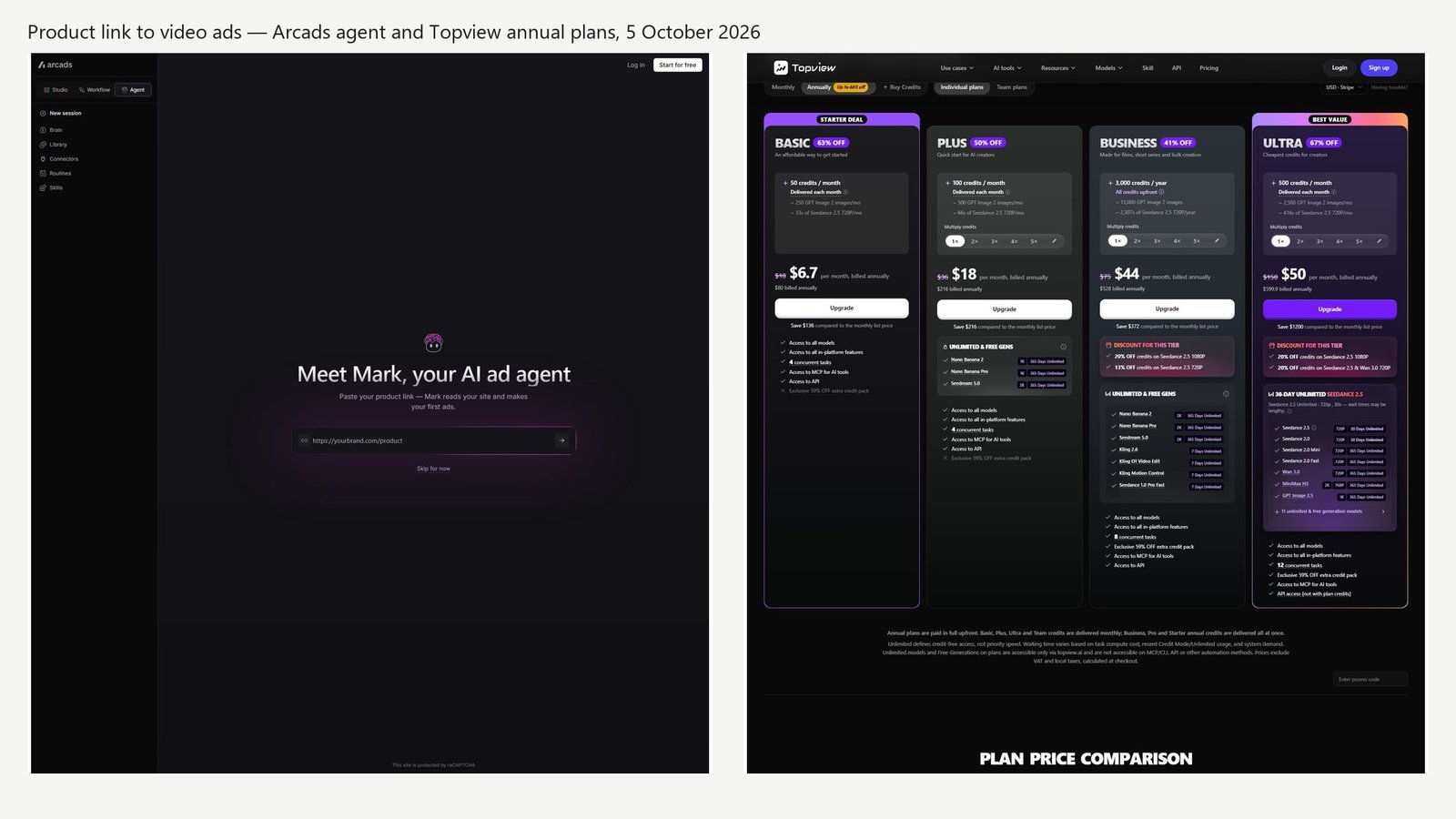
Quick picks
- Best overall: Creatify, for a documented product-link to video-ad path plus actors, script editing, and a Pro card that lists ad clone and a performance agent.
- Best product link to ad: Creatify, with Arcads and Topview as the other tools that publicly ask for a product URL.
- Best AI actor ads: Arcads, because its help center prices talking-actor time separately from generative video models.
- Best generative product footage: Topview, where listing images and Seedance-class models sit on one credit card.
- Best store connection and posting: Predis.ai, which publishes a Shopify-class integration list and social channel publishing.
- Best product-in-hand UGC ads: MakeUGC.
- Best image-to-ad-video inside a creative suite: AdCreative.ai Professional.
- Clearest month-to-month ad plan: Creatify Starter at $39/month.
- Lowest printed annual entry: Topview Basic at $6.70/month, billed annually. That buys model credits, not a month of finished ads.
Comparison table
Prices below are the figures printed on each vendor’s page on 5 October 2026. A credit in one product is not a credit in another. “Product URL” means the vendor says you can paste a link. It does not mean a Shopify app or an Amazon seller integration.
| Tool | Best for | Product URL | AI actors | Variants | Publishing | Starting price |
|---|---|---|---|---|---|---|
| Creatify | URL to a video ad | Yes. Amazon, Shopify, and app-store links in the help FAQ | 300 on Starter, 1,500 on Pro | Batch mode in the product nav; Ad Clone on the Pro card | Ad Launcher named on the pricing compare list. Plan gate not isolated | $39/month |
| Arcads | Talking-actor ads from a link | Yes. The agent asks for a product link | 1,000+ on the feature page; 1,500+ on a demo page | Hook repurposer in the help center | Not listed | Dollar price not published |
| Topview | Listing URL plus generative footage | Yes. Shopify, Amazon, AliExpress on its ecommerce pages | 5,000+ public avatars on the pricing table | Not a named A/B test | Format export claimed. Ad-account publishing not verified | $6.70/month, billed annually |
| Predis.ai | Offer, brand, and social posting | Store integrations listed, not only a pasted URL | Not the product’s center | Not documented as an ad-variant lab | Social channels, including Facebook, Instagram, TikTok, and Shorts | $24/month, billed yearly |
| MakeUGC | Creator-style product ads | Not verified as a URL importer | 1,000+ on the homepage | Reference-ad agent and a content library | Not listed | $1 start button; paid tier dollars not isolated |
| AdCreative.ai | One product image to short ad videos | Not verified | UGC-style claimed on the marketing page | Batch creatives marked Pro | Ad platform integrations listed on Professional | $39/month on the monthly card |
How we chose the best AI video ad generators
We compared current public product pages, pricing cards, and help articles. The questions were practical. Can the tool start from a product, offer, image, or script? Does it help with a hook, a script, or a call to action? Does it offer an actor, a product visual, or generative footage, and does it say which? Can you make another version? Is a 9:16 file treated as “TikTok publishing,” or does the vendor actually name an ad account? What does a credit buy? What does the license say?
Nobody on the Moon Picke side generated the same product in every tool, and nobody ran those files as ads. There is no CTR, CPA, or ROAS table in this article. Vendor case-study tiles stay labeled as vendor case studies. A platform score widget is not a Moon Picke score.
What is an AI video ad generator?
An AI video ad generator helps a team go from an offer to a video meant for paid placement. A useful workflow can start from a product URL, a product photo, a service description, or a script. It then helps with an angle, a hook, a short script, a voice or on-screen line, captions, a brand mark, and an aspect ratio. Some tools add an AI actor. Some animate the product photo. Some do both.
The export is a file until someone checks the product and the claim, then tests it in an ad account. Making ten versions is not an A/B test.
AI video ad generator vs AI video generator
A text-to-video model can supply a shot. It does not know your offer, your hook, or your call to action. Topview is on this list because its advertising pages describe a listing-to-ad path, not because it also resells generative models.
AI video ads vs AI UGC ads
Creator-style ads are one format inside video advertising. A talking actor, a green-screen creator over b-roll, or a person holding a package can be the creative. A video ad can also be a product demo, a kinetic offer, a voiceover over footage, or a slide-style explainer. This article does not re-rank the UGC category. If the only requirement is an AI creator for organic-looking ads, start with the ecommerce UGC comparison and the MakeUGC review.
Synthetic actors are not customers. Do not write “I’ve used this for six months,” a health result, or an income claim unless you can substantiate it. Advertisers still own the claim, the disclosure, the likeness, the music, and the platform policy. Nothing in this guide is legal advice, and nothing here means an export is allowed in a given ad account.
Product video vs video ad
A product video can be a listing clip, a demo, or a homepage hero. A video ad adds a reason to stop and a next step. If you need a catalog clip with no offer, use a product-video tool. If you need three hooks against one body, use an ad workflow and test the files yourself.
1. Creatify: best for turning a product link into a video ad
Creatify is the clearest match for the search. Its URL-to-video page says you paste a product link, the tool pulls assets, it writes a script, and you get a video ad. The help FAQ says compatible links include Amazon product pages, Shopify product pages, and app-store pages, and that some sites block the fetch. Pasting a Shopify product URL is not a Shopify app, a catalog sync, or a store login. You can also upload images, video, and text. The help article lists JPG, PNG, MP4, and MOV, with a 200 MB file cap.
On 5 October 2026 the pricing page’s annual-savings switch was off. Starter was $39/month for 100 credits: watermark removal, 300 AI actors, AdFlow with 200+ templates, 50+ models, 75+ languages on the card, and one generation at a time. Pro was $99/month for 300 credits, with a slider to 500, 1,000, 2,000, or 5,000 credits. The Pro card lists 1,500 actors plus 3 custom avatars, 500+ templates, 100+ models, five parallel generations, a competitor ad tracker described as 10M+ Meta ads, a performance agent, Ad Clone (“remake any ad from a URL”), up to five brand spaces with two included, and up to five seats with two included. Enterprise is “Let’s talk.”
The pricing-page FAQ says the free plan includes 10 monthly credits, up to 2 video ads or 20 image ads, 300 actors, and a watermark. A separate help article says free credits replenish at 5 per month. Both pages were live in this check. Use the number on the plan you are about to start, not an average of the two articles.
The same help article prices AI video ads, avatar videos, and AI shorts at 5 credits per 15 seconds, rounded up. Revisions are 3 credits per 15 seconds, and Pro does not spend revision credits if you do not change the script, avatar, or voice. Ad Clone is listed at 1 credit per second. Moon Picke calculation: at the 5-credit rate, a 15-second ad is 5 credits and a 30-second ad is 10. Starter’s 100 credits are twenty 15-second renders or ten 30-second renders if every credit goes to that rate and you ignore revisions, Ad Clone, and failed takes. The product says it shows the cost before you render. That estimate is the cost of a render, not the cost of a usable winning ad.
Language counts conflict: the plan cards say 75+ languages, and the help FAQ names 29. Do not merge them. The pricing compare list also names an Ad Launcher for Meta, TikTok, and AppLovin. The three plan cards did not print that line, so the plan that unlocks it stays unverified. A 9:16 file is not a publish button. The same compare list mentions video-length caps of 2 minutes and 10 minutes; the checkmark for each plan was not isolated.
Creatify’s FAQ says you own the creatives and that its stock footage is royalty-free. That is their statement. Product fidelity still depends on the images the page fetch returns.
Best for: ecommerce and app teams who can paste a product URL and want actors plus a script in one ad product.
Skip if: you need a published dollar price for an API-only workload and have not opened the API tab, or you need a confirmed one-click publish into a specific ad account.
2. Arcads: best for talking-actor ads from a product link
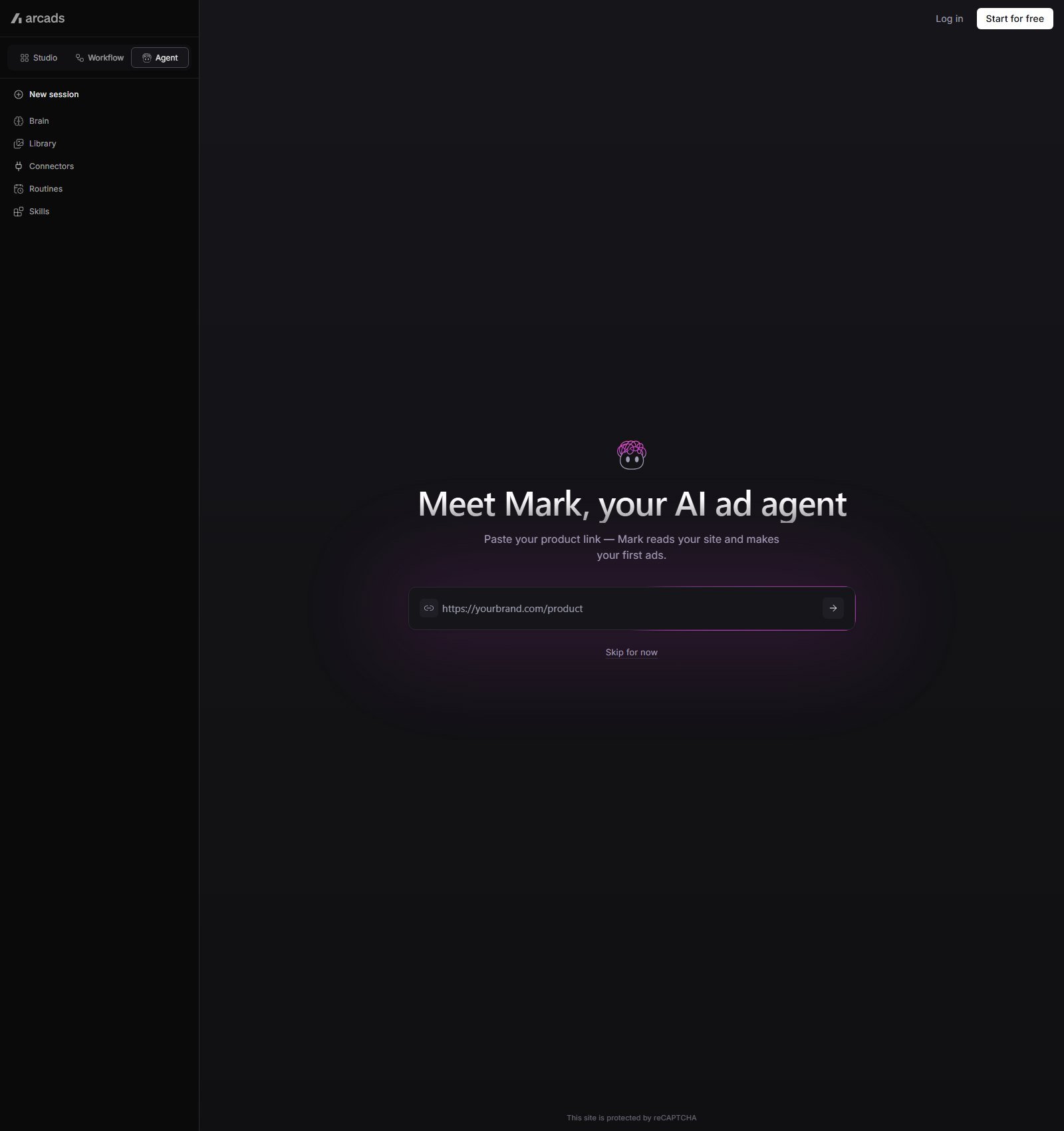
Arcads is an ad product, not a general editor that happens to have a face filter. The screen captured for this article says to paste a product link so the agent can read the site and make the first ads. What it extracts — title, price, images, reviews — is not spelled out on that screen. Treat it as URL import until a settings page says otherwise.
There is no public pricing page. arcads.ai/pricing returned 404 during this check, so this article does not print a dollar price. Third-party blogs quote monthly prices. Those numbers are not used here. The help center does publish the meter. Starter includes 8,000 credits a month. Creator includes 16,000. Both reset, do not roll over, and pause the account at the cap. Pro, Scale, and Business roll unused credits while the subscription stays active and can bill overage. Dollar amounts for those tiers are not in the help article.
Talking-actor models — Arcads 1.0, audio-driven, and OmniHuman 1.5 — are priced at 800 credits per minute, per actor. More than one actor multiplies that line. A hook repurposer is 800 credits. Captions are 80. Generative clips are a different meter: the same article lists ranges for Kling, Veo, Sora, and Seedance, so a “video” is not one price. Moon Picke calculation: if every Starter credit goes to one talking actor at 800 credits per minute, 8,000 credits are 10 actor-minutes. The help page prices time per minute. It does not say whether a 15-second export is billed as a fraction of a minute or rounded up, so this article does not turn 10 minutes into “10 ads.”
A feature page says 1,000+ AI actors and a demo page says 1,500+. Neither number is a quality score. Product-in-hand and logo preservation are not documented on the pages used here. A separate SPY subscription is priced on its own page and does not include the Arcads tool.
Direct publishing to Meta or TikTok was not listed on the pages checked. Export the file and upload it in the ad account. Arcads pages also show customer revenue figures. Those are vendor-displayed results, not a forecast for your offer.
Best for: performance teams who want a talking actor and a documented credit rate, and who can see the dollar price inside the app before they subscribe.
Skip if: you need a public price, a confirmed product-holding workflow, or an ad-account connection.
3. Topview: best for a listing URL plus generative footage
Topview’s ecommerce pages say you can paste a Shopify, Amazon, or AliExpress product URL and the tool scrapes images, price, and description into a video. That is URL import. This check did not find a Shopify app or a catalog sync, so those words are not used. Its advertising pages also say you can start from images or a brief, and they claim native formats for TikTok, Meta, YouTube, and other placements. Format support is not an ad-account login. No Meta or TikTok publishing switch was verified.
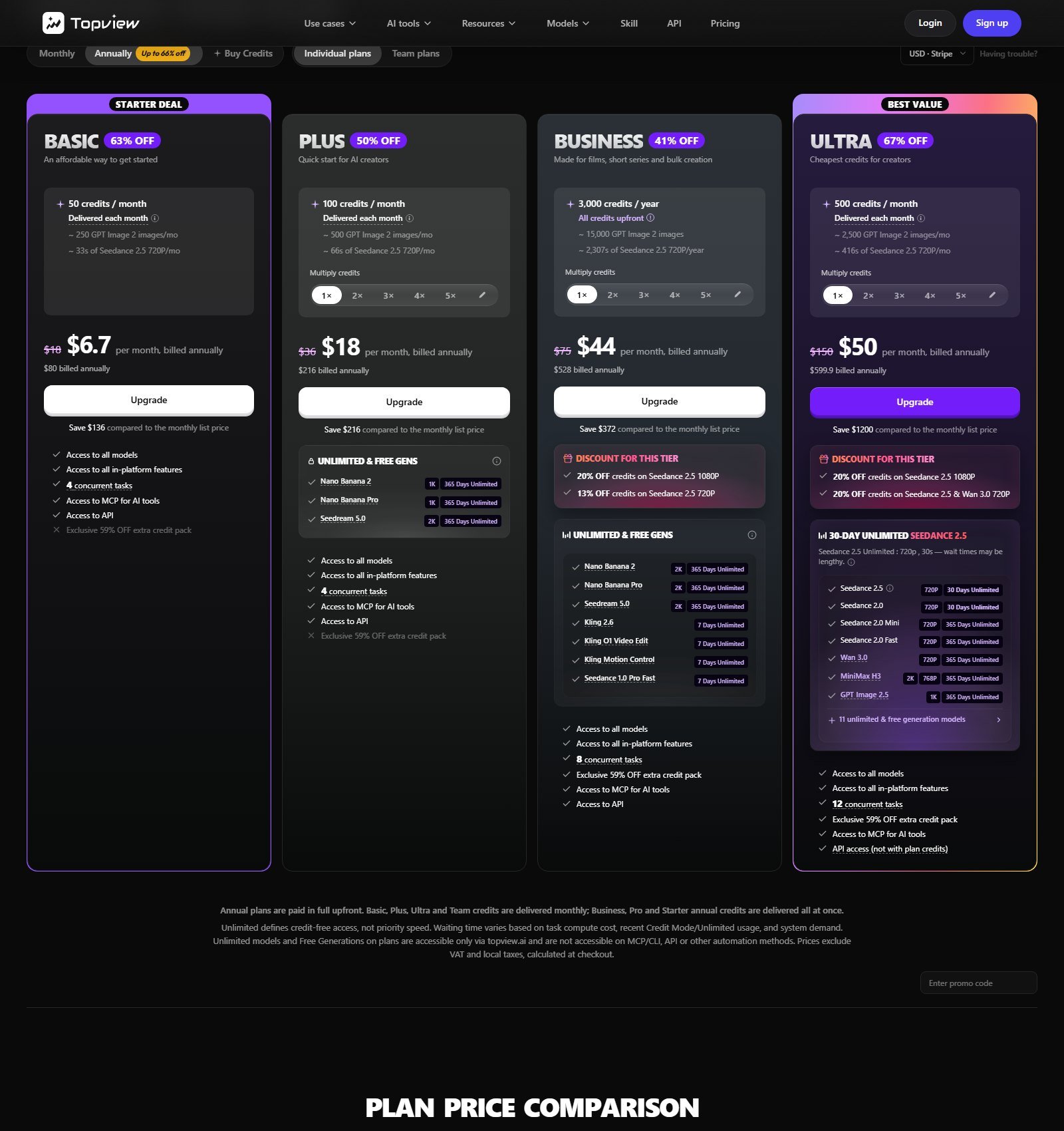
The annual tab, which was the view captured, shows Basic at $6.70 per month, billed annually ($80 billed annually), with 50 credits delivered each month. Plus is $18 per month, billed annually ($216 billed annually), with 100 credits. Business is $44 per month, billed annually ($528 billed annually), with 3,000 credits for the year, delivered up front. Ultra is $50 per month, billed annually, with 500 credits a month. The yearly Ultra total is printed on that card. Nearby strikethrough figures are monthly list prices, not the amount billed on the annual tab. The Monthly tab was visible and was not the source of these numbers.
The Basic card ties 50 credits to about 33 seconds of Seedance 2.5 at 720p. Plus is about 66 seconds on the same line. Business is about 2,307 seconds of that setting across the yearly pool. Those are Topview’s examples for one model and one resolution. Seedance, Kling, Wan, Veo, and image models on the same table have different credit costs. Moon Picke calculation: a 15-second Seedance 2.5 720p clip is not “15 credits.” At the card’s own example, 50 credits buy about 33 seconds, so one 15-second clip is a large share of a Basic month if you use that setting and nothing else. A second model, a 1080p render, or a failed generation changes the math. Do not compare these credits with Creatify’s 5-credits-per-15-seconds rate.
The pricing table lists 5,000+ public avatars, a product avatar you can save from a photo, Avatar 4 with a 180-second cap, and a video lip-sync row capped at 30 minutes or 24,000 words. Those are different features. A photo avatar is not a studio digital twin, and Topview does not need that phrase for this workflow. Voice cloning starts with a free allotment that rises by plan, then 2 credits per extra clone. A TikTok Ad Library row says browsing and filtering are unlimited. That is a reference library, not your ad-account analytics.
The annual cards list API access, while the pricing FAQ says Ultra and Team plan credits cannot be used for API calls. Commercial-use checkmarks were not readable as a yes on every plan. Copy that says the model improves ROAS is a vendor claim, not a result from this comparison.
Best for: sellers who want a listing link, product images, and generative b-roll on a published annual credit card.
Skip if: you need month-to-month pricing, a confirmed ad-account publish button, or a single credit that always means one finished ad.
Disclosure
Disclosure: Moon Picke may earn a commission if you purchase through links on this page, at no additional cost to you.
4. Predis.ai: best when the ad also has to be scheduled
Predis is a social and ad creative suite, not an actor studio. On 5 October 2026 the pricing toggle was set to Annual. Core is $24/month, billed yearly ($288 billed yearly, with $32 struck through), for 1,300 credits. The card estimates about 325 images or 33 videos. Rise is $55/month, billed yearly ($664 billed yearly, with $79 struck through), for 3,200 credits and an estimate of about 800 images or 80 videos. Enterprise+ is $212/month, billed yearly ($2,540 billed yearly, with $249 struck through), for 10,000 credits and an estimate of about 2,500 images or 250 videos. Those video counts are Predis’s own estimate on the card. They are not a count of 15-second paid ads, and they are not comparable to Creatify credits.
Every plan on that page starts with 3 days free. Predis says it takes a card and charges when day 3 ends. Its FAQ says payments after the trial are non-refundable. Core includes 1 brand, no auto posting, publishing to 10 channels, and 60 competitor runs a month. Rise includes up to 4 brands, auto posting, 20 channels, and 130 competitor runs. Enterprise+ includes unlimited brands, 60 channels, and 600 competitor runs. Team members are listed as unlimited on the feature matrix. API access is on the cards.
The integration list names Shopify, WooCommerce, Wix, Squarespace, and a generic ecommerce connection. That is a published integration list, not a store this article connected. Competitor analysis uses a public Instagram handle or Facebook page, not a private ad account. Publishing destinations include Facebook, Instagram, TikTok, YouTube Shorts, and LinkedIn. That is social scheduling, not a confirmed ads-manager connection.
The matrix lists a 30-second video maker and a 5-minute video maker without a readable plan split, so neither cap is assigned here. The FAQ cites 18+ languages. There is no documented actor library and no documented product-holding model.
Best for: a small brand that wants short videos, a brand kit, a store connection, and posting from the same subscription.
Skip if: the work is a high-volume actor test or a product-link-to-script engine.
5. MakeUGC: best for creator-style ads that put a product in frame
MakeUGC’s homepage describes a short path: write a script, pick an avatar, generate a video. It also advertises product-in-hand clips, a video agent that studies a reference ad and rebuilds the flow with your product and creator images, and a library of ad formats you recreate with a product image and dialogue. The editor line covers captions, music, b-roll, and trims. The homepage says 1,000+ AI actors. None of that makes the actor a real buyer. A full review of the product lives in the MakeUGC review. This section only covers the ad workflow.
See current MakeUGC plans at https://www.makeugc.ai/?ref=jackyvg.
Pricing on the public pages is less tidy than Creatify’s cards. The homepage shows a “Create Your Ad For $1” control. The FAQ says unlimited generation does not start during that $1 trial, and that paid plans include 500, 1,000, or 2,000 credits a month depending on the plan. The dollar price of those three credit tiers was not isolated on a clean card in this pass. An API Pro block on the pricing page was $299 per month for 6,000 credits. Credits refresh and do not roll over. The feature list near the paid blocks mentions HD, 2K, and 4K export and unlimited AI scripts; which of those sit on the $1 trial versus a paid tier was not cleanly separated. Do not budget a 15-second ad from these credits until the app shows a per-model cost.
Product-in-hand means the actor presents the product. The pages do not say whether that package is your original file, a cutout, or a generated recreation, so logo survival is not assumed. Homepage ROAS quotes are customer lines on MakeUGC’s site, not results from this comparison.
Direct publishing was not documented. You export and upload. There is no basis here for calling variant generation an A/B test.
Best for: teams who want a synthetic creator and a product in the same frame, and who will confirm the paid credit price in the app.
Skip if: you need a pasted product URL, a public self-serve price for the 500-credit plan, or a non-UGC demo.
6. AdCreative.ai: best when one product photo has to become several short ads
AdCreative.ai is a static-and-video advertising suite. On its “why go pro” page, the Ad Videos card says you create short-form video ads for products by uploading one image, and the card is marked Pro. A Batch Creatives card uses the same one-image description and the same Pro mark. That is an image-to-ad workflow. A product URL importer was not verified. UGC-style video is mentioned on the company’s video-ads marketing page. This article does not treat that sentence as a counted actor library.
The monthly view of the same pricing content shows Starter at $39/month with 10 credits and 1 brand, Professional at $249/month with 50 credits, and Ultimate at $999/month with 100 credits. Quarterly and yearly views show lower per-month figures. The $249 figure is the monthly Professional card, not an annual price. One Professional feature list includes ad platform integrations, an insight tool, and a higher user count. Which networks connect, and whether a video file can be pushed rather than downloaded, was not isolated. Their credit FAQ says a credit is spent when you download a creative, not when you generate it, and that generation itself is unlimited. A video-specific credit cost was not published, so there is no defensible cost for a 15-second or 30-second ad.
The site shows creative scores and an ROI calculator. Those are AdCreative’s signals, not a guaranteed CTR and not a Moon Picke benchmark. A compliance checker on the page does not make an ad lawful.
Best for: teams already comparing static ads and short videos from the same product photo.
Skip if: you need a product-link importer, a talking-actor credit rate, or a published price per video second.
Best for ecommerce, variants, and teams
Ecommerce URL: Creatify names Amazon, Shopify, and app-store links. Topview names Shopify, Amazon, and AliExpress. Arcads asks for a product link, then prices the actor by the minute. Use Creatify for the script and the actor, Topview when the listing images need to move, and Arcads when you can see the in-app price.
UGC-style ads: Arcads and MakeUGC are the actor tools. They are still synthetic. The broader UGC shortlist is a different article.
Variants: Creatify’s nav includes batch mode, and the Pro card includes Ad Clone. AdCreative marks batch creatives as Pro. MakeUGC rebuilds a reference ad with your product. None of those features is an A/B test. A useful set is hook A, hook B, and hook C against the same body and the same call to action, then a second pass that changes the actor or the offer. You still have to split delivery in the ad account if you want a controlled read.
Teams: Creatify Pro includes two seats and can go to five. Predis lists unlimited team members on the matrix. Do not buy seats from a marketing sentence alone.
Pricing and credits
Pricing, credits, generation limits and advertising features were checked on 5 October 2026 and may change. Check each provider’s current plans before purchasing.
Creatify Starter at $39/month is a month-to-month card, because the annual switch on that page was off. Topview Basic at $6.70/month and Predis Core at $24/month are annual-billing prices. AdCreative Professional at $249/month is the monthly card, with cheaper per-month figures on longer terms. Arcads did not publish a dollar price. MakeUGC published a $1 start and a $299 API Pro plan, and did not publish a clean price for the 500-credit tier.
Only two cost sketches are defensible. Creatify’s help rate is 5 credits per 15 seconds, so a 30-second render is 10 credits before revisions. Topview’s Basic card says 50 monthly credits are about 33 seconds of Seedance 2.5 at 720p. Arcads can be sketched only in credits: 800 per talking-actor minute. Predis, MakeUGC, and AdCreative do not publish a rate that turns into a reliable 15-second price.
How to choose an AI video ad generator
Start from the input you have. A product URL points to Creatify or Topview. A script and a face point to Arcads, after you see the in-app price. A product that must be held points to MakeUGC. One hero image plus static ads points to AdCreative. A connected store and a calendar point to Predis. Then ask what one 15-second file costs in that product’s unit, and whether “TikTok” means a vertical file or a connected ad account.
How to create a video ad with AI
Write the offer in one sentence. Pick one angle, then write three hooks and keep the body stable. Import the real product images or the real page. Choose an actor only if the ad needs a person, and do not invent a customer story. Keep product footage, stock, and generated scenes distinct in your review. A call to action inside an MP4 is text or a voice line, not a button, unless a publishing layer adds a link. Export the ratio the placement needs, read every claim, and test in the ad account.
What these tools still get wrong
These are structural limits, not measured failure rates. Redrawn packages lose label text. Hooks repeat. Actors are not buyers. A bad render still spends credits. An insight score can be confident and wrong, and an ad platform can reject a file the generator exported.
FAQ
What is the best AI video ad generator?
For a US team that wants a product link, a script, and an actor in one ad product, Creatify is the overall pick in this pass. Arcads is the pick when the ad is a talking actor and you can accept an in-app price. Topview is the pick when the listing images need generative motion. There is no performance winner, because no ads were run.
Can AI turn a product URL into a video ad?
Creatify, Topview, and Arcads each say yes, in different words. Creatify names Amazon, Shopify, and app-store links. Topview names Shopify, Amazon, and AliExpress. Arcads asks for a product link on its agent screen. Pasting a Shopify URL is not a Shopify integration. Predis is the tool in this list that publishes an actual store-integration list.
What is the difference between an AI video ad and AI UGC?
An AI video ad is any generated video built to sell, including demos and offer-led edits. AI UGC is the creator-style subset. The person on screen is synthetic unless you filmed a real customer. Do not label that person as a verified buyer.
Does making several ad variants count as A/B testing?
No. Variants are files. A test is what happens after you deliver them under a plan you can measure. Creatify, AdCreative, and MakeUGC can help you produce more files. They do not, on the evidence here, replace an experiment in Meta, TikTok, or Google.
Can these tools publish straight to Meta or TikTok?
Not as a default. Creatify’s pricing compare list names an Ad Launcher for Meta, TikTok, and AppLovin, and the plan that unlocks it was not isolated. AdCreative lists ad platform integrations on Professional without naming the exact video handoff. Predis publishes to social channels, which is scheduling, not an ads manager. Arcads, Topview, and MakeUGC were export-only on the pages checked. A vertical file is not a publish button.
Can the ads be used commercially?
Creatify’s FAQ says you own the creatives and can use them on any channel, and that its stock footage is royalty-free. Predis, Topview, Arcads, MakeUGC, and AdCreative were not given the same sentence in this check. You still do not own a stock actor’s identity, and you are responsible for claims about your product. Read the current terms.
How much do AI video ad generators cost?
On 5 October 2026, published entries included Creatify at $39/month, Topview Basic at $6.70/month billed annually, Predis Core at $24/month billed yearly, and AdCreative Starter at $39/month on the monthly card. Arcads did not publish a price. MakeUGC showed a $1 start and a separate $299 API plan. The useful comparison is what a 15-second file costs inside each meter, not which subscription looks smallest.
Can AI-generated video ads improve ROAS?
They can make it cheaper to produce another hook, another actor, or another ratio. Return on ad spend still depends on the offer, the audience, the landing page, the price, the media buy, and the measurement. Vendor pages that promise a higher ROAS are describing their own case studies or their own pitch. They are not a guarantee, and this comparison did not reproduce them.
Final verdict
Buy Creatify when the job starts at a product URL and needs a script, an actor, and a credit rate you can read before you render. Buy Arcads when the ad is a talking actor and you will read the in-app price. Buy Topview when you want the listing scrape and generative footage on an annual credit card. Buy Predis when posting and a store connection matter as much as the clip. Buy MakeUGC when the ad is a synthetic creator with the product in frame. Buy AdCreative when one product photo has to feed static ads and short videos.
HeyGen and Synthesia stay off this ranking because they are presenter studios, not product-to-ad engines. Revid, Vidofy, and TheInfluencer.ai stay off because a social video tool or a virtual influencer is not this workflow; their reviews are separate: Revid, Vidofy, and TheInfluencer.ai. UGCVideo.ai and UGCReal stay on the UGC list. See the UGCVideo.ai review and the UGCReal vs MakeUGC comparison. Google’s Asset Studio can build a video ad from a URL inside Google Ads, according to Google’s own announcement, and it is not ranked here because it is not a standalone plan with a public price card. Check the billing toggle, the credit definition, and the claim sheet before you export.